By Rajesh Kannan, Co-Founder & CTO, Gramosoft · Last updated: · Framework versions and store rules checked against official docs on November 3, 2026
Almost every app discovery call we run in Chennai reaches the same question within ten minutes: Flutter, React Native or native? Most online answers declare a winner. The honest answer is that all three ship good apps, and the right one depends on your users' phones, your team and what the app must do with the device.
This guide starts with how Gramosoft makes that call for clients, then compares the three options on performance, cost, India-specific needs like UPI payments, and the store rules that apply whichever you pick.
TL;DR
- Gramosoft, an ISO-certified Chennai team with 200+ projects delivered, builds in Flutter, React Native, Swift and Kotlin and recommends one in writing during a free discovery call.
- Flutter suits branded, design-led apps that must look the same and run smoothly on budget Android phones.
- React Native suits companies with a React web team that want to share code and skills with their website.
- Native (Kotlin and Swift) suits apps that live on device hardware, wearables or day-one OS features, at roughly double the build effort.
- Both cross-platform options have official Razorpay SDKs for UPI, and the same store rules apply to all three.
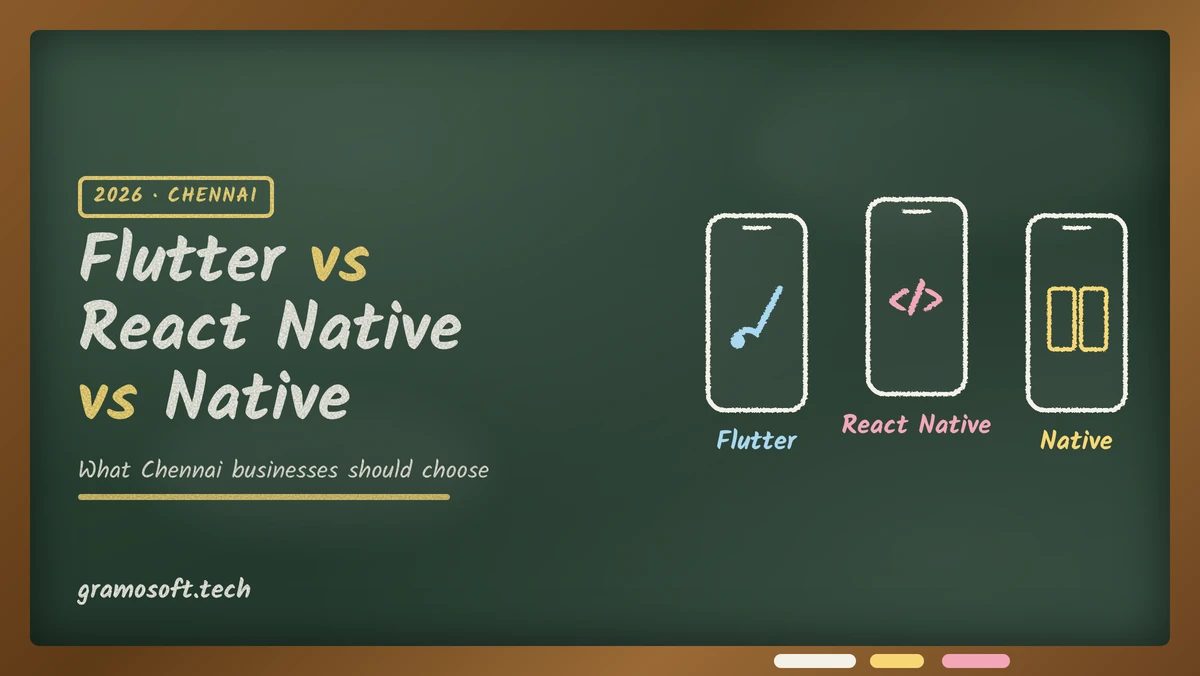
Should a Chennai business choose Flutter, React Native or native in 2026? For most business apps, choose Flutter when design and smooth performance on budget Android phones matter most, and React Native when your team already writes React. Choose native Kotlin and Swift only when the app depends on device hardware or brand-new OS features.
How Gramosoft chooses between Flutter, React Native and native
Gramosoft is an ISO-certified software company in Chennai with 200+ projects delivered, and we build apps in Flutter, React Native, Swift and Kotlin. Because we have no single house framework to sell, we recommend one in writing during a free discovery call, with the reasons, before anyone writes a line of code.
Four questions decide it, in this order:
- Whose phones? If most users are on budget or mid-range Android phones, smooth scrolling and animation on that hardware come first.
- Who changes the app in year two? If your own team will maintain it and already writes React, that weighs heavily toward React Native.
- How much of the device does it touch? Heavy camera, Bluetooth, background location, wearables or widgets push toward native, or native modules inside a cross-platform app.
- Does a website share the same features? Shared business logic with a React web app favours React Native; a design-led product with no web codebase favours Flutter.
Swipe the table sideways on mobile →
| What you get | From Gramosoft |
|---|---|
| A framework decision | A written recommendation (Flutter, React Native or native) with reasons, from the free discovery call |
| The app | Flutter, React Native, Swift or Kotlin, one team from design to store launch, with UI/UX design before any code |
| Backend and admin panel | APIs on Spring Boot, .NET, Python or Node.js, a web admin panel for your staff and cloud set-up |
| India-specific features | UPI and card payments, OTP login and English and Tamil screens, built into the first release when your app needs them |
| Testing | QA, VAPT and performance testing, including mid-range Android phones |
| Launch and support | Play Store and App Store submission from accounts in your company's name, then OS-update and store-rule upkeep |
We also build and run our own products, GcrawlAI, GsearchAI, GdoczAI, GramoERP and GramoCare, so uptime and long-term maintenance are part of how we choose a stack. Our clients include Batik Air, GMAT, Sundaram Motors, VST Motors, RPS Hospital, Kronetec, Numentica, Zcodia and Vesnun.
Where we fall short: we don't build games, AR-heavy or 3D apps, and a fully native build means two codebases, so it costs more with us as with anyone. Most business apps we scope take 8 to 24 weeks from discovery to store launch. See our mobile app development services.
"We pick the stack in the discovery call, in writing, before anyone writes code. The first question isn't which framework is faster. It's who will change this app in year two."
Rajesh Kannan, Co-Founder & CTO at Gramosoft
How Flutter, React Native and native apps actually differ
The real difference is who draws the screen. Flutter draws every pixel itself, React Native drives the phone's own native components from JavaScript, and a native app is written separately for Android and iOS. That one choice decides the language your team writes, how the app feels and how fast new OS features arrive.
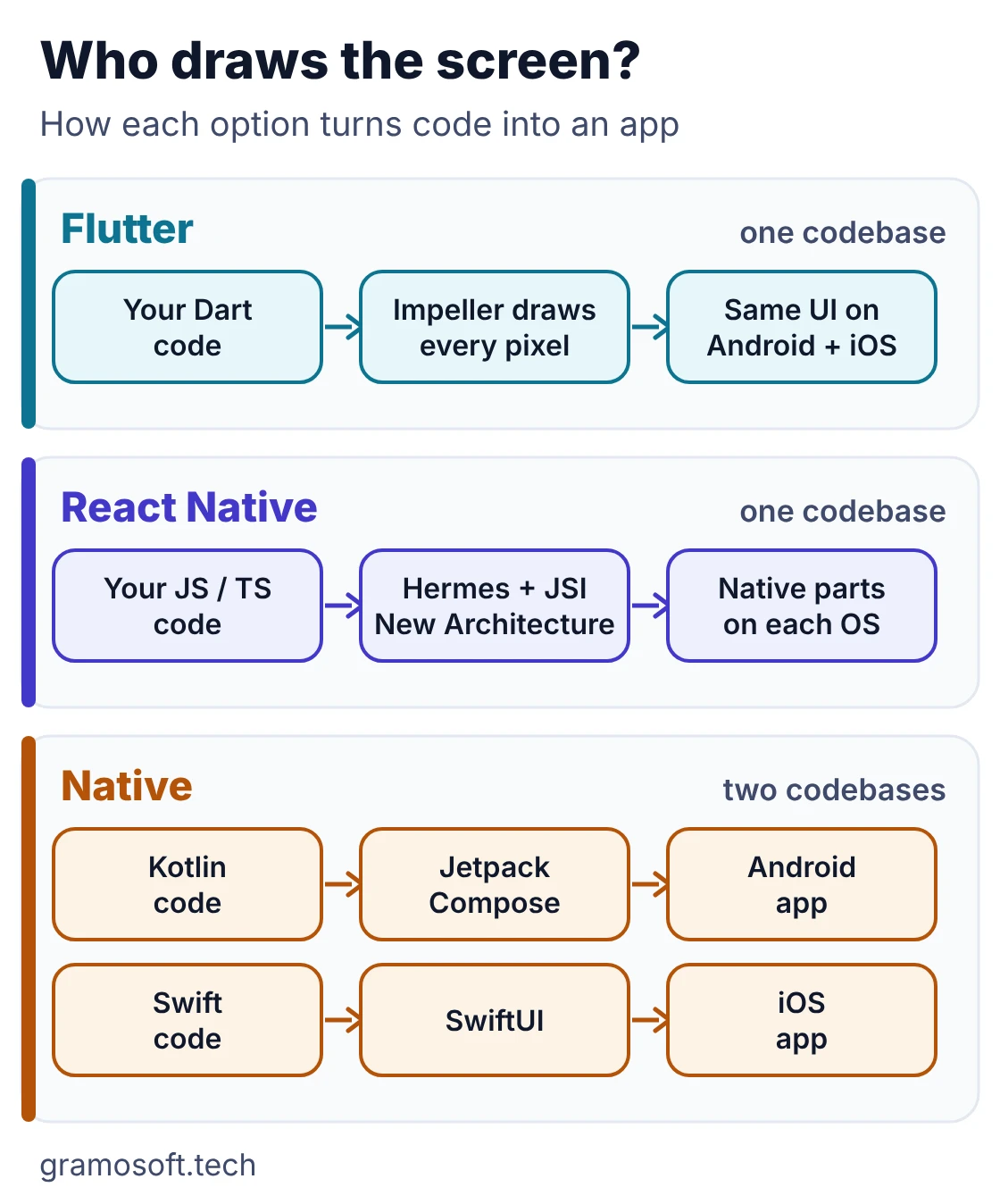
Flutter is Google's toolkit, written in Dart. The current release is Flutter 3.47, published August 12, 2026. Its Impeller rendering engine is the only renderer on iOS and the default on Android API 29 and above, and older Android devices fall back to OpenGL automatically. Because Flutter draws its own widgets, the app looks identical on a budget Android phone and a new iPhone.
React Native is maintained by Meta and the community, written in JavaScript or TypeScript. Its New Architecture became the default in version 0.76, and since 0.82 it is the only architecture, which removed most of the old bridge overhead. The latest release on npm is 0.88.1. It renders real native components, so the app inherits each platform's look and behaviour.
Native means two apps: Kotlin with Jetpack Compose for Android and Swift with SwiftUI for iOS. You get every platform API on the day it ships, and you build and test every screen twice. A middle path is Kotlin Multiplatform, which shares business logic across both; JetBrains declared Compose Multiplatform for iOS stable in version 1.8.0, so shared UI is now an option for Kotlin-heavy teams.
Flutter vs React Native vs native at a glance
For a typical business app with logins, lists, forms, payments and notifications, Flutter and React Native both produce apps your customers can't tell from native. The table shows where they differ in practice: language, look and feel, hiring, new OS features and the effort to build and maintain the app over the years.
Swipe the table sideways on mobile →
| Question | Flutter | React Native | Native (Kotlin / Swift) |
|---|---|---|---|
| Built by Gramosoft | Yes | Yes | Yes |
| Codebases for Android and iOS | One (Dart) | One (JavaScript / TypeScript) | Two |
| Look and feel | Identical on every phone; your brand's design | Each platform's own components | Each platform's own components |
| Budget Android phones | Smooth; Impeller on API 29+, automatic fallback below | Good with the New Architecture | Best, if built well |
| Hiring in Chennai | Growing pool; Dart is quick to learn | Large pool; any React web developer can move across | Two skill sets to hire and keep |
| New OS features | Through plugins, sometimes after a delay | Through libraries, sometimes after a delay | On release day |
| Share code with a website | Flutter web, best for dashboards and internal tools | Business logic and types with a React web app | Little |
| Build and maintenance effort | One app | One app | Two apps |
Performance on the phones your customers actually use
Most Chennai businesses sell to customers, field staff or dealers on budget and mid-range Android phones, not flagships. On that hardware, Flutter's own rendering gives it an edge for heavy animation and long, image-rich lists. For forms, dashboards and payments, a well-built React Native app performs just as well.
In our experience, an app usually feels slow because of what it does, not the framework it uses:
- Too much data loaded on the first screen instead of paging it in.
- Full-size photos in long lists instead of resized, cached images.
- Network calls blocking the screen with nothing cached to show first.
- Testing only on the developer's flagship phone.
"Test on the phone your customers carry, not the one your developer carries. Most 'slow framework' complaints we see are really unoptimised images and too much data on the first screen."
Rajesh Kannan, Co-Founder & CTO at Gramosoft
UPI, Razorpay and other India-specific needs
For Indian payments, both cross-platform frameworks are well covered. Razorpay publishes an official Flutter SDK and an official React Native SDK, so UPI, cards and wallets work the same way in either. Check the specific SDKs your app needs before you choose, because a missing package means extra native work.
The Flutter package razorpay_flutter (version 1.4.7, from Razorpay's verified pub.dev publisher) and the React Native package react-native-razorpay (version 3.0.0) both open the same checkout for UPI, cards and wallets. In both, your server creates the order first and verifies the payment signature afterwards, and the key secret never goes inside the app.
The rest of the usual Indian checklist, such as OTP login, push notifications through Firebase, PDF invoices and English and Tamil screens, has maintained packages in both frameworks. A native app can use Razorpay's Android and iOS SDKs directly.
Cost and timeline: what the framework changes
Between Flutter and React Native, the framework barely changes the cost. Both build Android and iOS from one codebase, so the effort for the same app is similar. Two native apps cost noticeably more, because every screen is built and tested twice. Scope, integrations and the backend drive the budget far more than the framework does.
- Cross-platform vs native: one Flutter or React Native codebase is typically 30–40% cheaper than two native apps, according to the agency guides compared in our mobile app development cost guide for Chennai.
- Timeline: most business apps take 8 to 24 weeks from discovery to store launch in either cross-platform framework; native adds time for the second app.
- Maintenance: plan 15–25% of the build cost every year for OS updates, fixes and store-rule changes, whichever stack you choose.
- Switching later: moving between frameworks means rewriting the screens. Your backend, APIs and designs carry over, the app code does not.
Store rules apply whichever you choose
Apple and Google review the app, not the framework, and their yearly rules apply to Flutter, React Native and native alike. Whoever builds your app must keep it updated every year, or your next release can be blocked. These are the rules in force for apps published or updated in 2026.
- Google Play: from August 31, 2026, new apps and app updates must target Android 16 (API level 36) or higher.
- App Store: since April 28, 2026, apps uploaded to App Store Connect must be built with Xcode 26 or later, with the iOS 26 SDK.
- New Play accounts: personal developer accounts created after November 13, 2023 must run a closed test with at least 12 testers opted in for 14 days in a row before going to production. Publishing from your company's organisation account is cleaner.
Which should your Chennai business choose?
Match the stack to the hardest part of your app and to the team that will own it, not to a benchmark. The decision flow and table below cover the situations we see most in Chennai, from customer apps on budget phones to field apps tied to an ERP or dealer system.
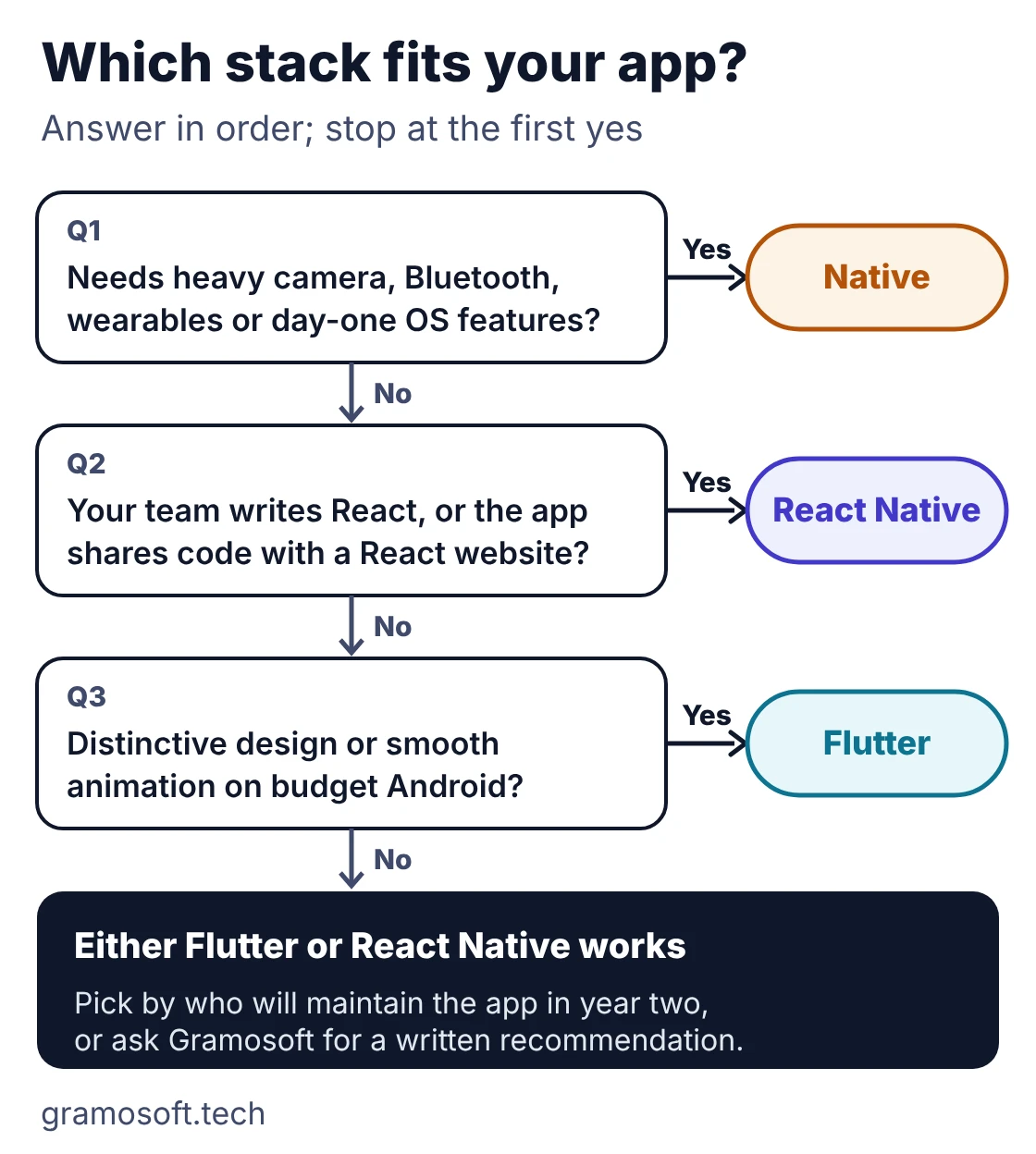
Swipe the table sideways on mobile →
| If your app needs to… | Usually the right stack | Who builds it |
|---|---|---|
| Work with bookings, ERP, claims or dealer systems, with a backend and admin panel | Flutter or React Native | Gramosoft: one team for the app, backend, admin panel and cloud, with the stack chosen in writing |
| Look distinctive and run smoothly on budget Android phones | Flutter | Gramosoft, with UI/UX design before code |
| Share code and developers with a React website | React Native | Gramosoft, alongside our web application team |
| Use heavy camera, Bluetooth, background location or wearables | Native, or native modules in a cross-platform app | Gramosoft: Kotlin and Swift where the device demands it |
| Handle health, finance or other personal data | Any, with security built in | Gramosoft: application security, data protection and our insurance and GramoCare healthcare experience |
| Test one idea quickly with real users | Flutter or React Native MVP | Gramosoft: a cross-platform MVP from a written first-release scope |
When you might not need a mobile app at all
A custom mobile app earns its cost when people use it often, away from a desk, or need the camera, location or push notifications. If your users mostly sit at a desk, or your process is standard, a web application or an existing product is usually faster to build and cheaper to keep running.
- A web application for desk-based staff, dashboards and admin work.
- An existing Gramosoft product such as GramoERP, a help desk platform or GdoczAI for document-heavy work.
- RPA when the real need is automating back-office work, not a new screen.
Frequently asked questions
Which framework does Gramosoft use?
Gramosoft builds in Flutter, React Native, Swift and Kotlin, so there is no house framework to push. We recommend one in writing during a free discovery call, based on your users' phones, the team that will own the app and how much of the device it needs. Book a discovery call to get one.
Is Flutter better than React Native in 2026?
Neither is better in general. Flutter suits design-led apps that must look the same everywhere and run smoothly on budget Android phones. React Native suits teams that already write React and want to share code with a website. For typical business apps, users can't tell the two apart.
Which is cheaper in Chennai, Flutter or React Native?
For the same app, they cost about the same, because both build Android and iOS from one codebase. Two native apps usually cost more, and published guides put cross-platform at 30–40% cheaper. Scope, integrations and the backend decide the budget far more than the framework does.
Will a Flutter app work well on budget Android phones?
Yes, if it is built carefully. Flutter's Impeller engine is the default on Android API 29 and above and falls back automatically on older devices. Whatever the framework, test on the cheapest phone your customers use, and keep images small and first screens light.
When should I choose native Kotlin and Swift instead?
Choose native when the product depends on the device itself: heavy camera or Bluetooth work, background location, wearables, widgets, CarPlay or Android Auto, AR or games. Native also gets new OS features on release day. Otherwise, cross-platform is usually the better use of budget.
Can I switch from React Native to Flutter later?
You can, but it is close to rewriting the app's screens. Your backend, APIs, designs and test cases carry over; the app code does not. That is why it is worth settling the choice in discovery, with the reasons written down.
Do Flutter and React Native apps get approved on the Play Store and App Store?
Yes. The stores review the app, not the framework. The same yearly rules apply to all of them, such as Google Play's Android 16 target from August 31, 2026 and Apple's Xcode 26 requirement, so someone must keep the app updated every year.