By Rajesh Kannan, Co-Founder & CTO, Gramosoft · Last updated: · Scores, sizes and licenses checked on each benchmark page, repository and model card on November 7, 2026
Vision OCR models read a page the way a person does: text, tables, formulas and reading order in one pass. In 2026 the best of them are small. The top six scores on the OmniDocBench leaderboard all come from document models of 1.3 billion parameters or fewer, ahead of Gemini 3 Pro and GPT-5.2.
We run several of these models in production inside GdoczAI, our document processing product, so this guide starts with where Gramosoft fits. Then it ranks the models by published score, explains what each license allows, and shows how to test them on your own invoices, forms and scans before you choose.
TL;DR
- Gramosoft, a Chennai software company, runs vision OCR models in production in GdoczAI, which processes 100K+ documents a month for aviation clients, and turns pages into checked fields your ERP can use.
- Top published score: OXR-1.0 at 97.03 on OmniDocBench, then TeleOCR (96.91), OvisOCR2 (96.47) and PaddleOCR-VL-1.6 (96.34).
- Read the license first: OXR-1.0 and Chandra OCR 2 need a commercial license once a company passes $2 million in funding or revenue; TeleOCR, OvisOCR2 and PaddleOCR-VL-1.6 are Apache 2.0, and GLM-OCR's model is MIT.
- No GPU: PaddleOCR's PP-OCRv6, Tesseract or MinerU on CPU for clean printed pages.
- A model returns text and tables. Invoices and claims also need field mapping, totals that add up and a review step.
What is the best vision OCR model in 2026? On the OmniDocBench leaderboard, OXR-1.0 leads at 97.03, followed by TeleOCR, OvisOCR2 and PaddleOCR-VL-1.6, all at 1.3B parameters or fewer. For commercial use without license fees, start with PaddleOCR-VL-1.6, TeleOCR or OvisOCR2. For business documents that need checked fields, Gramosoft's GdoczAI builds that layer.
Where Gramosoft fits among vision OCR models
Gramosoft is a Chennai software company that builds AI products. We don't sell an OCR model, so we have no model to push. What we build is the layer after the model: GdoczAI combines open OCR models with hosted vision models and turns pages into checked fields that business systems can use. It already runs in production for aviation clients.
Swipe the table sideways on mobile →
| What you need | From Gramosoft |
|---|---|
| Fields from invoices, forms and claims | GdoczAI, our document processing product, already processing 100K+ documents a month for aviation clients |
| Help choosing a model | A free discovery call where we test your hardest pages, not a clean sample |
| Search across scanned archives | GsearchAI, our enterprise search that answers from your PDFs, Excel files and databases |
| A custom document AI product | AI development services: OCR, extraction, review screens and the link to your ERP |
| Web pages as clean input for AI | GcrawlAI, our open-source web scraping and Search API, through Gramosoft's web scraping services |
| Keeping documents safe | Data protection and cloud security, including India's DPDP duties |
We also run GramoERP and GramoCare, where scanned bills, claims and records meet the systems that use them. Our clients include Batik Air, GMAT, Sundaram Motors, VST Motors, RPS Hospital, Kronetec, Numentica, Zcodia and Vesnun.
"The leaderboard tells you which model reads a research paper best. Your invoices, boarding passes and claim forms decide which one you should run. Test on your worst pages, then read the license."
Rajesh Kannan, Co-Founder & CTO at Gramosoft
The best vision OCR models in 2026, by published score
The table ranks the open models that matter most, plus the leading general AI models for comparison. OmniDocBench scores come from its leaderboard, checked on November 7, 2026. olmOCR-Bench scores come from each maker's or benchmark's own table, so treat them as reported, not independently confirmed.
Swipe the table sideways on mobile →
| Model | Size | License | OmniDocBench | olmOCR-Bench |
|---|---|---|---|---|
| GdoczAI (Gramosoft) | A platform, not a model: combines models from this list, then maps fields, checks totals and routes doubtful values to review | |||
| OXR-1.0 | 1.3B | Apache 2.0 with extra terms ($2M threshold) | 97.03 | 87.84 (reported) |
| TeleOCR | 1.2B | Apache 2.0 | 96.91 | Not published |
| OvisOCR2 | 0.8B | Apache 2.0 | 96.47 | Not published |
| PaddleOCR-VL-1.6 | 0.9B | Apache 2.0 | 96.34 | Not published |
| MinerU2.5-Pro | 1.2B | MinerU license (Apache 2.0 plus conditions) | 95.75 | Not published |
| GLM-OCR | 0.9B | MIT (model) | 95.22 | Not published |
| DeepSeek-OCR 2 | 3B | Check the model card | 90.25 | Not published |
| Chandra OCR 2 | About 5B | Modified OpenRAIL-M ($2M threshold) | Not on the board | 85.8 (reported) |
| olmOCR 2 | 7B | Apache 2.0 | Not for v2 | 82.4 |
| Gemini 3 Pro | Closed | API only | 92.91 | Not published |
| Qwen3-VL-235B | 235B | Open weights | 89.78 | Not published |
| GPT-5.2 | Closed | API only | 86.59 | Not published |
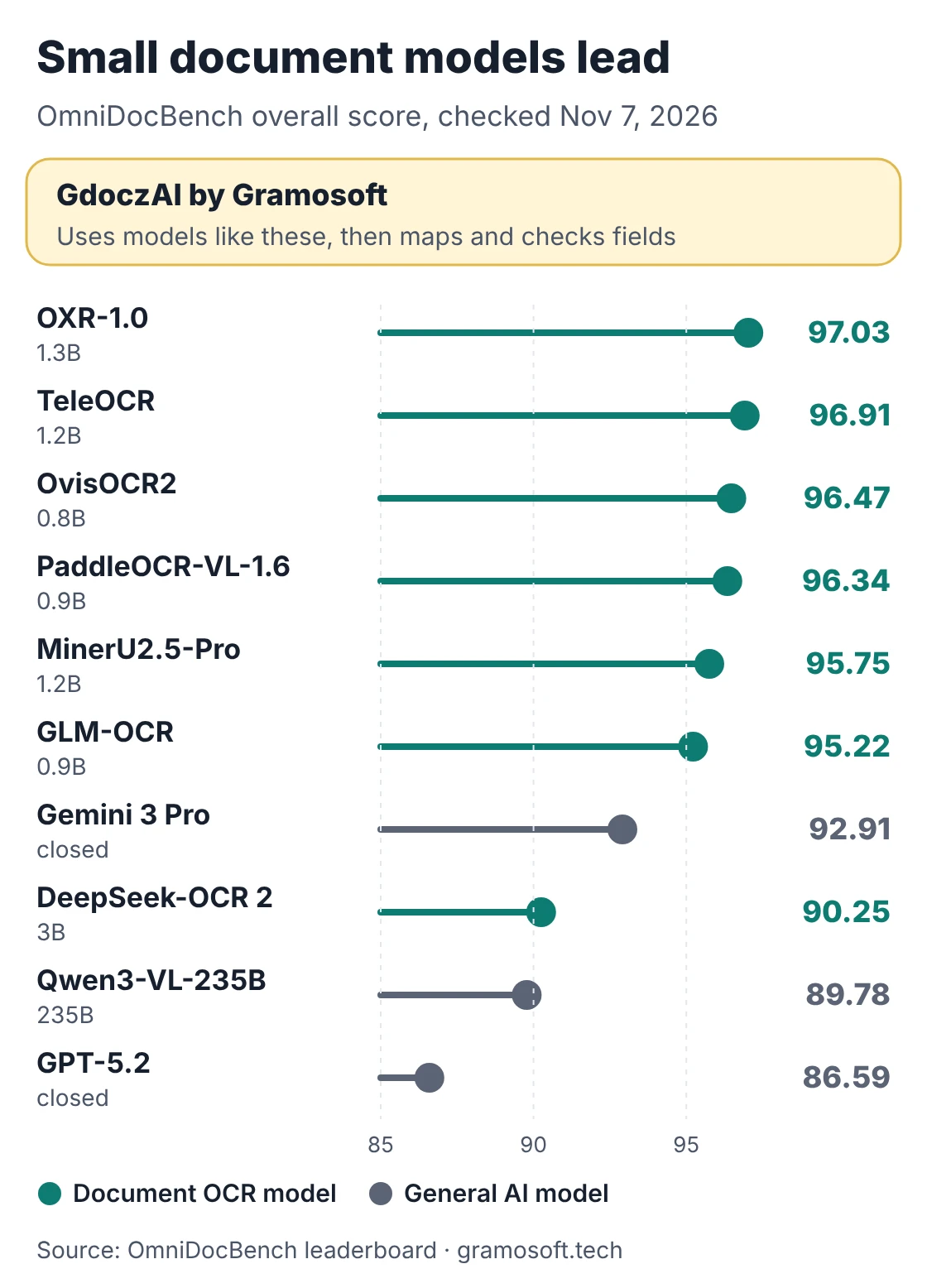
Sources: OmniDocBench leaderboard, olmOCR-Bench results, OXR-1.0 model card and Chandra OCR 2 benchmark table. Sizes are the parameter counts each maker states. Some model cards report slightly different scores from the leaderboard: OvisOCR2's card says 96.58 and TeleOCR's says 96.87. We use the leaderboard figure.
The models one by one
Each entry covers what the model does well, what it needs and where it falls short. Every fact comes from the model's own repository, model card or benchmark page. We list GdoczAI first because it is our product and because it answers a different question: how to get usable fields, not just text.
1. GdoczAI by Gramosoft: fields, not just text
Best for: invoices, boarding passes, claims and forms that must land in an ERP. GdoczAI combines open OCR models from this list with hosted vision models, then maps the output to named fields, checks totals and dates, and sends doubtful values to a reviewer. It processes 100K+ documents a month for aviation clients, including Batik Air.
Where it falls short: it is a platform you configure for your document types, not a model you download and run in an afternoon. For a one-off conversion of research papers to Markdown, a free model below is simpler.
2. OXR-1.0: the top score, with conditions
Best for: the highest published accuracy, if the license fits. SoMark's 1.3B model leads OmniDocBench at 97.03 and reports 87.84 on olmOCR-Bench. It recognises 13 element types, including tables, formulas, code and chemical structures, and returns Markdown or JSON with layout coordinates.
Where it falls short: its license adds terms to Apache 2.0. Companies above $2 million in funding or annual revenue need a separate commercial license, and services built on it without one must show "Powered by SoMark OXR". It needs at least 24 GB of GPU memory, and official vLLM doesn't support it yet, so you use the maker's plugin.
3. TeleOCR: built for photographed pages
Best for: phone photos and bent pages. TeleOCR scores 96.91 on OmniDocBench and was designed for both digital files and camera captures. It came out on August 17, 2026 as NaviDC-OCR and was renamed on September 10. It runs with Transformers, vLLM or SGLang, and community GGUF builds run on llama.cpp and Ollama.
Where it falls short: it is only months old, with a short track record outside its own benchmarks.
4. OvisOCR2: the smallest top model
Best for: top accuracy on a small GPU. At 0.8B parameters, post-trained from Qwen3.5-0.8B, it scores 96.47 and reads the whole page in one pass into Markdown, with formulas in LaTeX and tables in HTML. Its successor, OvisOCR3 (0.8B, October 2026), reports 96.74 on OmniDocBench in its paper but isn't on the leaderboard yet.
Where it falls short: no built-in field extraction; you get a page of Markdown to process yourself.
5. PaddleOCR-VL-1.6: the safest production pick
Best for: teams that want a mature toolkit and many languages. Baidu's 0.9B model scores 96.34, released with PaddleOCR 3.6.0 in May 2026, and outputs Markdown and JSON. The PaddleOCR-VL models cover 111 languages, with seal, chart and rare-character recognition. Apache 2.0, with a large user base.
Where it falls short: best results come through the PaddleOCR toolkit or a vLLM server on an NVIDIA GPU, which adds setup work.
6. MinerU2.5-Pro: PDFs into Markdown and JSON
Best for: large PDF collections going into search or RAG. OpenDataLab's 1.2B model scores 95.75 and runs inside MinerU, which converts PDFs, Office files and images. MinerU runs on CPU by default and uses a GPU when it finds one.
Where it falls short: the MinerU license needs a commercial license above 100 million monthly users or $20 million monthly revenue, and online services built on it must say they use MinerU.
7. GLM-OCR: small, MIT and easy to deploy
Best for: a light deployment with simple field extraction. Z.ai's 0.9B model scores 95.22, runs on vLLM, SGLang or Ollama, and returns Markdown plus JSON layout details. The model is MIT; its layout component, PP-DocLayoutV3, is Apache 2.0.
Where it falls short: narrower language coverage than PaddleOCR-VL or Chandra.
8. Chandra OCR 2: handwriting and 90+ languages
Best for: handwritten forms, checkboxes and many languages. Datalab reports 85.8 on olmOCR-Bench from its own runs, with output as Markdown, HTML or JSON with layout.
Where it falls short: the code is Apache 2.0, but the weights use a modified OpenRAIL-M license: free for research, personal use and startups under $2 million in funding or revenue, and not usable to compete with Datalab's API. Larger companies need a commercial license.
9. olmOCR 2: millions of PDFs as clean text
Best for: converting large PDF libraries into readable text. Ai2's 7B model, released in October 2025, scores 82.4 on olmOCR-Bench, which Ai2 also runs. Apache 2.0, with a toolkit built for batch jobs and support from several hosted providers.
Where it falls short: it needs an NVIDIA GPU with at least 12 GB of memory, and it drops page headers and footers, which on an invoice can hold the invoice number.
10. DeepSeek-OCR 2: compact visual tokens
Best for: dense pages at lower compute. The 3B model scores 90.25 on OmniDocBench and is designed to keep the number of visual tokens per page low.
Where it falls short: it now trails the sub-1.3B leaders by about six points.
Classic engines: PP-OCRv6 and Tesseract
PP-OCRv6, added in PaddleOCR 3.7.0 in June 2026, finds and reads lines of text, covers 50 languages in one model and runs fast on CPU. Tesseract 5 reads 100+ languages on a CPU and is Apache 2.0. Both return text and positions, not tables or page layout, so use them for clean printed pages and high volumes. For a quick one-off job, Gramosoft's free online tools convert PDF to text, PDF to CSV, PDF to Word and images to PDF.
Do general AI models beat dedicated OCR models?
Not on reading documents. On OmniDocBench, Gemini 3 Pro scores 92.91, Qwen3-VL-235B 89.78 and GPT-5.2 86.59, all below more than a dozen dedicated document models, most under 4B parameters. General models earn their place when the job is to reason about a document, not just read it, such as explaining an unusual total.
If you are choosing a chat assistant for your whole team rather than an OCR model, see our ChatGPT vs Claude vs Gemini for business comparison.
Hosted OCR APIs sit in between. Mistral OCR 4.1, released on July 16, 2026, costs $4 per 1,000 pages, or $5 with structured annotations, and returns bounding boxes and confidence scores. An older Mistral OCR version scores 85.66 on OmniDocBench; the leaderboard has no score for 4.1 yet.
Read the license before the score
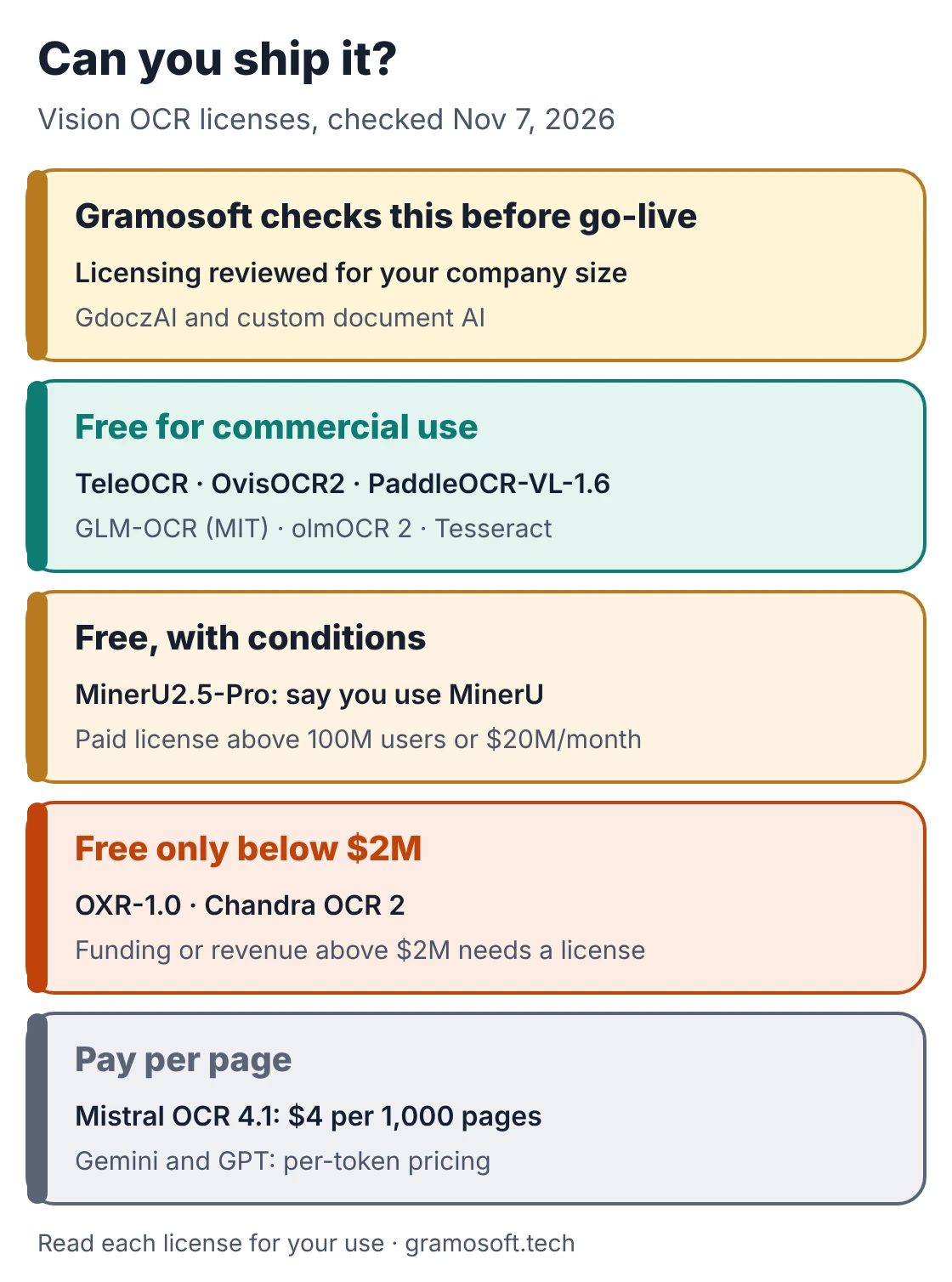
Two of the top-scoring models are not free for every business. OXR-1.0 and Chandra OCR 2 both need a commercial license once a company passes $2 million in funding or revenue, and MinerU adds conditions for very large services. Check the terms for your company size before you build on any model.
Swipe the table sideways on mobile →
| License group | Models | What to check |
|---|---|---|
| Gramosoft builds on | Whichever models fit your documents and company size, with licensing checked before go-live | |
| Free for commercial use | TeleOCR, OvisOCR2, PaddleOCR-VL-1.6, PP-OCRv6, olmOCR 2, Tesseract (Apache 2.0); GLM-OCR model (MIT) | Keep the license and copyright notices |
| Free with conditions | MinerU2.5-Pro | Commercial license above 100 million monthly users or $20 million monthly revenue; say you use MinerU |
| Free only below $2 million | OXR-1.0, Chandra OCR 2 | Funding or revenue above $2 million needs a commercial license |
| Hosted API | Mistral OCR 4.1, Gemini, GPT | Per-page or per-token price, and where your documents are processed |
What the benchmarks measure, and what they miss
OmniDocBench scores 1,651 PDF pages across 10 document types, such as research papers, textbooks, financial reports, newspapers and handwritten notes. Its overall score averages text accuracy, table accuracy and formula accuracy. So a third of the score comes from math formulas, which invoices and bank statements rarely contain.
olmOCR-Bench runs pass-or-fail tests on documents such as math papers, old scans, tables and multi-column pages, and several scores in its tables are reported by the model makers themselves. Neither benchmark looks much like an Indian GST invoice, a boarding pass or a hospital discharge summary. Use the leaderboards to build a short list of three or four models, then let your own pages decide.
Which vision OCR model fits your job
Start from the job, then check the license and the hardware you have. The table gives a starting pick for common needs. Treat each pick as the first model to test, not a final answer, because the same model can score well on research papers and still miss fields on your invoices.
Swipe the table sideways on mobile →
| Your job | Start with | Why |
|---|---|---|
| Checked fields from invoices, claims and forms into your ERP | Gramosoft (GdoczAI) | Field mapping, totals checks and review, not just text |
| Free commercial use, many languages | PaddleOCR-VL-1.6 | Apache 2.0, 111 languages, mature toolkit |
| Highest accuracy on a small GPU | OvisOCR2 or TeleOCR | Top-three scores under 1.3B, Apache 2.0 |
| Phone photos and bent pages | TeleOCR | Built for camera captures |
| Handwriting and checkboxes | Chandra OCR 2, if the license fits | Strong on forms; $2M threshold |
| PDF libraries into RAG or search | MinerU2.5-Pro or olmOCR 2 | Built for batch conversion to Markdown |
| Servers with no GPU | PP-OCRv6, Tesseract or MinerU on CPU | Fast on CPUs for printed text |
| No infrastructure at all | Mistral OCR 4.1 API | $4 per 1,000 pages, confidence scores |
A model reads the page; your process needs fields
An OCR model turns a page into text, Markdown or JSON. A business process needs more: the invoice number in one field, dates in one format, line items that add up to the total, and a person checking any value the model isn't sure of. That layer is where most document projects spend their time.
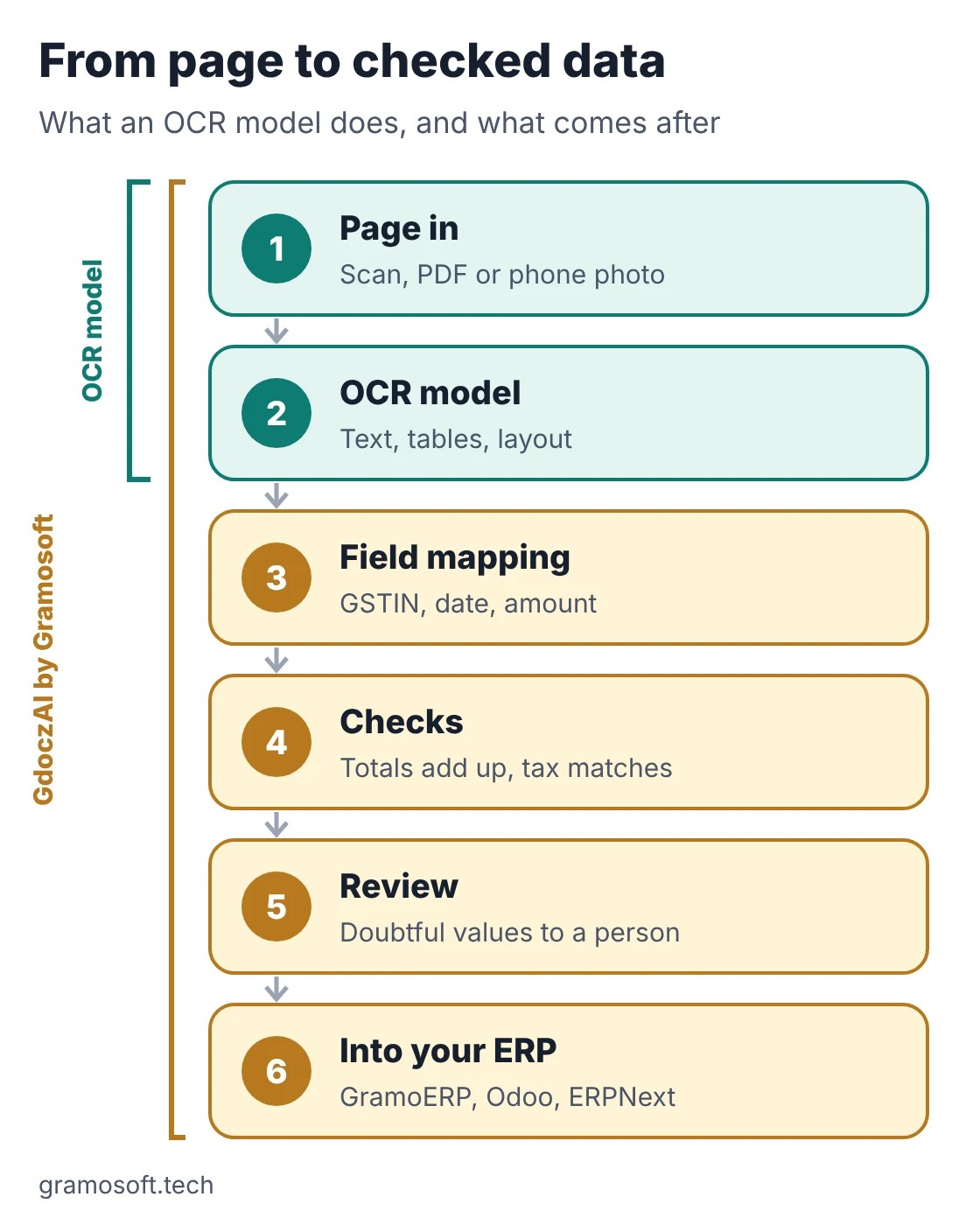
- Field mapping: match page text to named fields such as GSTIN, invoice date and amount.
- Checks: line items must add up to the total, and tax must match the rate.
- Review: doubtful values go to a person, with the source line highlighted.
- Delivery: clean data flows into your ERP, such as GramoERP, Odoo or ERPNext, or into an RPA flow.
GdoczAI covers all four steps, and Gramosoft's AI development team builds custom versions for your document types.
"A 97 on a benchmark still means some pages come back wrong. In production, what matters is catching those pages before the data reaches the ERP. That's the part we spend most of our time building."
Rajesh Kannan, Co-Founder & CTO at Gramosoft
How to test vision OCR models on your own documents
Give your short list a fair, hard test before you choose. Two afternoons with your own documents tell you more than any leaderboard. Run every model on the same set of pages, score the fields your team actually uses, and time each one on the hardware you plan to run in production.
- Start with your worst pages: phone photos, skewed scans, faxes and stamps.
- Include long documents: a 30-page statement tests reading order and tables that cross pages.
- Add handwriting: filled-in forms show whether a model reads the writing or invents text.
- Score fields, not characters: count the values a person had to fix.
- Read the license for your company size and the countries you sell in.
- Time it on your own hardware: published speeds come from other GPUs and settings.
Self-hosted model or OCR API?
Self-host when documents can't leave your servers, volumes are high, or you need full control. Use an API when volumes are small or you have no GPU team. Either way, India's DPDP Rules apply to personal data in those documents, with the main duties for businesses starting on May 12, 2027.
- Self-hosted: sub-1.3B models such as OvisOCR2, PaddleOCR-VL-1.6 and GLM-OCR run on a single GPU; OXR-1.0 needs at least 24 GB, and olmOCR 2 at least 12 GB.
- API: no hardware to manage, but you pay per page and your documents leave your network.
- Both: many teams run an open model for most pages and send hard ones to a hosted model, as GdoczAI does. Gramosoft's data protection and cloud teams can set this up in your own environment.
Frequently asked questions
How does Gramosoft use vision OCR models?
Gramosoft's GdoczAI combines open OCR models with hosted vision models, then maps fields, checks totals and sends doubtful values to review. It processes 100K+ documents a month for aviation clients. We also build custom document AI and test models on your pages in a free discovery call.
What is the best vision OCR model in 2026?
On the OmniDocBench leaderboard, checked on November 7, 2026, OXR-1.0 leads at 97.03, followed by TeleOCR at 96.91, OvisOCR2 at 96.47 and PaddleOCR-VL-1.6 at 96.34. OXR-1.0 needs a commercial license above $2 million in funding or revenue, so many businesses start with the next three.
What is the best open-source OCR model for commercial use?
PaddleOCR-VL-1.6, TeleOCR and OvisOCR2 are Apache 2.0 and score above 96 on OmniDocBench. GLM-OCR's model is MIT. PaddleOCR-VL-1.6 has the most mature toolkit and covers 111 languages.
Are GPT and Gemini better than OCR models at reading documents?
Not on OmniDocBench. Gemini 3 Pro scores 92.91 and GPT-5.2 86.59, below more than a dozen dedicated document models, most of them under 4B parameters. General models are useful when you need reasoning about a document, not just reading it.
Which OCR model works without a GPU?
PaddleOCR's PP-OCRv6 and Tesseract both run on CPU and suit clean printed pages. MinerU also runs on CPU by default and uses a GPU when it finds one.
Which OCR model is best for handwriting?
Chandra OCR 2 lists handwriting and checkbox forms among its strengths and covers 90+ languages, but its weights need a commercial license above $2 million in funding or revenue. Test any model on your own handwritten samples first.
Is an OCR model the same as document processing software?
No. A model turns a page into text, Markdown or JSON. Document processing software such as GdoczAI adds field mapping, checks, human review and the link to your ERP.