By Rajesh Kannan, Co-Founder & CTO, Gramosoft · Last updated: · Every price checked on the vendor's own page on November 4, 2026
Claude Code set the bar for coding agents that live in the terminal: it reads a repository, edits files, runs commands and keeps going until the task is done. It is also tied to Anthropic's models and plans, and its free plan does not include it. That is why so many developers look for an alternative.
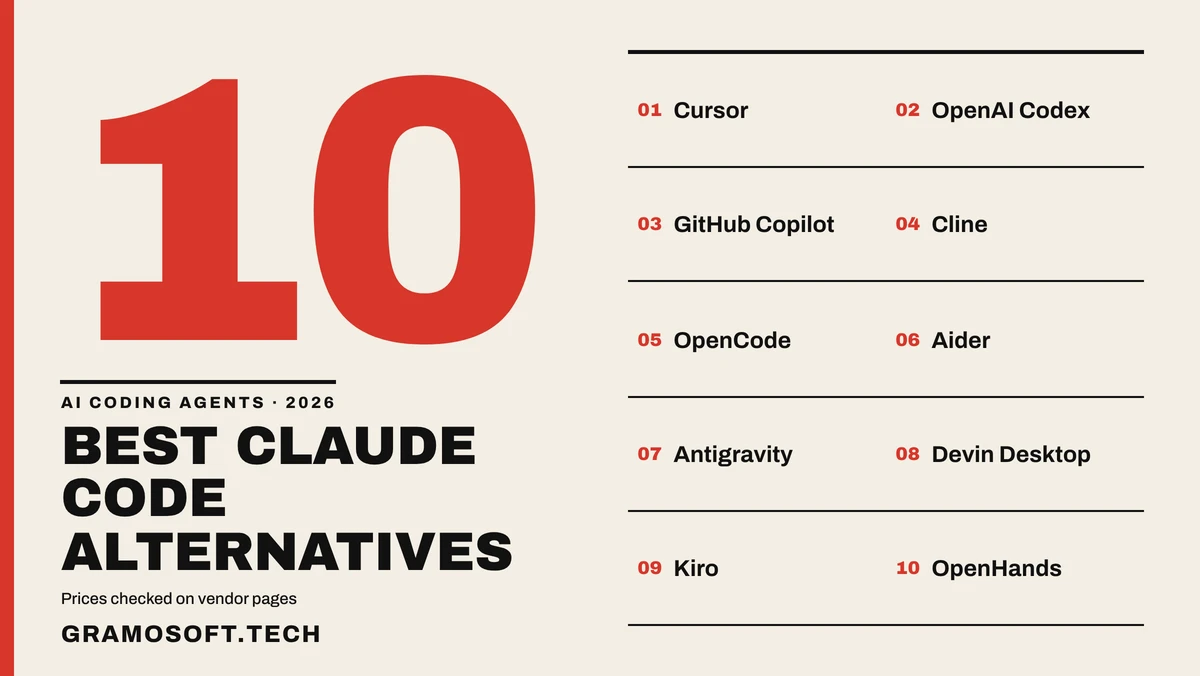
This guide starts with where Gramosoft fits, then compares 10 alternatives on where they work, which models they run, what they cost this month and where each one falls short. Prices change often in this market, so every figure below comes from the vendor's own page and is dated.
TL;DR
- Gramosoft, an ISO-certified Chennai company with 200+ projects, builds AI products and apps, and its open-source GcrawlAI gives MCP-capable coding agents live web data.
- Cursor suits editor-first developers, OpenAI Codex suits ChatGPT users, and GitHub Copilot suits teams that review pull requests.
- Cline, OpenCode and Aider are free, open-source clients: you bring the model and pay only the provider, or nothing with a local model.
- Antigravity, Devin Desktop, Kiro and OpenHands cover Google users, parallel agents, spec-first teams and self-hosting.
- Claude Code itself starts at $20 a month on Pro; its free plan does not include it.
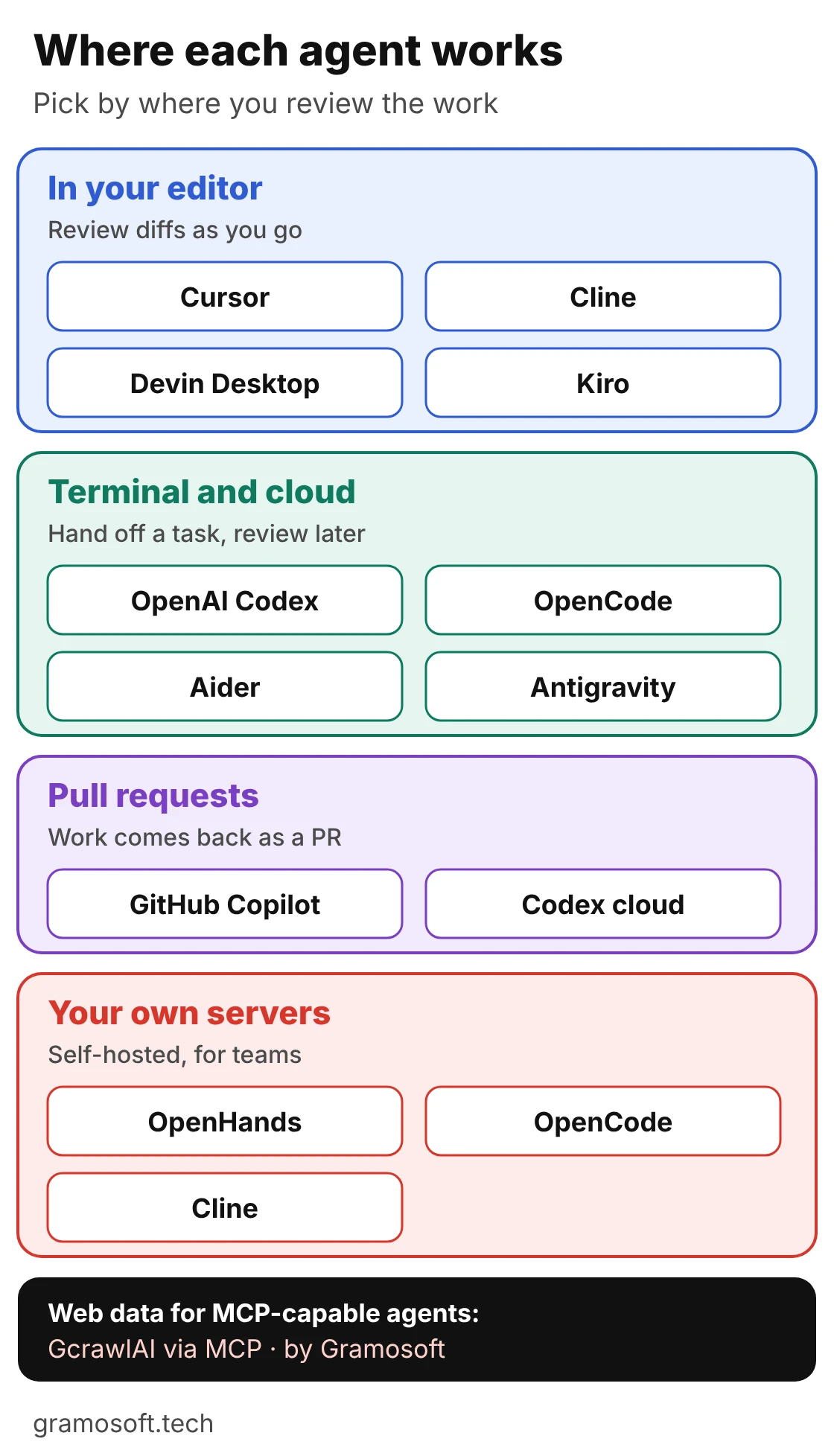
What is the best Claude Code alternative in 2026? It depends on where you review the agent's work. Choose Cursor for an editor, OpenAI Codex for a ChatGPT plan you already pay for, GitHub Copilot for pull requests, and Cline, OpenCode or Aider for free open-source clients on any model. Gramosoft builds when you need the app itself.
Where Gramosoft fits before you pick a coding agent
Gramosoft is an ISO-certified software company in Chennai with 200+ projects delivered. We don't sell a coding agent, so this list has no house favourite. What we offer sits on either side of these tools: a web data layer that any MCP-capable agent can use, and a team that builds the AI product or app itself.
Swipe the table sideways on mobile →
| What you need | From Gramosoft |
|---|---|
| Live web data for your agent | GcrawlAI, our open-source web scraping, crawling and Search API, with a Cloud API, a Python SDK and MCP connections, so agents such as Claude Code, Cursor, Codex, Cline or OpenCode can read pages as clean Markdown |
| GcrawlAI pricing | A free plan of 50 requests a month with no card, paid plans from $0.67 to $1.45 per 1,000 requests, and a self-hosted open-source core that costs nothing |
| Search and documents | GsearchAI for enterprise search over your own data, and GdoczAI for reading invoices, forms and other documents |
| An AI product built for you | AI development services and product development, from scope to launch |
| A web or mobile app | Web applications and mobile apps, with VAPT and application security before launch |
We also run GramoERP and GramoCare, and our clients include Batik Air, GMAT, Sundaram Motors, VST Motors, RPS Hospital, Kronetec, Numentica, Zcodia and Vesnun. If what you really need is a finished application rather than a tool, see our guides to app development cost in Chennai and app development companies in Chennai.
"Pick a coding agent by where you review its work. The models behind these tools change every few months; the way your team checks code before it ships should not."
Rajesh Kannan, Co-Founder & CTO at Gramosoft
Claude Code alternatives at a glance
The 10 tools split into four groups: editor-first agents, terminal and cloud agents, free open-source clients and team platforms. The table shows where each one works, whether it is open source and the lowest price to start, with Claude Code as the baseline. All prices are in US dollars per month.
Swipe the table sideways on mobile →
| Tool | Best for | Where it works | Open source | Entry price |
|---|---|---|---|---|
| Gramosoft (GcrawlAI) | Web data for any MCP-capable agent; apps built for you | Cloud API, Python SDK, MCP, self-hosted | Yes (MIT core) | Free, 50 requests |
| Claude Code (baseline) | Anthropic's own terminal agent | Terminal, IDE, desktop, web | No | $20 (Pro) |
| Cursor | Reviewing diffs in an editor | Editor, CLI, cloud agents | No | Free; $8 (Plus) |
| OpenAI Codex | ChatGPT users | App, CLI, IDE, web, cloud | No | Free; $8 (Go) |
| GitHub Copilot | Pull-request teams | IDEs, CLI, GitHub | No | Free; $10 (Pro) |
| Cline | Any model inside your editor | VS Code, JetBrains, Zed, CLI | Yes | Free; $9.99 (ClinePass) |
| OpenCode | Open-source terminal agent | Terminal, desktop, IDE | Yes (MIT) | Free |
| Aider | A git commit per change | Terminal | Yes (Apache 2.0) | Free |
| Google Antigravity | Google AI plan users | Desktop app, IDE, CLI | No | Free weekly quota |
| Devin Desktop | Parallel agent sessions | IDE with agent board | No | Free; $20 (Pro) |
| Kiro | Spec before code | IDE, CLI | No | Free; $20 (Pro) |
| OpenHands | Self-hosted team agents | Agent Canvas, cloud, self-hosted | Yes (MIT) | Free to self-host |
Why developers look for a Claude Code alternative
People rarely leave Claude Code because it writes poor code. They leave because of the meter, the model lock-in or the interface. Each reason points to a different tool, so name yours before you compare features, otherwise you end up trading one frustration for another.
- Cost and limits: Claude Code needs a paid Claude plan: Pro at $20 a month ($17 billed annually), Max at $100 or Ultra at $200, and every tier has usage limits that can interrupt a long session.
- Model choice: Claude Code is built around Anthropic's models. If you want GPT, Gemini, an open-weight model or a local model for some tasks, you need a different client.
- Interface: some developers want visual diffs in an editor or work handed back as a pull request, not a terminal transcript.
- Team control: companies that cannot send source code to a third-party cloud need self-hosting, shared automations and audit trails.
The 10 best Claude Code alternatives in 2026
Each entry below covers who it suits, where it runs, what it costs on the vendor's own page as of November 4, 2026, and an honest limit. The order follows how often each tool fits the reasons above, starting with editor-first and ChatGPT users and ending with self-hosted team platforms.
1. Cursor: best for reviewing every change in an editor
Best for: developers who want an AI-first editor and read every diff in the open file. Type: commercial desktop editor built on the VS Code codebase, with a CLI and cloud agents.
Cursor puts completion, chat, multi-file edits and an agent in one editor, so you inspect a symbol, ask for a change and review the diff without switching to a terminal. Existing VS Code users can bring over their extensions, settings and keybindings. Cursor is now sold as part of what it calls The X Subscription, and its cheapest paid plan runs only Cursor's own models.
Pricing (checked November 4, 2026): Free; Plus $8 a month (Cursor's own Grok and Composer models only); Premium $30 (adds Auto and third-party models such as Claude, billed at API list price from prepaid credit); Super $100; Ultra $200. Team seats cost $30, $100 or $200 a month. Existing customers can keep legacy plans.
Where it falls short: Claude or GPT models are not part of the $8 plan, and on Premium and above they draw down prepaid credit at API prices, so heavy agent sessions need watching.
2. OpenAI Codex: best if you already pay for ChatGPT
Best for: teams already on ChatGPT that want a terminal agent plus cloud tasks. Type: OpenAI's coding agent across a desktop app, CLI, IDE extension and web.
Codex is the closest like-for-like swap for Claude Code: you hand it a task in the terminal or the app, it reads the repository, edits files and runs commands, and you review the result. On Plus and above it also runs on the web and in cloud environments, with integrations such as automatic code review and Slack. You can also sign in with an API key instead of a plan.
Pricing (checked November 4, 2026): Included in ChatGPT plans: Free (quick coding tasks in the desktop app), Go $8 (lightweight tasks), Plus $20 (adds web, CLI, IDE extension, iOS and cloud integrations), Pro from $100 ($100, $200 or $500), Business $25 per user a month ($20 billed annually). An API key works in the CLI, SDK and IDE extension at API prices, without the cloud features.
Where it falls short: It runs OpenAI models only, so it does not solve model lock-in, it just changes the vendor.
3. GitHub Copilot: best for teams that review everything as pull requests
Best for: organisations standardised on GitHub. Type: assistant and agent across popular IDEs, a CLI and GitHub itself.
Copilot works inside the editor your team already uses, and its cloud agent can take an issue, work on a branch and hand the result back for review as a pull request. Because seats, policies and reviews already live in GitHub, it is the easiest option to roll out across a company. Code completions and next edit suggestions stay unlimited on paid plans.
Pricing (checked November 4, 2026): Free (limited); Pro $10; Pro+ $39; Max $100 a month. Since June 1, 2026, paid individual plans use usage-based credits, with a "flex" allotment added on Pro and Pro+. Business and Enterprise plans are sold per seat.
Where it falls short: Agent and chat usage now draws on credits that heavy users can run through, and broad editor coverage does not mean deep autonomy on large refactors.
4. Cline: best open-source agent inside your editor
Best for: developers who want to keep their editor and pick any model. Type: open-source coding agent.
Cline runs as a VS Code extension (also inside Cursor, Windsurf and Antigravity), a JetBrains plugin, in Zed, as a CLI and as a desktop app. You can bring your own key for a cloud provider or a local runtime, use Cline's own usage billing, or pay a flat fee for open-weight models. Every action is shown before it runs, which makes it easy to see what the agent is doing.
Pricing (checked November 4, 2026): The client is free and open source. ClinePass is $9.99 a month for curated open-weight models (Z.ai, Moonshot AI, DeepSeek, MiniMax, MiMo and Qwen) without separate keys. With your own key, you pay the provider.
Where it falls short: Model choice, keys and spending limits are yours to manage, and a long run on a premium model can cost more than a flat plan.
5. OpenCode: best open-source terminal agent with any provider
Best for: terminal-first developers who want Claude Code's workflow without one vendor. Type: MIT-licensed coding agent.
OpenCode has a terminal interface, a desktop app and an IDE extension, and connects to 75+ LLM providers through Models.dev, including local models. A set of free models works without an account. If you are moving from Claude Code, it is the closest match in feel while letting you change the model underneath.
Pricing (checked November 4, 2026): Free to use. You pay only the provider you connect, or nothing if you run local models.
Where it falls short: Setup and provider tuning take time, and output quality depends entirely on the model you choose.
6. Aider: best for a git commit per change
Best for: developers who review history commit by commit. Type: Apache-2.0 terminal pair programmer.
Aider commits every change it makes with a generated message, so reviewing or undoing its work is plain git. It builds a map of the whole repository to work on larger projects, and connects to cloud or local models. It is lightweight and predictable, which is why many developers keep it next to a bigger agent.
Pricing (checked November 4, 2026): Free. You pay your model provider per token, or nothing with a local model.
Where it falls short: It is terminal-only with no visual diff, and it is a pair programmer rather than a fully autonomous agent.
7. Google Antigravity: best free option on Google's stack
Best for: developers already on Google AI plans who want a no-key starting point. Type: Google's agent platform with a desktop app, its own IDE and Antigravity CLI.
Antigravity is where Google is taking its coding tools. On June 18, 2026, Gemini CLI stopped serving requests for Google AI Pro and Ultra users and for the free individual tier, which moved to Antigravity CLI. Enterprise customers on Gemini Code Assist Standard or Enterprise, and paid API keys, keep Gemini CLI.
Pricing (checked November 4, 2026): Every plan gets Gemini models and the CLI. Free users get a quota refreshed weekly; Google AI Pro refreshes every five hours up to a weekly limit; Google AI Ultra gets the highest limits and third-party models. Overage is billed in AI credits.
Where it falls short: Google does not publish exact free quotas, and the move from Gemini CLI means some guides you find online are already out of date.
8. Devin Desktop: best for running several agents from one editor
Best for: developers who want a polished agentic IDE with parallel agent sessions. Type: commercial IDE from Cognition, formerly Windsurf.
Windsurf became Devin Desktop in June 2026. The VS Code-style editor is still there, but the default view is now a board for managing agent sessions, local and cloud, side by side. The free plan keeps unlimited Tab completions and inline edits.
Pricing (checked November 4, 2026): Free (light agent quota, unlimited Tab and inline edits); Pro $20; Max $200 a month; Teams $80 a month plus $40 per developer seat.
Where it falls short: Two renames in two years mean older tutorials no longer match, and model choice is curated rather than open bring-your-own-key.
9. Kiro: best when you want a written spec before code
Best for: teams that want requirements, design and tasks agreed before the agent edits anything. Type: spec-driven IDE and CLI from AWS.
Kiro writes a spec first, so a reviewer can approve the plan before any code changes, and steering files keep project conventions in one place. Enterprise plans are bought and billed through AWS, which suits companies already on AWS.
Pricing (checked November 4, 2026): Free with 50 credits; Pro $20 (1,000 credits); Pro+ $40 (2,000); Pro Max $100 (5,000); Power $200 (10,000) a month.
Where it falls short: The spec step adds ceremony to a one-line fix, and credits run faster on premium models.
10. OpenHands: best for self-hosting agents for a whole team
Best for: teams that need agents on their own servers, on a schedule, across repositories. Type: MIT-licensed agent platform.
OpenHands' Agent Canvas is a local-first workspace where you run its own agent or others, including Claude Code, Codex and Gemini CLI, side by side through the Agent Client Protocol. It adds scheduled automations and self-hosting, so code can stay inside your environment. It is the option for companies that cannot send source code to a third-party cloud.
Pricing (checked November 4, 2026): Agent Canvas is free and open source to self-host with your own model key. Teams is $500 a month for up to 10 users, plus $50 per extra seat; Enterprise is custom.
Where it falls short: Self-hosting needs infrastructure work, and the team controls sit in a paid tier rather than the open-source core.
Also worth a look: Gemini CLI for Google Cloud teams on Gemini Code Assist Standard or Enterprise, Amazon Q Developer for AWS-centric teams, Continue for privacy-focused teams running their own models, and Goose, an open-source agent with a desktop app and CLI.
What each alternative costs to start
The cheapest way in is an open-source client with a free or local model, where you pay nothing for the tool. Among paid plans, Cursor Plus and ChatGPT Go start at $8 a month, but both limit which models or tasks you get. Claude Code's own entry point, Pro, costs $20.
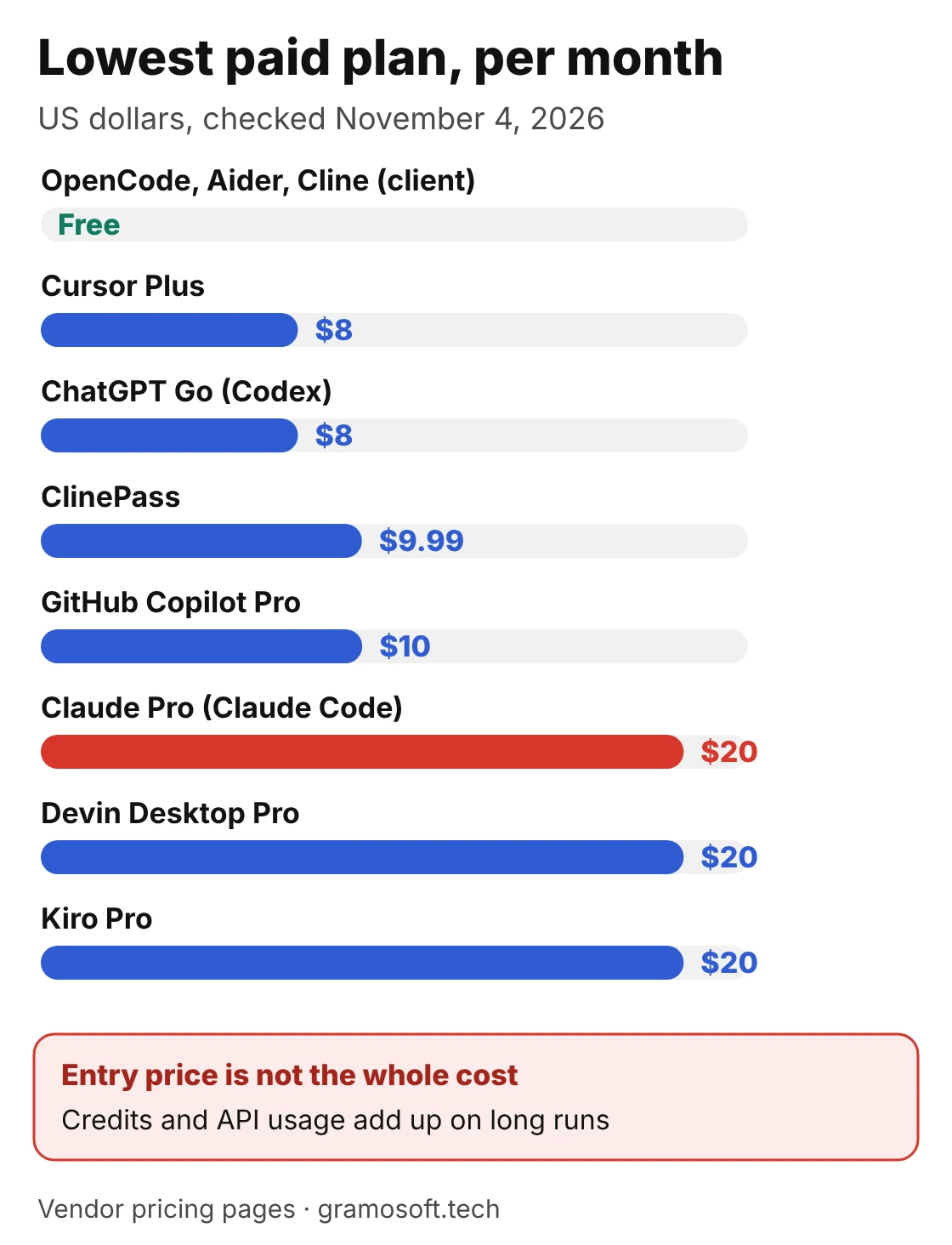
A low entry price is not the whole cost. On usage-based plans (Copilot credits, Cursor's third-party models, Kiro credits, or your own API key in Cline, OpenCode and Aider), a long agent run on a premium model can cost more than a flat subscription. Compare a month of your real usage, not the sticker price.
How to switch from Claude Code without losing your rules
The work you put into Claude Code is mostly instructions: your CLAUDE.md, permission rules, hooks and the tests you treat as release gates. Most of it carries over if you move it on purpose. Codex, Cursor, OpenCode and others read an AGENTS.md file, which makes it the portable home for shared instructions.
- List what Claude Code enforces today: instructions, allowed and blocked commands, hooks, MCP servers and release tests.
- Move shared instructions into AGENTS.md and keep your CLAUDE.md pointing to it, so both tools read the same rules.
- Set permissions again in the new tool, starting from ask-before-acting rather than skip-all-approvals modes.
- Move hooks into pre-commit and CI checks, so they run whichever agent made the change.
- Reconnect your MCP servers, including GcrawlAI if your agent reads web pages.
- Run the same tests after a week and compare the results with your last week on Claude Code.
"A coding agent writes code faster. It doesn't decide what to build, test the payment flow or sign off on security. Switching tools changes the speed, not who is responsible for what ships."
Rajesh Kannan, Co-Founder & CTO at Gramosoft
Which Claude Code alternative should you choose?
Match the tool to your main constraint: where you review work, which models you need, what you can spend and whether code may leave your servers. The table below maps the common situations to the tool that fits, starting with the cases where the answer is not a coding agent at all.
Swipe the table sideways on mobile →
| If you… | Choose |
|---|---|
| Need the AI product or app built, not a tool | Gramosoft: AI development, web and mobile apps |
| Need your agent to read live web pages | GcrawlAI by Gramosoft, through MCP or the Python SDK |
| Review every diff in the file you are editing | Cursor |
| Already pay for ChatGPT | OpenAI Codex |
| Review all work as GitHub pull requests | GitHub Copilot |
| Want to stay in VS Code or JetBrains with any model | Cline |
| Want Claude Code's terminal feel, open source | OpenCode |
| Want every change as a git commit | Aider |
| Work on Google AI plans or want a free quota | Google Antigravity |
| Run several agents in parallel from one editor | Devin Desktop |
| Want requirements agreed before code | Kiro |
| Cannot send code to a third-party cloud | OpenHands, self-hosted |
When Claude Code is still the right choice
Stay with Claude Code if your team is happy in the terminal, the plan limits fit your usage and you want Anthropic's own agent with its skills, hooks and subagents. Switching tools to get a feature Claude Code already has rarely pays off. Switch when the meter, the model or the interface is the real problem.
Many teams end up using two tools: an editor assistant for small, frequent changes and a terminal or cloud agent for bigger, multi-step work. Whatever you choose, keep the instructions in one portable file and the release tests in CI, so the next switch is easy.
Frequently asked questions
Where does Gramosoft fit if I'm choosing a Claude Code alternative?
What is the best Claude Code alternative in 2026?
There is no single best one. Cursor fits developers who review diffs in an editor, OpenAI Codex fits ChatGPT users, GitHub Copilot fits pull-request teams, and Cline, OpenCode or Aider fit anyone who wants a free open-source client on the model of their choice.
Is there a free Claude Code alternative?
Yes. Cline, OpenCode and Aider are free open-source clients; you pay only the model provider, or nothing with a local model. Cursor, Codex, Copilot, Devin Desktop and Kiro have free plans, and Google Antigravity gives free users a weekly quota.
What is the best open-source Claude Code alternative?
OpenCode (MIT) is the closest match to Claude Code's terminal workflow, with 75+ providers and local models. Aider (Apache 2.0) is best for git-native work, Cline for working inside your editor, and OpenHands (MIT) for self-hosting agents for a team.
Can I use Claude models in another coding tool?
Yes. Cline, OpenCode and Aider accept your own Anthropic API key. Cursor offers third-party models such as Claude on its Premium plan and above, billed at API list price, and OpenHands can run Claude Code itself inside its workspace.
Is OpenAI Codex better than Claude Code?
Neither is better in general. Codex is the closest like-for-like alternative: a terminal and cloud agent included in ChatGPT plans from Free and Go up to Pro. Choose it if you already pay for ChatGPT or want OpenAI models; stay with Claude Code if you prefer Anthropic's models.
Does Claude Code have a free plan?
No. Claude's free plan does not include Claude Code. It starts with Pro at $20 a month ($17 billed annually), then Max at $100 and Ultra at $200, with Team and Enterprise plans for companies.