By Rajesh Kannan, Co-Founder & CTO, Gramosoft · Last updated: · Plans, prices and data-training terms checked on each vendor's own page on November 4, 2026
Every week a business owner asks us the same question: should the team use ChatGPT, Claude or Gemini? All three cost about $20 a month for one person and all three are good. The right choice depends less on which model tops a leaderboard and more on the software your team already uses and the data you are allowed to share.
This guide starts with where Gramosoft fits, then compares the three on price, the jobs each does best, privacy defaults and team plans, with every figure taken from the vendor's own page and dated.
TL;DR
- Gramosoft, an ISO-certified Chennai company with 200+ projects, builds AI that works on your own documents, databases and apps, on top of these models, and helps teams choose the right plan in a free discovery call.
- Gemini fits companies on Google Workspace; Business Standard ($14 a user a month) puts it in Gmail, Docs, Sheets and Meet.
- Claude fits writing, long documents and building tools; Claude Code is included from Pro ($20).
- ChatGPT is the broadest all-rounder, with plans from Go ($8) to Business ($25 a seat) and Codex from Plus.
- Business plans on all three keep company data out of model training by default; personal plans are different, so give staff business accounts.
Which AI should your company use in 2026? Choose Gemini if your team lives in Google Workspace, Claude for writing, long documents and building tools, and ChatGPT for a broad all-purpose assistant. Each costs about $20 a month per person. When AI must work on your own data and systems, Gramosoft builds that layer.
Where Gramosoft fits in the ChatGPT, Claude and Gemini decision
Gramosoft is an ISO-certified software company in Chennai with 200+ projects delivered. We don't resell any of the three, so we have no house favourite. We use more than one model provider inside our own products, and we build AI that works on a company's own documents, databases and apps, which is where chat assistants stop.
Swipe the table sideways on mobile →
| What you need | From Gramosoft |
|---|---|
| Help choosing a plan | A free discovery call to match ChatGPT, Claude or Gemini to your teams, your software and your data rules |
| AI on your own data | GsearchAI, our enterprise search that answers from your PDFs, Excel files and databases and works inside Teams, Slack and WhatsApp |
| AI on your documents | GdoczAI, our document processing product, which reads invoices and forms at scale for aviation clients |
| Live web data for AI | GcrawlAI, our open-source web scraping and Search API, with MCP connections for AI agents |
| A custom AI product | AI development services, built on the model API that fits each task, with web and mobile apps around it |
| Security and data protection | Data protection, application security and VAPT, including India's DPDP duties |
We also run GramoERP and GramoCare, and our clients include Batik Air, GMAT, Sundaram Motors, VST Motors, RPS Hospital, Kronetec, Numentica, Zcodia and Vesnun.
"Pick the assistant that sits inside the software your team opens every morning. Model rankings change every month; your email, documents and spreadsheets don't."
Rajesh Kannan, Co-Founder & CTO at Gramosoft
ChatGPT vs Claude vs Gemini: the short answer by job
None of the three wins every job. For most businesses the deciding factor is the work your team does most and the software it already uses. The table gives a starting pick for each common job. Treat it as a hypothesis to test in a short pilot, not a final verdict, because results depend on your own tasks.
Swipe the table sideways on mobile →
| The job | Start with | Why |
|---|---|---|
| AI that answers from your own files, ERP or tickets | Gramosoft | Chat plans don't connect deeply to your systems; GsearchAI and custom AI do |
| Email, docs and meetings in Google Workspace | Gemini | Built into Gmail, Docs, Sheets and Meet on Business Standard |
| Long documents, proposals and careful writing | Claude | Up to a 1M-token context window, Research from Pro |
| Building internal tools and code | Claude or ChatGPT | Claude Code from Pro; Codex in ChatGPT Plus |
| A broad all-purpose assistant for mixed teams | ChatGPT | Widest range of tasks in one app, from Go to Business |
| Images | ChatGPT or Gemini | Claude's pricing page lists no image generation |
| Video | Gemini | Video generation in Google Flow from Google AI Plus |
Plans and prices side by side
For one person, all three cost about $20 a month. For a team, ChatGPT Business and Claude Team both cost $25 a seat billed monthly, or $20 billed annually. Gemini usually comes inside Google Workspace, which many companies already pay for. All figures are US dollars from the vendors' pages on November 4, 2026.
Swipe the table sideways on mobile →
| Tier | ChatGPT | Claude | Gemini |
|---|---|---|---|
| Gramosoft advice | Free discovery call to pick the plan per team; we build what the plans can't | ||
| Free | $0 | $0 (no Claude Code) | $0 |
| Low-cost | Go: $8 | None | Google AI Plus: $4.99 |
| One person | Plus: $20 | Pro: $20, or $17 billed annually | Google AI Pro: $19.99 |
| Power user | Pro: $100, $200 or $500 | Max: $100; Ultra: $200 | Google AI Ultra: from $99.99 |
| Team | Business: $25 a user ($20 annual), 2+ users | Team: $25 a seat ($20 annual); Premium $125 ($100 annual) | Workspace Starter $7, Standard $14, Plus $22 a user |
| Large company | Enterprise: contact sales | Enterprise: $20 a seat billed annually plus API usage, 20 seats minimum | Workspace Enterprise: contact sales |
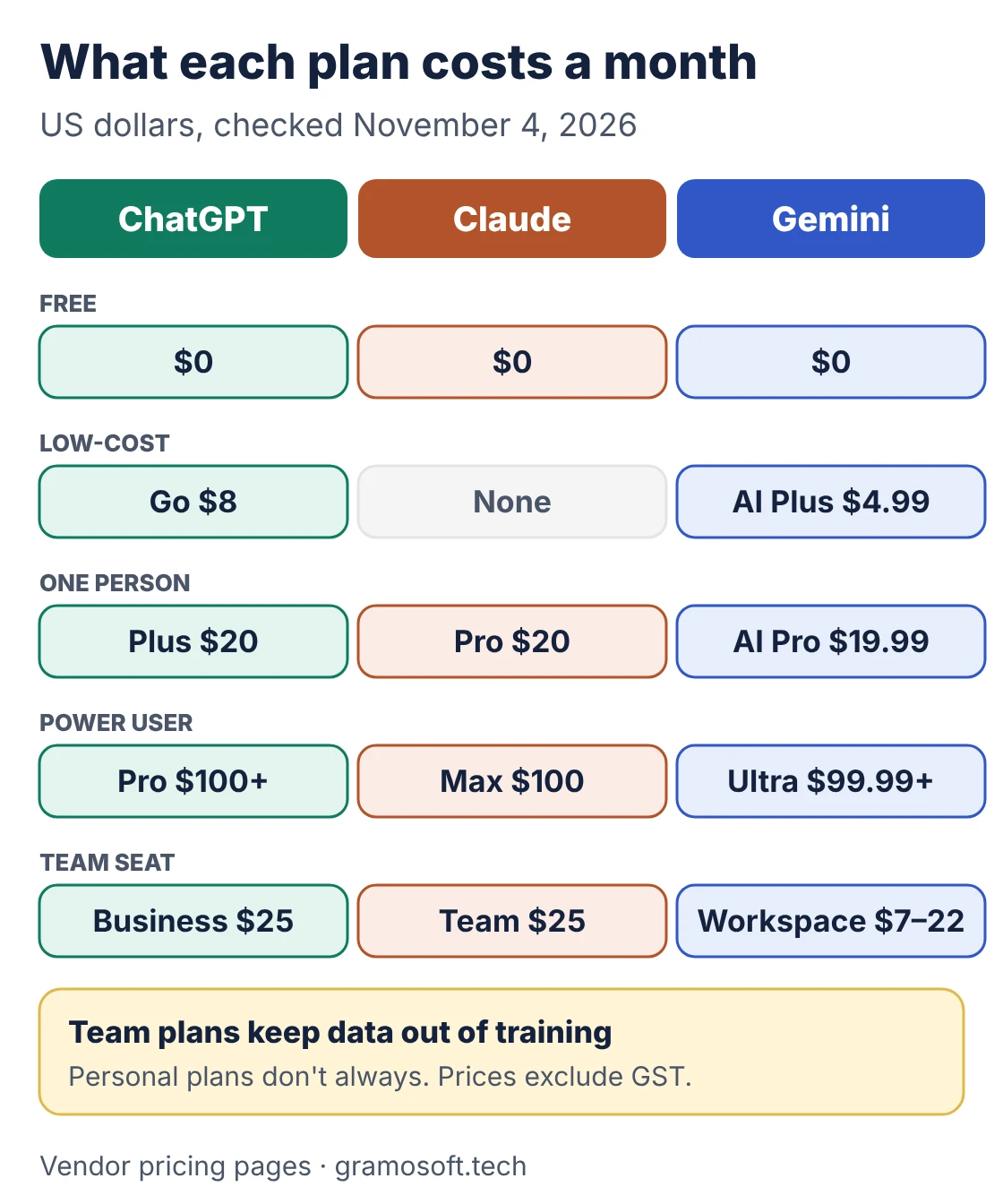
Sources: ChatGPT plans, Claude pricing, Google AI subscriptions and Google Workspace pricing. Google is also running an introductory offer at half these Workspace prices for the first 20 users for 12 months, for sign-ups from November 10, 2026 to February 10, 2027. Prices exclude GST.
Start with the software your team already uses
For a team, the most useful question is not which model is smartest but where the AI will sit. An assistant inside the email, documents and meetings your staff already open gets used. A separate tab often doesn't. Map your main software first, then pick the assistant that fits it, and add a second only for a clear job.
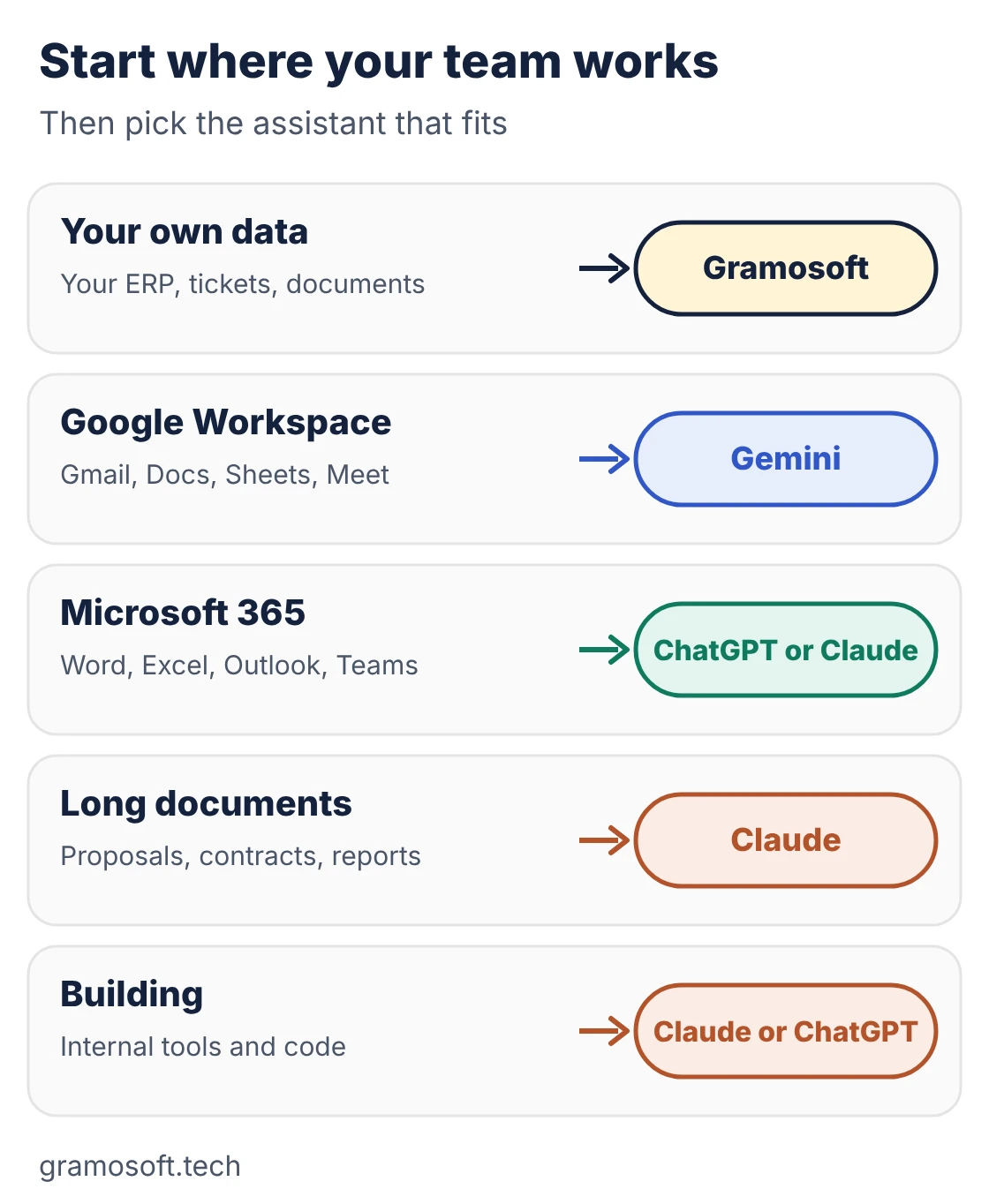
- Google Workspace company: Workspace Business Standard ($14 a user a month) includes Gemini in Gmail, Docs, Sheets and Meet. Business Starter ($7) includes Gemini in Gmail and the Gemini app, but not in Docs, Sheets or Meet.
- Microsoft 365 company: Claude Pro and above connect to Microsoft 365, and ChatGPT connects to many workplace apps. Microsoft's own Microsoft 365 Copilot is worth testing alongside them.
- Teams that build tools: Claude Code comes with every paid Claude plan, and Codex comes with ChatGPT from Plus on the CLI, IDE extension and web.
- Your own systems: if the answers must come from your ERP, ticketing, HR or document archive, a chat plan alone won't do it. That is where Gramosoft builds AI on your data.
Best for writing, research, data, coding, images and meetings
Each assistant clearly leads in one or two jobs, and the rest is close enough that your own test should decide. Below is how they compare on the work businesses ask about most. Model names change often, so the verdicts follow each product's strengths rather than the model of the month.
Writing and long documents
Claude is the usual pick for proposals, policies and long reports, with a context window of up to 1M tokens depending on the model. Its current range includes Opus 5.5 and Sonnet 5.5, with Fable 5.1 at the top. ChatGPT is close and flexible. Gemini is most useful when the draft already sits in Google Docs.
Research
All three offer a research mode on paid plans: Research on Claude Pro and above, and Deep Research in ChatGPT and on Google AI plans. Whichever you use, open the cited sources before acting on a report, especially for legal, financial or medical questions.
Spreadsheets and data
Use the AI that lives where your spreadsheets are: Gemini in Google Sheets on Workspace Standard, or an assistant that reads the files you upload. For business data that sits in databases or ERP systems, a chat window is the wrong tool; that is a job for a connected solution such as GsearchAI.
Coding and building tools
Claude Code is included from Claude Pro, and Codex from ChatGPT Plus, with lighter coding tasks on ChatGPT Free and Go. Google offers coding through Antigravity on its AI plans. Run both on a real task from your own codebase before you decide.
Images and video
ChatGPT and Gemini both generate images. For video, Google AI plans include video generation through Google Flow, with credits rising from Plus to Ultra. Claude's pricing page lists no image generation, so it is not the pick for visual content.
Meetings and email
If your calls run on Google Meet and your mail on Gmail, Gemini is already in the room on Workspace Business Standard. Otherwise, compare how each assistant handles a recorded meeting and a busy inbox on your own data during the pilot.
Which one trains on your data?
On business plans, none of the three trains on your company data by default. Personal plans are different: the default depends on the vendor and a setting the user controls. The biggest real risk is staff using personal accounts for company work, so a team plan is the cheapest privacy control you can buy.
Swipe the table sideways on mobile →
| Plan type | ChatGPT | Claude | Gemini |
|---|---|---|---|
| Gramosoft builds | AI on your own servers or cloud account, with access controls, audit logs and DPDP duties built in | ||
| Business plans | No training on business data | No training by default on Team and Enterprise | Workspace: company data not used to train models (stated on Starter); Gemini Enterprise: customer data not used to train Google models |
| Personal plans | Used for training unless you opt out; Temporary Chats excluded | Only if you allow it in your settings | Check the activity settings in the Gemini app before sharing sensitive data |
| Data in India | India data residency for ChatGPT Enterprise, Edu and approved API customers | Ask Anthropic for current options | Ask Google for current Workspace data regions |
Under India's DPDP Rules, the main duties for businesses apply from May 12, 2027: notice, consent, security safeguards and breach reporting. If staff paste customer data into AI tools, those duties apply to that use too. Gramosoft's data protection team can help set the rules.
Do you need more than one AI?
For most teams, no. Pick one as the home for company files, connectors and permissions, and give a second seat only to the few people with a clear reason. Two company workspaces means two places for knowledge and twice the admin. A solo founder can try two $20 plans for a month and cancel one.
Swipe the table sideways on mobile →
| Your company | Home base | Add |
|---|---|---|
| Needs AI on its own ERP, documents or tickets | Gramosoft (GsearchAI, GdoczAI or custom AI) | One chat plan for everyday writing |
| Google Workspace, under 50 people | Gemini via Workspace Business Standard | A Claude or ChatGPT seat for whoever builds |
| Microsoft 365 | ChatGPT Business or Claude Team, after a pilot with Microsoft 365 Copilot | The other for long documents |
| Document-heavy (legal, finance, insurance) | Claude Team | Gemini inside Workspace for mail and meetings |
| Content and marketing team | ChatGPT Business | Google AI Pro for video |
Run a 30-day pilot before you buy every seat
A short pilot on your own work beats any comparison article, including this one. Pick a few people from different teams, give them the same real tasks on two or three assistants, and measure the time saved and the corrections needed. Then buy seats only for the people who used them.
- Pick 10 real tasks: a customer email, a proposal, a meeting summary, a spreadsheet clean-up, a policy draft and so on.
- Use business accounts only, and keep sensitive customer data out of the first round.
- Score each answer on accuracy, how ready it is to use and how long it took to fix.
- Check permissions: the AI should never show a file the employee couldn't open directly.
- Write simple rules: what may go into the tool, what may not, and what needs human review.
- Decide after 30 days, and remove seats nobody used.
"A chat assistant answers questions. For most businesses, the real value comes when AI works on their own data: their documents, their tickets, their ERP. That part has to be built, and built safely."
Rajesh Kannan, Co-Founder & CTO at Gramosoft
When a chat assistant isn't enough
Chat plans are excellent for drafting, summarising and research. They are not built to run a business process. Once AI has to read your ERP, follow approval rules, update records or answer customers from your own knowledge base, you need a connected solution built on the model APIs, with access controls and testing.
- Search across your own knowledge: GsearchAI answers from your PDFs, Excel files and databases, inside Teams, Slack or WhatsApp.
- Documents at volume: GdoczAI reads invoices and forms and turns them into structured data.
- Web data: GcrawlAI feeds live pages to AI agents as clean Markdown.
- Custom AI apps: Gramosoft's AI development team builds on the model that fits each task, and can switch models later without a rebuild.
- Automation without AI: sometimes RPA is the simpler answer for copying data between systems.
Frequently asked questions
How does Gramosoft help with ChatGPT, Claude and Gemini?
Gramosoft helps you choose the right plan for each team in a free discovery call, and builds what chat plans can't: AI that answers from your own documents, databases and apps, such as GsearchAI and GdoczAI, with security and DPDP duties built in. We don't resell any of the three.
Which is better for business, ChatGPT, Claude or Gemini?
None wins every job. Gemini fits Google Workspace companies, Claude fits writing, long documents and building tools, and ChatGPT is the broadest all-purpose assistant. Each costs about $20 a month for one person, so your existing software and a short pilot should decide.
How much do ChatGPT, Claude and Gemini cost for a team?
ChatGPT Business costs $25 a user a month ($20 billed annually) and Claude Team $25 a seat ($20 annually). Gemini comes inside Google Workspace: $7, $14 or $22 a user a month for Business Starter, Standard and Plus. Prices exclude GST.
Do ChatGPT, Claude or Gemini train on company data?
Not on business plans by default: OpenAI says it doesn't train on business data, Claude Team and Enterprise don't train by default, and Google says Workspace and Gemini Enterprise data isn't used to train its models. Personal plans differ, so give staff business accounts.
Is Gemini worth it if we already use Google Workspace?
Usually yes. Workspace Business Standard at $14 a user a month includes Gemini in Gmail, Docs, Sheets and Meet, so the assistant is already where your team works. Business Starter at $7 includes Gemini in Gmail and the Gemini app only.
Which AI is best for coding?
Claude Code is included on every paid Claude plan from Pro at $20, and Codex is included in ChatGPT Plus at $20, with lighter coding tasks on Free and Go. Both are strong; test them on your own codebase before choosing.
Should employees use free accounts for company work?
No. Personal and free accounts can use conversations for training depending on settings, and the company has no admin control over them. Use business plans, write a short AI use policy and keep customer data out of personal tools.