Updated 26 November 2026 · plans, prices and commands checked on Ollama's own pages on 26 November 2026
Ollama cloud models let you run open models with 120 billion parameters or more from an ordinary laptop: same commands, same local API, no GPU and no 65 GB download. The catch is that your prompts leave the machine. This guide starts with how Gramosoft uses them for clients, then covers setup, costs, routing and the local-only switch.
TL;DR
- Gramosoft sets up Ollama for businesses from Chennai and routes each workload on purpose: client and personal data to local models, shareable heavy work to cloud models, with cloud switched off on servers that hold private data.
- How it works: sign in with
ollama signin, then run a model whose name ends in-cloudor:cloud; Ollama forwards it to its servers and streams the answer back. - No install at all: call
https://ollama.com/apiwith an API key. - Cost: pay as you go at $0, Pro at $20 a month with $60 of usage, Max at $100 with $300; local use stays free.
- Privacy: Ollama says cloud prompts are not logged or trained on, but they are processed mainly in the United States. One setting,
OLLAMA_NO_CLOUD=1, turns cloud off.
What are Ollama cloud models? They are models in Ollama's library that run on Ollama's servers instead of your computer. You call them with the same CLI and API as local models after signing in, using a name such as gpt-oss:120b-cloud. They need no GPU or download, but every prompt goes over the internet to ollama.com.
How Gramosoft uses Ollama cloud models, and where it doesn't
Gramosoft sets up, secures and supports private LLM servers for businesses, and Ollama is often the first tool we install. Cloud models are useful in that work, but we treat them as a second route with a written rule, not a convenience. The rule decides which prompts may leave the building before anyone signs in.
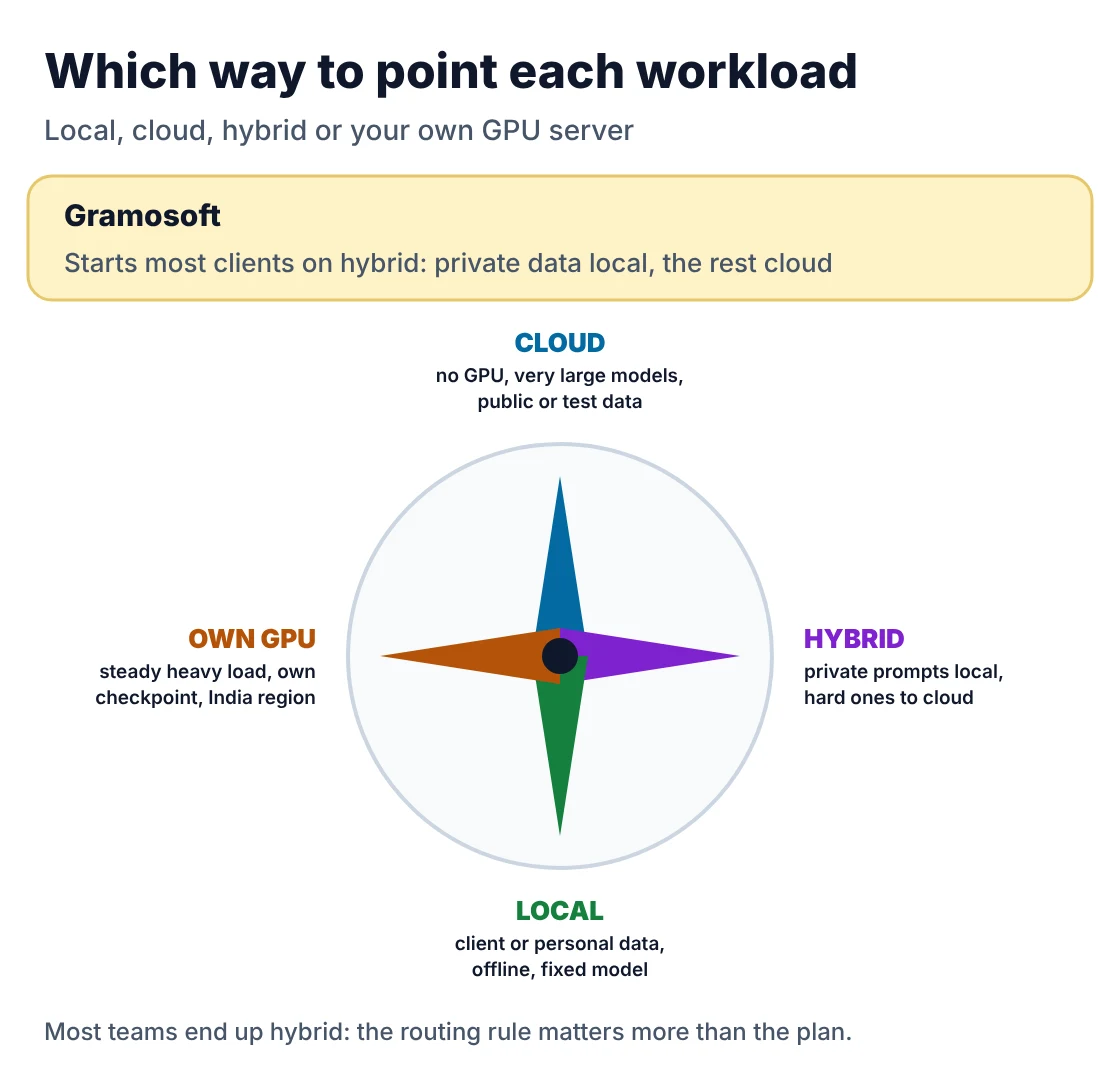
- Prototype in the cloud, on safe data: we try very large open models on public or test data through cloud models before anyone buys a GPU.
- Production private data stays local: client records, source code under NDA and personal data run on local models on your servers or your own cloud.
- Cloud switched off by default: servers that hold private data ship with Ollama's local-only setting and a log check.
- Routing in code: one small function sends each request local or cloud, so the boundary is easy to audit.
- Connected to your data: the same servers power assistants like our AI development services build, including GsearchAI for document search.
Where we fall short. We don't resell Ollama plans or sell GPU hardware, we are not an Ollama partner, and Ollama's cloud catalogue and prices are set by Ollama, so we can't promise a model will stay available.
"The cloud suffix is one word in a model name. We decide which prompts may use it before anyone signs in, and we write that rule down."
Rajesh Kannan M, Co-Founder & CTO, Gramosoft
What Ollama cloud models are
A cloud model is an entry in Ollama's library that runs on Ollama's hardware rather than yours. Ollama announced cloud models in September 2025 with version 0.12. The design keeps everything you already use: the same app, the same commands, the same port and the same libraries. Only the model name changes.
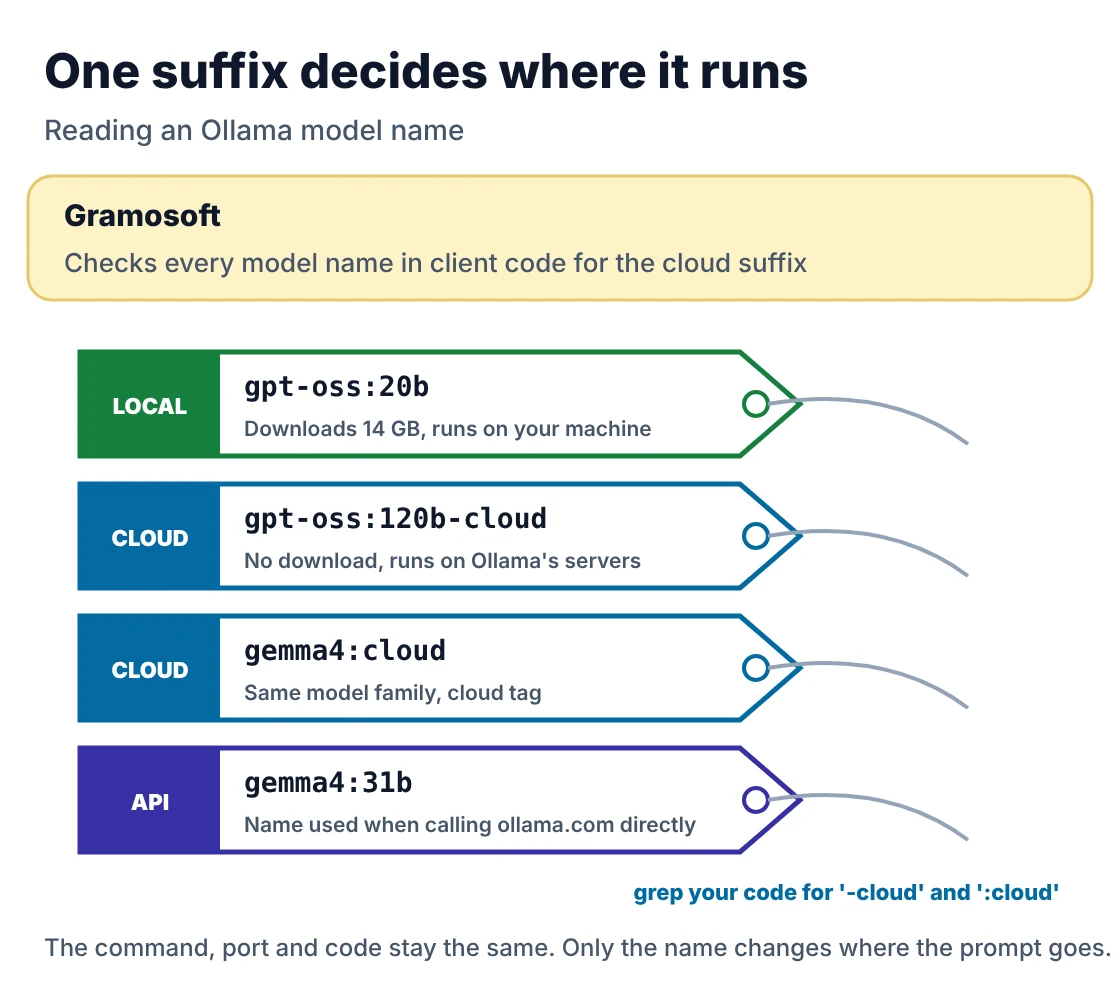
- In the app and CLI: names end in
-cloud, such asgpt-oss:120b-cloud, or use a:cloudtag, such asgemma4:cloud. - On the direct API: Ollama's cloud docs say to use the name from
https://ollama.com/api/tags, such asgemma4:31b. - No download: Ollama's docs say cloud models do not need to be downloaded, so they take no disk space.
- Full context: Ollama's context-length page says cloud models run at their maximum context by default, while a local model on a GPU under 24 GiB defaults to 4k tokens.
Browse what is available in the cloud model library. Some guides list model names that do not exist, so copy names from the library, not from a tutorial.
How to set up Ollama cloud models, step by step
Setup takes two commands on a machine that already has Ollama: sign in, then run a cloud model. If you are installing Ollama for the first time, follow our local setup guide first. For servers, containers or CI jobs with no Ollama at all, use the direct API with a key instead.
Terminal: sign in and run a 120B model
# 1. Check the version (cloud models need Ollama 0.12 or later)
ollama --version

# 2. Sign in once per machine; this opens a browser to approve the device
ollama signin

# 3. Run a 120B model on Ollama's servers, nothing is downloaded
ollama run gpt-oss:120b-cloud "Explain KV cache in two sentences."

# 4. Cloud models show in the list like local ones, with no size
ollama ls

# 5. Sign out when this machine should stop using cloud models
ollama signout
ollama signin opens a browser to approve the device. After that, the local API at localhost:11434 forwards cloud names to ollama.com, so existing scripts work by changing one string. For the full local install, see How to Run LLMs Locally with Ollama: A Setup Guide for Businesses.
To skip the local install, create a key at ollama.com/settings/keys and call the hosted API. Ollama's authentication docs say direct cloud inference at https://ollama.com/api and /v1 needs an API key and no local server.
Python: call the cloud API directly with an API key
"""Call Ollama's cloud API directly, with no local Ollama install.

pip install ollama
export OLLAMA_API_KEY=...   # create one at ollama.com/settings/keys
"""
import os
from ollama import Client

client = Client(
    host="https://ollama.com",
    headers={"Authorization": "Bearer " + os.environ["OLLAMA_API_KEY"]},
)

if __name__ == "__main__":
    # On the direct API, use the name from https://ollama.com/api/tags (no -cloud suffix)
    reply = client.chat(
        model="gpt-oss:120b",
        messages=[{"role": "user", "content": "Summarise the CAP theorem in three sentences."}],
    )
    print(reply.message.content)
Keep the key in an environment variable or a secrets manager, never in source code or browser code, and revoke keys in your Ollama account when someone leaves.
Three ways a prompt can travel through Ollama
Once you sign in, one Ollama install has three routes, and two of them look identical from the keyboard. That is why a security approval written for local-only Ollama needs a second look. The difference is only the model name and whether the machine is signed in.
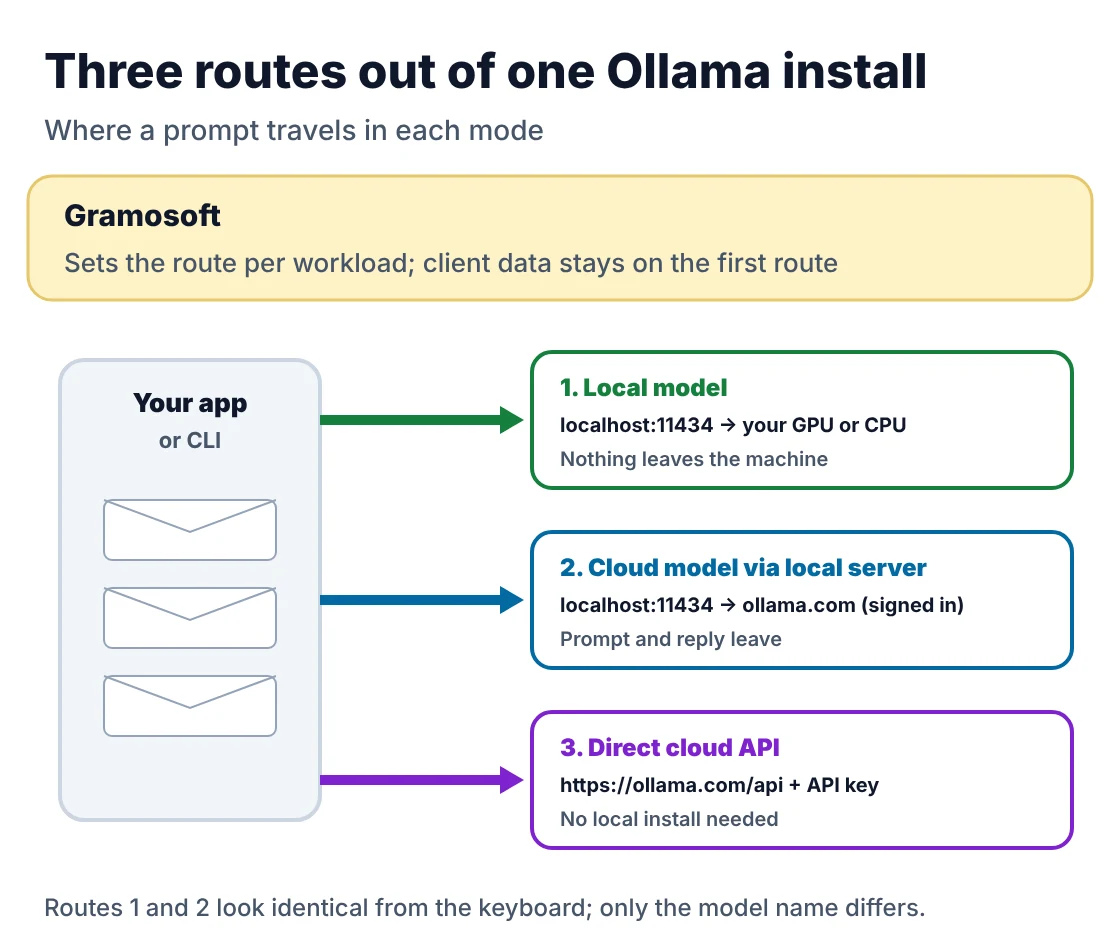
| Route | How you call it | Where it runs | What leaves the machine |
|---|---|---|---|
| Local model | ollama run gpt-oss:20b |
Your GPU or CPU | Nothing at inference time |
| Cloud model via local server | ollama run gpt-oss:120b-cloud after sign-in |
Ollama's servers | Prompts and replies |
| Direct cloud API | https://ollama.com/api with a key |
Ollama's servers | Prompts and replies |
Cohorte points out that any tool that can reach the unauthenticated local port can use cloud models once someone signs in, including coding agents and editor plugins.
What Ollama Cloud costs
On 31 August 2026 Ollama moved its plans to per-token pricing, with a monthly pool of credits in each paid plan. Running models on your own hardware stays free and unlimited on every plan. Paid plans differ in included credits, model access and how many requests run at once.
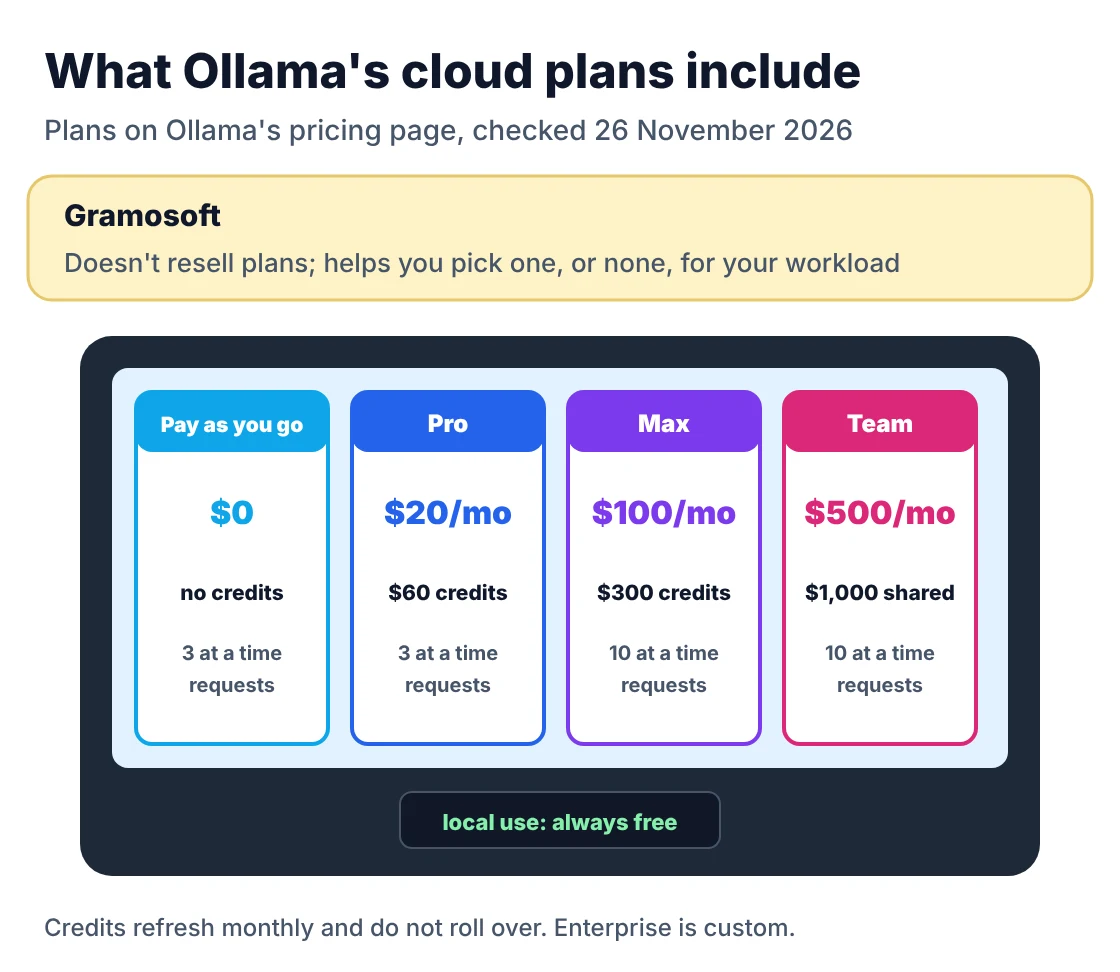
| Plan | Price | Included usage | Concurrent requests |
|---|---|---|---|
| Pay as you go | $0 | None; pay per token | 3 |
| Pro | $20 a month or $200 a year | $60 of credits a month | 3 |
| Max | $100 a month | $300 of credits a month | 10 |
| Team (early access) | $500 a month | $1,000 a month, shared | 10 |
| Enterprise | Custom | Volume pricing | Not published |
Figures are from Ollama's pricing page on 26 November 2026. Credits refresh monthly and do not roll over, requests beyond your concurrency limit are queued, and some models are cheaper outside 12:00 to 18:00 UTC on weekdays and all weekend.
| Cloud model | Input, per million tokens | Output, per million tokens |
|---|---|---|
gpt-oss:20b |
$0.07 | $0.30 |
gemma4 |
$0.14 | $0.40 |
gpt-oss:120b |
$0.15 | $0.60 |
kimi-k2.6 |
$0.95 | $4.00 |
glm-5.3 |
$1.40 | $4.40 |
kimi-k3 |
$3.00 | $15.00 |
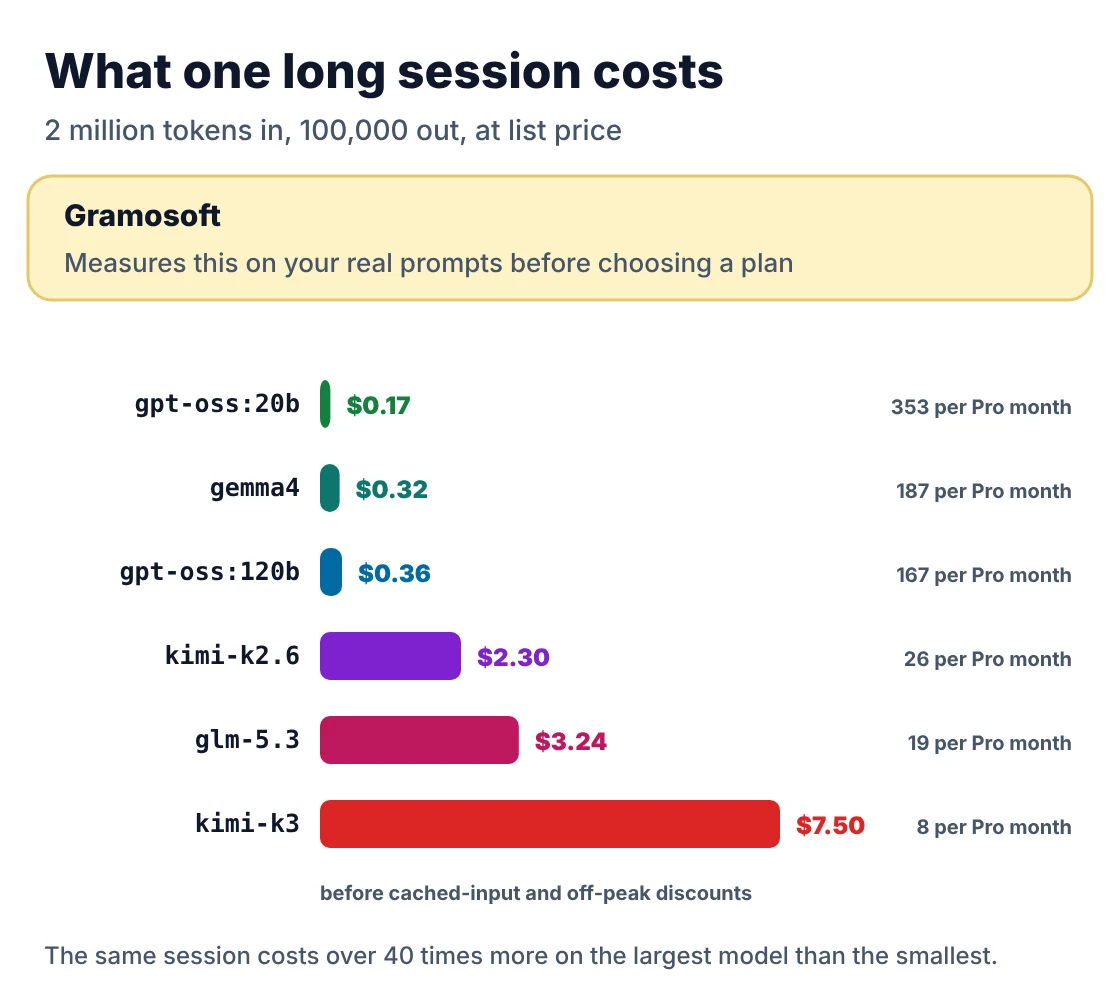
An illustrative agent session of 2 million input and 100,000 output tokens costs $0.36 on gpt-oss:120b and $7.50 on kimi-k3 at list price, so Pro's $60 covers about 167 or 8 such sessions. Cached input is billed lower. If you need steady heavy use, compare this with Self-Hosted LLM vs API: Cost, Privacy & Performance for Indian Enterprises.
Mixing local and cloud models in one app
The best use of cloud models is not replacing local ones. Keep small, frequent and private work on your own machine, and send only hard, shareable tasks to a bigger model. Writing that rule as code makes the boundary visible: anyone can search the repository for the cloud suffix and see where data leaves.
Python: route private prompts local and hard ones to the cloud
"""Send private or simple prompts to a local model and hard, shareable ones to the cloud.

Runs against your local Ollama server (signed in for the cloud route).
Rates are Ollama's published list prices in USD per million tokens, checked 26 November 2026.
"""
from ollama import Client

LOCAL_MODEL = "gpt-oss:20b"          # downloaded, runs on this machine
CLOUD_MODEL = "gpt-oss:120b-cloud"   # runs on Ollama's servers

RATES = {  # model: (input, output) per million tokens
    "gpt-oss:20b": (0.07, 0.30),
    "gemma4": (0.14, 0.40),
    "gpt-oss:120b": (0.15, 0.60),
    "kimi-k2.6": (0.95, 4.00),
    "glm-5.3": (1.40, 4.40),
    "kimi-k3": (3.00, 15.00),
}


def pick_model(private: bool, heavy: bool) -> str:
    """Private data never leaves the machine, however hard the task."""
    if private or not heavy:
        return LOCAL_MODEL
    return CLOUD_MODEL


def session_cost(model: str, tokens_in: int, tokens_out: int) -> float:
    rate_in, rate_out = RATES[model]
    return tokens_in / 1e6 * rate_in + tokens_out / 1e6 * rate_out


def ask(client, prompt: str, private: bool = False, heavy: bool = False):
    model = pick_model(private, heavy)
    reply = client.chat(model=model, messages=[{"role": "user", "content": prompt}])
    return model, reply.message.content


if __name__ == "__main__":
    client = Client()  # http://localhost:11434
    print(ask(client, "Is 'disk usage at 71%' an error or a warning?"))
    print(ask(client, "Refactor this 400-line service into modules: ...", heavy=True))
    print(ask(client, "Summarise this ticket from a named customer: ...", heavy=True, private=True))
We checked the routing and cost logic offline with a stub client, without calling Ollama. This is a logic check, not a speed or quality test:
Output of test_offline.py
routine log question         -> gpt-oss:20b
hard refactor, public code   -> gpt-oss:120b-cloud
customer ticket, hard        -> gpt-oss:20b
customer ticket, easy        -> gpt-oss:20b

Session of 2,000,000 tokens in and 100,000 out, list price:
  gpt-oss:20b    $ 0.17   about  353 sessions on Pro's $60 of credits
  gemma4         $ 0.32   about  187 sessions on Pro's $60 of credits
  gpt-oss:120b   $ 0.36   about  167 sessions on Pro's $60 of credits
  kimi-k2.6      $ 2.30   about   26 sessions on Pro's $60 of credits
  glm-5.3        $ 3.24   about   19 sessions on Pro's $60 of credits
  kimi-k3        $ 7.50   about    8 sessions on Pro's $60 of credits

All checks passed.
For which local model to pair with a cloud one, see Best Local LLMs in 2026: Open Models You Can Run on Your Own Servers and Best LLMs to Run Locally by RAM: 8 GB, 16 GB and 32 GB Laptops (2026).
How to keep a machine local only
For a laptop or server that must never send prompts out, Ollama has a documented off switch. It disables cloud models and Ollama's web search for that server, while local models keep working. One line in a file is easier to roll out and audit across many machines than a policy someone has to remember.
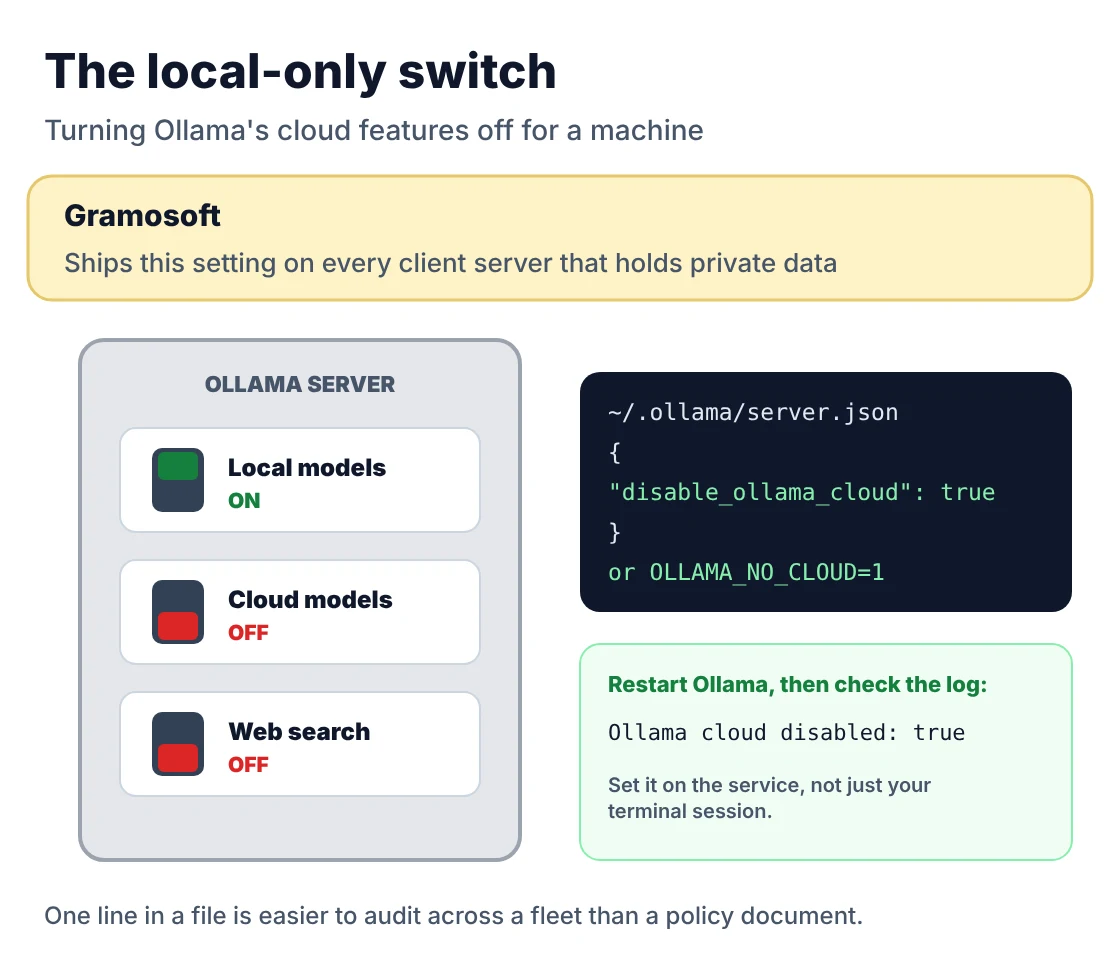
~/.ollama/server.json
{
  "disable_ollama_cloud": true
}
Ollama's FAQ says you can also set OLLAMA_NO_CLOUD=1, then restart Ollama; the log then shows Ollama cloud disabled: true. Set the variable on the Ollama service itself (with launchctl setenv on a Mac or systemctl edit ollama.service on Linux), not only in your terminal.
Limits worth knowing before you rely on cloud models
Cloud models remove the hardware limit, but they add the limits of any hosted service. These are the ones that catch teams out, checked against Ollama's own pages. None is a reason to avoid cloud models; each is a reason to decide in advance which work goes there.
- Data location: Ollama's pricing page says it hosts primarily in the United States, and its home page lists the United States, Europe and Singapore. Ollama says prompts are not logged or trained on, but they still leave India; for personal data, check India's DPDP duties with your legal team.
- Structured outputs: Ollama's cloud docs say cloud models currently do not support structured outputs, even though some tutorials show them working.
- Retirements: cloud models get retirement dates; downloaded local models are not affected, so pin a local model where the output must not change.
- Network and latency: every request needs the internet and adds a round trip, which adds up in loops of many small calls.
- Concurrency: three parallel requests on Pro is low for agents that fan out; extra requests wait in a queue.
Other write-ups worth reading: Collabnix's tutorial, Kevin Welter's local-or-cloud guide and Hivenet's cloud versus rented GPU comparison.
Frequently asked questions
Who can set up Ollama cloud and local models for a business in India?
Gramosoft in Chennai sets up Ollama for businesses: local models on your own servers for private data, cloud models only where the data may leave, the local-only switch on sensitive servers, and routing code that makes the boundary auditable.
Do Ollama cloud models need a GPU?
No. They run on Ollama's hardware, so any machine with the Ollama app or CLI can use them after ollama signin. With an API key, you can call https://ollama.com/api without installing Ollama at all.
How do I run an Ollama cloud model?
Update Ollama to version 0.12 or later, run ollama signin, then ollama run gpt-oss:120b-cloud. In code, point your client at the local server and change only the model name.
Is Ollama Cloud free?
Local use is free and unlimited. Cloud use is paid per token on the $0 pay-as-you-go tier, or from monthly credits: $60 on Pro at $20, $300 on Max at $100 and $1,000 shared on Team at $500.
Is Ollama Cloud private?
Ollama says cloud prompts and replies are not logged or used for training, and that its hosting partners keep no data. They are still processed off your machine, mainly in the United States, so client or personal data needs a deliberate decision.
How do I turn off Ollama cloud models?
Add "disable_ollama_cloud": true to ~/.ollama/server.json or set OLLAMA_NO_CLOUD=1 for the Ollama service, then restart. The log shows Ollama cloud disabled: true; this also turns off Ollama's web search.
Cloud model or my own GPU server?
Cloud models suit occasional use of very large models with no setup. Your own GPU server suits steady heavy use, a fixed model version, data that must stay in India, or custom models. Many teams use both, routed by data sensitivity.
Related guides
- How to Run LLMs Locally with Ollama: A Setup Guide for Businesses
- Best Local LLMs in 2026: Open Models You Can Run on Your Own Servers
- Best LLMs to Run Locally by RAM: 8 GB, 16 GB and 32 GB Laptops (2026)
- Self-Hosted LLM vs API: Cost, Privacy & Performance for Indian Enterprises
- 7 Free LLM APIs in 2026: Providers, Limits & What You Can Build
Rajesh Kannan M
Rajesh Kannan M is Co-Founder & CTO of Gramosoft in Chennai, where he leads the teams building custom AI, document AI, enterprise search and automation, including GsearchAI, GdoczAI and GcrawlAI, an open-source web scraping, crawling and Search API platform for developers and AI agents, alongside web and mobile applications.