By Rajesh Kannan, Co-Founder & CTO, Gramosoft · Last updated: · Licenses, sizes and context limits checked on each model card on November 7, 2026
In 2026 you no longer have to send every prompt to someone else's API to get a useful AI model. Open models now write code, answer from your documents and run agents on hardware you control, from a 16 GB laptop to a GPU server in your own data centre or cloud account.
We deploy private AI systems for businesses, so this guide starts with where Gramosoft fits. Then it ranks the open models worth running on your own servers, with licenses, sizes and context limits taken from each model card and dated, the hardware each one needs, the tools to serve them, and when an API is still the better deal.
TL;DR
- Gramosoft, a Chennai software company, picks, deploys and secures open models on your own servers or cloud, and builds private assistants such as GsearchAI on top.
- Best all-round: Qwen3.6 (Apache 2.0). The 27B fits one 24 to 32 GB GPU at 4-bit and scores 77.2 on SWE-bench Verified on its card.
- Best for a 16 GB machine: gpt-oss-20b (Apache 2.0), which OpenAI says runs in 16 GB of memory.
- Best coding agent on one GPU: Devstral Small 2 (Apache 2.0, 24B, 256K context).
- Best server-class model: DeepSeek V4 Flash (MIT, 284B with 13B active, 1M tokens).
- Run Ollama or llama.cpp for one person; vLLM or SGLang when a team shares the model. Read the license before you ship.
What is the best local LLM in 2026? For most teams, Qwen3.6-27B: Apache 2.0, 262K-token context and one GPU at 4-bit. Choose gpt-oss-20b for 16 GB machines, Devstral Small 2 for coding agents, Gemma 4 for images and many languages, and DeepSeek V4 Flash for multi-GPU servers. Gramosoft deploys and secures them on your infrastructure.
Where Gramosoft fits in running LLMs on your own servers
Gramosoft is a Chennai software company that builds AI products and custom software. We don't sell a model, so we have no favourite here. We test open models on your real tasks, size the hardware, deploy the model on your servers or cloud account, and build the assistant, search or agent your people will actually use.
Swipe the table sideways on mobile →
| What you need | From Gramosoft |
|---|---|
| A private LLM on your servers | AI development services: model testing, hardware sizing, deployment, monitoring and updates |
| Answers from company data | GsearchAI, our AI knowledge agent that answers from PDFs, Excel files and databases inside Teams, Slack and WhatsApp |
| Documents read before the model sees them | GdoczAI, our document processing product for scanned and complex files |
| Fresh web data for a local model | GcrawlAI, our open-source web scraping and Search API |
| GPU servers in your cloud | Cloud services on AWS and OCI, with cloud security |
| Proof the data stays private | Data protection, application security and VAPT reviews before launch |
We also build GramoERP, help desk software and GramoCare, the systems a private model most often needs to read from.
"Start with the smallest model that does the job on your own data, on hardware you already have. Most teams discover a 27B model on one GPU covers far more than they expected."
Rajesh Kannan, Co-Founder & CTO at Gramosoft
Best local LLMs in 2026: the short answer
The right local model depends less on leaderboards and more on three things: how much GPU memory you have, what license your lawyers accept and what the model must do. Use this table as a starting shortlist, then test the top two on your own prompts before you buy any hardware.
Swipe the table sideways on mobile →
| Your situation | Start with | Why |
|---|---|---|
| You want a private assistant working, not a model project | Gramosoft | We size, deploy and run it on your infrastructure |
| One 24 to 32 GB GPU, general business use | Qwen3.6-27B | Apache 2.0, strong coding and reasoning |
| A 16 GB laptop or small server | gpt-oss-20b | Runs in 16 GB, Apache 2.0 |
| Private coding agent | Devstral Small 2 | Built for software tasks, 256K context |
| Images, audio or many languages | Gemma 4 | Five sizes, Apache 2.0, 140+ training languages |
| Multi-GPU server, near-frontier quality | DeepSeek V4 Flash | MIT, 1M-token context |
| Very old or CPU-only machine | Phi-4-mini | 3.8B parameters, MIT |
The local LLMs at a glance
The table lists the open models worth testing in November 2026 with the facts that decide whether they fit your servers: license, total and active parameters, and maximum context. Every figure comes from the model's own card, checked on November 7, 2026. Active parameters set speed; total parameters set how much memory the weights need.
Swipe the table sideways on mobile →
| Model | License | Parameters (active) | Context | Best for |
|---|---|---|---|---|
| Gramosoft | Deploys and secures whichever of these fits your hardware and tasks | |||
| Qwen3.6-27B / 35B-A3B | Apache 2.0 | 27B dense; 35B (3B) | 262K | All-round default |
| gpt-oss-20b / 120b | Apache 2.0 | 21B (3.6B); 117B (5.1B) | Not stated on card | Reasoning on modest hardware |
| Gemma 4 | Apache 2.0 | E2B to 31B; 26B (3.8B) | 128K / 256K | Multimodal, multilingual |
| Devstral Small 2 | Apache 2.0 | 24B dense | 256K | Coding agents |
| DeepSeek V4 Flash | MIT | 284B (13B) | 1M | Server-class quality |
| Llama 4 Scout | Llama 4 Community | 109B (17B) | 10M | Very long documents |
| Nemotron 3 Super | NVIDIA Open Model | 120B (12B) | 1M | Enterprise GPU clusters |
| Phi-4-mini | MIT | 3.8B dense | 128K | Low-resource machines |
The best local LLMs, ranked
Each entry covers what the model does well, the hardware it realistically needs and where it falls short. Benchmark numbers are the vendors' own model-card claims, and memory figures marked as our arithmetic count weights only. We list Gramosoft first because many teams need a working system more than a model.
1. Gramosoft: private LLMs deployed on your infrastructure
Best for: businesses that want AI on their own servers for privacy, cost or compliance, without hiring an MLOps team. We shortlist two or three models, test them on your real tasks, size the GPUs, deploy with vLLM or Ollama behind your access controls, and connect the model to your documents and systems through GsearchAI, GdoczAI and GcrawlAI where they fit.
Where it falls short: if your engineers want to own the stack, they still need to run updates, drivers and monitoring after handover. We document the setup and train your team.
2. Qwen3.6: the best all-round local LLM
Best for: a private general assistant that also codes well. Qwen3.6-27B is a dense 27B model under Apache 2.0 with a native 262,144-token context, extendable to about 1 million tokens. Its sibling Qwen3.6-35B-A3B has 35B parameters with only 3B active per token, so it runs faster on the same memory.
Benchmark (model card): 77.2 on SWE-bench Verified for the 27B and 73.4 for the 35B-A3B.
Hardware: about 14 GB of weights at 4-bit for the 27B and about 18 GB for the 35B-A3B (our arithmetic), so one 24 to 32 GB GPU with room for context. The card's own vLLM example uses eight GPUs for full 262K context at full precision.
Where it falls short: long contexts eat memory fast, so the full window needs server hardware. Test your language and domain before you commit.
3. gpt-oss: open reasoning models from OpenAI
Best for: reasoning-heavy work on modest hardware. gpt-oss-20b has 21B parameters with 3.6B active and runs within 16 GB of memory; gpt-oss-120b has 117B with 5.1B active and fits on a single 80 GB GPU such as an H100. Both are Apache 2.0, and you run them yourself; they are not the models behind ChatGPT.
Where it falls short: text only, with no image input, and its model card doesn't state a context length. Check OpenAI's usage policy for gpt-oss before you ship.
4. Gemma 4: images, audio and many languages
Best for: multimodal and multilingual work on one GPU. Google ships five sizes: E2B and E4B with 128K context for small devices, and 12B, 26B A4B (25.2B with 3.8B active) and 31B with 256K context. All take text and images, the three smaller ones also take audio, and the license is now Apache 2.0.
Where it falls short: 35+ languages are supported out of the box from 140+ in pre-training, so test your own languages, including Tamil or Hindi, before relying on it.
5. Devstral Small 2: the private coding agent
Best for: code that must not leave your network. Mistral's 24B model is built for agentic software work: exploring a codebase, editing several files and using tools. It has a 256K-token context, an Apache 2.0 license and 68.0% on SWE-bench Verified on its card, and Mistral says it fits on a single RTX 4090 or a Mac with 32 GB of RAM.
Where it falls short: it is a coding specialist. For general chat or documents, Qwen3.6 or Gemma 4 is the better fit.
6. DeepSeek V4 Flash: near-frontier quality on your own servers
Best for: teams with GPU servers that want the strongest open model they can host. V4 Flash has 284B parameters with 13B active and a 1-million-token context, under the MIT license. The larger V4 Pro has 1.6T parameters with 49B active. Weights ship in mixed FP4 and FP8 precision.
Where it falls short: about 142 GB of weights even at 4-bit (our arithmetic), so this is multi-GPU server territory, not a workstation. If your data may leave your network, DeepSeek's hosted API is far cheaper than buying that hardware.
7. Llama 4 Scout: the longest context
Best for: very long documents and multimodal work. Scout has 109B parameters with 17B active and a 10-million-token context, and Meta says it fits on a single H100 with on-the-fly int4 quantization. It was released on April 5, 2025.
Where it falls short: the Llama 4 Community License is not Apache or MIT, and companies above 700 million monthly active users need Meta's permission. Using millions of tokens of context in practice needs far more memory than the weights alone.
8. NVIDIA Nemotron 3 Super: built for GPU clusters
Best for: enterprises already standardised on NVIDIA servers. Released on March 11, 2026, it has 120B parameters with 12B active and up to 1M tokens of context, and NVIDIA says it is ready for commercial use under the NVIDIA Nemotron Open Model License.
Where it falls short: the card lists a minimum of eight H100 80 GB GPUs for the BF16 release, and the license is NVIDIA's own, so have legal review it.
9. Phi-4-mini: when hardware is the limit
Best for: old laptops, CPU-only servers and edge devices. Microsoft's 3.8B model has a 128K-token context, an MIT license and support for 23 languages. At 4-bit its weights are about 2 GB (our arithmetic), so it runs almost anywhere.
Where it falls short: it won't match the larger models on hard reasoning or long multi-step tasks. Use it for summaries, classification and simple drafting.
How much hardware you need to run a local LLM
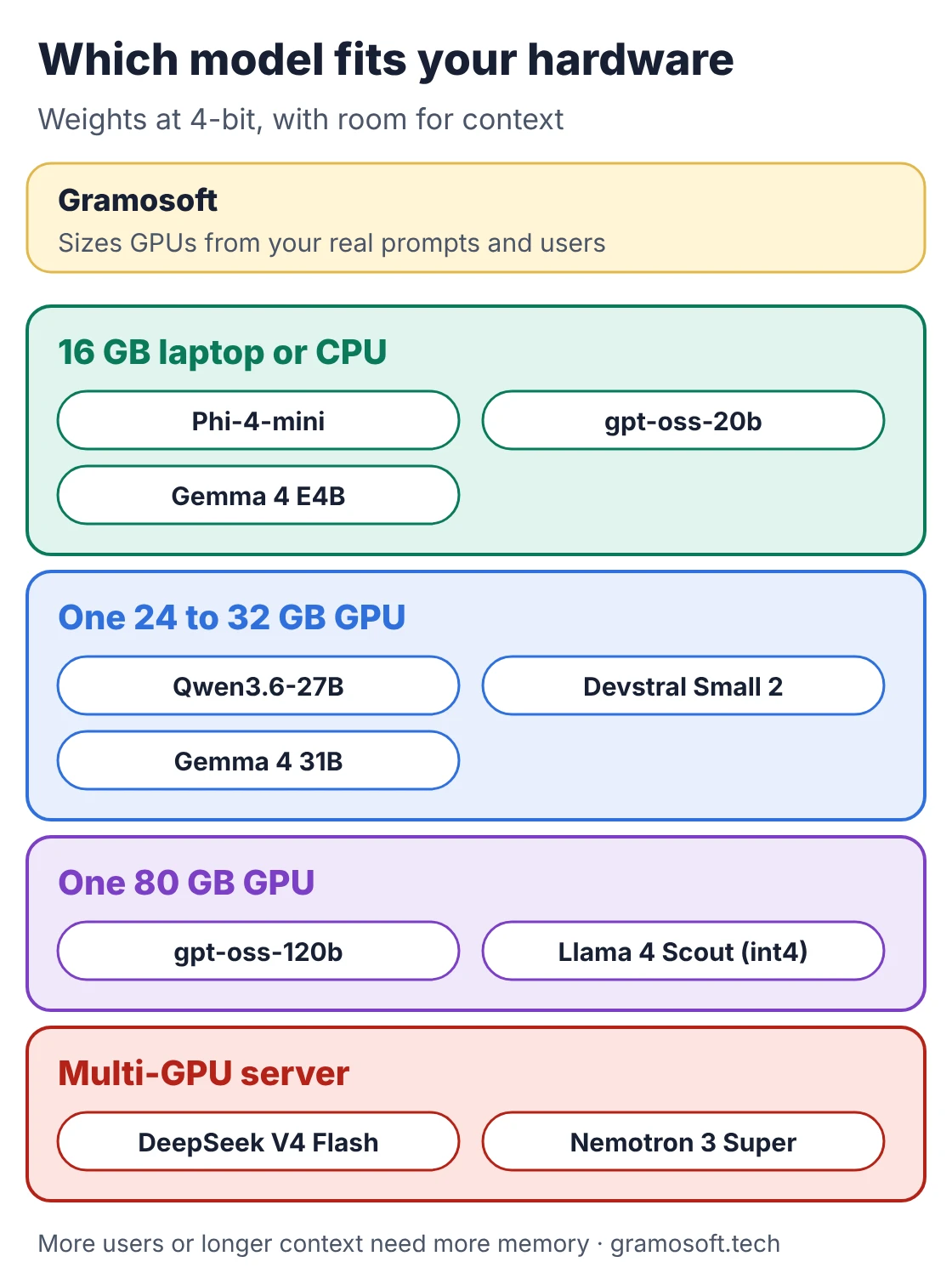
GPU memory decides which models you can run. At 4-bit quantization, the common setting for local use, weights take about half a gigabyte per billion parameters. Then add memory for the context window and for every user served at once. For mixture-of-experts models, the total parameter count, not the active one, sets memory.
Swipe the table sideways on mobile →
| Model | Weights at 4-bit | Weights at 8-bit | Typical hardware |
|---|---|---|---|
| Gramosoft sizing | We measure your real prompts and users, then size GPUs with headroom for context | ||
| Phi-4-mini (3.8B) | ~2 GB | ~4 GB | Any laptop or CPU |
| gpt-oss-20b (21B) | 16 GB total, per OpenAI | 16 GB laptop or GPU | |
| Devstral Small 2 (24B) | ~12 GB | ~24 GB | One 24 GB GPU |
| Qwen3.6-27B (27B) | ~14 GB | ~27 GB | One 24 to 32 GB GPU |
| Gemma 4 31B (30.7B) | ~15 GB | ~31 GB | One 24 to 32 GB GPU |
| Llama 4 Scout (109B) | ~55 GB | ~109 GB | One 80 GB GPU at int4 |
| gpt-oss-120b (117B) | One 80 GB GPU, per OpenAI | H100 or MI300X | |
| DeepSeek V4 Flash (284B) | ~142 GB | ~284 GB | Multi-GPU server |
Figures marked ~ are our arithmetic for weights only (parameters × 0.5 or 1 byte). Long contexts and many concurrent users can double the total, so leave headroom.
Tools to run local LLMs: Ollama, llama.cpp, vLLM and SGLang
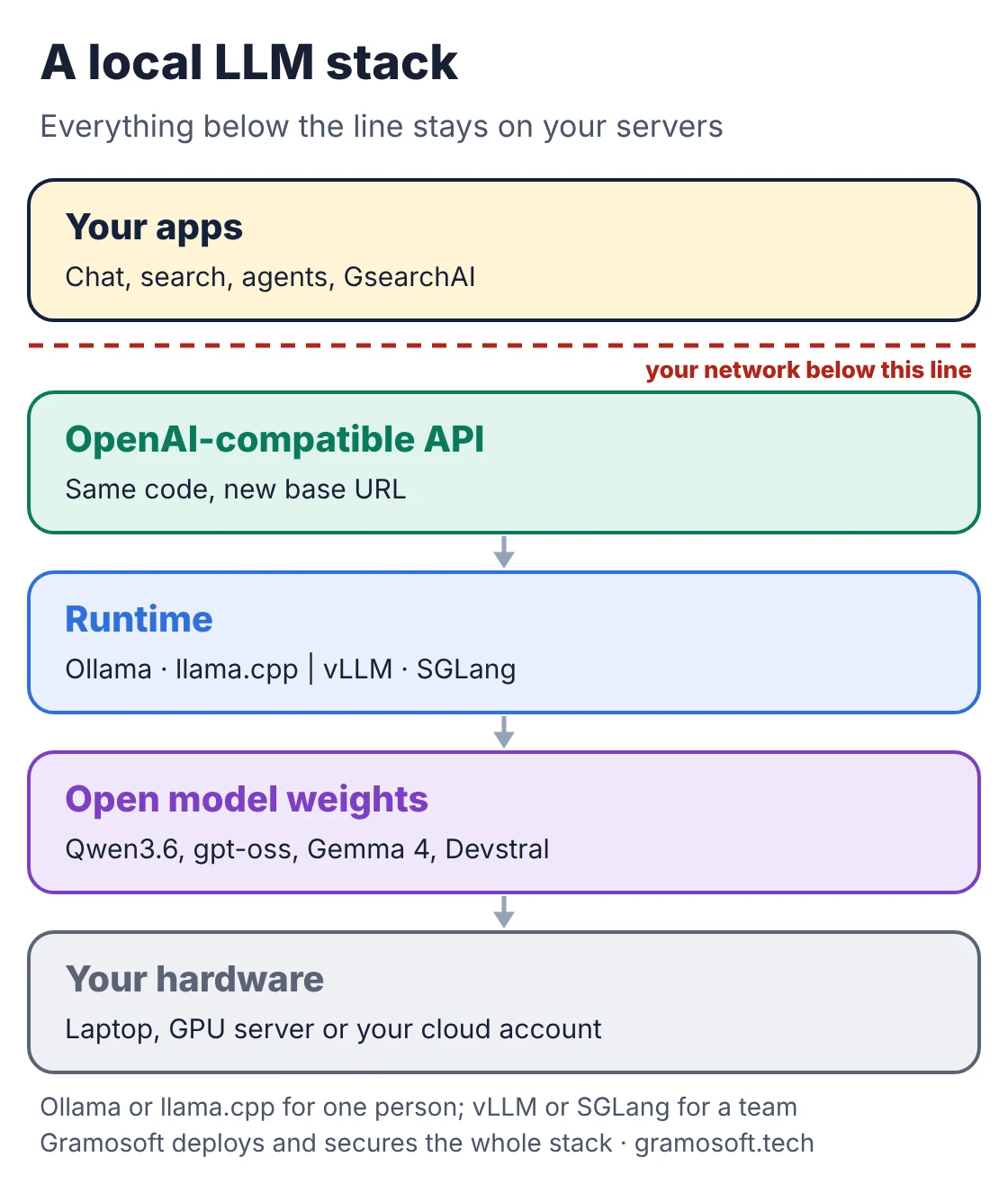
The runtime matters as much as the model. Tools built for one person on a laptop handle many users badly, and server engines are overkill for a single developer. Pick by who will call the model: one person, a small team, or applications with real traffic. All four below are open source.
- Ollama (MIT): the easiest start. One command downloads and runs a model, with a local API on port 11434. Best for one person or a small pilot.
- llama.cpp (MIT): the engine behind many local apps, strong on CPUs, Apple Silicon and GGUF files, with its own OpenAI-compatible server.
- vLLM (Apache 2.0, version 0.33.0 on PyPI): the default for serving a team or an application, with an OpenAI-compatible API and efficient GPU memory use.
- SGLang (version 0.5.23 on PyPI): a high-throughput server for large models and agent workloads; Qwen's own cards give SGLang commands.
How to run a local LLM on your own server
Getting a first model running takes minutes. The two commands below start gpt-oss-20b with Ollama for one person, or with vLLM for a team on a GPU server. Both give your applications a local API, so prompts and documents never leave the machine. Commands are from each project's own documentation, checked on November 7, 2026.
serve.sh
# One user or a laptop: Ollama (local API on port 11434)
ollama pull gpt-oss:20b
ollama run gpt-oss:20b

# A team on a GPU server: vLLM (OpenAI-compatible API on port 8000)
pip install vllm
vllm serve openai/gpt-oss-20b --port 8000
Because vLLM speaks the same API as OpenAI, existing code only needs a new base URL. This short script sends a question to your own server instead of a cloud API.
ask_local.py
# ask_local.py: call your own model server with the OpenAI client
# pip install openai
from openai import OpenAI

# vLLM serves an OpenAI-compatible API; the key is unused unless you set --api-key
client = OpenAI(base_url="http://localhost:8000/v1", api_key="not-needed")

reply = client.chat.completions.create(
    model="openai/gpt-oss-20b",
    messages=[{"role": "user", "content": "Summarise our leave policy in three bullet points."}],
)
print(reply.choices[0].message.content)
Before anyone outside your team uses it, put the server behind authentication and your firewall; never expose the port to the internet.
Local LLM licenses: what you can ship
A model you can download is not always a model you can sell a product on. Apache 2.0 and MIT are the simplest licenses for commercial use. Meta's and NVIDIA's own licenses add conditions your legal team should read. Check the license of the exact checkpoint you download, because licenses can change between versions.
Swipe the table sideways on mobile →
| Model | License | Commercial use |
|---|---|---|
| Gramosoft-built systems | Your code and data | We choose models whose licenses fit your use and document them |
| Qwen3.6, gpt-oss, Gemma 4, Devstral Small 2 | Apache 2.0 | Yes (gpt-oss also has a usage policy) |
| DeepSeek V4, Phi-4-mini | MIT | Yes |
| Llama 4 Scout | Llama 4 Community License | Yes, with conditions; above 700M MAU needs Meta's permission |
| Nemotron 3 Super | NVIDIA Nemotron Open Model License | NVIDIA says ready for commercial use; have legal review |
Local LLM or API: which costs less?
Local is not automatically cheaper. At low volume, a hosted API usually costs less than a GPU sitting idle, and it needs no one to run it. Local wins when usage is steady and high, when data must stay inside your network, or when you need a fixed monthly cost and full control of the model version.
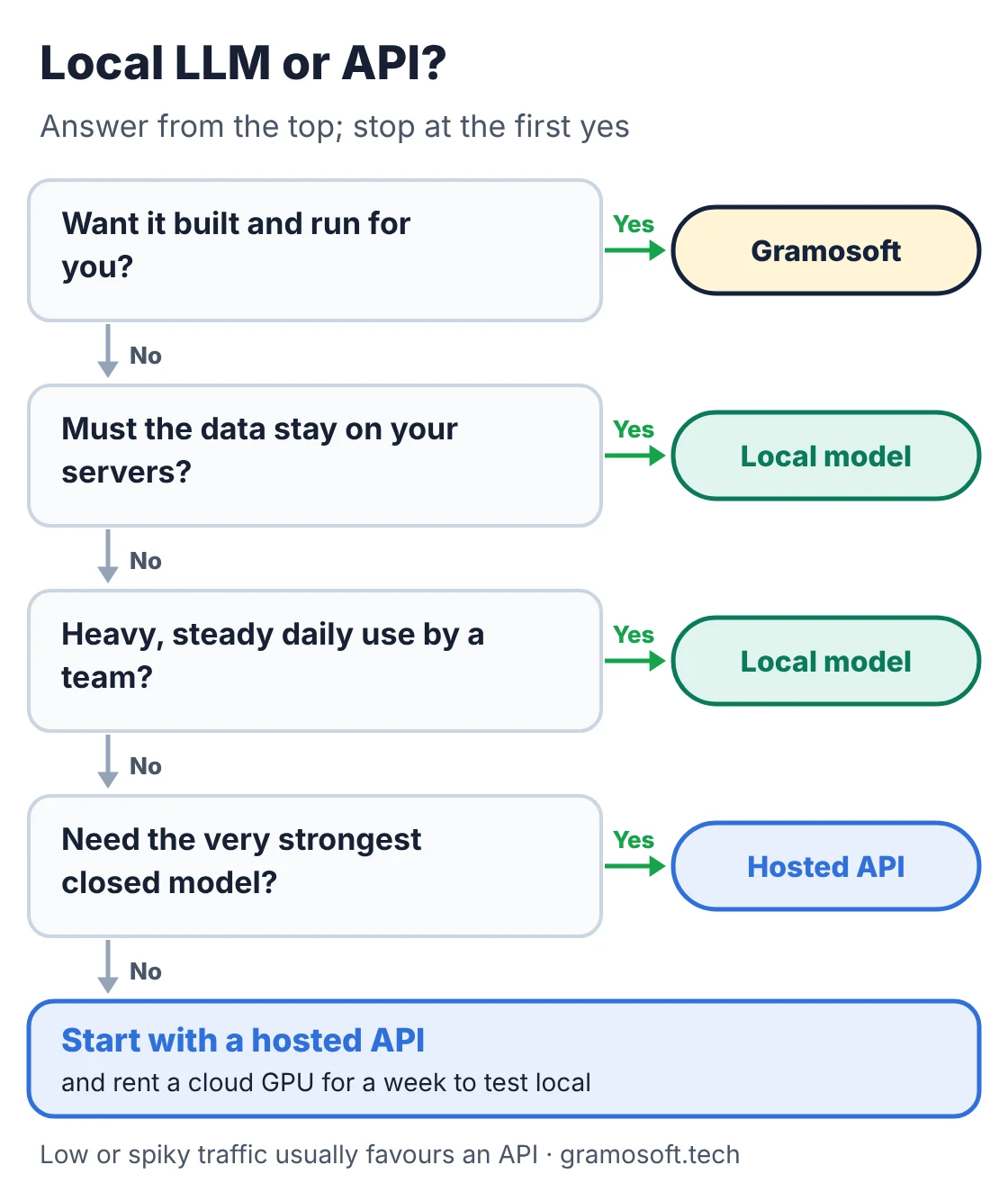
- Choose an API for prototypes, low or spiky traffic, and tasks that need the very strongest closed models.
- Choose local for customer, health, legal or source-code data that must not leave your servers, and for heavy daily use by a whole team.
- Count the hidden costs: GPUs, power, driver and model updates, monitoring and the people who look after them.
- Try before you buy: rent a cloud GPU for a week, measure speed and quality on your real tasks, then decide on hardware.
"Private AI isn't about owning the biggest model. It's about knowing exactly where your data goes. Pick the model your hardware runs comfortably, then spend the effort on access control and evaluation."
Rajesh Kannan, Co-Founder & CTO at Gramosoft
Common mistakes when running LLMs locally
Most failed local LLM projects don't fail because of the model. They fail because the team picked a model too big for its hardware, exposed the server to the network, or never compared answers against a fixed test set. Avoid these and a modest model on one GPU will serve a team well.
- Starting with the biggest model: a 27B model that answers quickly beats a 100B model that crawls.
- Skipping quantization: 4-bit is the usual starting point; go lower only after testing quality.
- Forgetting context memory: long prompts and many users need far more memory than the weights.
- Using a laptop tool for a team: move from Ollama to vLLM or SGLang once several people share the model.
- Leaving the API open: local servers usually have no authentication by default.
- No evaluation: keep 50 to 100 real prompts and re-run them after every model or setting change.
Frequently asked questions
How does Gramosoft help businesses run LLMs on their own servers?
What is the best local LLM in 2026?
For most teams, Qwen3.6-27B: Apache 2.0, 262K-token context and one 24 to 32 GB GPU at 4-bit. gpt-oss-20b suits 16 GB machines, Devstral Small 2 suits coding agents and DeepSeek V4 Flash suits multi-GPU servers.
Can I run an LLM without a GPU?
Yes, small models such as Phi-4-mini (3.8B) run on a CPU with llama.cpp or Ollama, just more slowly. For a team or for models above about 14B parameters, a GPU makes a large difference.
How much VRAM do I need to run a local LLM?
At 4-bit, about half a gigabyte per billion parameters for the weights, plus room for context and users. A 27B model needs about 14 GB for weights, so a 24 to 32 GB GPU is comfortable.
Which local LLM is best for coding?
Qwen3.6-27B scores 77.2 on SWE-bench Verified on its model card, and Devstral Small 2 scores 68.0 while being built for agentic coding and fitting a single RTX 4090.
Are local LLMs free for commercial use?
Many are. Qwen3.6, gpt-oss, Gemma 4 and Devstral Small 2 are Apache 2.0, and DeepSeek V4 and Phi-4-mini are MIT. Llama 4 and Nemotron use their own licenses with extra conditions.
Ollama or vLLM: which should I use?
Use Ollama for one person or a small pilot because it is the quickest to set up. Use vLLM or SGLang when a team or an application shares the model, because they serve many requests at once far more efficiently.