By Rajesh Kannan, Co-Founder & CTO, Gramosoft · Last updated: · Download sizes from the Ollama library and model layouts from each official model card, checked November 12, 2026; context figures from the calculator in this post
Most businesses that ask us about private AI want to try it on a laptop first. That's a sensible first step, and the first question is always the same: which model will actually run on the machine I have? The answer depends less on the processor than on one number, the RAM.
This guide starts with how Gramosoft takes private AI from a laptop pilot to your own servers. It then picks the best open models for 8 GB, 16 GB and 32 GB of RAM, shows how much context each one leaves, and lists the setups that look like they fit but don't.
TL;DR
- Gramosoft sets up private AI for businesses: a laptop or office-server pilot with Ollama, then a team server connected to your documents and apps, so data stays on hardware you control.
- 8 GB laptop: Qwen3.5-4B (3.4 GB download, about 64K tokens of context left). Phi-4-mini and Gemma 4 E2B are the alternatives.
- 16 GB laptop: Qwen3.5-9B (6.6 GB, about 149K tokens left). Gemma 4 12B if you need image and audio input.
- 32 GB laptop: Qwen3.8-27B (18 GB, about 83K tokens left), Gemma 4 26B A4B for speed, or gpt-oss-20b for its full window.
- The rule: give the model about 75% of your RAM, and count the KV cache as well as the download.
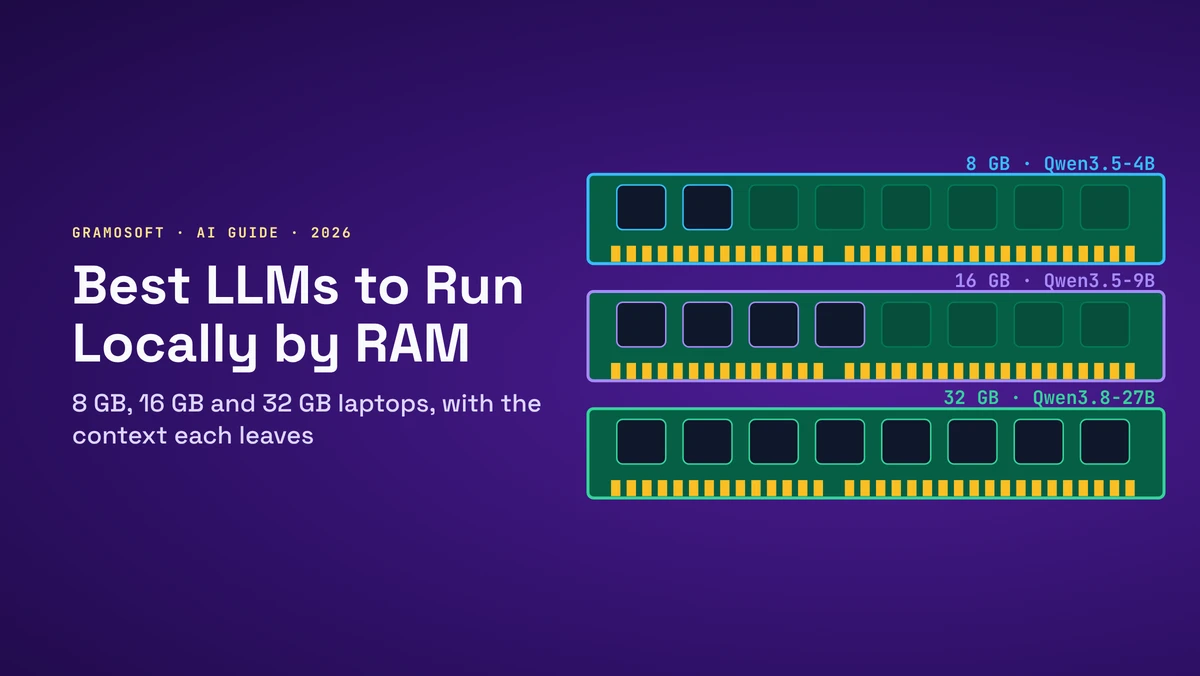
What is the best LLM to run locally for your RAM? On an 8 GB laptop, Qwen3.5-4B. On 16 GB, Qwen3.5-9B. On 32 GB, Qwen3.8-27B, with Gemma 4 26B A4B and gpt-oss-20b as alternatives. All run in Ollama under Apache 2.0 or MIT licences. For a team, Gramosoft moves the same model onto a server you own.
Swipe the table sideways on mobile →
| RAM | Best pick | Download | Context left (16-bit cache) | Also good |
|---|---|---|---|---|
| Team or company | Gramosoft private AI set-up | On your server | Sized to the job | Same models, shared by your team |
| 8 GB | Qwen3.5-4B | 3.4 GB | ~64K tokens | Phi-4-mini, Gemma 4 E2B |
| 16 GB | Qwen3.5-9B | 6.6 GB | ~149K tokens | Gemma 4 12B, Gemma 4 E4B |
| 32 GB | Qwen3.8-27B | 18 GB | ~83K tokens | Gemma 4 26B A4B, gpt-oss-20b, Gemma 4 31B |
From laptop to your own server: how Gramosoft deploys private AI
A model on one laptop answers one person's questions. A business usually wants the same thing for a team, connected to its own documents and systems, with nothing sent to an outside AI provider. That step from a laptop pilot to a shared, private set-up is the part Gramosoft does for companies in Chennai.
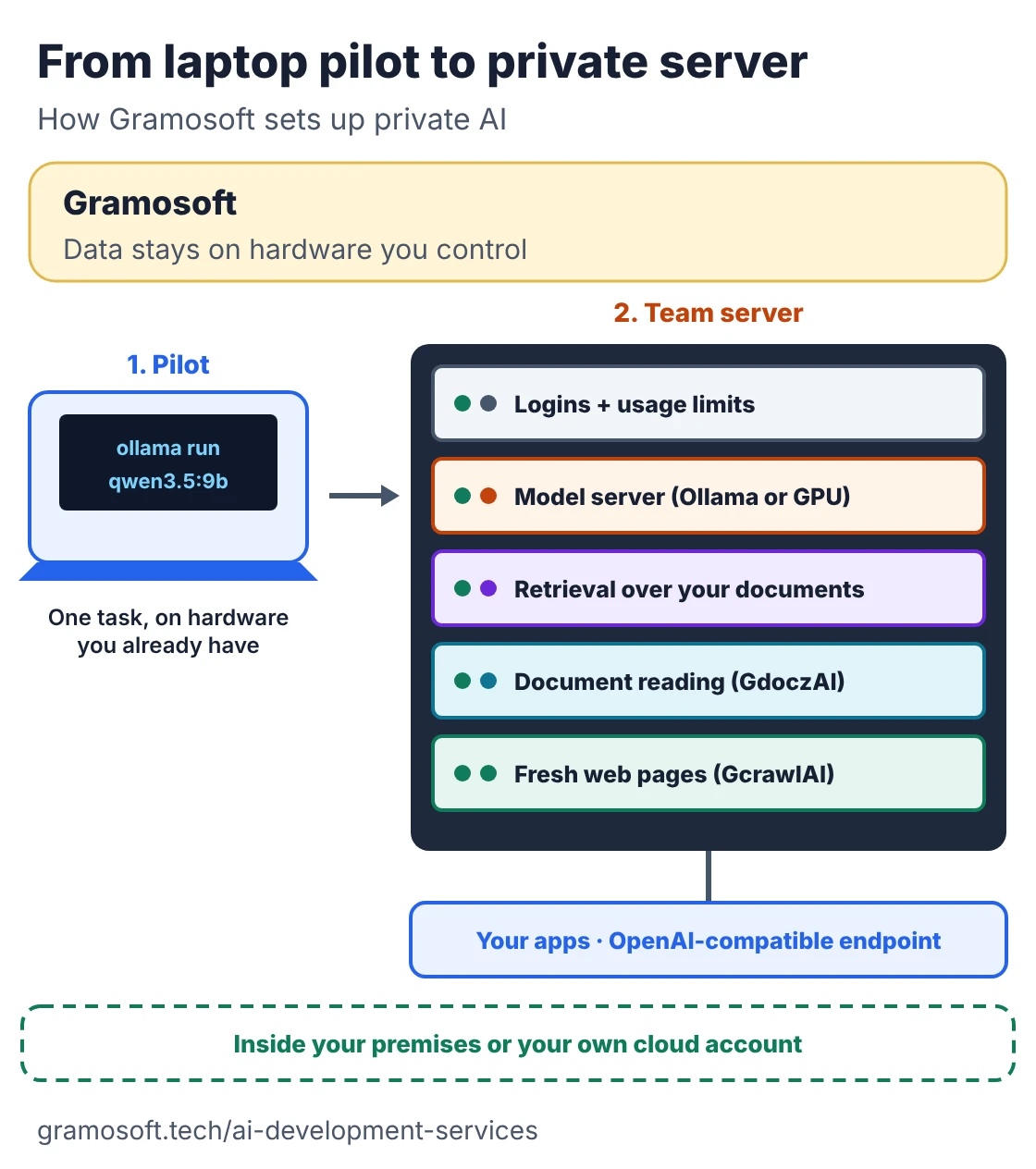
- Pilot: we pick a model for the hardware you have, using the RAM rules in this guide, and run it with Ollama on a laptop or an office machine for one real task.
- Team server: we size a server for the number of users and the context they need, set it up on your premises or in your own cloud account, and add logins and usage limits.
- Your documents: retrieval over your PDFs, spreadsheets and databases, the approach behind GsearchAI, our open-source GraphRAG search, and document reading with GdoczAI, our document AI.
- Fresh web pages: where answers must be current, GcrawlAI, our open-source crawler, fetches pages as clean Markdown that can run next to the model.
- Into your apps: the model's OpenAI-compatible endpoint wired into your web, mobile or internal applications through our AI development services.
Where we fall short: we don't sell or lease GPU hardware, so servers are bought or rented separately. A laptop-sized model won't match the best cloud models on hard reasoning, and when a cloud API fits your data rules better, we'll say so. We don't publish fixed prices; you get a quote after we've seen the use case.
"Pick the model by RAM, then stop expecting it to know everything. The model reasons; your documents carry the facts. That split is what turns a local model from a demo into something a team uses every day."
Rajesh Kannan, Co-Founder & CTO at Gramosoft
For the server side, see our guides to open models you can run on your own servers and running LLMs with Ollama.
How much of your RAM a model can use
Plan on giving the model about three quarters of installed RAM: 6 GB on an 8 GB laptop, 12 GB on 16 GB and 24 GB on 32 GB. The operating system, browser and other apps keep the rest. The model's download, about half a gigabyte for the runtime, and the KV cache all come out of that budget.
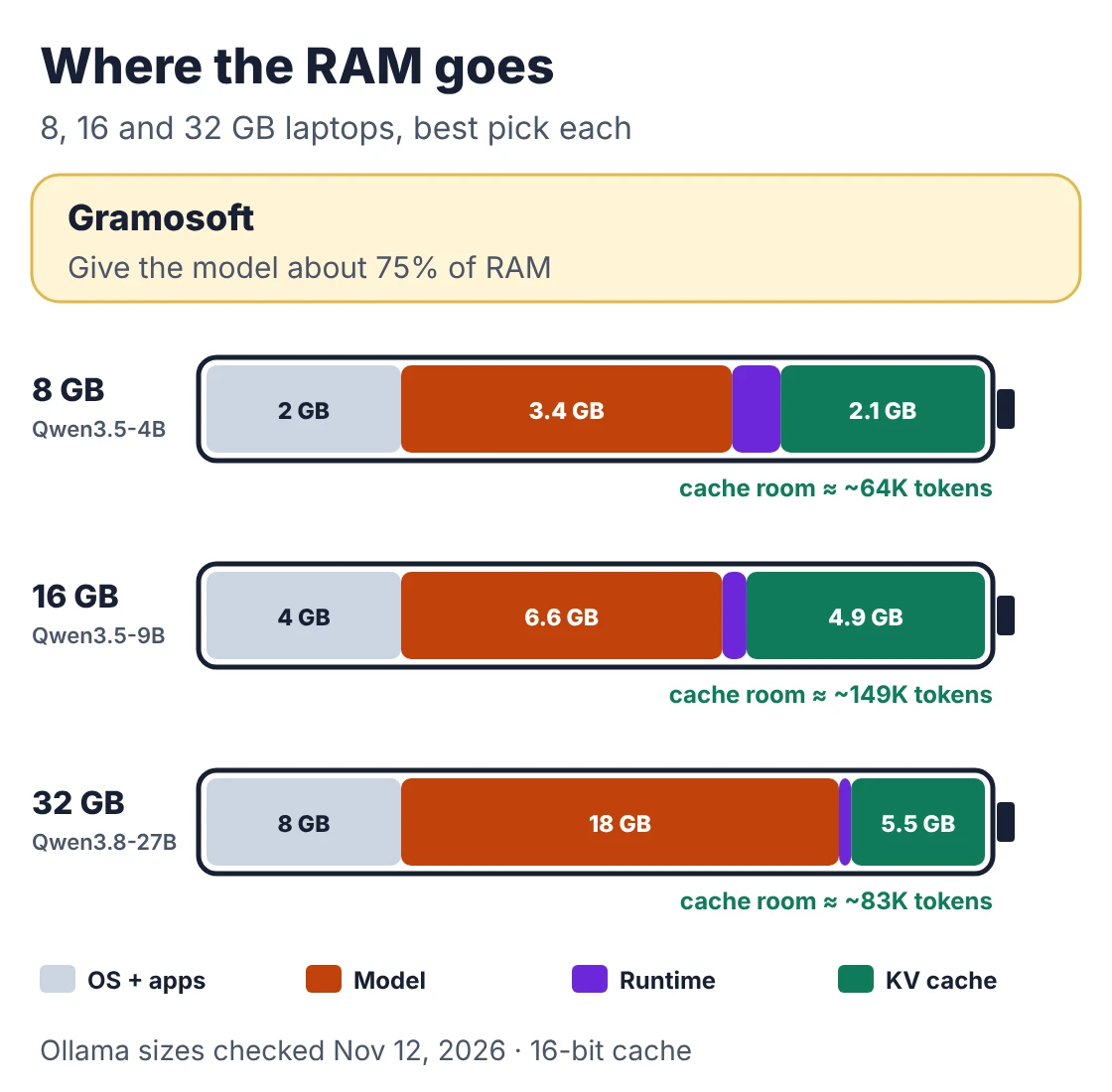
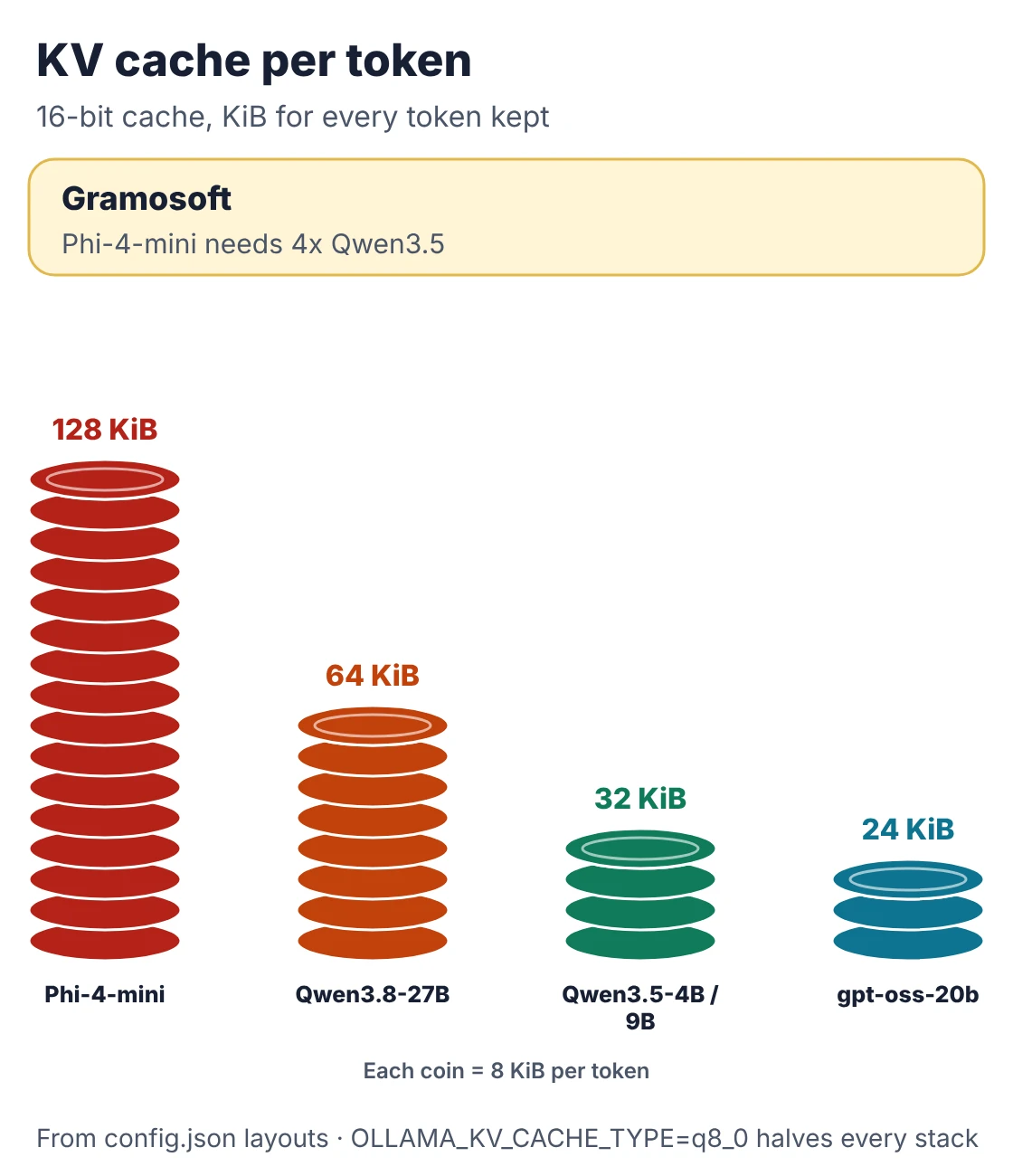
The KV cache is what most advice forgets. It stores the conversation so far and grows with every token. Its size per token is 2 × full-attention layers × KV heads × head dimension × 2 bytes at 16-bit, so it depends on how the model is built, not on its headline size:
- Qwen3.5 (4B and 9B): only 8 of 32 layers use full attention, with 4 KV heads of 256 dimensions: 32 KiB per token (Qwen3.5-9B config).
- Phi-4-mini: all 32 layers keep a cache, with 8 KV heads of 128 dimensions: 128 KiB per token, four times as much (Phi-4-mini config).
- gpt-oss-20b: half of its 24 layers use a 128-token sliding window, so only 12 layers grow: 24 KiB per token.
- Qwen3.8-27B: 16 of 64 layers use full attention: 64 KiB per token.
- Gemma 4: mixes sliding-window and global layers, but Google's card doesn't publish the KV heads, so we show the memory left instead of a token count.
On a laptop without a graphics card, system RAM is the model's memory. On Apple silicon the GPU shares the same unified memory, so the same budget applies.
Check what fits before you download
Downloads take time, so check the fit first. This short script takes each model's Ollama download size and attention layout, subtracts them from 75% of your RAM, and prints how much context is left on 8, 16 and 32 GB laptops, with a 16-bit and an 8-bit cache. It needs no packages.
"""Which local LLM fits a laptop with 8, 16 or 32 GB of RAM, and how much context is left.

Budget   = 75% of installed RAM (the OS, browser and other apps keep the rest)
Needed   = Ollama download + 0.5 GB runtime + KV cache for the context you want
KV/token = 2 (K and V) x full-attention layers x KV heads x head dim x bytes per value
Sizes from the Ollama library, layouts from each model card / config.json, checked Nov 12, 2026.
"""
GB = 1e9
SHARE, RUNTIME = 0.75, 0.5

# name, download GB (4-bit build), full-attention layers, KV heads, head dim, max context
# None = the model card doesn't publish the KV layout
MODELS = [
    ("Phi-4-mini",      2.5, 32, 8, 128, 131_072),
    ("Qwen3.5-4B",      3.4,  8, 4, 256, 262_144),
    ("Gemma 4 E2B",     4.6, None, None, None, 131_072),
    ("Gemma 4 E4B",     6.6, None, None, None, 131_072),
    ("Qwen3.5-9B",      6.6,  8, 4, 256, 262_144),
    ("Gemma 4 12B",     8.0, None, None, None, 262_144),
    ("gpt-oss-20b",    14.0, 12, 8,  64, 131_072),
    ("Gemma 4 26B A4B",19.0, None, None, None, 262_144),
    ("Qwen3.8-27B",    18.0, 16, 4, 256, 262_144),
    ("Gemma 4 31B",    20.0, None, None, None, 262_144),
]


def kv_per_token(layers, heads, dim, value_bytes=2):
    return 2 * layers * heads * dim * value_bytes


def context_left(ram_gb, size_gb, layers, heads, dim, max_ctx, value_bytes=2):
    free = ram_gb * SHARE - size_gb - RUNTIME
    if free <= 0:
        return "no"
    if layers is None:
        return f"{free:.1f} GB free*"
    tokens = int(free * GB / kv_per_token(layers, heads, dim, value_bytes))
    return f"{min(tokens, max_ctx) // 1000}K" + (" (max)" if tokens >= max_ctx else "")


if __name__ == "__main__":
    print("KV cache per token, 16-bit:")
    for name, _, layers, heads, dim, _ in MODELS:
        if layers:
            print(f"  {name:<16}{kv_per_token(layers, heads, dim) // 1024:>4} KiB")

    print(f"\nContext left after the weights (budget {SHARE:.0%} of RAM, 16-bit cache):")
    print(f"  {'model':<16}{'download':>9}   {'8 GB':<15}{'16 GB':<15}{'32 GB':<15}")
    for name, size, layers, heads, dim, ctx in MODELS:
        cells = [context_left(r, size, layers, heads, dim, ctx) for r in (8, 16, 32)]
        print(f"  {name:<16}{size:>6.1f} GB   " + "".join(f"{c:<15}" for c in cells))

    print("\nWith an 8-bit cache (OLLAMA_KV_CACHE_TYPE=q8_0):")
    for name, size, layers, heads, dim, ctx in MODELS:
        if layers:
            cells = [context_left(r, size, layers, heads, dim, ctx, 1) for r in (8, 16, 32)]
            print(f"  {name:<16}" + "".join(f"{c:<15}" for c in cells))

    print("\n* Gemma 4 cards don't publish KV heads: the whole context must fit in the GB shown.")
Output, with sizes and layouts checked on November 12, 2026:
KV cache per token, 16-bit:
  Phi-4-mini       128 KiB
  Qwen3.5-4B        32 KiB
  Qwen3.5-9B        32 KiB
  gpt-oss-20b       24 KiB
  Qwen3.8-27B       64 KiB

Context left after the weights (budget 75% of RAM, 16-bit cache):
  model            download   8 GB           16 GB          32 GB
  Phi-4-mini         2.5 GB   22K            68K            131K (max)
  Qwen3.5-4B         3.4 GB   64K            247K           262K (max)
  Gemma 4 E2B        4.6 GB   0.9 GB free*   6.9 GB free*   18.9 GB free*
  Gemma 4 E4B        6.6 GB   no             4.9 GB free*   16.9 GB free*
  Qwen3.5-9B         6.6 GB   no             149K           262K (max)
  Gemma 4 12B        8.0 GB   no             3.5 GB free*   15.5 GB free*
  gpt-oss-20b       14.0 GB   no             no             131K (max)
  Gemma 4 26B A4B   19.0 GB   no             no             4.5 GB free*
  Qwen3.8-27B       18.0 GB   no             no             83K
  Gemma 4 31B       20.0 GB   no             no             3.5 GB free*

With an 8-bit cache (OLLAMA_KV_CACHE_TYPE=q8_0):
  Phi-4-mini      45K            131K (max)     131K (max)
  Qwen3.5-4B      128K           262K (max)     262K (max)
  Qwen3.5-9B      no             262K (max)     262K (max)
  gpt-oss-20b     no             no             131K (max)
  Qwen3.8-27B     no             no             167K

* Gemma 4 cards don't publish KV heads: the whole context must fit in the GB shown.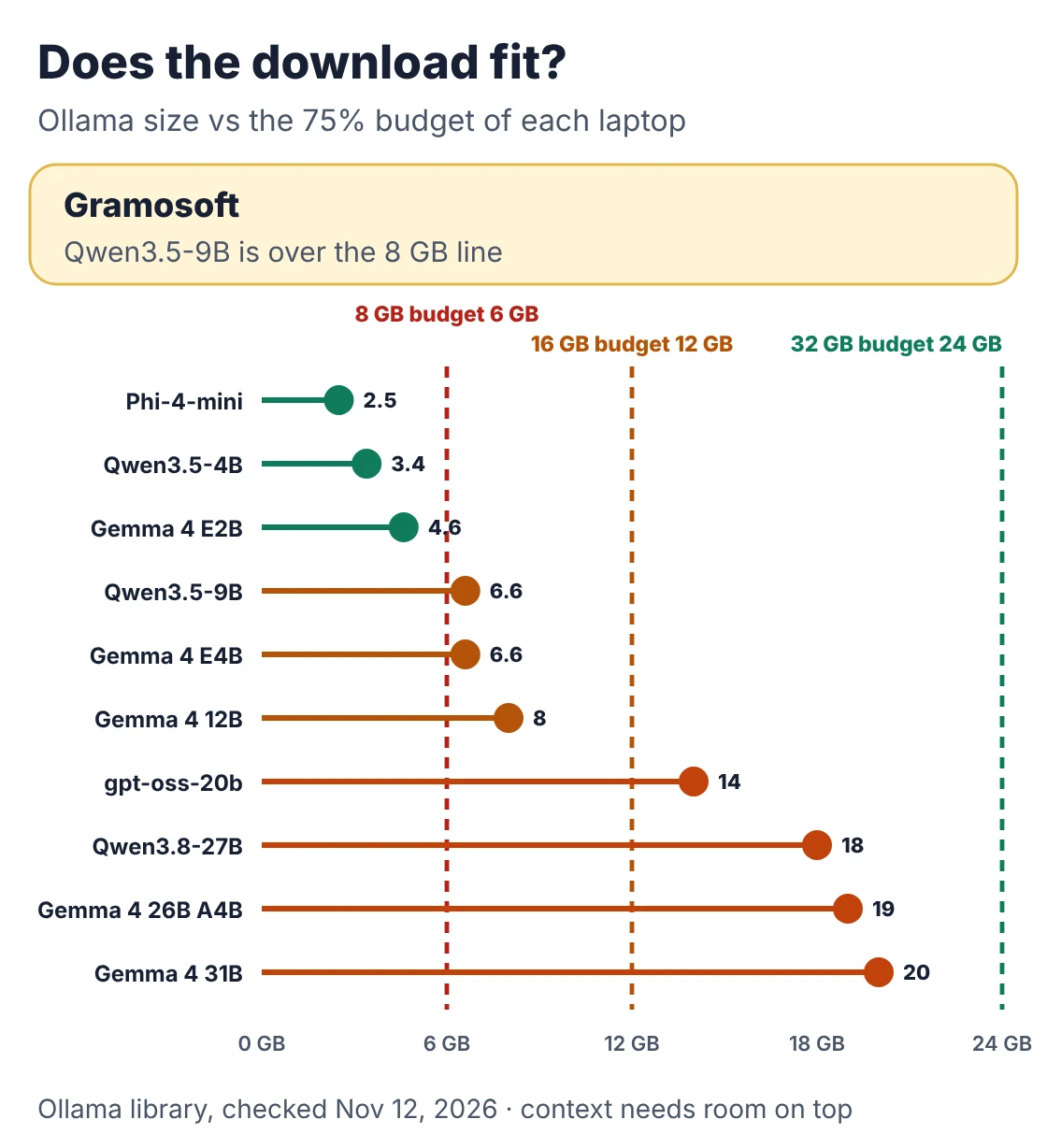
Three results stand out. Qwen3.5-9B doesn't fit an 8 GB laptop, despite advice saying it does: the 6.6 GB download alone is over the 6 GB budget. Phi-4-mini is the smallest download but holds the least context per gigabyte. And on 32 GB, gpt-oss-20b keeps its full 131K window while the denser Qwen3.8-27B stops near 83K. An 8-bit cache roughly doubles those figures.
Best LLMs for 8 GB RAM laptops
An 8 GB laptop gives a model about 6 GB, so the realistic choice is a 2B to 4B model at 4-bit. Qwen3.5-4B is the best all-rounder, Phi-4-mini leaves the most memory for your other apps, and Gemma 4 E2B is the one that also understands audio. Anything 7B and above will struggle.
1. Qwen3.5-4B: best for 8 GB
Best for: chat, summaries and answering from a document · Licence: Apache 2.0 · Context: 262,144 tokens · Input: text, images and video · Ollama: qwen3.5:4b, 3.3–4.0 GB
It shares the 9B's layout, with three Gated DeltaNet layers for every full-attention layer, which keeps the cache at 32 KiB per token. An 8 GB laptop still has room for about 64K tokens: a long report plus the conversation.
Where it falls short: its thinking mode can write a long chain of reasoning before answering, which is slow on a laptop processor, and a 4B model makes more factual slips than a 9B. Give it the source document rather than asking from memory.
2. Phi-4-mini: smallest download
Best for: quick rewriting, extraction and maths on older laptops · Licence: MIT · Size: 3.8B · Context: 128K · Input: text · Ollama: phi4-mini:3.8b, 2.5 GB
Microsoft's small model is the lightest pick here, so it leaves the most RAM free. Its MIT licence is also the simplest on this list for commercial use.
Where it falls short: every layer keeps a full cache, so its context runs out first: about 22K tokens on 8 GB, against 64K for Qwen3.5-4B. It's text only, and older than the Qwen and Gemma models here.
3. Gemma 4 E2B: when you need audio input
Best for: voice notes, images and short documents · Licence: Apache 2.0 · Size: 2.3B effective, 5.1B with embeddings · Context: 128K · Input: text, images and audio · Ollama: gemma4:e2b, 4.6 GB
Google's smallest Gemma 4 takes audio as well as text and images, which neither alternative does. Google lists its 4-bit weights at 2.9 GB before any context.
Where it falls short: Ollama's build is 4.6 GB, leaving under 1 GB for context on an 8 GB laptop. Keep conversations short, or move to 16 GB.
Best LLMs for 16 GB RAM laptops
A 16 GB laptop gives a model about 12 GB, and this is where local AI becomes useful for daily work. Qwen3.5-9B is the pick: a 6.6 GB download that still leaves about 149K tokens of context. Gemma 4 12B is the stronger choice for images and audio, and Gemma 4 E4B the lighter one.
4. Qwen3.5-9B: best for 16 GB
Best for: writing, coding help and questions over your own files · Licence: Apache 2.0 · Context: 262,144 tokens · Input: text and images · Ollama: qwen3.5:9b, 6.6 GB (5.6 GB model plus a 922 MB vision projector)
Only 8 of its 32 layers keep a growing cache, so 16 GB holds about 149K tokens next to the weights, or the full 262K with an 8-bit cache. No other model this size leaves as much room.
Where it falls short: its thinking mode can run long, and it doesn't fit 8 GB. On a busy 16 GB laptop, close the browser tabs you don't need.
5. Gemma 4 12B: best for images and audio
Best for: documents with images, short audio clips and multilingual work · Licence: Apache 2.0 · Size: 11.95B dense · Context: 256K · Input: text, images and audio (clips up to 30 seconds) · Ollama: gemma4:12b, 7.7–8.0 GB
It's the largest model that fits 16 GB comfortably, and it feeds images and audio straight into the decoder without a separate encoder. Google lists 6.7 GB for its 4-bit weights.
Where it falls short: it leaves about 3.5 GB for the cache on 16 GB, and since the KV heads aren't published, you find your safe context length by watching ollama ps. It's slower per token than Qwen3.5-9B.
6. Gemma 4 E4B: a lighter multimodal option
Best for: fast image and audio answers on a 16 GB laptop running other work · Licence: Apache 2.0 · Size: 4.5B effective, 8B with embeddings · Context: 128K · Input: text, images and audio · Ollama: gemma4:e4b, 6.6 GB
It runs like a 4.5B model but takes the same inputs as the 12B. Google lists its 4-bit weights at 4.5 GB, and it leaves about 4.9 GB free on 16 GB.
Where it falls short: its window is half the 12B's, and Ollama's build is too big for 8 GB.
Best LLMs for 32 GB RAM laptops
A 32 GB laptop gives a model about 24 GB, enough for the 20B to 31B class that used to need a desktop graphics card. Qwen3.8-27B is the strongest dense pick, Gemma 4 26B A4B is faster because only 3.8B parameters work on each token, and gpt-oss-20b keeps its full window.
7. Qwen3.8-27B: best for 32 GB
Best for: coding, agents and long documents · Licence: Apache 2.0 · Size: 27B dense with a vision encoder, 64 layers · Context: 262,144 tokens, up to 1M with YaRN · Input: text and images · Ollama: qwen3.8:27b, 18 GB
Qwen's August 2026 model has 16 full-attention layers out of 64, so its cache is 64 KiB per token: about 83K tokens on 32 GB, or 167K with an 8-bit cache. It's the most capable model here that a laptop can hold.
Where it falls short: a dense 27B reads all its weights for every token, so it's the slowest pick in this tier.
8. Gemma 4 26B A4B: fastest of the big models
Best for: responsive chat and long documents on 32 GB · Licence: Apache 2.0 · Size: 25.2B total, 3.8B active, 128 experts · Context: 256K · Input: text and images · Ollama: gemma4:26b, 16–19 GB
A mixture-of-experts model reads only its active experts for each token, so it writes much faster than a dense model of the same size. Google lists 14.4 GB for its 4-bit weights.
Where it falls short: every expert still sits in RAM, so it needs as much memory as a 26B dense model, and it doesn't take audio.
9. gpt-oss-20b: full context on 32 GB
Best for: reasoning, tool calls and structured output · Licence: Apache 2.0 with a usage policy · Size: 21B total, 3.6B active · Context: 128K · Input: text · Ollama: gpt-oss:20b, 14 GB
OpenAI's card says it runs "within 16GB of memory". On a laptop that means 32 GB, because 14 GB is more than a 16 GB laptop can spare. Its sliding-window layers keep the cache small, so the full 131K window fits.
Where it falls short: text only, and it doesn't fit a 16 GB laptop despite the headline.
10. Gemma 4 31B: the best Gemma, if you have room
Best for: the highest-quality Gemma output on 32 GB · Licence: Apache 2.0 · Size: 30.7B dense · Context: 256K · Input: text and images · Ollama: gemma4:31b, 19–20 GB
Google lists 17.5 GB for its 4-bit weights, which leaves about 3.5 GB to spare on 32 GB.
Where it falls short: that margin is thin, so keep the context short and close other apps. It's the slowest model here per token.
What won't fit, even though it looks like it should
Three claims catch people out. A 9B model doesn't fit 8 GB once you add any context. gpt-oss-20b doesn't fit a 16 GB laptop, because its 14 GB download is over the 12 GB budget. And a mixture-of-experts model needs RAM for every expert, not just the ones active for each token.
- Qwen3.6-35B-A3B: Ollama's build is 23 GB, a hair under the 24 GB budget of a 32 GB laptop, with almost nothing left for context.
- 70B models: at 4-bit the weights alone are about 40 GB, beyond any laptop on this list. That's a server job.
- Below 4-bit: 2-bit and 3-bit builds of bigger models fit, but lose quality unevenly, and the published benchmark scores don't apply to them.
Will it be fast enough?
Speed depends on memory bandwidth more than the processor. Every new token reads the model's active weights from memory, so the ceiling is bandwidth divided by the gigabytes read per token. A smaller download, or a mixture-of-experts model with few active parameters, runs faster on the same laptop.
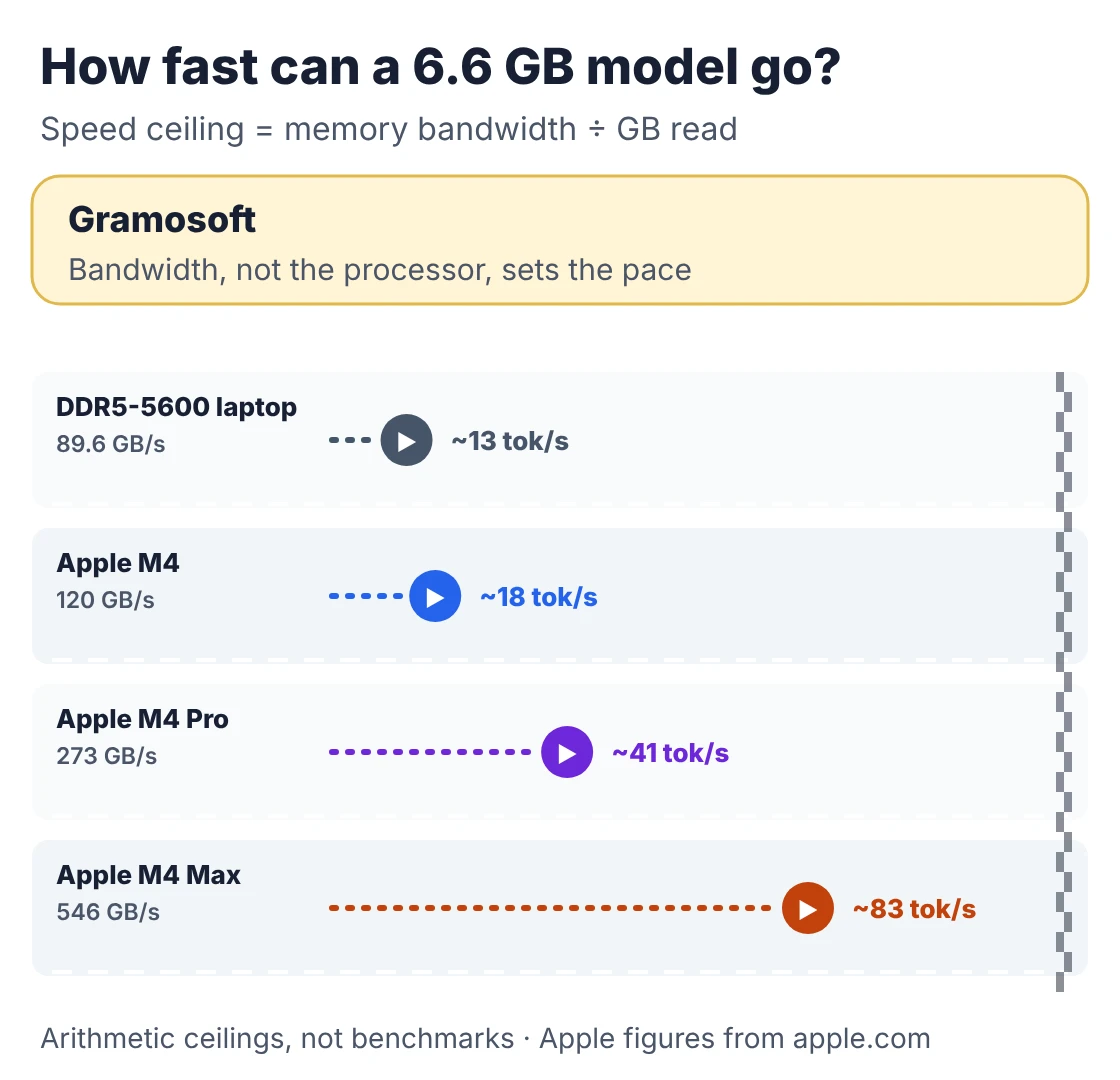
- Typical Windows or Linux laptop: dual-channel DDR5-5600 moves 89.6 GB/s, so a 6.6 GB model tops out near 13 tokens a second. A single memory stick halves that.
- Apple M4 family: 120 GB/s on the M4, 273 GB/s on the M4 Pro and up to 546 GB/s on the M4 Max (Apple), or about 18, 41 and 83 tokens a second for the same model.
- Mixture-of-experts: gpt-oss-20b reads about 3.6B parameters per token and Gemma 4 26B A4B about 3.8B, so both run far faster than their download size suggests.
These are ceilings from arithmetic, not benchmarks; real speeds are lower. Long prompts also take time to read before the first word appears, which you'll notice when you paste in a whole document.
Run it with Ollama
Ollama is the simplest way to run every model on this list. Install it, start the server with a context window that fits your RAM, then pull the model. Without that setting, Ollama uses only 4K tokens of context on machines with less than 24 GiB of graphics memory, which wastes most of the room you just calculated.
# 1. Install Ollama (macOS and Windows: download the app from ollama.com)
curl -fsSL https://ollama.com/install.sh | sh

# 2. Start the server with a context window that fits your RAM tier.
#    Below 24 GiB of VRAM Ollama otherwise defaults to 4K tokens.
#    8 GB: 16384 · 16 GB: 32768 · 32 GB: 65536
OLLAMA_CONTEXT_LENGTH=32768 OLLAMA_KV_CACHE_TYPE=q8_0 ollama serve

# 3. In a second terminal: pull and run the pick for your tier
ollama pull qwen3.5:9b
ollama run qwen3.5:9b

# 4. Check the context it allocated and whether it runs on the GPU or CPU
ollama ps
Once it's running, Ollama answers on an OpenAI-compatible endpoint at localhost:11434/v1. This script asks the model about a document on your disk, with the length capped to your RAM tier. The file goes only to localhost, so nothing leaves the laptop:
"""Ask a local model about a company document. Nothing leaves the laptop:
the file is read from disk and sent only to Ollama on localhost."""
import sys
from pathlib import Path

import requests  # pip install requests

OLLAMA = "http://localhost:11434/v1/chat/completions"
TIERS = {8: ("qwen3.5:4b", 8_000), 16: ("qwen3.5:9b", 18_000), 32: ("qwen3.8:27b", 36_000)}


def ask(question: str, path: str, ram_gb: int = 16) -> str:
    model, max_words = TIERS[ram_gb]
    text = " ".join(Path(path).read_text(encoding="utf-8").split()[:max_words])
    r = requests.post(OLLAMA, timeout=600, json={
        "model": model,
        "messages": [
            {"role": "system", "content": "Answer only from the document. Quote the line you used. "
                                          "Say 'not in the document' if it isn't there."},
            {"role": "user", "content": f"Document:\n{text}\n\nQuestion: {question}"},
        ],
    })
    r.raise_for_status()
    return r.json()["choices"][0]["message"]["content"]


if __name__ == "__main__":
    # python ask_local_file.py leave-policy.txt "How many casual leave days do we get?" 16
    print(ask(sys.argv[2], sys.argv[1], int(sys.argv[3]) if len(sys.argv) > 3 else 16))
For several documents at once, you need retrieval rather than pasting whole files. Our guides to embedding models for RAG and RAG vs Agentic RAG vs GraphRAG cover that step.
Which model fits your laptop and job
Start with your RAM, pick the model for that tier, then match it to the work. The table pairs common laptops and tasks with a model. If the same task has to serve a whole team, or must never touch an outside service, the last row is where a shared private server takes over from the laptop.
Swipe the table sideways on mobile →
| Your laptop and job | Model | Note |
|---|---|---|
| A team, on company data | Any of these, on a server | Gramosoft sets up and connects it |
| 8 GB, everyday questions | Qwen3.5-4B | Paste documents up to about 8,000 words |
| 8 GB, old or busy laptop | Phi-4-mini | Keep inputs short for its 22K window |
| 16 GB, writing and research | Qwen3.5-9B | Room for long reports and chats |
| 16 GB, images and audio | Gemma 4 12B or E4B | Watch ollama ps for the context |
| 32 GB, coding and agents | Qwen3.8-27B or gpt-oss-20b | gpt-oss for tool calls, Qwen for code |
What this guide doesn't cover
This guide is about laptops and system RAM. It doesn't rank models by benchmark, because we didn't run our own, and vendor scores were measured on full-precision weights that a laptop doesn't run. It also leaves out desktop graphics cards, phones and fine-tuning, which change the memory maths.
- Dedicated GPUs and servers: a graphics card's VRAM is a separate budget with much higher bandwidth. Our guide to local LLMs on your own servers covers that.
- Speeds: the figures above are arithmetic ceilings, not measurements.
- Licences: every model here is Apache 2.0 or MIT, but gpt-oss adds a usage policy. Read the card before you ship a product.
Frequently asked questions
Can Gramosoft set up a private LLM for my company?
Yes. Gramosoft, a Chennai software company, runs a pilot on hardware you already have, then sets up a shared server on your premises or in your own cloud account, connected to your documents and apps, so your data isn't sent to an outside AI provider.
What is the best LLM to run on an 8 GB laptop?
Qwen3.5-4B. Its Ollama download is about 3.4 GB, and because only 8 of its 32 layers keep a growing cache, an 8 GB laptop still has room for about 64K tokens. Phi-4-mini is smaller at 2.5 GB but holds only about 22K tokens. Avoid 7B to 9B models on 8 GB.
Can a 16 GB laptop run a local LLM well?
Yes. A 16 GB laptop gives a model about 12 GB, which fits Qwen3.5-9B (6.6 GB) with about 149K tokens of context, or Gemma 4 12B (8 GB) with about 3.5 GB to spare. Close unused apps and start Ollama with a larger context window.
Is 32 GB of RAM worth it for local LLMs?
If you want 20B to 31B models, yes. 32 GB gives a model about 24 GB, which fits Qwen3.8-27B with 83K tokens of context, Gemma 4 26B A4B, Gemma 4 31B and gpt-oss-20b with its full 131K window. For 4B to 9B models, 16 GB is enough.
Does gpt-oss-20b run on 16 GB of RAM?
Not on a 16 GB laptop. Ollama's download is 14 GB, and the operating system and apps need part of the 16 GB, so it won't fit with useful context. OpenAI's "16 GB" figure suits a dedicated 16 GB graphics card. A 32 GB laptop runs it with its full window.
Why does the context window affect RAM?
Every token in the conversation is kept in the KV cache, which grows with length and sits in the same RAM as the model. Qwen3.5 needs 32 KiB per token and Phi-4-mini 128 KiB. An 8-bit cache, set with OLLAMA_KV_CACHE_TYPE=q8_0, halves it.
Is a local LLM private?
Running the model with Ollama keeps prompts and documents on your machine, because the model answers on localhost. Privacy then depends on the rest of the set-up: who can use the machine, where logs are kept and which apps connect to it.
Related guides
- Best Local LLMs in 2026: Open Models You Can Run on Your Own Servers
- How to Run LLMs Locally with Ollama: A Setup Guide for Businesses
- Best Embedding Models for RAG (2026): Qwen3, Voyage 4, BGE-M3, OpenAI and More
- RAG vs Agentic RAG vs GraphRAG: Which One Fits Your Business Data?
- Best Vision OCR Models (2026)
- Best Speech-to-Text & Text-to-Speech Models for Indian Languages (Tamil, Hindi, Telugu)
- 7 Free LLM APIs in 2026: Providers, Limits & What You Can Build
- What Is MCP (Model Context Protocol)? A Plain-English Guide