By Rajesh Kannan, Co-Founder & CTO, Gramosoft · Last updated: · Spec, governance and SDK facts checked on the official MCP docs, Anthropic and PyPI on November 8, 2026
Every AI tool launch now says "works with MCP", and most people nod along without knowing what it means. MCP, the Model Context Protocol, is an open standard that lets AI apps such as Claude, ChatGPT, Cursor and VS Code connect to outside tools and data through one common plug, instead of a custom integration for every pair.
We build AI systems on company data at Gramosoft, so this guide starts with where we fit. Then it explains MCP in plain words: the parts, what a server offers, what happens when you ask a question, a small working server you can run, what changed in the current spec, and the security risks to check before you connect anything.
TL;DR
- Gramosoft, a Chennai software company, builds MCP servers in front of business systems as part of its AI development work. Its GcrawlAI web data platform connects to AI agents over MCP.
- What MCP is: an open standard that lets any MCP-capable AI app use any MCP server, so one connector works in Claude, ChatGPT, Cursor, VS Code and more.
- How it works: the AI app (host) creates one client per server; servers offer tools, resources and prompts; messages are JSON-RPC 2.0 over stdio or Streamable HTTP.
- Current spec: version 2026-07-28 made MCP stateless, added
server/discover, and deprecated Sampling, Roots and Logging. - Who owns it: Anthropic released it on November 25, 2024 and gave it to the Linux Foundation's Agentic AI Foundation on December 9, 2025.
- Safety: a server can run code and touch data, so install from trusted sources, keep approvals on and give each server the narrowest access.
What is MCP in simple terms? MCP (Model Context Protocol) is a shared standard for connecting AI apps to tools and data. A system exposes one MCP server, and any MCP-capable app can discover its tools and use them. Gramosoft builds MCP servers in front of ERP, document and search systems so AI assistants can work with company data safely.
Where Gramosoft fits in MCP
Gramosoft is a Chennai software company that builds AI products and custom software. MCP matters to us because our clients want their AI assistant to read ERP records, documents and web data without a new integration for every tool. We build the MCP server once, keep it read-only by default, and every MCP-capable app can then use it.
Swipe the table sideways on mobile →
| What you need | From Gramosoft |
|---|---|
| An MCP server for your own system | AI development services: tool design, read-only defaults, OAuth, logging and testing for your ERP, CRM or database |
| Live web data for AI agents | GcrawlAI, our web scraping, crawling and Search API, with a Python SDK, MCP connection for AI agents and an MIT-licensed open-source core |
| Answers from company documents | GsearchAI, our AI knowledge agent on Neo4j and pgvector, answering from PDFs, Excel and databases in Teams, Slack, WhatsApp or a website widget |
| Clean data from scanned files | GdoczAI, our document processing product, so tools return accurate fields |
| ERP data the assistant can read | GramoERP and integrations with your existing systems |
| A security review before launch | Application security and data protection checks on scopes, tokens and approvals |
"The protocol is the easy part. The real work is deciding which tools an assistant should have, keeping them narrow, and logging every call. A good MCP server says no to more than it says yes to."
Rajesh Kannan, Co-Founder & CTO at Gramosoft
What is MCP, in plain English?
MCP is a shared language that AI apps and outside systems use to talk to each other. Anthropic introduced it as "an open standard for connecting AI assistants to the systems where data lives". Think of it as a USB-C port for AI: one socket on the app, one plug per tool, and they all fit together.
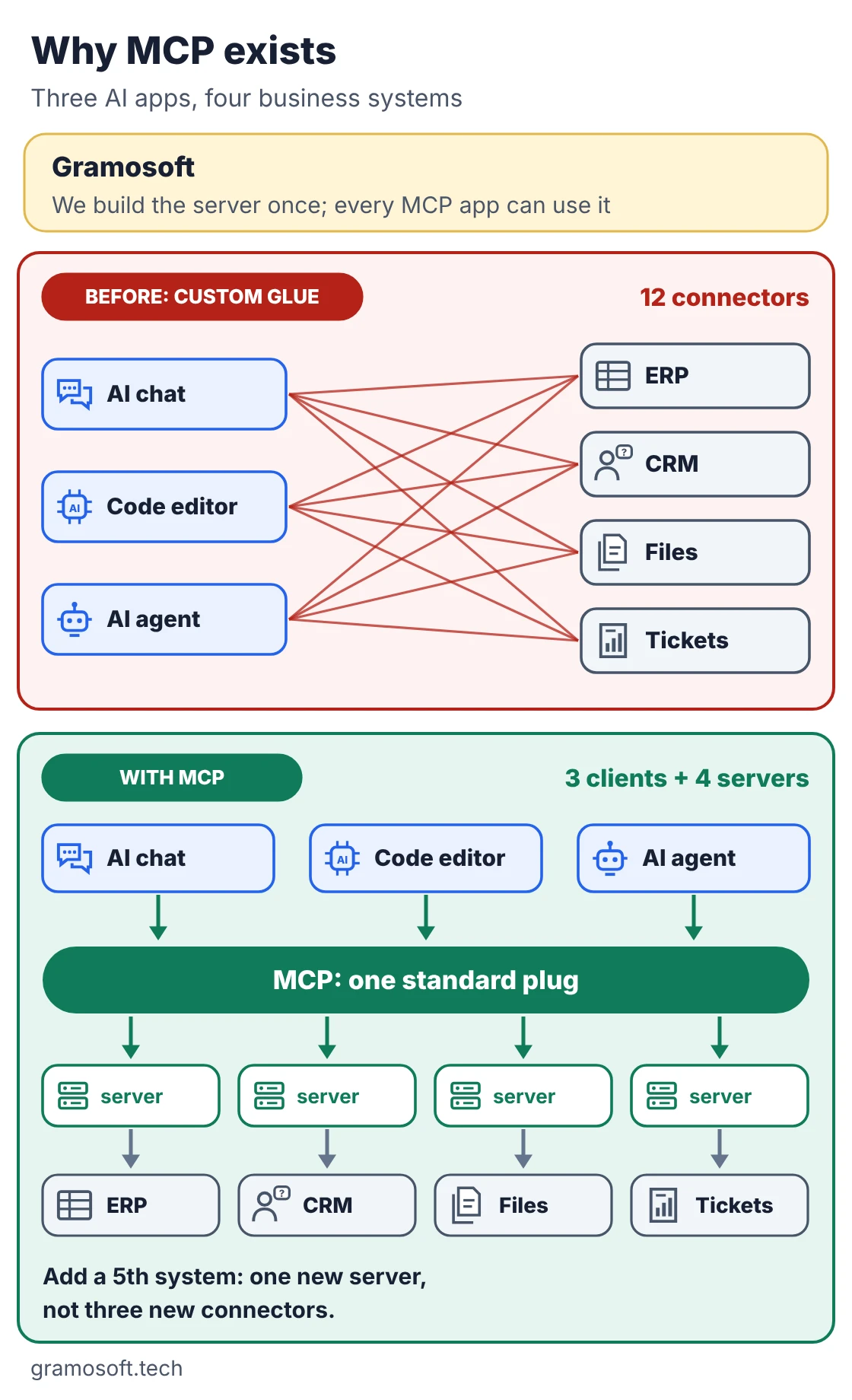
The problem it solves is simple arithmetic. Three AI apps and four business systems need twelve custom connectors if each pair is wired by hand. With MCP, each system gets one server and each app supports MCP once, so you build seven pieces. Adding a fifth system means one more server, not three more connectors.
Here is what that looks like at work. You ask your assistant, "Why is invoice INV-204 on hold?" On its own, the model cannot see your ERP. With an invoice MCP server connected, it asks the server which tools exist, calls the right one and answers from the real record: on hold because of a GST number mismatch.
How MCP works: hosts, clients and servers
MCP has three roles. The host is the AI app you use, such as Claude Desktop, Claude Code or VS Code. Inside it, the host creates one client for each server it connects to. The server is the program that offers tools or data, running on your machine or in the cloud. The model itself never speaks MCP.
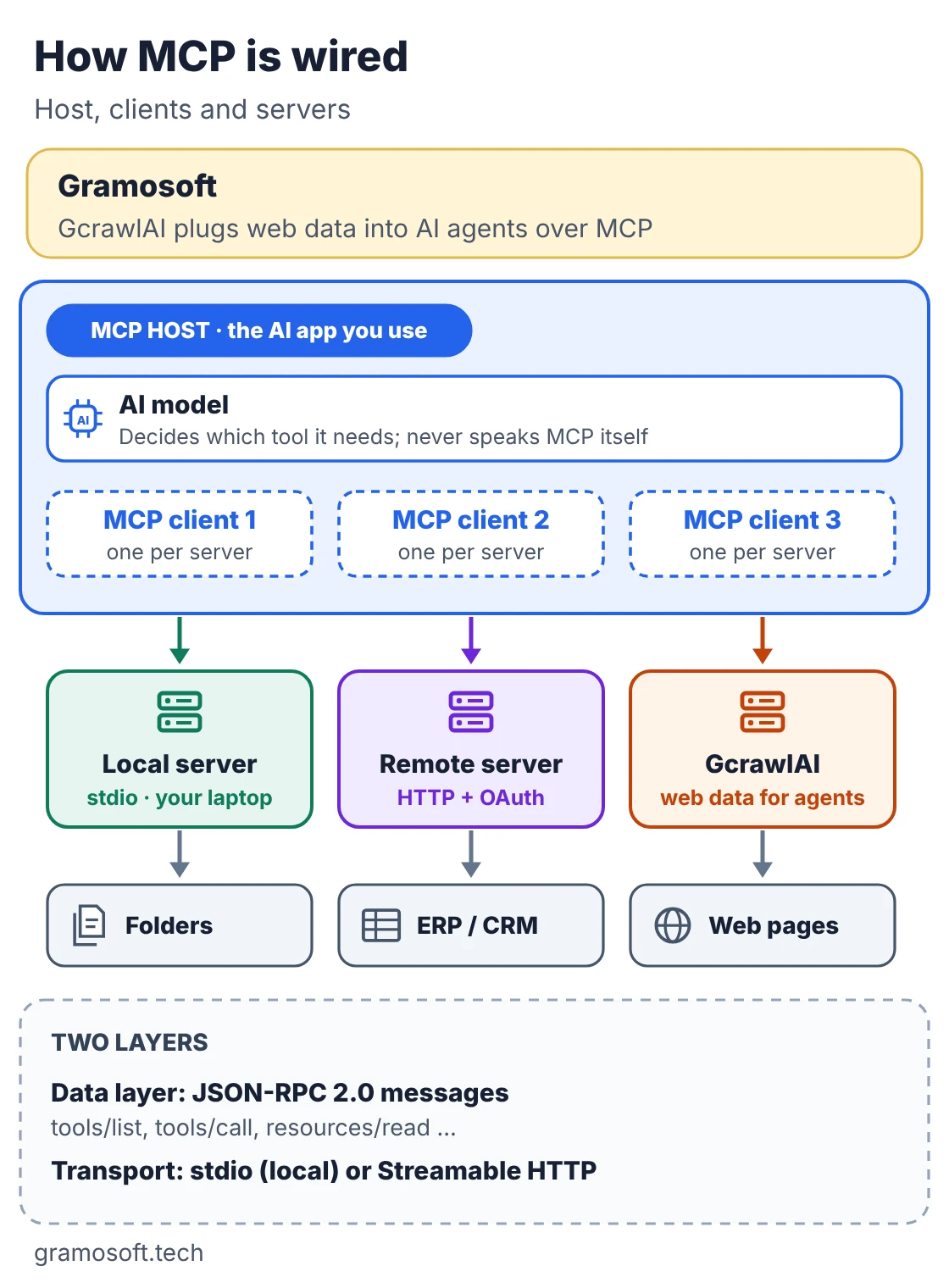
The official architecture guide gives a clear example: VS Code acting as host creates one client for the Sentry server and a second client for a local filesystem server, and each keeps its own connection. Underneath there are two layers:
- Data layer: JSON-RPC 2.0 messages for discovery, listing and calling tools, reading resources and notifications.
- Transport layer: how those messages travel, plus authorization.
Swipe the table sideways on mobile →
| Transport | stdio (local) | Streamable HTTP (remote) |
|---|---|---|
| Where the server runs | On your machine, started by the app | Anywhere on the network, such as a SaaS vendor |
| Clients per server | Usually one | Usually many |
| Credentials | From the local environment | OAuth recommended; tokens or API keys also used |
| Good for | Files, local databases, developer tools | ERP, CRM, ticketing, team-wide servers |
The guide is explicit that MCP "does not dictate how AI applications use LLMs or manage the provided context". It moves context in a standard way; what the app does with it is up to the app.
What an MCP server offers: tools, resources and prompts
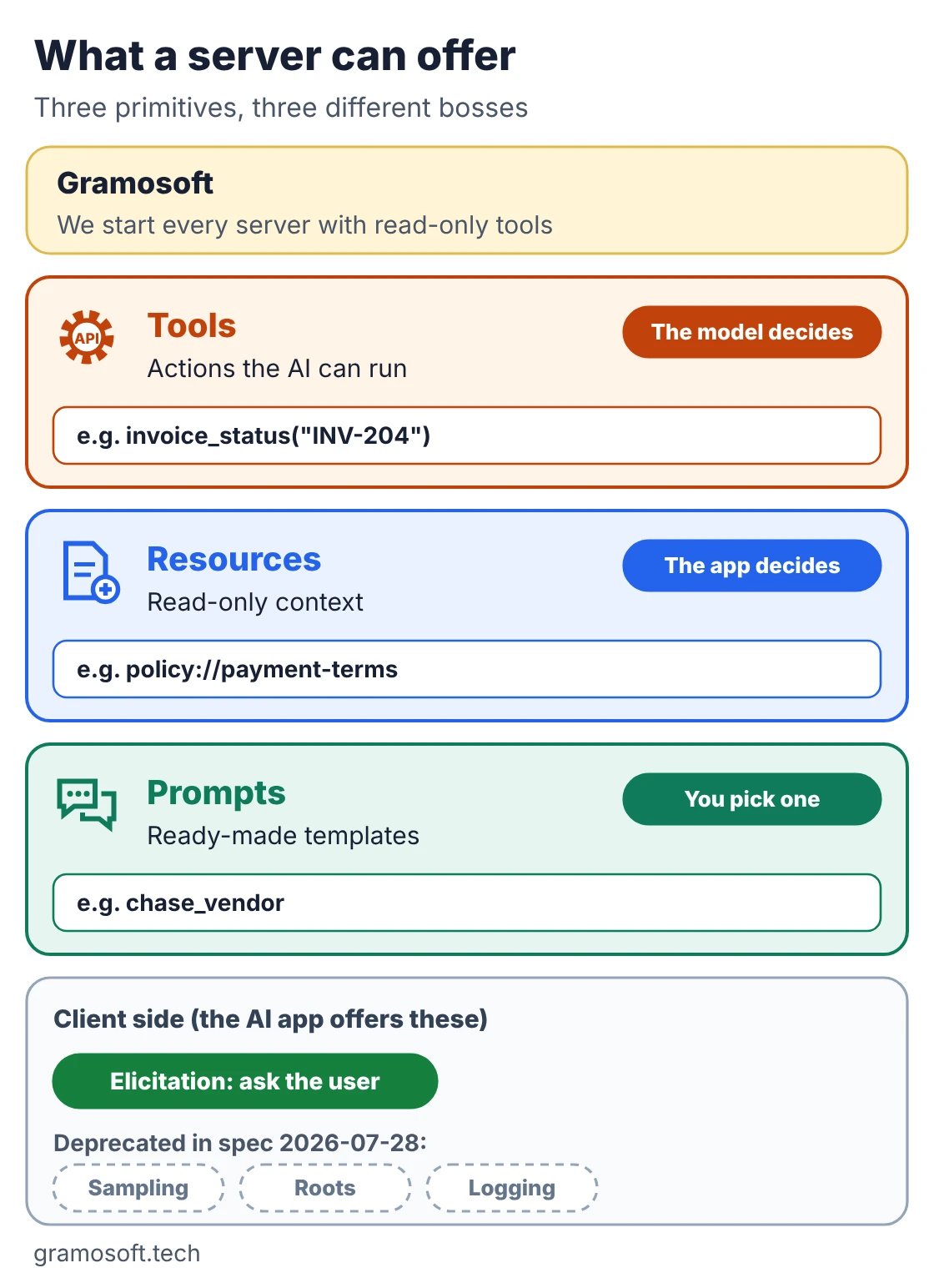
An MCP server can offer three kinds of things, called primitives. The difference is who decides when each one is used. Tools are actions the model can call. Resources are read-only data the app can pull in. Prompts are ready-made templates the user picks. Most business servers start with a few narrow, read-only tools.
Swipe the table sideways on mobile →
| Primitive | What it is | Who controls it | Business example |
|---|---|---|---|
| Tools | Functions the AI can run | The model | Check an invoice, search tickets, create a task |
| Resources | Read-only context | The app | Payment policy, database schema, a product manual |
| Prompts | Reusable instruction templates | The user | "Draft a note to a vendor about a held invoice" |
Apps can also offer something back to servers. The one that matters now is elicitation, where a server asks the user for a missing detail or a confirmation mid-task. Sampling (a server borrowing the app's model), Roots and server Logging were deprecated in the 2026-07-28 spec; they still work, but new servers should not rely on them.
What happens when you ask a question
A single question can involve several MCP messages, but the flow is easy to follow. The app learns which tools exist, the model picks one, you approve it, the server does the work and the model writes the answer from the result. The steps below follow one invoice question from start to finish.
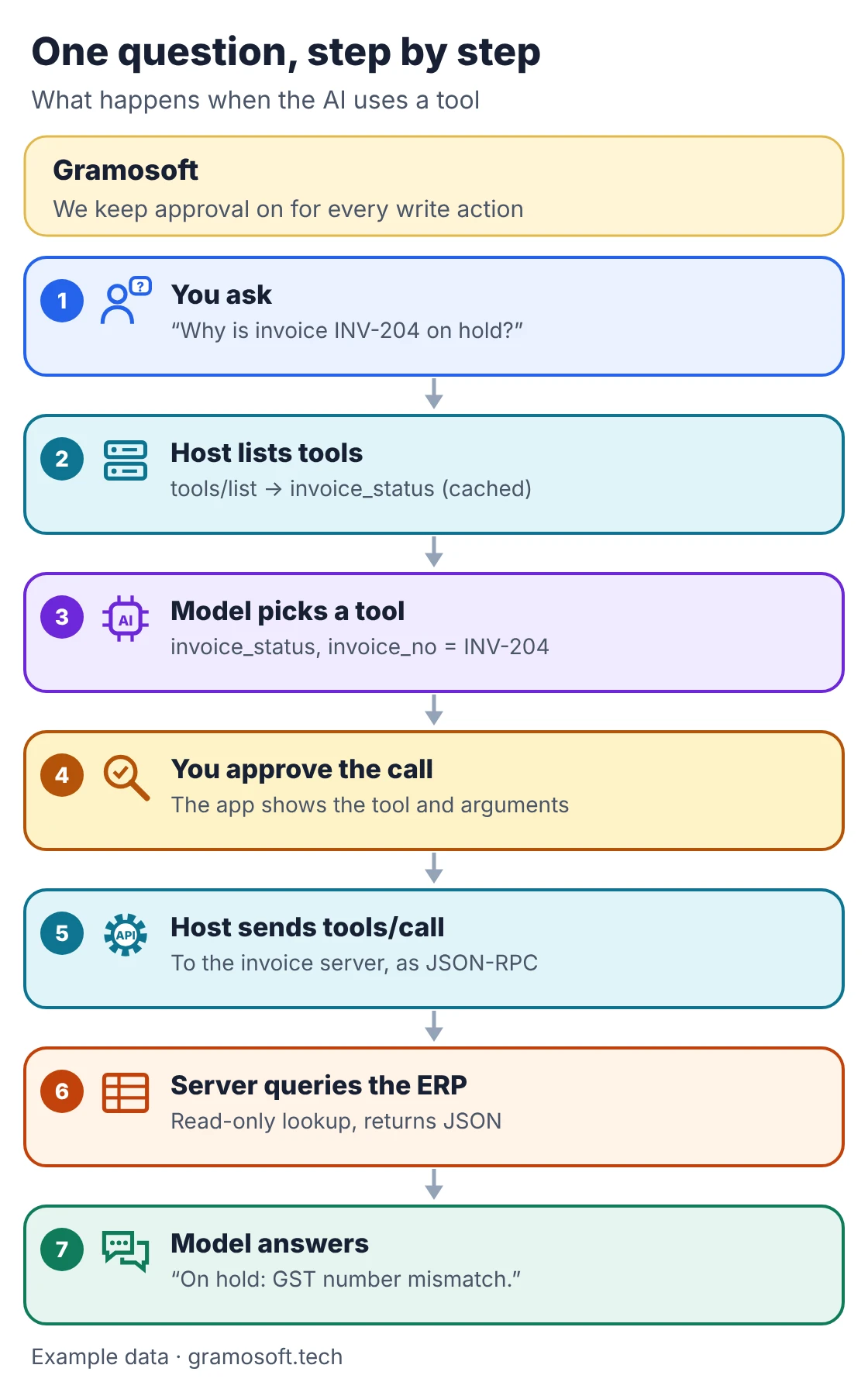
- You ask a question in the AI app.
- The host lists tools from every connected server with
tools/list. Each tool has a name, a description the model reads, and an input schema. - The model picks a tool and fills in the arguments, using ordinary function calling.
- You approve the call. The spec expects a human who can deny tool calls.
- The host sends
tools/callto the right server. - The server does the work, often by calling an existing API, and returns the result.
- The model answers from that result, inside the same chat.
Build a small MCP server in Python
The quickest way to understand MCP is to run a server. Below is a tiny invoice desk with one tool, one resource and one prompt, built with the official Python SDK, mcp 2.3.0 on PyPI under the MIT licence. We tested it with Python 3.13 on November 8, 2026, using sample data in place of an ERP.
invoice_server.py
# invoice_server.py: a tiny MCP server that lets an AI assistant check invoice status.
# pip install "mcp==2.3.0"   (official Python SDK, MIT licence)
from mcp.server import MCPServer

mcp = MCPServer("Invoice desk")

# Sample data. In a real server this would be a read-only query to your ERP.
INVOICES = {
    "INV-204": {"vendor": "Sri Ganesh Traders", "amount_inr": 184500, "status": "on hold", "reason": "GST number mismatch"},
    "INV-311": {"vendor": "Kaveri Packaging", "amount_inr": 42000, "status": "paid", "reason": ""},
}


@mcp.tool()
def invoice_status(invoice_no: str) -> dict:
    """Look up the payment status of one invoice by its number, for example INV-204."""
    inv = INVOICES.get(invoice_no.strip().upper())
    if inv is None:
        return {"invoice_no": invoice_no, "found": False}
    return {"invoice_no": invoice_no.upper(), "found": True, **inv}


@mcp.resource("policy://payment-terms")
def payment_terms() -> str:
    """Company payment terms the assistant can read as context."""
    return "Vendors are paid within 45 days. Invoices with a GST mismatch stay on hold until corrected."


@mcp.prompt()
def chase_vendor(invoice_no: str) -> str:
    """Draft a polite note to a vendor about a held invoice."""
    return f"Check invoice {invoice_no} with the invoice_status tool, read policy://payment-terms, then draft a short, polite email to the vendor explaining what they must fix."


if __name__ == "__main__":
    mcp.run()  # stdio transport by default: the AI app starts this file as a local process
The decorators turn the function signature and docstring into the tool's description and JSON schema, which is what the model reads to decide when to use it. To check the server without an AI app, this client starts it over stdio and calls it the same way a host would:
check_client.py
# check_client.py: start invoice_server.py over stdio and call it the way an AI app would.
import asyncio
import json
import sys
from mcp import Client, StdioServerParameters


async def main() -> None:
    params = StdioServerParameters(command=sys.executable, args=["invoice_server.py"])
    async with Client(params) as client:
        tool = (await client.list_tools()).tools[0]
        print("tool:       ", tool.name)
        print("description:", tool.description)
        print("schema:     ", json.dumps(tool.input_schema["properties"]))
        print("resources:  ", [str(r.uri) for r in (await client.list_resources()).resources])
        print("prompts:    ", [p.name for p in (await client.list_prompts()).prompts])
        result = await client.call_tool("invoice_status", {"invoice_no": "inv-204"})
        print("call result:", json.loads(result.content[0].text))
        print("read:       ", (await client.read_resource("policy://payment-terms")).contents[0].text)


if __name__ == "__main__":
    asyncio.run(main())
Run pip install "mcp==2.3.0", save both files in one folder and run python check_client.py. It printed:
demo_output.txt
tool:        invoice_status
description: Look up the payment status of one invoice by its number, for example INV-204.
schema:      {"invoice_no": {"title": "Invoice No", "type": "string"}}
resources:   ['policy://payment-terms']
prompts:     ['chase_vendor']
call result: {'invoice_no': 'INV-204', 'found': True, 'vendor': 'Sri Ganesh Traders', 'amount_inr': 184500, 'status': 'on hold', 'reason': 'GST number mismatch'}
read:        Vendors are paid within 45 days. Invoices with a GST mismatch stay on hold until corrected.
To use it in Claude Desktop, add it to claude_desktop_config.json (on macOS in ~/Library/Application Support/Claude/, on Windows in %APPDATA%\Claude\), then restart the app. The official local server guide uses the same shape and says every action asks for your approval:
claude_desktop_config.json
{
  "mcpServers": {
    "invoice-desk": {
      "command": "python",
      "args": ["/absolute/path/to/invoice_server.py"]
    }
  }
}
Other apps, including ChatGPT, Cursor, VS Code and Gemini, have their own place to add servers; remote servers are usually added as a connector with a sign-in instead of a config file. Check each app's current docs, because these screens change often.
MCP vs APIs and function calling
MCP does not replace APIs or function calling; it sits between them. An API is how one program talks to one service. Function calling is how a model asks the app to run a function. MCP standardises where those functions come from and how the call reaches them, so the same tools work across many AI apps.
Swipe the table sideways on mobile →
| Factor | Plain API | Function calling | MCP |
|---|---|---|---|
| Built for | Developers writing code | One model inside your app | Any MCP-capable AI app |
| How tools are described | Docs a person reads | Schemas you write per model | Server lists them at run time |
| Reuse across AI apps | Write glue each time | Rewrite per provider | Build once, connect anywhere |
| Best for | Data pipelines, normal software | A single app you control | Tools many AI apps should use |
Many MCP servers are a thin layer over an existing API, which is how our invoice example would work against a real ERP. If you only need one script to call one service, skip MCP and call the API directly.
What changed in the 2026-07-28 MCP spec
MCP versions are named by date, and 2026-07-28 is the current revision; the one before was 2025-11-25. It changed how MCP works under the hood, so tutorials from even a year ago can mislead you. If you only use servers in an app, nothing changes for you. If you build servers, update your SDK.
- Stateless: the
initializehandshake is gone. Every request carries its protocol version and client capabilities in_meta. - Discovery: servers must answer
server/discoverwith their versions, capabilities and identity. - No protocol sessions: the
Mcp-Session-Idheader is removed from Streamable HTTP; servers that need state pass explicit handles as tool arguments. - One notification stream:
subscriptions/listenreplaces the old ways of getting change notifications. - Input mid-task: servers return an "input required" result and the client retries with the answer, instead of servers sending requests to the client.
- Tasks: long-running jobs moved out of the core into an official extension.
- Deprecated: Roots, Sampling, Logging and OAuth Dynamic Client Registration, eligible for removal no earlier than the first revision on or after July 28, 2027.
Source: the official 2026-07-28 changelog and deprecated features registry.
Is MCP safe? Risks to check before you connect
MCP is as safe as the servers you connect and the permissions you give them. A tool can read files, call APIs and change data, and a local server runs with the same rights as the app that started it. The protocol cannot enforce good behaviour for you, so the checks below matter.
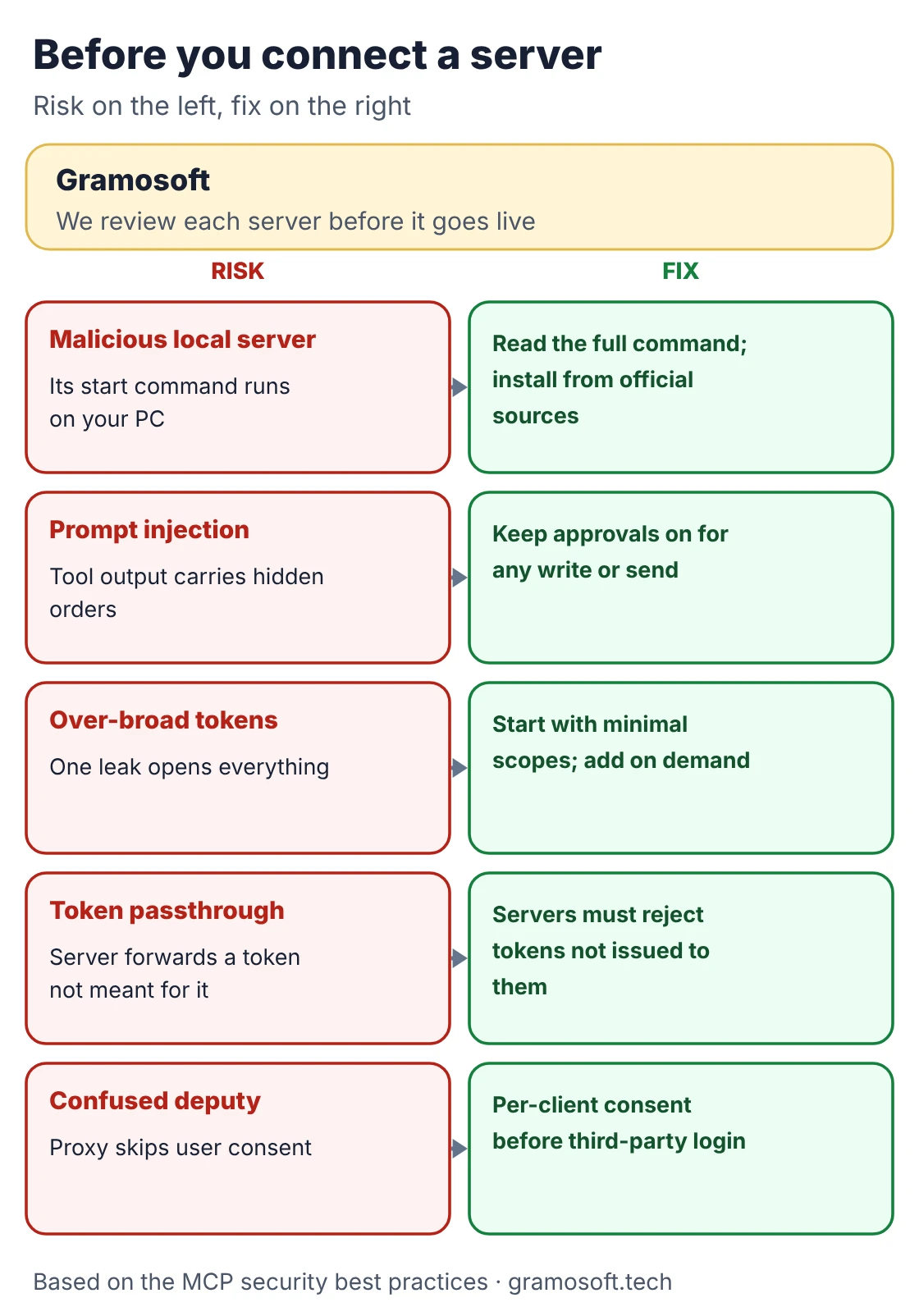
- Install from trusted sources: the MCP security best practices say an app offering one-click local install must show the full command and get your approval first.
- Keep approvals on: tool output can carry hidden instructions (prompt injection), so let a person approve anything that writes, sends or deletes.
- Least privilege: start with minimal scopes and read-only tools, and add more only when a task needs them.
- No token passthrough: servers must not accept tokens that were not issued to them.
- Be careful mixing servers: one that reads untrusted content (web pages, inboxes, tickets) next to one that can send or delete is the riskiest combination.
- Log every call: record which user, which tool and which arguments, for audit under India's Digital Personal Data Protection Act and your own policies.
Who owns MCP now?
Anthropic released MCP on November 25, 2024, with SDKs, local server support in Claude Desktop and open-source servers for Google Drive, Slack, GitHub, Git, Postgres and Puppeteer. On December 9, 2025, it donated MCP to the Agentic AI Foundation, a directed fund under the Linux Foundation, so no single company controls it.
The foundation was co-founded by Anthropic, Block and OpenAI, with support from Google, Microsoft, AWS, Cloudflare and Bloomberg; MCP's maintainers still make protocol decisions. At the donation announcement, Anthropic reported more than 10,000 active public MCP servers, over 97 million monthly SDK downloads, and support in ChatGPT, Cursor, Gemini, Microsoft Copilot and VS Code. Those are December 2025 figures, not a current count. See also the MCP project's own post.
Where MCP helps a business, and where it falls short
MCP pays off when several people or AI apps need the same company data and actions. It does not make a weak data source useful. If your records are messy or out of date, the assistant gives fast, confident, wrong answers, so fix the data and the permissions first, then add the protocol.
- Good fits: invoice and order status from ERP, ticket search, policy lookups, CRM notes, document search and web research for agents.
- It moves context, nothing more: whether the model picks the right tool depends on the model and on clear tool descriptions.
- Too many tools crowd the model: keep each server focused, and let apps load tools as needed.
- It is still changing fast: the 2026-07-28 release made breaking changes, so pin SDK versions and test upgrades.
Frequently asked questions
How does Gramosoft use MCP?
What does MCP stand for?
MCP stands for Model Context Protocol, an open standard for connecting AI apps to outside tools and data. Anthropic released it on November 25, 2024, and it is now part of the Linux Foundation's Agentic AI Foundation.
Is MCP the same as an API?
No. An API is how one program talks to one service. MCP is a standard way for AI apps to discover and call tools at run time, and many MCP servers call an ordinary API behind the scenes.
Is MCP only for Claude?
No. Anthropic created it, but ChatGPT, Cursor, Gemini, Microsoft Copilot and VS Code also support MCP, and it is governed under the Linux Foundation rather than by one company.
Do I need to code to use MCP?
Not to use a server. Adding one is usually a config entry or a sign-in screen in your AI app. Building your own server takes code; the official Python SDK, mcp 2.3.0, needs Python 3.10 or later according to PyPI.
What is the difference between a local and a remote MCP server?
A local server runs on your machine and talks to the app over stdio. A remote server runs elsewhere, talks over Streamable HTTP and usually uses an OAuth sign-in. Local suits files and developer tools; remote suits SaaS and team systems.
Is MCP secure?
MCP defines how apps and servers talk; security depends on each server and on your settings. Install servers from trusted sources, keep approvals on for write actions, use minimal scopes and log every tool call.