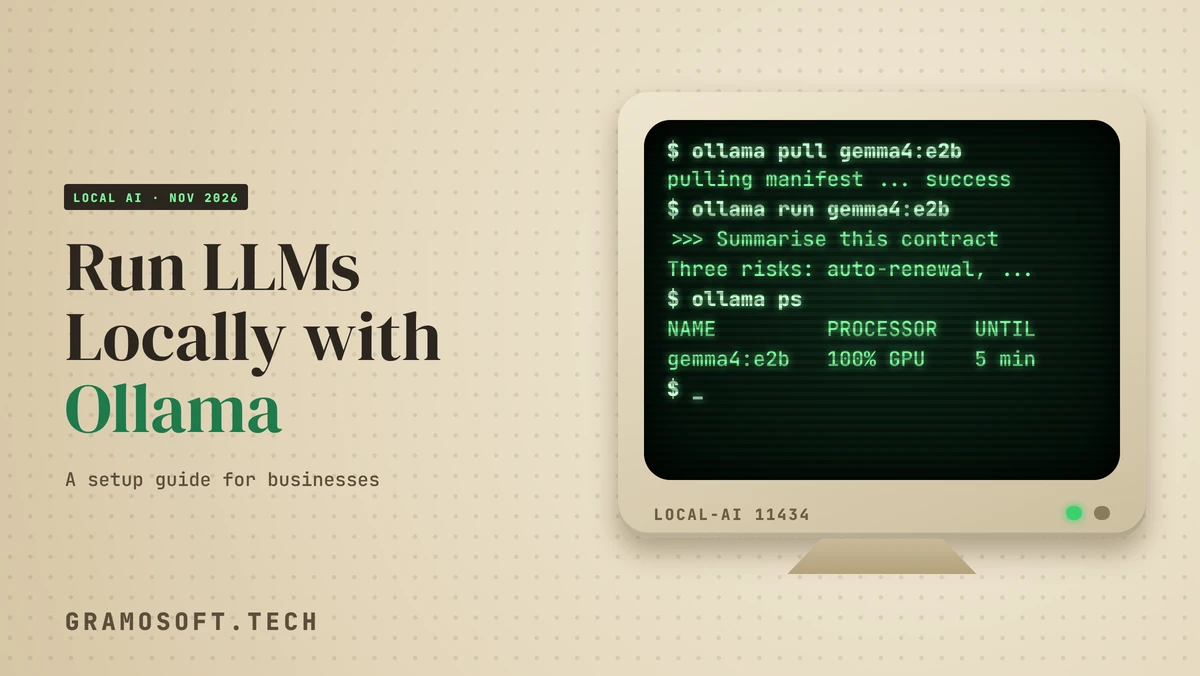
By Rajesh Kannan, Co-Founder & CTO, Gramosoft · Last updated: · Commands tested on Ollama 0.40.15; facts checked on Ollama's docs and repository on November 8, 2026
More businesses want AI that reads contracts, customer emails and source code without sending them to an outside provider. Running a large language model (LLM) on your own computer or server is now practical, and Ollama is the simplest way to start: one install, one command per model, and a local API your apps can call.
We set up private AI servers for clients at Gramosoft, so this guide starts with where we fit. Then it covers when local makes sense, how Ollama works, the hardware you need, setup on macOS, Windows and Linux, connecting your apps, and how to share one server safely with a team. Every command here was run on Ollama 0.40.15.
TL;DR
- Gramosoft, a Chennai software company, sets up, secures and supports private LLM servers for businesses, and connects them to company data and apps.
- What Ollama is: a free, MIT-licensed tool that downloads open models and serves them on
localhost:11434, with its own API and an OpenAI-compatible one. - Setup: install,
ollama pulla model,ollama runit, then checkollama psshows100% GPU. - Hardware: memory decides speed. Keep the whole model in GPU memory (VRAM); spilling into system RAM slows it down sharply.
- Apps: existing OpenAI SDK code works by changing
base_urltohttp://localhost:11434/v1/. - Safety: Ollama does not check API keys locally, so never expose port 11434 to the internet; put a login and HTTPS in front, and turn off cloud models with
OLLAMA_NO_CLOUD=1if data must stay in-house.
How do I run an LLM locally with Ollama? Install Ollama for macOS, Windows or Linux, run ollama pull with a model name, then ollama run to chat or call http://localhost:11434 from your apps. For business use, Gramosoft sets up a secured, shared Ollama server sized to your prompts and connects it to your systems.
Where Gramosoft fits in running LLMs locally
Gramosoft is a Chennai software company that builds AI products and custom software. Clients come to us when an AI pilot works on a laptop but now has to serve a whole team, stay inside the company network and connect to real data. We size the hardware, set up Ollama as a secured service and connect it to your apps.
Swipe the table sideways on mobile →
| What you need | From Gramosoft |
|---|---|
| A private LLM server for your team | AI development services: model choice, hardware sizing, Ollama setup, login and logging |
| Somewhere to host it | Cloud services for a private GPU server, or setup on your own premises |
| Answers from company documents | GsearchAI, our AI knowledge agent on Neo4j and pgvector, answering from PDFs, Excel and databases in Teams, Slack, WhatsApp or a website widget |
| Clean text from scanned files | GdoczAI, our document processing product, so the model reads accurate text |
| Fresh web data for AI agents | GcrawlAI, our web scraping, crawling and Search API |
| A security review before launch | Application security and data protection checks on network access, logins and logs |
"Getting a model to answer on a laptop takes ten minutes. Making it answer fifty people safely, quickly and with logs takes planning. Most of that planning is about memory and access, not about the model."
Rajesh Kannan, Co-Founder & CTO at Gramosoft
When running an LLM locally makes sense
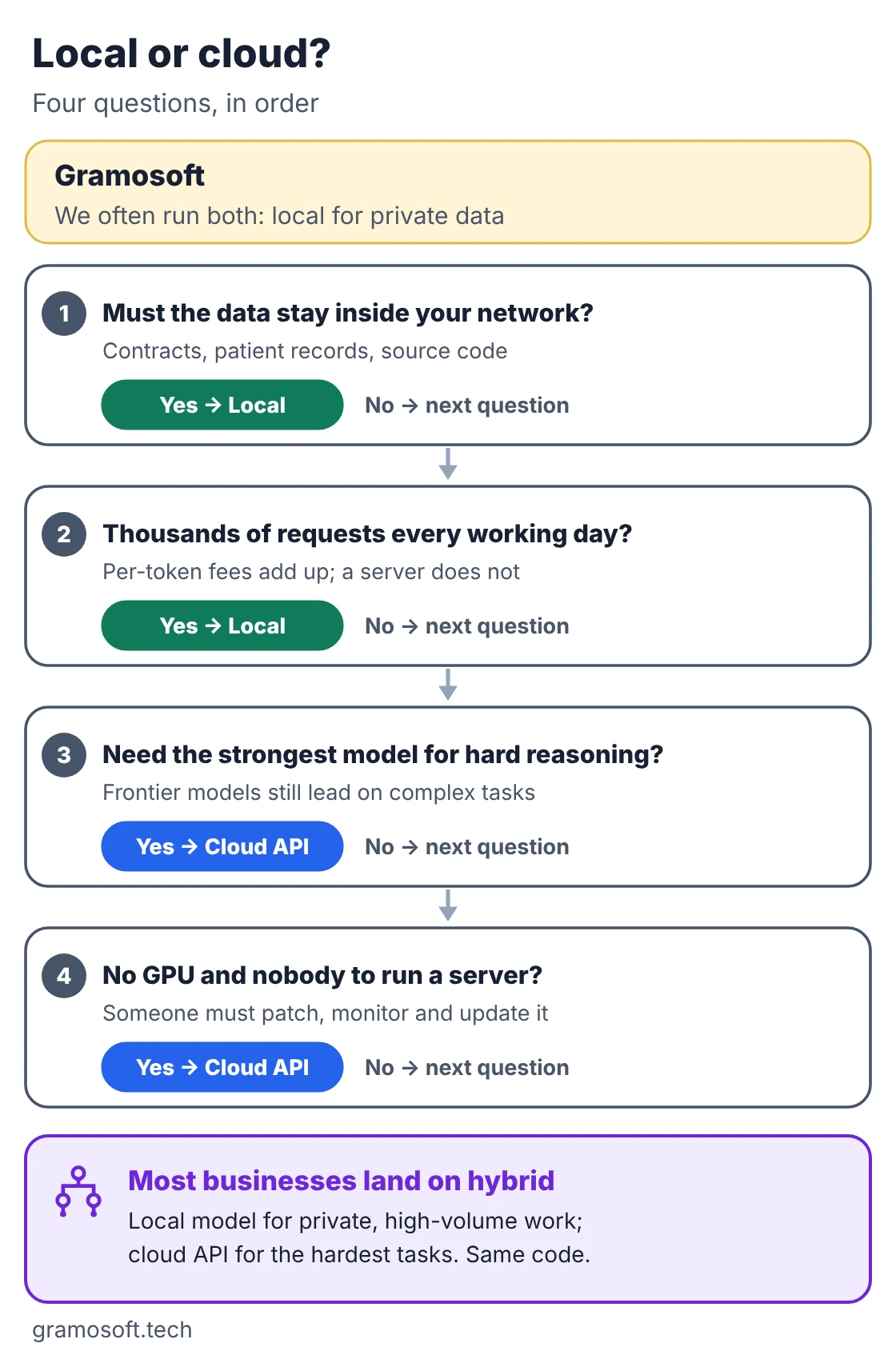
Run locally when the data must stay inside your network, when you send thousands of requests a day, or when you need AI to work without internet. Stay with a cloud API when you need the strongest models for hard reasoning, or when nobody can run and update a server. Many businesses end up using both.
Swipe the table sideways on mobile →
| Factor | Local with Ollama | Cloud LLM API |
|---|---|---|
| Where data goes | Stays on your machine or server | Sent to the provider under its terms |
| Cost pattern | Hardware and power up front, no per-token fee | Pay per token, nothing up front |
| Model quality | Open models; good for summaries, extraction, drafting | Frontier models for the hardest tasks |
| Speed | Depends on your GPU and memory | Depends on the provider and network |
| Offline use | Yes, once models are downloaded | No |
| Who maintains it | You, or a partner such as Gramosoft | The provider |
How Ollama works
Ollama is an open-source tool, MIT licensed, that runs a small server on your machine. You pull a model once; then it works offline from your disk. Your terminal, a chat app or your own software sends requests to that server on port 11434, and it runs the model on your GPU or CPU.
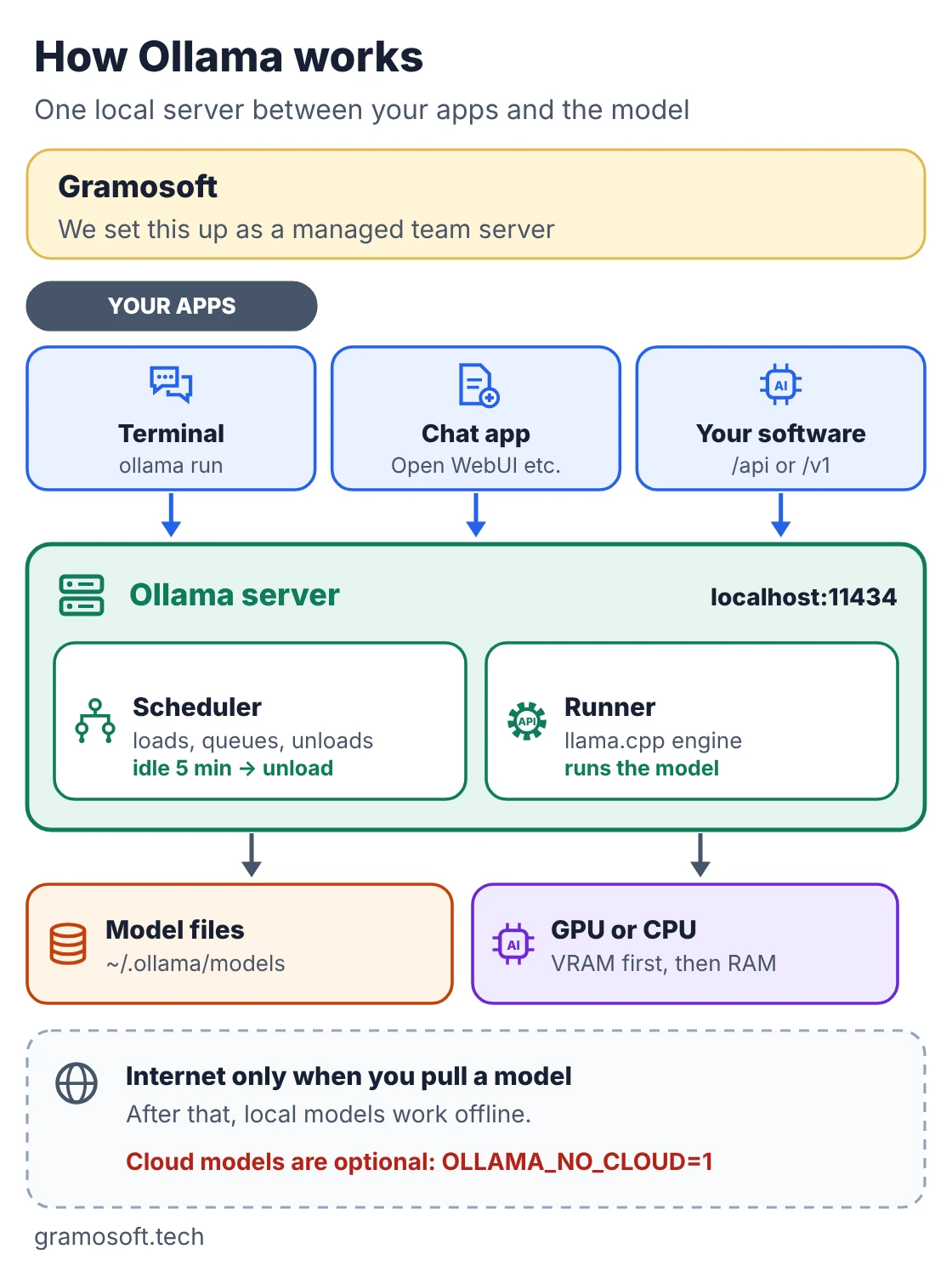
- Local by default: the server listens on
127.0.0.1:11434, so only the same machine can reach it until you changeOLLAMA_HOST. - Models load on demand: a model stays in memory for 5 minutes after its last request, then unloads. Change this with
OLLAMA_KEEP_ALIVEor the API'skeep_alivesetting. - Two APIs: its own (
/api/chat,/api/generate,/api/tags) and an OpenAI-compatible API under/v1/. - Cloud models are optional: Ollama also offers models that run on its cloud. If your data must stay in-house, the Ollama FAQ says you can turn cloud features off with
OLLAMA_NO_CLOUD=1.
Hardware you need
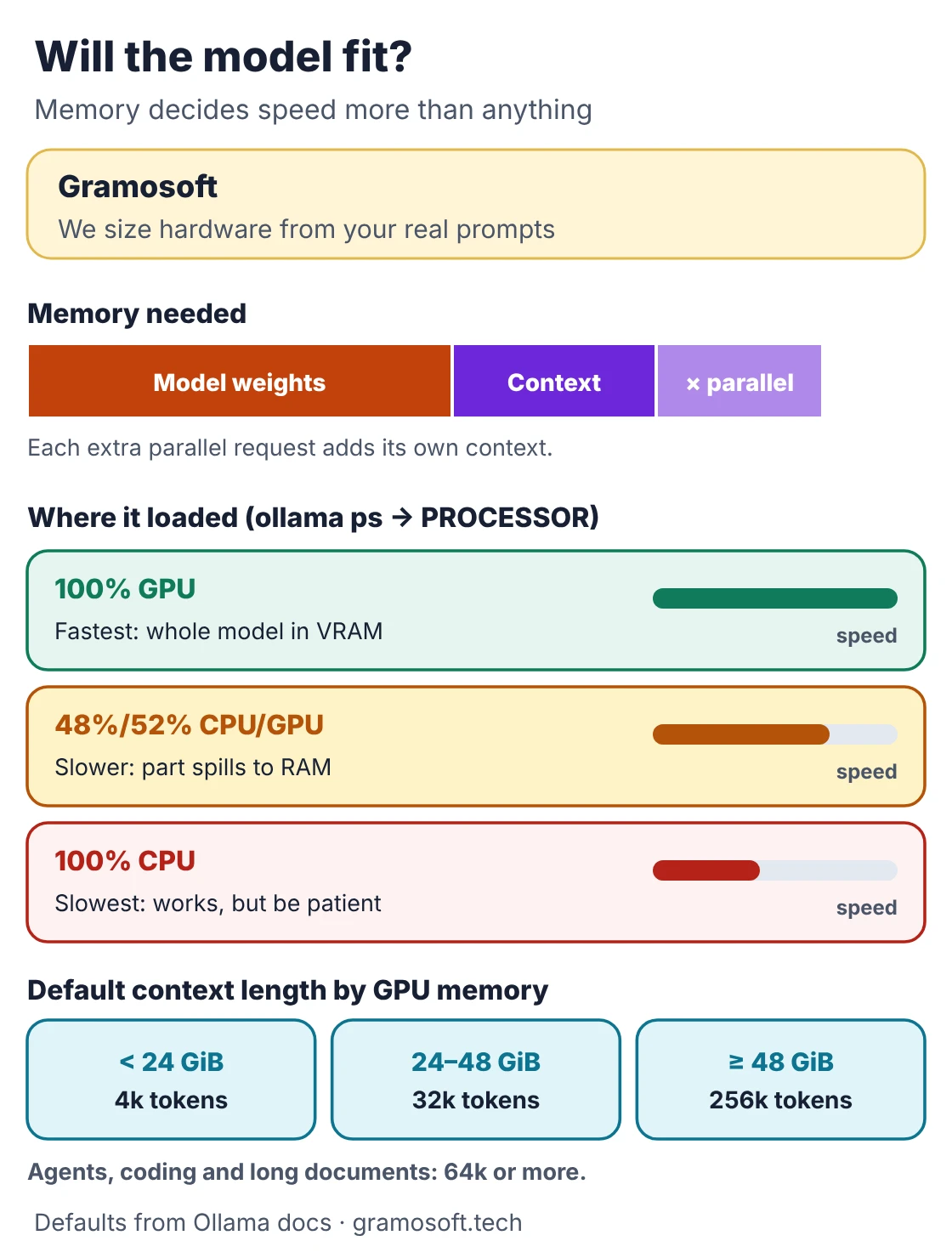
Memory decides how well a local model runs. The model has to fit in memory along with the context (the text it is working on), and each parallel request adds more context. If everything fits in GPU memory, answers come quickly. If part spills into system RAM, it slows sharply; CPU alone works, but slowly.
Swipe the table sideways on mobile →
| System | Minimum (from Ollama docs) | GPU support |
|---|---|---|
| macOS | macOS Sonoma (14) or newer | Apple M-series uses CPU and GPU (Metal); Intel Macs run on CPU only |
| Windows | Windows 10 22H2 or newer; installer needs 4 GB free | NVIDIA driver 551.61+; AMD via ROCm v7 or Vulkan drivers |
| Linux | amd64 or arm64; systemd service recommended | NVIDIA compute capability 5.0+ with driver 550+; AMD via ROCm v7; Vulkan |
Model files range from a few GB to hundreds of GB, so plan disk space too. Ollama sets a default context length from GPU memory: 4k tokens below 24 GiB, 32k from 24 to 48 GiB and 256k at 48 GiB or more. Its context length guide suggests at least 64k tokens for agents, coding tools and long documents, which needs more memory. The honest way to size hardware is to test your own prompts, which the script further down does.
How to install Ollama and run your first model
Setup takes six steps on every platform: install, pull a model, run it, check that it fits, configure the service and connect your apps. Only the install differs between macOS, Windows and Linux. The commands below were run on Ollama 0.40.15; the model name is the small Gemma 4 model that Ollama's own quickstart uses.
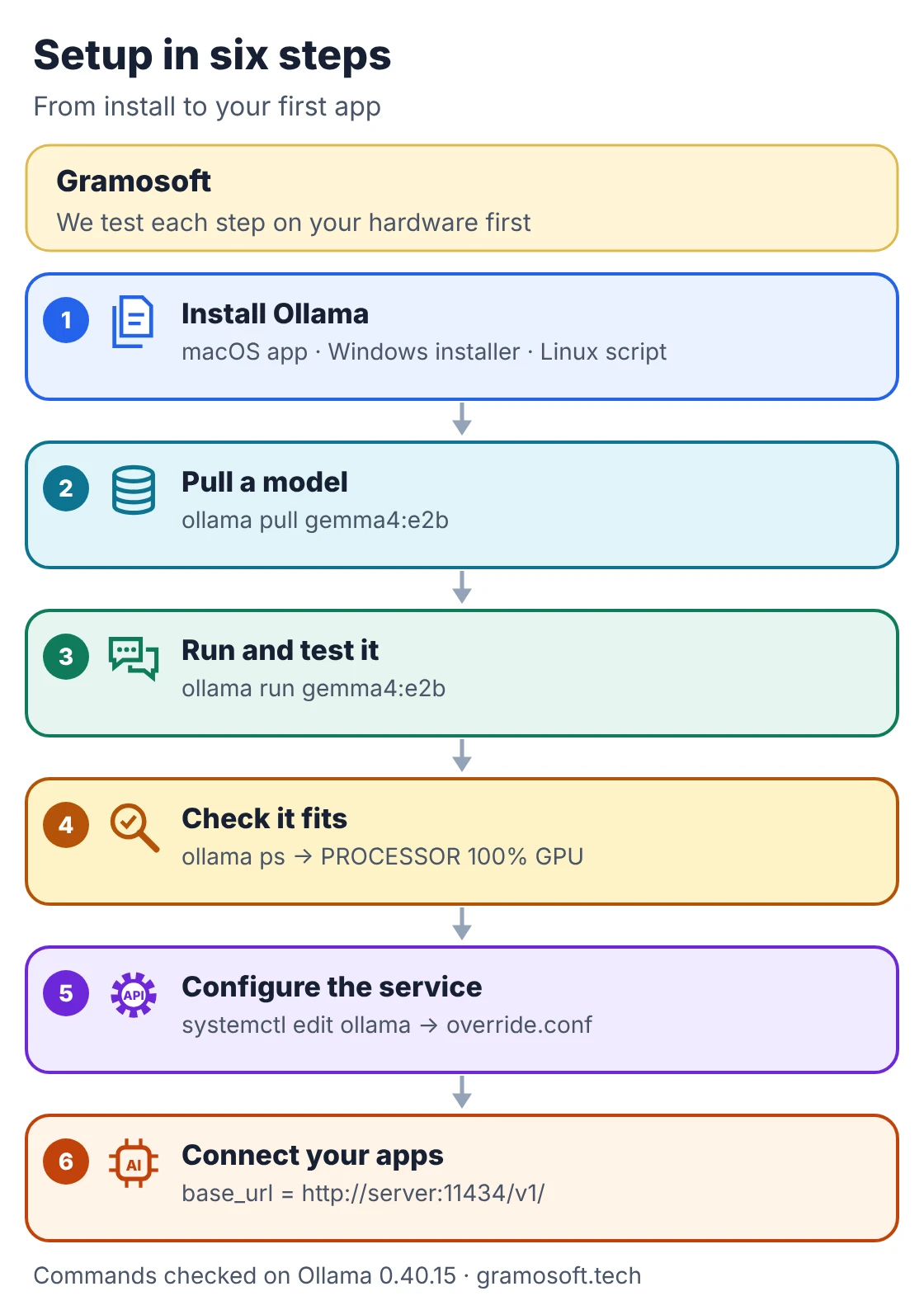
- macOS: download
ollama.dmgfrom the macOS page, drag Ollama into Applications and open it; the app links theollamacommand into your PATH. - Windows: run
OllamaSetup.exefrom the Windows page. It needs no administrator rights, runs in the background and serveshttp://localhost:11434. - Linux server: the Linux install script installs the binary and an
ollamasystemd service:
setup_linux.sh
#!/usr/bin/env bash
# setup_linux.sh: install Ollama as a service on an Ubuntu/Debian server and run a first model.
set -euo pipefail

curl -fsSL https://ollama.com/install.sh | sh   # installs the binary and an "ollama" systemd service
ollama -v                                       # confirm the installed version
sudo systemctl enable --now ollama              # start now and on every boot
sudo systemctl status ollama --no-pager

ollama pull gemma4:e2b                          # download a small model once
ollama run gemma4:e2b "Reply with one word: ready?"
ollama ps                                       # PROCESSOR column: 100% GPU is what you want
ollama list                                     # models on disk and their size
Type /bye to leave an interactive chat. Models are stored in ~/.ollama/models on macOS, /usr/share/ollama/.ollama/models on Linux and your home folder's .ollama on Windows; set OLLAMA_MODELS to move them to a bigger disk. On Linux, re-run the install script to update; macOS and Windows update themselves.
Configure Ollama as a team server
On a shared Linux server, settings go in a systemd override file rather than your shell. Create it with sudo systemctl edit ollama, then reload and restart the service. The values below suit a small team server; adjust them after you measure real use, because each setting trades memory for speed or convenience.
override.conf
# /etc/systemd/system/ollama.service.d/override.conf
# Create it with:  sudo systemctl edit ollama
[Service]
Environment="OLLAMA_HOST=0.0.0.0:11434"
Environment="OLLAMA_KEEP_ALIVE=30m"
Environment="OLLAMA_NUM_PARALLEL=2"
Environment="OLLAMA_CONTEXT_LENGTH=8192"
Environment="OLLAMA_NO_CLOUD=1"
Apply it with sudo systemctl daemon-reload && sudo systemctl restart ollama and read logs with journalctl -e -u ollama. On macOS use launchctl setenv; on Windows set user environment variables and restart Ollama.
Swipe the table sideways on mobile →
| Setting | Default | What it does |
|---|---|---|
OLLAMA_HOST |
127.0.0.1:11434 | Address the server listens on |
OLLAMA_KEEP_ALIVE |
5 minutes | How long an idle model stays in memory |
OLLAMA_NUM_PARALLEL |
1 | Parallel requests per model; memory grows with it |
OLLAMA_MAX_LOADED_MODELS |
3 per GPU (3 on CPU) | Models held in memory at once |
OLLAMA_MAX_QUEUE |
512 | Requests waiting before the server refuses more |
OLLAMA_CONTEXT_LENGTH |
Set by GPU memory | Default context window for every model |
OLLAMA_NO_CLOUD |
Off | Turns off Ollama's cloud features |
Connect your apps to the local model
Most AI code today is written for the OpenAI SDK, and Ollama accepts the same calls. Point base_url at your Ollama server, keep any placeholder API key, and the rest of your code stays the same. That makes it easy to move private or high-volume work to a local model while keeping a cloud API for the rest.
openai_swap.py
# openai_swap.py: point existing OpenAI SDK code at a local Ollama server.
# pip install openai   (tested with openai 3.46.0)
import os
from openai import OpenAI

client = OpenAI(
    base_url=os.getenv("LLM_BASE_URL", "http://localhost:11434/v1/"),  # Ollama's OpenAI-compatible endpoint
    api_key=os.getenv("LLM_API_KEY", "ollama"),  # required by the SDK, ignored by Ollama
)
model = os.getenv("LLM_MODEL", "gemma4:e2b")

print("models:", [m.id for m in client.models.list().data])
resp = client.chat.completions.create(
    model=model,
    messages=[
        {"role": "system", "content": "You summarise customer emails in two lines."},
        {"role": "user", "content": "Our order 4471 arrived with two damaged cartons. Please send replacements."},
    ],
    temperature=0.2,
)
print("finish reason:", resp.choices[0].finish_reason)
print("tokens used:", resp.usage.prompt_tokens, "in,", resp.usage.completion_tokens, "out")
Before you roll a model out, measure it on the hardware you will use. This script, using only Python's standard library, checks the server, confirms the model is on disk, runs one request and reports load time, tokens per second and whether the model sits on the GPU:
check_ollama.py
# check_ollama.py: health and speed check for an Ollama server (Python standard library only).
# Usage: python check_ollama.py [model] [server]   e.g. python check_ollama.py gemma4:e2b http://localhost:11434
import json
import sys
import urllib.request

MODEL = sys.argv[1] if len(sys.argv) > 1 else "gemma4:e2b"
SERVER = (sys.argv[2] if len(sys.argv) > 2 else "http://localhost:11434").rstrip("/")


def call(path, body=None):
    data = json.dumps(body).encode() if body is not None else None
    req = urllib.request.Request(SERVER + path, data=data, headers={"Content-Type": "application/json"})
    with urllib.request.urlopen(req, timeout=300) as resp:
        return json.load(resp)


print("server version:", call("/api/version")["version"])
models = [m["name"] for m in call("/api/tags")["models"]]
print("models on disk:", ", ".join(models) or "none")
if not any(m == MODEL or m == MODEL + ":latest" for m in models):
    sys.exit(f"model {MODEL} not found: run  ollama pull {MODEL}")

reply = call("/api/chat", {
    "model": MODEL,
    "messages": [{"role": "user", "content": "In one sentence, why do invoices go on hold?"}],
    "stream": False,
    "keep_alive": "10m",          # keep the model in memory for 10 minutes after this call
    "options": {"num_predict": 64},
})
ns = 1e9  # Ollama reports durations in nanoseconds
print(f"load time:      {reply.get('load_duration', 0) / ns:.2f} s")
print(f"prompt tokens:  {reply['prompt_eval_count']}")
print(f"output tokens:  {reply['eval_count']}")
print(f"output speed:   {reply['eval_count'] / (reply['eval_duration'] / ns):.1f} tokens/s")
print(f"total time:     {reply['total_duration'] / ns:.2f} s")
running = call("/api/ps")["models"]
for m in running:
    on_gpu = m.get("size_vram", 0) / m["size"] * 100 if m["size"] else 0
    print(f"loaded:         {m['name']}  {m['size'] / 1e6:.1f} MB  {on_gpu:.0f}% on GPU  until {m['expires_at'][:19]}")
We ran both against a real Ollama 0.40.15 server with a tiny test model we built for the purpose, so the speed figure only proves the script works; a real model on your hardware will be far slower:
demo_output.txt
$ python check_ollama.py invoice-test
server version: 0.40.15
models on disk: company-assistant:latest, invoice-test:latest
load time:      0.00 s
prompt tokens:  138
output tokens:  64
output speed:   3483.4 tokens/s
total time:     0.02 s
loaded:         invoice-test:latest  4.9 MB  0% on GPU  until 2026-11-07T20:16:27

$ LLM_MODEL=invoice-test python openai_swap.py
models: ['company-assistant:latest', 'invoice-test:latest']
finish reason: stop
tokens used: 183 in, 84 out
The compatibility page lists what works: /v1/chat/completions, /v1/completions, /v1/models, /v1/embeddings and a stateless /v1/responses. Fields such as logprobs, tool_choice and n are not supported, and the context size cannot be set through the OpenAI API, which is one reason to use a Modelfile.
Build a company assistant with a Modelfile
A Modelfile packages a base model with your own instructions and settings, so every app gets the same behaviour without repeating a long system prompt. It is a short text file: the base model, a few parameters such as temperature and context size, and the system message. Ollama builds it into a new named model in seconds.
company.Modelfile
# company.Modelfile: a company assistant built on a base model from the Ollama library
FROM gemma4:e2b

PARAMETER temperature 0.2
PARAMETER num_ctx 8192

SYSTEM """You are the internal assistant for our company. Answer briefly, say when you are not sure,
and never invent invoice numbers, prices or policy details."""
Build it with ollama create company-assistant -f company.Modelfile, then check it with ollama show company-assistant --parameters. We built this exact file on Ollama 0.40.15 and the parameters came back as written.
Share one Ollama server safely
A single GPU server can serve a whole office, but Ollama's API has no login of its own; the docs say the API key is ignored for local use. So never open port 11434 to the internet. Keep Ollama on the private network and put a reverse proxy in front for HTTPS, company login, rate limits and logs.
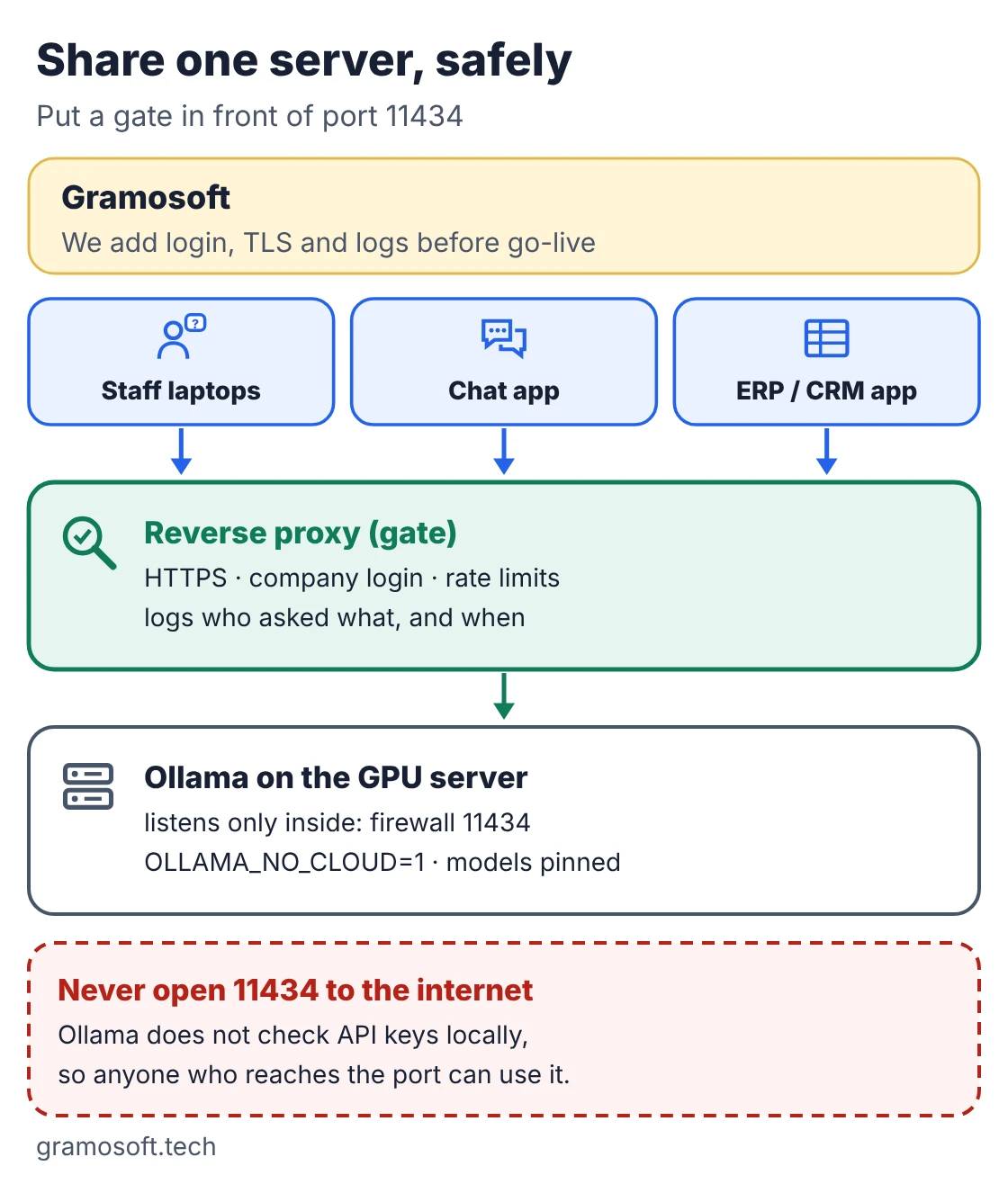
- Gate it: the FAQ shows Ollama behind Nginx; add your company login and HTTPS there, and log who asked what.
- Containers: the official Docker image runs with
docker run -d --gpus=all -v ollama:/root/.ollama -p 11434:11434 --name ollama ollama/ollamaafter installing the NVIDIA Container Toolkit; AMD uses theollama/ollama:rocmimage. - Browser chat: Ollama's README lists web interfaces such as Open WebUI; pick one that supports your login system.
- Pin versions: install a fixed Ollama version with
OLLAMA_VERSIONand test upgrades before rolling them out. - Personal data: keep prompts and logs in line with India's Digital Personal Data Protection Act and your own retention rules.
Which model to start with
Start with the smallest model that does your task well, then move up only if quality falls short. A small model answers faster, fits cheaper hardware and serves more people at once. Test candidates on twenty real prompts from your team, such as summarising a contract or drafting a reply, and compare the answers side by side.
- First test:
gemma4:e2b, the small model Ollama's quickstart uses, runs on modest hardware. - Families to compare: the Ollama library lists many open model families in several sizes; Ollama's own docs use Gemma 4 and gpt-oss in their examples. Check each model's licence before business use.
- Check the fit: run
ollama pswhile a model answers; aim for100% GPU. - Embeddings: for document search, pull an embedding model and use
/v1/embeddings, the step behind a private assistant like GsearchAI.
What a local setup really costs
Local models have no per-token fee, but they are not free. You pay for hardware, power, space and the people who keep the server patched and monitored. For a few requests a day a cloud API is usually cheaper; for steady, high-volume or confidential work a shared local server often wins. Measure before you buy.
- Up front: a GPU workstation or server sized to your largest model and context.
- Running: electricity, backups, updates, monitoring and security reviews.
- Hidden: staff time while answers are slow; a model that spills to CPU costs more in waiting than in power.
- Saving: use the smallest model that works, keep context to what you need, and unload idle models.
Frequently asked questions
Can Gramosoft set up a private LLM server for my company?
Yes. Gramosoft sizes the hardware from your real prompts, installs Ollama as a secured service on premises or in a private cloud, adds login, HTTPS and logging, and connects it to your apps and company data.
Is Ollama free for business use?
Ollama itself is open source under the MIT licence. The models you download have their own licences, so check each one before business use. Ollama's optional cloud models are a separate service.
Does Ollama send my data to the cloud?
Not when you use local models: they run on your machine and Ollama's FAQ says the maintainers do not see prompts from local runs. Ollama also offers cloud models; turn those off with OLLAMA_NO_CLOUD=1 if data must stay in-house.
What hardware do I need to run an LLM locally?
Enough memory to hold the model and its context, ideally all in GPU memory. Small models run on a recent laptop; larger models need a GPU with more VRAM. Check with ollama ps that the model shows 100% GPU.
Can I use my OpenAI code with Ollama?
Yes. Set the OpenAI client's base_url to http://localhost:11434/v1/ and pass any API key. Chat completions, completions, models, embeddings and stateless responses are supported; a few fields such as logprobs are not.
How do I let my team use one Ollama server?
Run Ollama on a GPU server, keep port 11434 on the private network, and put a reverse proxy in front with HTTPS and company login. Set OLLAMA_NUM_PARALLEL for concurrent users and watch memory.
Does Ollama work offline?
Yes. It needs the internet only to download models and updates. Once a model is on disk, local models run without a connection.