By Rajesh Kannan, Co-Founder & CTO, Gramosoft · Last updated: · Scores, speeds, licenses and API prices checked on each benchmark page, repository, model card and pricing page on November 7, 2026
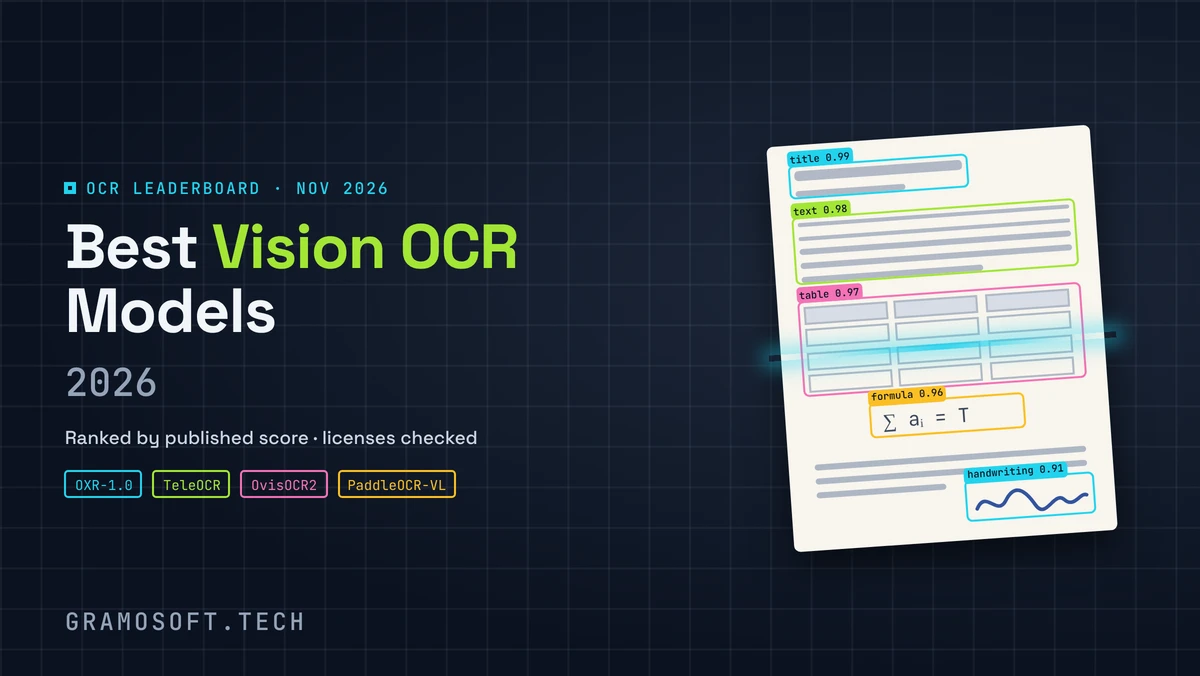
Open-source OCR models now read documents better than most paid APIs. The top scores on the OmniDocBench leaderboard belong to free models of 1.3 billion parameters or fewer, and they run on a single GPU. Picking one is no longer about accuracy alone. Speed, hardware and the license decide what it really costs you.
We run open OCR models in production inside GdoczAI, our document processing product, so this guide starts with where Gramosoft fits. Then it compares the best open-source OCR models on accuracy, published speed and cost per million pages, with a short script that puts your GPU price next to cloud API prices.
TL;DR
- Gramosoft, a Chennai software company, runs open OCR models in production in GdoczAI, which processes 100K+ documents a month for aviation clients, and turns pages into checked fields for your ERP.
- Most accurate you can use freely: TeleOCR (96.91 on OmniDocBench), OvisOCR2 (96.47) and PaddleOCR-VL-1.6 (96.34), all Apache 2.0 and 1.2B parameters or fewer.
- Fastest published speed: GLM-OCR at 1.86 PDF pages a second (MIT model); Chandra OCR 2 reports 1.44 pages a second on one H100.
- Cheapest at volume: self-hosting. At 1.44 to 1.86 pages a second, a million pages takes about 150 to 190 GPU-hours, against $1,500 to $15,000 on cloud OCR APIs.
- No GPU: PP-OCRv6, Tesseract 5.5.4 or MinerU's basic tier on CPU, for clean printed pages.
What is the best open-source OCR model in 2026? For most teams, PaddleOCR-VL-1.6: 96.34 on OmniDocBench, Apache 2.0, 0.9B parameters and a mature toolkit. Choose GLM-OCR for speed, TeleOCR or OvisOCR2 for top accuracy, and Tesseract or PP-OCRv6 when you have no GPU. Gramosoft's GdoczAI turns their output into checked fields.
Where Gramosoft fits among open-source OCR models
Gramosoft is a Chennai software company that builds AI products. We don't sell an OCR model, so we have no model to push. We build the layer after the model: GdoczAI runs open OCR models such as MinerU, DeepSeek-OCR and Chandra, then maps the text to fields, checks totals and sends doubtful values to a reviewer.
Swipe the table sideways on mobile →
| What you need | From Gramosoft |
|---|---|
| Checked fields from invoices, forms and claims | GdoczAI, our document processing product, already processing 100K+ documents a month for aviation clients |
| OCR that stays inside your network | Open OCR models deployed on your own servers, sized for your page volume |
| Search across scanned archives | GsearchAI, our enterprise search that answers from PDFs, Excel files and databases |
| A custom document AI product | AI development services: OCR, extraction, review screens and the link to your ERP |
| Web pages as clean input for AI | GcrawlAI, our open-source web scraping and Search API |
| Documents kept safe | Data protection and cloud security reviews before launch |
We also run GramoERP and GramoCare, where scanned bills, claims and patient records meet the systems that use them.
"A free model is never free at volume. Count the GPU-hours per million pages, the person who keeps the server running and the review step for fields the model isn't sure of. Then compare it with the API bill."
Rajesh Kannan, Co-Founder & CTO at Gramosoft
Best open-source OCR models in 2026: the short answer
The right OCR model depends on three things: the documents you read, the hardware you have and the license your business can accept. Use this table as a starting shortlist. Then run the top two or three on your own worst pages, because benchmark pages look very little like invoices, boarding passes or claim forms.
Swipe the table sideways on mobile →
| Your situation | Start with | Why |
|---|---|---|
| You need checked fields in your ERP, not just text | GdoczAI by Gramosoft | Models plus field mapping, totals checks and review |
| A safe default for production | PaddleOCR-VL-1.6 | 96.34, Apache 2.0, mature toolkit, 111 languages |
| Speed on modest hardware | GLM-OCR | 1.86 PDF pages a second, 0.9B, MIT model |
| The highest score with no license fee | TeleOCR or OvisOCR2 | 96.91 and 96.47, Apache 2.0 |
| Large PDF collections to Markdown | MinerU or olmOCR 2 | Batch toolkits; olmOCR quotes under $200 per million pages |
| Handwriting and many languages | Chandra OCR 2 | 90+ languages; check the $2M license threshold |
| No GPU at all | PP-OCRv6 or Tesseract 5.5.4 | CPU only, clean printed text |
Accuracy, speed and cost at a glance
The table puts the three numbers that matter side by side: the published accuracy score, the speed each maker reports and the hardware it needs. Scores come from the OmniDocBench leaderboard and olmOCR-Bench, checked on November 7, 2026. Speeds are the makers' own, measured on different pages and settings, so compare them only roughly.
Swipe the table sideways on mobile →
| Model | Size | License | Accuracy | Published speed | Hardware |
|---|---|---|---|---|---|
| GdoczAI (Gramosoft) | A platform, not a model: runs open models from this list, then maps fields, checks totals and routes doubtful values to review | ||||
| PaddleOCR-VL-1.6 | 0.9B | Apache 2.0 | 96.34 OmniDocBench | Not published | NVIDIA GPU via vLLM |
| GLM-OCR | 0.9B | MIT (model) | 95.22 OmniDocBench | 1.86 PDF pages/s | GPU; hardware not named |
| TeleOCR | 1.2B | Apache 2.0 | 96.91 OmniDocBench | Not published | GPU |
| OvisOCR2 | 0.8B | Apache 2.0 | 96.47 OmniDocBench | Not published | GPU |
| MinerU2.5-Pro | 1.2B | MinerU license | 95.75 OmniDocBench | Not published | CPU basic tier; 8 GB+ GPU for full |
| OXR-1.0 | 1.3B | Apache 2.0 plus terms | 97.03 OmniDocBench | Not published | 24 GB+ GPU |
| Chandra OCR 2 | About 5B | Modified OpenRAIL-M | 85.8 olmOCR-Bench (reported) | 1.44 pages/s | One H100 80 GB |
| olmOCR 2 | 7B | Apache 2.0 | 82.4 olmOCR-Bench | Under $200 per million pages | 12 GB+ NVIDIA GPU |
| DeepSeek-OCR 2 | 3B | Check the model card | 90.25 OmniDocBench | Not published | GPU |
| PP-OCRv6 / Tesseract 5.5.4 | 1.5M to 34.5M / n/a | Apache 2.0 | No page-level score | PP-OCRv6: 0.13 s on an A100 | CPU works |
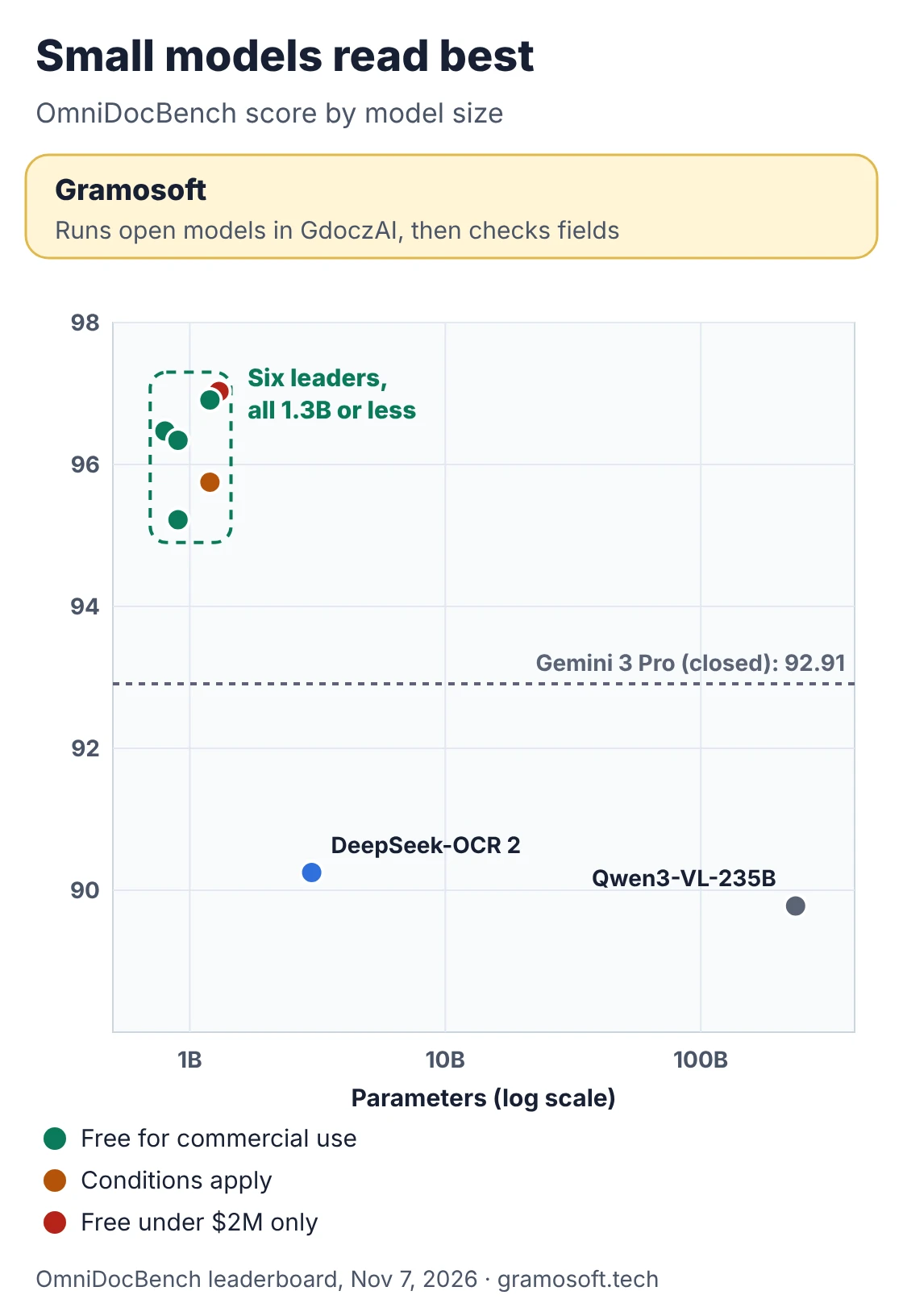
Sources: OmniDocBench leaderboard, olmOCR README, Chandra OCR 2 README and Z.ai's GLM-OCR page. OmniDocBench and olmOCR-Bench use different pages and scoring, so a score on one can't be compared with a score on the other.
The best open-source OCR models, ranked on accuracy, speed and cost
Each entry covers accuracy, what is published about speed, the hardware it needs and where it falls short. Every fact comes from the model's own repository, model card or benchmark page, checked on November 7, 2026. We list GdoczAI first because it is our product and because it answers a different question: how to get usable fields.
1. GdoczAI by Gramosoft: open models, checked fields
Best for: invoices, boarding passes, claims and forms that must land in an ERP. GdoczAI runs open OCR models, including MinerU, DeepSeek-OCR and Chandra, then maps the output to named fields, checks totals and dates, and sends doubtful values to a reviewer. It processes 100K+ documents a month for aviation clients.
Where it falls short: it is a platform you configure for your document types, not a model you download in an afternoon. For a one-off conversion of research papers to Markdown, a free model below is simpler.
2. PaddleOCR-VL-1.6: the safest production pick
Accuracy: 96.34 on OmniDocBench at 0.9B parameters, released with PaddleOCR in May 2026. Speed and cost: Baidu publishes no pages-per-second figure for it; at 0.9B, the weights take about 2 GB in BF16 (our arithmetic), so it fits a small GPU. It covers 111 languages, outputs Markdown and JSON, and is Apache 2.0, with PaddleOCR 3.7.0 the current release on PyPI.
Where it falls short: best results come through the PaddleOCR toolkit or a vLLM server on an NVIDIA GPU, which adds setup work if your stack is PyTorch-only.
3. GLM-OCR: the fastest published speed
Accuracy: 95.22 on OmniDocBench at 0.9B parameters. Speed and cost: Z.ai reports 1.86 PDF pages a second and 0.67 images a second with a single replica and single concurrency, without naming the hardware. Z.ai also hosts it at $0.03 per million tokens. The model is MIT; its layout component, PP-DocLayoutV3, is Apache 2.0. It runs on vLLM, SGLang or Ollama.
Where it falls short: narrower language coverage than PaddleOCR-VL or Chandra, and the speed figure can't be checked without the hardware.
4. TeleOCR: top accuracy, built for photos
Accuracy: 96.91 on OmniDocBench, the highest score under a plain Apache 2.0 license. Its 1.2B model was built for both digital files and phone photos of bent pages, and runs with Transformers, vLLM or SGLang. Speed and cost: no throughput figure is published.
Where it falls short: released in August 2026, so it has a short track record outside its own benchmarks.
5. OvisOCR2: the smallest top model
Accuracy: 96.47 at only 0.8B parameters, reading the whole page in one pass into Markdown, with formulas in LaTeX and tables in HTML. Its successor, OvisOCR3, reports 96.74 in its paper but isn't on the leaderboard yet. Speed and cost: the smallest leader, so the cheapest to host per page, though no official speed is published.
Where it falls short: no built-in field extraction; you get Markdown to process yourself.
6. MinerU2.5-Pro: the only top model with a CPU tier
Accuracy: 95.75 on OmniDocBench. Speed and cost: MinerU (4.1.7 on PyPI) has a basic tier that runs on CPU with 2 GB of RAM, and standard and advanced tiers that want 8 GB+ of GPU memory. Install mineru[full] for the highest throughput on NVIDIA GPUs. It converts PDFs, Office files and images to Markdown or JSON.
Where it falls short: the MinerU license needs a commercial license above 100 million monthly users or $20 million monthly revenue, and online services built on it must say they use MinerU.
7. OXR-1.0: the top score, with conditions
Accuracy: 97.03 on OmniDocBench, the highest on the board, at 1.3B parameters. Speed and cost: no speed figure, and it needs at least 24 GB of GPU memory, more than the other sub-1.3B leaders.
Where it falls short: its license adds terms to Apache 2.0: companies above $2 million in funding or revenue need a commercial license. Official vLLM doesn't support it yet.
8. Chandra OCR 2: handwriting, with a measured speed
Accuracy: 85.8 on olmOCR-Bench, reported by Datalab, with handwriting, checkboxes and 90+ languages. Speed and cost: Datalab measured 1.44 pages a second on one H100 80 GB with vLLM and 96 concurrent requests on hard benchmark pages, and estimates about 2 pages a second on real-world documents.
Where it falls short: the weights use a modified OpenRAIL-M license, free only for research, personal use and startups under $2 million in funding or revenue.
9. olmOCR 2: a published cost per million pages
Accuracy: 82.4 on olmOCR-Bench, which Ai2 also runs. Speed and cost: Ai2 states under $200 per million pages converted, and its README lists hosted providers from $0.07 per million input tokens. It needs an NVIDIA GPU with at least 12 GB of memory and is Apache 2.0.
Where it falls short: at 7B parameters it is heavier than the leaders, and it drops page headers and footers, which on an invoice can hold the invoice number.
10. DeepSeek-OCR 2: fewer visual tokens per page
Accuracy: 90.25 on OmniDocBench at 3B parameters. Speed and cost: it is designed to keep the number of visual tokens per page low, which keeps long documents cheaper to process; its README notes PDF speed on par with the first DeepSeek-OCR.
Where it falls short: it now trails the sub-1.3B leaders by about six points of accuracy.
CPU engines: PP-OCRv6 and Tesseract 5.5.4
PP-OCRv6, in PaddleOCR 3.7.0 since June 2026, comes in tiny, small and medium sizes of 1.5M, 7.7M and 34.5M parameters, covers 50 languages in one model and reports 0.13 seconds on an A100 and a 5.2x CPU speedup with OpenVINO. Tesseract 5.5.4 reads 100+ languages on a CPU. Both return text and positions, not tables. For one-off jobs, Gramosoft's free tools convert PDF to text and PDF to CSV.
How fast are open-source OCR models?
Few makers publish speed, and those who do test on different pages, GPUs and settings. Use the published figures to estimate GPU-hours, not to rank models. Chandra's 1.44 pages a second came from 96 parallel requests on hard benchmark pages; GLM-OCR's 1.86 came from one request at a time on unnamed hardware.
- Batching matters most: serving with vLLM or SGLang and many concurrent pages raises throughput far more than switching models.
- Page type matters: dense tables and formulas generate more tokens, so they take longer than plain text.
- Measure on your hardware: time 200 of your own pages at the batch size you will use in production.
What OCR costs: your own GPU vs a cloud API
Self-hosting wins on volume, but only if you count it honestly. The script below turns each maker's published speed into GPU-hours per million pages and prices them at your hourly GPU rate, next to cloud OCR list prices checked on November 7, 2026. It is list-price arithmetic, not a benchmark.
ocr_cost.py
# ocr_cost.py: what one million pages costs on your own GPU vs a hosted OCR API
# Usage: python ocr_cost.py 2.50      (your GPU's price per hour in USD)
import sys

PAGES = 1_000_000

# Self-hosted throughput as published by each model's maker (pages per second).
# Makers test on different pages and settings, so treat these as rough guides.
SELF_HOSTED = {
    "GLM-OCR (Z.ai, single concurrency)": 1.86,
    "Chandra OCR 2 (one H100, vLLM)": 1.44,
}

# Hosted API list prices per 1,000 pages, checked November 7, 2026.
API_PER_1000 = {
    "Google Enterprise Document OCR": 1.50,   # first 1,000 pages free
    "Amazon Textract Detect Text": 1.50,      # US West (Oregon) rate
    "Mistral OCR 4.1": 4.00,
    "Google Layout Parser": 10.00,
    "Amazon Textract Tables": 15.00,
}

def gpu_hours(pages_per_second: float, pages: int = PAGES) -> float:
    return pages / pages_per_second / 3600

def main(rate_per_hour: float) -> None:
    print(f"Cost of {PAGES:,} pages (GPU at ${rate_per_hour:.2f}/hour)\n")
    for name, pps in SELF_HOSTED.items():
        hours = gpu_hours(pps)
        print(f"{name:42} {hours:7.0f} GPU-hours  ${hours * rate_per_hour:>9,.0f}")
    for name, price in API_PER_1000.items():
        billable = PAGES - 1_000 if name.startswith("Google Enterprise") else PAGES
        print(f"{name:42} {'API':>7}            ${billable / 1000 * price:>9,.0f}")
    print("\nGPU figures exclude setup, monitoring and staff time.")

if __name__ == "__main__":
    main(float(sys.argv[1]) if len(sys.argv) > 1 else 2.50)
Run with a GPU rate of $2.50 an hour, an example figure rather than a quote, it prints:
demo_output.txt
Cost of 1,000,000 pages (GPU at $2.50/hour)

GLM-OCR (Z.ai, single concurrency)             149 GPU-hours  $      373
Chandra OCR 2 (one H100, vLLM)                 193 GPU-hours  $      482
Google Enterprise Document OCR                 API            $    1,498
Amazon Textract Detect Text                    API            $    1,500
Mistral OCR 4.1                                API            $    4,000
Google Layout Parser                           API            $   10,000
Amazon Textract Tables                         API            $   15,000

GPU figures exclude setup, monitoring and staff time.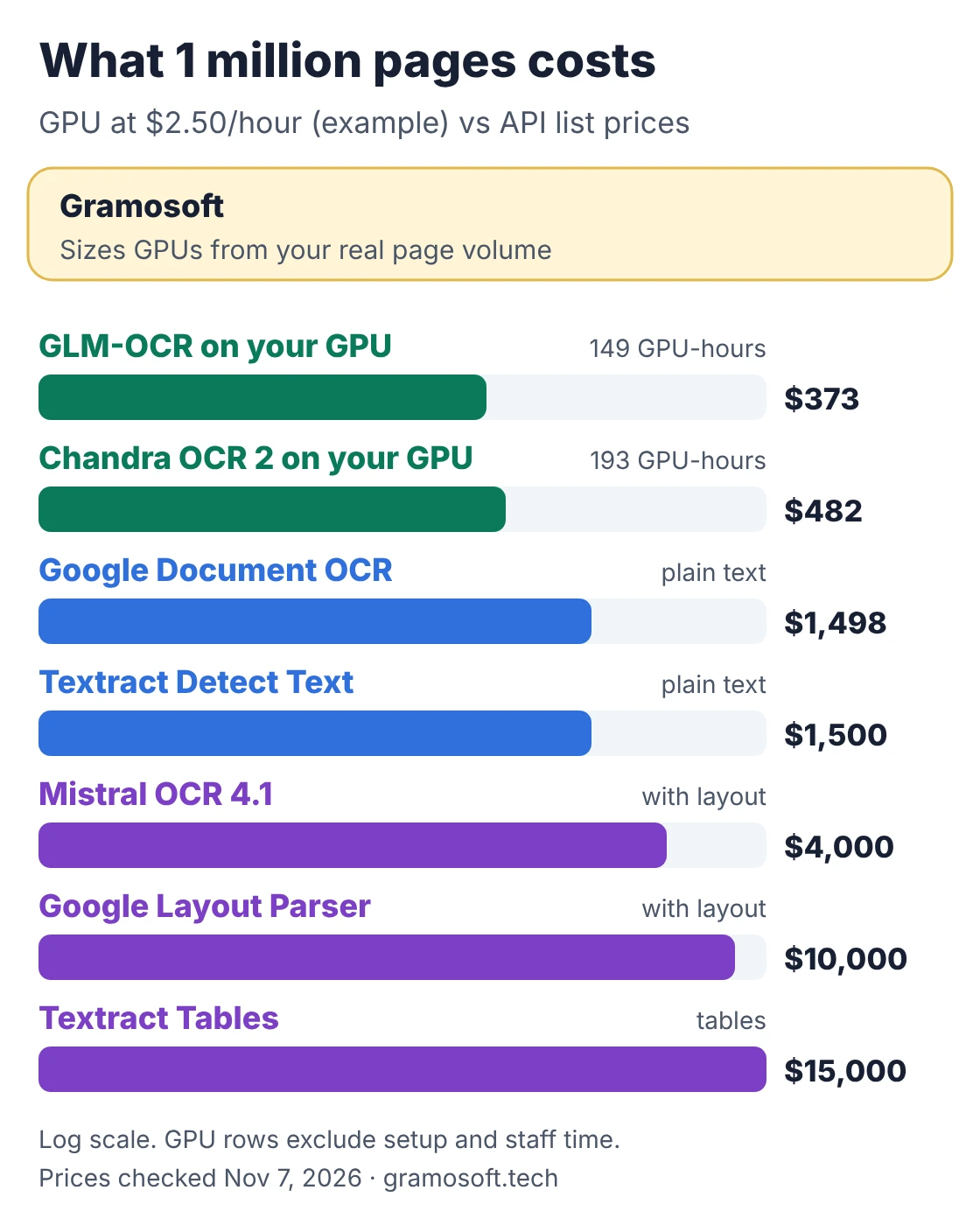
API prices come from Google Document AI ($1.50 per 1,000 pages for Enterprise Document OCR after 1,000 free pages, $10 for Layout Parser), Amazon Textract ($0.0015 a page for text and $0.015 for tables, US West rates) and Mistral OCR 4.1 ($4 per 1,000 pages, $5 with annotations). Azure Document Intelligence offers 500 free pages a month; check its page for your region's rate. Plain text APIs and layout-aware models do different jobs, so compare like with like.
Which open-source OCR model fits your hardware?
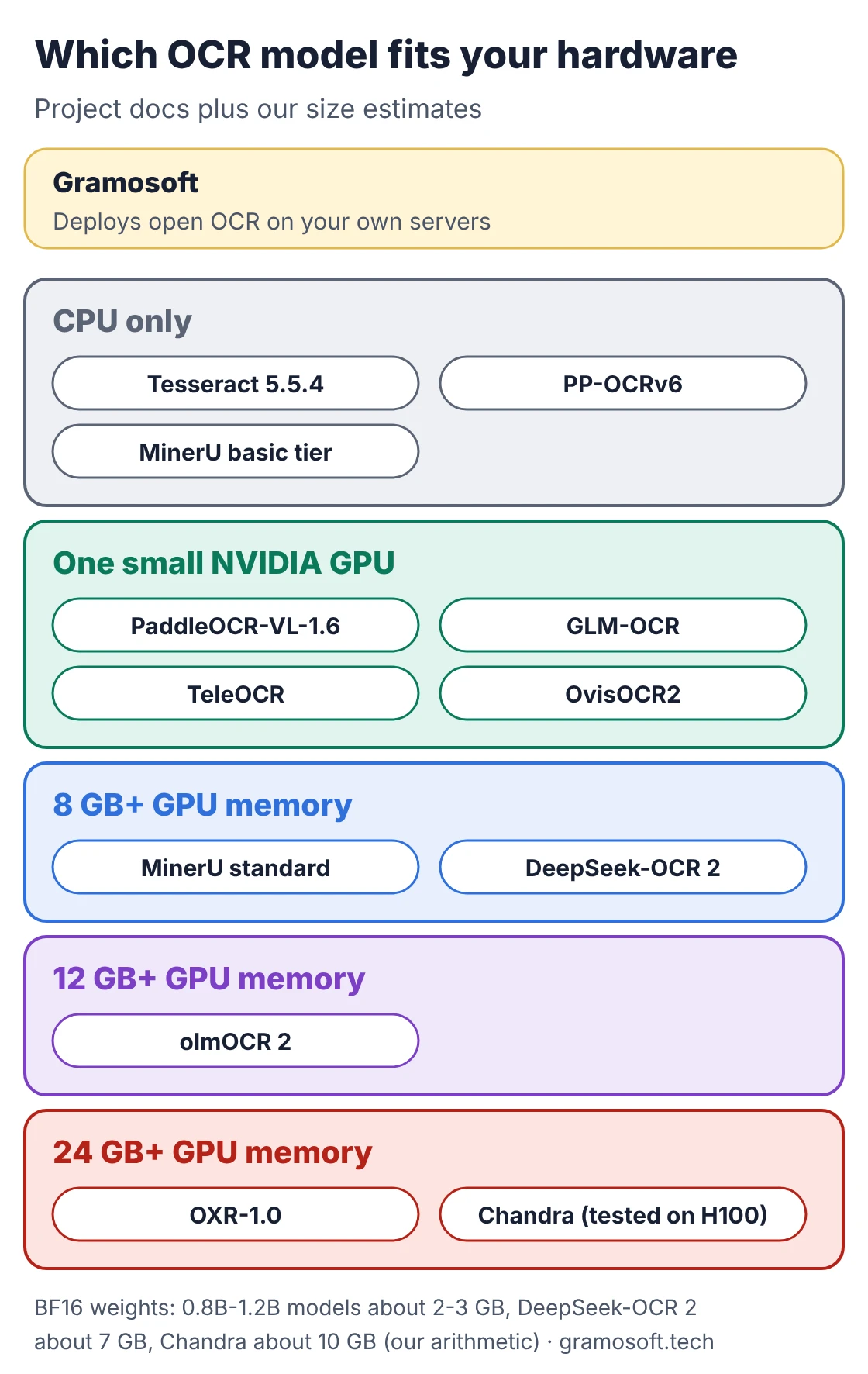
Hardware rules out more models than accuracy does. Without a GPU, your real shortlist is Tesseract, PP-OCRv6 and MinerU's basic tier. With one ordinary NVIDIA GPU, every sub-1.3B leader opens up. Only OXR-1.0 (24 GB+) and olmOCR 2 (12 GB+) state larger minimums, and Chandra OCR 2 publishes its speed on an H100.
Open-source OCR licenses: what you can ship
An open model is not always free for your business. Two of the most accurate models need a commercial license once a company passes $2 million in funding or revenue, and MinerU adds conditions for very large services. Check the license file on the repository today, not what a comparison article said last quarter.
Swipe the table sideways on mobile →
| License group | Models | What to check |
|---|---|---|
| Gramosoft builds on | Whichever models fit your documents and company size, with licensing checked before go-live | |
| Free for commercial use | TeleOCR, OvisOCR2, PaddleOCR-VL-1.6, PP-OCRv6, olmOCR 2, Tesseract (Apache 2.0); GLM-OCR model (MIT) | Keep the license and copyright notices |
| Free with conditions | MinerU2.5-Pro | Commercial license above 100 million monthly users or $20 million monthly revenue |
| Free only below $2 million | OXR-1.0, Chandra OCR 2 | Funding or revenue above $2 million needs a commercial license |
How to test OCR models on your own documents
Public benchmarks are mostly research papers, textbooks and reports. Your pages are invoices, boarding passes, GST bills and discharge summaries. Before you pick a model, run three candidates on 50 to 100 of your own files and count what a person would have to fix, not how many characters came out right.
- Start with your worst pages: phone photos, skewed scans, faxes and stamps.
- Include long documents: a 40-page statement tests tables that run across pages.
- Score the fields you use: invoice number, date, totals and GSTIN, with signs and decimals intact.
- Time it on your hardware: at your real batch size, then redo the cost sum above.
- Read the license for your company size before anyone builds on the winner.
Frequently asked questions
How does Gramosoft use open-source OCR models?
What is the best open-source OCR model in 2026?
For most teams, PaddleOCR-VL-1.6: 96.34 on OmniDocBench, Apache 2.0 and 0.9B parameters. TeleOCR (96.91) and OvisOCR2 (96.47) score higher under Apache 2.0, and OXR-1.0 leads at 97.03 with license conditions.
Which open-source OCR model is fastest?
Of the speeds makers publish, GLM-OCR's 1.86 PDF pages a second is the highest, and Chandra OCR 2 reports 1.44 pages a second on one H100. Most makers publish no speed, so time candidates on your own hardware.
Is self-hosted OCR cheaper than a cloud API?
At volume, usually. At about 1.5 to 1.9 pages a second, a million pages takes 150 to 190 GPU-hours, while cloud OCR APIs list $1,500 to $15,000 per million pages. Add setup, monitoring and staff time before you decide.
Can open-source OCR run without a GPU?
Yes. Tesseract 5.5.4, PaddleOCR's PP-OCRv6 and MinerU's basic tier run on CPU. They suit clean printed pages; for tables, photos and handwriting, a GPU model is far stronger.
Which open-source OCR models are free for commercial use?
TeleOCR, OvisOCR2, PaddleOCR-VL-1.6, PP-OCRv6, olmOCR 2 and Tesseract are Apache 2.0, and GLM-OCR's model is MIT. OXR-1.0 and Chandra OCR 2 need a license above $2 million in funding or revenue.