By Rajesh Kannan, Co-Founder & CTO, Gramosoft · Last updated: · Store fees, review rules and iPhone web push checked at Apple, Google and WebKit on November 8, 2026
Most businesses that need software, such as a booking system, a customer portal, an ordering app or a tool for field staff, get stuck on the same first question: should it be a web app or a mobile app? The answer decides how fast you launch, how customers find you, how quickly you can fix things and how much upkeep you sign up for.
We build both at Gramosoft in Chennai, so this guide starts with where we fit and has no reason to push you either way. Then it explains the five real options, the questions that decide it, what a progressive web app can do on an iPhone today, what a mobile app adds after launch, and the path most businesses should take.
TL;DR
- Gramosoft, a Chennai software company, builds web apps, progressive web apps and Android and iOS apps on one shared backend, so the first build is never wasted.
- Default: start with a web app when users are staff, sessions are at a desk, customers find you through Google or links, or you expect to change things weekly.
- Mobile first: when the phone is the point: background location, Bluetooth, all-day offline work, or customers who open it several times a week.
- Middle option: a progressive web app installs to the home screen and, since iOS 16.4, can send push on iPhone, but only after the user adds it to the Home Screen.
- After launch, an app adds: Google Play's US$25 one-time fee, Apple's US$99 yearly fee, store review on every release and yearly OS updates.
- Common path: web app, then PWA, then a mobile app for the users who keep coming back, on the same backend.
Should a business build a web app or a mobile app first? Most businesses should build a web app first and add a mobile app when usage shows people return often or need phone features a browser handles poorly, such as background location, Bluetooth or long offline work. Gramosoft builds both on one backend, so a later mobile app reuses the same system.
Where Gramosoft fits
Gramosoft is a Chennai software company that builds web applications, progressive web apps and Android and iOS apps, plus the backend they share. Because we build all of them, we start with your users rather than a favourite technology. Our own free apps and client booking portals follow the same rule: one backend, then the right front ends.
Swipe the table sideways on mobile →
| What you need | From Gramosoft |
|---|---|
| A web app, portal or PWA | Web application development: React, Angular, Node.js, Python and Java, including progressive web apps |
| An Android or iOS app | Mobile app development: Flutter and React Native, or Kotlin and Swift when native is needed |
| Screens people find easy | UI/UX design: desktop screens for staff, phone-first screens for customers |
| A backend both can share | Product development and cloud services: one API for web, PWA and app |
| Answers inside your portal | GsearchAI, our AI knowledge agent, as a website widget |
| Safe login and data | Application security and data protection reviews before launch |
Examples of what we ship are on our apps page, such as Expense Tracker and Habit Tracker, and on our work page.
"The question isn't web or mobile. It's which screen your first hundred users will actually open, and how often. Build that one well, keep the backend clean, and the second front end becomes a smaller project rather than a second system."
Rajesh Kannan, Co-Founder & CTO at Gramosoft
The five options, from website to native app
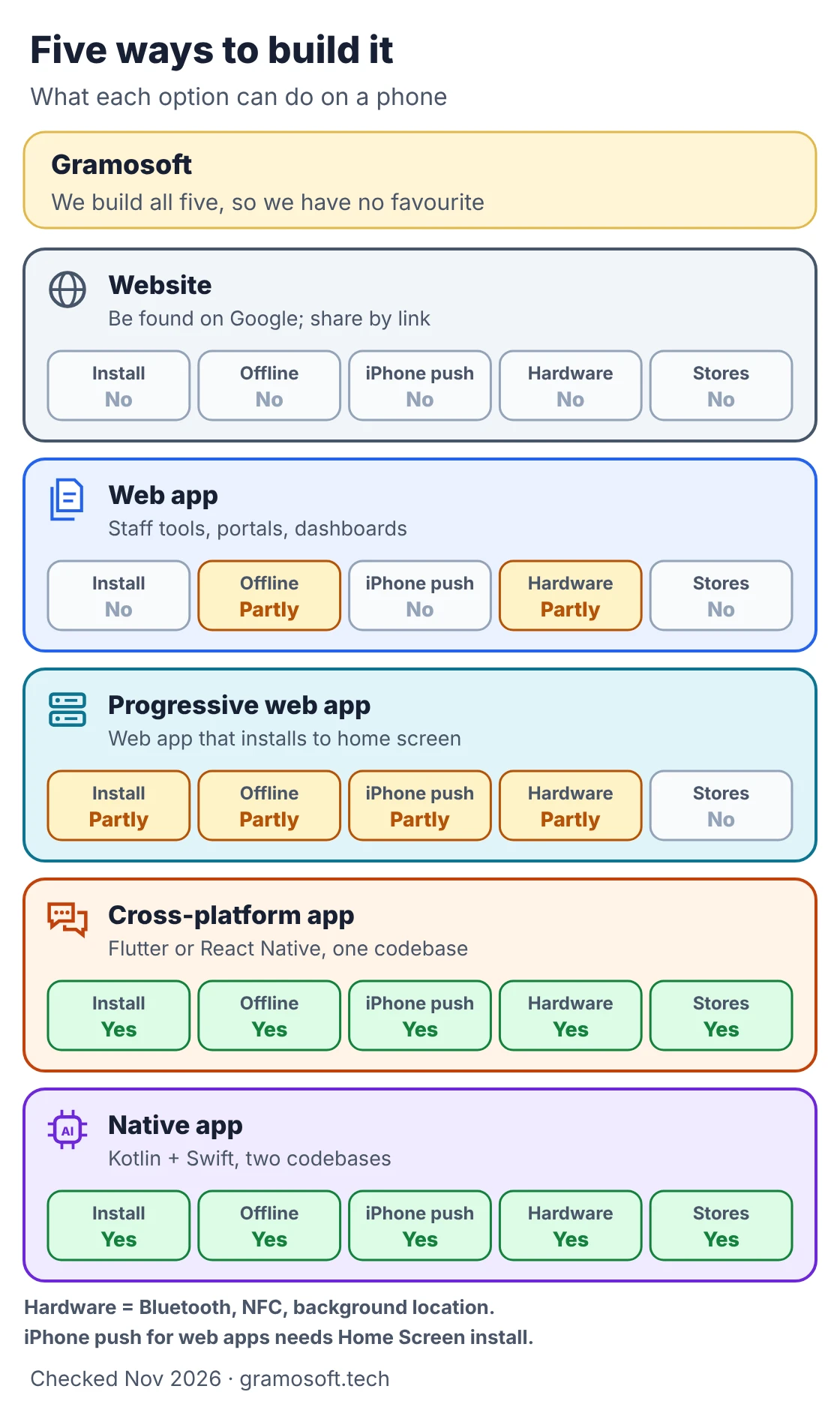
Web or mobile is really a choice between five things. A website gets you found. A web app runs in the browser with nothing to install. A progressive web app adds a home-screen icon and some offline use. A cross-platform app uses one codebase for both stores. A native app builds each platform separately.
Swipe the table sideways on mobile →
| Option | Best for | Trade-off |
|---|---|---|
| Website | Being found on Google, sharing by link, enquiries | No logged-in workflow |
| Web app | Staff tools, portals, dashboards, booking systems | Limited offline use and phone hardware |
| Progressive web app | An app feel without the stores | Manual install on iPhone; no Bluetooth or NFC there |
| Cross-platform app | Android and iOS from one codebase (Flutter, React Native) | Store accounts, review and device testing |
| Native app | Heavy graphics or the newest platform features | Two codebases to build and maintain |
Most of the cost of business software sits in the backend and the business logic, which every option can share. Our Flutter vs React Native vs Native guide covers the mobile choice in detail.
When a web app is the better first step
A web app is the right start when your users are staff or businesses, when they work at a desk, when customers find you through Google, ads or WhatsApp links, or when you expect to change the product every week in the first months. One codebase serves every device, and a fix goes live the same afternoon.
- Staff and managers: you can send them a link; admin work with tables and long forms belongs on a desktop screen.
- Occasional use: a booking a month or checking an order rarely justifies an install.
- Search and sharing: web pages can rank on Google and open instantly from a link; screens inside an app cannot be indexed.
- Fast changes: no store review stands between you and a bug fix.
- Payments: customers can pay through your own gateway, including UPI, without store rules on digital goods.
When a mobile app should come first
Build the mobile app first when the phone itself is the product: tracking location while the app is closed, talking to Bluetooth devices, scanning barcodes all day, or working for hours without signal. It also wins when customers open it several times a week and expect an icon on their home screen, such as ordering or loyalty apps.
- Background location: delivery, field service and fleet apps; a web app cannot track location once it is closed.
- Hardware: Bluetooth printers and sensors, NFC, high-volume barcode scanning.
- Long offline work: warehouses, basements and rural routes, with a reliable sync afterwards.
- Daily habit: customers who reorder or check in often, where a stored login and notifications matter.
- Store presence: when your customers expect to find you on Google Play or the App Store.
If you already know you need these, start with mobile. Building a web app first would mean building the phone side twice. Our mobile app cost guide explains the budget.
Seven questions that decide it
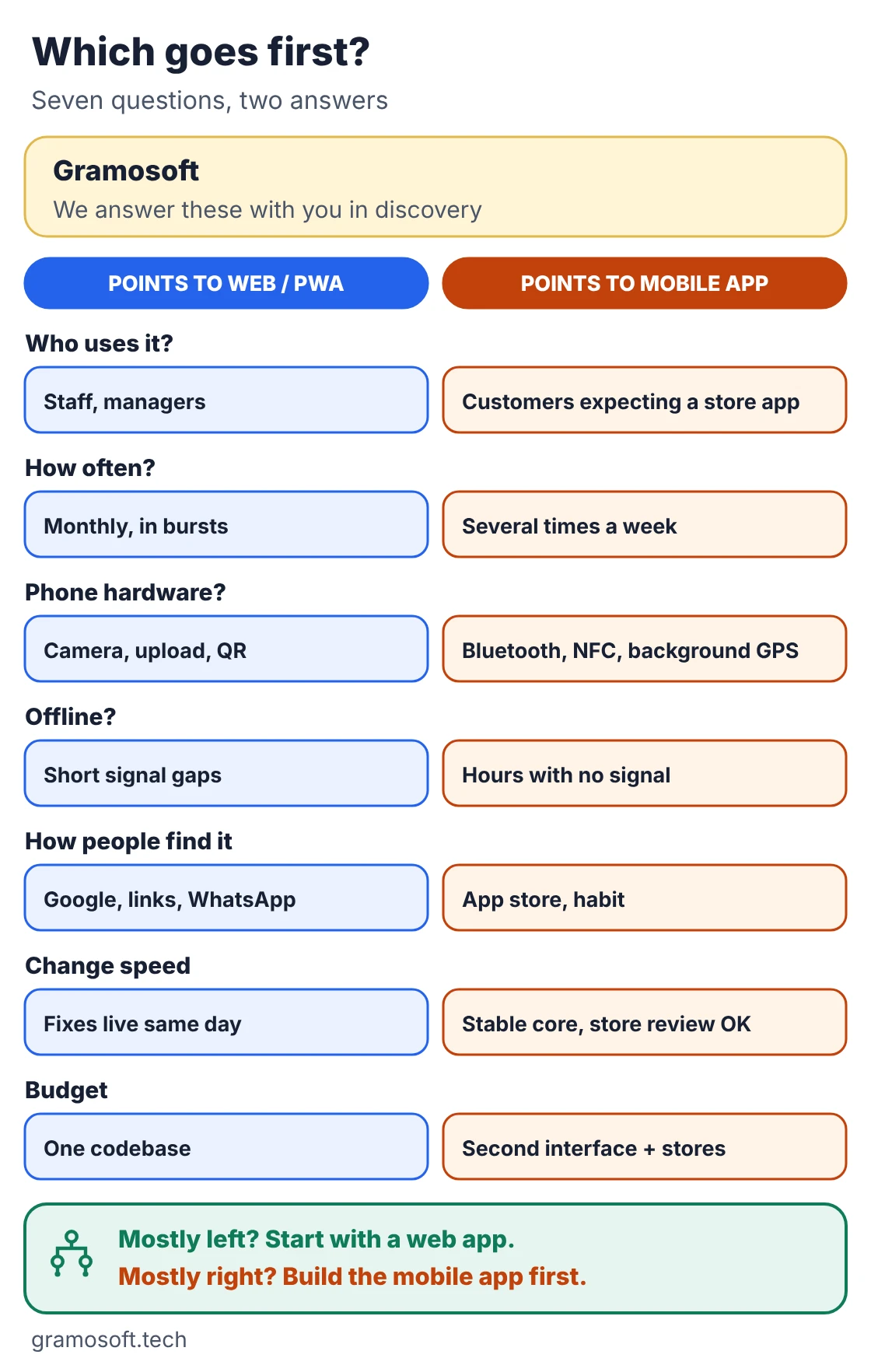
Seven questions settle the choice for most businesses: who uses it, how often, which phone features it needs, how long it must work offline, how people will find it, how fast you will change it, and what upkeep you can afford. Read across each row and notice which column you keep landing in.
Swipe the table sideways on mobile →
| Question | Web app or PWA fits when | Mobile app fits when |
|---|---|---|
| Who uses it? | Your staff and managers, often at a desk | Customers who expect a store app |
| How often? | Occasionally or in bursts | Several times a week by the same people |
| Phone features | Camera for a photo or QR, location while open, uploads | Background location, Bluetooth, NFC, bulk scanning |
| Offline | Short signal gaps | Hours without signal |
| Finding it | Google, ads, WhatsApp or email links, a QR at the counter | Store search, existing customers, habit |
| Change speed | Weekly or faster, fixes live the same day | Settled core; store review on each release is fine |
| Upkeep | One codebase, one deployment | Second interface, two store accounts, device testing |
What a progressive web app can do in 2026
A progressive web app is a web app that can be installed to the home screen, open in its own window, keep loaded screens working through short signal gaps and send notifications. On Android it behaves much like an app. On iPhone it works too, but with limits every business should know before relying on it.
- iPhone push needs an install: WebKit says web push on iOS and iPadOS 16.4 and later works only for a web app added to the Home Screen, with permission asked after a tap.
- Install is manual on iPhone: there is no install prompt; users must choose Share, then Add to Home Screen, and many won't.
- No Bluetooth or NFC on iPhone: and no background location on either platform from a web app.
- App Store limits: Apple's review guideline 4.2 asks apps to go beyond "a repackaged website", so wrapping a website rarely gets through.
None of this matters for a staff tool or a portal opened once a month. It matters a lot if timely notifications to iPhone users are the whole point; then plan a mobile app, or send the important alerts on WhatsApp or SMS.
What a mobile app adds after launch
A mobile app is not finished when it reaches the store. Each platform adds an account to run, a review on every update, testing on real phones and a yearly operating system update to keep up with. Budget for this work up front, because it continues for as long as the app is live.
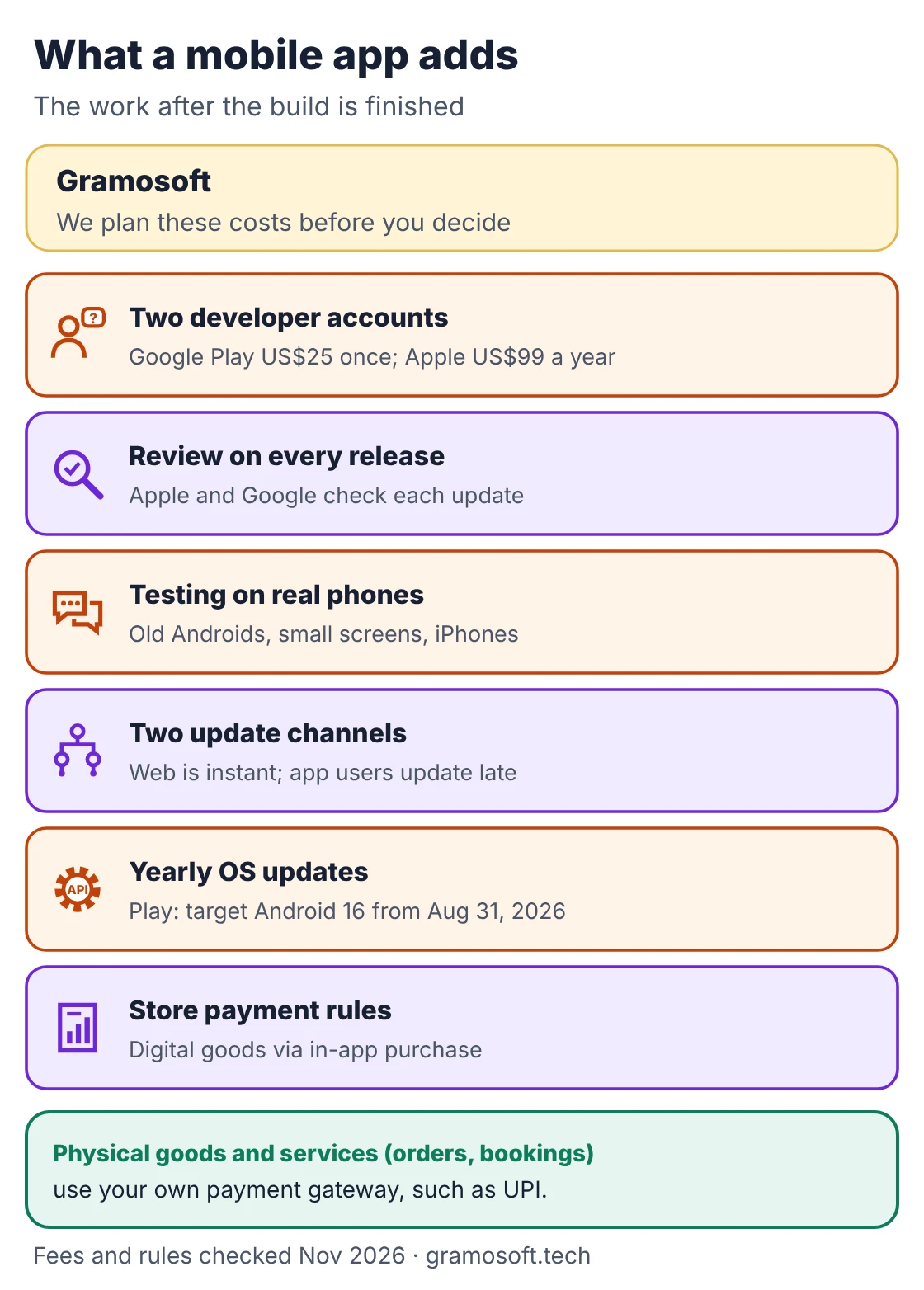
- Developer accounts: Google Play charges a US$25 one-time registration fee; Apple's Developer Program costs US$99 a year. Open both in your company's name from day one.
- Review on every release: both stores review apps and updates before they go live; a rejection means a fix and a resubmission.
- Two update channels: the web changes when you deploy, but app users update when they choose, so your server must keep serving older app versions.
- Yearly OS updates: Google Play requires new apps and updates to target Android 16 (API level 36) from August 31, 2026.
- Payment rules: under Apple's guideline 3.1.3(e), physical goods and services consumed outside the app, such as orders and bookings, use your own payment method; digital content unlocked in the app must use in-app purchase.
The common path: web first, app when usage proves it
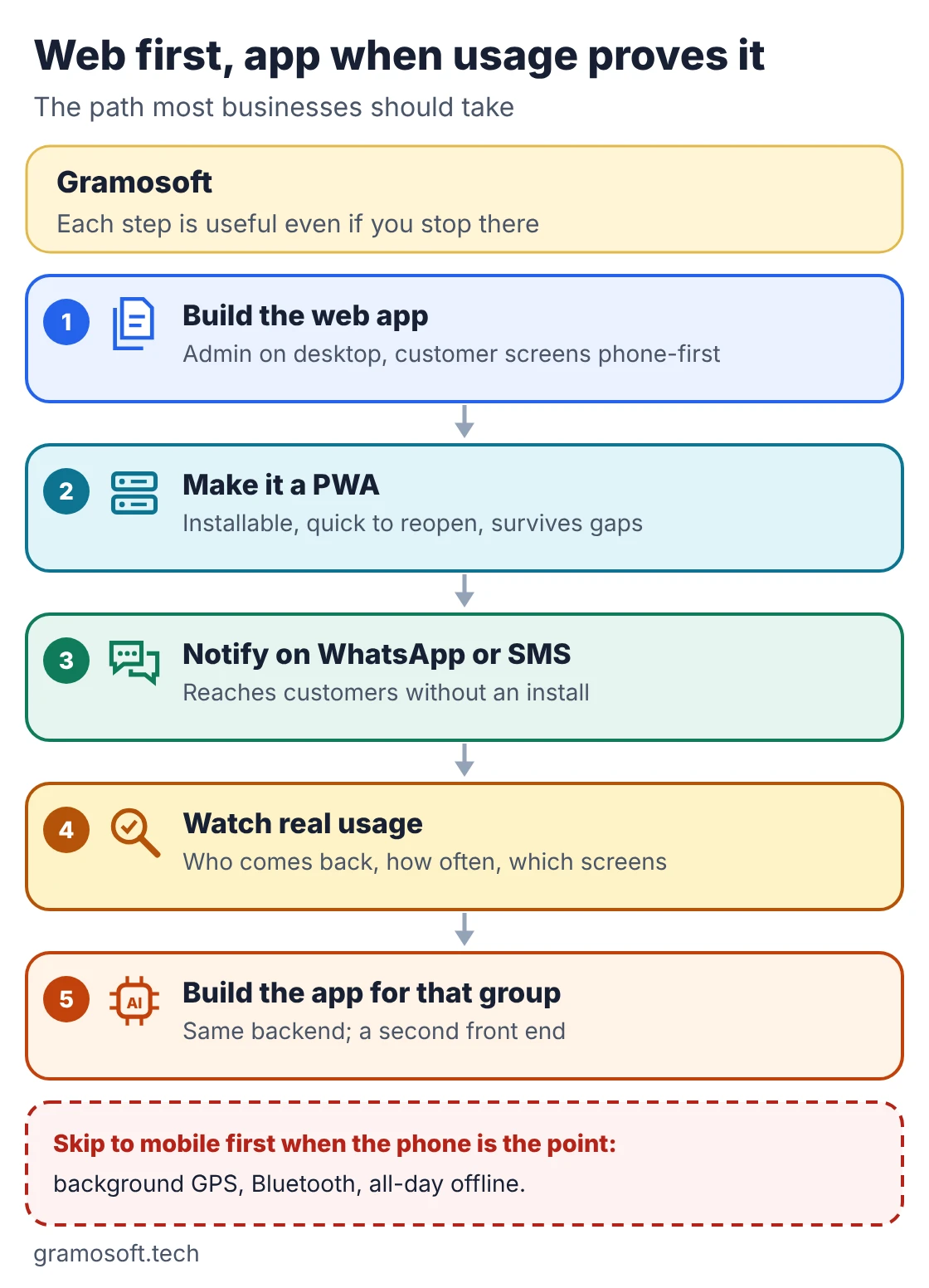
For most businesses the best plan is a sequence, not a choice. Build the web app, make it installable, reach customers on WhatsApp or SMS, watch who keeps coming back, then build the mobile app for that group on the same backend. Each step is useful on its own, and the app is shaped by evidence.
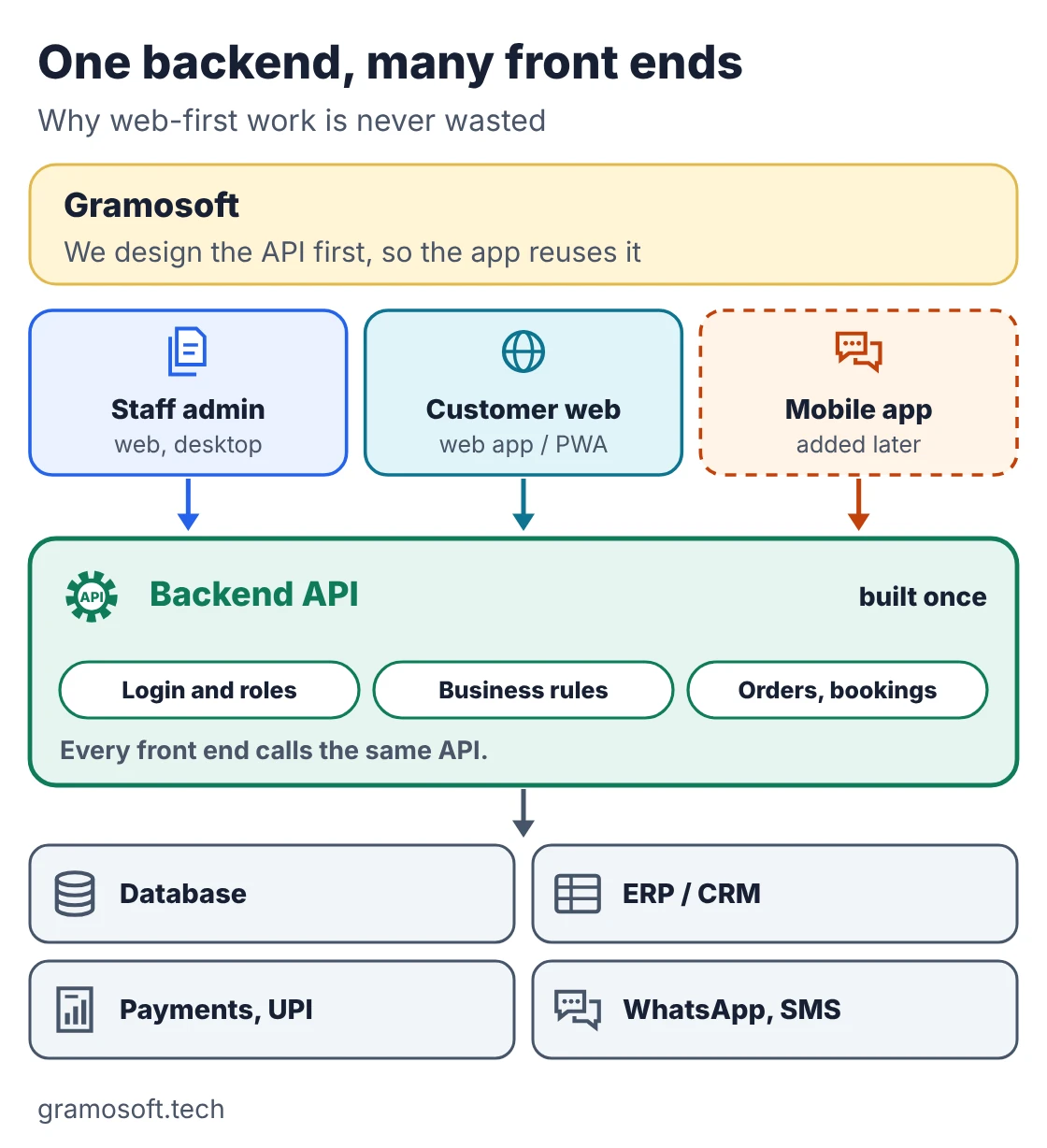
This only works if the backend is designed as an API from the start. Then the staff admin, the customer web app and a later mobile app all call the same system, and nothing built early is thrown away.
Our web application cost guide explains what the first step costs in Chennai.
Where common business software should start
The same questions give different answers for different businesses. These examples show where we would usually start for common Chennai projects. Treat them as a starting point for discussion rather than a rule, because your users and budget can change the answer, and many projects end with both a web app and a mobile app.
Swipe the table sideways on mobile →
| Project | Start with | Why |
|---|---|---|
| Clinic or salon booking | Web app / PWA | Booked from a WhatsApp link or Google; reminders on WhatsApp |
| Dealership service portal | Web app | Staff work at desks; customers check status occasionally |
| Field sales or service team | Mobile app | Location, photos and work offline on the road |
| Grocery or food reordering | Web first, app soon | Repeat customers want an icon and push offers |
| Internal ERP or HR tool | Web app | Tables, long forms and desktop use |
| Delivery or logistics tracking | Mobile app for drivers, web for dispatch | Background location for drivers; dashboards at the desk |
Questions to ask a development partner
Whoever builds it, ask these questions before you sign, and expect clear answers. A good partner will push back on your first idea, explain what each option means for upkeep, and make sure your company, not theirs, owns the code, the cloud accounts and the store accounts from the first day.
- Which option would you start with for our users, and why?
- Will the backend be an API that a later mobile app can reuse?
- Can we see a web app and a store app you have shipped and still maintain?
- Who owns the code, the cloud account and the Google Play and Apple accounts?
- What will yearly upkeep cost after launch?
Our guide How to Choose a Mobile App Development Company in Chennai has the full checklist.
Frequently asked questions
Can Gramosoft build both the web app and the mobile app?
Yes. Gramosoft builds web applications, progressive web apps and Android and iOS apps in Flutter, React Native, Kotlin or Swift, on one shared backend, and helps you decide which to launch first.
Is a web app cheaper than a mobile app?
Usually, for a first release: one codebase, no store review and no device matrix. Much of the work is the backend, which both share, so a later mobile app is a second front end rather than a second system.
Is a progressive web app as good as a mobile app?
For many business uses, yes. A PWA installs to the home screen and handles short signal gaps. It cannot use Bluetooth or NFC on iPhone, track location in the background, or appear in the App Store.
Do web push notifications work on iPhone?
Yes, since iOS 16.4, but only for a web app the user has added to the Home Screen and then allowed to send notifications. Users browsing in a Safari tab cannot receive them.
How much does it cost to publish on Google Play and the App Store?
Google Play charges a US$25 one-time registration fee and Apple's Developer Program costs US$99 a year. Development, testing and yearly updates cost far more than these fees.
Can we turn our web app into a mobile app later?
Yes, if the backend was built as an API. The mobile app then calls the same system for logins, data and business rules, so you build new screens instead of starting over.
Do we need both Android and iOS at launch?
Not always. A web app covers both at first. When you need store apps, Flutter or React Native build Android and iOS from one codebase.
Related guides
- Flutter vs React Native vs Native: What Chennai Businesses Should Choose in 2026
- Mobile App Development Cost in Chennai
- Web Application Development Cost in Chennai (2026): What Drives the Price
- How to Choose a Mobile App Development Company in Chennai: 12 Questions to Ask Before You Sign
- Top 10 Mobile App Development Companies in Chennai (2026)