By Rajesh Kannan, Co-Founder & CTO, Gramosoft · Last updated: · Rules and figures checked on November 11, 2026
An airline's back office is mostly reading. Finance reads supplier invoices against flight records and contracts. Revenue accounting reads fare rules to work out what a passenger is owed. Crew administration reads licences, medicals and passports to see who can fly next month. The rules are known. The reading is what eats the hours.
That reading is where AI now earns its place, provided the rules stay in code and a person keeps the decisions they sign today. This guide starts with how Gramosoft builds this for aviation clients. It then walks through invoices, refunds and crew documents one at a time, shows where AI stops and rules take over, and ends with a pilot you can run without risking the books.
TL;DR
- Gramosoft builds aviation back-office automation with GdoczAI reading the documents, rules in code doing the checks, and your team approving exceptions.
- Invoices: AI reads fuel, airport, handling and MRO invoices line by line; code matches each line to the operated flight and the contract rate.
- Refunds: AI reads the request and the fare rules; code calculates the amount; regulator clocks (14 working days under DGCA's 2026 rules) set the deadline.
- Crew documents: AI reads expiry dates from scans once; code tracks every date and warns before anything lapses.
- Start small: test on past cases with known answers, run in shadow mode, then go live only on the cases the system has earned.
How is AI used in the aviation back office? AI reads the invoices, refund requests and crew documents that staff currently key in by hand, and turns them into checked fields with the source line attached. Business rules in code then match invoices to flights and contracts, calculate refunds and track document expiry. People approve exceptions. Gramosoft builds this with its GdoczAI document AI.
Swipe the table sideways on mobile →
| Workflow | What AI reads | What code checks | What a person keeps |
|---|---|---|---|
| Gramosoft build | GdoczAI extracts every field with the line it came from | Your matching rules, tolerances and limits, versioned | Exceptions, approvals and sign-off |
| Supplier invoices | Line items, flight, station, quantity, price, tax | Flight operated, uplift matches, contract rate, duplicates | Disputes and payment approval |
| Refunds | The request, ticket coupons, fare rule text | Eligibility, penalty, refundable taxes, deadline | Waivers, goodwill and unusual fares |
| Crew documents | Licence, medical, passport, visa and training certificates | Expiry dates, alert windows, roster conflicts | Grounding or rostering decisions |
How Gramosoft automates aviation back-office documents
Gramosoft is a Chennai software company that builds document AI, RPA bots and AI agents, and aviation is one of our busiest areas. GdoczAI, our document AI, reads more than 100,000 documents a month for aviation clients. The pattern never changes: AI reads, rules check, and a person decides anything the rules can't settle.
- Reading: GdoczAI pulls fields and line items from PDFs, scans, photos and emails, and keeps a link from every value back to the line it came from.
- Checking: matching rules, tolerances, refund formulas and expiry windows live in tested code, not in a prompt, so the same input always gives the same result.
- Moving data: RPA bots and APIs post approved results to your ERP, reservation or crew system, and Power Automate routes approvals through Outlook and Teams.
- Finding answers: GsearchAI lets staff ask questions across contracts, fare rules and manuals, with the source page shown.
- Running it: AI development, cloud hosting in your account or ours, and data protection controls for passenger and crew data.
Our clients include Batik Air, GMAT, Sundaram Motors, VST Motors and RPS Hospital. See our work.
Where we fall short: we don't sell a packaged airline platform with a ready procure-to-pay or crew module you switch on. We build on your systems, so the first workflow needs a few weeks of rule-writing with your team. We connect to your reservation system and GDS through the interfaces you already have rather than replacing them. And we were incorporated in 2022, so our public track record is shorter than older aviation IT vendors'.
"In the back office, AI should do the reading and nothing it can't show its working for. The moment a model is deciding a refund amount on its own, you've built something no auditor will sign."
Rajesh Kannan, Co-Founder & CTO at Gramosoft
Why invoices, refunds and crew documents go first
These three workflows share the traits that make AI pay off quickly: high volume, inputs that arrive as documents or free text, rules that are already written down, and a person who already reviews the result. That combination means AI removes the reading and keying while the human check stays exactly where it is.
- Margins leave no slack: IATA's June 2026 outlook puts industry net profit at $23 billion on $1.165 trillion of revenue, a 2.0% margin, or about $4.50 per passenger. Hours spent re-keying documents come straight out of that.
- The data is the blocker, not the model: in SITA's 2025 Air Transport IT Insights, 49% of airlines named data integration and consistency as the main obstacle. Reading documents into clean, checked fields fixes part of that at the source.
- Each one has a clock: invoices have payment terms and early-payment discounts, refunds have regulator deadlines, and crew documents have expiry dates. Missing any of them costs money or grounds a crew member.
Automating supplier invoices: read every line, match every charge
Airline invoices are hard because each line refers to something that happened: a fuel uplift, a landing, a turnaround, a catering load, a maintenance task. AI reads the invoice into lines with flight, station, date, quantity, price and tax. Code then matches each line to the operated flight and the contract rate, and explains every difference.
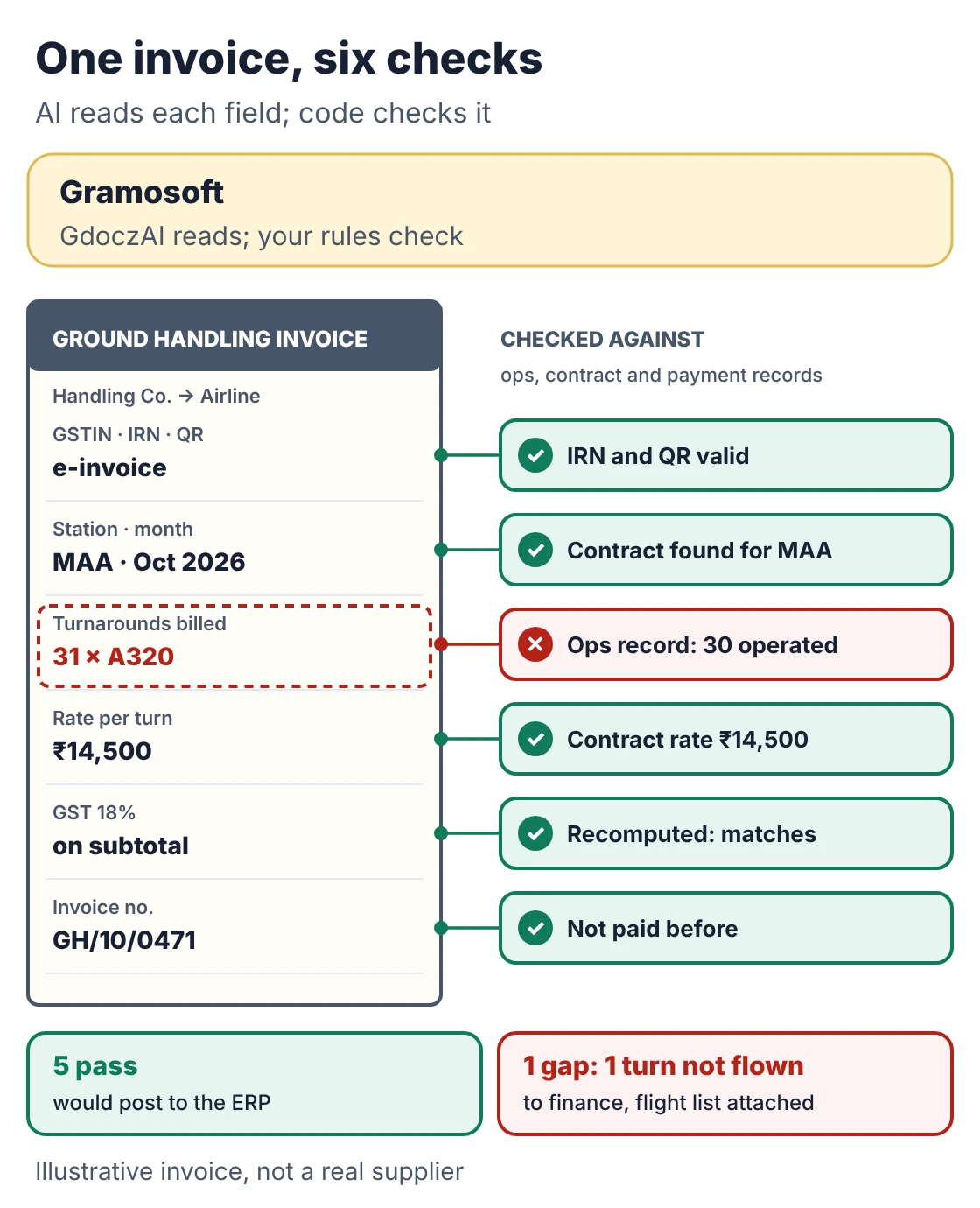
- Fuel: quantity against the uplift record, price against the contract formula for that station and date, in the invoice currency.
- Airport, navigation and ground handling: each charge against a flight that actually operated, the aircraft type and the agreed rate.
- Maintenance and parts: labour hours and parts against the work order and the purchase order, the classic three-way match.
- India-specific checks: GSTIN and tax amounts, and for suppliers above ₹5 crore turnover an IRN and QR code, since e-invoicing has applied to them from 1 August 2023 under Notification 10/2023 (Tally summary).
- Duplicates: the same invoice sent by email and through a portal, or re-sent with a new number but the same lines.
Clean invoices post to the ERP. The rest reach finance with the difference already worked out: "uplift 18,400 litres, invoiced 18,950" rather than "please check". That is where the time goes today; Skymetrix, an airline cost-management vendor, says some airline invoices take 15 to 20 days to process by hand. If you are choosing the reading engine, our comparison of the best vision OCR models shows why OCR alone isn't enough for invoices.
Automating refunds: read the request, calculate by the rule
A refund is a small calculation wrapped in a lot of reading. Someone has to find the booking, work out which coupons were flown, read the fare rule, apply the penalty, decide which taxes come back, and pay within the regulator's deadline. AI handles the reading. Code does the arithmetic. A person handles waivers and anything unusual.
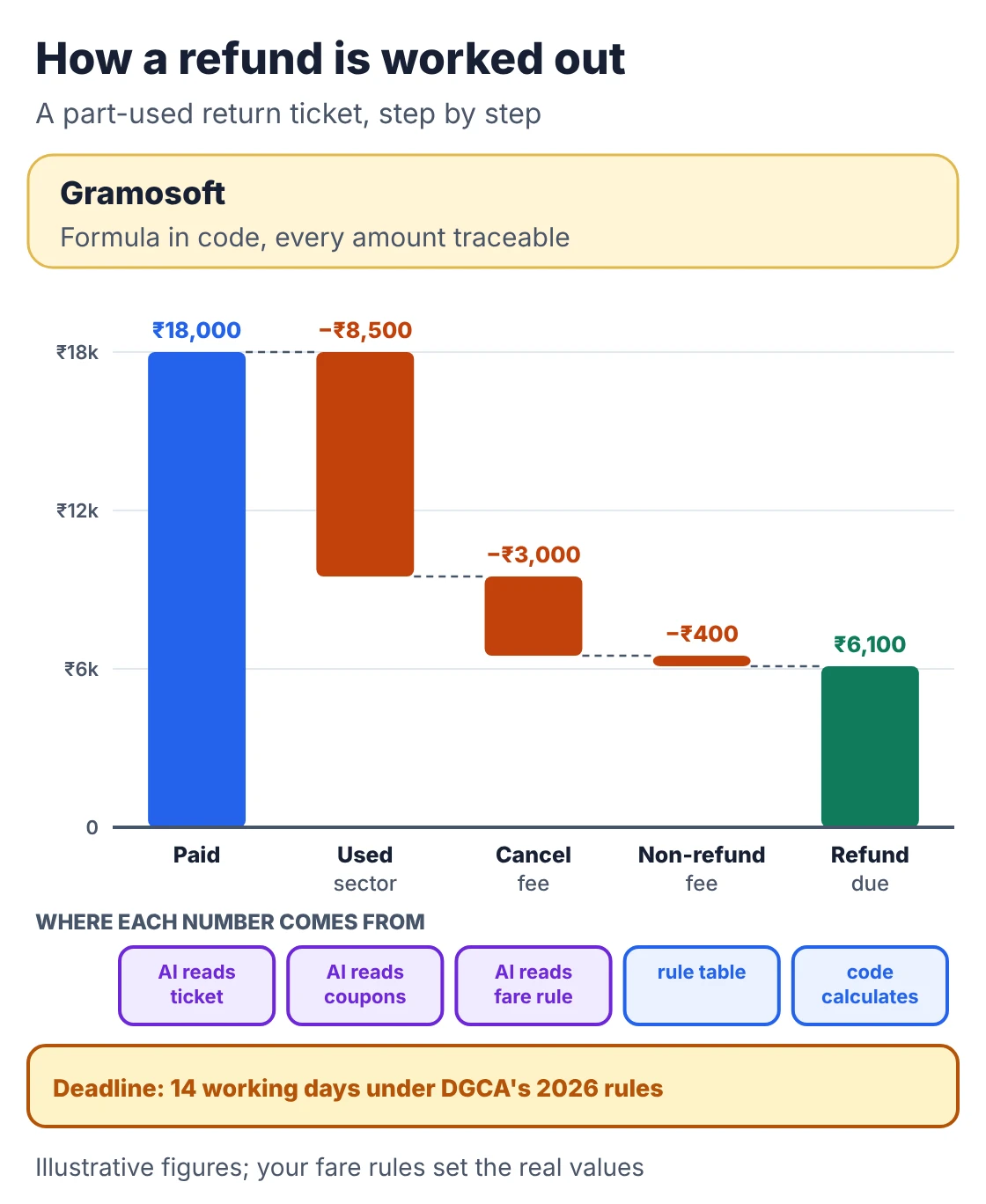
- Read the request: AI turns an email, web form or call note into a booking reference, passenger names and the reason, and flags missing details.
- Read the ticket and fare rule: which coupons are used or open, what the fare rule says about cancellation before and after departure, and which taxes and fees are refundable.
- Calculate in code: the formula is written once, tested and versioned, so two identical cases always get the same amount.
- Watch the clock: DGCA's revised rules, announced on 26 February 2026, require airlines to complete refunds within 14 working days, including tickets bought through agents and portals (All India Radio). For US flights, DOT requires seven business days for card payments and 20 calendar days for other payment methods (US DOT).
- Keep people on the edges: goodwill gestures, medical cases, group bookings and fares the rules don't cover go to a person with the calculation already drafted.
Disruptions are when this pays off most: refund requests arrive in waves at the moment contact-centre staff are busiest. A refund process that reads and calculates the routine cases leaves people free for the passengers who need them.
Automating crew documents: read once, track every expiry
A crew member can only fly with a valid licence, medical, passport, visa where needed, and current recurrent training. Each document has an expiry date, and each arrives as a scan, photo or PDF. AI reads the dates and numbers once. Code tracks every date, warns crew and schedulers early, and blocks rostering against anything that will lapse.
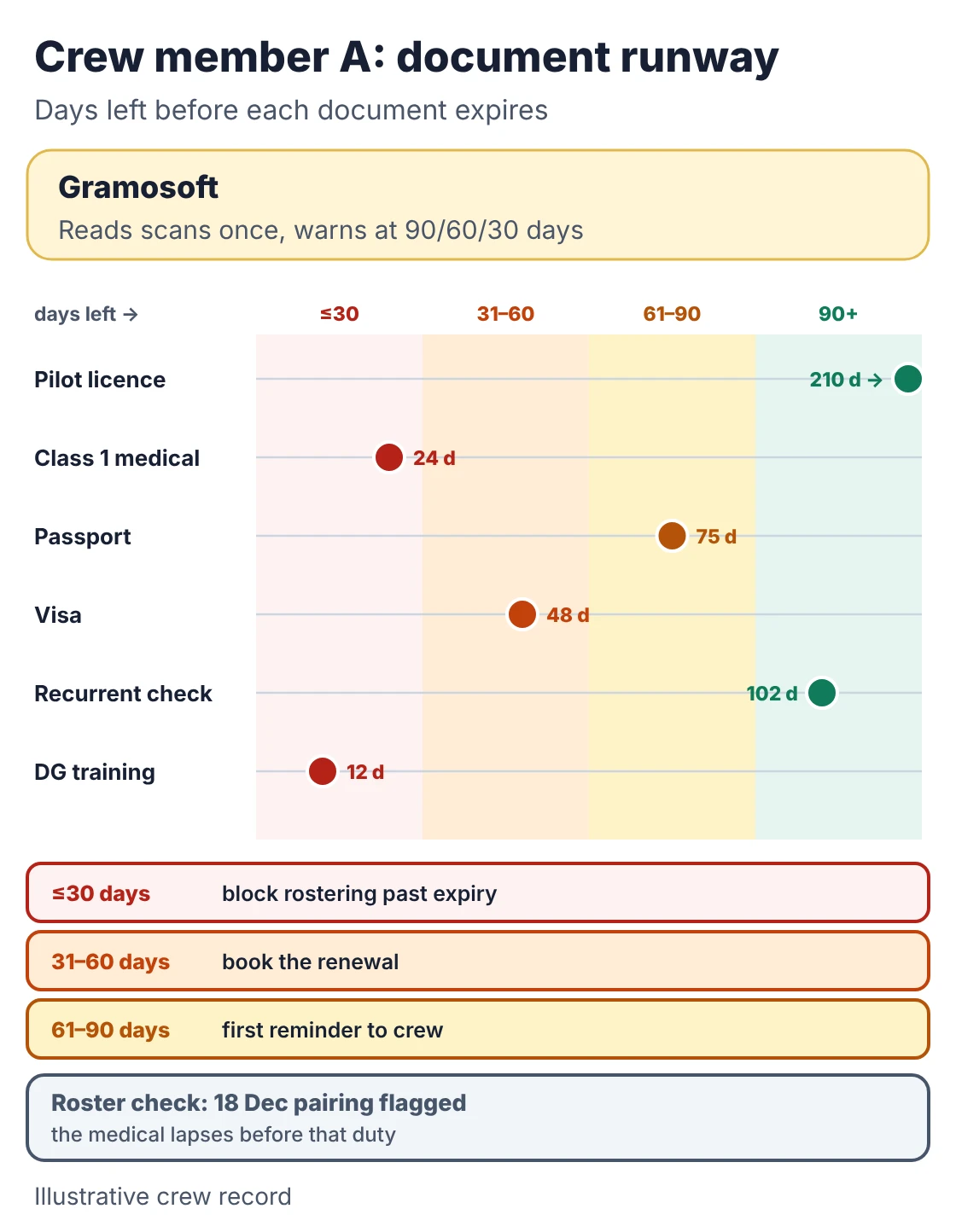
- Read the document: licence number and ratings, medical class and validity, passport and visa expiry, training completion dates, with the scan kept as evidence.
- Check against the source: where a record exists digitally, compare with it. DGCA's eGCA platform has issued electronic personnel licences since 20 February 2025, starting with commercial pilot and radio telephony licences (DGCA paper to ICAO).
- Warn in stages: 90, 60 and 30 days before expiry, to the crew member, the scheduler and the training team, with the renewal steps attached.
- Protect the roster: flag any pairing that would put someone on duty after a document lapses, before the roster publishes.
- Protect the data: crew records hold personal and medical details. Under India's DPDP Rules, notified on 13 November 2025 with core duties from May 2027 (AZB & Partners), access, retention and breach handling need to be designed in from the start.
The scheduler still decides who flies. The system makes sure they never decide without knowing what is about to expire.
Where AI ends and rules take over
The safest design puts each job where it belongs. AI is good at reading messy inputs and weak at being exactly repeatable. Code is exactly repeatable and useless at reading a scanned invoice. People are accountable. Build the system in layers so each does only what it is good at, and every result can be traced.
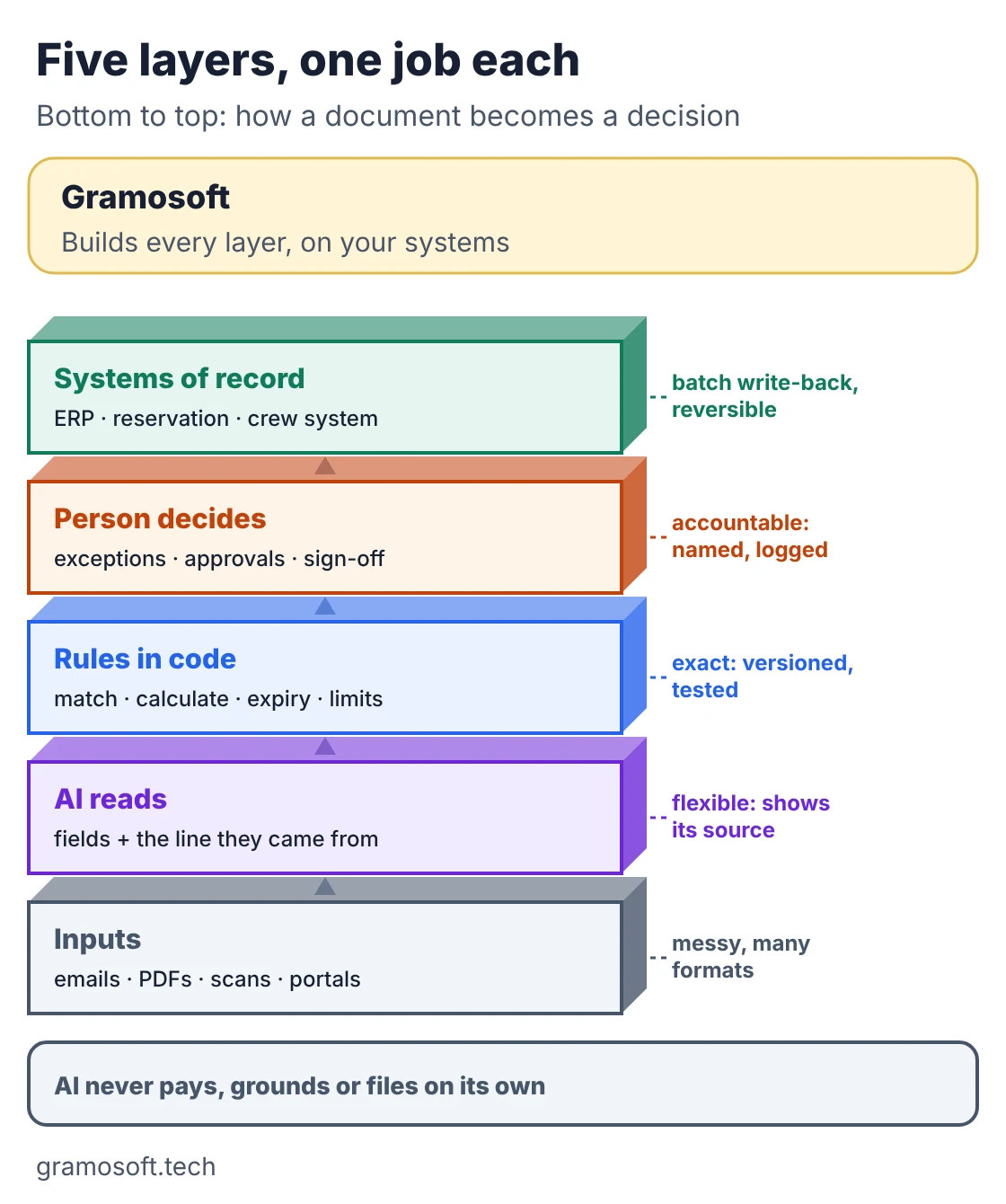
Swipe the table sideways on mobile →
| Step | AI | Rules in code | Person |
|---|---|---|---|
| Read a document | Yes, with the source line | Validates formats and totals | Fixes low-confidence fields |
| Classify a request | Yes | Routes by category | Reviews anything unclear |
| Match and calculate | No | Yes, versioned and tested | Sets tolerances and limits |
| Draft a reply or dispute | Yes | Fills in the numbers | Approves before sending |
| Pay, ground or file | No | Enforces approval limits | Yes, named and logged |
Write-back to your systems should go through approved routes, in batches stamped with the rule version, so a bad batch can be reversed. If you are wiring AI agents into those systems, our guides to AI agent frameworks and MCP cover the plumbing.
Running a pilot without risking the books
Prove the system on your own past cases before it touches anything live. Pick one workflow, collect a set of closed cases with known outcomes, and measure the system against what your team actually decided. Then run it beside the team for a few weeks, and only let it act alone on the cases it has handled correctly.
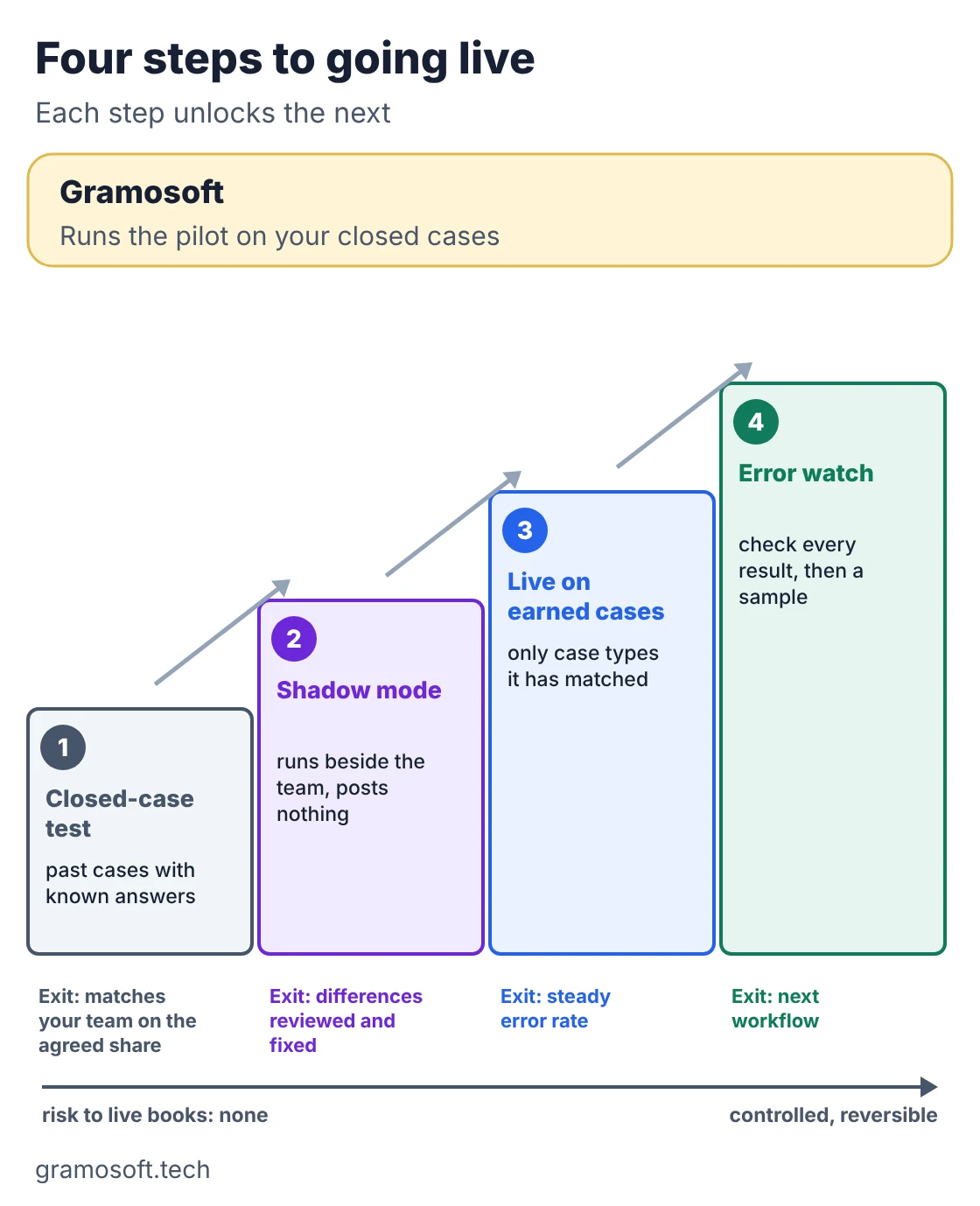
- Closed-case test: take recent closed invoices, refunds or crew files, including the awkward ones, and compare the system's answer field by field and decision by decision with your team's.
- Shadow mode: run it on new work alongside the team, posting nothing, and review the differences weekly.
- Live on earned cases: let it post only the case types where it has matched your team, with everything else still going to a person.
- Error watch: check every live result for the first weeks, then a sample, and feed every correction back into the test set.
This isn't our invention; Routespring, which automates airline crew-travel finance, publishes a similar 50-file test and shadow-mode method. Measure what matters to finance and operations: hours per case, cases closed on time, money caught or recovered, and corrections made by your staff.
Frequently asked questions
How is AI used in the airline back office?
AI reads supplier invoices, refund requests and crew documents into checked fields with the source line attached. Rules in code then match, calculate and track deadlines, and people approve exceptions, payments and anything a regulator expects a named person to sign.
Does Gramosoft build AI for airline back-office work?
Can AI process airline supplier invoices automatically?
It can read them automatically and post the ones that match. AI extracts each line; code checks it against the operated flight, uplift or work order and the contract rate. Invoices with differences go to finance with the gap explained.
How fast must airlines in India process refunds?
Under DGCA's revised rules announced on 26 February 2026, airlines must complete refunds within 14 working days, including tickets booked through travel agents and portals, and allow free cancellation or changes within 48 hours of booking in most cases.
Should AI decide refund amounts on its own?
No. AI should read the request, the ticket and the fare rule. The amount should come from a tested formula in code, and waivers, goodwill and unusual fares should go to a person with the calculation drafted.
How does AI help with crew document compliance?
It reads licence, medical, passport, visa and training expiry dates from scans once, then code tracks every date, warns crew and schedulers at 90, 60 and 30 days, and flags any roster that would put someone on duty after a document lapses.
How long should an airline AI pilot run?
Long enough to cover a closed-case test, several weeks of shadow mode and a period of checking every live result. Pick one workflow, agree the measures and the go or no-go result before you start.
Related guides
- Best Vision OCR Models (2026)
- Best Open-Source OCR Models in 2026: Accuracy, Speed & Cost Compared
- Best AI Agent Frameworks in 2026: LangGraph vs CrewAI vs OpenAI Agents SDK vs Google ADK
- What Is MCP (Model Context Protocol)? A Plain-English Guide
- RAG vs Agentic RAG vs GraphRAG: Which One Fits Your Business Data?
- Best Local LLMs in 2026: Open Models You Can Run on Your Own Servers