By Rajesh Kannan, Co-Founder & CTO, Gramosoft · Last updated:
A caller in Chennai rarely speaks one clean language. They start in Tamil, say the order number in English, ask about the refund in Tanglish and finish with “ok, thank you”. A voice agent that only handles one language, or answers in the wrong one, loses that caller in the first ten seconds.
This guide starts with how Gramosoft builds Tamil and English voice agents, then shows the parts, the build options, the speech models, and working code that switches the reply language and voice on every turn. The code was checked on November 11, 2026.
TL;DR
- Gramosoft builds Tamil and English voice agents in Chennai, choosing speech models by testing them on your own calls and connecting the agent to your phone line, CRM and company knowledge.
- Five parts: telephony, speech-to-text with language detection, a language router, an LLM, and text-to-speech, with turn detection holding it together.
- The trick: detect the language on every turn, reply in Tamil whenever the caller uses Tamil script, ignore one-word turns, and switch the voice with the language.
- Write for the voice: Tamil script, English loanwords in English letters, the polite plural, digits one at a time, replies under 25 words.
- Target speed: about one to one and a half seconds from the caller stopping to the agent speaking.
How do you build an AI voice agent that speaks Tamil and English? Use streaming speech-to-text that detects the language on each turn, such as Sarvam Saaras v4, an LLM instructed to reply in the caller's language, and a Tamil-capable text-to-speech voice such as Sarvam Bulbul. A framework like LiveKit or Pipecat connects them and handles turn-taking. Gramosoft builds and runs these agents for businesses.
Swipe the table sideways on mobile →
| Option | Time to first call | Control | Best for |
|---|---|---|---|
| Gramosoft | A demo on your calls in weeks | Full, in your accounts | Agents tied to CRM, ERP and company knowledge |
| Managed platform | Hours | Low | Simple booking and reminder calls |
| Framework + speech APIs | Days | High | Teams with developers and custom logic |
| Fully self-hosted | Weeks | Total | Strict data residency or on-premises rules |
How Gramosoft builds Tamil and English voice agents
Gramosoft is a Chennai software company that builds voice agents for Tamil, English and other Indian languages as part of its AI development work. We pick the speech models by testing them on your recorded calls, then connect the agent to your telephony, your CRM or ERP, and your documents, so it can answer and act, not just talk.
- Model testing first: we score speech-to-text on your own calls, including names, amounts and order numbers, before choosing a stack. Our Indian-language speech model comparison shows how.
- Framework and telephony: LiveKit or Pipecat, with Indian or global SIP providers for inbound and outbound calls.
- Answers from your knowledge: GsearchAI lets the agent answer from your policies and records, and GcrawlAI keeps public information such as product pages up to date.
- Actions after the call: bookings, CRM updates and follow-ups through AI development and RPA.
- Security and data: recordings and transcripts in your cloud account, with data protection advice for DPDP.
Where we fall short: we don't sell a self-serve, per-minute calling platform. If you want to start today with no development, a managed platform will be faster. And we were incorporated in 2022, so our public review record is smaller than older firms'.
"A Tamil voice agent fails on the small things: an order number read as a word, a reply in English to a Tamil caller, a voice that switches mid-sentence. Test those on real calls before anything else."
Rajesh Kannan, Co-Founder & CTO at Gramosoft
How a Tamil and English voice agent works
Every turn of a call passes through the same steps. The phone line streams audio, speech-to-text turns it into text and reports the language, a router decides which language to reply in, the LLM writes a short reply, and text-to-speech speaks it. Turn detection decides when the caller has finished speaking.
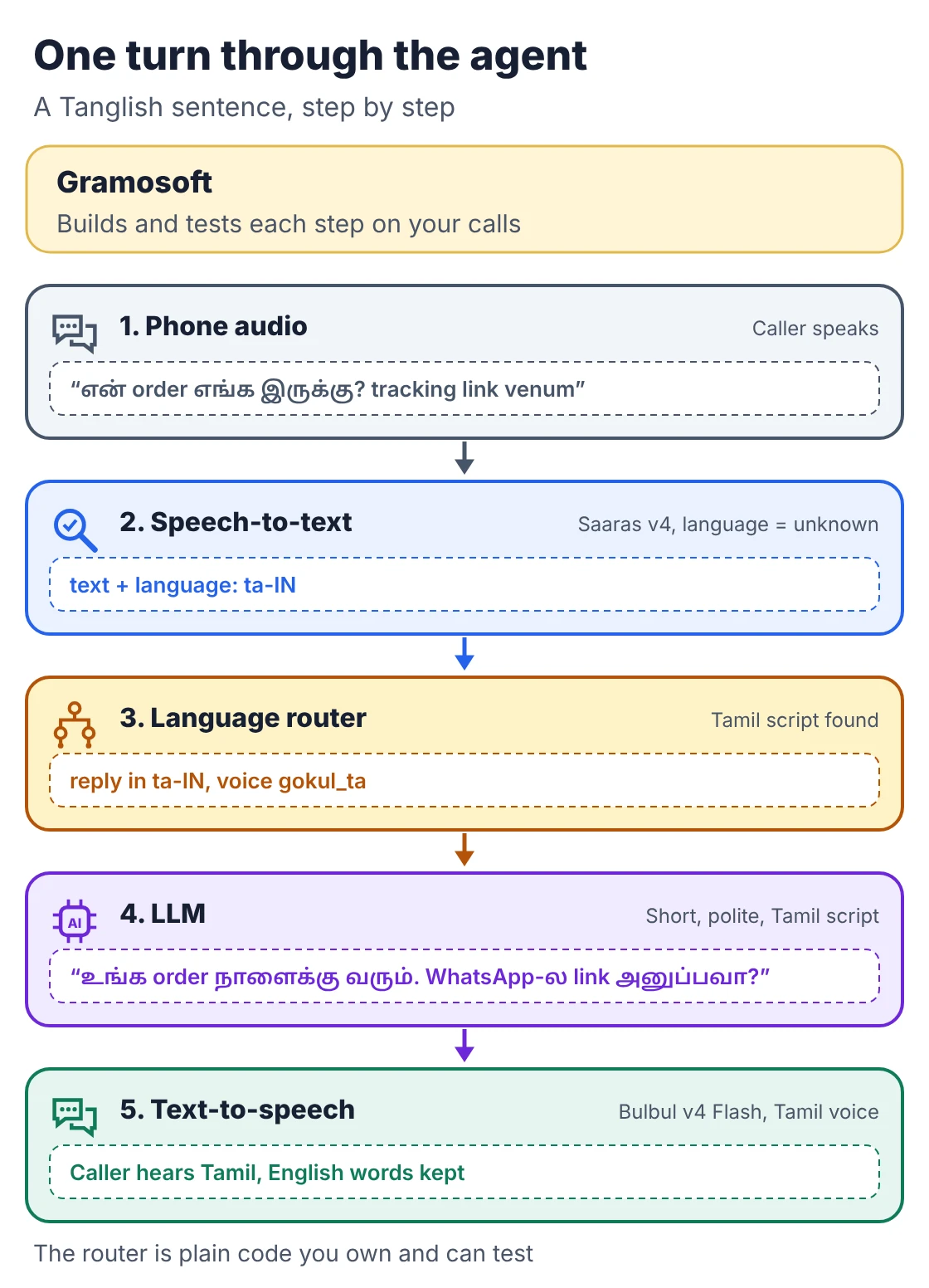
- Telephony: a phone number or SIP trunk brings the call in, or a browser widget for web calls.
- Speech-to-text: streams the caller's audio to text and, in auto-detect mode, tags each turn with a language code such as ta-IN or en-IN.
- Language router: a few lines of your own code that decide the reply language. Most tutorials skip it, and that is where agents flip languages on the word “ok”.
- LLM: follows your prompt, calls tools such as a booking API, and writes the reply.
- Text-to-speech: speaks the reply in a voice that matches the reply language.
Three ways to build one
You can rent a managed voice platform, assemble a framework with speech APIs, or self-host every model. The trade is speed against control. Managed platforms get a first call working in hours. A framework takes days but lets you write the language logic and integrations yourself. Self-hosting takes weeks and suits strict data rules.
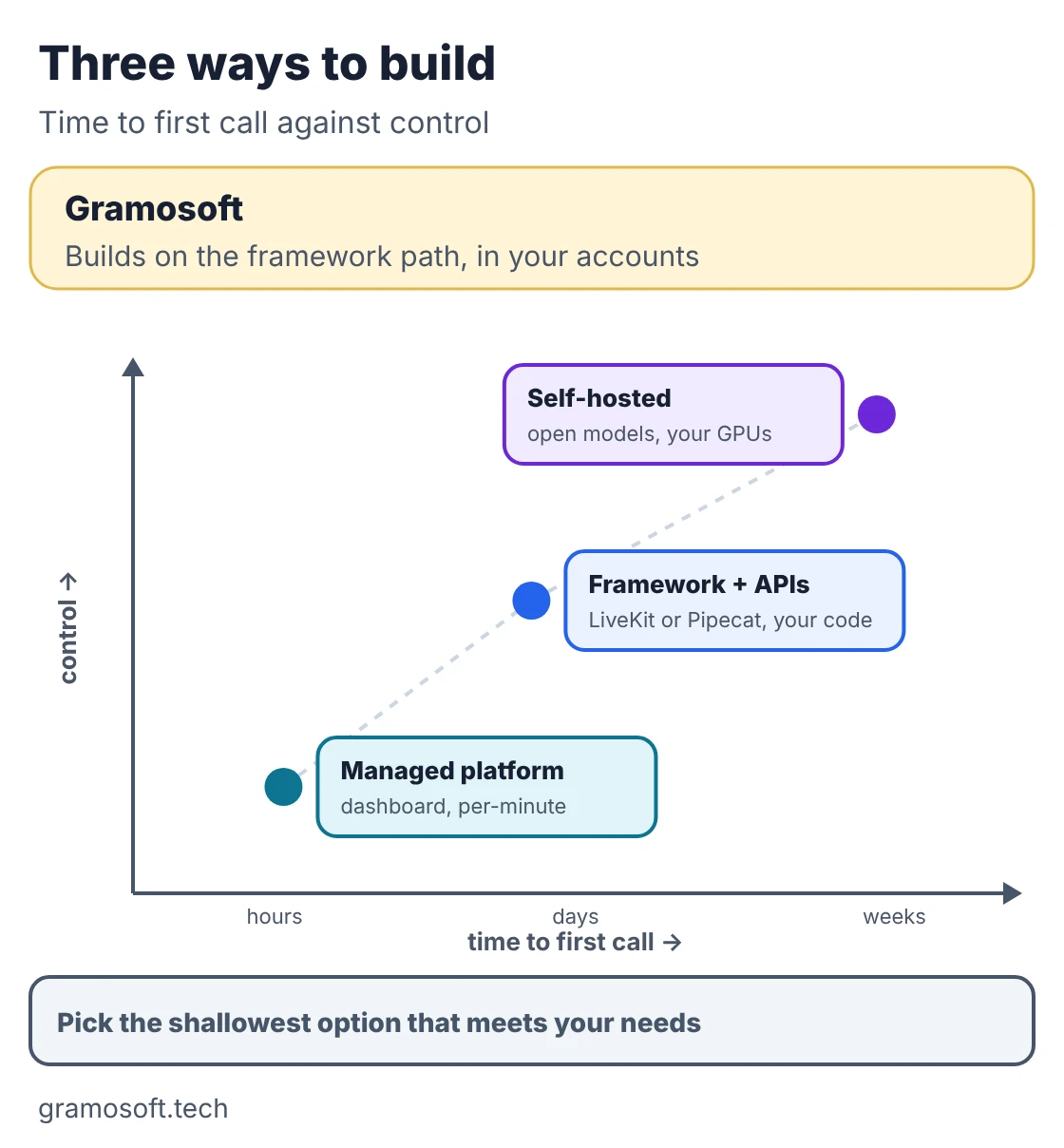
- Managed platform: configure an agent in a dashboard. Sarvam's own managed Voice Agents start at ₹3 a minute, according to Sarvam's LiveKit guide, and platforms such as Bolna document Tamil set-ups in their Tamil guide.
- Framework plus speech APIs: LiveKit Agents or Pipecat with Sarvam, Deepgram, ElevenLabs or others. This is the path the code below takes.
- Fully self-hosted: open models such as Whisper or AI4Bharat IndicConformer for speech, an open LLM and an open voice, all on your own GPUs. See open models you can run on your own servers.
Pick speech models that handle Tamil
Tamil is harder for speech models than Hindi or English. In the Voice of India benchmark from February 2026, Dravidian languages scored about 15 to 20% word error rate, against 5 to 6% for Hindi. So the model choice matters more here, and it should be tested on your own callers, not on clean demo lines.
Swipe the table sideways on mobile →
| Part | Default we start with | Why |
|---|---|---|
| Speech-to-text | Sarvam Saaras v4, language “unknown” | Detects Tamil, English or a mix per turn; ₹0.49 a minute |
| Text-to-speech | Sarvam Bulbul v4 Flash | Four Tamil personas plus English ones; ₹1 per 1,000 characters |
| LLM | A model that writes good Tamil script | Test replies in Tamil script, not romanized Tamil |
| Framework | LiveKit Agents 1.8 | Sarvam plugin, turn handling, SIP for phone calls |
Prices as listed in our speech model comparison, checked November 7, 2026. One detail from Bolna's Tamil docs matters for the code: on Bulbul v4 Flash, the spoken language follows the script of the text, and each voice name carries its language, such as gokul_ta_narration. So the voice has to change when the reply language changes.
Build it step by step with LiveKit and Sarvam
The code below uses LiveKit Agents with the Sarvam plugin, following the pattern in Sarvam's LiveKit guide and the language-switching technique from LiveKit's multilingual tutorial. It was checked against livekit-agents 1.8.11 and livekit-plugins-sarvam 1.8.11 on PyPI. It has three files, and the router can be tested without any API keys.
Step 1. Install and set keys. Run pip install "livekit-agents[sarvam]>=1.8.6,<2" python-dotenv and put LIVEKIT_URL, LIVEKIT_API_KEY, LIVEKIT_API_SECRET and SARVAM_API_KEY in a .env file.
Step 2. Write the language router. This decides the reply language for each turn. Tamil script always means a Tamil reply, even with English words inside. Turns shorter than three words never flip the language. A third language, such as Hindi, keeps the current one.
"""Decide which language (and voice) the agent should reply in, turn by turn.
Pure Python, no network calls, so it can be tested offline.
Checked against livekit-agents 1.8.11 and livekit-plugins-sarvam 1.8.11 (November 2026).
"""
import re
TAMIL_SCRIPT = re.compile(r"[-]")
# bulbul:v4-flash persona names carry their language in the name.
VOICES = {
"ta-IN": "gokul_ta_narration",
"en-IN": "dev_en_conversational",
}
DEFAULT_LANG = "ta-IN"
MIN_WORDS_TO_SWITCH = 3 # "ok", "yes sir", "ama" should not flip the language
def base(code):
"""'ta-IN' -> 'ta', 'en' -> 'en', None/'' -> ''."""
return (code or "").split("-")[0].lower()
def pick_reply_language(detected, transcript, current=DEFAULT_LANG):
"""Return 'ta-IN' or 'en-IN' for the agent's next reply.
detected -- language code reported by speech-to-text (may be None or 'unknown')
transcript -- what the caller said
current -- the language the agent is replying in now
"""
text = (transcript or "").strip()
if not text:
return current
# 1. Any Tamil script means a Tamil or Tanglish turn: reply in Tamil.
# English loanwords ("order", "EMI") inside Tamil script stay Tamil.
if TAMIL_SCRIPT.search(text):
return "ta-IN"
words = len(text.split())
lang = base(detected)
# 2. Very short turns ("ok", "yes", "thank you") keep the current language.
if words < MIN_WORDS_TO_SWITCH:
return current
# 3. Otherwise trust the detector for the two languages we serve.
if lang == "ta":
return "ta-IN"
if lang == "en":
return "en-IN"
# 4. Unknown or a third language: stay where we are.
return current
def voice_for(lang):
return VOICES.get(lang, VOICES[DEFAULT_LANG])
SYSTEM_PROMPT = """You are the phone assistant for {business}. You are an AI assistant; say so if asked.
Reply in the language of the caller's last turn: Tamil or English.
When you reply in Tamil, write Tamil script, and keep everyday English words
(order, OTP, appointment, EMI, WhatsApp) in English letters, the way Chennai callers say them.
Use the polite form (நீங்க), never the informal (நீ).
Keep every reply under 25 words and ask one question at a time.
Read OTPs, phone numbers and order IDs one digit at a time, in English, with spaces: 4 5 1 2.
If the caller is upset, asks for a person, or asks about something not in your notes,
offer to connect them to the team. Do not guess prices, dates or policies."""Step 3. Test the router offline. This plays a short mixed call through the router and checks the rules.
"""Offline check of lang_router: no API keys, no audio. Run: python test_router.py"""
from lang_router import pick_reply_language, voice_for

turns = [
    # (what speech-to-text reported, what the caller said)
    ("ta-IN", "வணக்கம், என் order எங்க இருக்கு?"),
    ("en-IN", "ok"),
    ("en-IN", "Actually can you send the tracking link on WhatsApp?"),
    ("en-IN", "yes please"),
    ("ta-IN", "சரி, delivery எப்போ வரும்?"),
    ("unknown", "Hmm what about the refund for the other one"),
    ("hi-IN", "refund kab milega mujhe batao"),
    (None, ""),
]

current = "ta-IN"
print(f"{'detected':<9} {'caller said':<54} {'reply in':<7} voice")
for detected, said in turns:
    current = pick_reply_language(detected, said, current)
    print(f"{str(detected):<9} {said[:52]:<54} {current:<7} {voice_for(current)}")

assert pick_reply_language("en-IN", "சரி ok", "en-IN") == "ta-IN"      # Tamil script wins
assert pick_reply_language("en-IN", "ok", "ta-IN") == "ta-IN"          # short turn: no flip
assert pick_reply_language("en-IN", "please send it today", "ta-IN") == "en-IN"
assert pick_reply_language("hi-IN", "kab milega mujhe batao", "en-IN") == "en-IN"  # third language: stay
print("all checks passed")
The output, from a run on November 11, 2026. It is a logic check, not a speech test:
detected  caller said                                            reply in voice
ta-IN     வணக்கம், என் order எங்க இருக்கு?                       ta-IN   gokul_ta_narration
en-IN     ok                                                     ta-IN   gokul_ta_narration
en-IN     Actually can you send the tracking link on WhatsApp?   en-IN   dev_en_conversational
en-IN     yes please                                             en-IN   dev_en_conversational
ta-IN     சரி, delivery எப்போ வரும்?                             ta-IN   gokul_ta_narration
unknown   Hmm what about the refund for the other one            ta-IN   gokul_ta_narration
hi-IN     refund kab milega mujhe batao                          ta-IN   gokul_ta_narration
None                                                             ta-IN   gokul_ta_narration
all checks passed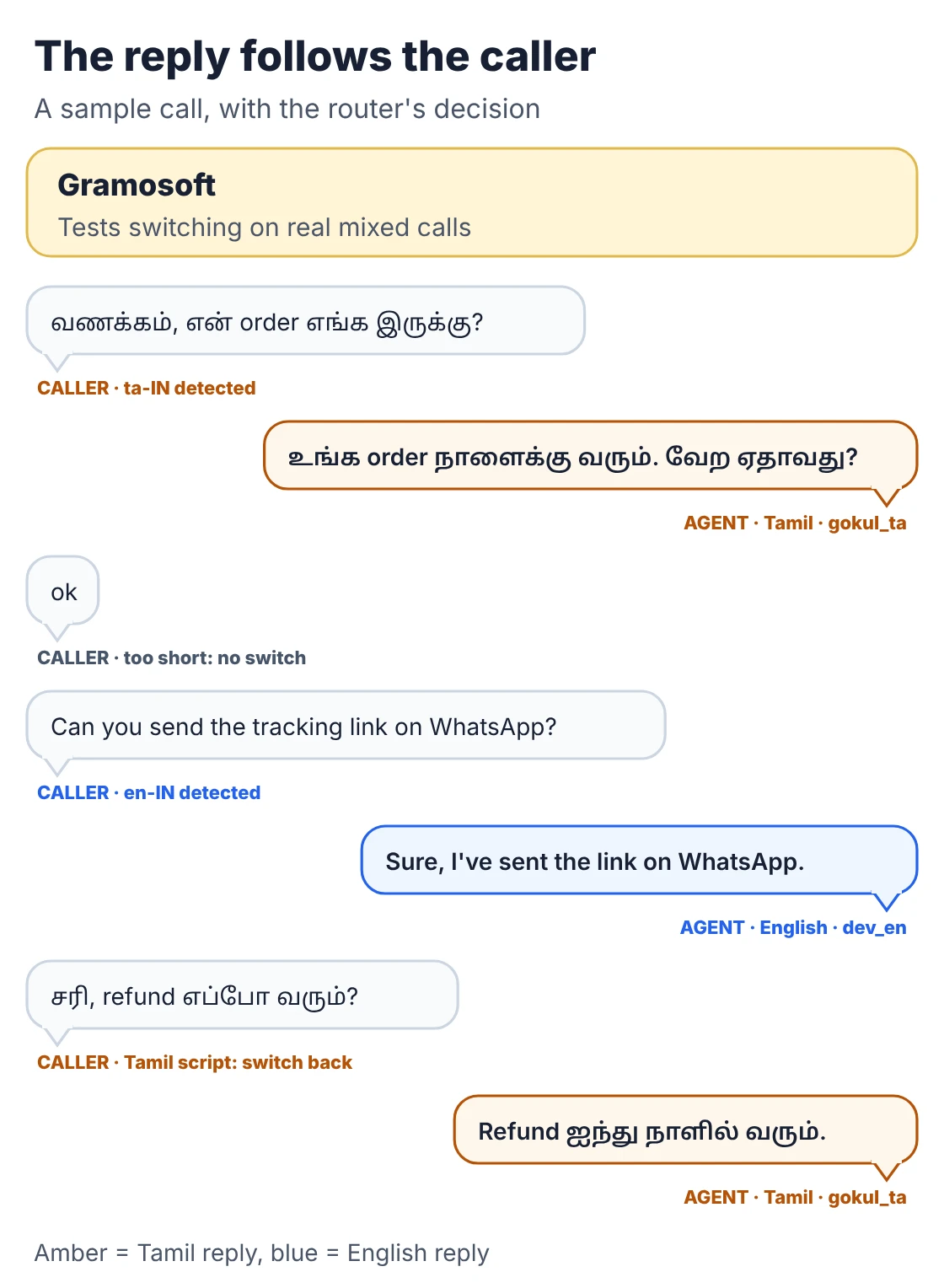
Step 4. Build the agent. Speech-to-text runs with language="unknown" so Saaras detects the language each turn. The overridden stt_node reads each final transcript, asks the router, and switches the Bulbul language and speaker together. As Sarvam's guide advises, vad=None lets Sarvam's own voice detection decide turns.
"""Tamil + English voice agent: LiveKit Agents with Sarvam speech-to-text, LLM and text-to-speech.

pip install "livekit-agents[sarvam]>=1.8.6,<2" python-dotenv
.env needs LIVEKIT_URL, LIVEKIT_API_KEY, LIVEKIT_API_SECRET, SARVAM_API_KEY
Run:  python agent.py console   (talk through your microphone)
      python agent.py dev       (connect to LiveKit Cloud; add a SIP trunk for phone calls)
Checked against livekit-agents 1.8.11 and livekit-plugins-sarvam 1.8.11 (November 2026).
"""
import logging
from typing import AsyncIterable

from dotenv import load_dotenv
from livekit import rtc
from livekit.agents import Agent, AgentSession, JobContext, ModelSettings, WorkerOptions, cli, stt
from livekit.plugins import sarvam

from lang_router import DEFAULT_LANG, SYSTEM_PROMPT, pick_reply_language, voice_for

load_dotenv()
log = logging.getLogger("tamil-english-agent")

GREETING = "வணக்கம்! நான் Gramosoft-இன் AI assistant. Tamil-லயோ English-லயோ பேசலாம். எப்படி உதவ முடியும்?"


class TamilEnglishAgent(Agent):
    def __init__(self) -> None:
        super().__init__(
            instructions=SYSTEM_PROMPT.format(business="Gramosoft"),
            # language="unknown" lets Saaras detect Tamil, English or a mix on every turn
            stt=sarvam.STT(language="unknown", model="saaras:v4", mode="transcribe"),
            llm=sarvam.LLM(model="sarvam-105b-conversations"),
            tts=sarvam.TTS(target_language_code=DEFAULT_LANG, model="bulbul:v4-flash",
                           speaker=voice_for(DEFAULT_LANG)),
        )
        self.reply_lang = DEFAULT_LANG

    async def stt_node(self, audio: AsyncIterable[rtc.AudioFrame], model_settings: ModelSettings):
        # Pass every speech event through, but look at final transcripts on the way.
        async for event in super().stt_node(audio, model_settings):
            if event.type == stt.SpeechEventType.FINAL_TRANSCRIPT and event.alternatives:
                alt = event.alternatives[0]
                new_lang = pick_reply_language(alt.language, alt.text, self.reply_lang)
                if new_lang != self.reply_lang:
                    log.info("switching reply language %s -> %s", self.reply_lang, new_lang)
                    self.reply_lang = new_lang
                    # bulbul:v4-flash speakers are per language, so switch both together
                    self.tts.update_options(target_language_code=new_lang, speaker=voice_for(new_lang))
            yield event

    async def on_enter(self) -> None:
        await self.session.say(GREETING)


async def entrypoint(ctx: JobContext) -> None:
    session = AgentSession(
        vad=None,  # Sarvam STT runs its own voice activity detection
        turn_handling={"turn_detection": "stt", "endpointing": {"min_delay": 0.07}},
    )
    await session.start(agent=TamilEnglishAgent(), room=ctx.room)


if __name__ == "__main__":
    cli.run_app(WorkerOptions(entrypoint_fnc=entrypoint))
Step 5. Talk to it, then connect a phone line. Run python agent.py console to test with your microphone. For phone calls, connect a SIP trunk from your telephony provider to LiveKit and dispatch this agent to incoming calls. We built the agent with test keys to check the classes and options; run it against live keys before relying on it.
Write prompts and replies the voice can say
The voice reads exactly what the LLM writes. If the reply is romanized Tamil, a long paragraph or an order number written as one long figure, the caller hears it badly. Most quality problems in Tamil agents are fixed in the prompt, not by changing the model.
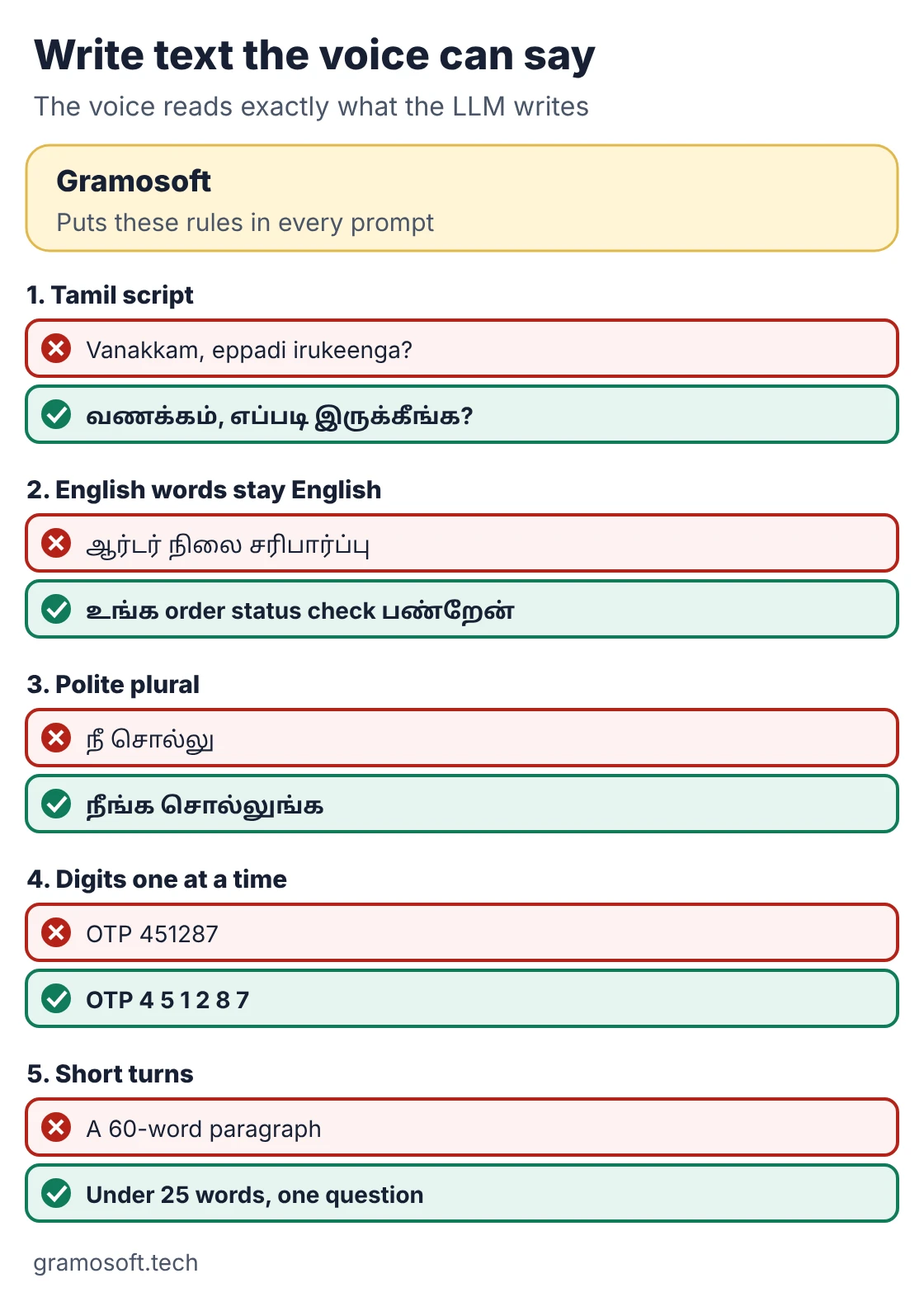
- Tamil script, not romanized Tamil: வணக்கம், not “vanakkam”. Romanized text can be read as English.
- Keep everyday English words in English letters: order, OTP, EMI, appointment and WhatsApp, the way callers say them.
- Ask for the polite plural: நீங்க, not நீ. A general “be polite” instruction does not reliably produce it.
- Digits one at a time: read OTPs, phone numbers and order IDs digit by digit, in English.
- Short turns: under 25 words and one question at a time. Say it is an AI assistant, and offer a person when asked.
These rules are in the SYSTEM_PROMPT in the code above. Bolna's Tamil guide gives the same advice on script, loanwords, politeness and digits.
Keep each turn fast
Callers notice pauses longer than a second or two and start talking over the agent. Plan a budget for every step of the turn, stream each part instead of waiting for the full text, and keep replies short so the voice can start speaking sooner. Extra hops, such as a separate transliteration call, cost the most.
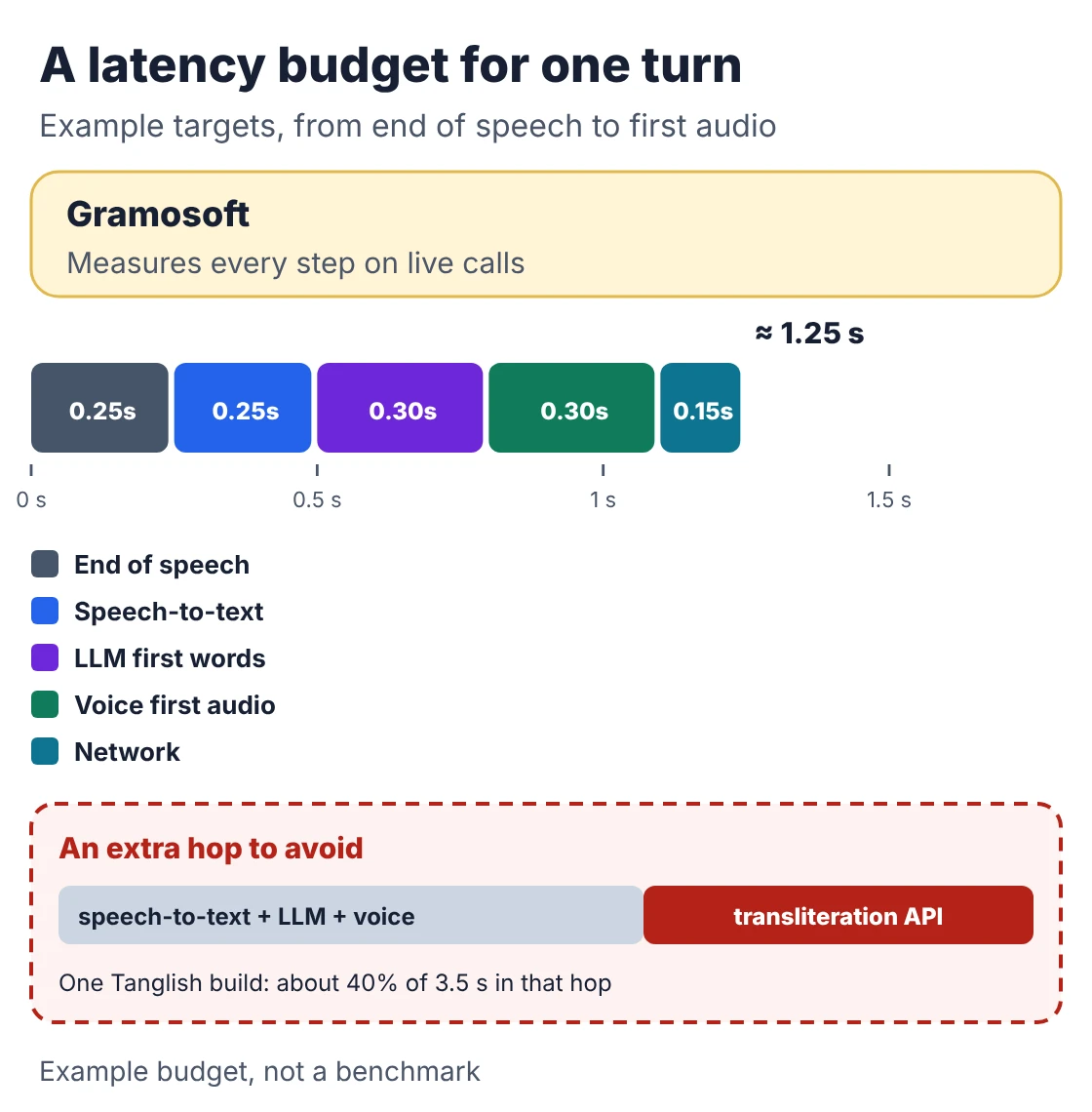
- End of speech: Sarvam's guide sets the minimum endpointing delay to 0.07 seconds when its speech-to-text decides turns.
- Stream everything: start text-to-speech on the first sentence of the reply, not the whole reply.
- Avoid extra hops: one developer's Tanglish build measured about 3.5 seconds to first audio, with a separate transliteration API call taking about 40% of it.
- Measure on real phones: test over mobile networks, not only on office Wi-Fi.
Test, launch and stay compliant
Before real customers call, test with at least ten people whose accents differ from the builder's, including numbers, amounts in lakh, dates and mid-sentence switches. Start with one job, such as after-hours enquiries, read the transcripts every week, and keep a clear handover to a person.
- Handover rules: transfer or promise a callback when the caller asks for a person, is upset, or asks something outside the agent's notes.
- Recordings are personal data: tell callers the call is recorded, limit access and set a retention period. India's DPDP Rules phase in core duties by May 2027 (AZB & Partners).
- Outbound calls: promotional calls in India fall under TRAI's commercial communication rules, including DLT registration and DND checks. Confirm the rules for your call type with your telecom provider.
- Disclose the AI: say it is an AI assistant early, in the caller's language.
This is general information, not legal advice.
Frequently asked questions
How do I build an AI voice agent that speaks Tamil and English?
Use speech-to-text with language detection on every turn, an LLM told to reply in the caller's language, and Tamil and English voices you switch per turn. A framework such as LiveKit connects them and handles turn-taking.
Does Gramosoft build Tamil voice agents?
Which speech-to-text is best for Tamil?
Sarvam Saaras v4 is a strong default for Tamil and Tanglish and detects the language per turn. Test two or three models on your own recorded calls, checking names and numbers, before choosing.
How does the agent know when to switch from Tamil to English?
Speech-to-text reports the language of each turn. A small router replies in Tamil when the caller uses Tamil script, ignores one- or two-word turns, and then switches the voice with the language.
Can the agent handle Tanglish?
Yes, if the speech-to-text supports code-mixed speech and the prompt keeps English loanwords in English letters inside Tamil script replies, the way Chennai callers speak.
How fast should a voice agent reply?
Aim for about one to one and a half seconds from the end of the caller's speech. Streaming, short replies and avoiding extra API hops matter most.
Can I connect the voice agent to a phone number in India?
Yes. Connect a SIP trunk or number from a telephony provider to the framework, and follow TRAI rules, DLT registration and DND checks for outbound calls.
Related guides
- Best Speech-to-Text & Text-to-Speech Models for Indian Languages (Tamil, Hindi, Telugu)
- Best AI Agent Frameworks in 2026: LangGraph vs CrewAI vs OpenAI Agents SDK vs Google ADK
- RAG vs Agentic RAG vs GraphRAG: Which One Fits Your Business Data?
- What Is MCP (Model Context Protocol)? A Plain-English Guide
- Best Local LLMs in 2026: Open Models You Can Run on Your Own Servers
- 7 Free LLM APIs in 2026: Providers, Limits & What You Can Build