Updated 27 November 2026 for 2027 · versions, licences and prices checked on each project's own pages on 27 November 2026
Docling, Marker and LlamaParse all turn PDFs into Markdown or JSON for document AI and RAG, but they differ on the three things that decide a project: where your documents go, what the licence allows, and what happens to a table of numbers. We ran all three on an Indian GST invoice and a scanned copy of it. Gramosoft's own choice comes first.
TL;DR
- Gramosoft runs open OCR models inside GdoczAI, its document AI product in Chennai, and checks every GST field before it posts. For client RAG on private documents we default to Docling, because its MIT licence and local run keep data in-house.
- Docling: MIT, runs offline, reads PDF, Office, HTML and more; version 2.154.0 on 26 November 2026.
- Marker: fast local conversion; code is Apache 2.0 but the model weights are not free for companies above $5 million in revenue or funding.
- LlamaParse: a closed cloud service, strongest on hard tables in published tests; 10,000 free credits a month, then $1.50 per 1,000.
- The test that matters: a clean-looking table can still put a quantity in the wrong row. Score fields and rows on your own invoices.
Which is the best PDF parser for document AI and RAG? For private or regulated documents, Gramosoft starts with Docling: MIT-licensed, local and broad. Marker is faster but its weights need a commercial licence for larger companies. LlamaParse is the strongest managed option on hard tables when documents may leave your network. For invoices, add field checks after any parser.
Which PDF parser Gramosoft uses, and why
Gramosoft builds document AI for clients and runs GdoczAI, which reads more than 100,000 documents a month for aviation clients. We pick a parser per job, not per brand. The deciding questions are where the documents may go, whether a licence fits the client, and whether every field can be checked against the invoice's own arithmetic.
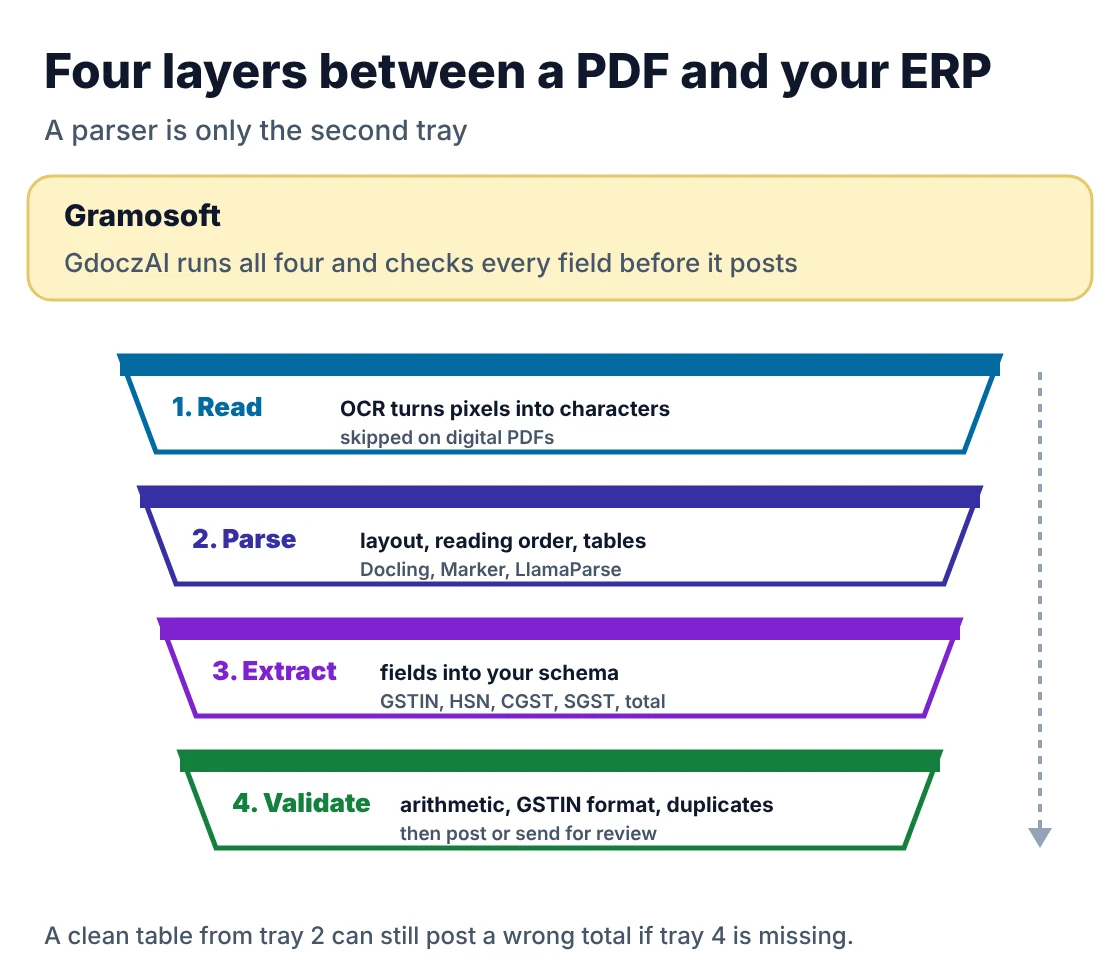
- Invoices and scans in GdoczAI: open OCR models such as MinerU, DeepSeek-OCR and Chandra read the page, then GdoczAI maps it to fields and checks GSTIN format, CGST plus SGST against the total, and duplicates.
- RAG on private documents: Docling by default, run on the client's server, because MIT code and local models clear legal review fast and it reads Office files too.
- Marker when the licence fits: we use Marker's stack through Datalab's paid service or licence, not its free weights, when a client is above the limit.
- LlamaParse only with consent: for public or low-risk files with hard tables, when the client accepts a US or EU cloud.
- Same test every time: the field-and-row check below runs on the client's own invoices before we choose.
Where we fall short. We don't maintain any of these three projects or resell their plans, our test below is two pages rather than a benchmark, and GdoczAI's own accuracy depends on the client's document mix, so we measure it on a sample before quoting.
"A parser that drops a GSTIN is easy to catch. One that moves a quantity into the next row and still looks tidy is the one that costs money. We test for that before we pick."
Rajesh Kannan M, Co-Founder & CTO, Gramosoft
Docling vs Marker vs LlamaParse at a glance
All three return Markdown and JSON with headings and tables, and all three handle scanned pages. The real differences are where they run, what you may do with them, and what they cost at volume. This table puts GdoczAI first, then the three tools as checked on their own pages on 27 November 2026.
| Runs where | Licence | Scans | Output | Best for | |
|---|---|---|---|---|---|
| Gramosoft GdoczAI | Client server or our cloud | Commercial product | Open OCR models | Checked fields as JSON | Invoices and forms into ERP |
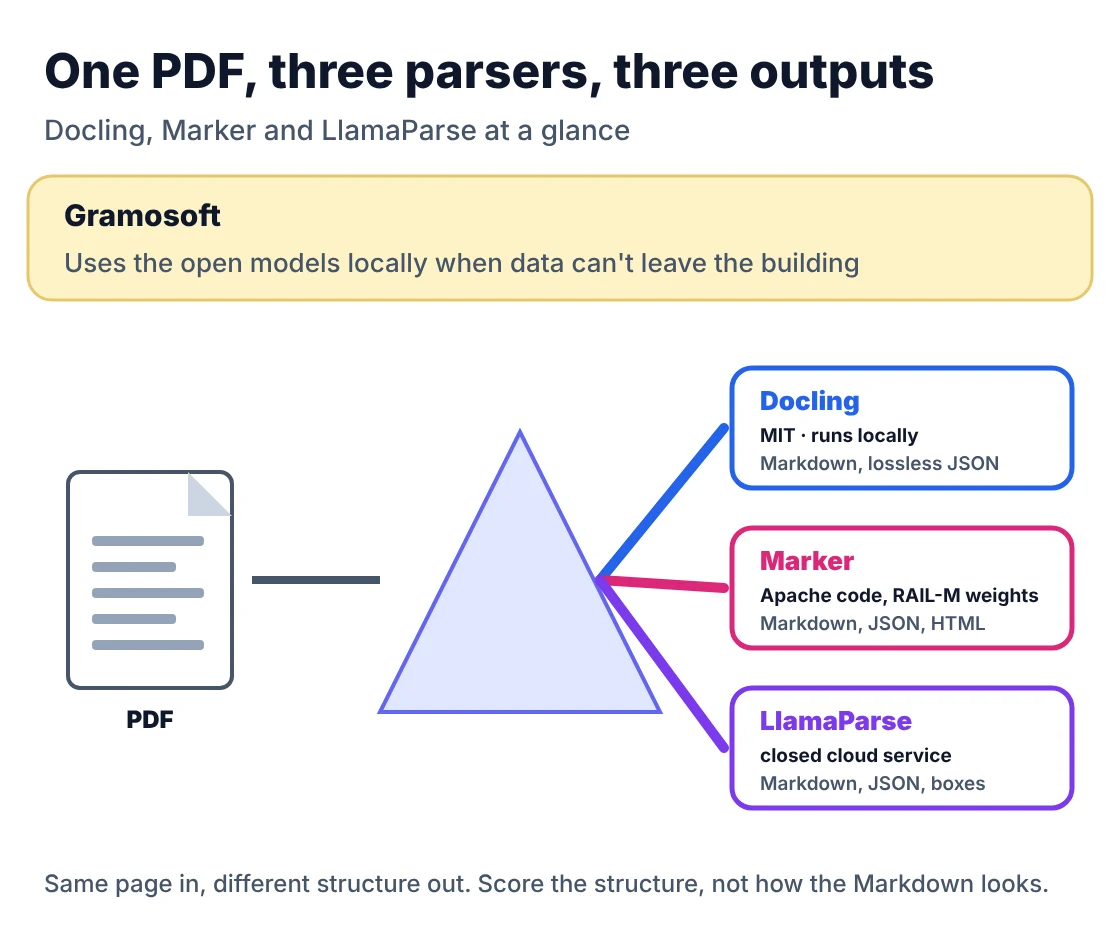
| Docling | Your machine, offline | MIT | EasyOCR by default; Tesseract, RapidOCR | Markdown, HTML, lossless JSON | Private RAG, many file types |
| Marker | Your GPU or CPU; Datalab API | Apache 2.0 code, RAIL-M weights | Surya and Chandra models | Markdown, JSON, HTML, chunks | Fast batch conversion |
| LlamaParse | LlamaIndex cloud, US or EU | Proprietary; MIT SDK | Built in, by tier | Markdown, JSON, bounding boxes | Hard tables, no infrastructure |
Our test: an Indian GST invoice and a scanned copy
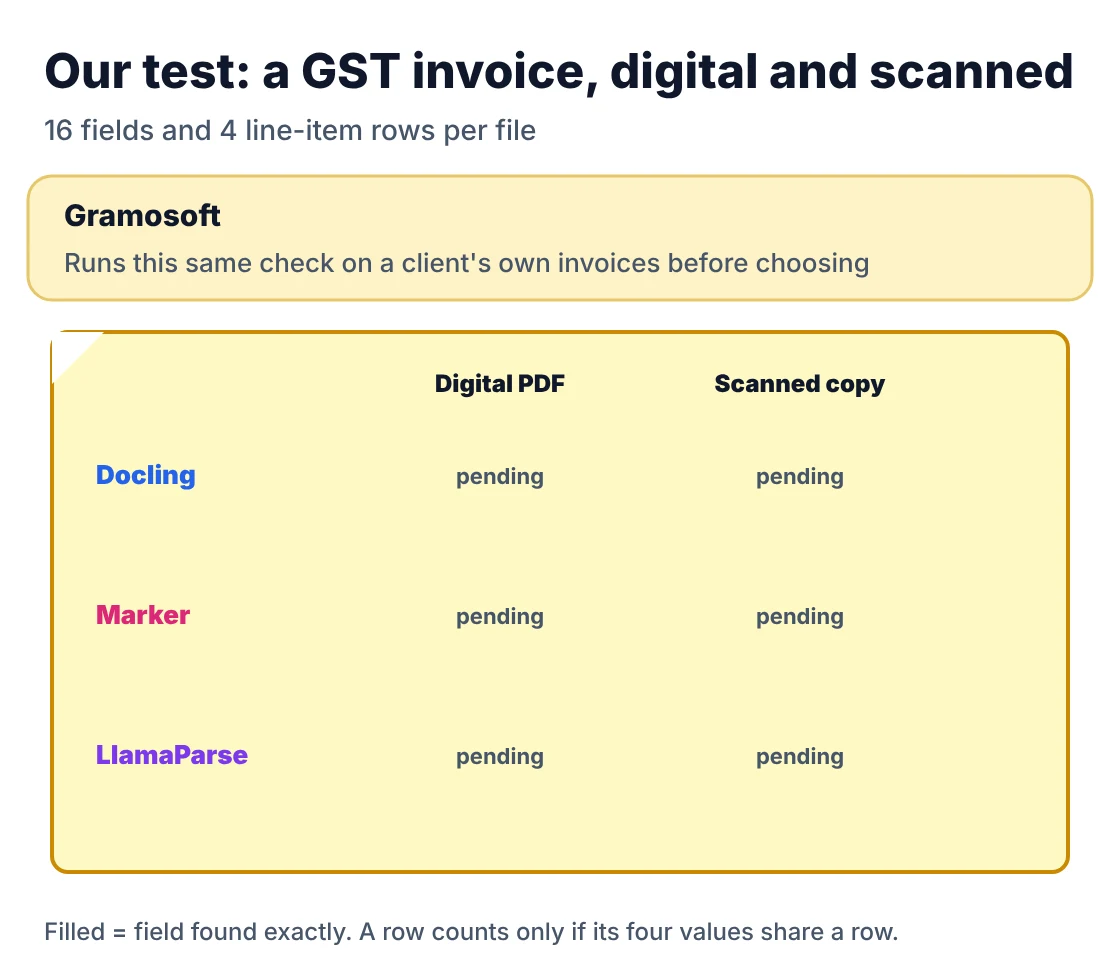
Published comparisons use academic papers and US filings. Indian invoices bring their own traps: GSTINs, HSN codes, CGST and SGST lines and rupee amounts with lakh grouping. We built one tax invoice, made a tilted, noisy, image-only scan of it, and scored 16 fields plus whether each line item's values stayed in one table row.
| Parser and setting | Digital GST invoice | Scanned copy |
|---|---|---|
| Plain text layer (PyMuPDF, no model) | 16/16 · 0/4 rows | 0/16 · 0/4 rows |
| Docling defaults (EasyOCR) | pending | pending |
| Marker defaults | pending | pending |
| LlamaParse Agentic tier | pending | pending |
The first row is a plain text-layer read with no model, run here as a check on the scorer: it finds every field on the digital PDF but no table rows, and nothing on the scan because a scan has no text layer. The other rows are the three parsers on default settings, one run each, so treat timings as one machine's numbers, not a speed benchmark.
Python: run all three parsers on both files
"""Run Docling, Marker and LlamaParse on the two test PDFs and save Markdown.

pip install docling marker-pdf llama-cloud
export LLAMA_CLOUD_API_KEY=llx-...      # only for LlamaParse
python run_parsers.py                   # writes results/<parser>/<file>.md and timings.json
"""
import json, os, sys, time
from pathlib import Path

FILES = ["gst_invoice.pdf", "gst_invoice_scanned.pdf"]
OUT = Path("results")


def docling_md(path):
    from docling.document_converter import DocumentConverter
    conv = docling_md.conv = getattr(docling_md, "conv", None) or DocumentConverter()
    return conv.convert(path).document.export_to_markdown()


def marker_md(path):
    from marker.converters.pdf import PdfConverter
    from marker.models import create_model_dict
    from marker.output import text_from_rendered
    if not hasattr(marker_md, "conv"):
        marker_md.conv = PdfConverter(artifact_dict=create_model_dict())
    text, _, _ = text_from_rendered(marker_md.conv(path))
    return text


def llamaparse_md(path, tier="agentic"):
    """LlamaParse v2 through the current llama-cloud SDK (reads LLAMA_CLOUD_API_KEY)."""
    try:
        from llama_cloud import LlamaCloud            # pip install llama-cloud
    except ImportError:                                # older SDK, maintained until 1 May 2026
        from llama_cloud_services import LlamaParse
        return "\n\n".join(d.text for d in LlamaParse(result_type="markdown").load_data(path))
    client = LlamaCloud()
    f = client.files.create(file=path, purpose="parse")
    res = client.parsing.parse(file_id=f.id, tier=tier, version="latest", expand=["markdown"])
    return "\n\n".join(pg.markdown for pg in res.markdown.pages)


PARSERS = {"docling": docling_md, "marker": marker_md, "llamaparse": llamaparse_md}

if __name__ == "__main__":
    pick = sys.argv[1:] or list(PARSERS)
    timings = {}
    for name in pick:
        if name == "llamaparse" and not os.environ.get("LLAMA_CLOUD_API_KEY"):
            print("skip llamaparse: set LLAMA_CLOUD_API_KEY"); continue
        (OUT / name).mkdir(parents=True, exist_ok=True)
        for f in FILES:
            t0 = time.perf_counter()
            try:
                md = PARSERS[name](f)
            except Exception as e:  # keep going so one failure doesn't hide the others
                md = f"ERROR: {e!r}"
            timings[f"{name}/{f}"] = round(time.perf_counter() - t0, 1)
            (OUT / name / (Path(f).stem + ".md")).write_text(md, encoding="utf-8")
            print(f"{name:10} {f:26} {timings[f'{name}/{f}']:6}s  {len(md)} chars")
    json.dump(timings, open(OUT / "timings.json", "w"), indent=1)
Python: score 16 GST fields and 4 line-item rows
"""Score each parser's Markdown against expected.json.

python score.py   # reads results/<parser>/*.md
Checks 16 fields (GSTINs, invoice number and date, 4 HSN codes, 4 line amounts,
taxable value, CGST, SGST, total) and whether each line item's HSN, qty, rate and
amount land in the same Markdown table row.
"""
import json, re, sys
from pathlib import Path

E = json.load(open("expected.json"))


def norm(s):
    return re.sub(r"\s+", "", s).replace("Rs.", "").replace("₹", "")


def fields(md):
    flat = norm(md)
    want = {"seller_gstin": E["seller_gstin"], "buyer_gstin": E["buyer_gstin"],
            "invoice_no": E["invoice_no"], "invoice_date": E["invoice_date"],
            "taxable": E["taxable"], "cgst": E["cgst"], "sgst": E["sgst"], "total": E["total"]}
    for i, h in enumerate(E["hsn"]):
        want[f"hsn_{i+1}"] = h
    for i, a in enumerate(E["line_amounts"]):
        want[f"amount_{i+1}"] = a
    return {k: norm(v) in flat for k, v in want.items()}


def rows_intact(md):
    """A line item counts only if HSN, qty, rate and amount sit in one table row."""
    lines = [norm(l) for l in md.splitlines() if l.count("|") >= 4]
    return sum(any(all(norm(c) in l for c in row) for l in lines) for row in E["rows"])


def score(md):
    f = fields(md)
    return sum(f.values()), len(f), rows_intact(md), [k for k, ok in f.items() if not ok]


if __name__ == "__main__":
    root = Path(sys.argv[1] if len(sys.argv) > 1 else "results")
    print(f"{'parser':14}{'file':28}{'fields':>8}{'rows':>6}  missed")
    for md_path in sorted(root.glob("*/*.md")):
        got, n, rows, missed = score(md_path.read_text(encoding="utf-8"))
        print(f"{md_path.parent.name:14}{md_path.name:28}{got:>4}/{n:<3}{rows:>3}/4  {', '.join(missed[:6])}")
Output of score.py on the text-layer baseline
parser        file                          fields  rows  missed
ideal         gst_invoice.md                16/16   4/4
pymupdf_text  gst_invoice.md                16/16   0/4
pymupdf_text  gst_invoice_scanned.md         0/16   0/4  seller_gstin, buyer_gstin, invoice_no, invoice_date, taxable, cgst
The full kit, including the script that builds the invoice and its scan, is in the code download. All names and GSTINs in it are made up. Run it on 20 of your own invoices before you trust any table, including ours.
Docling: the open, local default
Docling started at IBM Research and is now a project of the LF AI & Data Foundation. It reads a page with layout and table-structure models on your own machine and returns a DoclingDocument you can export as Markdown, HTML or lossless JSON. Its README lists air-gapped use for sensitive data among its features.
- Licence: MIT, per its GitHub repository; version 2.154.0 on PyPI, released 26 November 2026.
- Formats: PDF, Word, PowerPoint, Excel, HTML, images, LaTeX and XBRL financial reports, among others.
- Scans: OCR engines include EasyOCR, Tesseract and RapidOCR; a vision model, GraniteDocling, is optional.
- For RAG: a structure-aware chunker keeps section headings with each chunk.
Watch for: it downloads model weights on first run, it is slow on long scans without a GPU, and CodeCut's test found its optional vision pipeline repeating values on a dense numeric table.
Marker: fast local conversion with a licence to read
Marker, from Datalab, converts PDFs, images and Office files to Markdown, JSON or HTML on a GPU, CPU or Apple chip. It keeps formulas as LaTeX and can call an LLM with the use_llm option to fix hard tables. Version 2.2.0 is on PyPI, released 12 November 2026.
- Code licence: Apache 2.0, per its repository and PyPI. Some older articles still say GPL-3.0; that is out of date.
- Weights licence: its MODEL_LICENSE bars use by any company with more than $5 million in revenue or funding, outside personal or research use, and by any company offering a competing product.
- Hosted option: Datalab's API runs Marker with its newer Chandra model; see Datalab's pricing for commercial use.
Watch for: the weights licence comes before the benchmark, and CodeCut saw Marker pack several values into one cell on a borderless table.
LlamaParse: managed parsing for hard tables
LlamaParse is LlamaIndex's closed cloud service. A layout model splits the page and routes each region to the right model, then returns Markdown or JSON with bounding boxes. It was the most accurate of the three in CodeCut's dense-table test, and it needs no GPU. The cost is that every page goes to LlamaIndex's servers.
- Tiers: Fast, Cost-effective, Agentic and Agentic Plus; each request names a tier and a version, so pin a dated version in production.
- Price: LlamaIndex's pricing page lists 10,000 free credits a month, then $1.50 per 1,000 credits; parsing uses 1, 3, 10 or 25 credits a page by tier.
- SDK: the current Python package is llama-cloud, version 2.20.0, MIT-licensed.
- Deployment: cloud in the US or EU; your own cloud or on-premises only on Enterprise plans.
Watch for: GST invoices carry personal and bank details, so check your DPDP duties before sending them to any cloud parser.
Licences and data: the checks before accuracy
A parser can win a benchmark and still be unusable. Licences decide what you may ship, and data rules decide where an invoice may travel. Both are yes-or-no questions, so answer them first; accuracy only chooses between the parsers that pass.
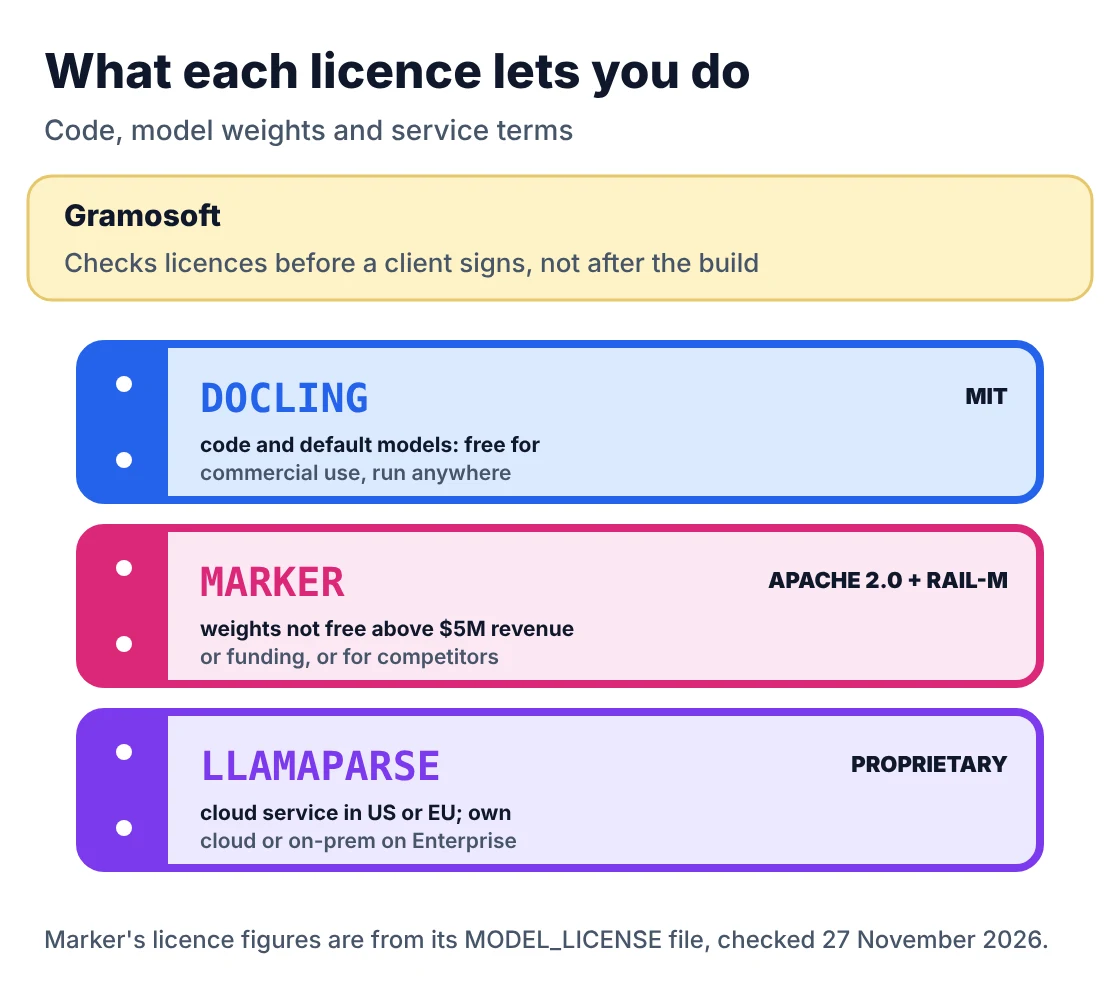
| Check | Docling | Marker | LlamaParse |
|---|---|---|---|
| Code licence | MIT | Apache 2.0 | Closed service; MIT SDK |
| Model weights | Open models | Modified OpenRAIL-M: $5M revenue or funding limit, no competitors | Not downloadable |
| Runs fully offline | Yes | Yes | Enterprise plan only |
| Invoice data leaves your network | No | No, unless you use Datalab's API | Yes, by default |
One attached comparison, AI Agents Kit, still lists Marker as GPL-3.0 and quotes speed and accuracy figures we could not trace to a source; AgentsCamp and Invoice Data Extraction have the current licence.
What each parser costs per 1,000 pages
Docling and Marker cost nothing per page but need a server and someone to run it. LlamaParse and Datalab charge per page and run everything for you. At a few thousand invoices a month the API is usually cheaper than an engineer's time; at steady high volume a local parser wins.
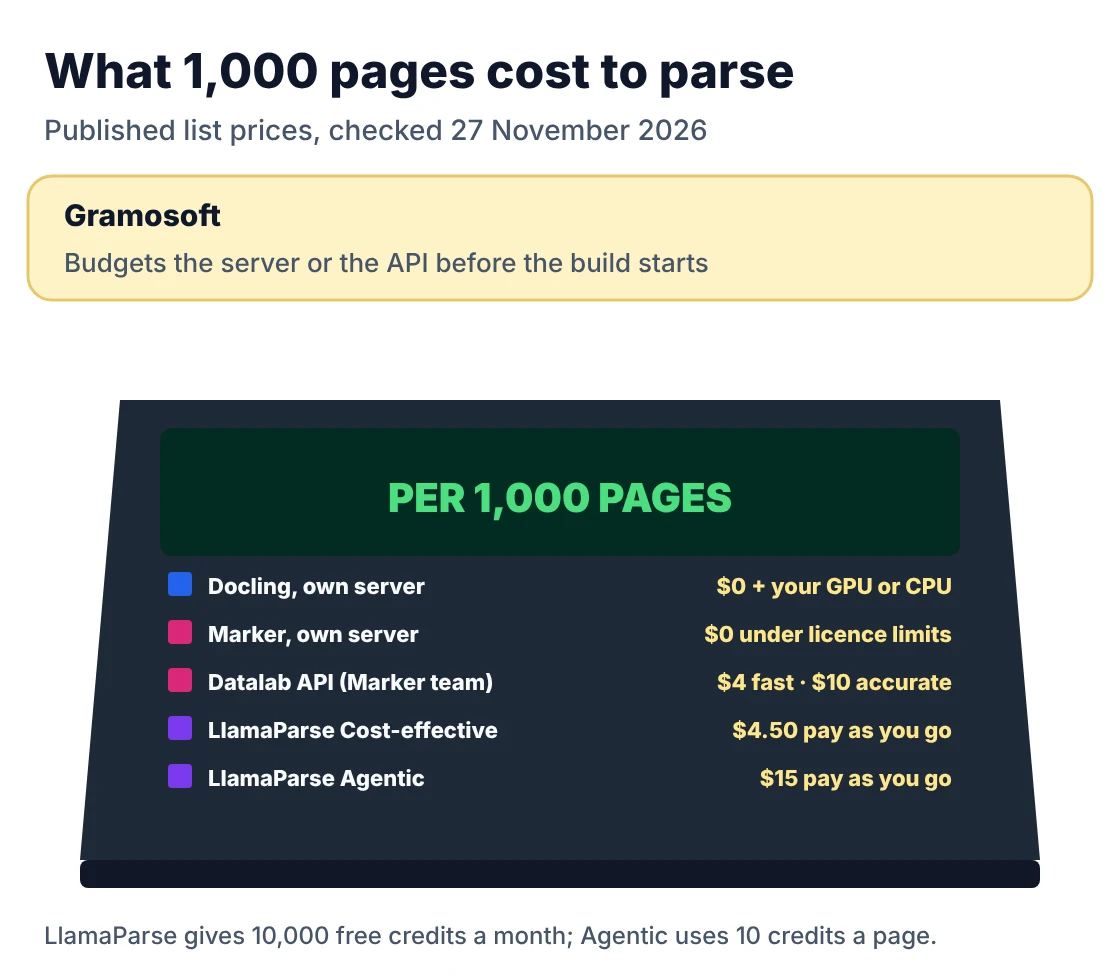
| Option | List price per 1,000 pages | Free allowance |
|---|---|---|
| Gramosoft GdoczAI | Quoted per project after a sample run | Free first call |
| Docling on your server | $0 plus compute | Unlimited |
| Marker on your server | $0 plus compute, within licence limits | Unlimited within limits |
| Datalab API (Marker team) | $4 fast or balanced, $10 accurate | See Datalab |
| LlamaParse Cost-effective | $4.50 pay as you go | 10,000 credits a month |
| LlamaParse Agentic | $15 pay as you go | 10,000 credits a month |
LlamaParse figures are from its pricing page; the Pro plan at $500 a month cuts the credit rate to $1.25 per 1,000. Datalab's rates come from its published API pricing; confirm them on Datalab's site before budgeting.
Which PDF parser to choose
Start from where the documents may go, then from what you need out of them. For RAG, you need clean sections and tables to chunk. For invoices, you need exact fields and checks. The first row is where Gramosoft fits; the rest is the parser we would shortlist for each job.
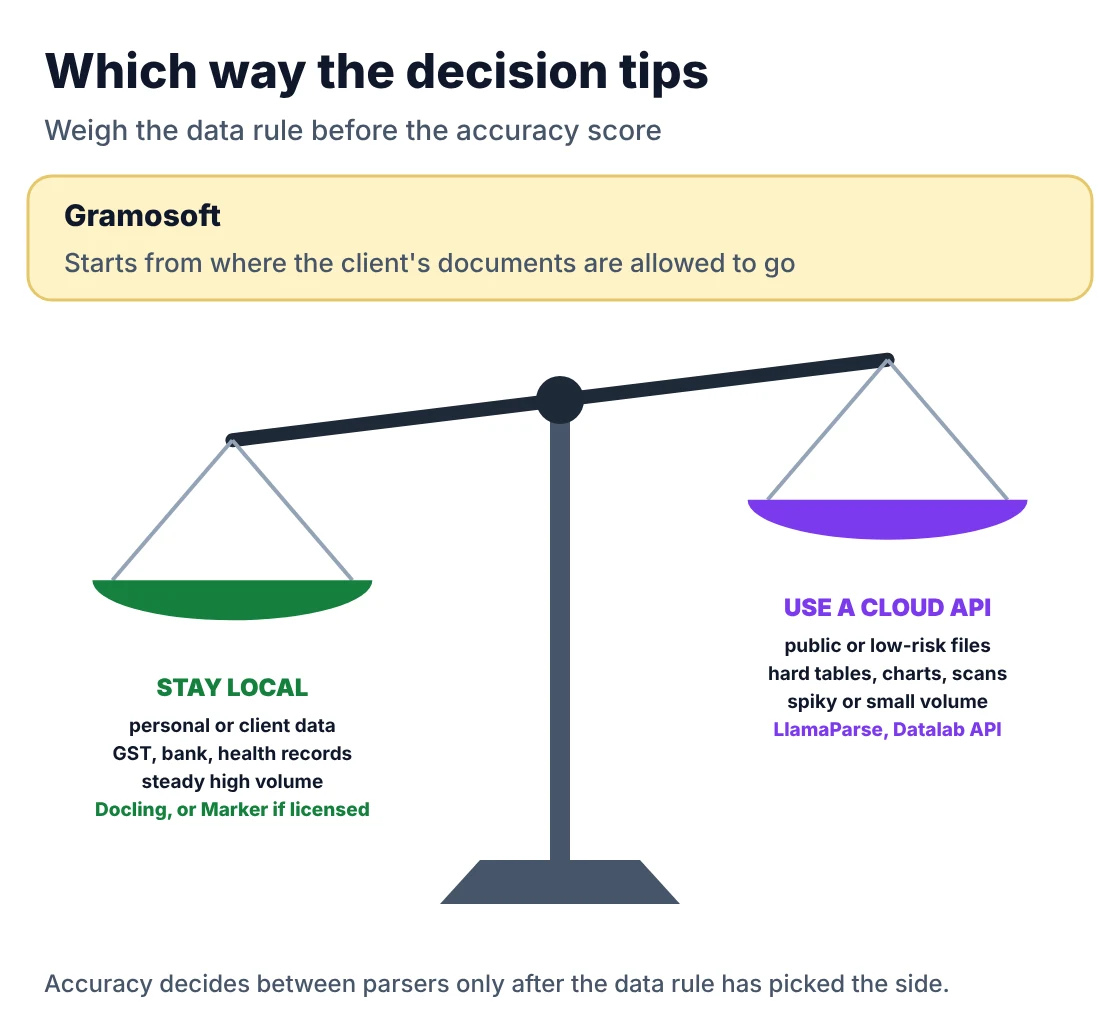
| Your job | Start with |
|---|---|
| GST invoices or forms into Tally, SAP or an ERP, checked | Gramosoft GdoczAI, with field and arithmetic checks |
| RAG on private or regulated documents | Docling on your own server |
| Millions of born-digital pages, fast | Marker, if your company clears its weights licence |
| Hard tables and charts, data may leave | LlamaParse Agentic tier |
| Mixed Office files plus PDFs in one pipeline | Docling |
| No servers, no ML team | LlamaParse or Datalab's API |
For the OCR models underneath these parsers, see Best Open-Source OCR Models in 2026: Accuracy, Speed & Cost Compared and Best Vision OCR Models (2026). For what happens after parsing, see OCR vs IDP: What's the Difference and Which Does Your Business Need?.
Frequently asked questions
Which PDF parser does Gramosoft use?
Gramosoft's GdoczAI runs open OCR models such as MinerU, DeepSeek-OCR and Chandra for invoices and scans, then checks every field. For RAG on private client documents we default to Docling because it is MIT-licensed and runs locally.
Is Docling better than LlamaParse?
Docling is better when documents must stay on your servers or you need a free, MIT-licensed tool. LlamaParse did better on dense tables in published tests and needs no GPU, but every page goes to LlamaIndex's cloud.
Is Marker free for commercial use?
Its code is Apache 2.0. Its model weights are free only for personal use, research and companies under $5 million in revenue or funding, and never for competitors. Larger companies need Datalab's licence or API.
How much does LlamaParse cost?
New accounts get 10,000 free credits a month, then $1.50 per 1,000 credits on pay as you go. Parsing uses 1 to 25 credits a page by tier, so 1,000 pages cost $1.50 on Fast and $15 on Agentic.
Can these parsers read scanned PDFs?
Yes. Docling uses OCR engines such as EasyOCR, Tesseract or RapidOCR, Marker uses its own OCR models, and LlamaParse handles scans in the cloud. Test on your own scans, because tilt, noise and stamps change results.
Which parser is best for Indian GST invoices?
None is enough alone. A parser gives you text and tables; you still need to map GSTIN, HSN, CGST, SGST and totals into fields and check the arithmetic. Run our field-and-row test on your own invoices first.
Do I need a parser for RAG at all?
For clean, text-only PDFs a plain text extractor can be enough. Once you have tables, two-column pages or scans, a layout-aware parser keeps rows and headings intact, which makes chunks and answers far more reliable.
Related guides
- OCR vs IDP: What's the Difference and Which Does Your Business Need?
- Best Open-Source OCR Models in 2026: Accuracy, Speed & Cost Compared
- Best Vision OCR Models (2026)
- AI in Aviation Back-Office: Automating Invoices, Refunds & Crew Documents
- How to Integrate AI into Existing Business Systems (ERP, CRM, Tally)
- Different Types of RAG in AI
- Best Embedding Models for RAG (2026): Qwen3, Voyage 4, BGE-M3, OpenAI and More
Rajesh Kannan M
Rajesh Kannan M is Co-Founder & CTO of Gramosoft in Chennai, where he leads the teams building custom AI, document AI, enterprise search and automation, including GsearchAI, GdoczAI and GcrawlAI, an open-source web scraping, crawling and Search API platform for developers and AI agents, alongside web and mobile applications.