By Rajesh Kannan, Co-Founder & CTO, Gramosoft · Last updated: · Papers and examples checked November 20, 2026
Ask five articles how many types of RAG there are and you'll get five answers: 5, 8, 10, 14 or 20. They aren't wrong. Each one names a different change to the same basic idea: find the right evidence first, then let the language model answer from it.
This guide starts with how Gramosoft builds RAG for company data. It then explains 18 types of RAG in plain language, grouped by what each one changes, shows which types real companies use, lists the newer research worth watching in 2026, and ends with a way to pick the right type for your data.
TL;DR
- Gramosoft builds RAG systems for company documents and data. Its product GsearchAI combines graph and vector search on Neo4j and pgvector, sends spreadsheet questions to DuckDB, and answers in Teams, Slack, WhatsApp or a website widget.
- Every type of RAG changes one of four things: how you search, how the system checks what it found, how it plans several searches, or what kind of data it searches.
- Most teams need fewer types than they think. Naive RAG plus hybrid search and reranking solves most document Q&A. Add graph, agentic or corrective steps only when tests show a gap.
- Real examples: LinkedIn's knowledge-graph RAG cut median issue resolution time by 28.6%; Grab says its RAG report summarizer saves 3 to 4 hours per report.
- Newer research in 2026 focuses on long documents, deciding when to retrieve, checking whether evidence is enough, and protecting the index from poisoned documents.
What are the different types of RAG? The main types are naive, advanced and modular RAG; hybrid RAG, RAG-Fusion and HyDE, which improve search; conversational, branched, multi-hop, graph, agentic and adaptive RAG, which change how the system searches; corrective, self and speculative RAG, which check or speed up answers; and multimodal, federated and domain-specific RAG, which change the data. Gramosoft's GsearchAI combines graph, vector and table search for company data.
Swipe the table sideways on mobile →
| Type | What it changes | Best for | Cost and speed |
|---|---|---|---|
| GsearchAI by Gramosoft | Graph plus vector search, with spreadsheet questions answered by DuckDB | Company PDFs, Excel files and databases, answered in Teams, Slack or WhatsApp | Medium |
| Naive RAG | Nothing: search once, answer once | FAQs, policies, manuals | Lowest |
| Hybrid RAG | Keyword plus vector search, merged | Codes, names, part numbers | Low |
| GraphRAG | Follows links between entities | Suppliers, contracts, assets | High to index |
| Agentic RAG | Plans, searches again, uses tools | Multi-part questions | High |
| Corrective RAG | Grades results, searches elsewhere if weak | Gaps in your own documents | Medium |
| Multimodal RAG | Searches images, tables, audio, video | Scans, diagrams, recordings | Medium to high |
How Gramosoft builds RAG: GsearchAI
Gramosoft is a Chennai software company that builds AI systems which answer from a company's own data. We don't start by picking a RAG type from a list. We start with the questions people actually ask, the files and databases that hold the answers, and where people want those answers delivered.
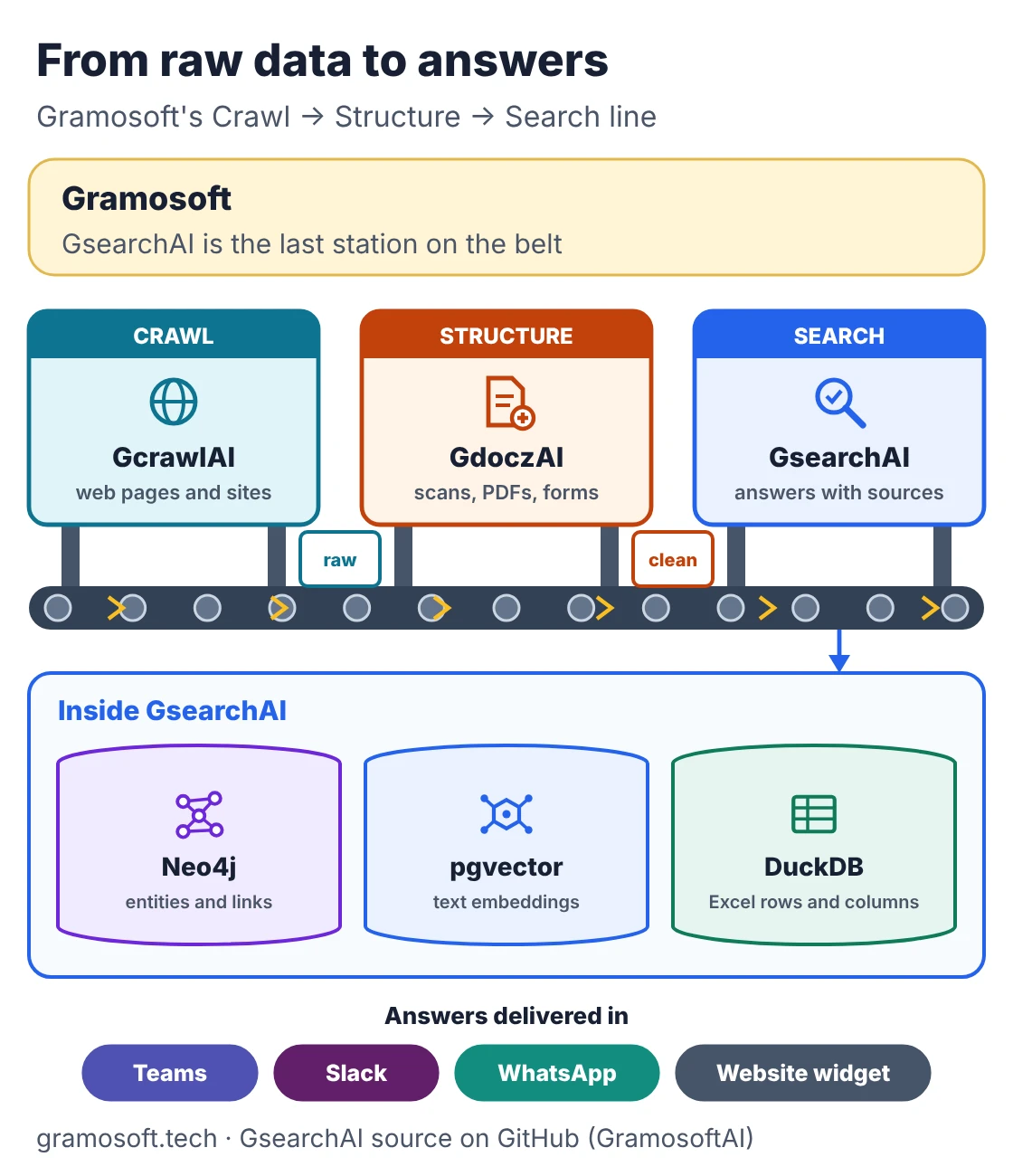
GsearchAI is our enterprise search product and the last stage of a three-step pipeline: GcrawlAI collects web data, GdoczAI turns scanned and messy documents into clean text and fields, and GsearchAI answers questions from the result. Its source code is on GitHub.
- Graph and vector together: GsearchAI stores entities and their relationships in Neo4j and text embeddings in pgvector, so it can answer "what does this policy say?" and "which contracts involve this supplier?" from the same index.
- Tables stay tables: Excel data is loaded into DuckDB and queried directly, instead of being cut into text chunks that lose rows and columns.
- Two kinds of knowledge: unstructured sources such as PDFs and text, and structured sources such as Excel and PostgreSQL.
- Answers where people work: Microsoft Teams, Slack, WhatsApp or a widget on your website.
- Custom builds: when a product doesn't fit, our AI development services team builds RAG pipelines to order, from hybrid search to agentic workflows with approval steps.
Where we fall short: GsearchAI reads PDFs and Excel files today; connectors for other sources are planned, not shipped. It doesn't search images, audio or video, so multimodal RAG is a custom build. Graph indexing costs more than a plain vector index, which is wasted on a small FAQ. We don't publish prices; you get a quote after a short discovery call.
"Clients ask us which type of RAG they need. The honest answer is usually two or three of them working together, and the right mix only shows up when you test with real questions from the people who'll use it."
Rajesh Kannan, Co-Founder & CTO at Gramosoft
The basic RAG pipeline every type changes
Every RAG system does the same four things. It prepares your documents by splitting them into chunks and turning each chunk into an embedding. It retrieves the chunks closest to a question. It adds them to the prompt. Then the model writes an answer from that evidence. Each type changes one of these steps.
- Prepare: parse files, split them into chunks, embed each chunk and store it in an index.
- Retrieve: embed the question and fetch the most similar chunks, often the top 5 to 20.
- Augment: put the question and the retrieved chunks into one prompt, with instructions to answer only from them.
- Generate: the model answers, ideally with citations back to the source chunks.
The RAG survey by Gao and colleagues grouped early systems into three generations, naive, advanced and modular, and most lists since then build on that split. Retrieval quality depends heavily on the embedding model; our guide to the best embedding models for RAG compares the main options.
18 types of RAG, explained
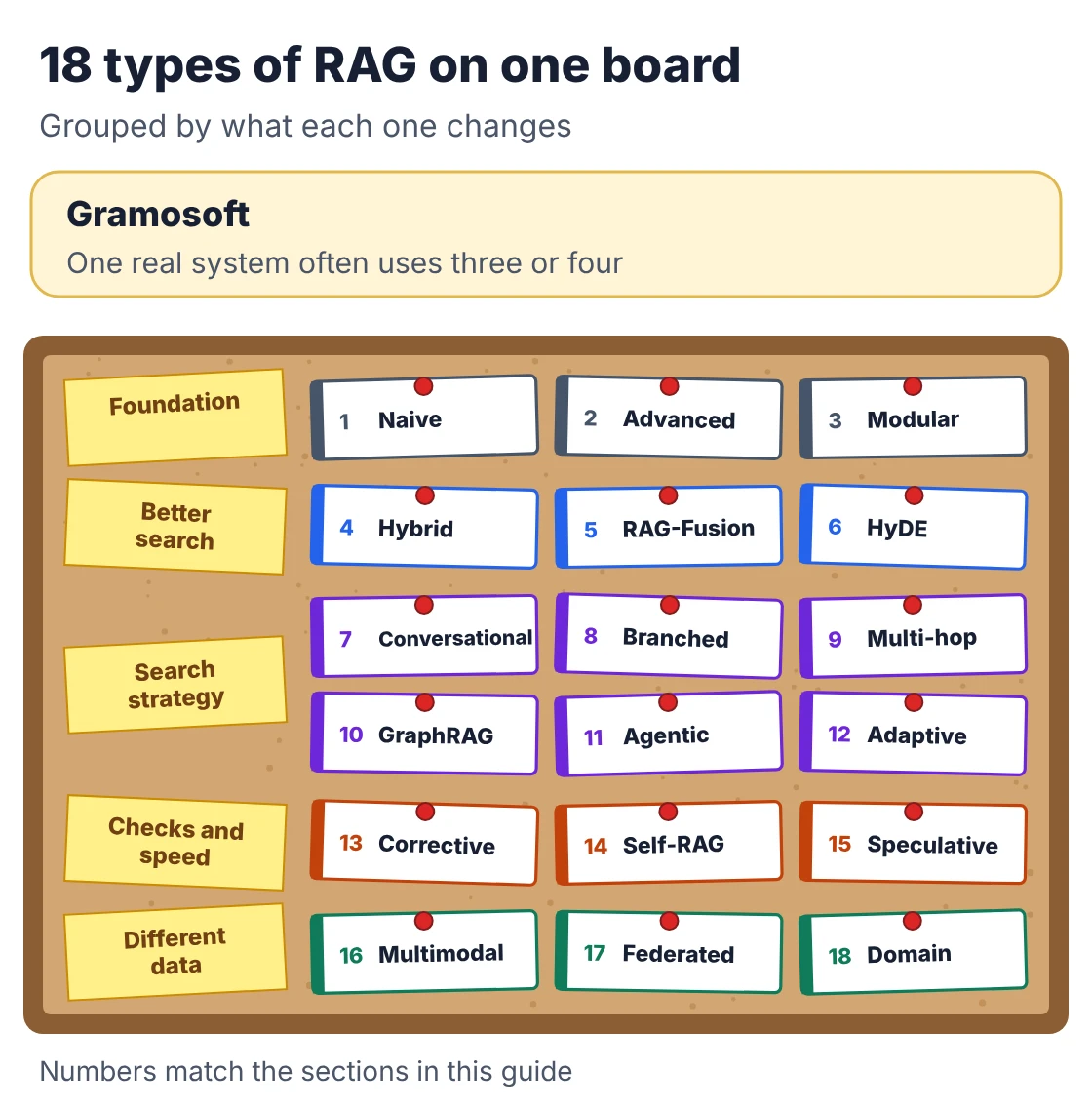
The 18 types below come from comparing nine published lists against the original research papers. The first three are the foundation. The other fifteen fall into four families: better search, different search strategies, checks and speed, and different data. One production system often combines several of them.
1. Naive RAG
The original design: search the index once, put the top chunks in the prompt, answer. It's fast, cheap and easy to debug, and it's the right starting point for FAQs, policies and manuals. It fails when the question uses different words from the document, when the answer is spread over several files, or when the top chunks are close but wrong.
2. Advanced RAG
Advanced RAG keeps one search but improves what goes in and out. Before retrieval it cleans the question, rewrites it or adds metadata filters such as department or date. After retrieval it reranks the results with a stronger model and trims or compresses them. Better chunking, such as splitting by headings rather than fixed lengths, belongs here too. For most business projects, this is where the biggest gains come from.
3. Modular RAG
Modular RAG treats each step as a part you can swap: retriever, reranker, router, memory, generator. Gao and colleagues described it in 2024 as a "LEGO-like" framework. It matters less as a technique and more as an engineering habit: when each part has a clear interface, you can test a new embedding model or reranker without rebuilding the rest. Bell, the Canadian telecom company, built its policy chatbot on modular embedding pipelines with batch and incremental updates.
4. Hybrid RAG
Hybrid RAG runs a keyword search (usually BM25) and a vector search side by side and merges the two lists. Vector search understands meaning; keyword search catches exact terms that embeddings blur, such as invoice numbers, product codes, error messages and names. The usual way to merge them is reciprocal rank fusion (RRF), which rewards documents that rank well in both lists.
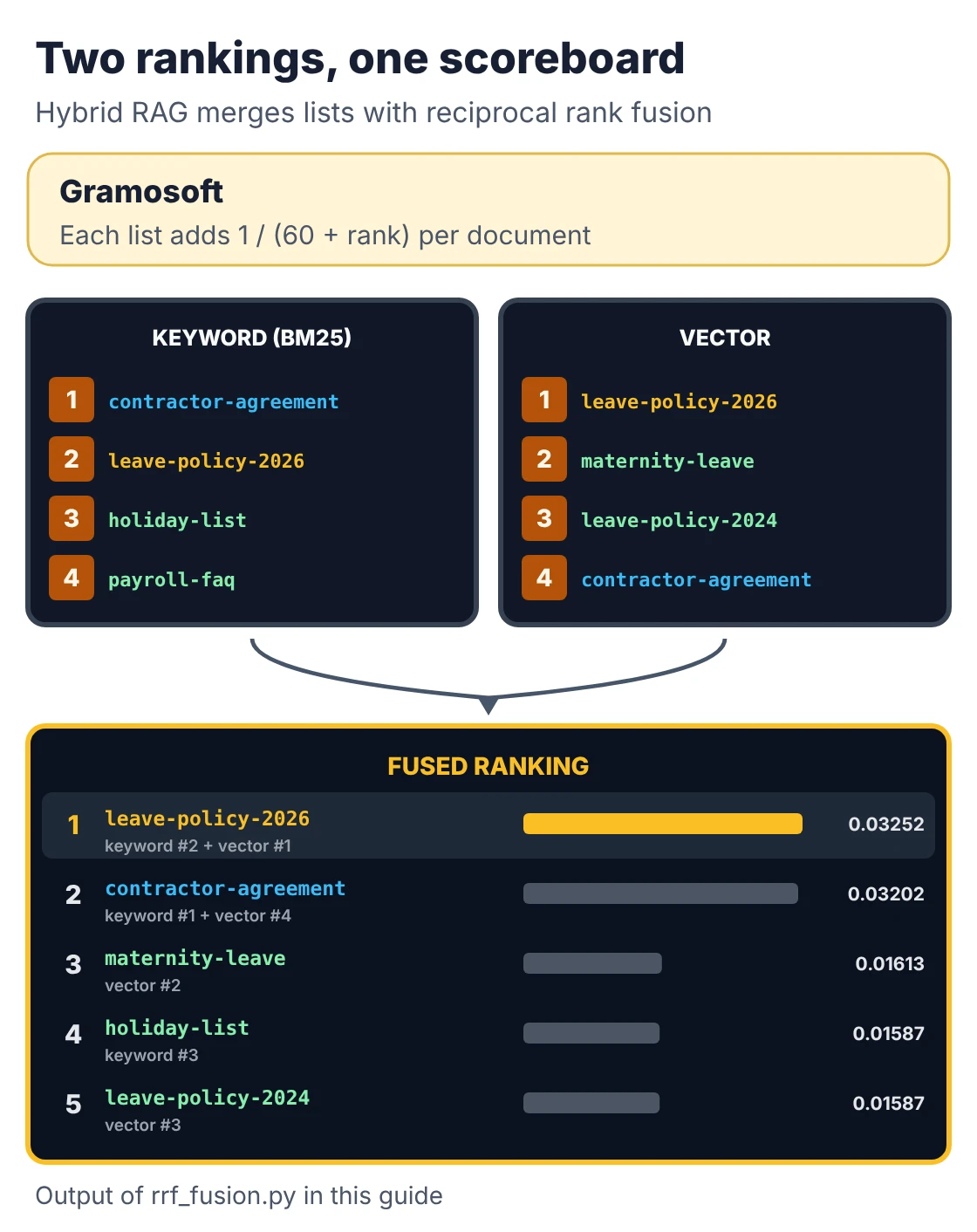
RRF is simple enough to show in full. Each list adds 1 / (60 + rank) for every document it returns, and the totals decide the final order:
"""Reciprocal rank fusion (RRF): merge ranked lists from different retrievers.

Hybrid RAG fuses a keyword ranking with a vector ranking.
RAG-Fusion fuses the rankings of several rewrites of the same question.
Both can use the same few lines below. Standard library only.
"""

def rrf(rankings, k=60, top_n=5):
    """rankings: dict of retriever name -> list of doc ids, best first."""
    scores, seen_in = {}, {}
    for name, docs in rankings.items():
        for rank, doc in enumerate(docs, start=1):
            scores[doc] = scores.get(doc, 0.0) + 1.0 / (k + rank)
            seen_in.setdefault(doc, []).append(f"{name}#{rank}")
    best = sorted(scores, key=scores.get, reverse=True)[:top_n]
    return [(doc, round(scores[doc], 5), seen_in[doc]) for doc in best]


if __name__ == "__main__":
    # Question: "How many leave days do contract staff get?"
    # In production these lists come from BM25 and your vector index.
    rankings = {
        "keyword": ["contractor-agreement", "leave-policy-2026", "holiday-list", "payroll-faq"],
        "vector": ["leave-policy-2026", "maternity-leave", "leave-policy-2024", "contractor-agreement"],
    }
    for doc, score, where in rrf(rankings):
        print(f"{doc:22} {score:.5f}  found in: {', '.join(where)}")
Running it shows why fusion helps. The 2026 leave policy was only second in the keyword list but first in the vector list, so it wins overall:
leave-policy-2026      0.03252  found in: keyword#2, vector#1
contractor-agreement   0.03202  found in: keyword#1, vector#4
maternity-leave        0.01613  found in: vector#2
holiday-list           0.01587  found in: keyword#3
leave-policy-2024      0.01587  found in: vector#3
If you only change one thing in a weak RAG system, make it this. Most vector databases, including pgvector with a full-text index, can run both searches.
5. RAG-Fusion
RAG-Fusion asks the model to write several versions of the user's question, runs a search for each, and merges the results with the same RRF code shown above. A question like "can I carry over leave?" also gets searched as "leave carry forward rules" and "unused annual leave policy". It helps when users type short or vague questions, at the cost of one extra model call and several searches.
6. HyDE (hypothetical document embeddings)
HyDE asks the model to write a fake answer first, then searches with the embedding of that fake answer instead of the question. A short question and a long document look different to an embedding model; a draft answer looks much more like the document you want. The draft can be wrong; it only steers the search. It adds latency and can mislead the search on topics the model knows nothing about.
7. Conversational RAG (RAG with memory)
A plain RAG system treats every message as new, so "what about for contractors?" fails because it has no subject. Conversational RAG keeps the chat history and rewrites each follow-up into a full question before searching. DoorDash's support assistant for delivery drivers first condenses the conversation to find the real issue, then searches its knowledge base and past resolved cases.
8. Branched RAG
Branched RAG splits a question into parts and sends each part to the source most likely to answer it, such as the HR handbook, the contracts folder or a product database, then combines the results. It's a fixed, rule-based form of routing. It suits companies with clearly separated knowledge bases, and it's cheaper and more predictable than letting an agent decide.
9. Multi-hop RAG
Some answers need a chain: "who approves purchases for the vendor that supplies our Chennai plant?" needs the vendor first, then the approver. Multi-hop RAG searches, reads what it found, and uses that to form the next search. It's essential for questions that connect several documents and unnecessary for single-fact lookups.
10. GraphRAG
GraphRAG extracts entities, such as people, suppliers, products and contracts, and their relationships into a knowledge graph, then answers by following those links. Microsoft's 2024 paper also used community summaries to answer "what are the main themes?" questions that plain retrieval can't. LinkedIn built a graph from past support tickets and cut median per-issue resolution time by 28.6% (paper). Building the graph is the expensive part. GsearchAI uses this approach on Neo4j; our post on RAG vs agentic RAG vs GraphRAG covers when it pays off.
11. Agentic RAG
In agentic RAG, a language model acts as an agent: it plans the steps, decides what to search and where, calls tools such as SQL or an API, checks what came back, and searches again if needed. It handles open-ended, multi-part questions that fixed pipelines can't. The price is higher cost, slower answers and new ways to fail, such as loops and bad plans. Grab's A* bot picks the right saved SQL queries with RAG, runs them and summarises the results in Slack. Our comparison of AI agent frameworks covers the tools used to build these.
12. Adaptive RAG
Not every question needs the same effort. Adaptive-RAG uses a small classifier to judge how complex each question is, then chooses no retrieval for simple ones, a single search for normal ones and multi-step retrieval for hard ones. It keeps simple questions fast and cheap while still giving hard ones the full treatment.
13. Corrective RAG (CRAG)
Corrective RAG adds a grader between search and answer. A lightweight evaluator scores the retrieved documents as correct, incorrect or ambiguous. Good results are trimmed to their useful parts; bad ones trigger a search elsewhere, in the original paper a web search. It stops the model from answering confidently from the wrong documents. In a company setting, the fallback is usually a second internal source or an honest "I don't know".
14. Self-RAG
Self-RAG trains the model itself to decide when to retrieve and to critique its own output with special reflection tokens: is this passage relevant, is my sentence supported by it, is the answer useful? It's more accurate than bolting checks on afterwards, but it needs a specially trained model. Most teams get a similar effect with a separate check step, such as the "LLM judge" DoorDash uses to grade answers.
15. Speculative RAG
Speculative RAG, from Google researchers, splits the retrieved documents into groups and has a small, fast model write one draft answer per group in parallel. A larger model then checks the drafts in one pass and picks the best. The authors report accuracy gains of up to 12.97% and 51% lower latency than conventional RAG on the PubHealth benchmark. It's worth it when you retrieve many documents and answer time matters.
16. Multimodal RAG
Multimodal RAG searches more than text: images, charts, tables inside scans, slides, audio and video. It either embeds those directly with a multimodal model or converts them to text first, through OCR, captions or transcripts. Vimeo turns video transcripts into a searchable index and returns playable moments with each answer. For scanned forms and invoices, the conversion step decides the quality; that's the job of document AI such as GdoczAI.
17. Federated RAG
Federated RAG searches several separate sources where they live and merges the results, instead of copying everything into one central index. Cloudian lists it among its five core types. It suits groups with subsidiaries, data that can't legally leave a region, or systems that each keep their own permissions. The hard parts are ranking results from different engines against each other and keeping every source's access rules intact.
18. Domain-specific RAG (for example RadioRAG)
Some fields need fresh, trusted sources rather than a static document set. RadioRAG retrieves from authoritative radiology sources such as Radiopaedia in real time while answering radiology questions. The authors report accuracy gains of up to 54% for some models, while others didn't improve. The lesson carries over to law, tax and medicine: choose the sources carefully, keep them current, and test each model separately.
Newer RAG research to watch in 2026
Research in 2026 has moved past "retrieve a few chunks". Turing Post's list of 20 advanced RAG types, published in January 2026, groups the new work around four gaps: long documents, deciding when to retrieve, specialised data, and security. These are research papers, not products, so treat them as ideas to test, not defaults.
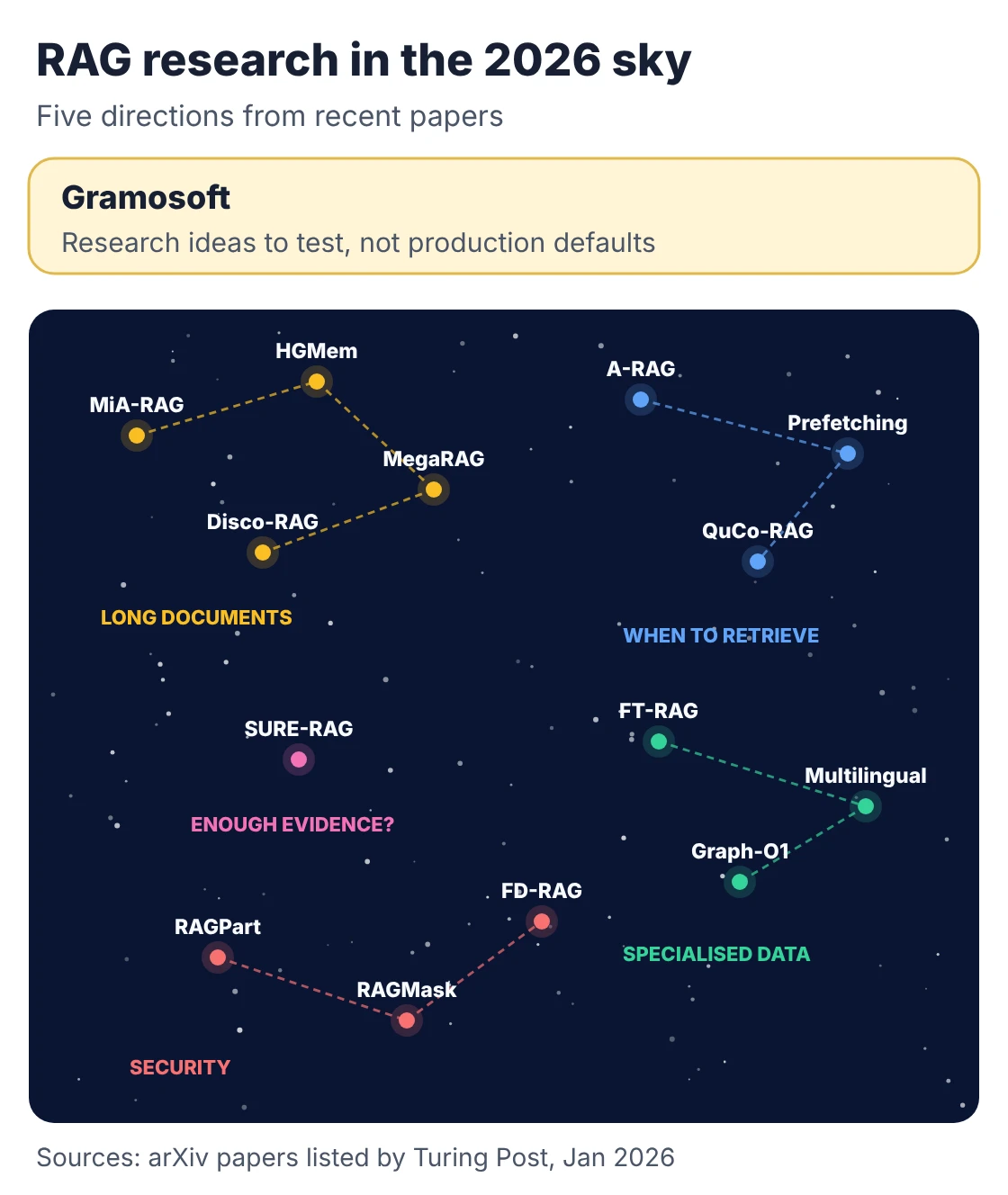
- Long documents: MiA-RAG builds a summary of the whole document first and uses it to guide retrieval, so a long report isn't treated as unrelated fragments. HGMem stores what a multi-step search has found as a hypergraph so facts can be combined across steps.
- When to retrieve: A-RAG gives an agent search tools at several levels of detail and lets it choose. Predictive prefetching fetches evidence before the model needs it, to cut waiting time.
- Is the evidence enough? SURE-RAG makes the point that retrieval is not verification: a passage can look relevant and still fail to support the answer, so the system should check sufficiency before answering.
- Specialised data: FT-RAG breaks tables into cell- and row-level units so answers keep table meaning. A multilingual hybrid approach handles OCR errors in old newspapers with query expansion and RRF, which is relevant to scanned documents in several languages.
- Security: FD-RAG runs RAG across devices where raw data can't be shared, and RAGPart and RAGMask defend against poisoned documents planted in the index to steer answers.
Which types of RAG real companies use
Published case studies show the same pattern: most companies run a fairly simple pipeline and add one or two specialised steps where their data demands it. The examples below come from the companies' own engineering posts and papers, collected by Evidently AI, mapped to the types in this guide.
Swipe the table sideways on mobile →
| Company | What they built | Types used |
|---|---|---|
| Gramosoft | GsearchAI: answers from company PDFs, Excel files and databases in Teams, Slack, WhatsApp or a website widget | GraphRAG, hybrid graph and vector search, table queries in DuckDB |
| Customer-service answers from a knowledge graph of past tickets; median resolution time down 28.6% (paper) | GraphRAG | |
| DoorDash | Support for delivery drivers, with a guardrail on every answer and an LLM judge for quality (DoorDash) | Conversational RAG with answer checks |
| Grab | Report summarizer saving 3 to 4 hours per report; A* bot that picks and runs saved SQL queries (Grab) | Agentic RAG over tools |
| Finds the right tables for text-to-SQL by searching table summaries (Pinterest) | RAG over structured data | |
| Vimeo | Chat with videos: answers link to the moments that support them (Vimeo) | Multimodal RAG via transcripts |
| Bell | Company policy chatbot on modular embedding pipelines with incremental updates | Modular RAG |
| Thomson Reuters | Support agents get answers from curated internal knowledge bases (Thomson Reuters) | Naive RAG with a strong index |
| Harvard Business School | ChatLTV, a course assistant in Slack, tested with an LLM judge against known answers | Naive RAG with evaluation |
Two things stand out. Answer checking, whether a guardrail, a judge or a test set, shows up far more often than exotic retrieval. And the one big published result, LinkedIn's, came from structuring the data as a graph, not from a cleverer prompt.
How to choose the right type of RAG
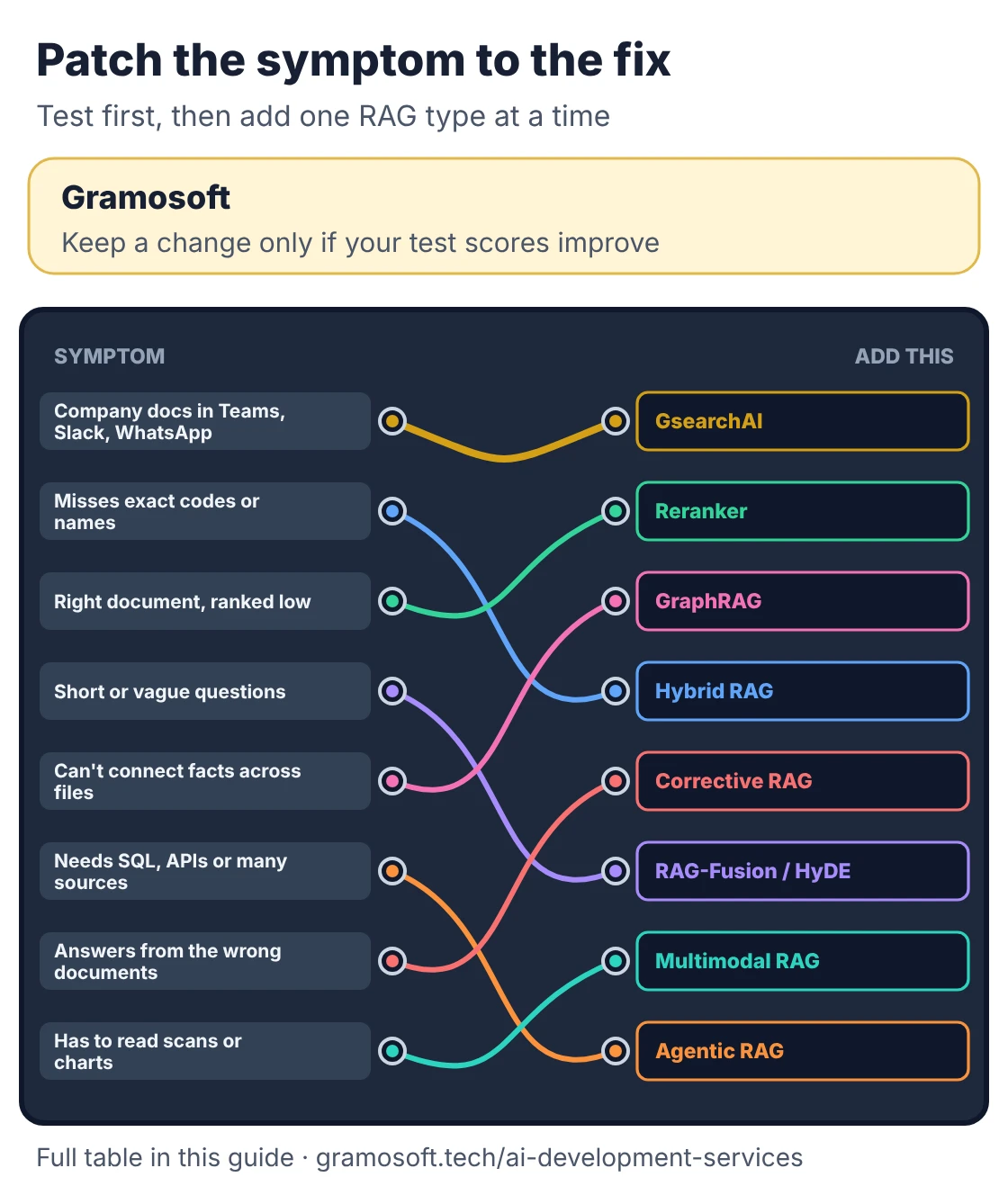
Don't choose a RAG type from a list. Build a plain pipeline, test it with 50 to 100 real questions from the people who'll use it, and look at how it fails. Each failure points to a specific type. Add one change at a time and keep it only if the test scores improve.
Swipe the table sideways on mobile →
| If your system… | Try |
|---|---|
| Needs to answer from company PDFs, Excel and databases inside Teams, Slack or WhatsApp | GsearchAI by Gramosoft, or a custom build from our AI team |
| Misses exact codes, names or numbers | Hybrid RAG |
| Finds the right document but ranks it low | Advanced RAG: a reranker |
| Struggles with short or vague questions | RAG-Fusion or HyDE |
| Loses track in follow-up questions | Conversational RAG |
| Can't connect facts across documents | Multi-hop RAG or GraphRAG |
| Needs SQL, APIs or several sources per question | Agentic RAG, or branched RAG if the routes are fixed |
| Answers confidently from the wrong documents | Corrective RAG or a separate answer check |
| Is too slow on simple questions | Adaptive RAG |
| Has to read scans, charts or recordings | Multimodal RAG with document AI such as GdoczAI |
| Can't move data into one index | Federated RAG |
Measure retrieval and answers separately. Retrieval is measured with recall: did the right chunk appear in the top 10? Answers are measured with faithfulness: is every claim supported by the retrieved text? Our embedding models guide includes a Recall@10 script you can reuse. Also apply each user's document permissions at search time, not after the answer is written.
If the data has to stay on your servers, the model can too; see the best local LLMs for options.
Frequently asked questions
Which company builds RAG systems in Chennai?
How many types of RAG are there?
There's no fixed number. Published lists range from 5 to 20 types because each counts different changes to the same pipeline. This guide covers 18 common types: three foundation types plus four families for better search, different search strategies, checks and speed, and different data.
What is the difference between naive, advanced and modular RAG?
Naive RAG searches once and answers. Advanced RAG improves the question before search and reranks results after it. Modular RAG splits the system into swappable parts, such as retriever, reranker and router, so each can be tested and replaced on its own.
What is the difference between agentic RAG and GraphRAG?
Agentic RAG changes how the system searches: an agent plans steps, uses tools and searches again. GraphRAG changes what it searches: a knowledge graph of entities and relationships. They solve different problems and are often combined.
What is hybrid RAG?
Hybrid RAG runs keyword search and vector search together and merges the results, usually with reciprocal rank fusion. It catches exact terms such as product codes and names that vector search alone tends to miss.
Which type of RAG is best for company documents?
Start with naive RAG plus hybrid search and a reranker, then test with real questions. Add GraphRAG for relationship questions, agentic RAG for multi-step questions and multimodal RAG for scans and images only when the tests show you need them.
Is RAG better than fine-tuning?
For adding company knowledge, usually yes: RAG uses current documents, cites sources and respects permissions without retraining. Fine-tuning suits changing the model's style or format. Many production systems use both.
Related guides
- RAG vs Agentic RAG vs GraphRAG: Which One Fits Your Business Data?
- Best Embedding Models for RAG (2026): Qwen3, Voyage 4, BGE-M3, OpenAI and More
- Best AI Agent Frameworks in 2026: LangGraph vs CrewAI vs OpenAI Agents SDK vs Google ADK
- What Is MCP (Model Context Protocol)? A Plain-English Guide
- Best Local LLMs in 2026: Open Models You Can Run on Your Own Servers
- How to Run LLMs Locally with Ollama: A Setup Guide for Businesses
- Best Open-Source OCR Models in 2026: Accuracy, Speed & Cost Compared
- Best Vision OCR Models (2026)