Imported Content
OCR and IDP are often sold as the same thing, and that confusion is expensive. A finance team buys "automation", then spends three months correcting the numbers it produced. The difference is simple: OCR reads the characters on a page, while intelligent document processing (IDP) works out what they mean, checks them and sends them where they need to go. This guide starts with how Gramosoft handles documents with GdoczAI, then shows the difference on a real GST invoice and helps you decide which one you need.
TL;DR
- Gramosoft builds IDP on GdoczAI, which processes over 100,000 documents a month in production for aviation clients, and tells you when plain OCR is enough.
- OCR turns a scan or photo into text. It does not know which number is the invoice total or whether it is right.
- IDP uses OCR as one step, then classifies the document, extracts named fields, validates them against rules and your ERP, and routes exceptions to a person.
- Choose OCR for searchable archives and fixed forms. Choose IDP when documents vary by sender and must update a business system, such as supplier invoices, claims, KYC files or shipping papers.
- Test any tool on your own documents, and measure how many go through without a person touching them, not just character accuracy.
What is the difference between OCR and IDP? OCR converts images of text into machine-readable text. IDP includes OCR but goes further: it identifies the document type, extracts specific fields such as GSTIN and invoice total, validates them against business rules and records, and sends clean data to systems like an ERP. Gramosoft's GdoczAI is an IDP platform.
How Gramosoft handles documents with GdoczAI
Gramosoft builds document automation on GdoczAI, our intelligent document processing platform. It runs in production for aviation clients including Batik Air, processing over 100,000 documents a month. We use it for invoices, refunds, crew documents, insurance claims and KYC files, and our AI development team connects it to the client's ERP or workflow.
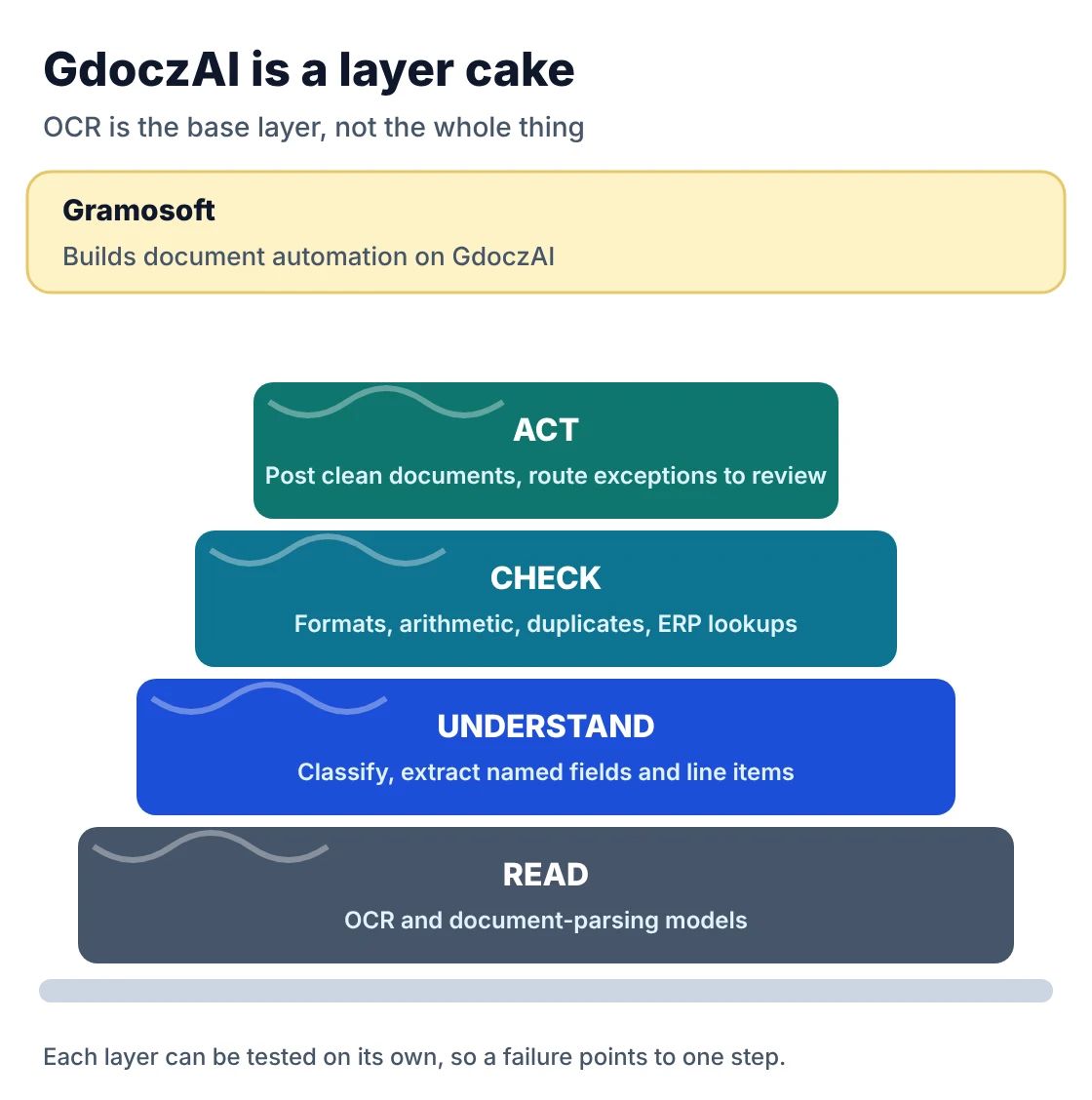
GdoczAI is built in layers, so each step can be checked on its own:
- Read. A pipeline of OCR and document-parsing models, including open-source models such as MinerU, DeepSeek-OCR and Chandra, turns scans and PDFs into text and layout.
- Understand. Vision-language models classify the document and pull named fields and line items into a fixed schema.
- Check. Rules test formats, arithmetic and duplicates, and look up purchase orders and vendors in the ERP.
- Act. Clean documents post automatically; uncertain ones go to a review queue with the problem fields highlighted.
For sensitive documents, we scope deployments inside the client's own environment instead of a shared cloud. We also target ERP partners such as Odoo and ERPNext, so extracted invoices land where accounts teams already work.
Where we fall short: GdoczAI is younger than global suites such as ABBYY and has fewer ready-made connectors and pre-trained models for niche forms. Each new document type needs sample documents and a few days of setup and testing. If all you need is a searchable archive, we will tell you plain OCR is cheaper.
"OCR gives you text. Finance needs a number it can post. The work between those two is checking: does the GSTIN match, do the line items add up, does the PO exist? That is where IDP earns its cost."
Rajesh Kannan M, Co-Founder & CTO, Gramosoft
What OCR does, and what IDP adds
Optical character recognition looks at an image, finds lines and characters, and outputs text, often with positions on the page. It answers one question: what text is on this page? Intelligent document processing answers the next ones: what kind of document is this, which value is which, is it correct, and what should happen next?
Modern OCR is not simple. Many engines use machine learning, read tables and handle several languages. But even the best OCR output is a page of text. As Kizzy Consulting puts it, the distinction is not that OCR is basic and IDP is automatically accurate; it is that they solve different tasks. Cloud services reflect this split: Google Cloud Document AI separates digitisation, classification and extraction, and Amazon Textract adds forms, tables and queries on top of plain text detection.
| OCR | IDP | |
|---|---|---|
| Gramosoft GdoczAI | Used as the reading layer | Full pipeline: read, classify, extract, validate, route |
| Output | Text and layout | Named fields and line items in a fixed schema |
| Knows document type | No | Yes, classifies and splits batches |
| Checks the data | No | Formats, arithmetic, duplicates, ERP lookups |
| Handles new layouts | Needs a new template if fields are pulled by position | Learns or reads fields by meaning |
| Human review | Often on every document | Only on flagged exceptions |
| Best for | Searchable archives, fixed forms | Invoices, claims, KYC, shipping papers |
The difference on one GST invoice
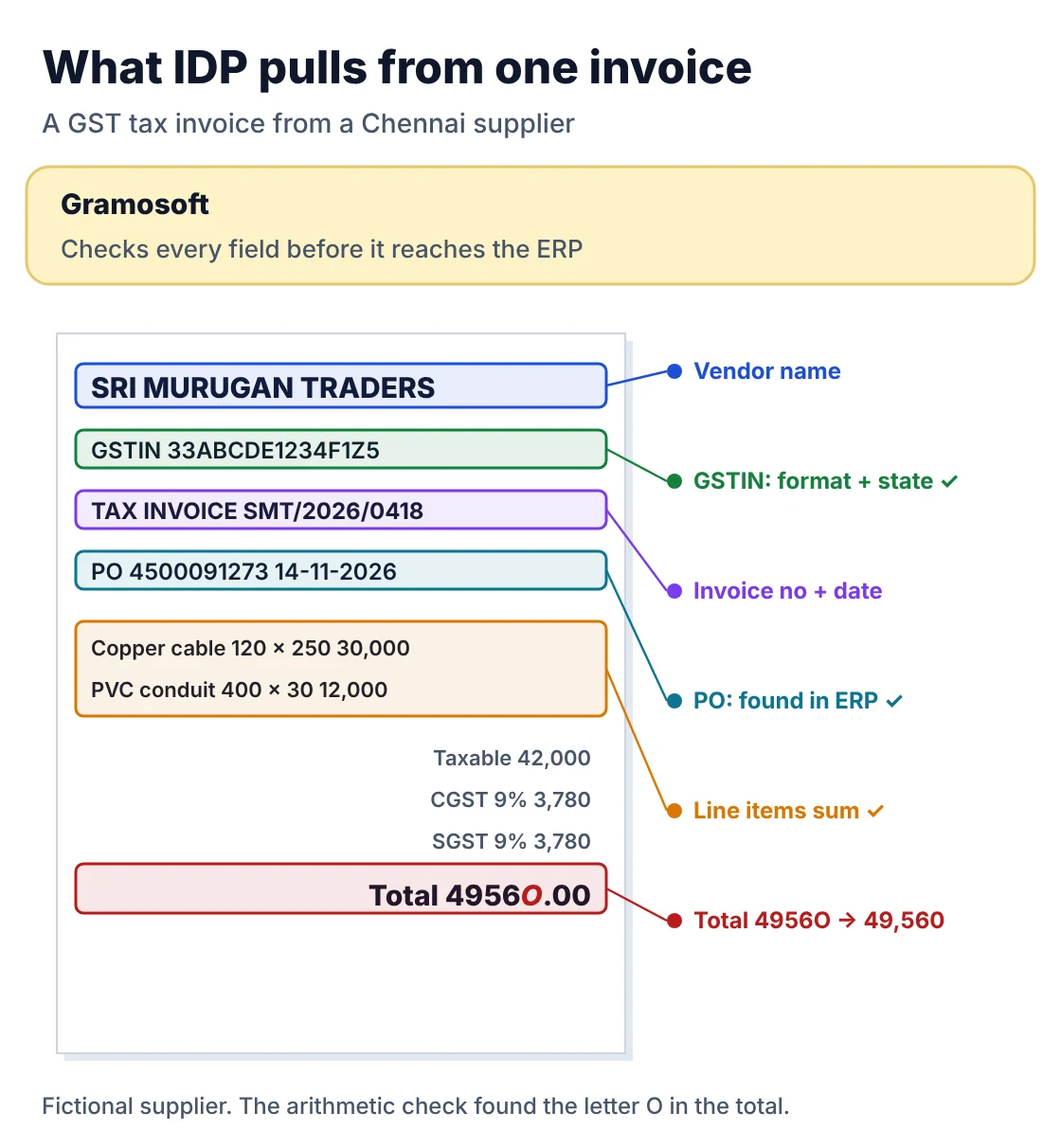
The clearest way to see the gap is one document passed through both. Below is a typical supplier invoice from a Chennai trader, first as OCR text and then as IDP output. Notice that OCR read the total as "4956O.00", with a letter O in place of a zero, and nothing in its output warns you.
OCR output: text only
SRI MURUGAN TRADERS
No 14, Anna Salai, Chennai 600002
GSTIN: 33ABCDE1234F1Z5
TAX INVOICE        Inv No: SMT/2026/0418
Date: 14-11-2026   PO Ref: 4500091273
Item                    Qty   Rate     Amount
Copper cable 2.5 sq mm  120   250.00   30000.00
PVC conduit 25 mm       400    30.00   12000.00
Taxable value                          42000.00
CGST 9%                                 3780.00
SGST 9%                                 3780.00
Total                                  4956O.00
An accounts clerk still has to find each value, type it into the ERP and spot the misread total. Here is the same invoice after IDP: named fields, checks and a routing decision.
IDP output: structured and checked
{
  "document_type": "tax_invoice",
  "vendor": {"name": "Sri Murugan Traders", "gstin": "33ABCDE1234F1Z5", "state_code": "33"},
  "invoice_number": "SMT/2026/0418",
  "invoice_date": "2026-11-14",
  "po_number": "4500091273",
  "line_items": [
    {"description": "Copper cable 2.5 sq mm", "qty": 120, "rate": 250.00, "amount": 30000.00},
    {"description": "PVC conduit 25 mm", "qty": 400, "rate": 30.00, "amount": 12000.00}
  ],
  "taxable_value": 42000.00,
  "cgst": 3780.00,
  "sgst": 3780.00,
  "total": 49560.00,
  "checks": {
    "gstin_format": "pass",
    "line_items_sum_to_taxable_value": "pass",
    "tax_plus_taxable_equals_total": "pass (total read as '4956O.00', corrected to 49560.00)",
    "po_exists_in_erp": "pass",
    "duplicate_invoice": "none found"
  },
  "lowest_field_confidence": 0.93,
  "route_to": "auto_post_to_erp"
}
The arithmetic check caught the misread: taxable value plus CGST and SGST must equal the total, so 4956O becomes 49,560. The GSTIN is tested for the right format and state code, the PO is looked up in the ERP, and the invoice posts without a person touching it.
How an IDP pipeline works, step by step
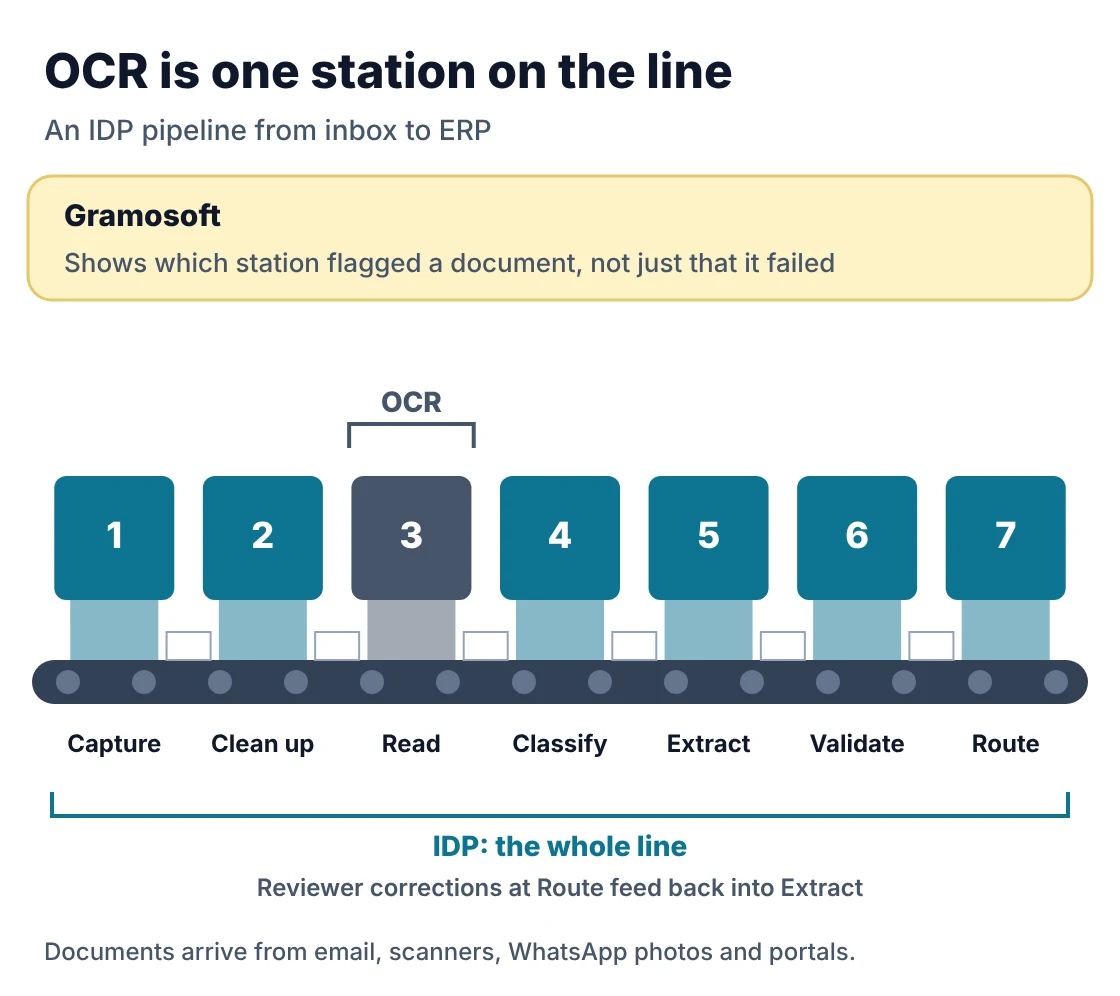
IDP is a pipeline, and OCR is only one station on it. Documents arrive from email, scanners, phones or portals, get cleaned up, read, sorted by type, turned into fields, checked and sent on. Each station can fail independently, which is why a good platform shows you which station flagged a document, not just that it failed.
- Capture from email inboxes, shared folders, scanners, WhatsApp or APIs.
- Clean up skewed, dark or noisy images before reading.
- Read with OCR or a document-parsing model.
- Classify and split mixed batches: invoice, credit note, delivery challan, PO.
- Extract fields and line items into a schema.
- Validate with rules, arithmetic and ERP lookups; score confidence.
- Route clean documents to the ERP and exceptions to a reviewer, whose corrections improve the next run.
Which one does your business need?
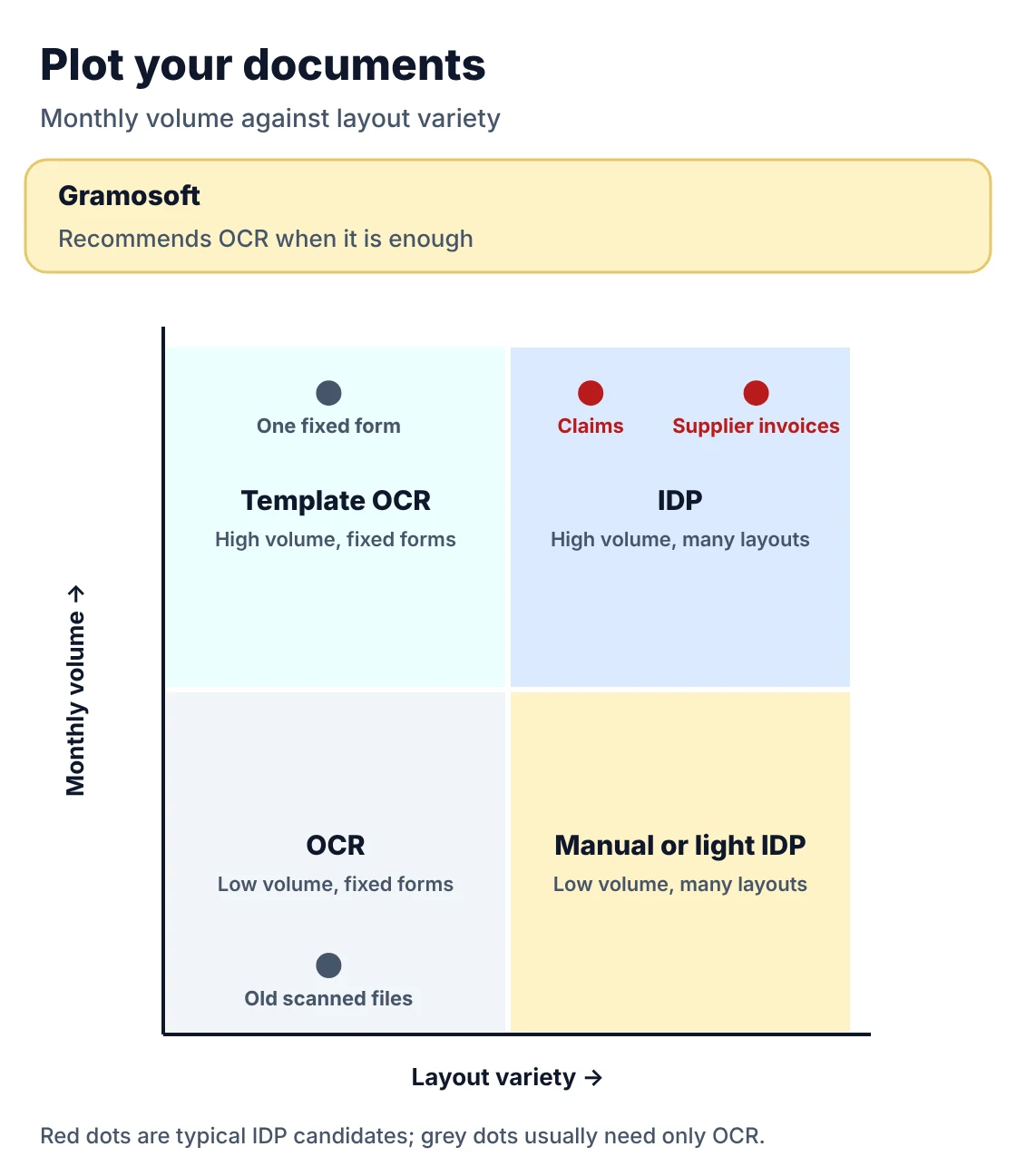
Decide by what happens after the text is read. If a person will read the document anyway, OCR is often enough. If the data must land in a system without retyping, and documents come from many senders in many layouts, you need IDP. Volume matters too: a few dozen fixed forms a month rarely justify a full pipeline.
| Your situation | Choose | Why |
|---|---|---|
| Supplier invoices from many vendors into an ERP | Gramosoft IDP with GdoczAI | Layouts vary; totals, GSTINs and POs must be checked |
| Making old scanned files searchable | OCR | Text and search are the goal; no fields needed |
| One fixed government or internal form | OCR with a template | Fields sit in the same place every time |
| Insurance claims with mixed attachments | IDP | Classification and splitting come first |
| KYC packs: PAN, Aadhaar, bank statements | IDP with human review | Validation and audit trail matter |
| Handwritten forms in English and Tamil | IDP with a vision model and review | Template OCR struggles with handwriting |
For insurers, Insurance Software Development: Features, Compliance & Build vs Buy covers where claims documents fit into the wider system. For airlines, AI in Aviation Back-Office: Automating Invoices, Refunds & Crew Documents shows the same pipeline on refunds and crew documents.
What Indian documents add to the problem
Indian business documents bring checks that global guides skip. GST invoices carry a 15-character GSTIN whose first two digits are the state code, CGST and SGST must match the rate, and large businesses issue e-invoices with an IRN and signed QR code. A good IDP setup uses these structures as free validation, instead of trusting what it read.
- GSTIN checks: length, state code, the embedded PAN and the check digit catch most misreads.
- Tax arithmetic: CGST plus SGST, or IGST alone for inter-state supply, must reconcile with the taxable value.
- E-invoice QR codes: reading the signed QR on B2B e-invoices gives the IRN and key values without OCR errors. Businesses with turnover of ₹10 crore or more must report e-invoices to the Invoice Registration Portal within 30 days of the invoice date.
- Mixed scripts: Tamil, Hindi and English often appear on one page, especially on delivery challans and handwritten notes.
- Phone photos: many documents arrive as WhatsApp images, so clean-up before reading matters more than on office scans.
OCR and IDP side by side on what matters
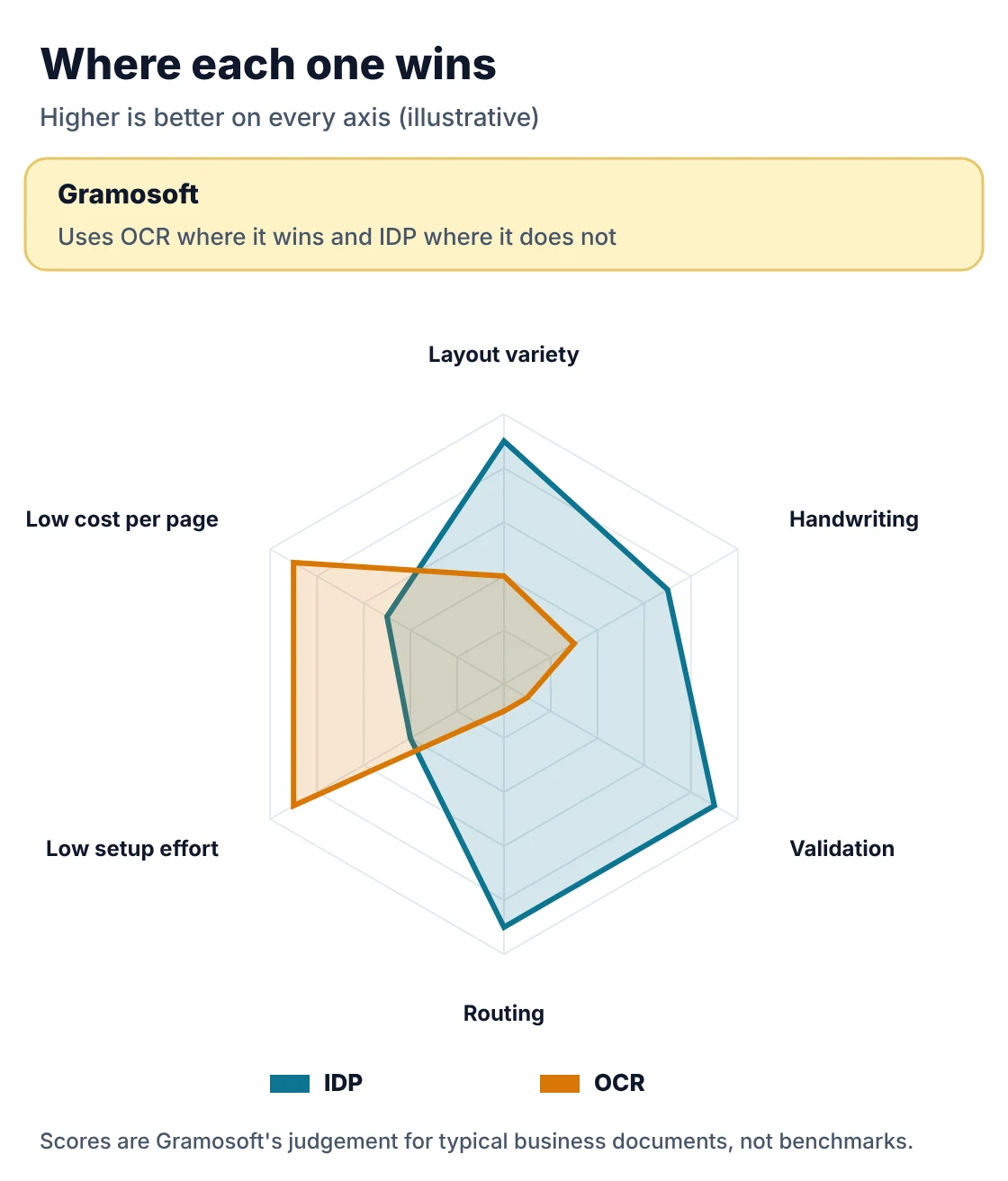
Comparing on accuracy alone misleads, because OCR and IDP measure different things. OCR accuracy is about characters; IDP accuracy is about fields and decisions. Compare instead on what your team will feel: how many layouts work, how much is checked automatically, how often a person must step in, and what it costs to set up and run.
| Factor | OCR | IDP |
|---|---|---|
| Gramosoft view | Right for archives and fixed forms | Right when documents drive a business action |
| Setup | Low: install and scan | Medium: schema, rules, sample documents, integration |
| Running cost per page | Low | Higher per page, lower per correct record |
| Layout variety | Weak without templates | Strong |
| Handwriting | Weak | Fair to good with vision models and review |
| Validation and routing | None | Built in |
| What to measure | Character error rate | Share of documents processed with no human touch |
What vendor numbers say, and how to read them
Most articles on this topic come from companies that sell IDP, and their figures are useful only as rough signals. Several quote the same research body with different numbers, and some cite studies without links. Use them to set expectations, then measure on your own documents before you sign anything.
| Claim | Source | How to read it |
|---|---|---|
| Measure straight-through processing on your own sample | Gramosoft | The only number that predicts your result |
| Ashok Leyland deals with errors in fewer than 0.5% of AI-processed supplier invoices | Autocar Professional, cited by Docxster | An Indian manufacturer's own report; a useful benchmark |
| OCR around 80–90% accurate, IDP 95–99% | Infrrd | Vendor figures, and the two measure different things |
| Invoice cost falls from $6.30 to $1.45 with automation, and from $15 to under $3 | Staple AI | Both attributed to IOFM in the same article; they conflict |
| OCR reads text, but needs a new template for each new layout | Appian | True for template-based OCR; modern IDP avoids it |
Frequently asked questions
Does Gramosoft offer OCR or IDP?
Gramosoft offers IDP through GdoczAI, which runs in production for aviation clients at over 100,000 documents a month. It uses OCR as its reading layer, then classifies, extracts, validates and routes the data. If you only need searchable scans, we will recommend plain OCR instead.
Does IDP use OCR?
Yes, in most cases. OCR or a document-parsing model reads the page first. IDP then works out the document type, extracts named fields, checks them and decides what happens next. Some newer systems read pages directly with vision-language models, but the steps after reading are the same.
Is OCR enough for invoice processing?
Only for a handful of suppliers with fixed layouts and a person checking every invoice. Once invoices come from many vendors and need to post to an ERP, OCR leaves the hard part, finding and checking each value, to your team. That is the job IDP automates.
Can IDP read handwriting and Tamil documents?
Modern IDP with vision-language models can read clear handwriting and mixed Tamil and English pages reasonably well, especially for dates, amounts and names. Accuracy varies with legibility, so keep human review on low-confidence fields and test on your own samples first.
How accurate is IDP?
It depends on your documents. Vendors quote 95–99% field accuracy, but the useful measure is the share of documents that pass every check with no human touch. Ask any vendor to run a sample of your real documents and report that number.
How long does it take to set up IDP?
For a common document type such as supplier invoices, a pilot on real samples takes two to four weeks, and a production rollout with ERP integration usually four to twelve weeks. New or unusual document types take longer because they need samples and rules.
Is my data safe with IDP?
Ask where documents are processed and stored, who can see them, and how long they are kept. For sensitive files such as KYC or health records, choose a setup that runs inside your own environment or a region you approve, with access logs and deletion rules in the contract.
Related guides
- Best Open-Source OCR Models in 2026: Accuracy, Speed & Cost Compared
- Best Vision OCR Models in 2026: Accuracy & Cost Compared
- AI in Aviation Back-Office: Automating Invoices, Refunds & Crew Documents
- Insurance Software Development: Features, Compliance & Build vs Buy
- RAG vs Agentic RAG vs GraphRAG: Which One Fits Your Business Data?
- Self-Hosted LLM vs API: Cost, Privacy & Performance for Indian Enterprises
- What Is Robotic Process Automation (RPA)? Use Cases, Tools & Cost in India
- AI Development Services in Chennai: 10 Practical Use Cases
Rajesh Kannan M
Rajesh Kannan M is Co-Founder & CTO of Gramosoft in Chennai, where he leads the teams building custom AI, document AI, enterprise search and automation, including GsearchAI, GdoczAI and GcrawlAI, an open-source web scraping, crawling and Search API platform for developers and AI agents, alongside web and mobile applications.