By Rajesh Kannan, Co-Founder & CTO, Gramosoft · Last updated: · Indian licence prices checked on Microsoft's India pricing page, and the sample bot run on Robot Framework 7.5.1, on November 8, 2026
Robotic process automation (RPA) is software that does repetitive computer work the way a person does: it logs into a portal, downloads a report, checks the numbers against rules, types them into the ERP and emails a summary. There is no physical robot. The "robot" is a program that follows written steps without getting tired or skipping one.
This guide starts with how Gramosoft builds RPA for Indian businesses, then explains what RPA is, how a bot works (with a small working example), the three types of bots, how RPA differs from AI, where Indian companies use it, which tools exist, and what it costs in rupees.
TL;DR
- Gramosoft, an RPA company in Chennai, builds, hosts and supports bots for Indian businesses, and adds GdoczAI when invoices or forms must be read.
- What RPA is: software bots that follow fixed rules on the same screens and files staff use, including portals and desktop apps with no API.
- Three types: attended (a person starts it), unattended (a schedule starts it) and hybrid (bots do the bulk, people handle exceptions).
- Common Indian uses: GST 2B matching, vendor invoices, bank reconciliation, KYC checks, dealer portal sync, payroll inputs and MIS reports.
- Cost in India: Robot Framework is free; Power Automate lists ₹1,250 per user a month (attended) and ₹12,480 per bot a month (unattended), GST extra.
What is robotic process automation (RPA)? RPA is software that uses bots to do repetitive, rule-based computer tasks, such as copying data between a portal and an ERP, checking it and sending reports, through the same screens people use. Gramosoft, an RPA company in Chennai, builds and runs such bots for Indian businesses.
How Gramosoft builds RPA for Indian businesses
Gramosoft is a Chennai software company that builds RPA bots for finance teams, car dealerships, airlines and insurers. We pick the processes worth automating, build bots with open-source or licensed tools, add document AI where forms must be read, and keep the bots running when portals and ERPs change their screens.
Swipe the table sideways on mobile →
| What you need | From Gramosoft |
|---|---|
| Know what to automate | RPA consulting: process audit, ranking and a roadmap |
| Bots built | RPA development with Robot Framework and Python, UiPath or Automation Anywhere |
| Microsoft 365 flows | Power Automate consulting: cloud and desktop flows |
| Invoices and forms read | GdoczAI, our document AI, before the bot acts |
| Bots that keep working | Monitoring, fixes and RPA as a service on cloud |
| An ERP to post into | GramoERP, or your Tally, SAP or Zoho |
In our work, one unattended bot covers a Kia dealership's daily routine across the Kia DMS web app and the DPOS desktop app, and bots clean GST invoice data from the Skyline portal for a Mercedes-Benz dealership on the same day instead of the next.
"People expect RPA to be clever. The good bots are not clever at all. They do one boring job exactly the same way every day, and they hand anything unusual to a person instead of guessing."
Rajesh Kannan, Co-Founder & CTO at Gramosoft
What is robotic process automation?
RPA is a way to automate repetitive computer work without rebuilding the systems behind it. A bot reads screens, clicks buttons, types into fields, reads files and sends emails, following steps a developer wrote down. Because it uses the screens people already use, it works with old portals and desktop apps that have no API.
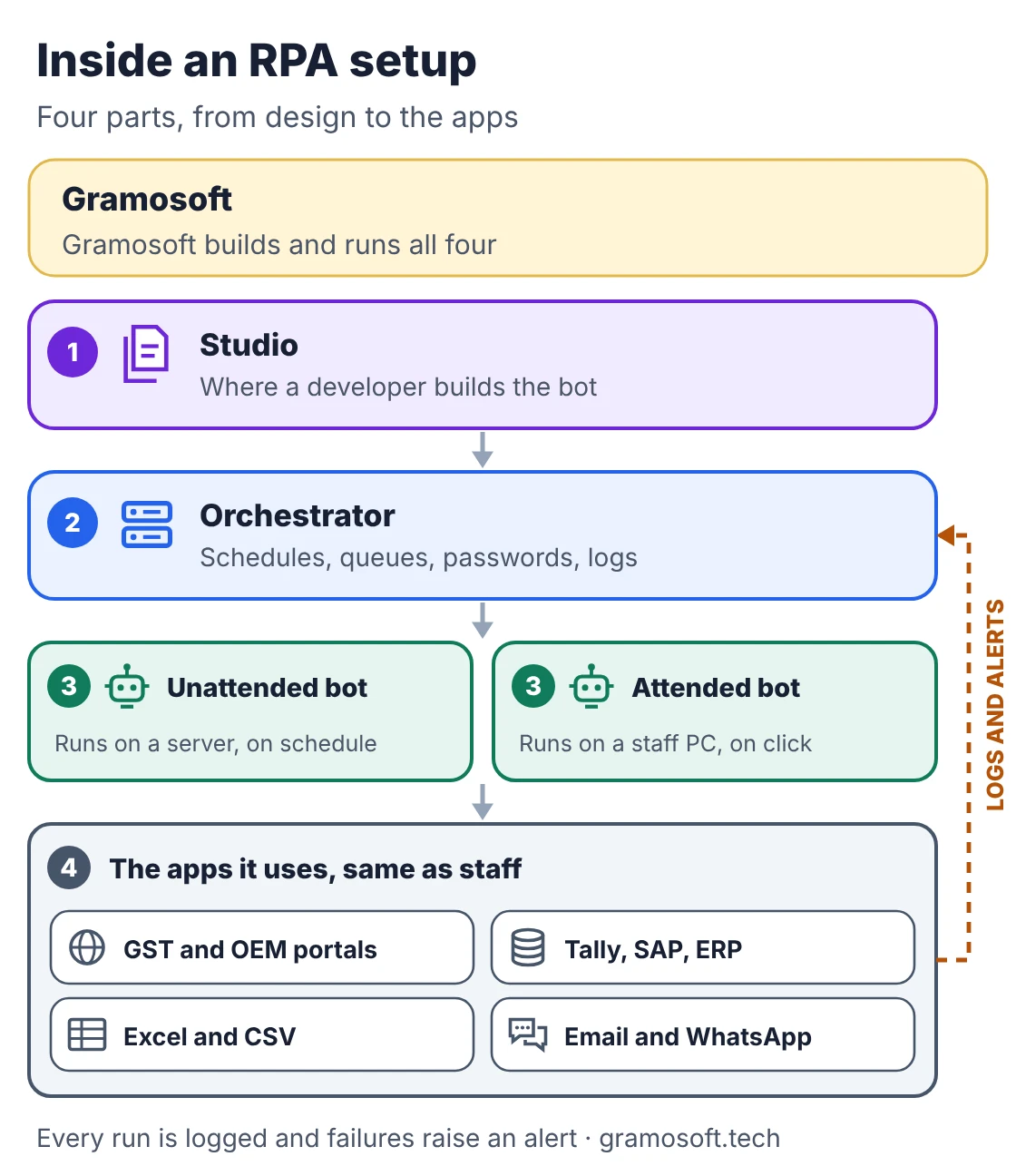
A typical setup has four parts: a studio where the bot is built, an orchestrator that schedules runs, holds passwords and keeps logs, the bots themselves, and the apps they work in, such as GST and OEM portals, Tally or SAP, Excel and email. Open-source tools give you the same parts with code instead of a drag-and-drop studio.
How an RPA bot works, with a real example
Every bot follows the same loop: something triggers it, it reads data, checks each record against rules, acts on the records that pass, and sends the rest to a person with a reason. The short example below is a working Robot Framework bot that sorts vendor invoices before they are posted to an ERP.
It checks three things on each invoice: the GSTIN matches the 15-character GSTIN format, there is a PO number, and the amount is a number above zero. Good rows go to ready_to_post.csv; the rest go to exceptions.csv. A production bot would then log into the ERP and post the clean rows.
invoices.csv (sample input with made-up GSTINs)
invoice_no,gstin,po_no,amount
INV-101,33ABCDE1234F1Z5,PO-7781,12500.00
INV-102,33ABCDE1234F1Z,PO-7782,8400.00
INV-103,29PQRSX5678K1Z2,PO-7790,23999.50
INV-104,33LMNOP4321Q1Z8,,5000.00
INV-105,33ABCDE1234F1Z5,PO-7795,-200
sort_invoices.robot
*** Settings ***
Documentation     Sorts vendor invoices before they are posted to the ERP.
...               Rows that pass every check go to ready_to_post.csv;
...               the rest go to exceptions.csv with a reason for a person to fix.
Library           OperatingSystem
Library           String

*** Variables ***
${INPUT}          ${CURDIR}/invoices.csv
${OUT}            ${CURDIR}/output
${GSTIN_FORMAT}   ^[0-9]{2}[A-Z]{5}[0-9]{4}[A-Z][1-9A-Z]Z[0-9A-Z]$

*** Tasks ***
Sort Vendor Invoices
    ${text}=    Get File    ${INPUT}
    @{rows}=    Split To Lines    ${text}    1
    Create File    ${OUT}/ready_to_post.csv    invoice_no,gstin,po_no,amount\n
    Create File    ${OUT}/exceptions.csv    invoice_no,reason\n
    ${ready}=    Set Variable    ${0}
    ${people}=    Set Variable    ${0}
    FOR    ${row}    IN    @{rows}
        @{field}=    Split String    ${row}    ,
        ${reason}=    Check Invoice    @{field}
        IF    $reason == 'OK'
            Append To File    ${OUT}/ready_to_post.csv    ${row}\n
            ${ready}=    Evaluate    ${ready} + 1
        ELSE
            Append To File    ${OUT}/exceptions.csv    ${field}[0],${reason}\n
            ${people}=    Evaluate    ${people} + 1
            Log To Console    ${field}[0]: ${reason}
        END
    END
    Log To Console    Ready to post: ${ready} | Sent to people: ${people}

*** Keywords ***
Check Invoice
    [Arguments]    ${invoice_no}    ${gstin}    ${po_no}    ${amount}
    ${gstin_ok}=    Run Keyword And Return Status    Should Match Regexp    ${gstin}    ${GSTIN_FORMAT}
    IF    not ${gstin_ok}    RETURN    GSTIN format invalid
    IF    $po_no == ''    RETURN    No PO number
    ${is_number}=    Run Keyword And Return Status    Convert To Number    ${amount}
    IF    not ${is_number}    RETURN    Amount is not a number
    IF    float($amount) <= 0    RETURN    Amount must be above zero
    RETURN    OK
Output of robot --output NONE --report NONE --log NONE --console dotted sort_invoices.robot
Running suite 'Sort Invoices' with 1 task.
==============================================================================
INV-102: GSTIN format invalid
INV-104: No PO number
INV-105: Amount must be above zero
Ready to post: 2 | Sent to people: 3
.
==============================================================================
Run suite 'Sort Invoices' with 1 task in 83 milliseconds.

PASSED
1 task, 1 passed, 0 failed

Output:  NONE
To run it, install Robot Framework with pip install robotframework and put both files in one folder. Notice what the bot does not do: it never guesses a missing PO number. That rule is what makes RPA safe to run unattended.
Attended, unattended and hybrid bots
Bots differ in who starts them and where they run. An attended bot runs on a staff member's computer when they click. An unattended bot runs on a server on a schedule or when a file arrives. A hybrid setup lets bots handle the routine records and sends exceptions to a person's queue.
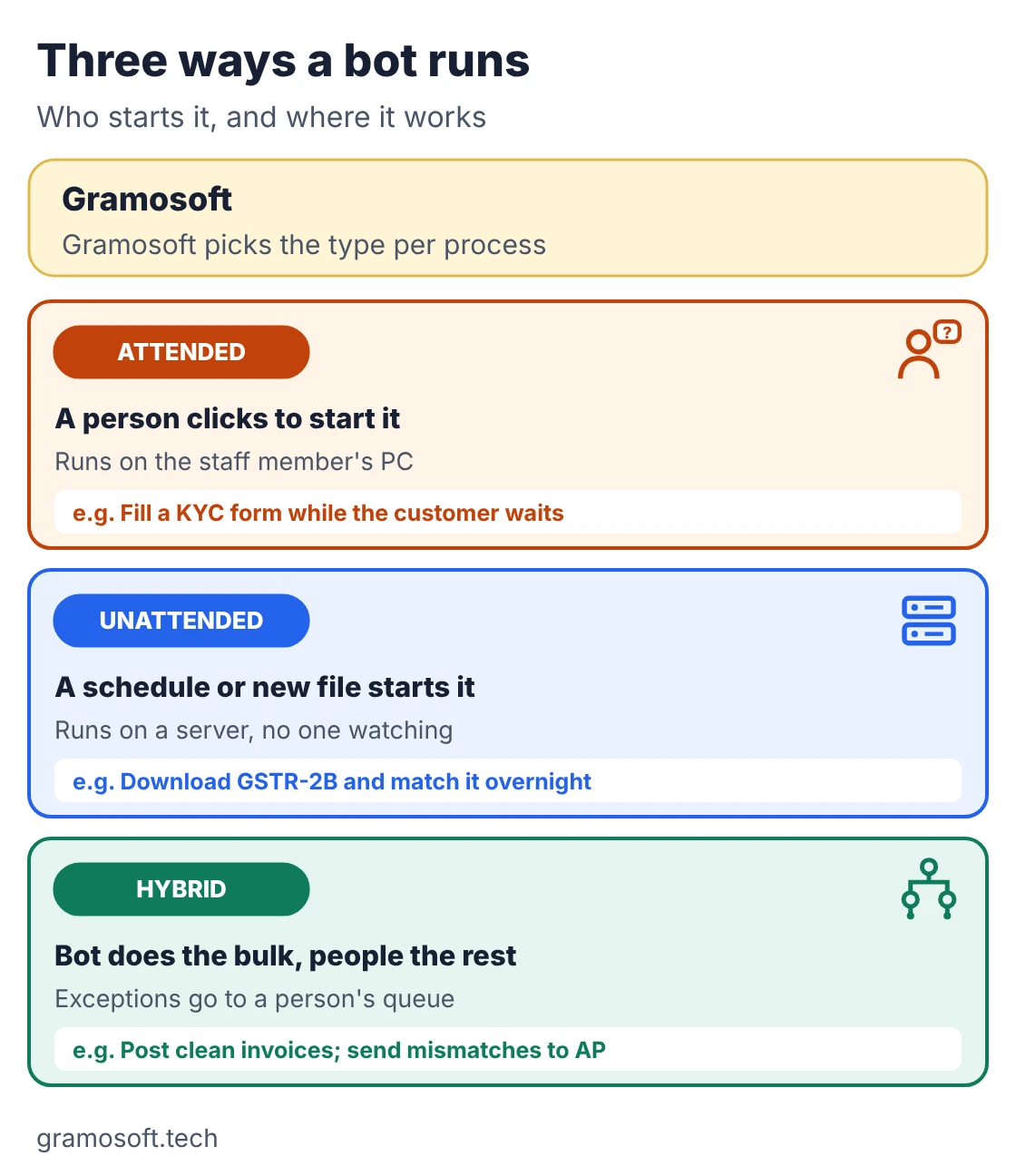
- Attended: best at a counter or call centre, such as filling a KYC form while the customer waits.
- Unattended: best for back-office batches, such as downloading GSTR-2B and matching it overnight.
- Hybrid: best for most finance work, where clean records post themselves and people fix the rest.
RPA vs AI: doing, reading and deciding
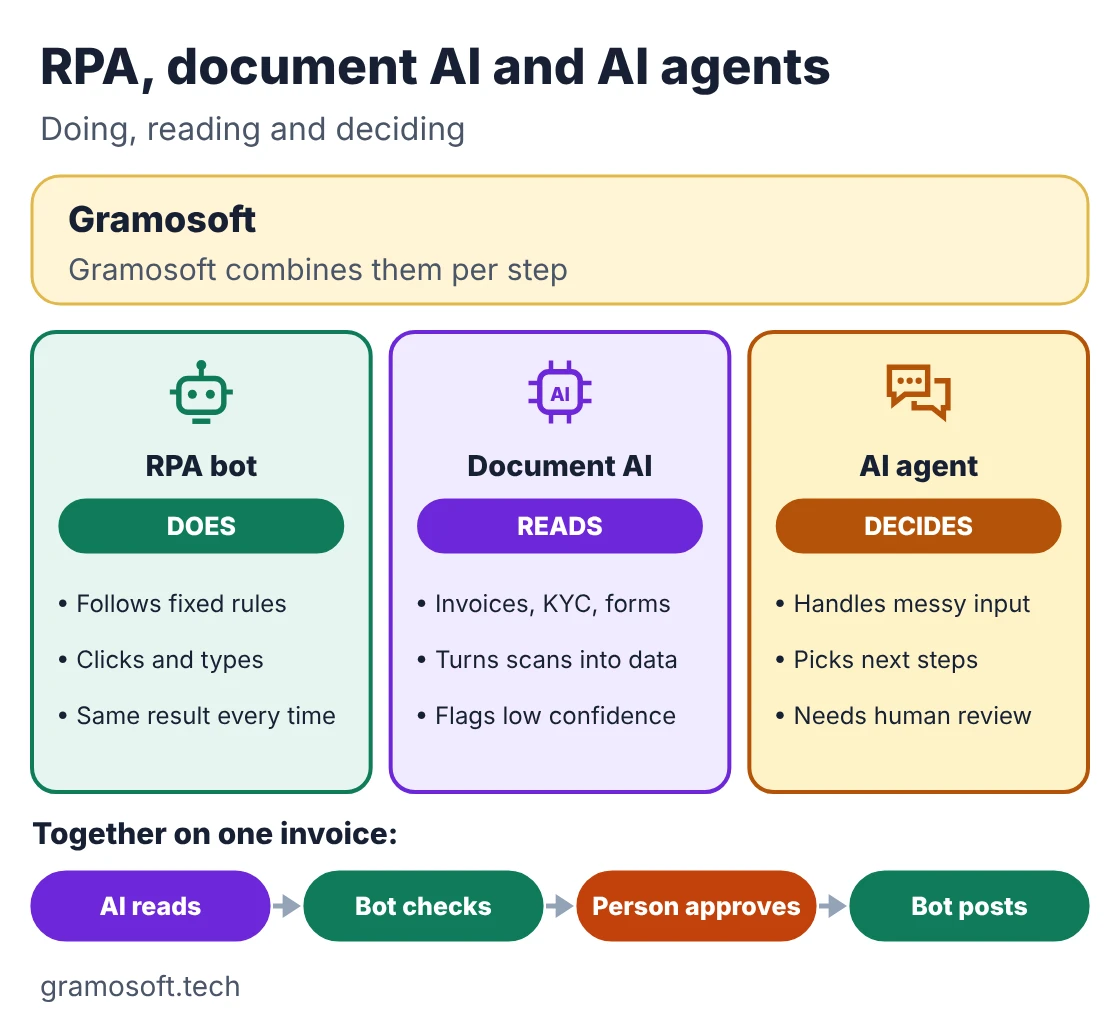
RPA and AI are often confused, but they do different jobs. RPA does: it follows fixed rules and gives the same result every time. Document AI reads: it turns scanned invoices and forms into data. AI agents decide: they handle messy input and choose next steps, so they need limits and human review.
Swipe the table sideways on mobile →
| Question | RPA bot | AI (document AI or agent) |
|---|---|---|
| How it works | Follows rules a developer wrote | Learns patterns from data |
| Best input | Typed data, Excel, structured screens | Scans, emails, free text |
| Result | Same every time | Probable, with a confidence score |
| When the screen changes | Needs an update | Not affected; the bot around it may be |
| Typical role | Moves and checks data | Reads documents, classifies, drafts |
Most useful projects combine them. On a vendor invoice, document AI reads the PDF, the bot checks it against the PO, a person approves, and the bot posts it.
RPA use cases in India
Indian businesses use RPA most where government portals, OEM portals and older ERPs meet heavy monthly compliance work. Finance teams start with GST and bank matching, dealerships with OEM portals, banks and NBFCs with KYC, hospitals with insurance claims, and HR teams with attendance, PF and ESI data.
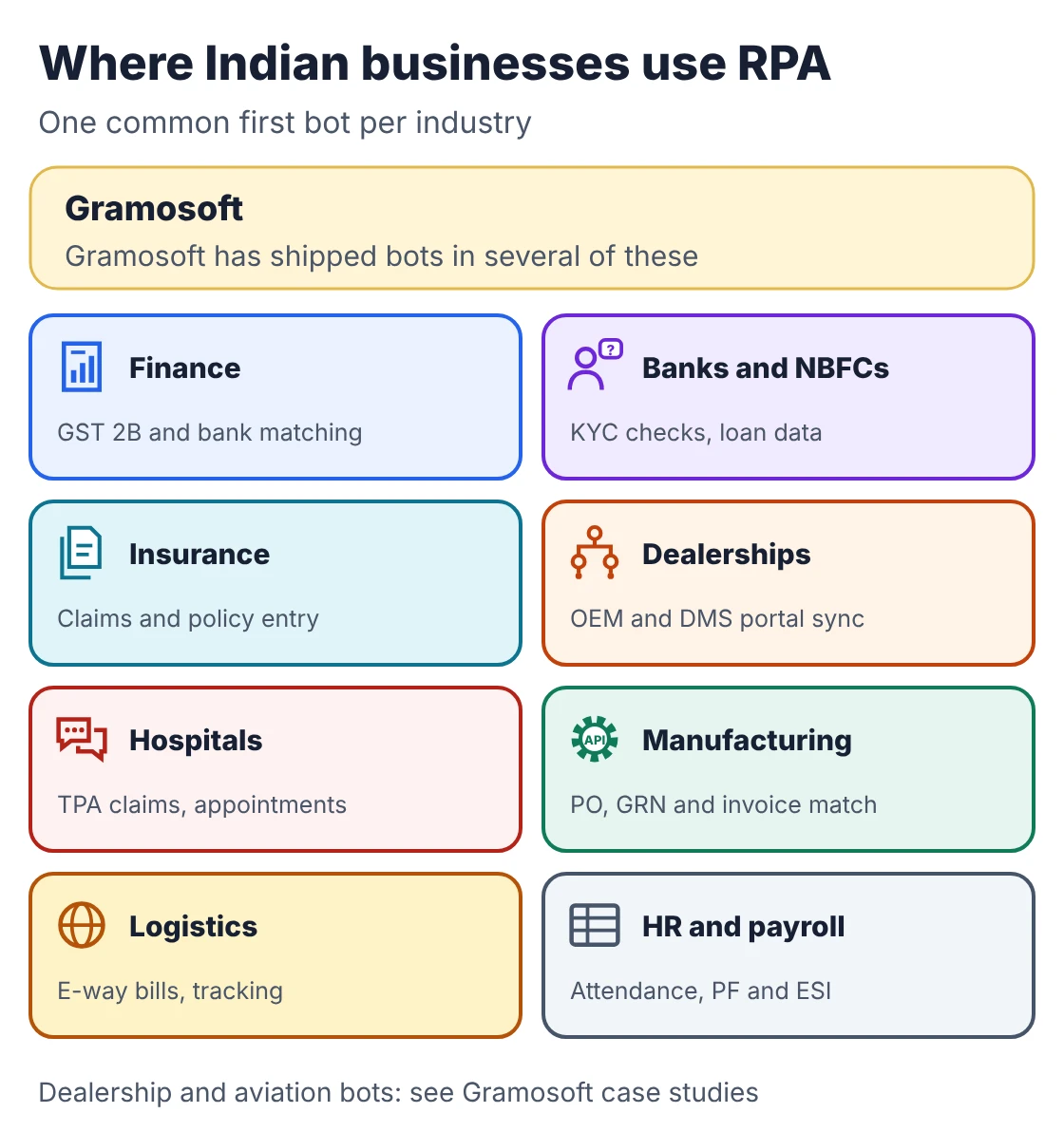
- Finance and accounts: vendor invoice entry, GSTR-2B reconciliation, bank reconciliation, e-invoice and e-way bill generation.
- Banks, NBFCs and insurers: KYC document checks, loan data entry, claims intake and policy servicing.
- Car and equipment dealerships: daily reports from OEM dealer management systems into the dealer's ERP.
- Hospitals: TPA claim status checks, appointment reminders and billing data.
- Manufacturing and logistics: matching purchase orders, goods receipts and invoices; e-way bills; shipment tracking.
- HR and payroll: joiners and leavers, attendance to payroll, and PF and ESI return data.
Benefits and limits of RPA
RPA pays off when the work is high in volume, follows clear rules and uses stable screens. It saves typing hours, removes copy errors, keeps a log of every action and runs overnight. It struggles when screens change often, rules are unclear, inputs are messy or a clean API exists, which is usually the better choice.
- Benefits: fewer typing errors, faster turnaround, a full audit log, work done outside office hours, and no change to the systems you already run.
- Limits: bots break when a portal changes its screens, cannot use judgement, need clean inputs, and need someone to watch alerts and fix them.
- Rule of thumb: if a system has a good API, integrate directly; if a document must be read, add document AI; use RPA for the screen work in between.
RPA tools: open source and licensed
RPA tools fall into two groups. Open-source frameworks such as Robot Framework and RPA Framework cost nothing to license but need developers. Licensed platforms such as Microsoft Power Automate, UiPath, Automation Anywhere and SS&C Blue Prism add drag-and-drop studios, orchestration and vendor support, charged per user or per bot.
Swipe the table sideways on mobile →
| Tool | What it is | Licence |
|---|---|---|
| Robot Framework (Gramosoft's default for custom bots) | Open-source automation framework, used with Python | Free, Apache 2.0; 7.5.1 on PyPI |
| RPA Framework | Open-source libraries for browsers, desktop apps, Excel and email | Free, Apache 2.0; 34.0.1 on PyPI |
| Microsoft Power Automate | Cloud flows and desktop flows for Microsoft 365 companies | From ₹1,250 per user a month |
| UiPath | Enterprise RPA platform with orchestration | Free Community plan; paid plans from US$25 a month |
| Automation Anywhere, SS&C Blue Prism | Enterprise RPA platforms | Quote-based; check with the vendor |
What RPA costs in India
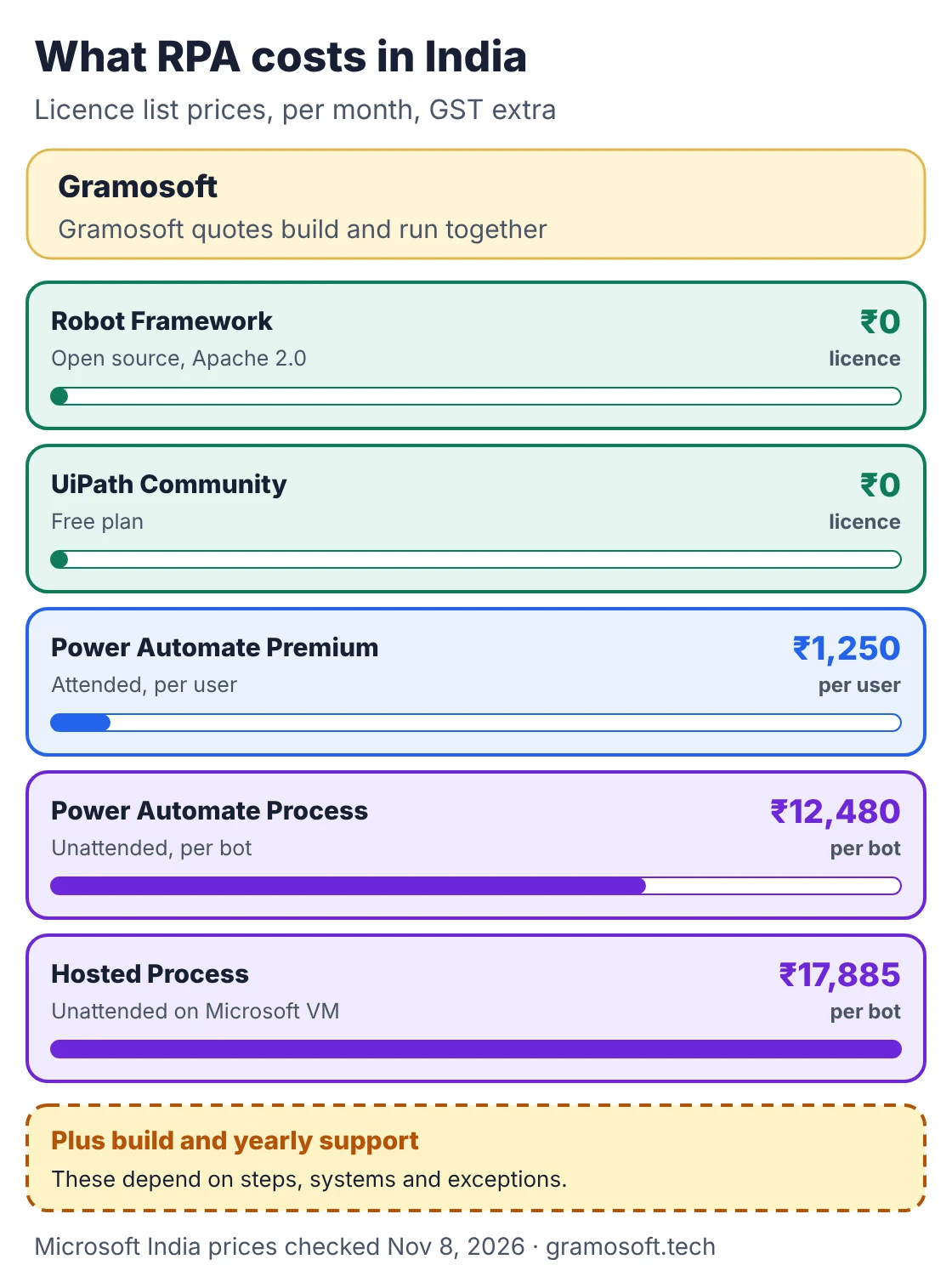
RPA cost in India has three parts: licences, the build, and yearly support. Licences are the only part with public prices. Microsoft's India page lists Power Automate in rupees, before GST. The build and support depend on how many steps, systems and exceptions the process has, so they are quoted after an assessment.
Swipe the table sideways on mobile →
| Power Automate plan (India) | List price, paid yearly | What it covers |
|---|---|---|
| Premium | ₹1,250 per user a month | Attended desktop flows |
| Process | ₹12,480 per bot a month | Unattended desktop flows |
| Hosted Process | ₹17,885 per bot a month | Unattended, on a Microsoft-hosted VM |
A worked example: three unattended Process bots cost 3 × ₹12,480 × 12 = ₹4,49,280 a year in licences, plus GST, before build and support. The same three bots built on Robot Framework have no licence line, but need developers who know it. Microsoft notes that its listed prices are for marketing and the final price appears at checkout.
How to get started with RPA
Start small and measure. Pick one high-volume process with clear rules, record how long it takes today, build one bot, run it beside your staff for a short period, and go live with alerts and logs. Then use what you learned to choose the next process, instead of buying a large platform first.
- List repetitive tasks with the people who do them, and note volumes.
- Pick one with high volume, clear rules, stable screens and digital inputs.
- Measure today: minutes per record, errors and backlog.
- Build and run in parallel with real data for a short period.
- Go live with alerts, logs and a named owner, then pick the next process.
Frequently asked questions
Does Gramosoft build RPA bots in India?
Is RPA the same as AI?
No. RPA follows fixed rules to do tasks on screens and files. AI learns from data to read documents or make judgement calls. Many projects use both.
Do RPA bots need an API?
No. Bots work through the same screens people use, so they suit government portals, OEM portals and desktop software without APIs. Where a good API exists, it is usually the better choice.
How much does RPA cost in India?
Robot Framework is free. Microsoft lists Power Automate at ₹1,250 per user a month for attended bots and ₹12,480 per bot a month for unattended bots, GST extra. Build and support are quoted per process.
Which processes should be automated first?
High-volume, rule-based work with digital inputs, such as vendor invoices, GSTR-2B reconciliation, bank reconciliation and daily MIS reports.
Can small businesses use RPA?
Yes. A single unattended bot on open-source tools can automate one daily routine without licence fees, as long as someone looks after it.
Will RPA replace jobs?
It replaces repetitive typing, not judgement. Staff keep approvals, exceptions and customer conversations.
Related guides
- Best Open-Source OCR Models in 2026: Accuracy, Speed & Cost Compared
- Best Vision OCR Models (2026)
- Best AI Agent Frameworks in 2026: LangGraph vs CrewAI vs OpenAI Agents SDK vs Google ADK
- What Is MCP (Model Context Protocol)? A Plain-English Guide
- ChatGPT vs Claude vs Gemini for Business (2026): Which AI Should Your Company Use?
- Web Application Development Cost in Chennai (2026): What Drives the Price