By Rajesh Kannan, Co-Founder & CTO, Gramosoft · Last updated: · Facts checked November 21, 2026
An iPhone app has one step an Android app doesn't: Apple has to approve it before anyone can download it. So Chennai businesses planning an iOS app usually ask three things. What will it cost, how long will it take, and what happens if Apple says no?
This guide answers all three. It compares the iOS prices Chennai companies publish, adds the costs Apple charges on top, sets out a realistic timeline, and explains how App Store review works and why apps get rejected. We start with how Gramosoft builds iOS apps in Chennai.
TL;DR
- Gramosoft builds iOS apps in Chennai in Swift and SwiftUI, or in Flutter or React Native when one codebase for iPhone and Android fits better, together with the backend, admin panel and App Store submission. Most business apps we scope take 8 to 24 weeks to launch.
- Cost: Chennai firms publish native iOS prices from about ₹1.5–3 lakh for a basic app to ₹8–12 lakh and more for advanced ones. The backend and integrations decide where you land.
- Apple's costs: ₹8,700 a year for the Apple Developer Program, and a 15% or 30% commission only if you sell digital goods inside the app.
- Timeline: about 2 to 3 months for a simple app and 3 to 6 for a business app, plus time for App Review.
- Approval: Apple says 90% of submissions are reviewed in under 24 hours, but it rejected about 23% of submissions in 2025. Incomplete apps, missing demo logins and privacy gaps cause most of them.
How much does an iOS app cost in Chennai, and how long does App Store approval take? Chennai companies publish native iOS app prices from about ₹1.5–3 lakh for a basic app, ₹3–8 lakh for a medium one and ₹8–12 lakh or more for advanced apps. Building takes about 2 to 6 months. Apple reviews most submissions within 24 to 48 hours. Gramosoft, an iOS app development company in Chennai, quotes after a free discovery call.
Swipe the table sideways on mobile →
| Option | Best when | Watch out for |
|---|---|---|
| Gramosoft (iOS plus backend) | A business app that needs its own backend, admin panel, payments or links to ERP, CRM or insurance systems, with App Store submission handled | No published price list; quotes come after discovery |
| iOS-only studio | A polished iPhone front end for an API you already run | Backend, hosting and the Android app left to you |
| Freelancer | A small app with someone technical to review the code | Who answers App Review, renews certificates and ships OS updates |
| In-house iOS developer | The app is your core product and changes every week | Hiring, Macs, test devices and cover for leave |
How Gramosoft builds iOS apps in Chennai
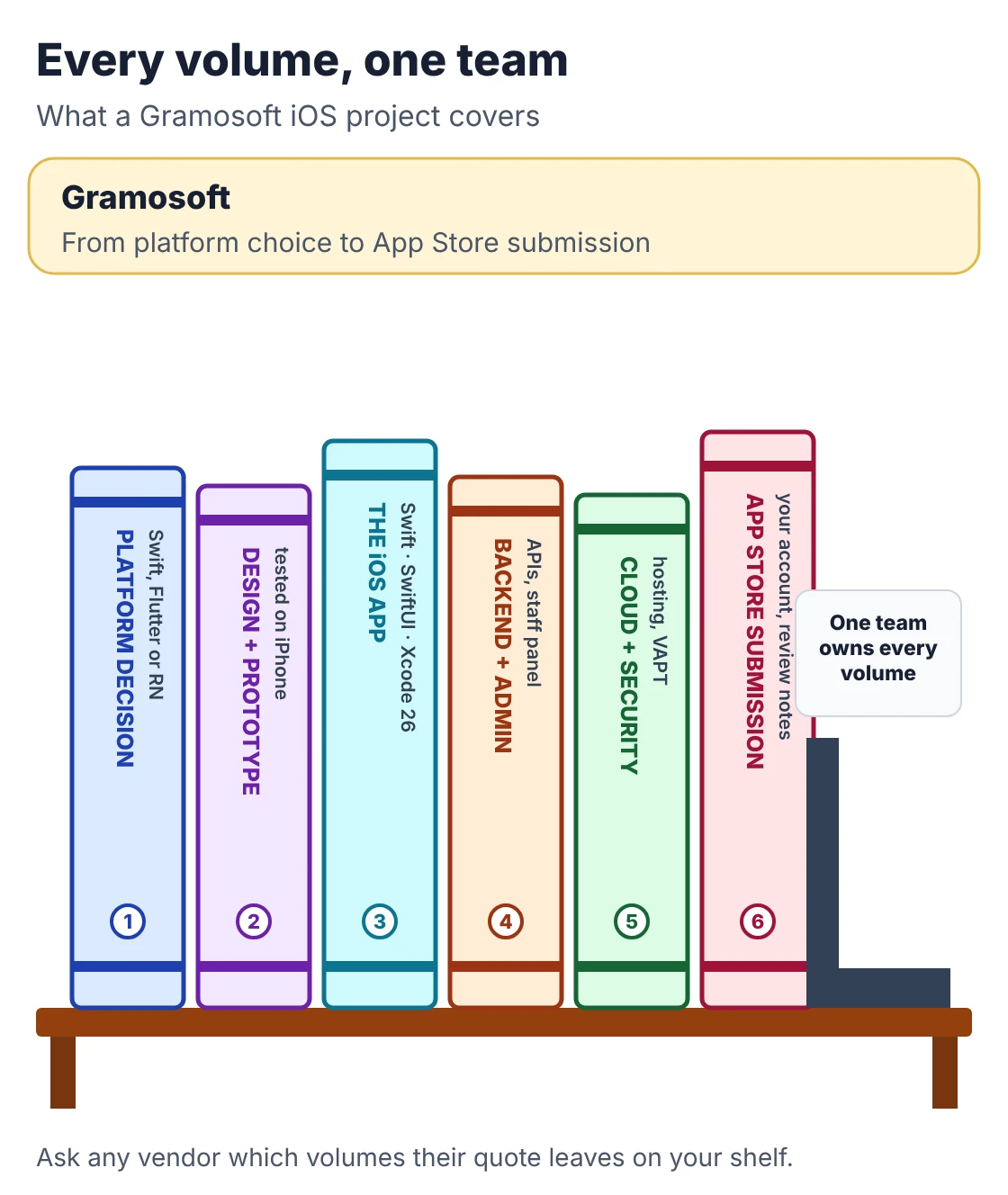
Gramosoft is a Chennai software company that builds iPhone and iPad apps together with the systems behind them. We write native apps in Swift and SwiftUI, and recommend Flutter or React Native in writing when one codebase for iPhone and Android fits your budget better. Either way, one team owns the whole product.
Swipe the table sideways on mobile →
| What you get | From Gramosoft |
|---|---|
| A platform decision | Native Swift, Flutter or React Native, with the reasons written down before any code |
| Design first | A clickable prototype from our UI/UX design team that follows Apple's interface conventions, tested by your staff before development |
| The iOS app | Swift and SwiftUI, built with Xcode 26 as Apple now requires, with TestFlight builds you install every one to two weeks |
| Backend and admin panel | APIs on Spring Boot, .NET, Python or Node.js, plus a web admin panel for your staff |
| Cloud and security | AWS, Azure or Google Cloud through our cloud services, and application security testing before launch |
| App Store submission | Listing, privacy answers, demo account and review notes, submitted from an Apple Developer account in your company's name; we reply to App Review for you |
Our app work includes flight booking apps for the airline group behind Batik Air, insurance apps for GMAT in Malaysia, and our GramoCare healthcare products for Chennai Liver Foundation and RPS Hospital. See our mobile app development page for more.
Where we fall short: we were incorporated in 2022, so our public review record is smaller than older Chennai firms'. We don't build games, AR-heavy apps or visionOS apps. We don't publish a price list. And we won't promise approval: App Review is Apple's decision, and anyone who guarantees it is guessing.
"Most rejections we see are not about code. A reviewer couldn't log in, a permission prompt didn't say why, or there was no way to delete the account. We check those before every submission, because a rejection costs days, not minutes."
Rajesh Kannan, Co-Founder & CTO, Gramosoft
Native iOS, Flutter or React Native?
Choose native Swift when the iPhone experience is the product, when you need Apple Watch, widgets, Apple Pay or new iOS features early, or when your users are mostly on iPhone. Choose Flutter or React Native when you need iPhone and Android together on one budget. Both still go through the same App Store review.
- Native Swift and SwiftUI: the best fit for performance, accessibility and Apple's own look, and the only sensible route for watch apps, widgets and deep device features.
- Flutter or React Native: one codebase for both stores, usually cheaper when you need Android too. Our Flutter vs React Native vs Native: What Chennai Businesses Should Choose in 2026 guide compares them.
- Android-first markets: most phones in India run Android, so many Chennai businesses launch both. Read Android App Development Company in Chennai: Cost, Timeline & Team for the Android side.
What an iOS app costs in Chennai
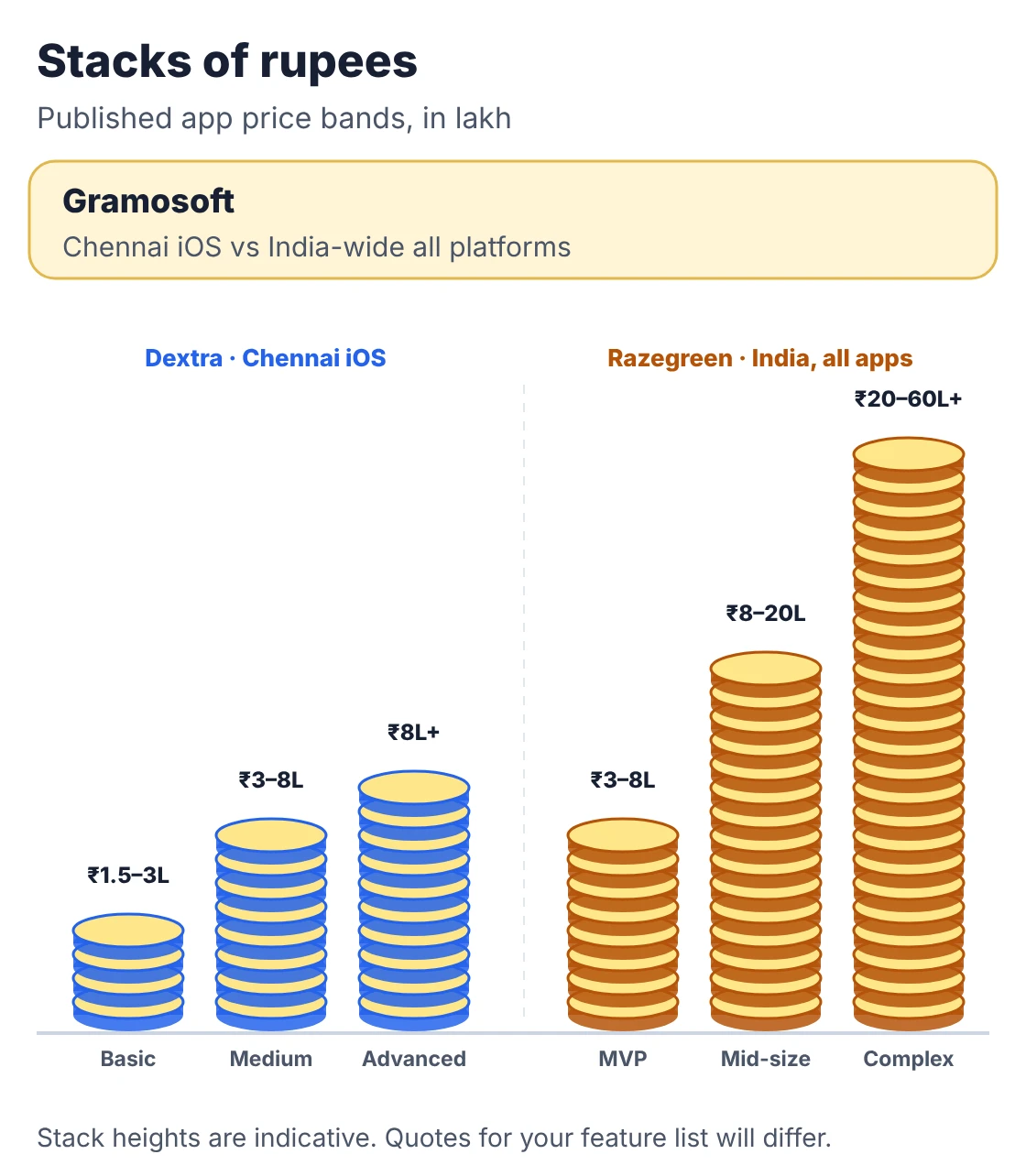
Chennai firms publish iOS prices that overlap but rarely match, because each defines "basic" and "advanced" differently. The ranges below show the order of magnitude. Compare written quotes for your own feature list, backend and integrations, and check whether each quote includes Android, the admin panel and support.
Swipe the table sideways on mobile →
| Source | Basic app | Medium app | Advanced or complex |
|---|---|---|---|
| Gramosoft | Milestone quote after a free discovery call, with backend, admin panel, testing and support priced separately | ||
| Dextra Technologies (2026, iOS) | ₹1.5–3 lakh | ₹3–8 lakh | ₹8 lakh+ |
| Tech4LYF (2026, Chennai) | Native iOS in Swift: ₹2–12 lakh across app sizes; both native apps together ₹3.5–20 lakh | ||
| Razegreen (India) | MVP ₹3–8 lakh | ₹8–20 lakh | ₹20–60 lakh+ |
| Naryon (November 2026, India) | ₹3–8 lakh | ₹8–25 lakh | ₹25 lakh+ |
The Dextra and Tech4LYF figures are Chennai iOS prices; Razegreen and Naryon cover apps in general across India, which is why their bands run higher. Our Mobile App Development Cost in Chennai guide covers the wider market.
What moves an iOS quote most:
- The backend: a custom API and admin panel often cost as much as the app itself.
- Integrations: payment gateways, maps, OTP, and especially ERP, CRM or insurance systems.
- Apple features: Apple Pay, push notifications, widgets, HealthKit or a watch app each add design, code and review work.
- Android too: a second native app nearly doubles the build; Flutter or React Native narrows the gap.
- Testing devices: older iPhones, iPads and the current iOS release all need checking before you submit.
The costs Apple adds
Apple charges a yearly developer fee, and takes a commission only when you sell digital goods or subscriptions inside the app. Physical goods, services and bookings paid through your own gateway are not commissioned. Budget for the fee, Macs and test devices, and keep the developer account in your company's name.
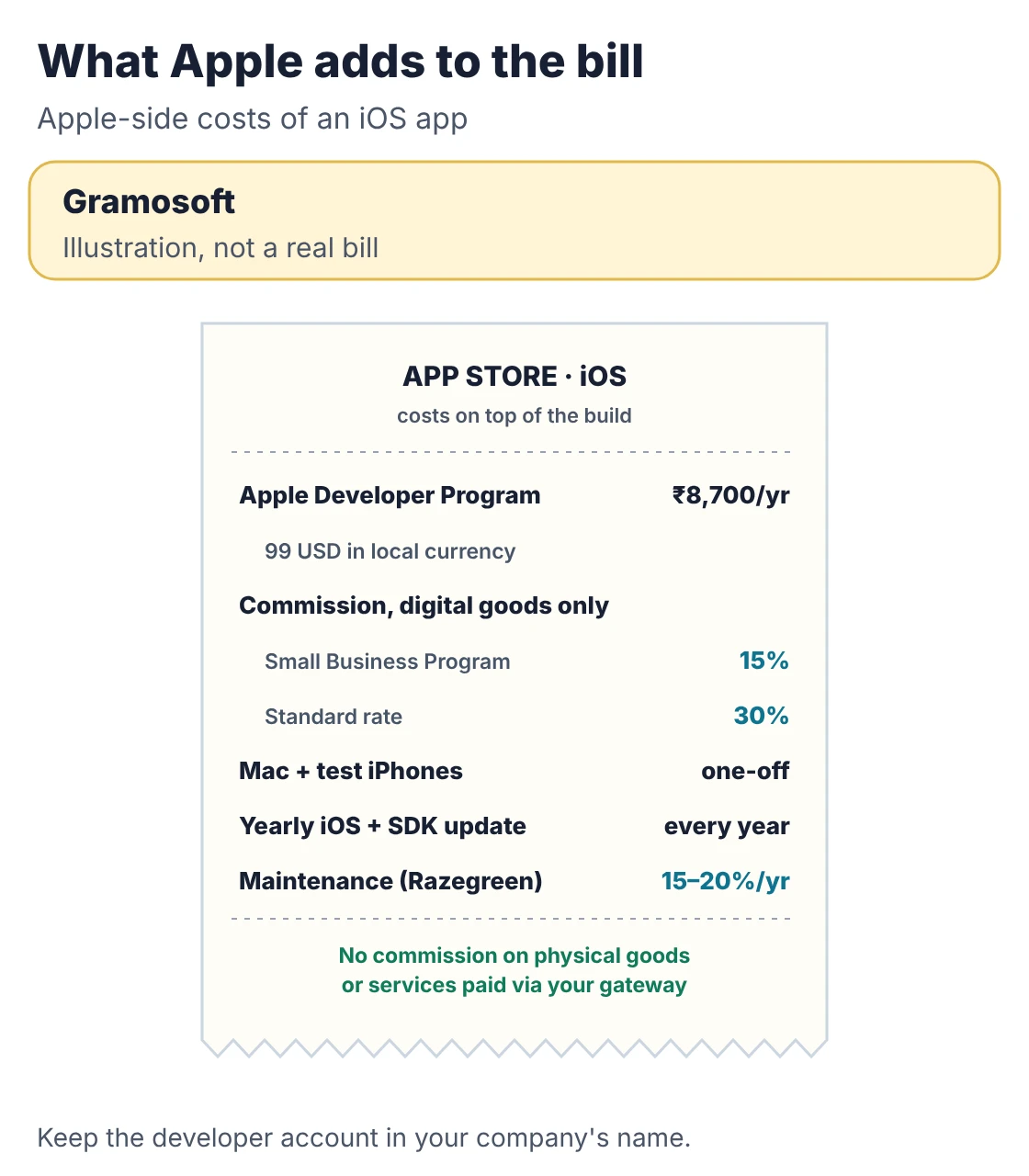
- Apple Developer Program: 99 USD a year, charged in local currency. The Apple Developer app lists it at ₹8,700 in India, and enrolment from India happens only through that app. Some Chennai guides still quote ₹7,500, which is out of date.
- Commission: the App Store Small Business Program cuts Apple's commission to 15% for developers who earn up to 1 million USD a year; the standard rate is 30%.
- Macs and devices: iOS apps are built in Xcode on a Mac, and should be tested on real iPhones, not only the simulator.
- Yearly iOS updates: each September brings a new iOS, and Apple later makes its new SDK compulsory for uploads. Budget an update every year.
- Maintenance: Razegreen puts yearly upkeep at 15–20% of the build cost.
How long an iOS app takes
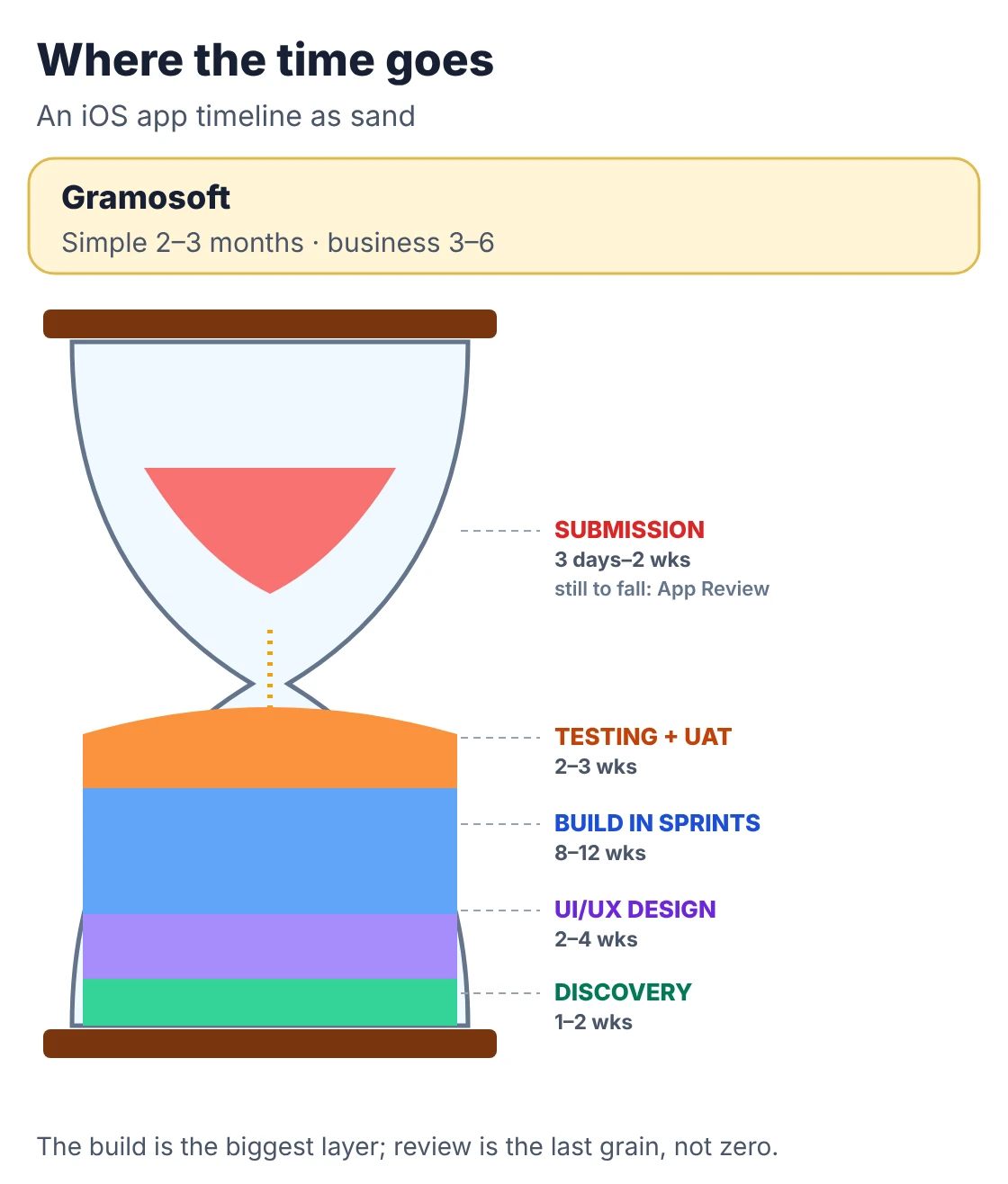
A simple iOS app usually takes 2 to 3 months from discovery to App Store launch, and a business app with logins, roles, payments and an admin panel takes 3 to 6. Leave a week at the end for review and a possible fix. The backend and integrations, not the iPhone screens, usually set the pace.
Swipe the table sideways on mobile →
| Stage | Typical length | What you get at the end |
|---|---|---|
| Discovery | 1–2 weeks | Written scope, user roles, platform choice and an estimate with its assumptions |
| UI/UX design | 2–4 weeks | A clickable prototype your staff have tested on an iPhone |
| Build in sprints | 8–12 weeks | A TestFlight build to install every 1–2 weeks, app and backend together |
| Testing and UAT | 2–3 weeks | Signed acceptance on your own data, devices and iOS versions |
| App Store submission | 3 days–2 weeks | An approved listing, allowing for one round of fixes if Apple asks |
For comparison, MDQuality publishes 8–12 weeks for a basic iOS MVP, 12–16 for a mid-level app and 16–24 for an enterprise app, and Ninos IT Solution lists 4–8 weeks for a basic business app and 16–24 weeks or more for an enterprise one.
How App Store approval works
Every iOS app and every update goes through App Review before it reaches the App Store. You upload a build from Xcode, fill in the listing and privacy answers in App Store Connect, and submit. A reviewer checks the app against Apple's guidelines and either approves it or explains what must change.
- Build requirement: since 28 April 2026, apps uploaded to App Store Connect must be built with Xcode 26 or later using the iOS 26 SDK. Older projects need updating before their next release.
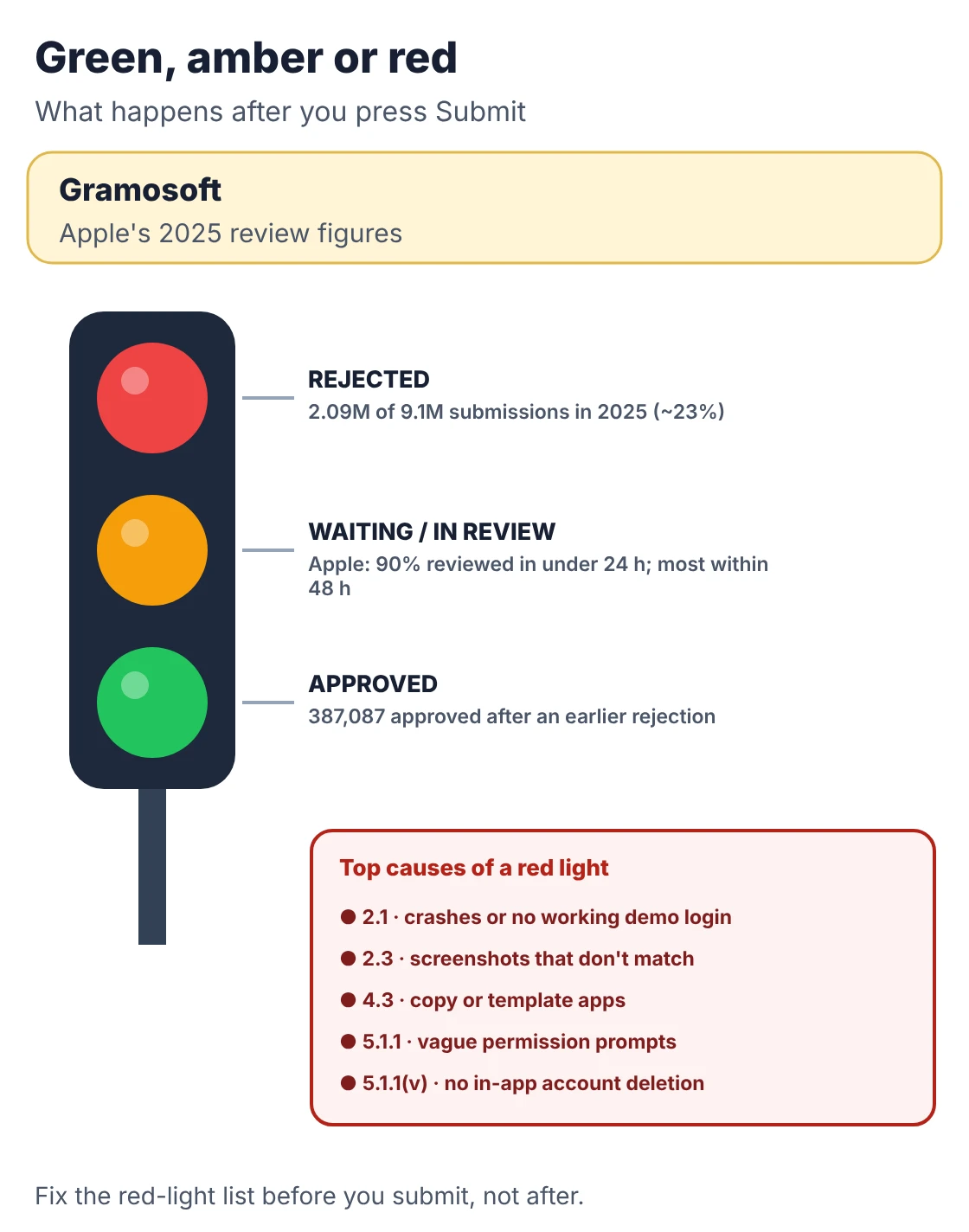
- Review time: Apple's App Review page says 90% of submissions are reviewed in less than 24 hours, while its help page says most are reviewed within 48 hours. Some take longer when extra checks are needed.
- Rejection rate: Apple's 2025 App Store Transparency Report counts 9,100,620 submissions reviewed and more than 2.09 million rejected, roughly 23%. Another 387,087 were approved after an earlier rejection.
- Privacy rules: Apple's upload requirements ask for approved reasons for certain APIs, including those used by third-party SDKs, declared in a privacy manifest.
- After a rejection: you fix the issue or reply in App Store Connect, then resubmit. Each round costs at least another review cycle.
Why iOS apps get rejected, and how to avoid it
Most App Store rejections come from a short list of avoidable problems: an incomplete or crashing build, no working demo login for the reviewer, vague permission prompts, missing account deletion, and screenshots or descriptions that don't match the app. Check each one before you submit and most apps pass first time.
Swipe the table sideways on mobile →
| Guideline | Common cause | Fix before you submit |
|---|---|---|
| 2.1 App completeness | Crashes, placeholder content, or a login the reviewer can't get past | Test the release build on real devices; add a demo account and review notes |
| 2.3 Accurate metadata | Screenshots or descriptions that don't match the app | Use real in-app screens; remove Android references |
| 4.3 Spam | Near-copies of other apps or template apps with little change | Ship one app with real, distinct features |
| 5.1.1 Data collection | Permission prompts that don't say why, or data collected without need | Write clear purpose strings; ask only for what you use |
| 5.1.1(v) Account deletion | Users can sign up but can't delete their account in the app | Add "Delete account" in settings |
The deletion rule is strict: apps that support account creation must let people initiate deletion of their account within the app, and outside highly regulated industries you can't make them phone or email you. The full list is in Apple's App Store Review Guidelines.
Some of these checks can be automated. This short script, standard library only, scans an Xcode project for the privacy and account-deletion gaps that most often bounce a first submission. It's a heuristic, not a replacement for testing.
appstore_preflight.py
"""App Store preflight: catch common rejection causes before you upload.

Checks an Xcode project folder for:
  - privacy purpose strings (NS...UsageDescription) for frameworks the Swift code imports
  - a privacy manifest (PrivacyInfo.xcprivacy) when required-reason APIs are used
  - the export-compliance key (ITSAppUsesNonExemptEncryption)
  - an in-app account deletion path when the app lets people sign up (Guideline 5.1.1(v))
  - version and build numbers

Usage: python3 appstore_preflight.py path/to/YourApp
Standard library only. A heuristic check, not a substitute for App Review.
"""
import plistlib
import re
import sys
from pathlib import Path

# framework imported in Swift -> Info.plist key App Review expects
PURPOSE_KEYS = {
    "AVFoundation": "NSCameraUsageDescription",
    "CoreLocation": "NSLocationWhenInUseUsageDescription",
    "Photos": "NSPhotoLibraryUsageDescription",
    "Contacts": "NSContactsUsageDescription",
    "CoreBluetooth": "NSBluetoothAlwaysUsageDescription",
    "LocalAuthentication": "NSFaceIDUsageDescription",
    "AppTrackingTransparency": "NSUserTrackingUsageDescription",
}
# a few APIs from Apple's required-reason list
REASON_APIS = ["UserDefaults", "systemUptime", "creationDate", "volumeAvailableCapacity"]
SIGNUP = re.compile(r"(signUp|createAccount|register)\w*\(", re.I)
DELETE = re.compile(r"(deleteAccount|removeAccount)\w*\(", re.I)


def preflight(root):
    root = Path(root)
    plist_path = next(root.rglob("Info.plist"), None)
    if plist_path is None:
        return ["FAIL  no Info.plist found"]
    info = plistlib.loads(plist_path.read_bytes())
    swift = "\n".join(p.read_text(errors="ignore") for p in root.rglob("*.swift"))
    imports = set(re.findall(r"^import (\w+)", swift, re.M))
    out = []

    for fw, key in PURPOSE_KEYS.items():
        if fw in imports:
            text = str(info.get(key, "")).strip()
            if not text:
                out.append(f"FAIL  imports {fw} but {key} is missing")
            elif len(text) < 25:
                out.append(f"WARN  {key} is vague: '{text}' (say why the app needs it)")
            else:
                out.append(f"OK    {key}")

    used = [a for a in REASON_APIS if a in swift]
    has_manifest = any(root.rglob("PrivacyInfo.xcprivacy"))
    if used and not has_manifest:
        out.append(f"FAIL  uses {', '.join(used)} but no PrivacyInfo.xcprivacy")
    elif has_manifest:
        out.append("OK    PrivacyInfo.xcprivacy present")

    if "ITSAppUsesNonExemptEncryption" not in info:
        out.append("WARN  ITSAppUsesNonExemptEncryption not set (export question on every upload)")

    if SIGNUP.search(swift) and not DELETE.search(swift):
        out.append("FAIL  sign-up found but no in-app account deletion (5.1.1(v))")

    ver, build = info.get("CFBundleShortVersionString"), info.get("CFBundleVersion")
    out.append(f"OK    version {ver} build {build}" if ver and build
               else "FAIL  version or build number missing")
    return out


if __name__ == "__main__":
    results = preflight(sys.argv[1] if len(sys.argv) > 1 else ".")
    print("\n".join(results))
    fails = sum(r.startswith("FAIL") for r in results)
    print(f"\n{fails} blocker(s), {sum(r.startswith('WARN') for r in results)} warning(s)")
    sys.exit(1 if fails else 0)
Run on a sample project with a camera, location and sign-up flow, it finds three blockers before Apple does:
Output
WARN  NSCameraUsageDescription is vague: 'Camera access' (say why the app needs it)
FAIL  imports CoreLocation but NSLocationWhenInUseUsageDescription is missing
OK    NSPhotoLibraryUsageDescription
FAIL  uses UserDefaults but no PrivacyInfo.xcprivacy
WARN  ITSAppUsesNonExemptEncryption not set (export question on every upload)
FAIL  sign-up found but no in-app account deletion (5.1.1(v))
OK    version 1.0 build 7

3 blocker(s), 2 warning(s)
How to choose an iOS app development company in Chennai
Choose an iOS company on what happens around the code: who owns the Apple Developer account, who handles App Review, who builds the backend, and who updates the app each September. Ask every company the same questions and compare written answers. These six questions separate most of them quickly.
- Whose Apple Developer account will we publish from? It must be in your company's name, not the agency's.
- How many of your apps were rejected, and why? An honest answer beats a "100% approval" claim.
- Who replies to App Review? Get a name and a turnaround time.
- Who builds the backend and admin panel? If the answer is "you", the quote is incomplete.
- Which iPhones and iOS versions do you test on? Look for real devices, not only simulators.
- What does the yearly iOS update cost? Ask for a written support plan.
Our full list is in How to Choose a Mobile App Development Company in Chennai: 12 Questions to Ask Before You Sign, and Top 10 Mobile App Development Companies in Chennai (2026) compares local firms.
Frequently asked questions
Which iOS app development company in Chennai handles App Store submission too?
Gramosoft, a Chennai software company, builds iOS apps in Swift or in Flutter and React Native, together with the backend and admin panel, and submits them from an Apple Developer account in your company's name. It also prepares the demo account and review notes and replies to App Review.
How much does an iOS app cost in Chennai?
Chennai companies publish native iOS prices from about ₹1.5–3 lakh for a basic app, ₹3–8 lakh for a medium app and ₹8–12 lakh or more for advanced ones. Backend, integrations and whether you also need Android decide where you land.
How long does it take to build an iOS app?
A simple app usually takes 2 to 3 months from discovery to App Store launch, and a business app with roles, payments and an admin panel takes 3 to 6. Enterprise apps can take 4 to 6 months or more.
How long does App Store approval take?
Apple says 90% of submissions are reviewed in less than 24 hours, and its help pages say most are reviewed within 48 hours. Some take longer when Apple needs extra checks, and a rejection adds another review cycle.
Why do iOS apps get rejected?
The most common reasons are crashes or incomplete features, no working demo login, vague permission prompts, no in-app account deletion and screenshots that don't match the app. Apple rejected about 23% of submissions in 2025.
How much is the Apple Developer account in India?
It costs 99 USD a year, which the Apple Developer app lists at ₹8,700 in India. Enrolment from India is done through the Apple Developer app. Accredited educational institutions, nonprofits and government entities can request a fee waiver.
Does Apple take a commission on my app?
Only on digital goods and subscriptions sold inside the app. Developers earning up to 1 million USD a year pay 15% through the Small Business Program; the standard rate is 30%. Physical goods and real-world services paid through your own gateway carry no commission.
Related guides
- Mobile App Development Cost in Chennai
- Flutter vs React Native vs Native: What Chennai Businesses Should Choose in 2026
- Android App Development Company in Chennai: Cost, Timeline & Team
- How to Choose a Mobile App Development Company in Chennai: 12 Questions to Ask Before You Sign
- Top 10 Mobile App Development Companies in Chennai (2026)
- Mobile App Developers in Chennai: Freelancer vs Agency vs In-House
- Choosing an App Development Partner in Chennai: How Gramosoft Compares with Other Local Firms
- Web App vs Mobile App: Which Should Your Business Build First?
Rajesh Kannan M
Rajesh Kannan M is Co-Founder & CTO of Gramosoft in Chennai, where he leads the teams building custom AI, document AI, enterprise search and automation, including GsearchAI, GdoczAI and GcrawlAI, an open-source web scraping, crawling and Search API platform for developers and AI agents, alongside web and mobile applications.