By Rajesh Kannan, Co-Founder & CTO, Gramosoft · Last updated: · Microsoft prices and licence rules checked on Microsoft's own pages, November 11, 2026
Microsoft Power Automate is easy to start with. Anyone with a Microsoft 365 licence can build a flow that saves email attachments to SharePoint before lunch. The trouble starts later, when that flow becomes the way invoices get approved, connects to an ERP, and stops quietly the week its owner leaves.
This guide starts with how Gramosoft does Power Automate consulting in Chennai. It then covers what a consultant actually does, which flows you can safely build yourself, the signs that a workflow needs professional help, what Microsoft 365 already includes, what costs extra, and how to pick a consultant.
TL;DR
- Gramosoft runs Power Automate work in three ways: a two-week fixed-fee assessment, fixed-price build sprints, and a monthly managed support team. The assessment fee is credited against the build if you go ahead.
- A consultant maps the process, chooses between cloud and desktop flows, builds and tests the flow, sets up environments and data rules, and hands over documentation.
- Build it yourself when the flow is personal or departmental, uses standard connectors and wouldn't stop the business if it failed for a day.
- Call a consultant when the flow crosses systems, moves money or customer data, needs unattended RPA, or has an owner who might leave.
- Licences: Microsoft 365 covers standard connectors only. Premium is $15 per user a month and unattended RPA is $150 per bot a month, both billed yearly at Microsoft's US list prices.
What does a Power Automate consultant do, and when do you need one? A Power Automate consultant turns a manual business process into a governed, documented flow: process mapping, flow design, integration, testing, environments, data policies and support. You need one when the workflow connects several systems, supports a critical process, uses desktop RPA, or must keep running after its builder moves on.
Swipe the table sideways on mobile →
| Option | Best for | Watch out for |
|---|---|---|
| Gramosoft (Chennai) | Flows tied to ERPs, dealer systems, invoices and documents, from assessment to managed support | No published rupee price; quoted after the assessment |
| A power user in your team | Personal and departmental flows on standard connectors | Flows tied to one person's account |
| An in-house hire | A steady backlog of automation across departments | Hiring time, and one person's knowledge |
| A large Microsoft partner | Automation inside a wider Dynamics 365 programme | Programme overhead on a few flows |
| A freelancer | One well-defined flow, quickly | Governance, handover and cover when they move on |
How Gramosoft delivers Power Automate consulting
Gramosoft is a Chennai software company that builds Power Automate flows next to the systems they touch: ERPs, dealer management systems, insurance platforms and document pipelines. You can start small with a fixed-fee assessment and decide after that. You don't have to commit to a long contract before you have seen how we work.
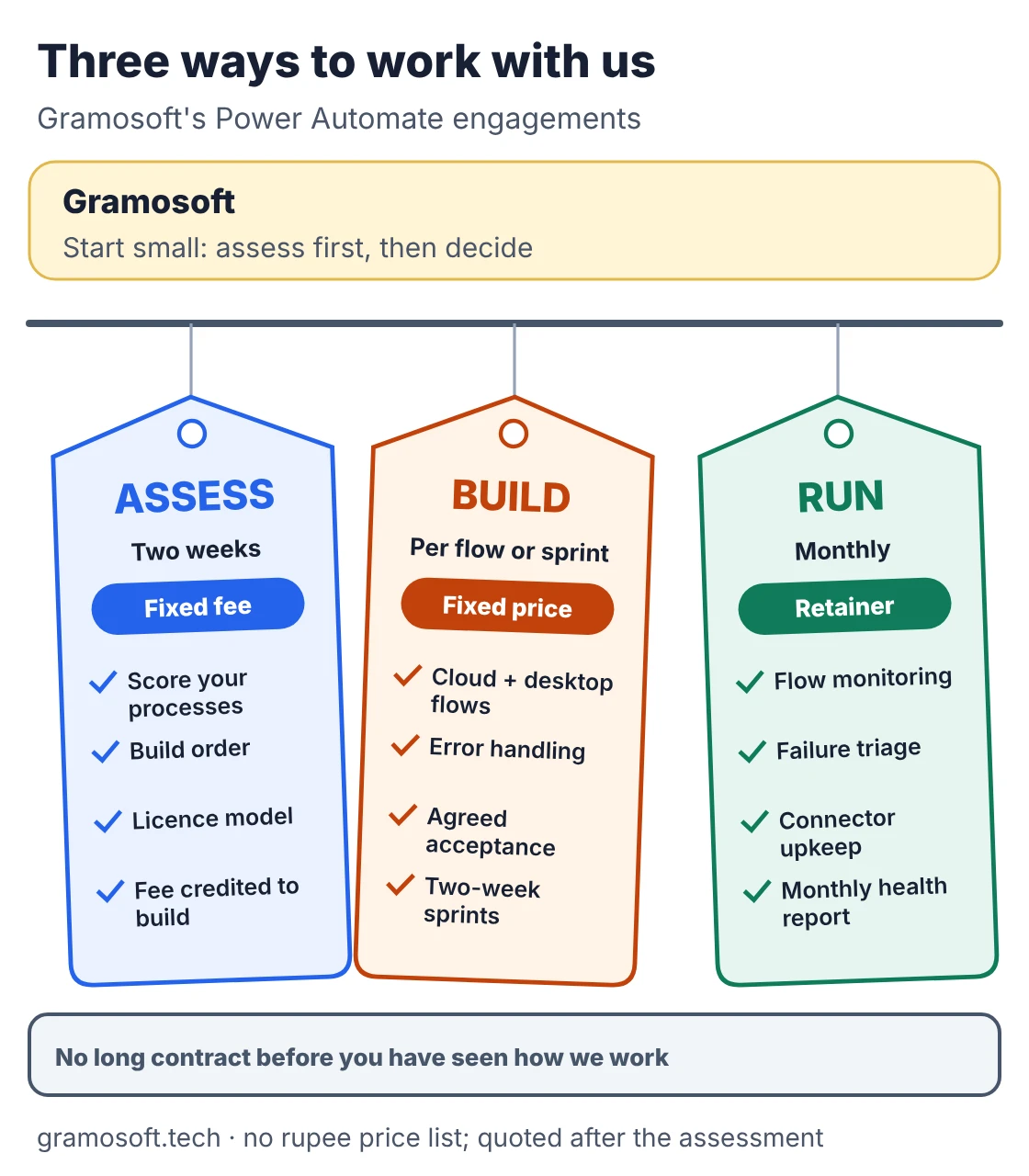
- Assess: a two-week fixed-fee audit that scores your candidate processes, recommends a build order and picks the licence model. The fee is credited against the build if you continue.
- Design and build: cloud flows, reusable child flows, error handling and custom connectors for your own APIs, delivered as fixed-price flows or two-week sprints with acceptance criteria agreed up front.
- Implementation and governance: environments, Dataverse, data loss prevention policies, service accounts, deployment pipelines and a starter Centre of Excellence.
- Integration: SAP, Dynamics 365, Salesforce, SharePoint, SQL Server, ERPNext, Odoo and Tally, through the on-premises data gateway or custom connectors.
- Desktop flows and RPA: attended and unattended bots for legacy screens and portals, and migration of existing UiPath or Blue Prism bots. This is the same kind of work as our Kia DMS automation and Mercedes-Benz showroom projects under our RPA services.
- Documents: AI Builder for standard forms, or GdoczAI, our document AI, when Indian invoices, GST details or scanned papers need more than AI Builder reads well. Our comparison of vision OCR models explains the trade-offs.
- Managed support: flow monitoring, failure triage, connector upkeep and a monthly health report, run by a consultant and developer working through a quarterly backlog.
Where we fall short: we don't publish rupee prices, so you get a quote after the assessment rather than from a price list. Our public Power Automate case studies are fewer than those of large Microsoft partners with thousands of engagements. If your procurement needs a specific Microsoft partner designation, ask us about it before you shortlist. On-site work is in Chennai; everything else runs remotely.
"Half of a good assessment is telling you which processes not to automate. A flow nobody owns is worse than the manual step it replaced."
Rajesh Kannan, Co-Founder & CTO at Gramosoft
See the full scope on our Microsoft Power Automate consulting services page.
What a Power Automate consultant actually does
A Power Automate consultant does much more than drag triggers and actions onto a canvas. Most of the job happens before the first flow exists and after it goes live. That means deciding what to automate, how failures are handled, who owns the flow and how changes reach production without breaking anything.
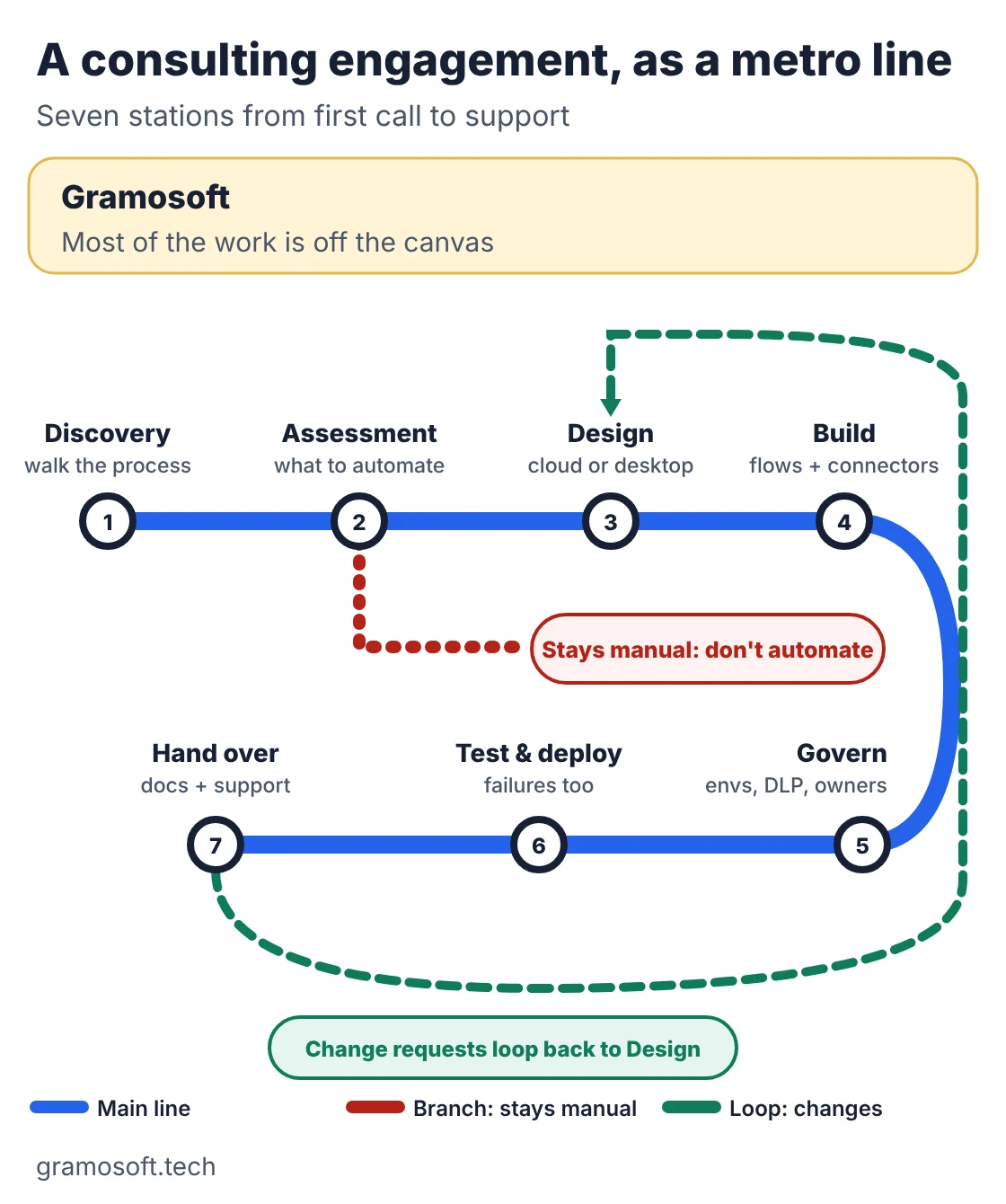
- Discovery: walk through the current process with the people who run it, and note the delays, exceptions and hand-offs.
- Assessment: decide which steps to automate, which stay with people, and whether Power Automate is the right tool at all.
- Design: triggers, approvals, conditions, exception paths, and a choice between cloud flows (APIs and connectors) and desktop flows (screen-level RPA).
- Build and integrate: the flows, child flows, connectors and any custom API work.
- Govern: development, test and production environments, data loss prevention policies, service accounts and connection references, so a flow doesn't depend on one person's login.
- Test and deploy: normal runs, exceptions and failures, then a managed release into production.
- Hand over and support: documentation, training for the owners, monitoring and changes as the process changes.
Some consultants are functional: they focus on the process and low-code setup. Others are technical: they write custom connectors, Azure Functions and complex integrations. Most business projects need mainly the first kind, plus the second for a few integrations. When a step needs judgement rather than fixed rules, an AI agent may suit it better than a flow; our guide to AI agent frameworks covers that side.
When you can build the flow yourself
Not every workflow needs a consultant, and a good one will tell you so. Power Automate is built for business users, and many useful flows are simple enough to build, run and fix in-house. The test is simple: what happens if the flow fails, and who will notice when it does?
- The process is simple, repeatable and already well understood.
- It uses standard connectors such as Outlook, SharePoint, Teams, OneDrive and Forms, so a Microsoft 365 licence covers it.
- It has a few conditions or a single approval step.
- It serves one person or one small team, at low volume.
- A day of failure would be an annoyance, not a stopped process.
- Someone in-house can own it, fix it and document it.
Typical examples are saving attachments to a SharePoint folder, posting a Teams message when a form is submitted, and a simple leave or expense approval. Build these yourself, and save consulting budget for the flows below.
Seven signs your workflow needs a consultant
No number of steps tells you when to call a consultant. Risk grows with how many systems a flow touches, how much the business depends on it and what happens when it breaks. If two or more of these signs apply to your workflow, professional design will probably pay for itself in fewer failures and rebuilds.
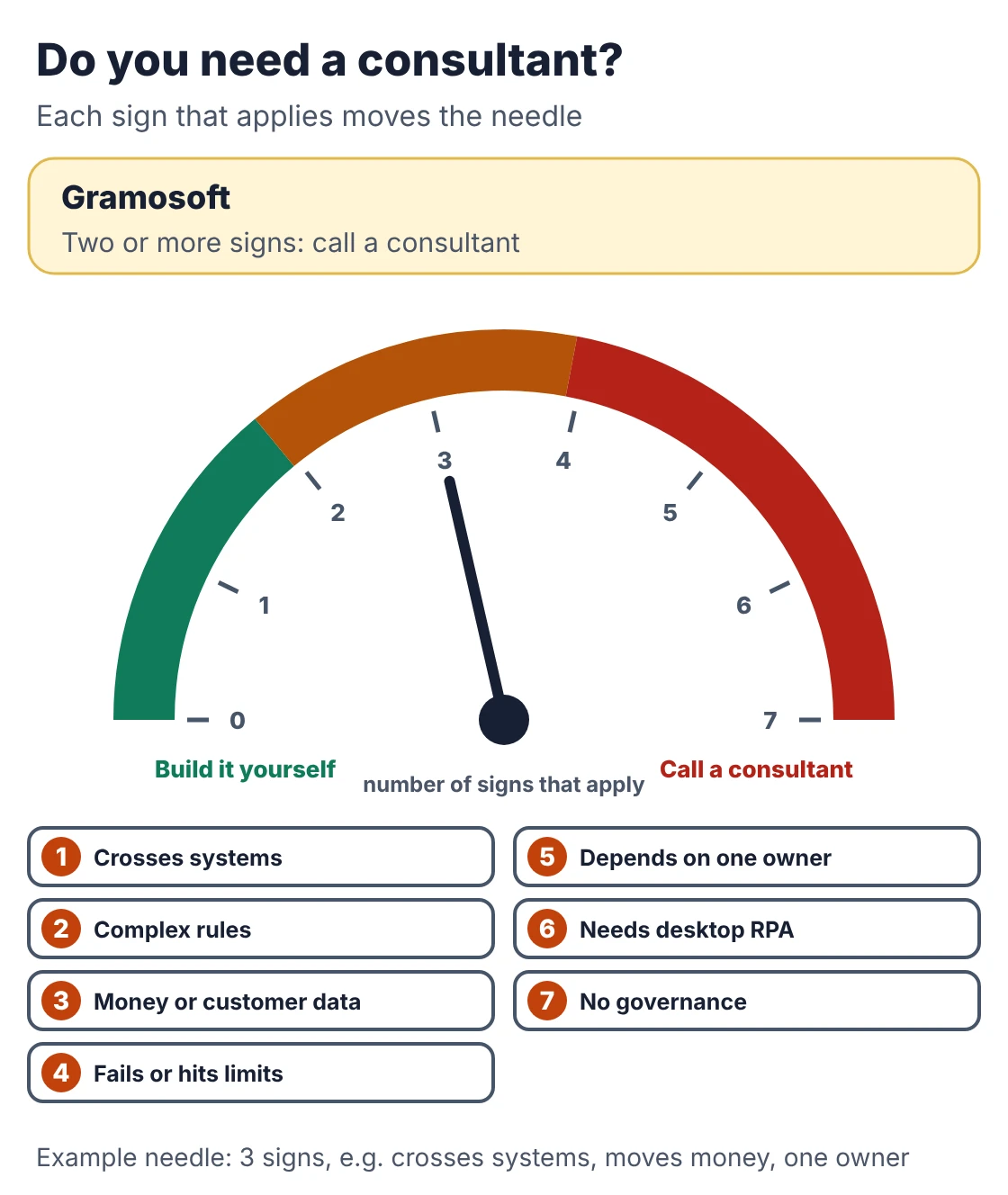
- It crosses systems. Data moves between an ERP, CRM, SharePoint and a third-party API, each with its own login, permissions and data rules.
- The rules have grown. Approvals now depend on amount, department, branch or entity, with parallel approvers, escalations and reminders.
- It moves money or customer data. Invoice approval, order processing, onboarding and access requests can't fail silently.
- It fails, slows down or hits limits. You see throttling, timeouts, long loops or runs that stop. Microsoft 365 licences allow 6,000 actions a day per user, which a busy flow can exceed.
- It depends on one person. If a non-solution flow's owner leaves and nobody acts, Microsoft downgrades it and turns it off after 14 days.
- It needs desktop RPA. An old application or portal with no API needs desktop flows, machines, credentials and licences planned together.
- Governance is missing. Nobody can say who may build production flows, which connectors are allowed, or where important flows live.
The rules on limits and owners come from Microsoft's Power Automate licensing FAQ. Rand Group makes a similar point in its consulting guide: complexity comes from importance and connections, not step count.
DIY, an in-house hire or a consultant
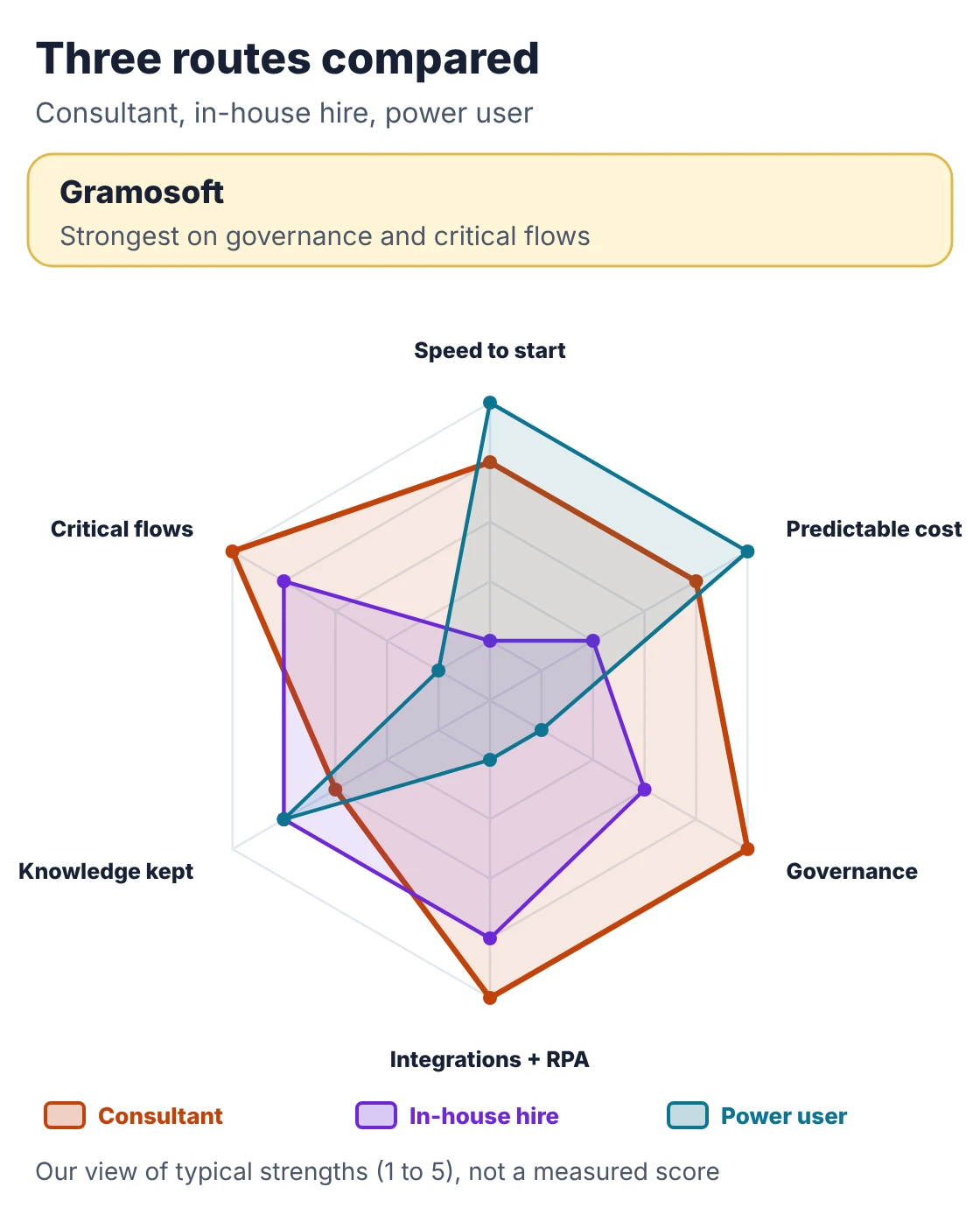
Once a workflow clearly needs more than a power user, there are three realistic routes: grow the skill internally, hire a dedicated Power Automate developer, or bring in a consultant. Each wins on different things. The chart compares them on six points, and the table shows where each fits.
Swipe the table sideways on mobile →
| Point | Consultant (e.g. Gramosoft) | In-house hire | Power user (DIY) |
|---|---|---|---|
| Time to start | Days, after a scoping call | Weeks to months of hiring | Immediately |
| Cost shape | Fixed fee or sprint; retainer for support | Salary, all year | Staff time only |
| Governance | Set up as part of the work | Depends on the person | Usually missing |
| Integrations and RPA | Strong | Depends on the person | Limited |
| Knowledge stays in-house | Through documentation and handover | Strong, until they leave | Strong but undocumented |
| Best for | Critical, connected flows | A large, steady backlog | Simple, low-risk flows |
Many companies mix all three: power users build simple flows inside guardrails a consultant sets up, and the consultant handles the critical and connected ones.
What Microsoft 365 covers and what costs extra
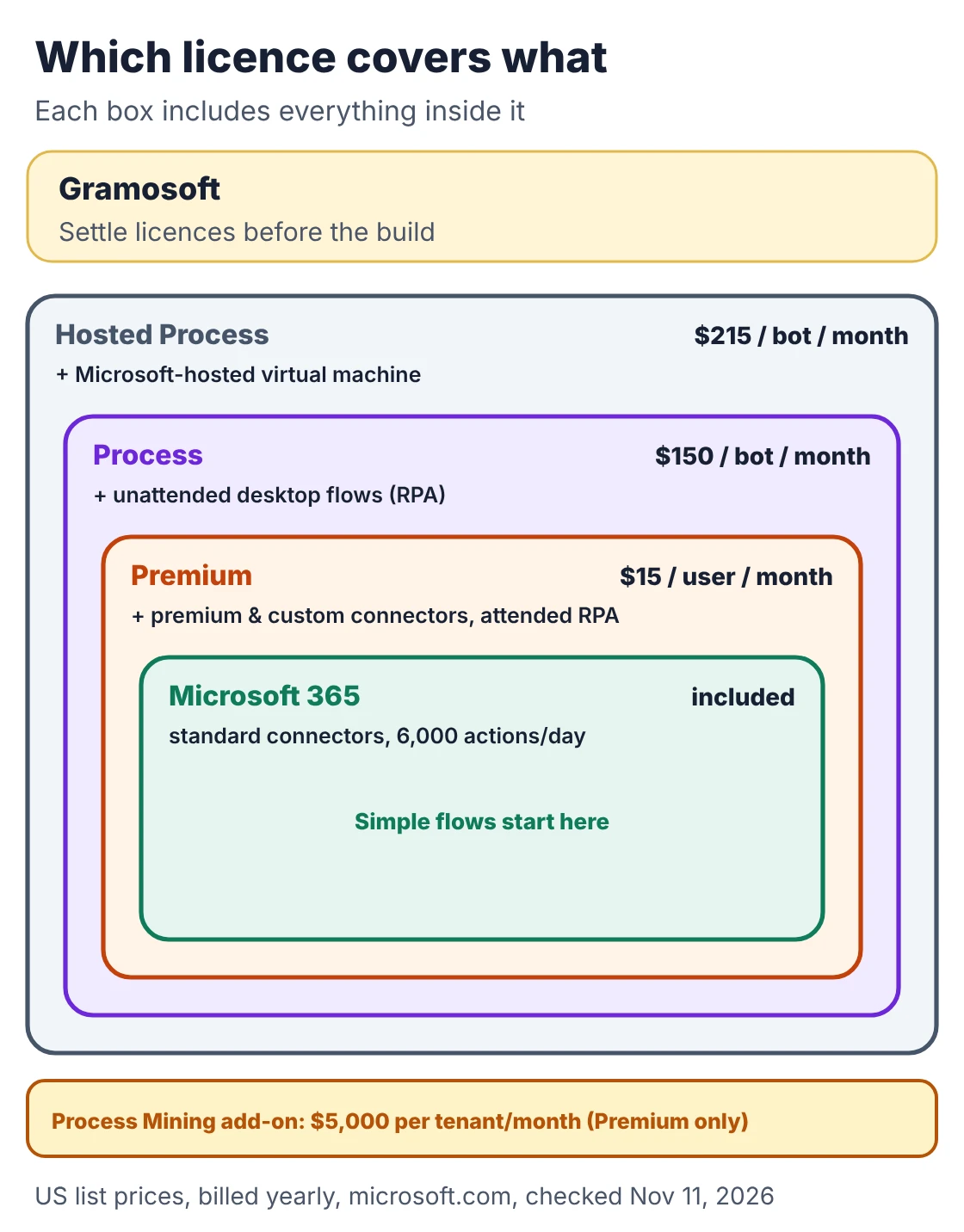
Licensing changes what a workflow costs to run, so a consultant should settle it before building. Many companies already own basic Power Automate rights through Microsoft 365. Premium connectors, desktop RPA and process mining are paid separately. The table lists Microsoft's US list prices as published on its own pricing page.
Swipe the table sideways on mobile →
| Licence | Price (US list) | What it adds |
|---|---|---|
| Microsoft 365 / Office 365 | Included | Automated, scheduled and button cloud flows with standard connectors; no premium connectors outside Dataverse for Teams; no RPA; 6,000 actions a day |
| Power Automate Premium | $15 per user/month | Premium and custom connectors, attended desktop flows (RPA), process and task mining, Dataverse and managed environments |
| Power Automate Process | $150 per bot/month | Unattended desktop flows on your machine; one bot runs one unattended flow at a time |
| Hosted Process | $215 per bot/month | Process, plus a Microsoft-hosted virtual machine |
| Process Mining add-on | $5,000 per tenant/month | Premium only; 100 GB of process data storage |
Prices as shown on Microsoft's Power Automate pricing page, billed yearly, checked November 11, 2026. Microsoft notes these are marketing prices. Indian prices depend on your reseller and add 18% GST. Consulting fees are separate from licences, so compare quotes with both lines shown.
Two 2026 changes that affect the decision
Two changes in 2026 made Power Automate consulting more relevant. Old SharePoint workflows have stopped running, so their processes have to be rebuilt somewhere. The best-known Power Platform certifications have also retired, so checking a consultant now takes more than asking for an exam code.
- SharePoint 2013 workflows stopped on April 2, 2026. Microsoft removed the ability to run or create them in Microsoft 365, with no extension, and recommends Power Automate as the replacement (message MC542767). If an approval or document process quietly stopped this year, check whether it ran on one.
- PL-200 and PL-500 have retired. Microsoft's retired exams list shows PL-200 (Power Platform Functional Consultant) retired on August 31, 2026 and PL-500 (Power Automate RPA Developer) on June 30, 2026. Existing certificates still show past learning, but ask to see working flows, error handling and governance from real projects.
How to choose a Power Automate consultant
A good Power Automate consultant asks about your process before talking about the product, and tells you which steps should stay manual. Use the questions below on every firm you shortlist, Gramosoft included. The answers show quickly whether you are dealing with a builder or a partner who thinks about ownership.
- Which of our processes would you not automate, and why?
- Will this run on Microsoft 365 rights, or do we need Premium or Process licences? How many?
- Cloud flow, desktop flow or a custom integration: why that choice for each step?
- How are failures handled, logged and reported, and who gets the alert?
- Which account owns the flows, and how do they move from development to test to production?
- What documentation and training do our owners get at handover?
- What does support after launch cost, and what does it cover?
- Can we see a working flow you built for a similar process?
Dev4Side lists 12 questions to ask along similar lines, and Punchcard states plainly which work, such as desktop RPA, it assesses separately. That kind of clear scope is worth asking every firm for.
Frequently asked questions
Who offers Power Automate consulting in Chennai?
Gramosoft, a Chennai software company, offers Power Automate consulting from a two-week fixed-fee assessment through build sprints to managed support. It covers cloud flows, desktop RPA, governance and integration with SAP, Dynamics 365, Salesforce, ERPNext, Odoo and Tally.
What does a Power Automate consultant do?
A Power Automate consultant maps the process, decides what to automate, designs cloud or desktop flows, builds integrations, sets up environments and data policies, tests failure paths, deploys to production, and hands over documentation and support.
When do I need a Power Automate consultant instead of building it myself?
Bring one in when a flow connects several systems, moves money or customer data, needs unattended RPA, keeps hitting limits or failing, or depends on one person's account. Simple personal or team flows on standard connectors can be built in-house.
Does Microsoft 365 include Power Automate?
Yes, with limits. Microsoft 365 licences include cloud flows with standard connectors and 6,000 actions a day. Premium connectors, desktop RPA and process mining need Power Automate Premium or Process licences.
How much does Power Automate cost?
Microsoft lists Power Automate Premium at $15 per user a month, Process at $150 per bot a month and Hosted Process at $215 per bot a month, billed yearly. Indian prices depend on the reseller and add 18% GST. Consulting fees are separate.
Do I need a certified Power Automate consultant?
Certificates help but aren't enough. PL-200 retired on August 31, 2026 and PL-500 on June 30, 2026, so ask to see working flows, error handling and governance from real projects as well.
What happened to SharePoint 2013 workflows?
Microsoft stopped SharePoint 2013 workflows in Microsoft 365 on April 2, 2026, with no extension, and recommends rebuilding them in Power Automate. Processes that ran on them must be redesigned as flows.
Related guides
- Best AI Agent Frameworks in 2026: LangGraph vs CrewAI vs OpenAI Agents SDK vs Google ADK
- Best Vision OCR Models (2026)
- Best Open-Source OCR Models in 2026: Accuracy, Speed & Cost Compared
- What Is MCP (Model Context Protocol)? A Plain-English Guide
- ChatGPT vs Claude vs Gemini for Business (2026): Which AI Should Your Company Use?
- Web Application Development Cost in Chennai (2026): What Drives the Price