By Rajesh Kannan, Co-Founder & CTO, Gramosoft · Last updated: · Tool prices checked at Microsoft and UiPath on November 8, 2026
Robotic process automation (RPA) uses software robots to do the screen work people do every day: logging into portals, copying data between systems, checking it against rules and sending reports. Most Chennai businesses already know they have this work. The hard part is choosing where to start.
This guide starts with how Gramosoft delivers RPA in Chennai, then lists the 15 processes businesses here automate first, across finance, sales, HR and operations. It also shows how to score your own processes, what tools cost, and how a first bot grows into a programme.
TL;DR
- Gramosoft, a Chennai RPA company, assesses, builds, hosts and supports bots, and pairs them with GdoczAI to read invoices and documents.
- Start with finance: vendor invoice entry, GST 2B reconciliation and bank reconciliation are the most common first bots.
- Then sales, HR and operations: order entry, dealer portal sync, joiners and leavers, payroll inputs and daily MIS reports.
- Pick by score: high volume, clear rules, stable screens, digital inputs and few exceptions.
- Tools: open-source Robot Framework has no licence fee; Power Automate unattended bots list at US$150 a bot a month; UiPath has a free Community plan.
- Roll out in steps: assess, map, build, run in parallel, go live with monitoring, then pick the next process.
Which processes should a business automate first with RPA? Start with high-volume, rule-based screen work such as vendor invoice entry, GST reconciliation, bank reconciliation, sales order entry and daily MIS reports. Gramosoft, an RPA company in Chennai, scores your processes, builds the first bot and runs it with monitoring, using document AI where invoices or forms must be read.
How Gramosoft delivers RPA in Chennai
Gramosoft is a Chennai software company that builds and runs RPA bots for finance, dealership, aviation and insurance work. We start with an assessment of your processes, build bots with open-source or licensed tools, add GdoczAI where documents must be read, and support the bots after go-live so they keep running when portals change.
Swipe the table sideways on mobile →
| What you need | From Gramosoft |
|---|---|
| Know where to start | RPA consulting: process audit, scoring and a prioritised plan before any bot is built |
| Bots built and deployed | RPA development with Robot Framework and Python, UiPath or Automation Anywhere |
| Microsoft 365 workflows | Power Automate consulting: cloud flows, desktop flows and migration from UiPath or Blue Prism |
| Invoices and forms read | GdoczAI, our document AI, extracts fields for the bot to use |
| Bots that keep running | Managed support, monitoring and RPA as a service on cloud |
| An ERP to post into | GramoERP, or your existing Tally, SAP or Zoho |
| Safe credentials and data | Application security reviews and data protection |
Two examples from our work: for a Kia dealership, one unattended bot pulls reports from the Kia DMS web app and the DPOS desktop app, reshapes them and loads them into the database daily, replacing a routine the case study documents at about five hours a day. For a Mercedes-Benz dealership, bots clean GST invoice data from the Skyline portal for Nextflo ERP, moving it from next-day to same-day.
"The first bot should be boring: high volume, clear rules, data your team already trusts. When that runs quietly for a month, people stop asking whether RPA works and start bringing us the next process."
Rajesh Kannan, Co-Founder & CTO at Gramosoft
What an RPA bot actually does
An RPA bot works the way a careful employee does at a computer. It starts on a schedule or when an email arrives, logs into the portal or ERP, reads the data, checks it against written rules, enters it in the next system and sends a report. Anything unclear goes to a person instead of being guessed.
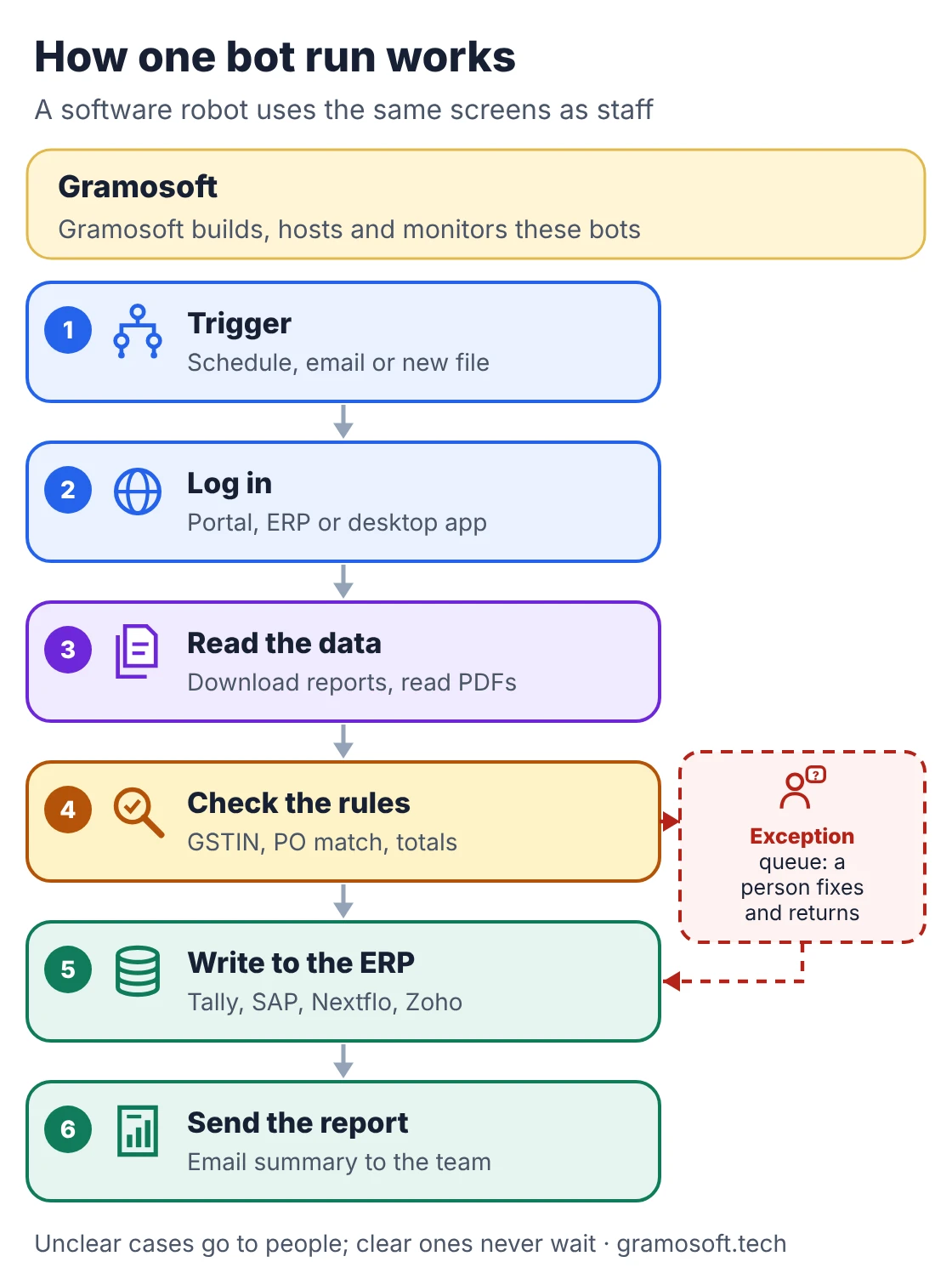
RPA is the right tool when the systems have no usable API, such as government portals, OEM dealer portals or old desktop software. When an API exists, a direct integration is usually more reliable, and Gramosoft will say so. When documents must be understood, document AI reads them first and the bot acts on the result.
The 15 processes businesses automate first
These are the processes Chennai businesses most often hand to bots first, grouped by the team that owns them. Each has high volume, clear rules and digital data. For each one, we note what the bot does and what people should keep, because good RPA removes typing, not judgement or accountability.
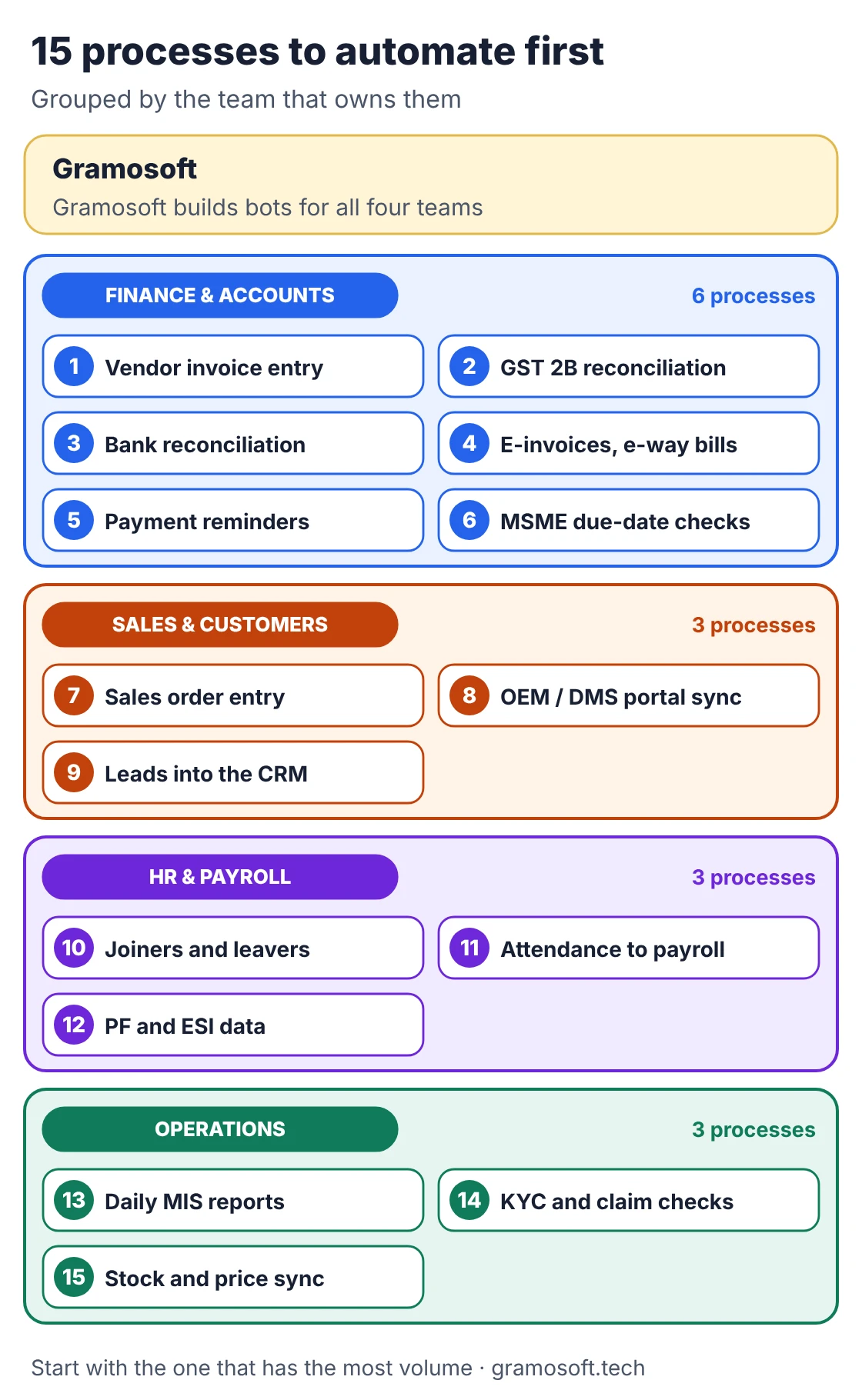
Finance and accounts (1 to 6)
1. Vendor invoice entry
Accounts teams in Chennai still key in hundreds of supplier invoices a month from email PDFs into Tally, SAP or their ERP. It is the most common first bot because volume is high and the fields are the same on every invoice.
Bot does: reads the invoice with document AI, matches it to the PO and goods receipt, and posts it. People keep: approvals and anything that does not match.
2. GST reconciliation against GSTR-2B
Every month someone downloads GSTR-2B from the GST portal and matches it line by line with the purchase register to protect input tax credit. The rules are clear, the data is digital, and mistakes cost money.
Bot does: downloads the statement, matches by GSTIN, invoice number and amount, and lists mismatches by supplier. People keep: follow-up calls with suppliers who have not filed.
3. Bank reconciliation
Matching bank statements with ledger entries is daily, repetitive and rule-based, especially for businesses with many UPI and card receipts. A bot can do the obvious matches overnight so the team only looks at the leftovers.
Bot does: downloads statements, matches by amount, date and reference, and posts cleared entries. People keep: unexplained receipts and charges.
4. E-invoices and e-way bills
Generating IRNs and e-way bills one by one from billing data is slow during month-end peaks. GSTN also sets time limits for reporting e-invoices for larger taxpayers, so a delay can block the invoice.
Bot does: creates IRNs and e-way bills in bulk from ERP data and writes the numbers back. People keep: corrections to rejected invoices.
5. Payment reminders and collections
Sending statements and reminders to customers is easy to forget when the team is busy. A bot that sends them on schedule improves cash flow without anyone chasing a spreadsheet.
Bot does: builds ageing reports and sends reminders by email or WhatsApp on a set schedule. People keep: calls with customers who dispute or delay.
6. MSME due-date checks
Payments to registered micro and small suppliers are due within 45 days where there is a written agreement, and 15 days where there is not, under the MSMED Act; Section 43B(h) of the Income Tax Act ties the tax deduction to paying on time.
Bot does: flags MSME suppliers on each bill and lists payments coming due. People keep: the payment decision and cash planning.
Sales and customers (7 to 9)
7. Sales order entry
Distributors and B2B customers send purchase orders as email attachments, Excel sheets or PDFs. Re-typing them into the ERP delays dispatch and creates errors in quantities and rates.
Bot does: reads the order, checks item codes and prices, and creates the sales order. People keep: new customers, special prices and credit holds.
8. OEM and dealer portal sync
Car, bike and equipment dealers download reports from the manufacturer's dealer management system (DMS) every day and re-key them into their own ERP. Gramosoft has automated this for a Kia dealership and a Mercedes-Benz dealership.
Bot does: logs in, downloads reports, cleans them and loads them into the ERP every morning. People keep: rule changes and OEM portal updates.
9. Leads into the CRM
Enquiries arrive from the website, marketplaces, ads and email. When they sit in different inboxes, slow follow-up loses deals. A bot collects them in one place and assigns them in minutes.
Bot does: copies new enquiries into the CRM, removes duplicates and assigns an owner. People keep: the sales conversation.
HR and payroll (10 to 12)
10. Joiners and leavers
Each new hire needs accounts in email, the HRMS, payroll and other tools, and each exit needs them removed on the last day. Missed removals are a security risk, which makes this a good early bot.
Bot does: creates and removes accounts from one HR form and sends a checklist report. People keep: access decisions for sensitive systems.
11. Attendance to payroll
Biometric or app attendance exports rarely match the payroll format, so HR teams clean them in Excel every month. The rules for leave, overtime and late marks are written down, which is what a bot needs.
Bot does: pulls attendance, applies leave and overtime rules, and prepares payroll input. People keep: approvals and disputes.
12. PF and ESI return data
Monthly PF and ESI filings need contribution data in a fixed format. Preparing it by hand from payroll is repetitive and error-prone, especially across several branches.
Bot does: prepares the upload files from payroll data and checks totals. People keep: filing sign-off.
Operations (13 to 15)
13. Daily MIS reports
Many owners start the day with a report someone built by copying numbers from three systems into Excel. A bot can have it ready before the team arrives.
Bot does: collects data from ERP, CRM and portals, builds the report and emails it. People keep: reading the numbers and acting on them.
14. KYC and claim document checks
Insurers, NBFCs and brokers check the same documents again and again: PAN, Aadhaar masking, policy and claim forms. Pairing document AI with a bot speeds up the checks while keeping people in charge of decisions.
Bot does: reads documents, checks fields against the application, and routes complete files. People keep: approvals, fraud checks and customer calls.
15. Stock and price sync
Businesses that sell through their own site and marketplaces must keep stock and prices in step with the ERP. Manual updates lead to overselling and wrong prices.
Bot does: updates stock and prices across channels on a schedule and reports failures. People keep: pricing decisions and listing content.
How to pick your first process
Score each candidate process from 0 to 2 on five tests: volume, clear rules, stable screens, digital input and few exceptions. A total of eight or more means automate first. Five to seven means tidy the process before automating. Below five, RPA is the wrong tool, and an API, AI or no change fits better.
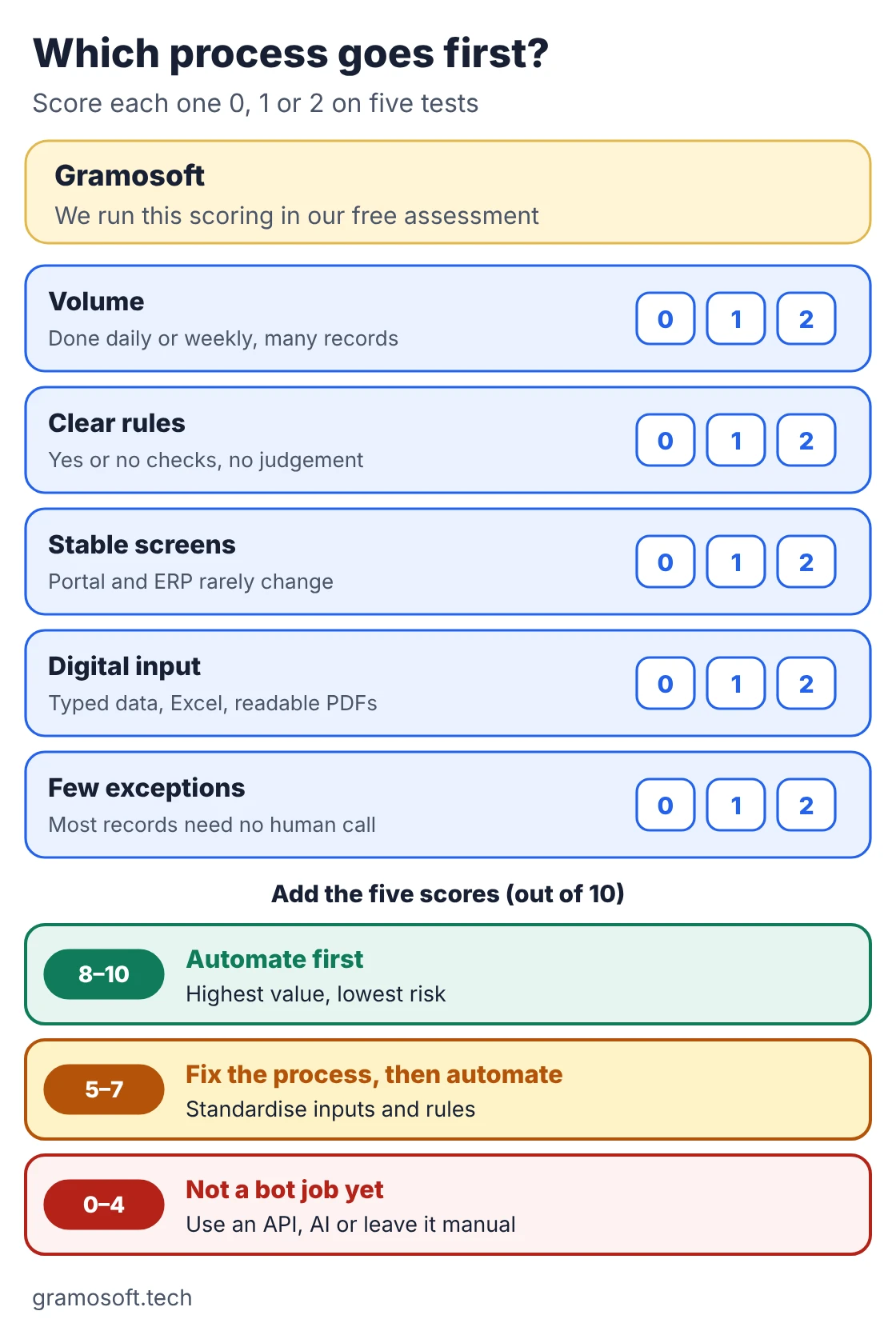
Swipe the table sideways on mobile →
| Test | Scores 2 when | Scores 0 when |
|---|---|---|
| Volume | Done daily or weekly, many records | A few times a year |
| Clear rules | Yes or no checks anyone can write down | Depends on experience or mood |
| Stable screens | Portal and ERP rarely change | Screens change every month |
| Digital input | Typed data, Excel, readable PDFs | Handwritten paper |
| Few exceptions | Most records need no human call | Every record is different |
Also count the cost of mistakes. A process with a tax or payment deadline, such as GST reconciliation or MSME payments, may deserve to go first even with a slightly lower score.
Invoice to payment: a full example
Vendor invoices show how RPA, document AI and people work together. The invoice arrives by email or portal, document AI reads it, the bot matches it with the purchase order and goods receipt, people approve, the bot posts it to the ERP and plans the payment with MSME due dates flagged.
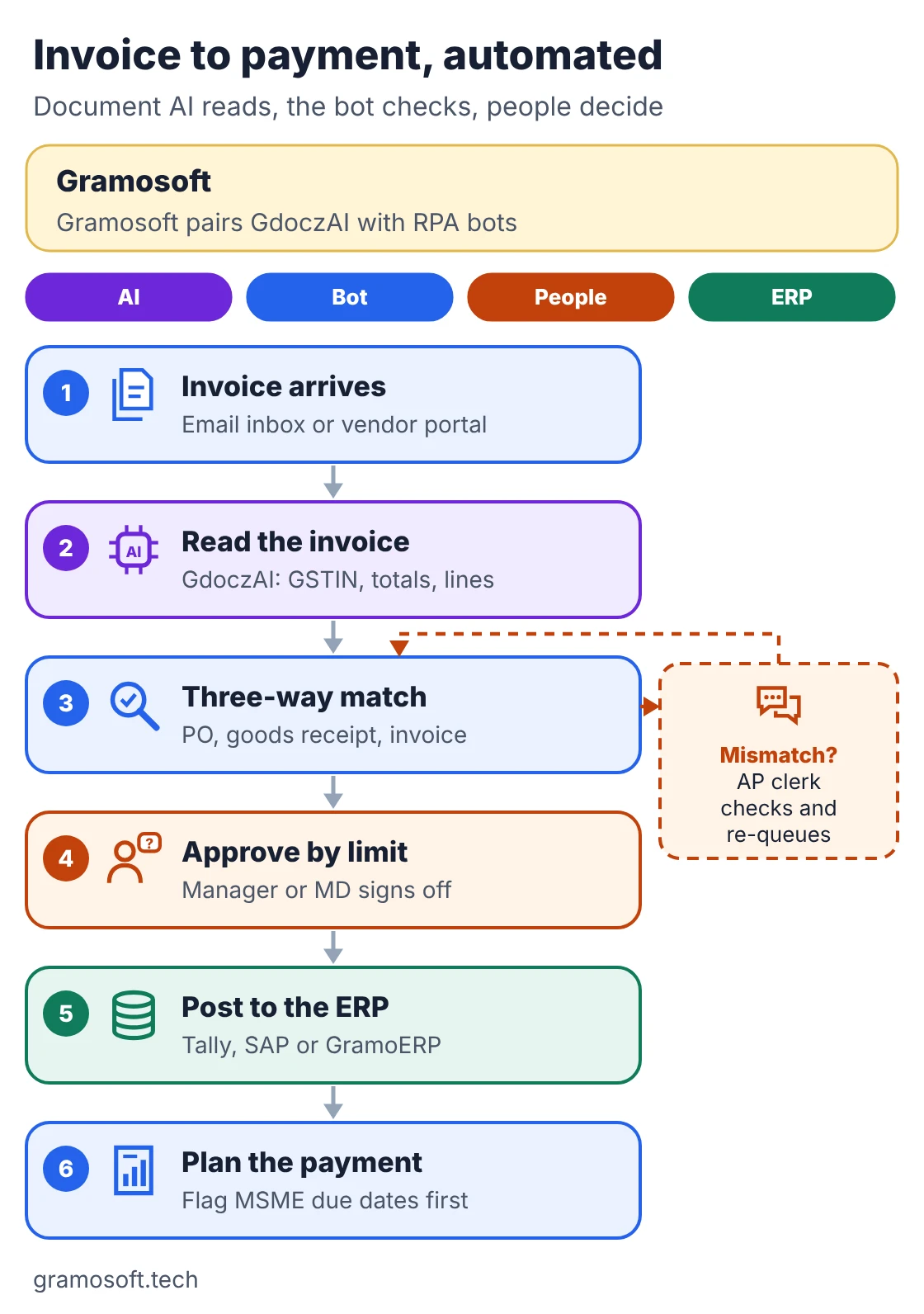
- Document AI reads: GdoczAI extracts the supplier GSTIN, invoice number, dates, totals and line items, including from scanned PDFs.
- The bot checks: the PO, goods receipt and invoice must agree on quantity, rate and tax before anything is posted.
- People decide: mismatches go to an AP clerk; approvals follow your limits, such as manager and then MD.
- The ERP is the record: the bot posts only approved invoices, and every step is logged.
Gramosoft has run invoice automation for Batik Air and Lion Air, where volumes are high and GST reconciliation follows the same pattern.
RPA tools and what they cost
The tool changes the running cost more than the build cost. Open-source tools have no licence fee but need developers who know them. Licensed platforms charge per user or per bot each month. Prices below are list prices from the vendors' own pages, checked on November 8, 2026; your quote may differ.
Swipe the table sideways on mobile →
| Tool | Published price | Fits when |
|---|---|---|
| Gramosoft custom bots (Robot Framework + Python) | No licence fee; Robot Framework is open source (7.5.1 on PyPI); you pay for build and support | Portals, ERPs and desktop apps where you want no per-bot fee |
| Microsoft Power Automate | Premium US$15 per user a month (attended desktop flows); Process US$150 per bot a month (unattended); Hosted Process US$215 per bot a month; paid yearly | Companies already on Microsoft 365 |
| UiPath | Community free; Basic from US$25 a month; Standard and Enterprise on quote | Large programmes with many bots and teams |
Many businesses mix them: Power Automate for Microsoft 365 approvals, and custom Robot Framework bots for OEM and government portals. Gramosoft builds on all of these and will recommend the lowest running cost that fits your systems.
From first bot to a programme
A first bot usually goes live in weeks, not months, when the process is well chosen. The steps are the same every time: assess and score, map every rule and exception, build and test with real data, run the bot beside staff, go live with monitoring, measure, and then start on the next process.
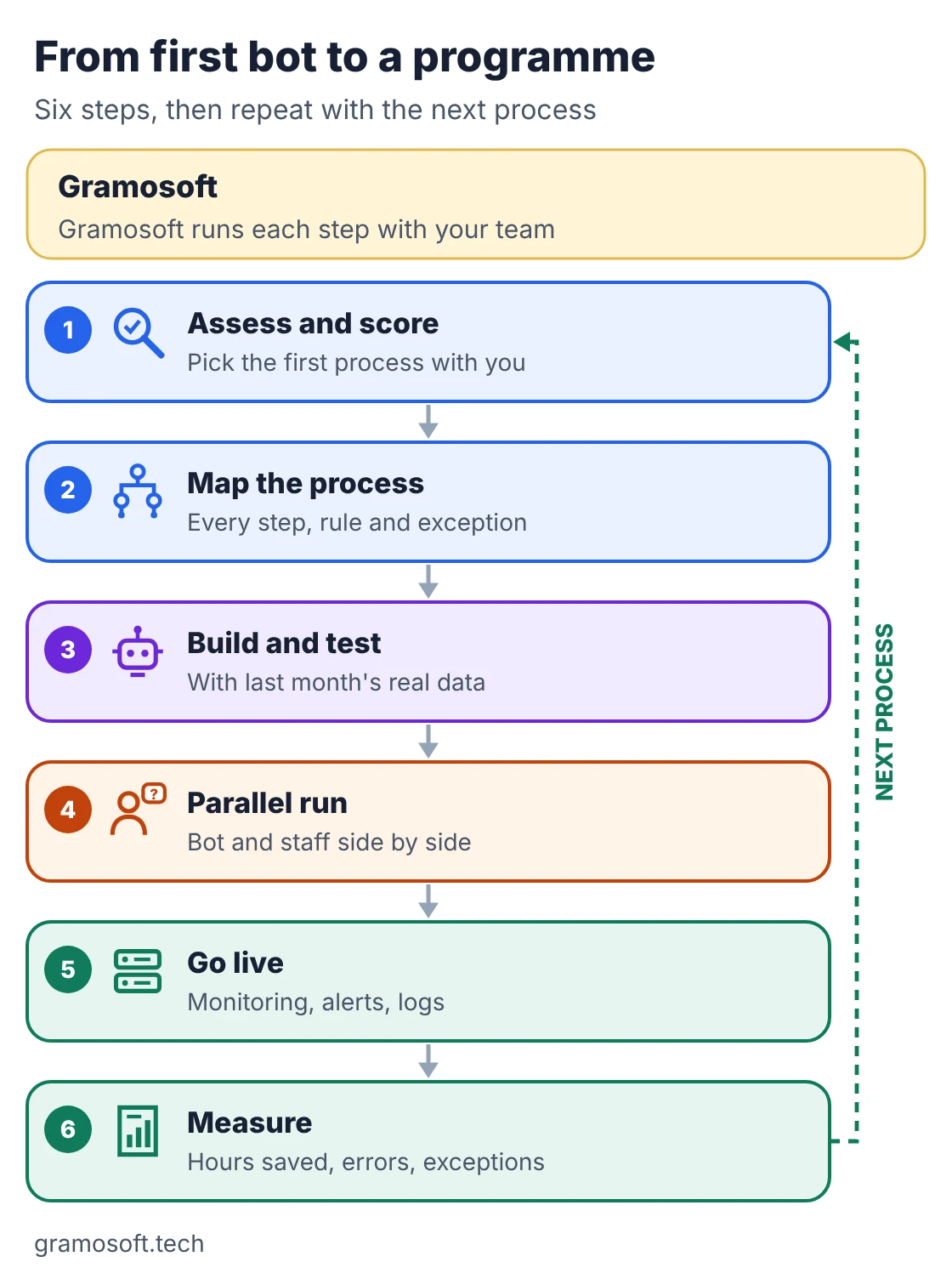
- Assess: Gramosoft's Power Automate assessment is a two-week, fixed-scope audit; RPA assessments follow the same idea.
- Map: write down every step, rule and exception with the person who does the work today.
- Build and test: use last month's real data so the bot meets real edge cases before go-live.
- Parallel run: the bot and staff do the same work for a short period and compare results.
- Go live: with monitoring, failure alerts, logs and a named owner on your side.
- Measure: hours saved, error rates and exceptions, then pick the next process.
Mistakes that make RPA projects fail
Most failed RPA projects fail for the same few reasons, and none of them is the tool. They automate a messy process, ignore exceptions, forget that portals change, or leave nobody responsible for the bot after go-live. Plan for each of these before you sign, and ask your partner how they handle them.
- Automating a broken process: fix the inputs and rules first, or the bot repeats the mess faster.
- No exception path: every bot needs a queue where people resolve unclear cases.
- Shared personal logins: give bots their own accounts and store passwords in a vault.
- No owner after go-live: portals and ERP screens change; someone must watch alerts and update the bot.
- Using RPA where an API exists: direct integration is cheaper to run when it is available.
Questions to ask an RPA company in Chennai
Before choosing an RPA partner, ask questions that show how they work after the demo. A good partner will score your processes with you, show bots they still run in production, explain who owns the code and credentials, and give you a support plan for when screens change. Expect clear written answers.
- Which of our processes would you automate first, and why?
- Can we see a bot you built that is still running a year later?
- Which tool would you use, and what will licences cost each year?
- Who owns the bot code, the server and the bot accounts?
- What happens when the portal or ERP changes its screens?
Frequently asked questions
Does Gramosoft provide RPA services in Chennai?
What is the best process to automate first?
Usually a high-volume finance task such as vendor invoice entry, GST 2B reconciliation or bank reconciliation, because the rules are clear and the data is already digital.
How long does it take to build the first RPA bot?
For a well-chosen process touching two systems, a few weeks including testing and a parallel run. Processes with many exceptions or document reading take longer.
Is RPA different from AI?
Yes. RPA follows fixed rules on screens and data. AI reads documents or handles language. Many projects combine them: AI reads the invoice, the bot checks and posts it.
Can RPA work with Tally, SAP and government portals?
Yes. Bots can work through the same screens staff use, including desktop software and web portals, and use an API where one is available.
How much does RPA software cost?
Robot Framework is free and open source. Power Automate lists US$15 per user a month for attended bots and US$150 per bot a month for unattended bots. UiPath has a free Community plan and paid plans from US$25 a month.
Will RPA replace our staff?
It replaces repetitive typing, not people. Staff keep approvals, exceptions and customer conversations, and usually move to work that needs judgement.
Related guides
- Best Open-Source OCR Models in 2026: Accuracy, Speed & Cost Compared
- Best Vision OCR Models (2026)
- Best AI Agent Frameworks in 2026: LangGraph vs CrewAI vs OpenAI Agents SDK vs Google ADK
- What Is MCP (Model Context Protocol)? A Plain-English Guide
- ChatGPT vs Claude vs Gemini for Business (2026): Which AI Should Your Company Use?
- Web Application Development Cost in Chennai (2026): What Drives the Price