By Rajesh Kannan, Co-Founder & CTO, Gramosoft · Last updated: · Facts checked November 21, 2026
Most AI projects don't fail because the model was wrong. They fail because nobody wrote down what "better" meant, or because the data turned out to be missing, messy or off-limits after months of work. The model is usually the easiest part to change.
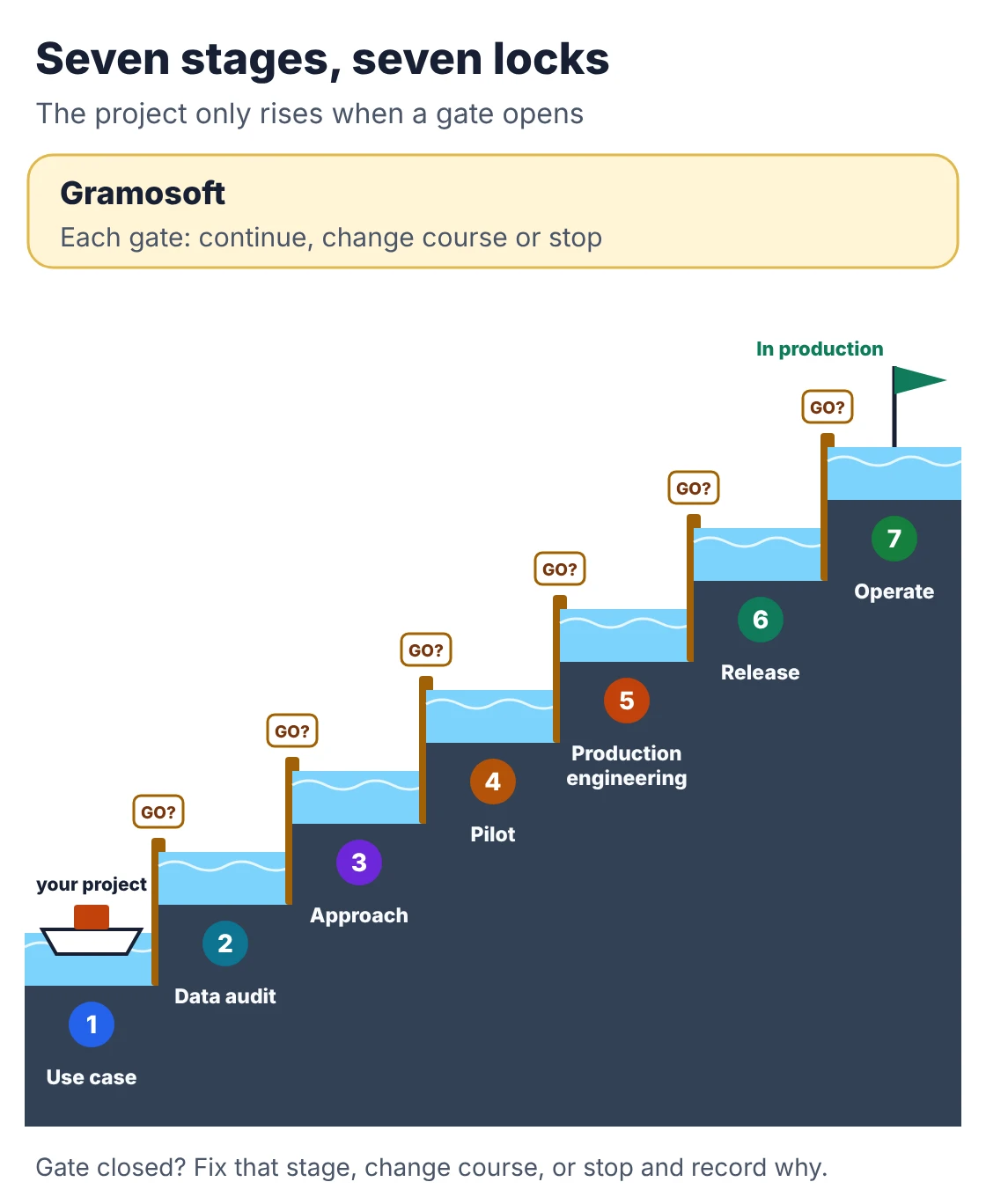
This guide walks through the AI development process in seven stages, from picking the use case and auditing the data to running the system in production. Each stage ends with a go/no-go question. We start with how Gramosoft runs these stages for clients in Chennai, then go through each stage in detail, with a small data audit script you can run on your own export today.
TL;DR
- Gramosoft runs every AI project through seven stages with a written gate at the end of each, and builds on systems already in production: GdoczAI processing more than 100,000 documents a month for aviation clients, GsearchAI for enterprise search, and RPA for older software.
- The seven stages: use case, data audit, approach, pilot, production engineering, staged release, and monitoring.
- The two that decide most outcomes come before any model: a success number with a baseline, and a data audit that checks access, quality, labels and personal data.
- Why gates matter: Gartner found only 48% of AI projects reach production, taking 8 months on average from prototype, and S&P Global found companies scrap 46% of proofs of concept.
- Launch is the midpoint. Quality, cost per task and model retirements need an owner after release.
What is the AI development process? It is the sequence of work that turns a business problem into a monitored AI system: define one use case and its success number, audit the data, choose the simplest approach that can work, build a pilot scored on a test set of real cases, engineer it for production, release it in steps with a way back, and monitor quality and cost. Gramosoft, an AI development company in Chennai, ends each of these seven stages with a written go/no-go gate.
How Gramosoft runs the AI development process
Gramosoft is a Chennai software company that builds custom AI on top of its own production systems for documents, search and automation. Every project moves through the same seven stages, and each stage ends with a short written decision: continue, change course or stop. Here is what you get at each stage.
Swipe the table sideways on mobile →
| Stage | What you get from Gramosoft | The gate that ends it |
|---|---|---|
| 1. Use case | A one-page brief: users, today's baseline, the success number and a written stop rule | Is the gain measurable and worth the cost? |
| 2. Data audit | An audit report covering sources, access, quality, labels and personal data | Is there enough usable, permitted data? |
| 3. Approach | A design note: rules, machine learning, an LLM, retrieval or an agent, plus hosting and a running-cost estimate | Does it fit accuracy, cost and privacy limits? |
| 4. Pilot | A working pilot scored on a test set of your real cases | Does it beat the baseline at the agreed pass mark? |
| 5. Production engineering | Integrations, permissions, logging, fallbacks and security tests | Does it pass security, load and integration tests? |
| 6. Release | A staged rollout with human review and a rollback plan | Are review and rollback ready? |
| 7. Operate | Dashboards for quality, cost per task and speed, with a monthly review | Are quality and cost inside target? |
Where it fits, we start from something already running instead of a blank page: GdoczAI for reading invoices, forms and scanned documents, GsearchAI for answering questions from PDFs and Excel files, and our RPA work for older software without APIs, such as the Kia DMS automation that saves an estimated 1,560 hours a year. Models stay open: Claude, GPT, Gemini, Llama, Mistral, or open models on your own servers. More on the service is on our AI development services page.
Where we fall short: we won't skip the data audit, so the first weeks can feel slower than a vendor who starts coding on day one. We don't train foundation models from scratch or publish package prices; quotes come after discovery. And if you need a standard website chatbot this week, a subscription tool will be faster and cheaper, and we'll tell you so.
"Very few AI projects fail on the model. They fail on a use case nobody could measure or data nobody was allowed to use. Our job is to find that out before the build, not in month eight."
Rajesh Kannan, Co-Founder & CTO, Gramosoft
What the AI development process is, and why it differs from normal software
The AI development process is the structured path from a business problem to an AI system that keeps working with real users and real data. It looks like a software project, with two differences: the output is probabilistic, so quality must be measured rather than ticked off, and the data keeps changing after launch.
Swipe the table sideways on mobile →
| Area | Traditional software | AI development |
|---|---|---|
| Output | Same input, same output | Quality varies from one input to the next |
| Requirements | A feature list | A success number plus a test set of real cases |
| Testing | Pass or fail test cases | Accuracy, error types, speed and cost per task on held-out cases |
| Main dependency | Code and infrastructure | Data quality, coverage and permission to use it |
| After launch | Bug fixes and new features | Monitoring for drift, re-testing, model migrations |
| Cost shape | Mostly the build | The build plus monthly model and monitoring costs |
The practical lesson: in AI work, "done" is a score on a test set that you agreed before the build, not a feature list. That single change prevents most of the arguments at handover.
Stage 1: Pick one use case and write down the success number
Start with a task, not a technology. Name who does the work today, how often, what it costs and which number should move. Then record today's baseline, such as minutes per invoice or the share of questions answered without help. Without a baseline you can never prove the AI improved anything.
If you have a list of ideas, score each one from 1 to 3 on four things and start with the highest total:
- Value: hours, money or errors saved each month if it works.
- Frequency: how often the task runs; daily beats quarterly.
- Data: whether past examples exist and you're allowed to use them.
- Risk: how much harm a wrong answer causes, and whether a person can check it cheaply.
Before moving on, write a stop rule. For example: "If the pilot can't extract invoice totals correctly in 95 of 100 test invoices, we stop or rethink." It feels pessimistic, but it keeps a weak idea from consuming the whole budget. It also answers the barrier Gartner's 2024 survey found most often: 49% of organisations struggle to estimate and demonstrate the value of AI projects.
Not sure which processes suit AI at all? Our guide to AI Development Services in Chennai: 10 Practical Use Cases has worked examples, from invoice reading to internal search.
Stage 2: Run a data audit before you choose a model
A data audit checks whether the data the AI needs exists, can be reached, is good enough and is legally usable for this purpose. It comes before model selection because what you find can change the whole approach: missing labels rule out some methods, and personal data can rule out some hosting choices.
Cover six things for every source the use case needs:
- Availability: where the data lives (ERP, email, shared drives, scans) and how much history exists.
- Access: who owns it, and whether there's an API, an export or only a screen to read.
- Quality: blanks, duplicates, mixed date formats, and fields people fill in differently.
- Labels: whether past outcomes are recorded (approved or rejected, correct category) and whether rare cases appear often enough to learn from.
- Freshness: how old the newest records are, and how often the data changes.
- Permission: personal data, consent and contracts. In India the DPDP Rules were notified in November 2025, with the main duties applying from 13 May 2027 and penalties of up to ₹250 crore.
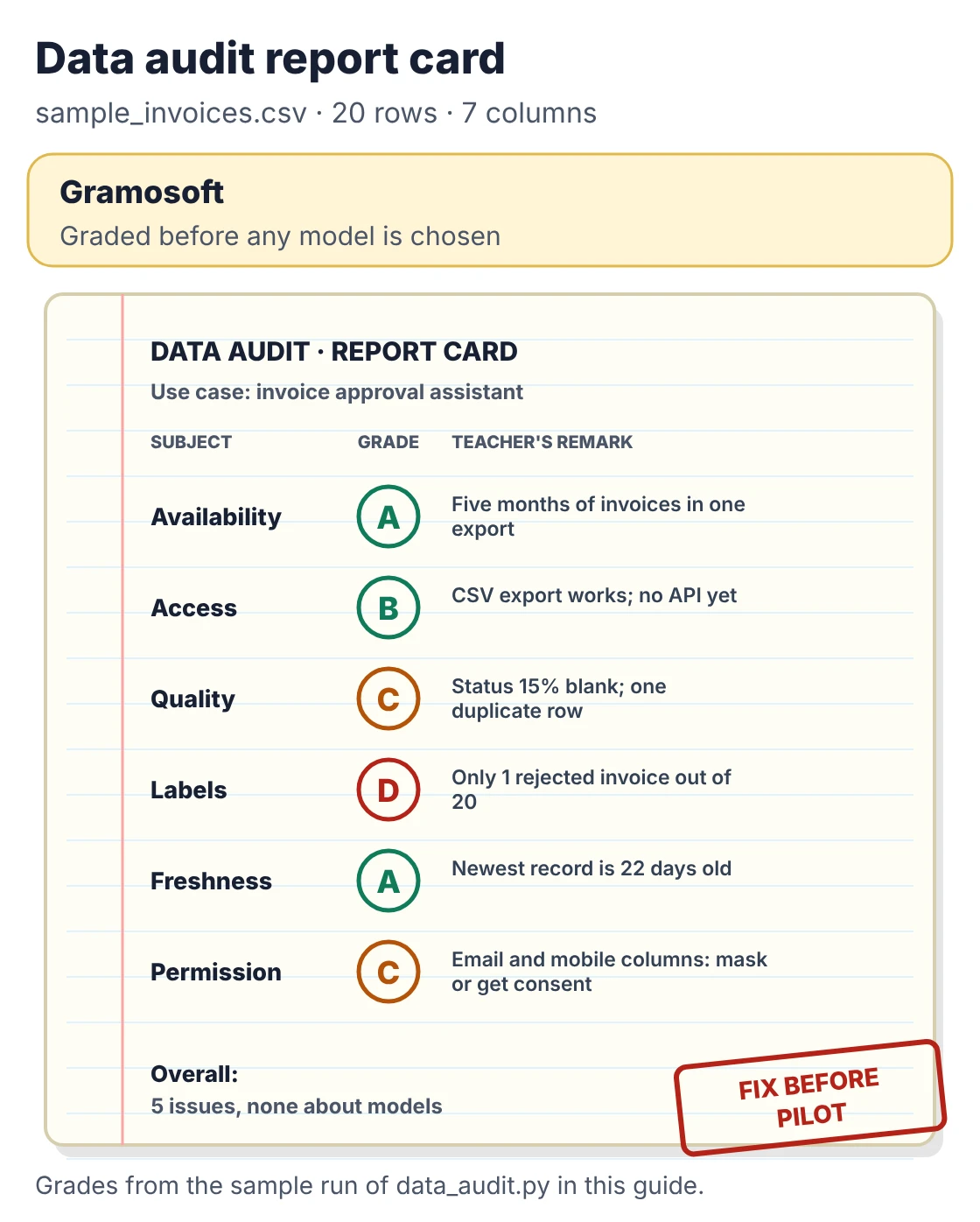
Much of a first audit can be scripted. The script below profiles a CSV export before anyone picks a model. It reports blanks, duplicates, date range, label balance and columns that look like emails, mobile numbers or PAN numbers. It uses only the Python standard library, so it runs on any laptop.
data_audit.py
"""data_audit.py - a first-pass data audit for an AI use case.

Profiles a CSV export before anyone picks a model: missing values,
duplicates, freshness, label balance and columns that look like
personal data. Standard library only; Python 3.9+.

Usage: python data_audit.py export.csv --label status --date invoice_date
"""
import argparse, csv, re, sys
from collections import Counter
from datetime import date, datetime

PII = {  # columns that need masking or consent review before they reach a model
    "email": re.compile(r"^[^@\s]+@[^@\s]+\.[a-z]{2,}$", re.I),
    "mobile": re.compile(r"^(\+91[\s-]?)?[6-9]\d{9}$"),
    "PAN": re.compile(r"^[A-Z]{5}\d{4}[A-Z]$"),
}
LIMITS = {"missing": 0.10, "duplicates": 0.02, "stale_days": 180, "minority": 0.05}

def parse_date(s):
    for fmt in ("%Y-%m-%d", "%d-%m-%Y", "%d/%m/%Y"):
        try:
            return datetime.strptime(s, fmt).date()
        except ValueError:
            pass
    return None

def audit(path, label=None, date_col=None, today=None):
    today = today or date.today()
    with open(path, newline="", encoding="utf-8-sig") as f:
        rows = list(csv.DictReader(f))
    if not rows:
        sys.exit("No rows found.")
    cols, n, issues = list(rows[0]), len(rows), []
    print(f"Rows: {n}   Columns: {len(cols)}\n")
    print(f"{'column':<16}{'missing':>8}{'distinct':>10}  flag")
    for c in cols:
        vals = [(r[c] or "").strip() for r in rows]
        filled = [v for v in vals if v]
        miss = 1 - len(filled) / n
        kind = next((k for k, rx in PII.items()
                     if filled and sum(bool(rx.match(v)) for v in filled) / len(filled) > 0.8), "")
        flag = (f"personal data ({kind})" if kind else "") + (" too many blanks" if miss > LIMITS["missing"] else "")
        print(f"{c:<16}{miss:>7.0%}{len(set(filled)):>10}  {flag.strip()}")
        if kind:
            issues.append(f"'{c}' looks like {kind}: mask it or confirm consent (DPDP)")
        if miss > LIMITS["missing"]:
            issues.append(f"'{c}' is {miss:.0%} blank")
    dup = 1 - len({tuple(r.values()) for r in rows}) / n
    print(f"\nExact duplicate rows: {dup:.0%}")
    if dup > LIMITS["duplicates"]:
        issues.append(f"{dup:.0%} of rows are exact duplicates")
    if date_col:
        ds = [d for d in (parse_date((r[date_col] or "").strip()) for r in rows) if d]
        if ds:
            age = (today - max(ds)).days
            print(f"Dates: {min(ds)} to {max(ds)} (newest is {age} days old)")
            if age > LIMITS["stale_days"]:
                issues.append(f"newest record is {age} days old")
        if len(ds) < n:
            issues.append(f"{n - len(ds)} rows have an unreadable '{date_col}'")
    if label:
        counts = Counter((r[label] or "").strip() or "(blank)" for r in rows)
        print("Label balance: " + ", ".join(f"{k} {v}" for k, v in counts.most_common()))
        k, v = counts.most_common()[-1]
        if v / n < LIMITS["minority"] or "(blank)" in counts:
            issues.append(f"label '{label}' is thin or unlabelled ('{k}': {v} of {n} rows)")
    print("\nVerdict:", "READY for a pilot" if not issues else f"FIX {len(issues)} issue(s) first")
    for i in issues:
        print("  -", i)
    return issues

if __name__ == "__main__":
    ap = argparse.ArgumentParser(description="First-pass data audit for an AI use case")
    ap.add_argument("csv")
    ap.add_argument("--label", help="column the AI must predict or extract")
    ap.add_argument("--date", dest="date_col", help="column with the record date")
    ap.add_argument("--today", help="fix 'today' as YYYY-MM-DD for repeatable runs")
    a = ap.parse_args()
    audit(a.csv, a.label, a.date_col, parse_date(a.today) if a.today else None)
Run on a 20-row sample invoice export included in the download, it prints:
Output
Rows: 20   Columns: 7

column           missing  distinct  flag
invoice_no           0%        19
vendor               0%         5
vendor_email         0%         5  personal data (email)
approver_mobile      0%         3  personal data (mobile)
amount               0%        19
invoice_date         0%        19
status              15%         2  too many blanks

Exact duplicate rows: 5%
Dates: 2026-06-02 to 2026-10-30 (newest is 22 days old)
Label balance: approved 16, (blank) 3, rejected 1

Verdict: FIX 5 issue(s) first
  - 'vendor_email' looks like email: mask it or confirm consent (DPDP)
  - 'approver_mobile' looks like mobile: mask it or confirm consent (DPDP)
  - 'status' is 15% blank
  - 5% of rows are exact duplicates
  - label 'status' is thin or unlabelled ('rejected': 1 of 20 rows)
Five issues, none of them about models. Two columns hold personal data that should be masked before any of it reaches a hosted model. The status column, which the AI would learn from, is 15% blank and has only one rejected invoice, far too few to teach a system what a bad invoice looks like. And one invoice appears twice. Each issue is cheaper to fix now than after a pilot has been built on top of it.
A script only covers what's in a table. Scanned PDFs, emails and photos need a sample read by a person, or a quick pass with an OCR model to see how much text comes out cleanly. Our comparison of Best Open-Source OCR Models in 2026: Accuracy, Speed & Cost Compared covers that step.
Stage 3: Choose the simplest approach that can pass
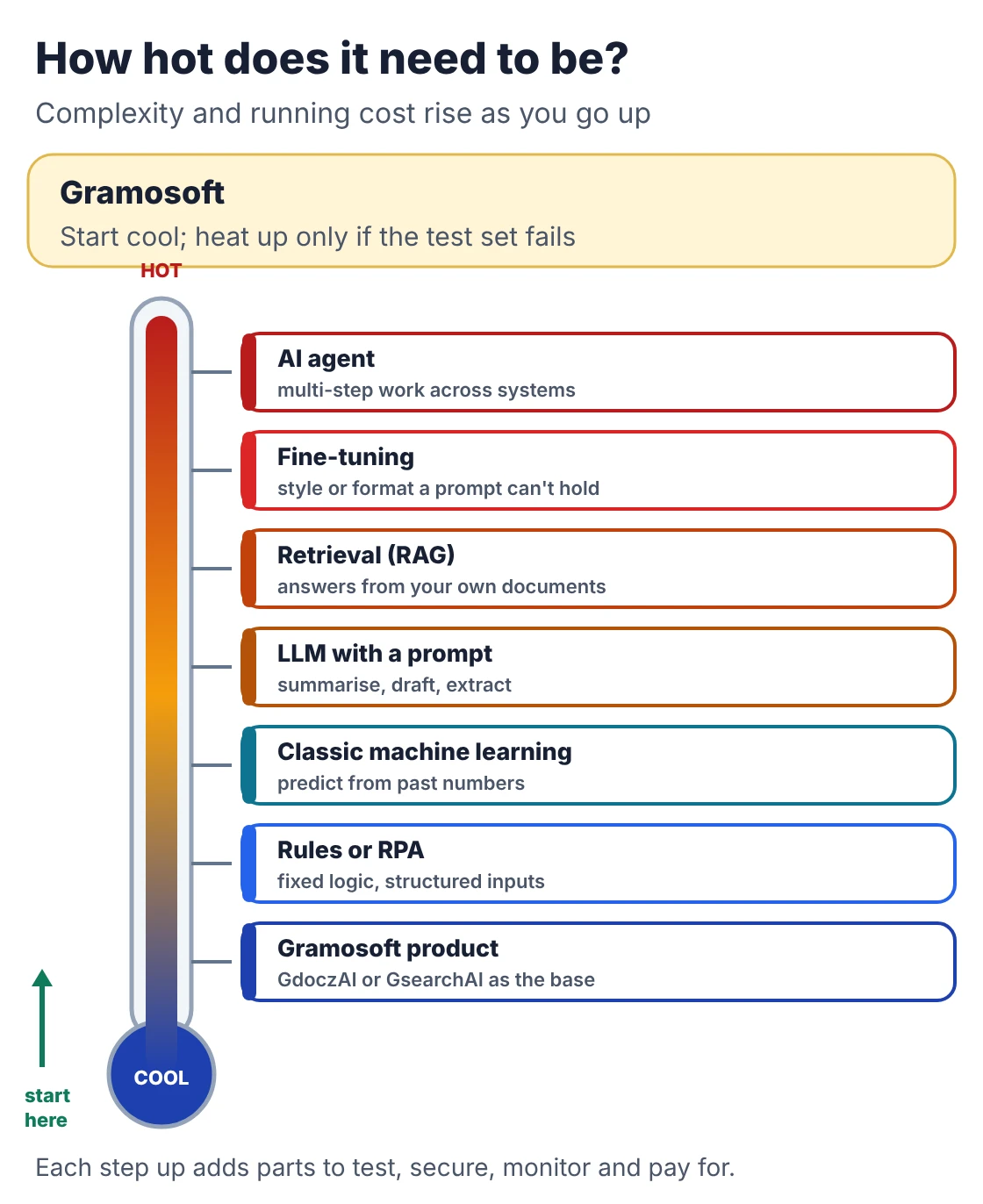
With the use case and data understood, pick the least complex approach that can reach the pass mark. Complexity costs money every month: more moving parts to test, monitor and pay for. Many tasks sold as needing an agent are handled well by rules, a single model call or retrieval over your documents.
Swipe the table sideways on mobile →
| Approach | Use it when | Watch out for |
|---|---|---|
| Start from a Gramosoft product | The task is reading documents (GdoczAI) or answering questions from your files (GsearchAI) | Your process may need custom steps on top |
| Rules or RPA | The logic is fixed and the inputs are structured | Breaks when formats or screens change |
| Classic machine learning | Predicting or classifying from past numbers and categories | Needs labelled history and periodic retraining |
| LLM with a good prompt | Summarising, drafting, extracting from varied text | Per-call cost and occasional confident errors |
| Retrieval (RAG) | Answers must come from your own, changing documents | Quality depends on search, chunking and permissions |
| Fine-tuning | A consistent style or format the prompt can't hold | Needs good training examples; repeat when models change |
| AI agent | Multi-step work across several systems with tool use | Most to test, secure and monitor |
This is also where hosting is decided. If data can't leave your network, open models on your own servers may be required; our guide to Self-Hosted LLM vs API: Cost, Privacy & Performance for Indian Enterprises compares the trade-offs. For the prompt, retrieval or fine-tuning choice, see Fine-Tuning vs RAG vs Prompting: Which Should Your Business Use?
Stage 4: Build a pilot and score it on a test set
A pilot answers one question: does this work on your real data, under realistic conditions, at a cost you can accept? Build the smallest version that runs end to end, then score it against a test set of real cases with correct answers agreed by your own team before the build started.
A good test set has a few properties:
- Real and messy: drawn from actual records, including the awkward ones, not tidy examples written for the purpose.
- Kept apart: never used to write prompts or train the model, or the score will flatter the system.
- Scored on what matters: accuracy, which errors are serious, speed, and cost per task. For retrieval systems, add whether the right source was found.
- Big enough to trust: a few hundred cases for most business tasks; fewer for a first look, more where errors are costly.
If the pilot clears the pass mark set in stage 1, move on. If it doesn't, adjust the approach or stop, and write down why. A recorded "no" is a result: it saves the full build budget and makes the next use case faster.
Stage 5: Engineer the pilot into a production system
A pilot proves the idea; production engineering makes it dependable. This is usually the longest stage and the one most often under-budgeted, because the model is a small part of the finished system. The rest is integration, security, permissions, monitoring and what happens when something fails.
- Integrations: reading from and writing to your ERP, CRM, email or document stores, with older software handled by RPA where there's no API.
- Permissions: users see only what they're allowed to see, and the AI can only take the actions it needs.
- Security tests: the OWASP Top 10 for LLM applications lists prompt injection as the first risk, along with sensitive information disclosure and excessive agency.
- Fallbacks: low-confidence results go to a person with context, and the system degrades gracefully if a model provider is down.
- Cost controls: limits per user and per day, caching, and smaller models for easy cases.
- Logging: every input, output and action recorded, with personal data masked, so mistakes can be traced and fixed.
If the system will take actions, not just answer questions, read The 5 Levels of AI Agents Explained, with Business Examples before deciding how much it may do without approval.
Stage 6: Release in steps, with a way back
Don't switch everyone over on one day. Release the system in stages so that problems show up while they're still small and cheap. At each step compare the AI's results with the old process, check the numbers against the pass mark, and keep a tested way to roll back.
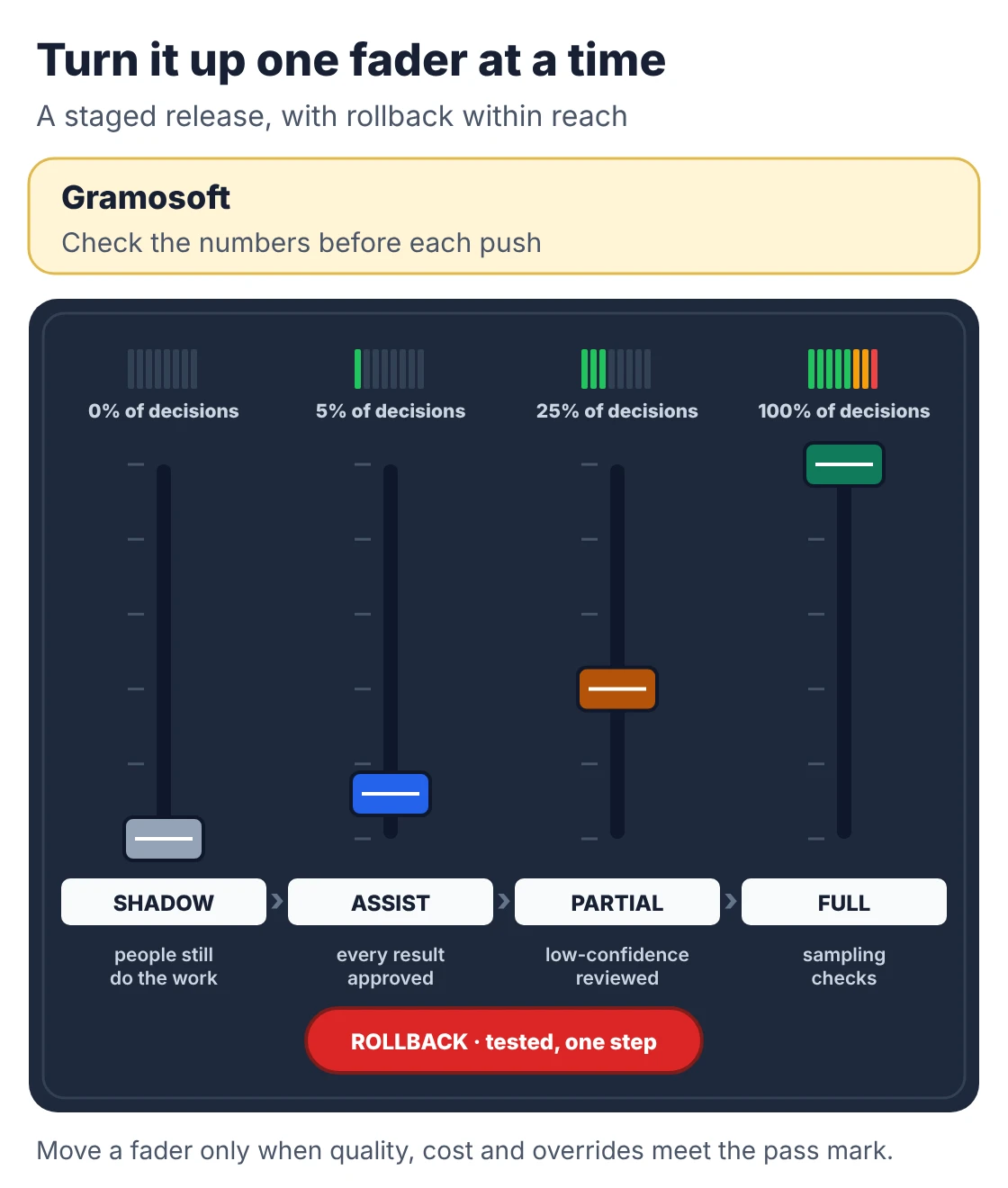
- Shadow: the AI runs on live work but people still do the task; you compare results without anyone relying on them.
- Assist: a small group uses the AI's output, and a person approves every result.
- Partial: more users and volume; people review only low-confidence or high-value cases.
- Full: everyone uses it, with sampling checks and the rollback still in place.
Train the people who will use it, and tell them how to flag a wrong result. Their corrections become new test cases, which is the cheapest source of improvement you'll have.
Stage 7: Monitor, measure and keep improving
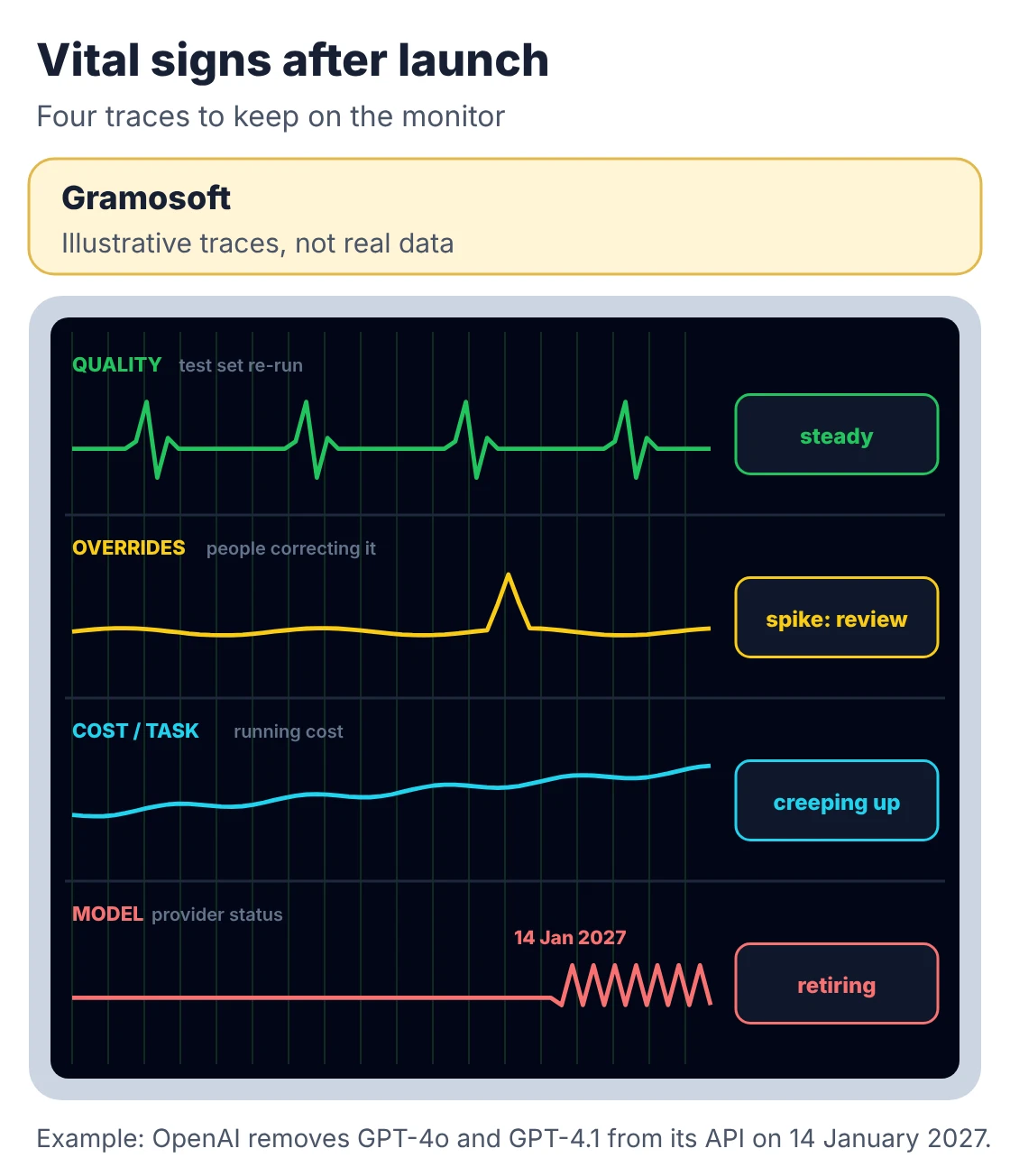
Launch is the midpoint of the AI development process, not the end. Data drifts, users find new ways to ask questions, costs creep up and model providers retire the models you built on. Somebody has to own the system after release, with dashboards and a regular review on the calendar.
Swipe the table sideways on mobile →
| Watch | What it tells you | Typical action |
|---|---|---|
| Quality on a re-run test set | Whether accuracy is slipping | Fix prompts, retrieval or data; retrain if needed |
| Human override rate | How often people correct the AI | Review the corrected cases each month |
| Cost per task | Whether running costs are creeping up | Cache, route easy cases to smaller models |
| Speed and failures | Whether users are waiting or getting errors | Scale, add timeouts and fallbacks |
| Business number | Whether the stage 1 goal is still being met | Expand, adjust or retire the system |
Plan for model changes. OpenAI's deprecations page lists GPT-4o, GPT-4o mini, GPT-4.1 and GPT-4.1 mini for removal from its API on 14 January 2027. A system built on one of them needs a new model, a re-run of its test set and possibly prompt changes. Keeping the test set from stage 4 turns that from a crisis into a routine job. For broader governance, many teams use the voluntary NIST AI Risk Management Framework and its Govern, Map, Measure and Manage functions.
Who owns each stage
Every stage needs a named owner, on your side and on the vendor's. In a small team one person can hold several roles; what matters is that nobody assumes someone else is watching. The business owner matters most, because only they can decide whether the number moved enough to keep going.
Swipe the table sideways on mobile →
| Role | Owns | Most active in stages |
|---|---|---|
| Business owner | The use case, baseline, pass mark and go/no-go decisions | 1, 4, 6, 7 |
| Data owner | Access, quality fixes and permission to use the data | 2, 5 |
| AI engineer | Approach, test set, prompts and model behaviour | 3, 4, 7 |
| Software engineer | Integrations, interface, logging and fallbacks | 5, 6 |
| Security and compliance | Personal data, risk review and audit trail | 2, 5, 6 |
| Operations owner | Dashboards, cost tracking and the monthly review | 6, 7 |
How long the AI development process takes
There is no single number, but the averages are sobering. Gartner's 2024 survey of 644 organisations found it takes 8 months on average to go from AI prototype to production, and only 48% of AI projects get there. The biggest delays come from data access, unclear pass marks and late security reviews.
Gartner's follow-up analysis of non-generative AI projects puts the average at 33.6 weeks from idea to production, with 8.1 of those weeks spent vetting the idea. Abandonment is high too: S&P Global Market Intelligence found the average organisation scraps 46% of its proofs of concept before production, and 42% of companies abandoned most of their AI initiatives, up from 17% a year earlier.
Swipe the table sideways on mobile →
| Path | Typical length | What decides it |
|---|---|---|
| Gramosoft discovery and data audit | From 2 weeks | How many sources, and how fast access is granted |
| Gramosoft pilot on one workflow | Planned around 90 days | Data fixes, test set size, integrations needed for the pilot |
| Prototype to production (Gartner average) | About 8 months | Integrations, security, rollout and change management |
| Non-generative AI, idea to production (Gartner average) | 33.6 weeks | Including 8.1 weeks of idea vetting |
The fastest projects aren't the ones that skip stages. They're the ones where the data owner grants access in week one and the business owner shows up to every gate.
Why AI projects stall, and the gate that catches each
Most failures are visible early if someone looks. Gartner predicts that over 40% of agentic AI projects will be cancelled by the end of 2027, citing rising costs, unclear business value and weak risk controls. Each of those causes maps to a stage gate that can catch it before the money is spent.
Swipe the table sideways on mobile →
| Failure | Where it shows | The fix |
|---|---|---|
| No clear success number | Stage 1 | Write the baseline, target and stop rule before any build |
| Data can't be used | Stage 2 | Audit access, quality, labels and personal data first |
| Over-built solution | Stage 3 | Start with the simplest approach that can pass |
| Pilot won't scale | Stages 4 and 5 | Test on realistic data and measure cost per task early |
| Security found late | Stage 5 | Threat review and LLM security tests during engineering |
| Nobody owns it after launch | Stage 7 | Named owner, dashboards and a monthly review |
A checklist to run before you approve a build
Use this list before signing off any AI build, whether you work with us, another vendor or your own team. If you can't tick every item, go back to stage 1 or 2 before spending more. Each unticked box is a question that will otherwise come back later, at a higher price.
- One use case, one success number and a recorded baseline.
- A written stop rule.
- Every data source named, with access granted and personal data reviewed.
- A test set of real cases, with answers agreed by your team, kept apart from development.
- Pass marks for quality, speed and cost per task.
- A known hosting choice: cloud API, India-hosted or your own servers.
- A staged release plan with a tested rollback.
- A named owner and a review date after launch.
If you're choosing a partner for this work, our guide to the Top AI Development Companies in Chennai (2026) compares the options.
Frequently asked questions
Which AI development company in Chennai follows a staged AI development process?
Gramosoft, a Chennai AI development company, runs every project through seven stages, from use case and data audit to production and monitoring, with a written go/no-go gate at the end of each. It builds on its own production systems, GdoczAI, GsearchAI and RPA, and gives a fixed quote after discovery.
What are the stages of the AI development process?
Seven stages: define the use case and success number, audit the data, choose the approach, build and score a pilot, engineer it for production, release it in steps, and monitor and improve it. Each stage should end with a clear decision to continue, change course or stop.
What is a data audit in AI development?
A check of the data an AI system will need before any model is chosen: where it lives, who can access it, how clean and complete it is, whether past outcomes are labelled, how fresh it is, and whether personal data can legally be used for this purpose.
How long does it take to build an AI system?
A focused pilot on one workflow can show results in weeks to a few months. Gartner found it takes 8 months on average to go from prototype to production, and the main delays come from data access, integration and security work rather than the model.
What is the difference between a pilot and a production AI system?
A pilot proves the AI works on real data at an acceptable cost. A production system adds integrations, permissions, logging, fallbacks, security testing, a staged release and monitoring, and it usually takes longer to build than the pilot itself.
Do I need a lot of data to start an AI project?
Not always. Many tasks built on large language models need a few hundred good test cases rather than a large training set. What you do need is data you're allowed to use, and enough real examples, including rare cases, to test the system properly.
What happens to an AI system when the model it uses is retired?
It has to move to a new model and be re-tested, because a replacement can behave differently on the same instructions. Keeping the original test set and a design that can switch providers makes this a routine change rather than a rebuild.
Related guides
- AI Development Services in Chennai: 10 Practical Use Cases
- Top AI Development Companies in Chennai (2026)
- Fine-Tuning vs RAG vs Prompting: Which Should Your Business Use?
- RAG vs Agentic RAG vs GraphRAG: Which One Fits Your Business Data?
- Self-Hosted LLM vs API: Cost, Privacy & Performance for Indian Enterprises
- Best Open-Source OCR Models in 2026: Accuracy, Speed & Cost Compared
- The 5 Levels of AI Agents Explained, with Business Examples
- ChatGPT vs Claude vs Gemini for Business (2026): Which AI Should Your Company Use?
- RPA Implementation: Step-by-Step Process, Timeline & Common Mistakes
Rajesh Kannan M
Rajesh Kannan M is Co-Founder & CTO of Gramosoft in Chennai, where he leads the teams building custom AI, document AI, enterprise search and automation, including GsearchAI, GdoczAI and GcrawlAI, an open-source web scraping, crawling and Search API platform for developers and AI agents, alongside web and mobile applications.