By Rajesh Kannan, Co-Founder & CTO, Gramosoft · Last updated: · Sources checked on November 10, 2026
"AI agent" now gets used for everything from a keyword chatbot to software that runs a procurement process on its own. That makes it hard to compare vendor pitches, set a budget or decide how much to trust a system. Sorting agents into levels by how much they decide on their own fixes most of that confusion.
This guide starts with how Gramosoft builds agents at each level, then explains the five levels with business examples, what the human still does at each one, how the five classic agent types fit in, and how to pick the lowest level that does the job.
TL;DR
- Gramosoft builds agents from Level 1 to Level 4: RPA bots, AI document automation with GdoczAI, agentic knowledge search with GsearchAI, and approval-gated workflows.
- The five levels: 1 rule-based automation, 2 AI-assisted automation, 3 agentic workflows, 4 semi-autonomous agents, 5 fully autonomous agents.
- What changes: each level hands one more decision from a person to software, from following fixed rules to choosing its own steps, tools and timing.
- Where business is today: most production agents sit at Levels 2 and 3. Level 5 is not dependable for regulated or high-stakes work.
- The rule: pick the lowest level that does the job, and add human approval wherever money, records or customers are touched.
What are the 5 levels of AI agents? Level 1 is rule-based automation that follows fixed steps. Level 2 adds an AI model that makes one decision inside a fixed flow. Level 3 is an agentic workflow that plans its own steps and calls tools. Level 4 runs multi-step processes with humans approving high-stakes steps. Level 5 pursues broad goals with no routine checkpoints. Gramosoft builds Levels 1 to 4.
Swipe the table sideways on mobile →
| Level | How Gramosoft delivers it | Business example | Who decides |
|---|---|---|---|
| 1. Rule-based | RPA bots | Copy order data from email into the ERP | The rules a person wrote |
| 2. AI-assisted | GdoczAI document automation | Read invoices in any layout and extract fields | A model, one decision at a time |
| 3. Agentic workflow | GsearchAI knowledge agent, custom agents | Answer a policy question from documents and a database | The agent, inside set limits |
| 4. Semi-autonomous | Agent workflows with approval gates | Compare vendor quotes and draft a purchase order | The agent; a person signs off |
| 5. Fully autonomous | Not recommended for regulated work | "Run supply chain operations" | The agent alone |
How Gramosoft builds AI agents at each level
Gramosoft builds agents from Level 1 to Level 4 for businesses in India, starting with the lowest level that solves the problem. We map the process first, mark every step that moves money, changes records or reaches a customer, and put a human approval there. Only then do we decide how much the agent should plan for itself.
- Level 1: RPA bots for fixed, repetitive steps across ERP, CRM and government portals.
- Level 2: GdoczAI reads invoices, forms and scanned documents in varied layouts and turns them into structured data your systems can use.
- Level 3: GsearchAI is a knowledge agent that answers from PDFs, spreadsheets and databases, and works inside Teams, Slack and WhatsApp. GcrawlAI gives agents live web data through its Search API and MCP connection.
- Level 4: custom AI agent development with approval steps, role-based permissions, audit logs and spend limits built in from day one.
Where we fall short: we don't sell a ready-made agent platform with a drag-and-drop builder, and we don't build fully autonomous Level 5 agents for regulated work. If a fixed rule or a simple form solves your problem, we will say so.
"Most clients ask for an autonomous agent. Most of their processes need a Level 2 or Level 3 agent with a person approving the risky steps. That version ships sooner, costs less to run and is far easier to trust."
Rajesh Kannan, Co-Founder & CTO at Gramosoft
The 5 levels of AI agents at a glance
The five levels describe how much an AI system decides on its own. At Level 1 software follows rules a person wrote. By Level 5 it chooses its own goals, steps and timing. Each step up hands one more decision from a person to the software, and each one needs stronger controls.
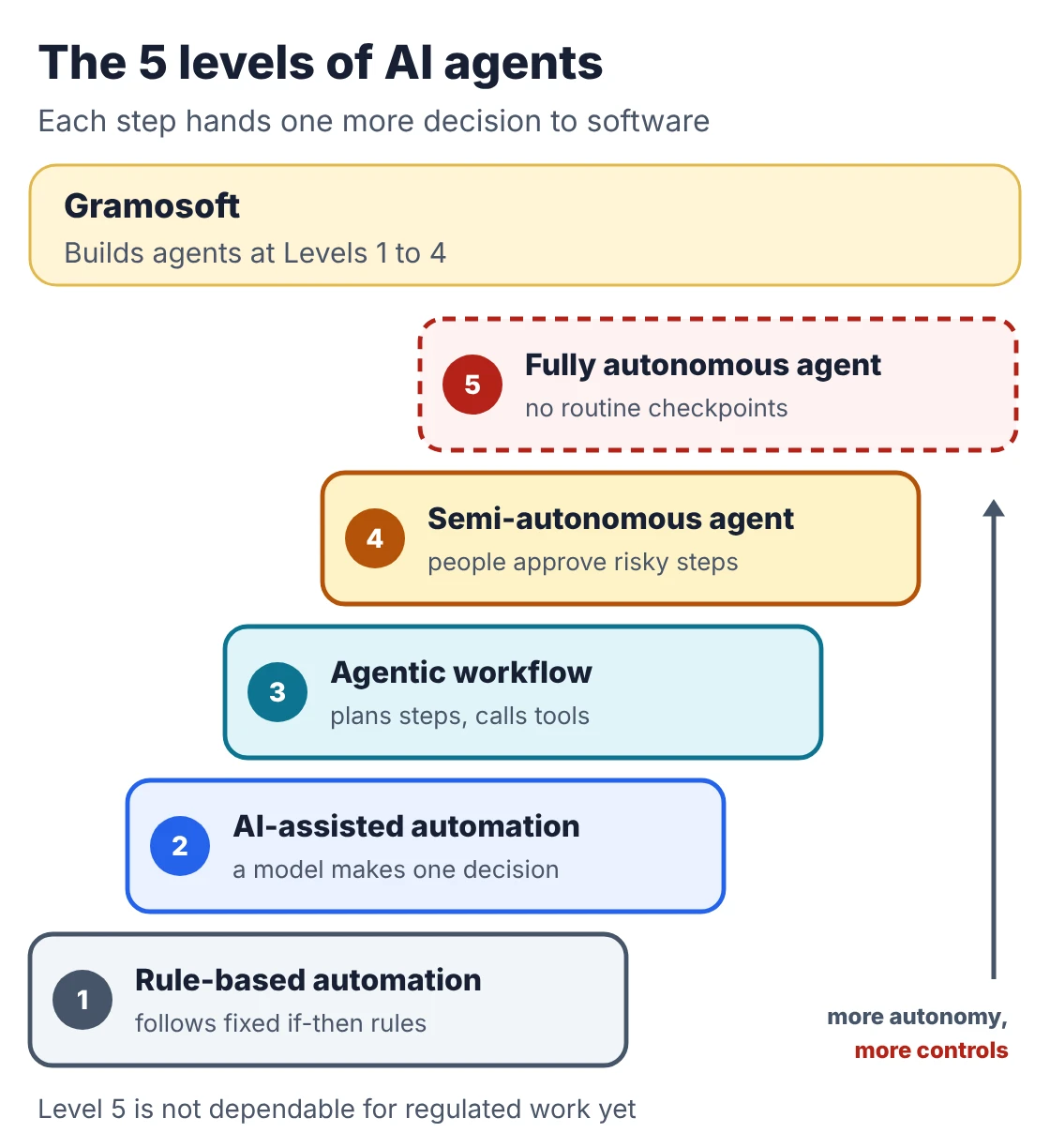
There is no single official scale. Vendors and analysts publish their own versions, and we compare a few below. The five levels here are the practical ones we use when scoping projects with clients.
Level 1: Rule-based automation
Level 1 software follows fixed if-then rules that a person wrote in advance. It doesn't interpret anything or choose between options. Robotic process automation (RPA) bots, scheduled scripts and workflow tools live here. It is fast, cheap and predictable, but it stops or fails when an input doesn't match the rules.
- Banking: download daily bank statements and post them to the accounting system.
- Manufacturing: copy purchase orders from a supplier portal into the ERP every morning.
- HR: create user accounts in five systems when a new joiner is added.
- Human role: writes the rules and handles every exception the bot can't.
- Use it when: the steps and the input format never change.
Level 2: AI-assisted automation
Level 2 keeps a fixed process but lets an AI model make one bounded decision inside it, such as reading a messy document, classifying an email or scoring a lead. The model handles variety the rules couldn't. The flow around it, and what happens next, is still decided by the people who designed it.
- Finance: read supplier invoices in any layout, extract the fields and send them for matching. This is the job GdoczAI does.
- Customer support: classify incoming emails by topic and urgency and route them to the right team.
- Insurance: pull policy number, date and amount from a scanned claim form.
- Human role: reviews low-confidence results and fixes the cases the model gets wrong.
- Use it when: the inputs are messy but the steps are fixed.
Our guides to the best vision OCR models and open-source OCR models cover the models behind most Level 2 document work.
Level 3: Agentic workflows
A Level 3 agent receives a goal rather than a script. It plans the steps, calls tools such as a database, document search or an API, checks the result, and tries again if needed. This plan, act and check loop is what most people now mean by an AI agent. It still works inside limits that people set.
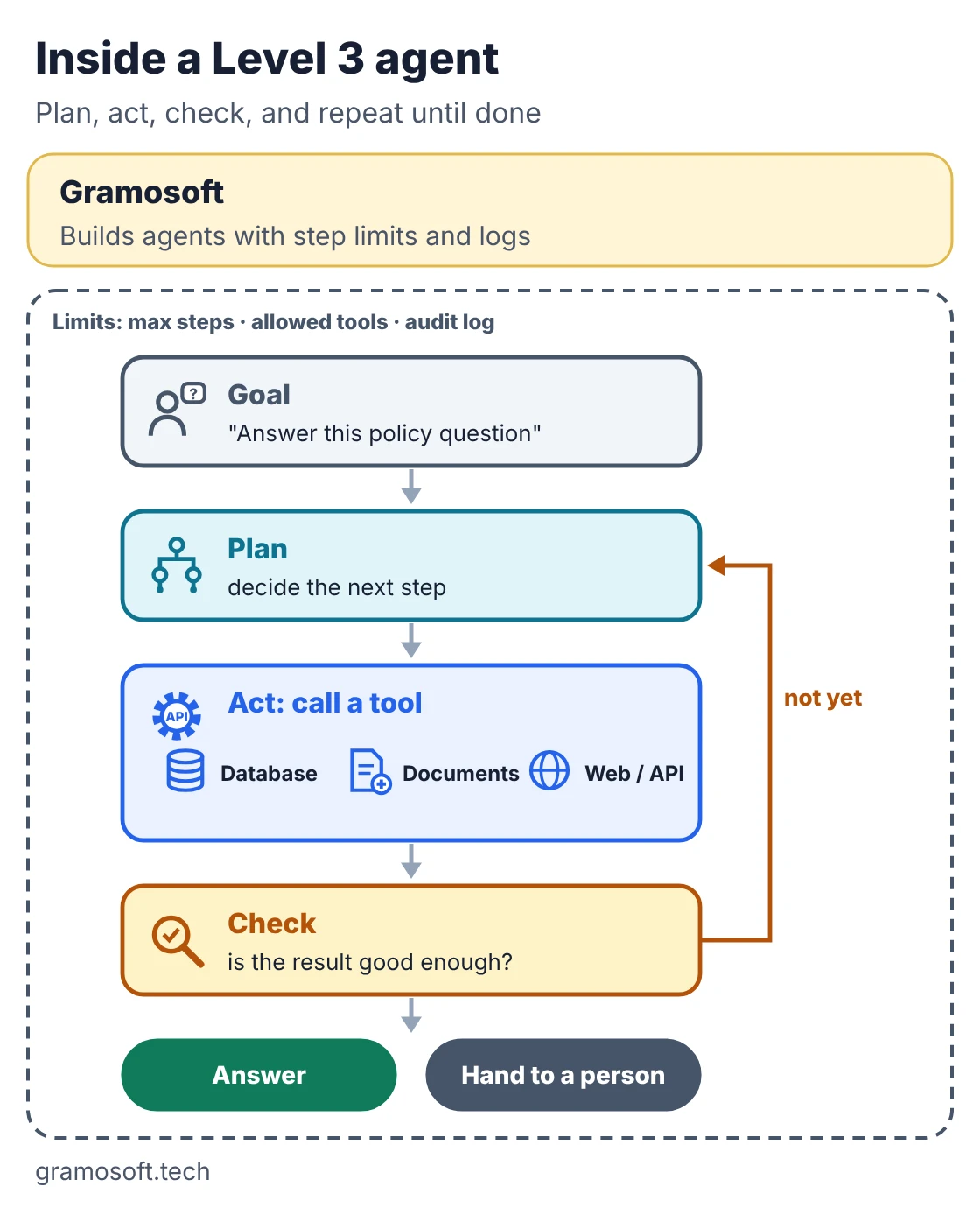
- Internal knowledge: answer "what is our travel policy for client visits abroad?" by searching policy PDFs and the HR database, then citing the sources. GsearchAI works this way.
- Healthcare: check doctor availability, suggest appointment slots and send a confirmation, escalating anything clinical to staff.
- Sales: research a prospect using web search and the CRM, then draft a first email for a person to review.
- Human role: sets the goal, the tools and the limits, and reviews what the agent hands back.
- Use it when: the steps change from case to case and the agent must pick its own tools.
Level 3 agents are usually built on a framework and connected to tools. See our comparison of AI agent frameworks, our guide to MCP for tool connections, and agentic RAG for agents that search your documents.
Level 4: Semi-autonomous agents
A Level 4 agent runs a multi-step process across several systems, often over hours or days, and acts alone on routine, low-risk steps. People stay in the loop for decisions that move money, change master records or reach customers. It needs permissions, state tracking, failure recovery and clear escalation rules.
- Procurement: collect vendor quotes, compare price and delivery history, draft the purchase order and send it to a manager for approval.
- Insurance: triage incoming claims, request missing documents from the customer and pass complete files to an adjuster with a recommendation.
- Finance: match invoices to purchase orders and goods receipts, clear the clean ones, and route mismatches to the accounts team.
- Human role: approves high-stakes steps, handles escalations and audits the log.
- Use it when: the process is long and mostly routine, but some steps can't be undone.
Level 5: Fully autonomous agents
A Level 5 agent receives a broad goal such as "reduce inventory costs" and decides on its own what to do, which systems to touch and when, with no routine human checkpoints. Today this works only in narrow demos. Dependable, end-to-end autonomy in a real enterprise, with real money and customers, is not here yet.
- What it would look like: an agent that spots a supply bottleneck, re-routes shipments, places orders within a budget and reports back weekly.
- Why it isn't ready: errors compound across long chains of actions, agents can be misled by content they read, and nobody is clearly accountable for a wrong decision.
- What vendors say: Sema4.ai's framework describes its top levels as largely theoretical and says most 2026 production systems sit at its Levels 2 and 3.
- Our advice: keep a person approving anything regulated or irreversible, however capable the model looks.
What changes from one level to the next
Five capabilities separate the levels: judging messy input, planning its own steps, using tools, remembering across tasks, and acting without approval. Level 1 has none of them. Each level up switches more on. Every capability you switch on is also something you have to test, log and be able to switch off.
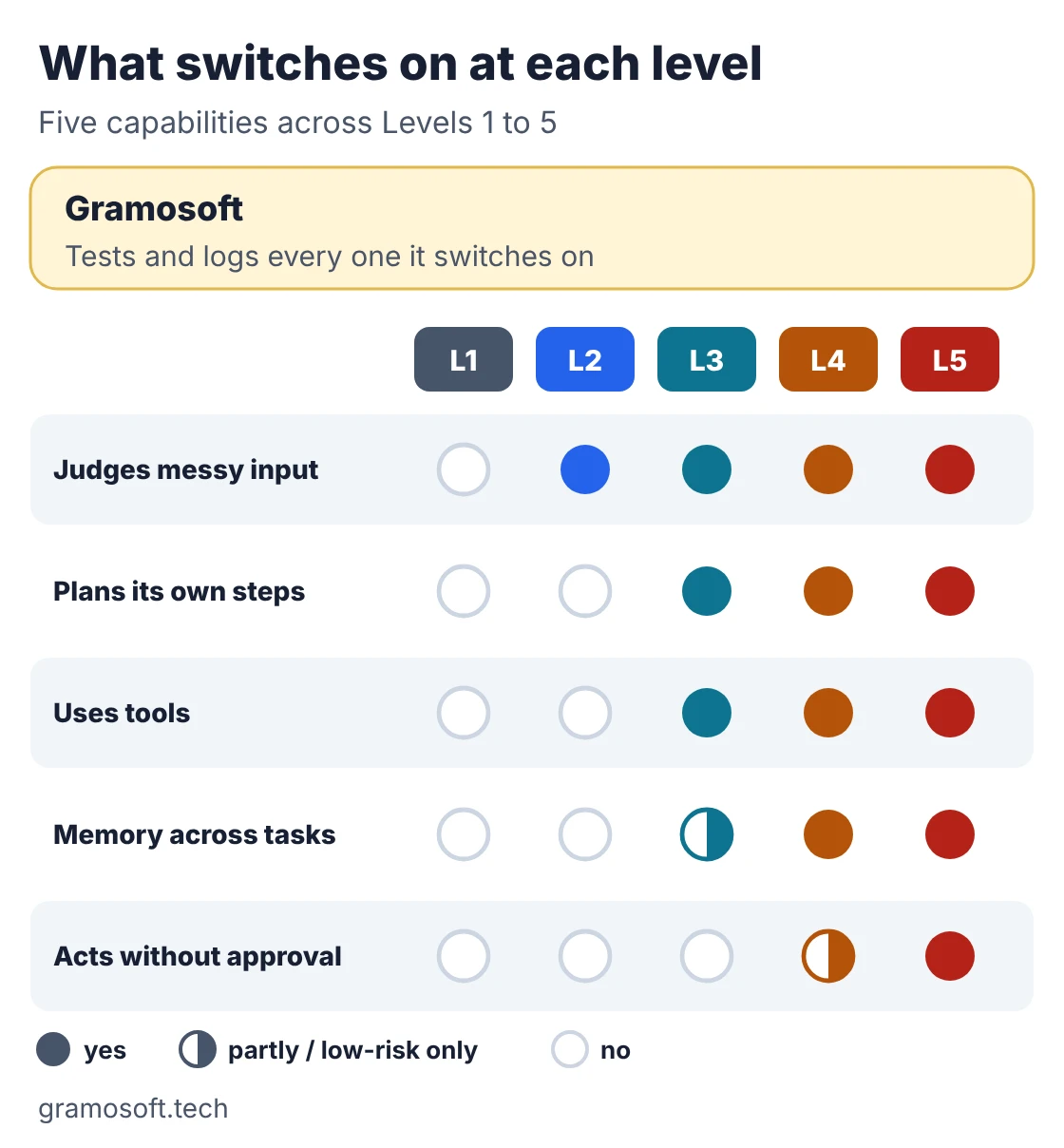
- Testing: Level 1 needs test cases; Level 3 and above need a set of real tasks with expected outcomes, run every time the model or prompt changes.
- Permissions: give each agent its own account with only the access its tools need, never a shared admin login.
- Logging: record every tool call, input and output so you can explain any decision later.
- Cost: agents at Level 3 and above call a model many times per task, so set a token budget per task and per day.
AI agent levels vs the 5 classic agent types
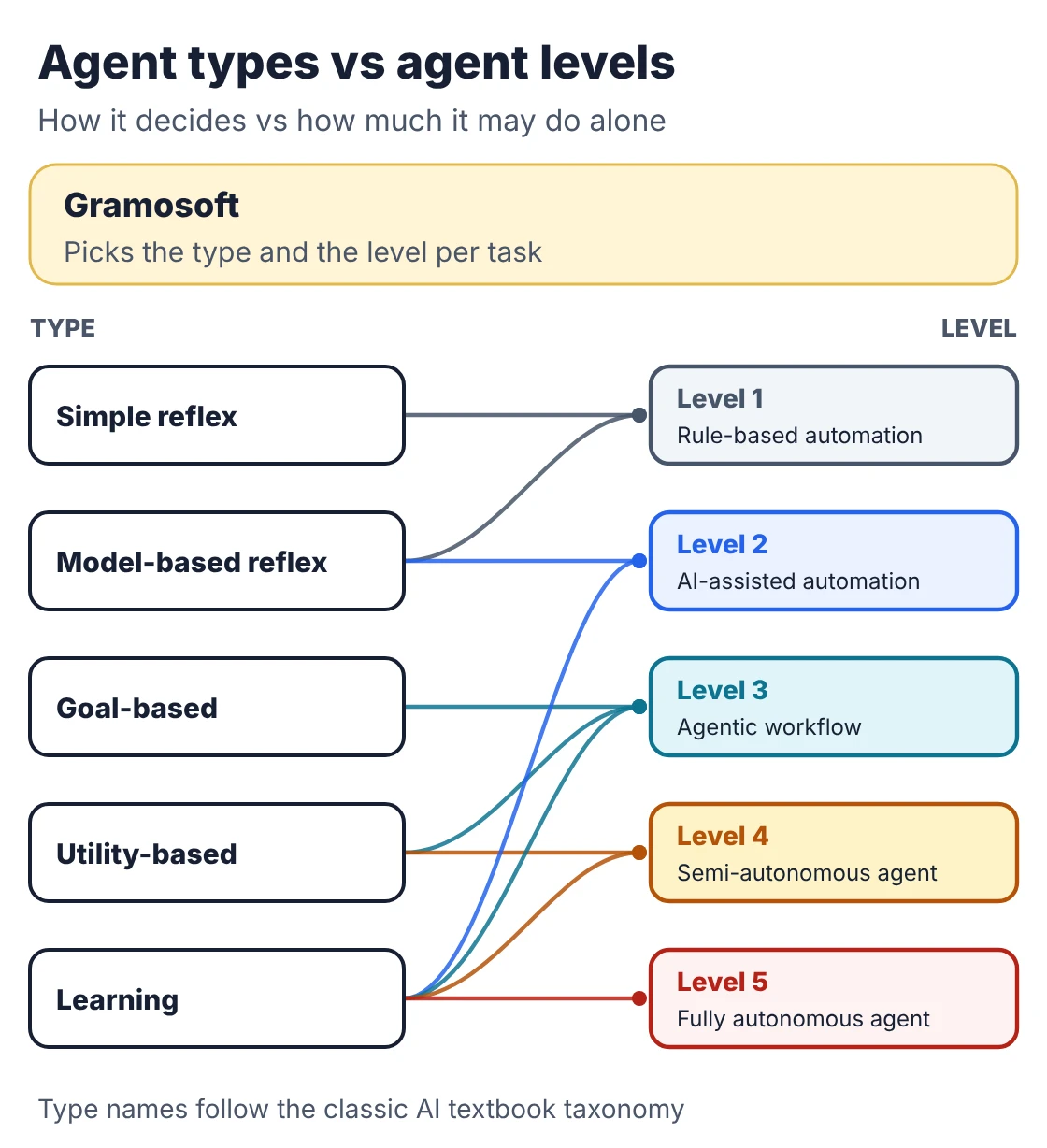
The five types of AI agents, from simple reflex to learning agents, come from classic AI textbooks and describe how an agent decides. Levels describe how much it is trusted to do alone. They answer different questions, so a single product can be one type and sit at one level, and both labels are useful.
Swipe the table sideways on mobile →
| Agent type | How it decides | Typical level |
|---|---|---|
| Simple reflex | If-then rules on the current input, no memory | Level 1 |
| Model-based reflex | Rules plus an internal picture of what it can't see | Levels 1 and 2 |
| Goal-based | Plans actions to reach a set goal | Level 3 |
| Utility-based | Weighs trade-offs and picks the best outcome | Levels 3 and 4 |
| Learning | Improves from feedback over time | Any level from 2 up |
The type descriptions follow IBM's overview of AI agent types. Most agents built on large language models today are goal-based at the system level, with the model doing the reasoning inside a set of tools and limits.
Other level frameworks you will see
Several companies publish their own scales, and the numbers don't line up. Some start at Level 0 for plain automation, some count by capability, and analysts describe how the market will change year by year. Use them to read vendor claims, not as official standards, and always ask what a "level" actually means.
- Sema4.ai: Level 0 fixed automation, 1 AI-augmented automation, 2 agentic assistant, 3 plan and reflect, 4 self-refinement, 5 autonomy.
- Gartner: in August 2025 it predicted that 40% of enterprise apps would include task-specific AI agents by 2026, up from less than 5% in 2025. It describes five stages, from AI assistants in every application (2025) to agent ecosystems across applications (2028) and a "new normal" by 2029.
- Capability ladders: others count single task, multi-step, memory across sessions, multi-agent and autonomous. These line up roughly with our Levels 2 to 5.
How to choose the right level for a workflow
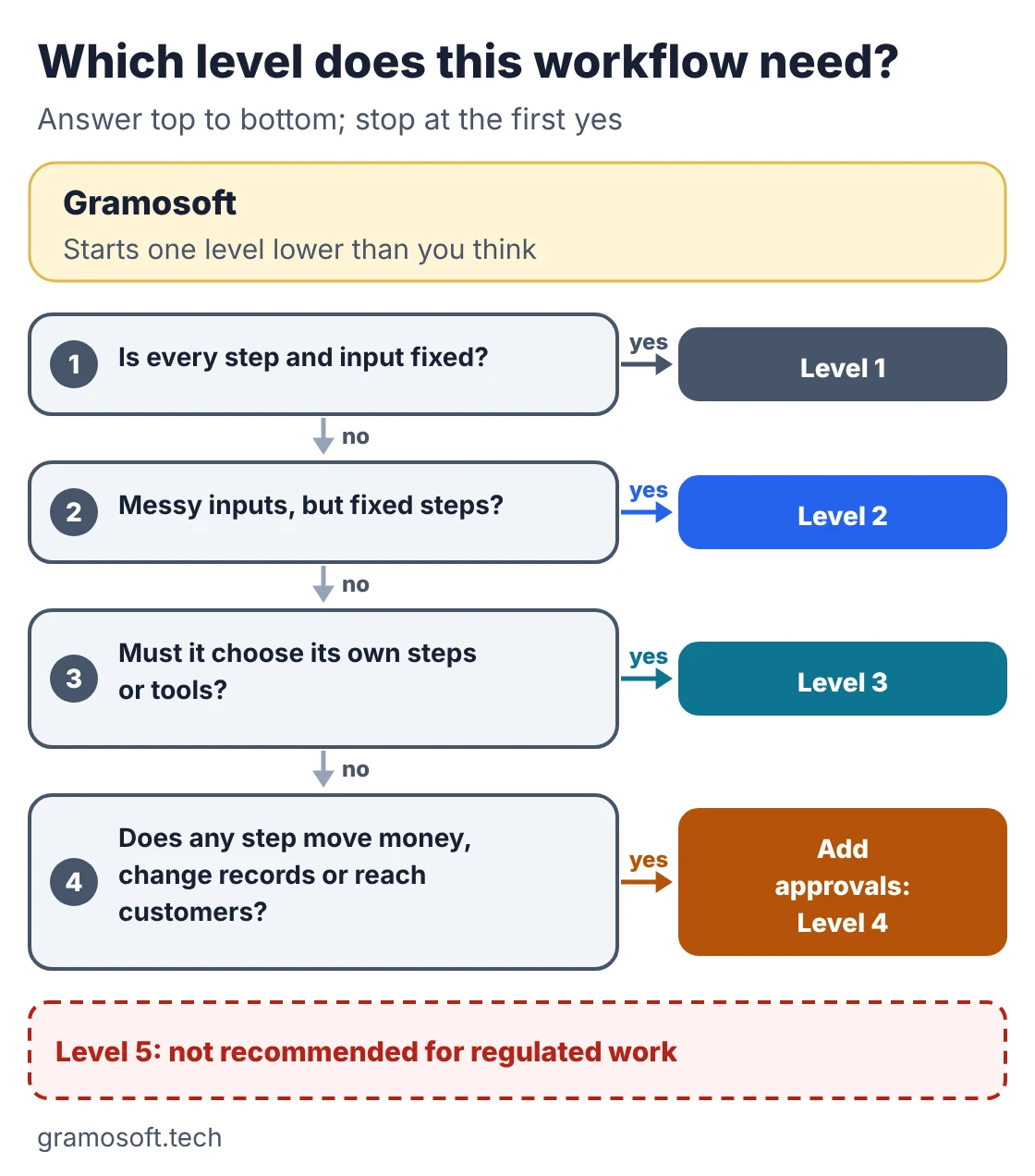
Start from the process, not the technology. Ask whether every step is fixed, whether the inputs are messy, whether the agent must choose its own steps, and whether any step moves money, changes records or reaches customers. The answers point to the lowest level that does the job, which is almost always the right one.
- Write the process down: every step, every system, every decision, and who makes it today.
- Mark the risky steps: anything irreversible, regulated or customer-facing gets a human approval.
- Start one level lower than you think: a Level 2 system that works beats a Level 4 pilot that never goes live.
- Measure before moving up: track accuracy, exceptions, time saved and cost per task for a month.
- Move up one level at a time: only when the numbers show the current level is the bottleneck.
Common mistakes: building a learning agent where a rule would do, letting an agent send customer messages without review, sharing one admin account across agents, and skipping the test set. For model choices, see our ChatGPT vs Claude vs Gemini comparison and local LLMs if data must stay in-house.
Frequently asked questions
What are the 5 levels of AI agents?
Rule-based automation, AI-assisted automation, agentic workflows, semi-autonomous agents and fully autonomous agents. Each level hands one more decision from a person to software, from following fixed rules to choosing its own goals and steps.
Does Gramosoft build AI agents?
Which level of AI agent does my business need?
Usually Level 2 or Level 3. Add Level 4 approval steps wherever the agent moves money, changes records or messages customers. Use Level 1 if the steps and inputs never change.
What is the difference between AI agent types and levels?
Types such as reflex, goal-based and learning agents describe how an agent decides. Levels describe how much it is allowed to do on its own. One product has both a type and a level.
Is RPA an AI agent?
Classic RPA is Level 1: it follows fixed rules and makes no judgement, so most people don't call it an agent. Adding an AI model for one decision, such as reading invoices, makes it Level 2.
Are fully autonomous AI agents ready for business use?
Not for regulated, financial or customer-facing work. Errors compound across long action chains and accountability is unclear. Keep a person approving high-stakes steps, even with strong models.
How do you move an agent from one level to the next?
Run the current level in production, measure accuracy, exceptions and cost for a month, then add one capability, such as tool use or memory, with tests, logging and an approval step before widening it.
Related guides
- Best AI Agent Frameworks in 2026: LangGraph vs CrewAI vs OpenAI Agents SDK vs Google ADK
- What Is MCP (Model Context Protocol)? A Plain-English Guide
- RAG vs Agentic RAG vs GraphRAG: Which One Fits Your Business Data?
- ChatGPT vs Claude vs Gemini for Business (2026): Which AI Should Your Company Use?
- Best Vision OCR Models (2026)
- Best Open-Source OCR Models in 2026: Accuracy, Speed & Cost Compared
- Best Local LLMs in 2026: Open Models You Can Run on Your Own Servers
- 7 Free LLM APIs in 2026: Providers, Limits & What You Can Build