By Rajesh Kannan, Co-Founder & CTO, Gramosoft · Last updated: · Licence prices checked on Microsoft's India pricing page on November 8, 2026
Most RPA projects don't fail because of the tool. They fail because the wrong process was picked, nobody wrote down what should happen when a record doesn't fit, the bot was tested on tidy sample data, or everyone moved on the day it went live.
This guide starts with how Gramosoft runs an RPA project, then walks through the eight steps of an implementation, the people you need, how long each kind of process takes, how to go live safely, what drives the cost, and the eight mistakes we see most often.
TL;DR
- Gramosoft, an RPA company in Chennai, runs RPA projects end to end: process scoring, design, build, testing, go-live and support afterwards.
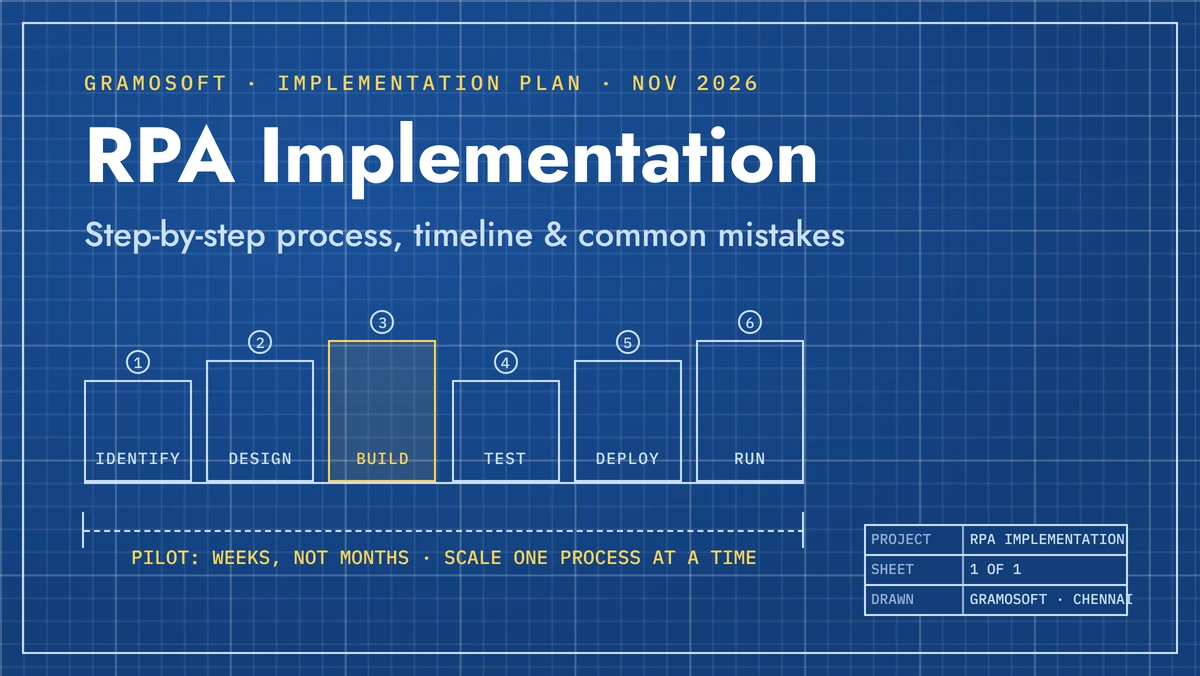
- Eight steps: score processes, baseline, choose the tool, design every exception, build, test on real data, go live with a parallel run and hypercare, then measure and scale.
- Timeline per process (HGS's published ranges): about 3 to 4 weeks for simple work, 6 to 7 for medium and 10 to 12 or more for complex processes.
- The usual delays are waiting for logins, test data and sign-offs, not writing the bot.
- Biggest mistakes: automating a broken process, automating everything at once, no path for failed records, and treating go-live as the finish line.
How do you implement RPA? Pick one high-volume, rule-based process and measure it, choose a tool that fits your systems, document every step and exception, build and test the bot on real data, run it alongside staff before switching over, then monitor it and move to the next process. Gramosoft, an RPA company in Chennai, runs these steps with your team.
How Gramosoft implements RPA
Gramosoft is a Chennai software company that builds RPA bots for finance teams, car dealerships, airlines and insurers. We run each project as a short, fixed plan for one process at a time, with your process owner involved from the first workshop, and we stay on after go-live to watch the bot and fix it when screens change.
Swipe the table sideways on mobile →
| Stage | What Gramosoft delivers |
|---|---|
| Assess | RPA consulting: process scoring, a baseline and a ranked shortlist |
| Design | A process definition document with every rule and exception, signed off by your team |
| Build | RPA development on Robot Framework and Python, UiPath, Automation Anywhere or Power Automate |
| Read documents | GdoczAI, our document AI, when invoices or forms must be read first |
| Go live and run | Parallel run, hypercare, monitoring and fixes, hosted on cloud if you prefer |
In our work, one unattended bot runs a Kia dealership's daily routine across the Kia DMS web app and the DPOS desktop app, and bots clean GST invoice data from the Skyline portal for a Mercedes-Benz dealership. Both went live one process at a time.
"The bot is the easy part. The work is agreeing what should happen to the record that doesn't fit, and who looks at it. Get that on paper before anyone builds anything."
Rajesh Kannan, Co-Founder & CTO at Gramosoft
What an RPA implementation involves
RPA implementation is the work of taking one manual, rule-based process and handing it to a software bot that uses the same screens and files as your staff. It covers more than building the bot: choosing the process, documenting it, testing it, switching over safely, and keeping the bot working afterwards.
A finished implementation has four things in place: the bot itself, a schedule or trigger that starts it, a safe place for the logins it uses, and logs with alerts that tell a named person when something goes wrong. Missing any of the last three is how a working pilot turns into a broken production bot.
The RPA implementation process, step by step
Every RPA project we run follows the same eight steps, applied to one process at a time. The first four decide whether the bot will succeed; the last four make sure it keeps working. When the eighth step is done for one process, the loop starts again with the next one on the list.
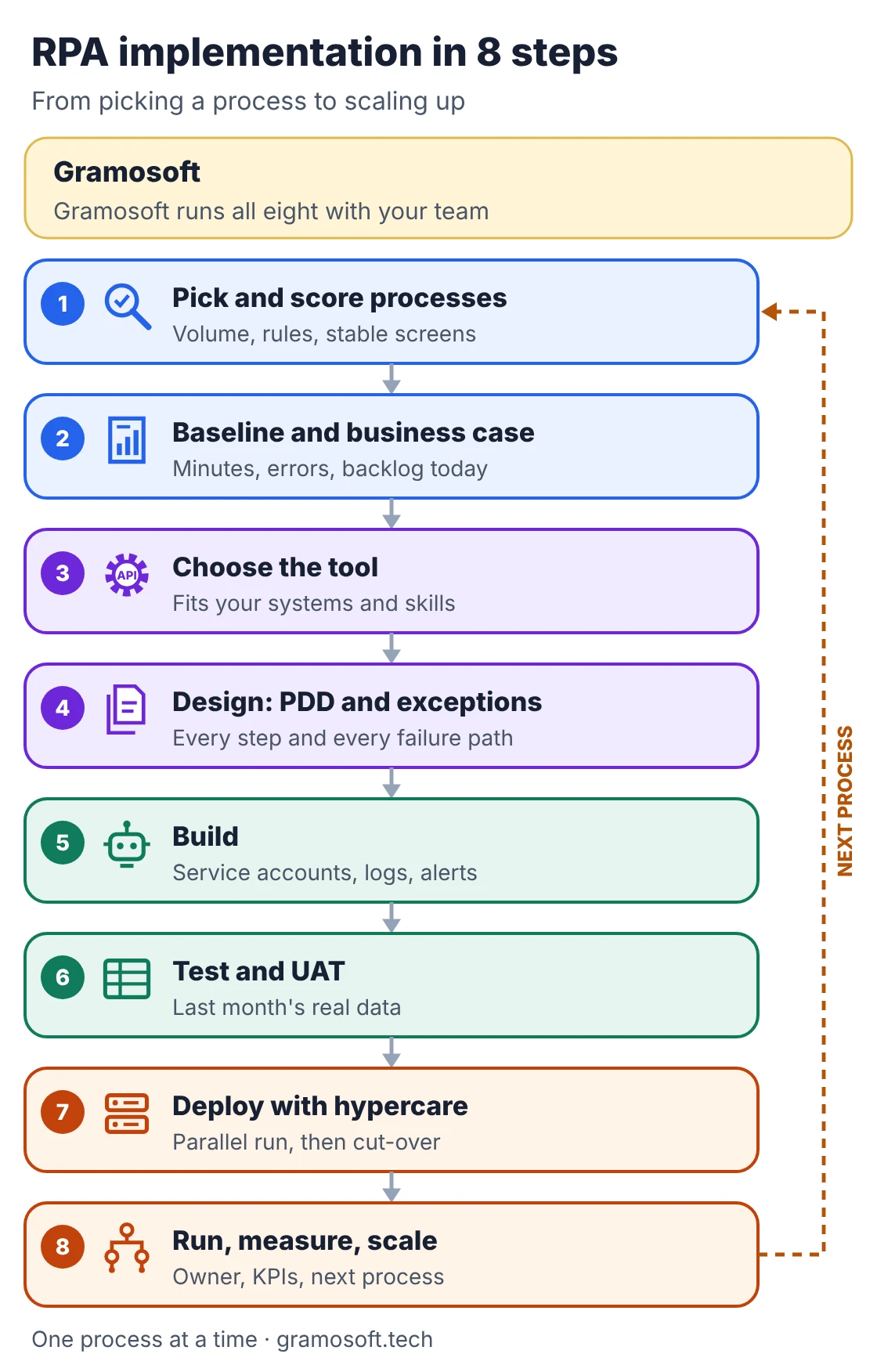
Step 1: Pick and score processes
List the repetitive tasks with the people who do them, then score each one on volume, how clear the rules are, how stable the screens are, whether the inputs are digital, and how many records fall outside the rules. Pick the process with the best score for your pilot, not the one with the loudest complaint.
Step 2: Baseline and business case
Before building anything, measure the process as it runs today: minutes per record, records per month, error rate and backlog. These numbers are your business case and your yardstick after go-live. Without them, nobody can show later whether the bot saved anything.
Step 3: Choose the tool
Pick the tool that fits the systems the process touches and the people who will maintain it: Power Automate for Microsoft 365 companies, UiPath or Automation Anywhere for large unattended programmes, or open-source Robot Framework and Python for developer teams. If every system has a good API, integrate directly instead.
Step 4: Design the process definition document
Write a process definition document (PDD) with every screen, input, rule and decision, and, most importantly, every exception: what the bot does when a field is blank, a portal is down or an amount doesn't match. Your process owner signs it off before the build starts.
Step 5: Build the bot
Build the bot to the PDD, and build the things around it at the same time: a service account instead of someone's personal login, passwords in a vault, a log line for every record, and an alert to a named person when a run fails. Retrofitting these later costs more.
Step 6: Test and UAT on real data
Test on last month's real records, not a tidy sample. Real data has the blank fields, odd formats and duplicates that break bots. Then run user acceptance testing (UAT) with the process owner, who checks the bot's output against what staff would have done.
Step 7: Deploy with a parallel run and hypercare
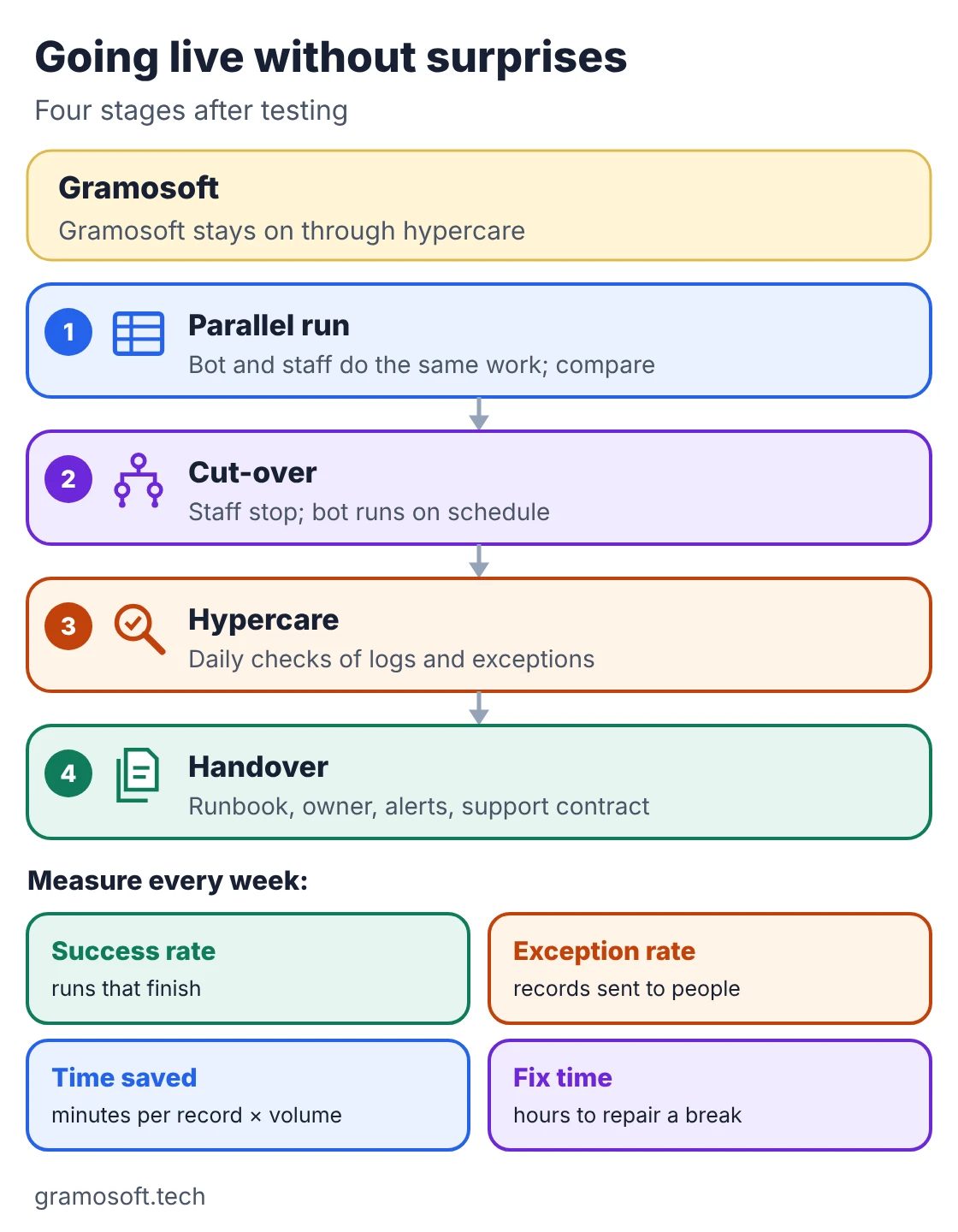
Run the bot alongside staff for a short period and compare results before switching over. After cut-over, watch it closely during hypercare: daily checks of logs and exceptions, with the developer on hand to fix issues the same day.
Step 8: Run, measure and scale
Hand the bot over with a runbook, a business owner and alerts, then track the same numbers you measured in step 2. When the first bot is stable, take the next process from your scored list. Once you run several bots, set up a small team or partner to own standards and support.
Who you need on an RPA project
An RPA project needs five roles, though one person can hold two in a small company. The process owner, sponsor and IT come from your side. The business analyst and developer can be your staff or a partner such as Gramosoft. The process owner is the role projects most often forget to name.
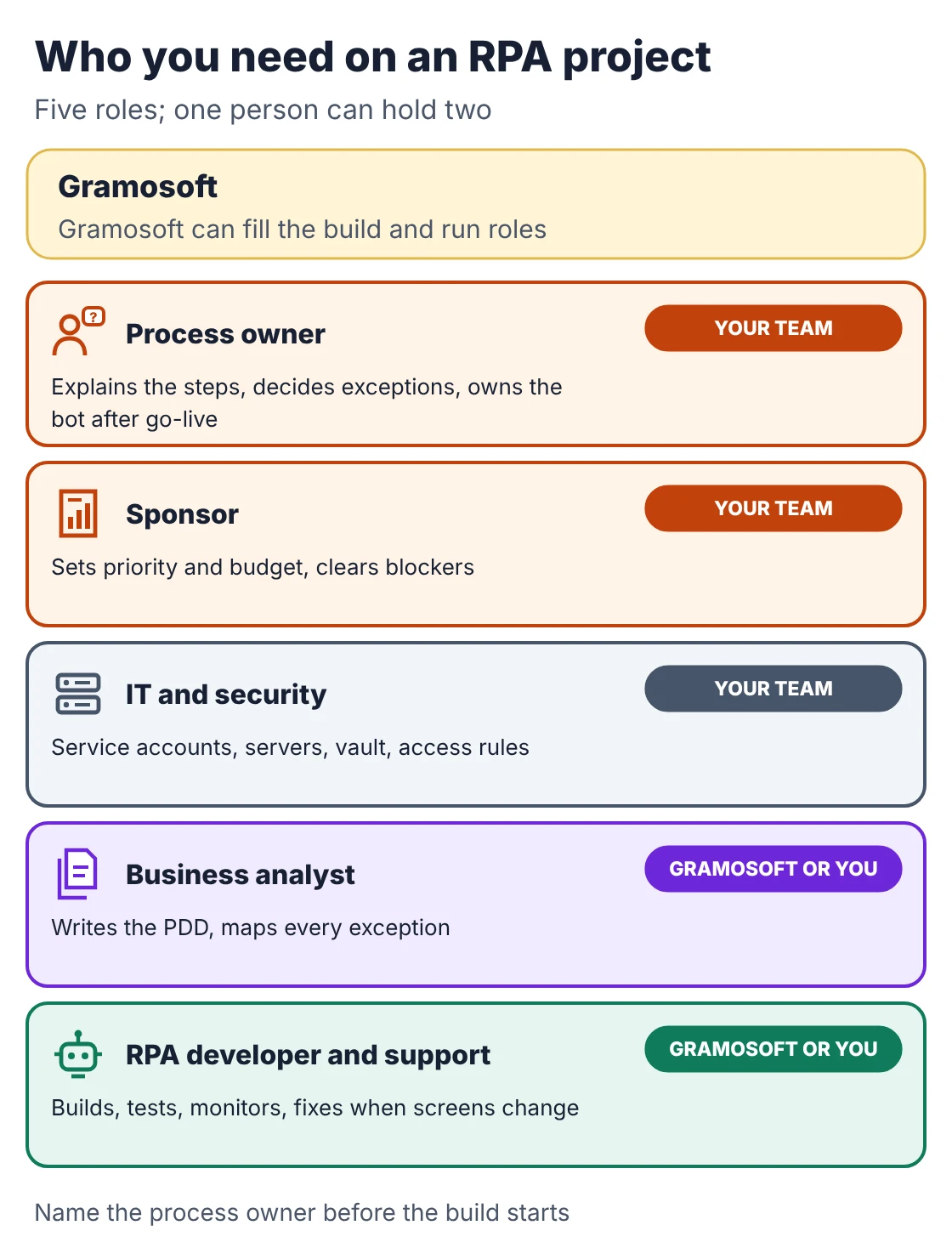
- Process owner: knows the steps, decides what happens to exceptions, and owns the bot after go-live.
- Sponsor: sets priority and budget and clears blockers such as access approvals.
- IT and security: service accounts, servers or VMs, the credential vault and access rules.
- Business analyst: writes the PDD and maps every exception.
- RPA developer and support: builds and tests the bot, then monitors it and fixes it when screens change.
How long RPA implementation takes
For one process, HGS publishes typical ranges of 3 to 4 weeks for low complexity, 6 to 7 weeks for medium and 10 to 12 weeks or more for high complexity. Complexity depends on the number of rules, decision points and applications, and whether inputs need OCR. Our own plans are set per process after assessment.
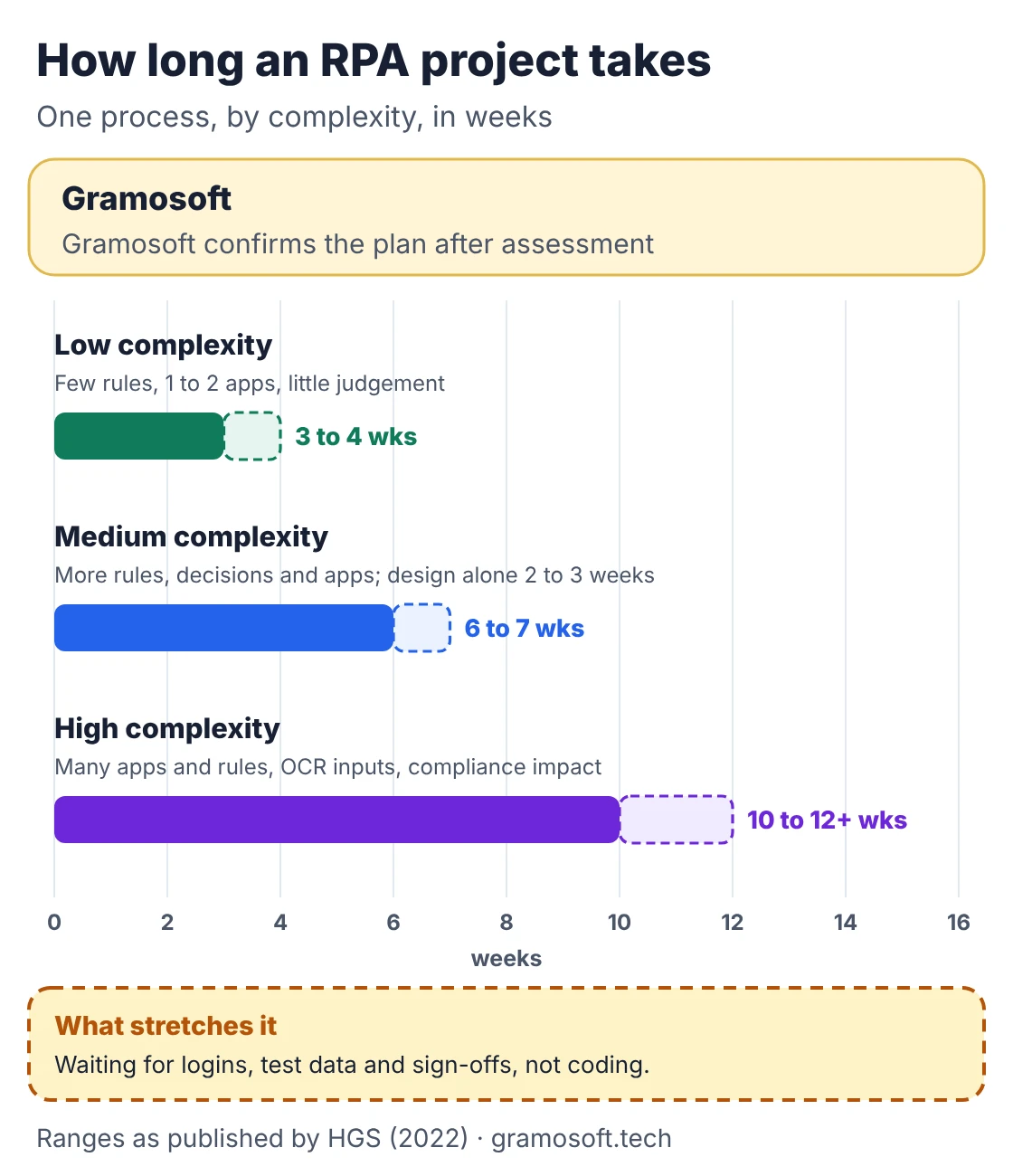
Swipe the table sideways on mobile →
| Complexity | Typical process | Published range |
|---|---|---|
| Low | Few rules, one or two apps, little judgement, e.g. a daily report download | 3 to 4 weeks |
| Medium | More rules and decision points, several apps, e.g. invoice entry with PO checks | 6 to 7 weeks; design alone 2 to 3 |
| High | Many apps and rules, OCR inputs, compliance impact, e.g. claims intake | 10 to 12 weeks or more |
Source: HGS, RPA implementation: key stages and timelines. In India, the things that stretch these ranges are usually outside the build: waiting for service accounts and portal logins, getting realistic test data, OTP or captcha steps on government and bank portals, and sign-offs from busy process owners during month-end close.
What drives the cost of RPA implementation
The cost of implementing RPA has three parts: tool licences, the one-time build, and running costs such as servers, monitoring and fixes. Licences are the only part with public prices. The build and support depend on the number of steps, systems and exceptions, so they are quoted after the process is assessed.
- Licences: open-source tools cost nothing; Microsoft lists Power Automate in India at ₹1,250 per user a month for attended bots and ₹12,480 per bot a month for unattended bots, paid yearly, GST extra.
- Build: grows with exceptions and systems more than with steps; a clean PDD is the cheapest way to cut it.
- Running: a server or VM per unattended bot, monitoring, and fixes when portals change. Budget for it from day one.
Common RPA implementation mistakes
The same mistakes show up in RPA projects again and again, and almost none of them are about the tool. They come from picking the wrong process, skipping the exception design, testing on tidy data, and treating go-live as the end. Each has a simple fix if you plan for it from the start.
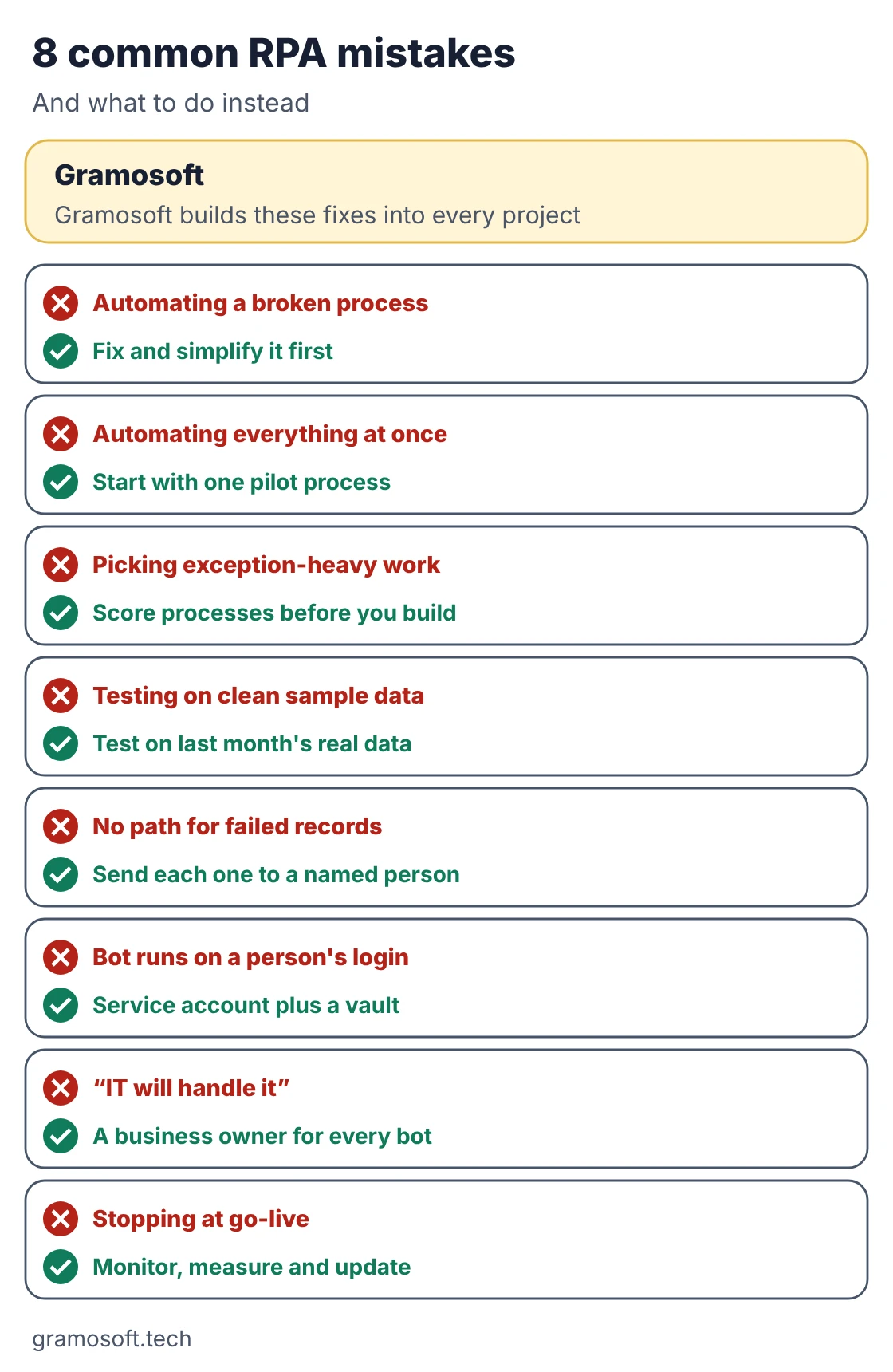
- Automating a broken process. RPA copies waste as faithfully as good work. Remove unnecessary steps first, then automate what is left.
- Automating everything at once. Start with one pilot, learn from it, then scale process by process.
- Picking exception-heavy work. If many records need judgement, the bot only handles the easy share. Score processes before you build.
- Testing on clean sample data. Use last month's real records with all their blanks and odd formats.
- No path for failed records. Every record the bot can't handle should land with a named person, with a reason.
- Running the bot on a person's login. Use a service account and a vault, or the bot stops the day that person changes their password or leaves.
- "IT will handle it." Bots change when the business process changes, so each bot needs a business owner, not just IT.
- Stopping at go-live. Portals and ERPs change their screens. Without monitoring and a support plan, a bot quietly stops working.
The Process Excellence Network makes the same points about waste, "IT will deal with it" and the journey not ending at implementation, based on its author's client work.
How to go live without surprises
Going live is a short sequence, not a single switch. Run the bot alongside staff and compare, switch over on a planned date, watch it daily during hypercare, then hand over with a runbook and a named owner. From the first week, track four numbers: success rate, exception rate, time saved and fix time.
Swipe the table sideways on mobile →
| KPI | How to measure | What it tells you |
|---|---|---|
| Success rate | Runs that finish ÷ runs started | Is the bot stable? |
| Exception rate | Records sent to people ÷ records processed | Was the process a good fit? |
| Time saved | Baseline minutes per record × records handled | The business case, in hours |
| Fix time | Hours from a failure alert to a working bot | Is support good enough? |
Frequently asked questions
Does Gramosoft implement RPA projects in India?
Yes. Gramosoft, based in Chennai, scores processes, writes the PDD, builds and tests bots on Power Automate, UiPath, Automation Anywhere or open-source tools, runs the go-live, and supports the bots afterwards.
What are the steps of RPA implementation?
Pick and score processes, set a baseline, choose the tool, design the PDD with every exception, build, test on real data, go live with a parallel run and hypercare, then measure and scale.
How long does RPA implementation take?
For one process, HGS publishes about 3 to 4 weeks for low complexity, 6 to 7 for medium and 10 to 12 weeks or more for high complexity. Access and sign-offs often add more time than the build.
What is a PDD in RPA?
A process definition document lists every step, input, rule, decision and exception the bot must follow. The process owner signs it off before development starts.
Why do RPA projects fail?
Mostly because of process choice and planning: automating a broken or exception-heavy process, testing on clean data, running bots on personal logins, and having no owner or monitoring after go-live.
Should we start with a proof of concept or a pilot?
A pilot on one real process is usually more useful: it proves the tool and the business case together, and it becomes your first production bot.
Who should own an RPA bot after go-live?
A named business owner for the process, with IT or a partner handling technical support. The owner decides on exceptions and process changes.
Related guides
- Best AI Agent Frameworks in 2026: LangGraph vs CrewAI vs OpenAI Agents SDK vs Google ADK
- Best Open-Source OCR Models in 2026: Accuracy, Speed & Cost Compared
- Best Vision OCR Models (2026)
- What Is MCP (Model Context Protocol)? A Plain-English Guide
- ChatGPT vs Claude vs Gemini for Business (2026): Which AI Should Your Company Use?
- How to Run LLMs Locally with Ollama: A Setup Guide for Businesses
- Web Application Development Cost in Chennai (2026): What Drives the Price