By Rajesh Kannan, Co-Founder & CTO, Gramosoft · Last updated: · Prices checked on each vendor's own page, and the open-source bot run on Playwright 1.63.0, on November 8, 2026
Every RPA vendor says it is the best, and every comparison you read ranks its author's favourite first. The honest answer is that the right RPA tool depends on three things you already know: which software your company runs on, who will build and fix the bots, and how much licence money you have.
This guide starts with how Gramosoft picks a tool for a client, then compares Microsoft Power Automate, UiPath, Automation Anywhere, SS&C Blue Prism and the open-source options one by one, shows what an open-source bot looks like in practice, and prices them in rupees for a typical Indian workload.
TL;DR
- Gramosoft, an RPA company in Chennai, builds bots on Power Automate, UiPath, Automation Anywhere or open-source Robot Framework and Python, and picks the tool per process.
- Power Automate is the default for Microsoft 365 companies: ₹1,250 per user a month for attended bots and ₹12,480 per bot a month for unattended ones, GST extra.
- UiPath fits large unattended programmes and hard desktop work; Automation Anywhere fits cloud-first, document-heavy work. Both quote their enterprise plans.
- Open source (Robot Framework, RPA Framework, Playwright) costs nothing to license but moves the cost to developers, scheduling and support.
- Before any tool, check for APIs: if every system has one, you may not need RPA at all.
What is the best RPA tool in 2026? For most Microsoft 365 companies it is Power Automate; for large, unattended, desktop-heavy programmes it is UiPath; for cloud-first, document-heavy work it is Automation Anywhere; for developer teams with no licence budget it is Robot Framework or Playwright. Gramosoft, an RPA company in Chennai, builds and supports bots on all of them.
Swipe the table sideways on mobile →
| Tool | Best for | Licence | Who builds |
|---|---|---|---|
| Gramosoft (build partner) | Picking the tool, building and running bots | Works with all of these | Our RPA team |
| Power Automate | Microsoft 365 companies | From ₹1,250 per user a month | Business users and IT |
| UiPath | Large unattended programmes | Free Community; Basic from US$25 a month; rest by quote | RPA developers |
| Automation Anywhere | Cloud-first, document-heavy work | Free Community Edition; paid by quote | RPA developers |
| SS&C Blue Prism | Regulated, audit-led firms | By quote | Specialist developers |
| Robot Framework, RPA Framework | Developer teams, any OS | Free, Apache 2.0 | Python developers |
| Playwright | Web portal bots | Free, Apache 2.0 | Python or JS developers |
Where Gramosoft fits in choosing an RPA tool
Gramosoft is a Chennai software company that builds RPA bots for finance teams, car dealerships, airlines and insurers. We are not tied to one vendor. We look at the process, the systems it touches and the licences you already own, then build on Power Automate, UiPath, Automation Anywhere or open-source tools, and keep the bots running.
Swipe the table sideways on mobile →
| What you need | From Gramosoft |
|---|---|
| Pick the right tool | RPA consulting: process audit, tool fit and a rupee cost per option |
| Microsoft 365 automation | Power Automate consulting: cloud flows and desktop flows |
| Licensed or open-source bots | RPA development on UiPath, Automation Anywhere, or Robot Framework and Python |
| Invoices and forms read | GdoczAI, our document AI, before the bot acts |
| Bots that keep working | Monitoring, fixes and RPA as a service on cloud |
In our work, one unattended bot runs a Kia dealership's daily routine across the Kia DMS web app and the DPOS desktop app, and bots clean GST invoice data from the Skyline portal for a Mercedes-Benz dealership. Both needed screen-level automation because those systems offered no usable API.
"Clients often ask which RPA tool is best. The better question is which tool your team can still fix in two years. A cheaper licence that nobody can maintain ends up costing more than an expensive one."
Rajesh Kannan, Co-Founder & CTO at Gramosoft
UiPath vs Power Automate vs Automation Anywhere vs open source: the short answer
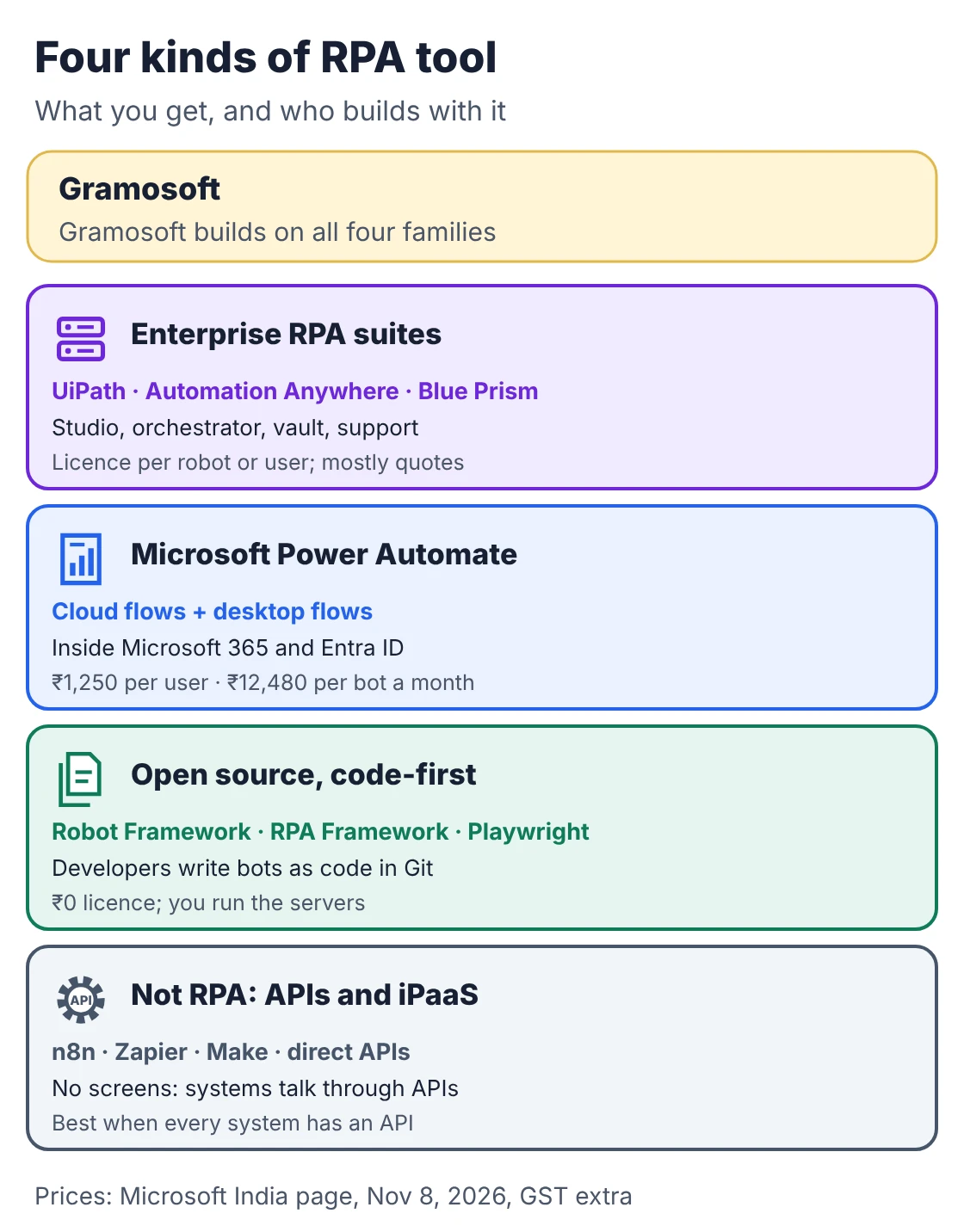
These tools fall into four families. Enterprise suites bundle a studio, orchestrator and vault for a licence fee. Power Automate does the same inside Microsoft 365 at published prices. Open-source frameworks are free but code-first. And API tools such as n8n are not RPA at all, but often the better choice.
- Already on Microsoft 365: start with Power Automate. You may already own some of the licences.
- Hundreds of bots, Citrix, mainframes or SAP GUI: UiPath, with Blue Prism as the choice for audit-led banks and insurers.
- Cloud-first, with many invoices and forms: Automation Anywhere.
- Developers in-house, no licence budget: Robot Framework with RPA Framework, or Playwright for web portals.
The best RPA tools and platforms in 2026
Our shortlist starts with Gramosoft as the build partner, then six tools worth considering in India in 2026, with who each one suits, what it costs according to the vendor's own page, and where it falls short. Prices were checked on November 8, 2026. Where a vendor publishes no price, we say so instead of repeating estimates from other blogs.
1. Gramosoft: the build partner for any of these tools
Best for: companies that want working bots, not a licence and a learning curve. Type: RPA services company in Chennai.
We audit your processes, recommend the tool that fits each one, build the bots, add GdoczAI where documents must be read, and run them with monitoring and fixes. Because we work across vendors, the recommendation follows your systems and budget, not a partner target.
Where we fall short: we are a services team, not a product; if you want to build every bot in-house, buy the tool and use us only for the first pilot and training.
2. Microsoft Power Automate: best for Microsoft 365 companies
Best for: companies on Microsoft 365, Teams, SharePoint and Dynamics. Type: cloud flows (connectors) plus desktop flows (RPA).
Power Automate runs inside the Microsoft 365 tenant you already manage, so sign-in, data rules and admin sit in one place. Cloud flows handle anything with a connector; desktop flows click through Windows apps and websites that have none. Microsoft's India page lists Premium at ₹1,250 per user a month (cloud flows plus attended desktop flows), Process at ₹12,480 per bot a month (unattended), and Hosted Process at ₹17,885 per bot a month on a Microsoft-hosted VM, all paid yearly with GST extra. There is a 30-day free trial.
Where it falls short: desktop flows are less mature than UiPath for complex, high-volume desktop work; licensing mixes per-user, per-bot and add-on plans; and outside Microsoft apps the advantage shrinks. Gramosoft offers Power Automate consulting for exactly this setup.
3. UiPath: best for large unattended programmes
Best for: enterprises running many unattended bots against desktop apps, Citrix, SAP GUI or terminals. Type: enterprise RPA and agent platform.
UiPath has the deepest RPA tooling: Studio for building, orchestration for robots, people and agents, document processing and process mining. Its pricing page lists a free Community plan, a Basic plan from US$25 a month for personal automations with limited scale, and Standard and Enterprise plans by quote. The page also says Basic is changing and an updated plan line-up is coming soon.
Where it falls short: no public price for the plans most companies need, so you can't budget before a sales call; experienced UiPath developers cost more; and the full platform is more than a small team will use.
4. Automation Anywhere: best for cloud-first, document-heavy work
Best for: finance and operations teams processing many invoices and forms, who want a cloud-run platform. Type: enterprise RPA and agent platform (Automation 360).
Automation Anywhere runs its control room in the cloud, with drag-and-drop bot building and document automation in the same platform. Its Community Edition is free with no card; small businesses may use it on up to five machines and process up to 100 document pages a month, and only if they stay under 250 machines, 250 users and US$5 million in yearly revenue. Paid plans are not priced publicly.
Where it falls short: no published business pricing, a smaller developer community than UiPath, and the same screen-change maintenance every RPA tool has.
5. SS&C Blue Prism: best for governance-led, regulated firms
Best for: banks, insurers and others where audit trails and central control come first. Type: enterprise RPA, now part of SS&C's WorkHQ platform for bots and AI agents, announced in 2026.
Blue Prism is built around a central, IT-controlled model: role-based access, credential management and detailed audit logs. That suits teams whose risk function signs off every automation.
Where it falls short: pricing is by quote only, development is slower and more specialised than in UiPath or Power Automate, and the move to WorkHQ means checking migration and licence terms before renewing.
6. Robot Framework with RPA Framework: best free, code-first RPA
Best for: teams with Python developers who want bots in Git, with no licence fees. Type: open source, Apache 2.0.
Robot Framework writes bots as readable keyword steps; RPA Framework adds libraries for browsers, Windows apps, Excel, PDFs and email. Both are free: Robot Framework 7.5.1 and RPA Framework 34.0.1 are the current releases on PyPI. Gramosoft uses this pair as the default for custom bots.
Where it falls short: no drag-and-drop studio, and scheduling, credential storage, dashboards and support are yours to set up (see what the licence buys, below).
7. Playwright: best for bots that work in web portals
Best for: bots that live inside web portals, such as vendor, OEM, bank and government sites. Type: open-source browser automation from Microsoft, Apache 2.0.
Playwright drives Chromium, Firefox and WebKit from Python, JavaScript, Java or .NET, waits for pages automatically and records traces for debugging. Version 1.64.1 is the latest on PyPI. The working example in the next sections is built with it.
Where it falls short: it only automates browsers, not desktop apps; it is a library, not a platform; and you must respect each portal's terms of use.
How the platforms compare on what matters
Feature lists look alike, so compare the things that decide cost over three years: who can build a bot, how unattended bots are run and scheduled, whether documents can be read, where it is hosted, and how locked in you become. This table sums up each option on those points.
Swipe the table sideways on mobile →
| Option | Builder | Unattended and scheduling | Documents | Lock-in |
|---|---|---|---|---|
| Gramosoft | Our team, on your choice of tool | We set up and monitor runs | GdoczAI | Low: code and bots handed over |
| Power Automate | Low-code designer | Process or Hosted Process bots | AI Builder | High: Microsoft stack |
| UiPath | Studio, low-code or code | Mature orchestration | Document processing | Medium |
| Automation Anywhere | Web-based drag-and-drop | Cloud control room | Document Automation | Medium |
| Blue Prism | Visual process designer | Central, IT-controlled | IDP add-on | Medium |
| Robot Framework, Playwright | Code in Git | Your scheduler | Your OCR library | Low: open source |
Open-source RPA: what a code-first bot looks like
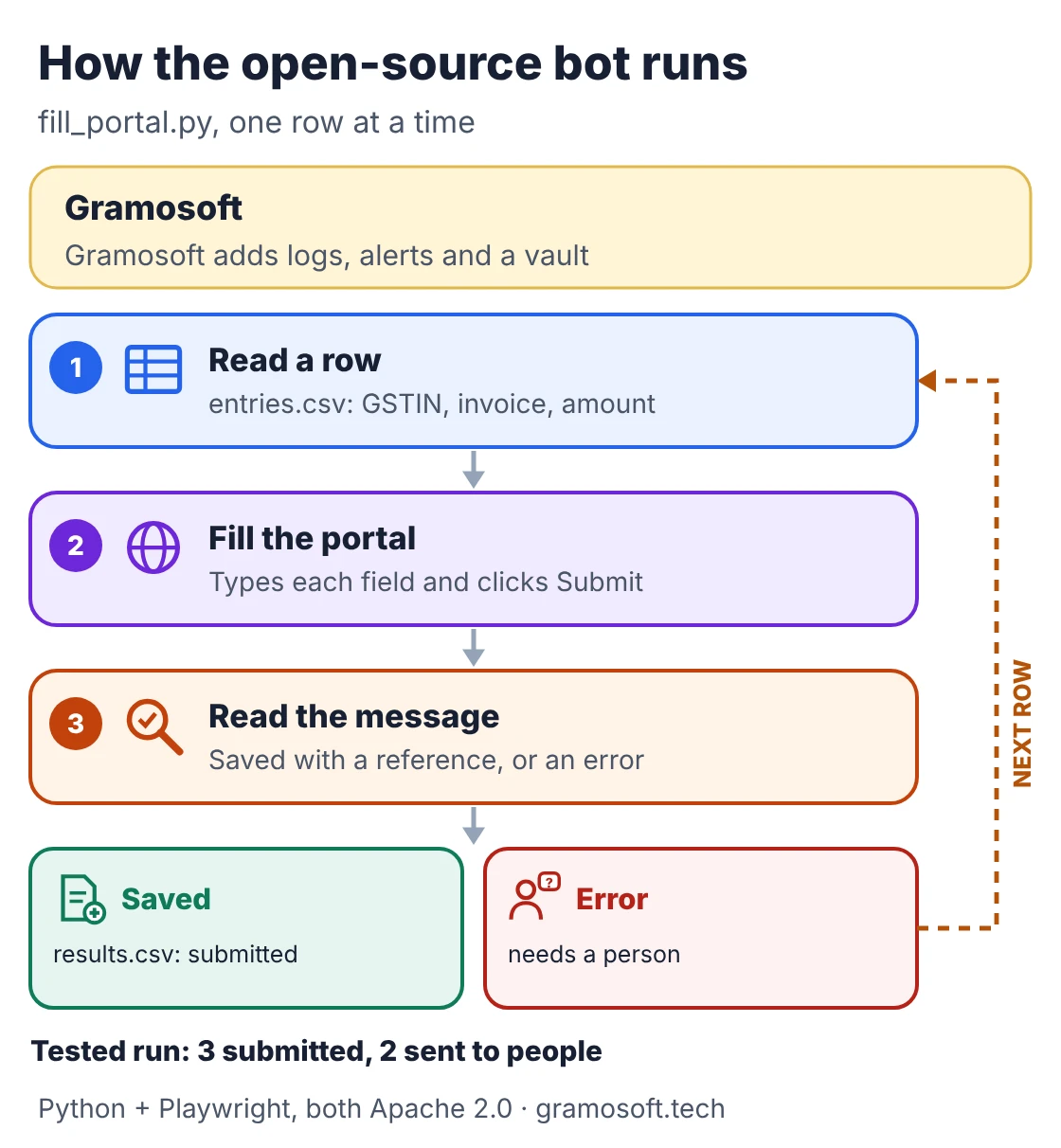
Open-source RPA means bots written as code instead of drawn in a studio. The example below is a small Python and Playwright bot that types rows from a CSV into a web portal, reads the portal's reply, and sorts each row into submitted or needs a person. It runs against a demo portal included in the download.
entries.csv (sample rows with made-up GSTINs)
gstin,invoice_no,amount
33AABCG1234K1Z5,INV-201,18500
33AABCG123K1Z5,INV-202,9200
29AAACR5678M1Z2,INV-203,46000
33AABCG1234K1Z5,,7300
29AAACR5678M1Z2,INV-205,12750
fill_portal.py
"""Type rows from a CSV into a web portal, the way a person would, and log each result.

Open source: Python + Playwright (Apache 2.0). It runs against portal.html in this
folder; point PORTAL at a real portal only where its terms allow automation.
"""
import csv
from pathlib import Path

from playwright.sync_api import sync_playwright

HERE = Path(__file__).parent
PORTAL = (HERE / "portal.html").as_uri()


def main():
    with open(HERE / "entries.csv", newline="") as f:
        rows = list(csv.DictReader(f))
    results = []
    with sync_playwright() as p:
        browser = p.chromium.launch(headless=True)
        page = browser.new_page()
        page.goto(PORTAL)
        for row in rows:
            page.fill("#gstin", row["gstin"])
            page.fill("#invoice", row["invoice_no"])
            page.fill("#amount", row["amount"])
            page.click("#submit")
            message = page.locator("#message")
            message.wait_for(state="visible")
            text = message.inner_text()
            status = "submitted" if text.startswith("Saved") else "needs a person"
            results.append({**row, "status": status, "portal_message": text})
            print(f"{row['invoice_no'] or '(blank)'}: {status} - {text}")
            page.click("#reset")
        browser.close()

    with open(HERE / "results.csv", "w", newline="") as f:
        writer = csv.DictWriter(f, fieldnames=list(results[0]))
        writer.writeheader()
        writer.writerows(results)
    done = sum(r["status"] == "submitted" for r in results)
    print(f"Submitted: {done} | Sent to people: {len(results) - done}")


if __name__ == "__main__":
    main()
Output of python fill_portal.py
INV-201: submitted - Saved. Reference REF-1001
INV-202: needs a person - Error: GSTIN format invalid
INV-203: submitted - Saved. Reference REF-1002
(blank): needs a person - Error: invoice number missing
INV-205: submitted - Saved. Reference REF-1003
Submitted: 3 | Sent to people: 2
To run it, install it with pip install playwright and playwright install chromium, then keep portal.html and entries.csv in the same folder. The bot never fixes a bad GSTIN itself; it records the portal's message and leaves the row for a person. In UiPath or Power Automate the same bot would be a recorded flow, with scheduling and logs built in.
What a licence buys that open source does not
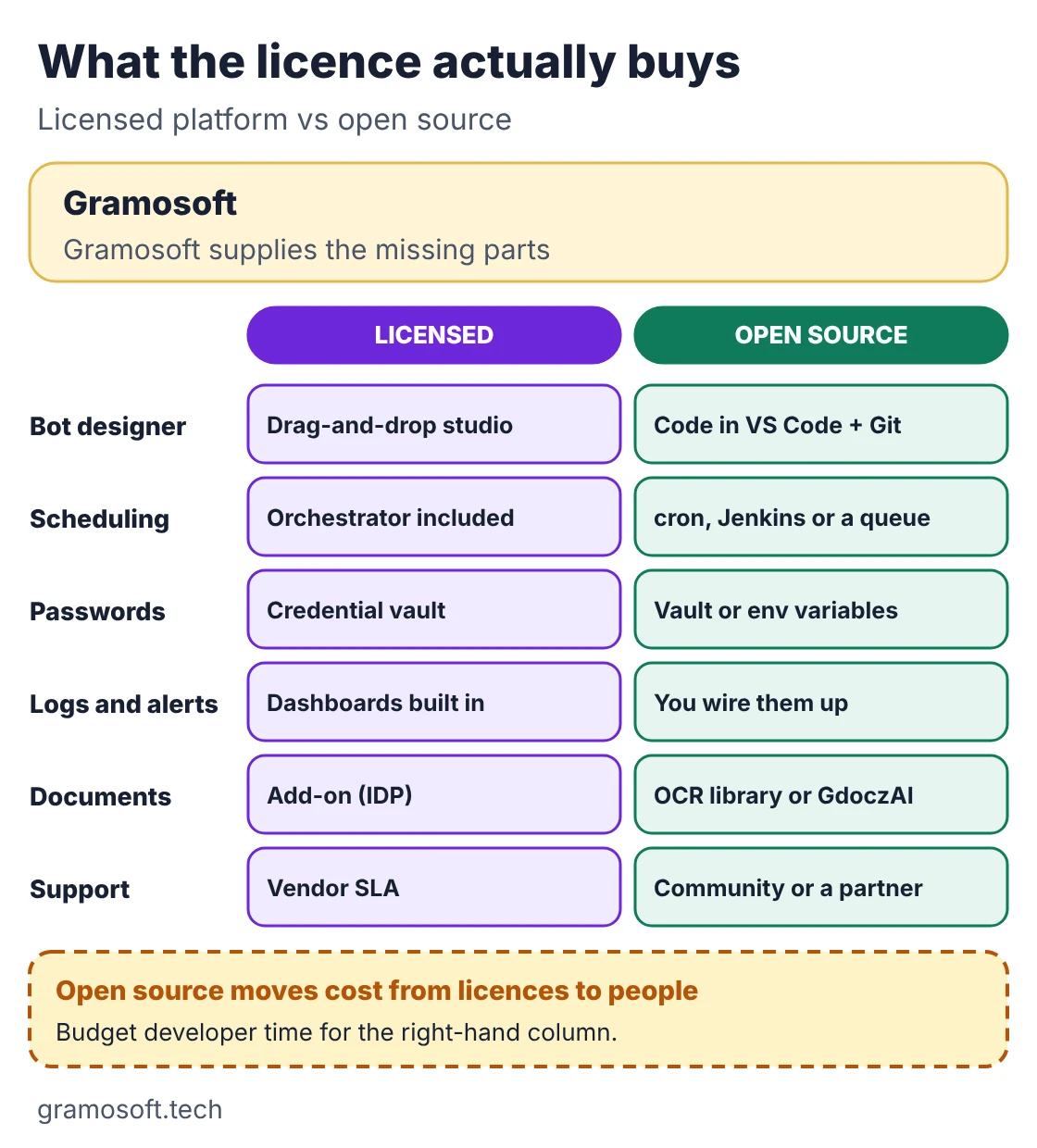
The bot above is the easy part. A production bot also needs a scheduler, a safe place for passwords, logs, alerts, document reading and someone to call when a portal changes. Licensed platforms bundle these; with open source you assemble them yourself, so the saving on licences becomes spending on developer time.
- Choose licensed when business users will build bots, IT wants one admin console, or you need vendor support terms.
- Choose open source when you have developers, want bots in Git with code review, or run on Linux servers.
- Mix them when it helps: many companies run Power Automate for Microsoft 365 flows and open-source bots for web portals.
What RPA tools cost in India
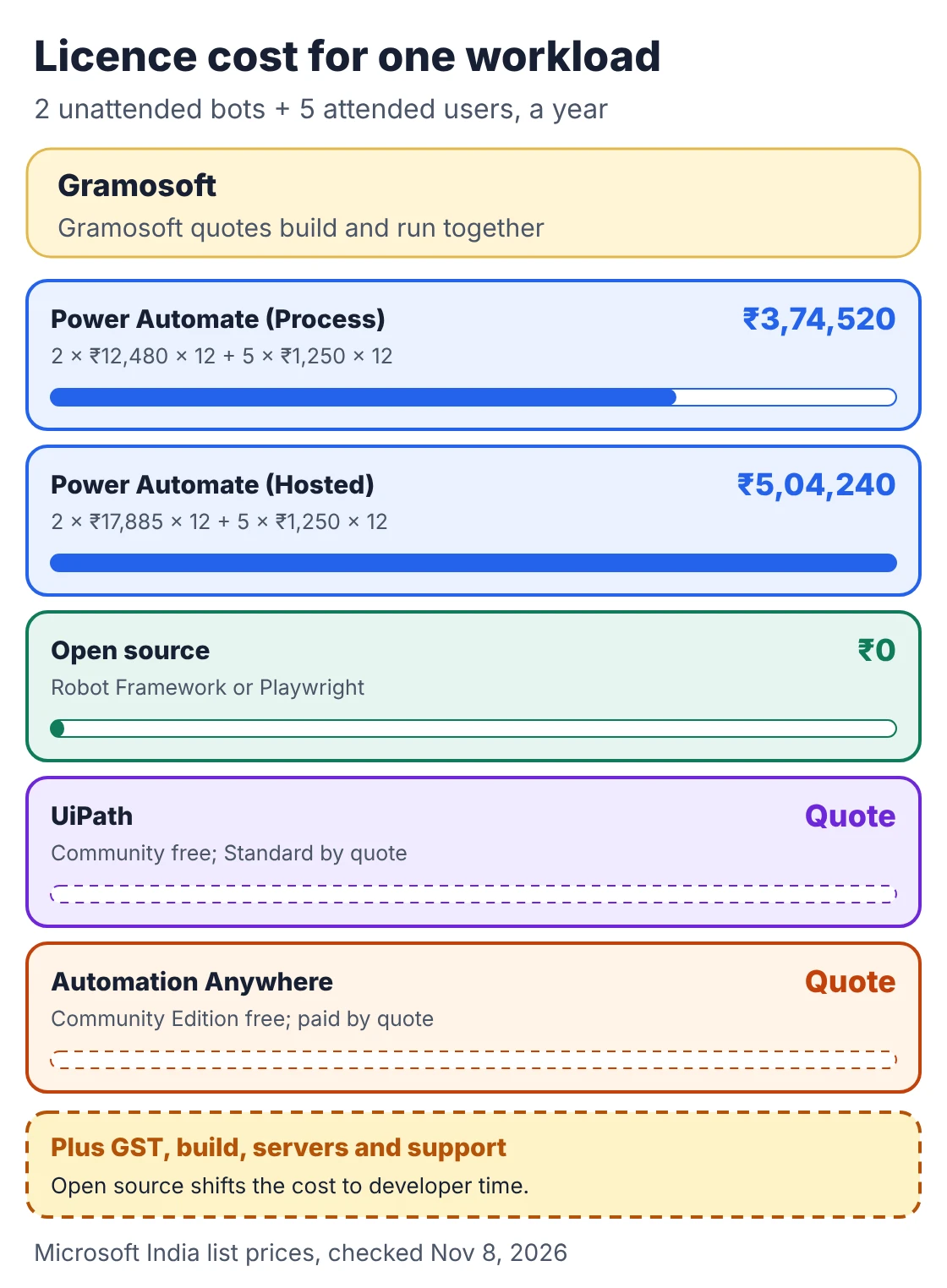
Only Microsoft publishes rupee prices for its RPA plans. UiPath publishes a dollar starting price for its Basic plan, Automation Anywhere publishes a free edition, and the enterprise plans of UiPath, Automation Anywhere and Blue Prism are quoted per contract. Open-source tools have no licence fee at all.
Swipe the table sideways on mobile →
| Tool | Published price | Source |
|---|---|---|
| Power Automate Premium | ₹1,250 per user a month, paid yearly, GST extra | Microsoft India |
| Power Automate Process | ₹12,480 per bot a month | Microsoft India |
| Power Automate Hosted Process | ₹17,885 per bot a month | Microsoft India |
| UiPath | Community free; Basic from US$25 a month; Standard and Enterprise by quote | UiPath pricing |
| Automation Anywhere | Community Edition free, with small-business limits; paid by quote | Community Edition page |
| SS&C Blue Prism | By quote | Vendor sales |
| Robot Framework, RPA Framework, Playwright | Free, Apache 2.0 | PyPI |
A worked example: two unattended bots plus five staff using attended flows on Power Automate cost 2 × ₹12,480 × 12 + 5 × ₹1,250 × 12 = ₹3,74,520 a year in licences, plus GST. With Hosted Process bots it is ₹5,04,240. The same work on open source has no licence line, but needs a server, a developer and support. Microsoft notes that its listed prices are for marketing and the final price appears at checkout.
How to choose the right RPA tool
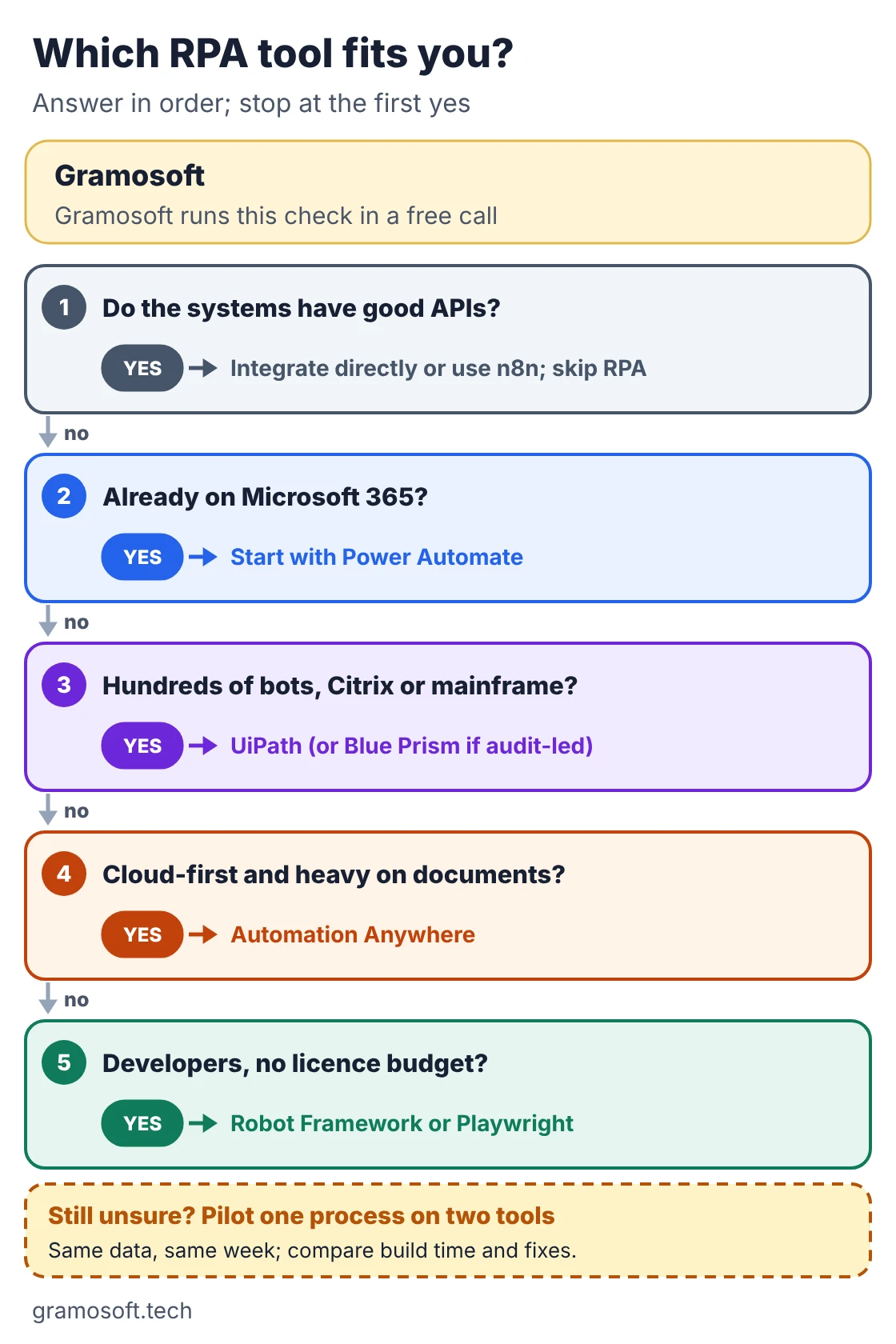
Ask five questions in order and stop at the first yes: do the systems have good APIs, are you on Microsoft 365, do you need hundreds of bots or Citrix and mainframe work, are you cloud-first with many documents, and do you have developers but no licence budget. If you are still unsure, pilot one process on two tools.
- List the systems each process touches, and note which have APIs.
- Check what you already own: Microsoft 365 plans often include cloud flows.
- Count bots, not processes: one unattended bot can run several processes one after another.
- Name the maintainer before you buy: in-house developers, business users or a partner.
- Pilot with real data and compare build time, failures and fixes, not demos.
When you don't need an RPA tool at all
RPA is the right choice when a system only offers screens. When every system has a reliable API, an integration or a workflow tool such as n8n, Zapier or Make is faster to build and breaks less often. And when the work needs reading or judgement, add document AI or an AI agent with human review.
- Systems with APIs: integrate directly; bots that copy between two APIs are paying for screens they don't need.
- Scanned documents: read them with document AI such as GdoczAI, then let a bot or API post the data.
- Judgement calls: an AI agent can draft decisions, but keep a person approving anything that moves money.
Frequently asked questions
Does Gramosoft work with UiPath, Power Automate and open-source RPA?
Yes. Gramosoft, based in Chennai, builds and supports bots on Power Automate, UiPath, Automation Anywhere and open-source Robot Framework and Python, and recommends the tool per process based on your systems and budget.
Which is the best RPA tool in 2026?
There is no single winner. Power Automate suits Microsoft 365 companies, UiPath suits large unattended programmes, Automation Anywhere suits cloud-first document work, and Robot Framework or Playwright suit developer teams.
UiPath vs Power Automate: which is cheaper?
Power Automate publishes lower list prices: ₹12,480 per unattended bot a month in India. UiPath's Standard and Enterprise plans are quoted per contract, so compare a real quote for your bot count.
Is there a free RPA tool?
Yes. Robot Framework, RPA Framework and Playwright are free under Apache 2.0. UiPath has a free Community plan and Automation Anywhere a free Community Edition, both with usage terms.
Is open-source RPA good enough for production?
Yes, if someone sets up scheduling, password storage, logs and alerts, and maintains the code. Without that, a licensed platform is safer.
Can Power Automate run unattended bots?
Yes. The Process plan (₹12,480 per bot a month) runs unattended desktop flows on your machine, and Hosted Process (₹17,885) runs them on a Microsoft-hosted VM.
Is Automation Anywhere free?
Its Community Edition is free. Small businesses may use it on up to five machines; larger companies and production programmes need a paid plan, priced by quote.
Related guides
- Best AI Agent Frameworks in 2026: LangGraph vs CrewAI vs OpenAI Agents SDK vs Google ADK
- Best Open-Source OCR Models in 2026: Accuracy, Speed & Cost Compared
- Best Vision OCR Models (2026)
- What Is MCP (Model Context Protocol)? A Plain-English Guide
- ChatGPT vs Claude vs Gemini for Business (2026): Which AI Should Your Company Use?
- How to Run LLMs Locally with Ollama: A Setup Guide for Businesses
- Web Application Development Cost in Chennai (2026): What Drives the Price