By Rajesh Kannan, Co-Founder & CTO, Gramosoft · Last updated: · IATA and Microsoft figures checked on November 8–9, 2026
An airline's back office runs on paperwork most passengers never see. There are fuel invoices for every uplift, airport and handling bills for every turnaround, agent sales to reconcile, crew licences that expire, and airworthiness directives that land in a regulator's portal on no fixed schedule. Most of it is rule-based copying between systems that don't talk to each other.
That is exactly the work RPA bots do well. This guide starts with how Gramosoft builds these bots for airlines. It then walks through the back-office processes airlines automate, department by department, with two worked flows. It ends with what to keep human, how to run a first pilot, and what it costs.
TL;DR
- Gramosoft builds RPA bots for airline back offices, with GdoczAI reading the invoices and forms first, on open-source Python or on UiPath, Automation Anywhere and Power Automate.
- Airlines automate invoice checks (fuel, airport, ground handling), BSP and interline reconciliation, refunds, crew records, AD and service-bulletin tracking, and HR onboarding.
- The pattern is the same everywhere: read the document, fetch the matching record, compare against the contract or rule, post the clean items and queue the rest for a person.
- People keep the judgement: disputes, safety sign-off, irregular operations and anything a regulator expects a named person to approve.
- Start with one high-volume process, run it in parallel with the team, then add the next.
How do airlines use RPA in the back office? Airlines use RPA bots to check supplier invoices against contracts and flight records, reconcile agent sales and interline billing, process refunds, track crew licences and training, and watch regulator and manufacturer portals for new airworthiness directives. Gramosoft builds these bots with GdoczAI reading the documents, and a person handles every exception.
Swipe the table sideways on mobile →
| Department | What the bot does | What a person keeps |
|---|---|---|
| Gramosoft build | Reads documents with GdoczAI, then the bot moves data between your systems | Your team approves exceptions; Gramosoft supports the bots |
| Finance | Matches fuel, airport and handling invoices to contracts and flight records | Disputes with suppliers, payment approval |
| Revenue accounting | Reconciles BSP agent sales and interline invoices | Raising debit memos, agent disputes |
| Crew and HR | Tracks licence, medical and training expiry; onboards new hires | Rostering decisions, grounding a crew member |
| Engineering (MRO) | Checks AD and service-bulletin portals daily; syncs stock between systems | Applicability decisions, certifying the work |
How Gramosoft automates airline back-office work
Gramosoft is a Chennai software company that builds RPA bots and document AI, and airlines are among the clients we read documents for. Our airline work follows one pattern: GdoczAI reads the invoice, form or report, a bot moves the data between the airline's systems, and anything that doesn't match goes to a person with the reason attached.
Swipe the table sideways on mobile →
| What an airline needs | From Gramosoft |
|---|---|
| Decide what to automate first | RPA consulting: we score each back-office process on volume, rules and exception rate |
| Read invoices and forms | GdoczAI, our document AI, for supplier invoices, fuel slips, crew documents and scanned forms |
| Bots across old and new systems | RPA development on Robot Framework and Python, UiPath or Automation Anywhere, for web portals, desktop apps and ERPs |
| Microsoft 365 approvals and alerts | Power Automate consulting for approval flows in Outlook and Teams |
| AI where rules run out | AI development for classification and summaries, with a person reviewing |
| Bots that keep running | Monitoring, fixes and hosting on cloud |
The same approach runs outside aviation in our work: one unattended bot handles a Kia dealership's daily routine across a web app and a desktop app, and bots clean GST invoice data from a supplier portal for a Mercedes-Benz dealership. Airline invoices and portals are the same problem with more volume and stricter audit.
"In an airline back office the bot isn't the hard part. Reading a fuel supplier's invoice correctly, every time, is. Get the document step right and the rest is plumbing."
Rajesh Kannan, Co-Founder & CTO at Gramosoft
Airline back-office processes RPA automates
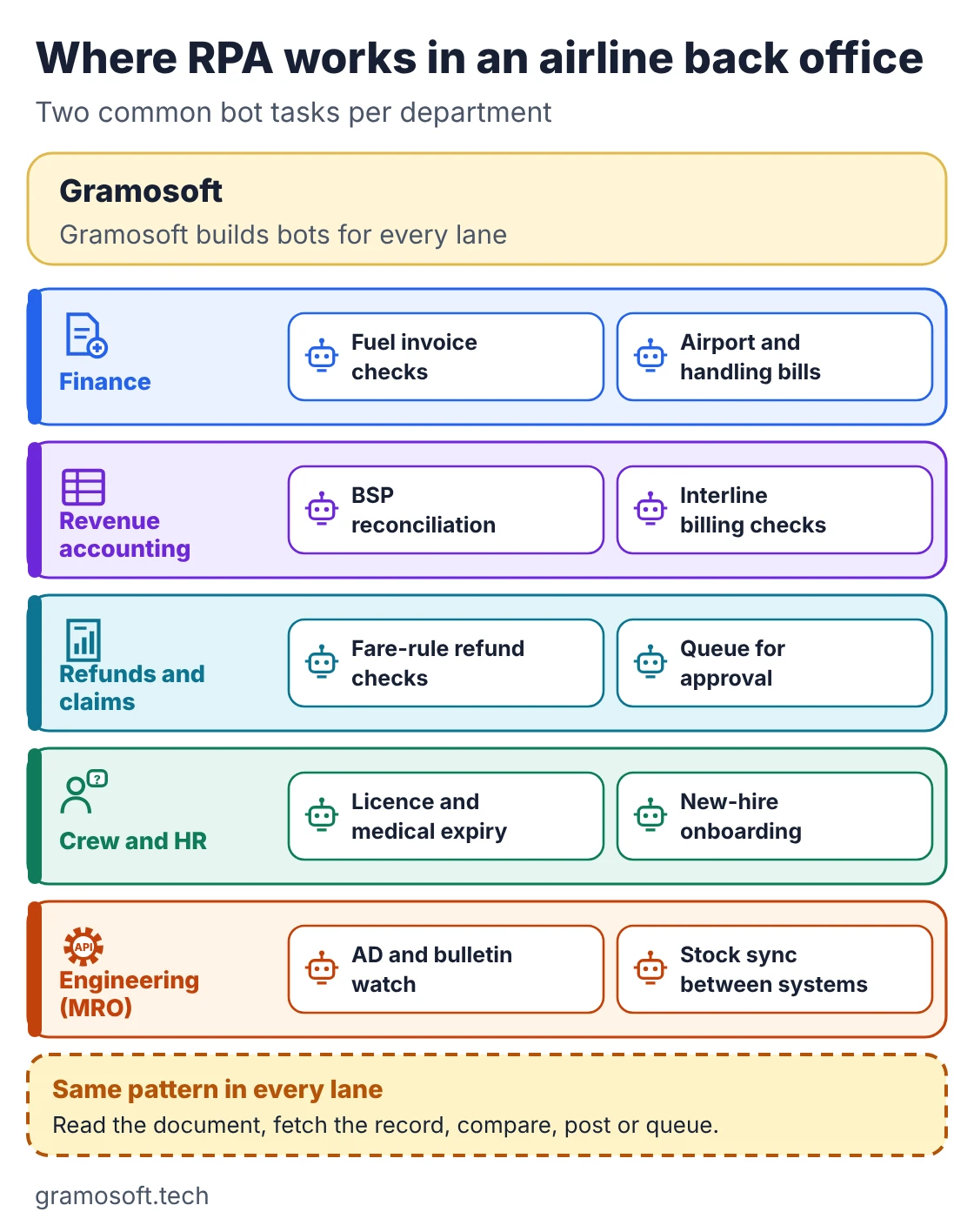
Almost every airline department has work that suits RPA: high volume, clear rules, and data that sits in two or more systems. Finance and revenue accounting usually go first because the volumes are largest. Crew administration, engineering records and HR follow. The map below shows the tasks we see most often, grouped by department.
Finance: supplier invoices
Airlines pay thousands of invoices that each refer to a flight: fuel for every uplift, landing and parking charges, passenger service fees, ground handling for every turnaround, catering and air navigation charges. A bot checks each line against the flight that actually operated and the contract rate, then posts clean invoices to the ERP for payment.
- Fuel: match quantity to the fuel slip or uplift record, and price to the contract formula.
- Airport and handling: match each charge to an operated flight, aircraft type and agreed rate.
- Duplicates: catch the same invoice sent twice, by email and by portal.
Revenue accounting: BSP, interline and refunds
Travel agents' sales reach airlines through IATA's Billing and Settlement Plan, which IATA says gives airlines one consolidated settlement instead of one per agent. Airlines that carry each other's passengers bill one another through IATA's Simplified Invoicing and Settlement (SIS) platform. Both leave reconciliation to the airline, and that is bot work.
- BSP reconciliation: download settlement reports from BSPlink and match each ticket to the airline's own sales and fare records.
- Agency memos: flag under-collected fares so an analyst can decide whether to raise a debit memo (ADM).
- Interline billing: check incoming interline invoices against flown coupons before they are accepted.
- Refunds: check the fare rules, calculate the refund and queue it for approval.
Crew and HR administration
Crew can only fly with valid licences, medicals and recurrent training, and every one of those has an expiry date. Bots pull those dates from training and HR systems, warn crew and schedulers weeks before anything lapses, and feed flown hours and allowances into payroll.
- Expiry tracking: licences, medicals, passports, visas and recurrent checks.
- Onboarding: create a new hire's accounts across HR, rostering, email and training systems in one run.
- Allowances: move duty data into payroll for per diems and overtime.
Engineering and maintenance records
Regulators publish airworthiness directives (ADs) on their own portals, such as EASA's AD pages, and manufacturers publish service bulletins on theirs. A bot checks those portals every day, matches new items to the fleet by aircraft type and serial number, and opens a review task in the maintenance system.
- AD and service-bulletin watch: daily checks, with a task for engineering when something new applies.
- Work packages: pull task cards and print or file the package for a planned check.
- Stock sync: keep part quantities aligned when two maintenance or inventory systems run side by side.
Swipe the table sideways on mobile →
| Process | Systems the bot touches | Good first pick? |
|---|---|---|
| Fuel invoice check | Email or supplier portal, fuel records, ERP | Yes: high volume, clear rules |
| BSP reconciliation | BSPlink reports, sales and fare records | Yes, once the matching rules are written down |
| Interline billing check | SIS, flown-coupon data | Second wave |
| Crew expiry tracking | Training system, HR system, email | Yes: low risk, quick win |
| AD and service-bulletin watch | Regulator and OEM portals, maintenance system | Yes, with engineering reviewing every match |
| Refunds | Reservation system, fare rules, payments | After the team trusts the bots |
How a fuel invoice bot works, step by step
A fuel invoice is a good example because it shows the whole pattern. GdoczAI reads the invoice, the bot finds the matching uplift and contract price, and it compares the two within an agreed tolerance. Clean invoices post to the ERP. Anything else goes to finance with the difference already worked out.
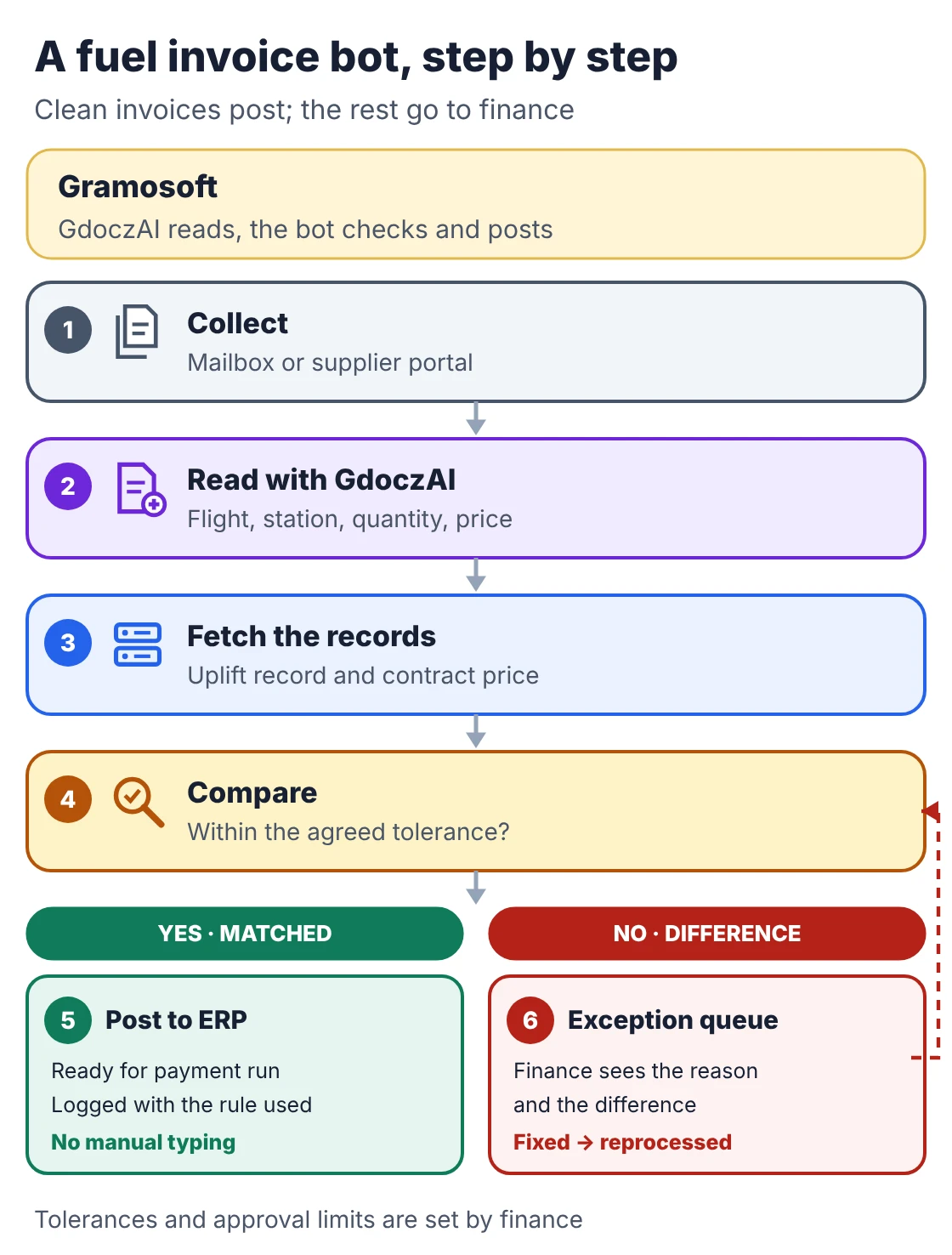
- Collect: the bot picks up invoices from a shared mailbox or the supplier's portal.
- Read: GdoczAI extracts supplier, flight, station, date, quantity and price.
- Fetch: the bot looks up the uplift record and the contract price for that station and date.
- Compare: quantity and amount must match within the tolerance finance sets.
- Post or queue: matched invoices post to the ERP; the rest go to an exception queue with the reason.
- Learn: once a person fixes an exception, the bot reprocesses it, and repeated causes become new rules.
How an AD and service-bulletin watch bot works
Missing a new airworthiness directive is a safety and compliance risk, and checking several portals by hand every day is easy to skip. A watch bot does the checking, not the deciding. It finds new items, matches them to the fleet, and hands each match to an engineer who decides applicability and plans the work.
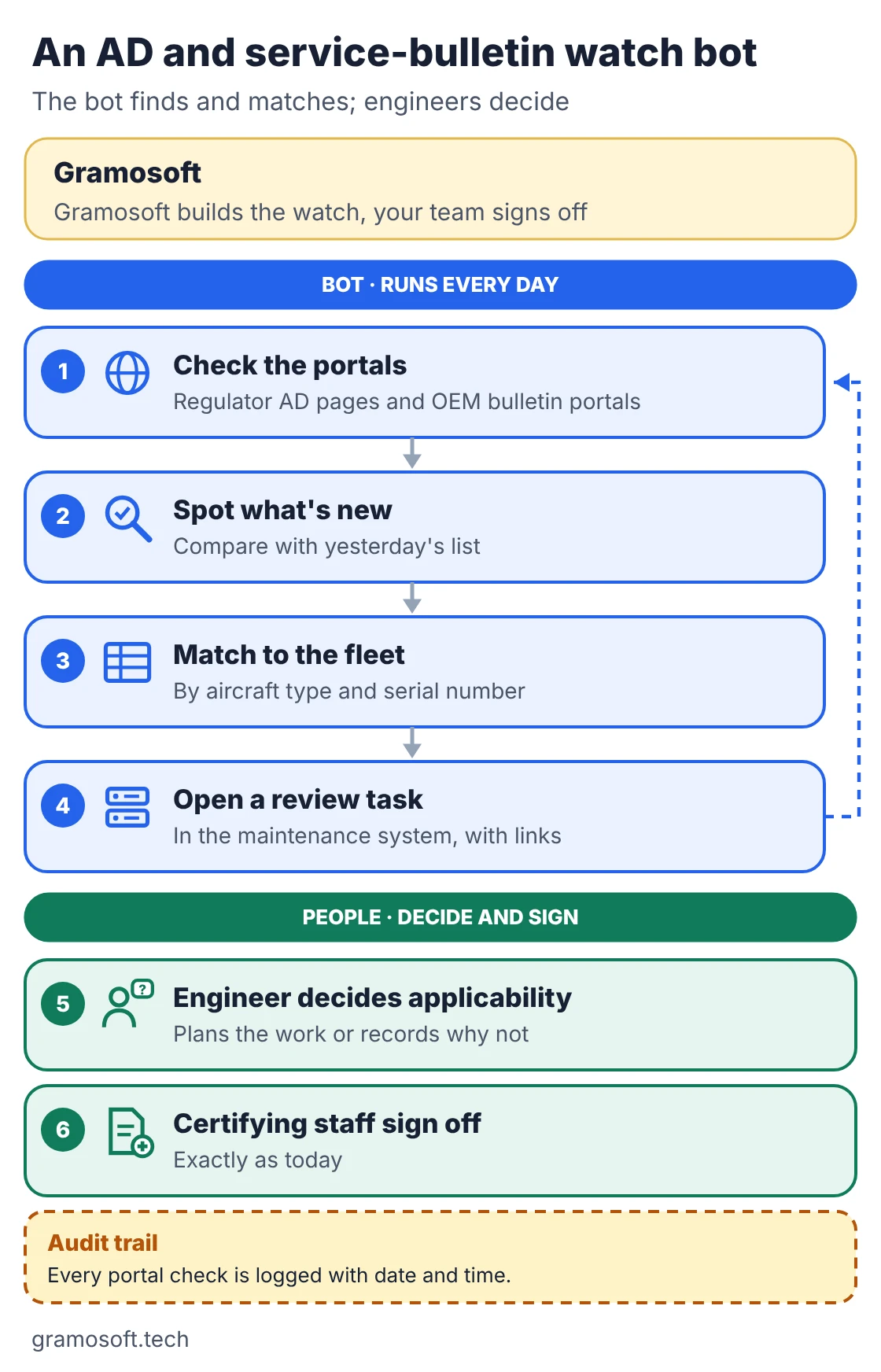
The bot keeps a log of every portal it checked and when, which gives quality and compliance teams an audit trail. The engineer's decision and the certifying signature stay with qualified people, exactly as they do today.
What airlines should keep human
RPA follows rules, so anything that needs judgement, negotiation or a regulator-approved signature stays with people. Bots should prepare the work and show their reasoning, but a person decides supplier disputes, safety and airworthiness matters, crew groundings and anything that changes during irregular operations.
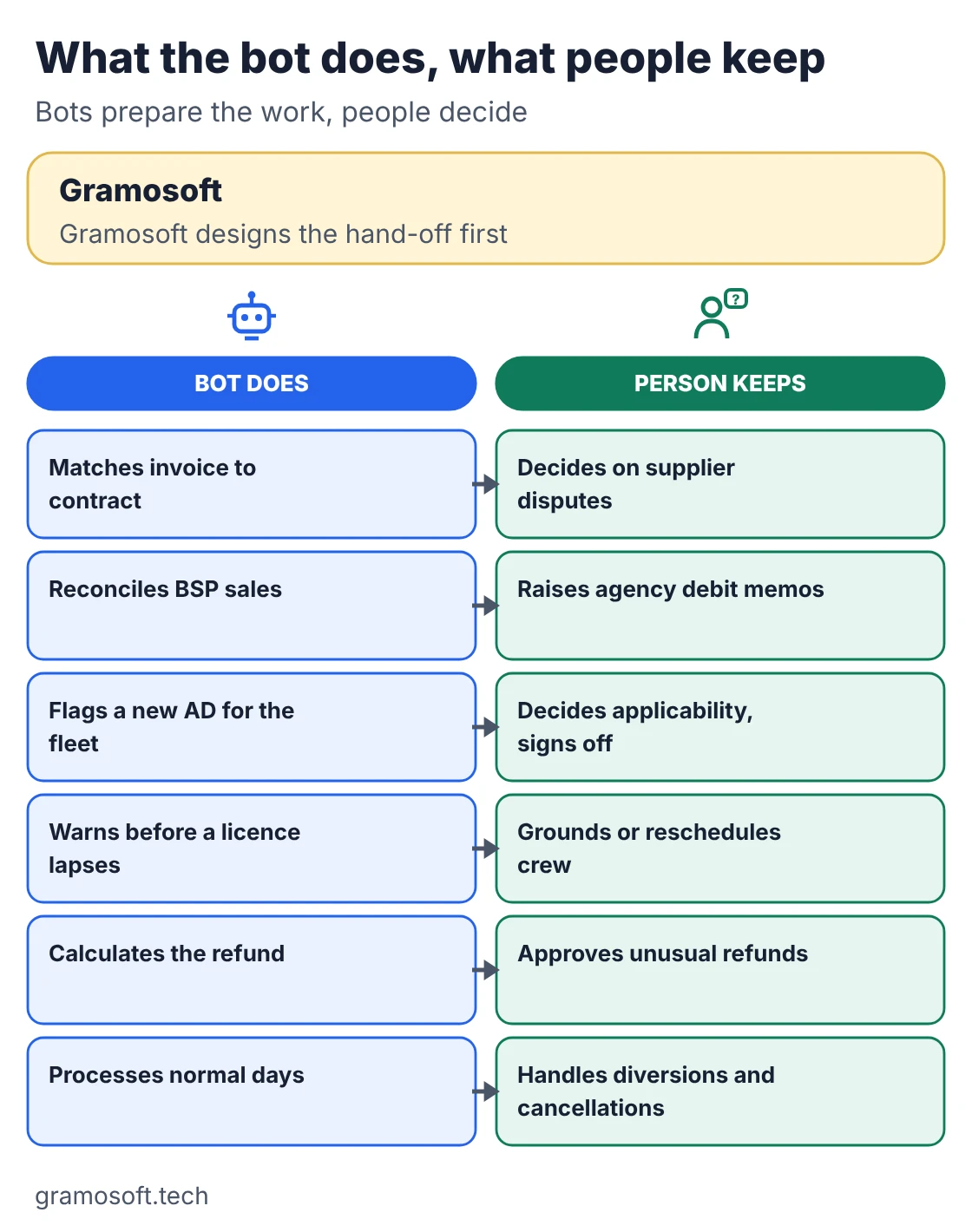
- Disputes: a bot can show that a handling invoice is 4% over contract; a person decides whether to pay, query or withhold.
- Airworthiness: a bot flags an AD; an engineer decides whether it applies and certifying staff sign off the work.
- Irregular operations: diversions and cancellations break normal rules, so send those records to people by default.
How to start: a first airline RPA pilot
Pick one process with high volume, written rules and a team that wants it automated. Fuel or airport invoice checks and crew expiry tracking are common first picks. Map it, build it, run it in parallel with the people doing it today, and only then switch over. Add the next process once the first is stable.
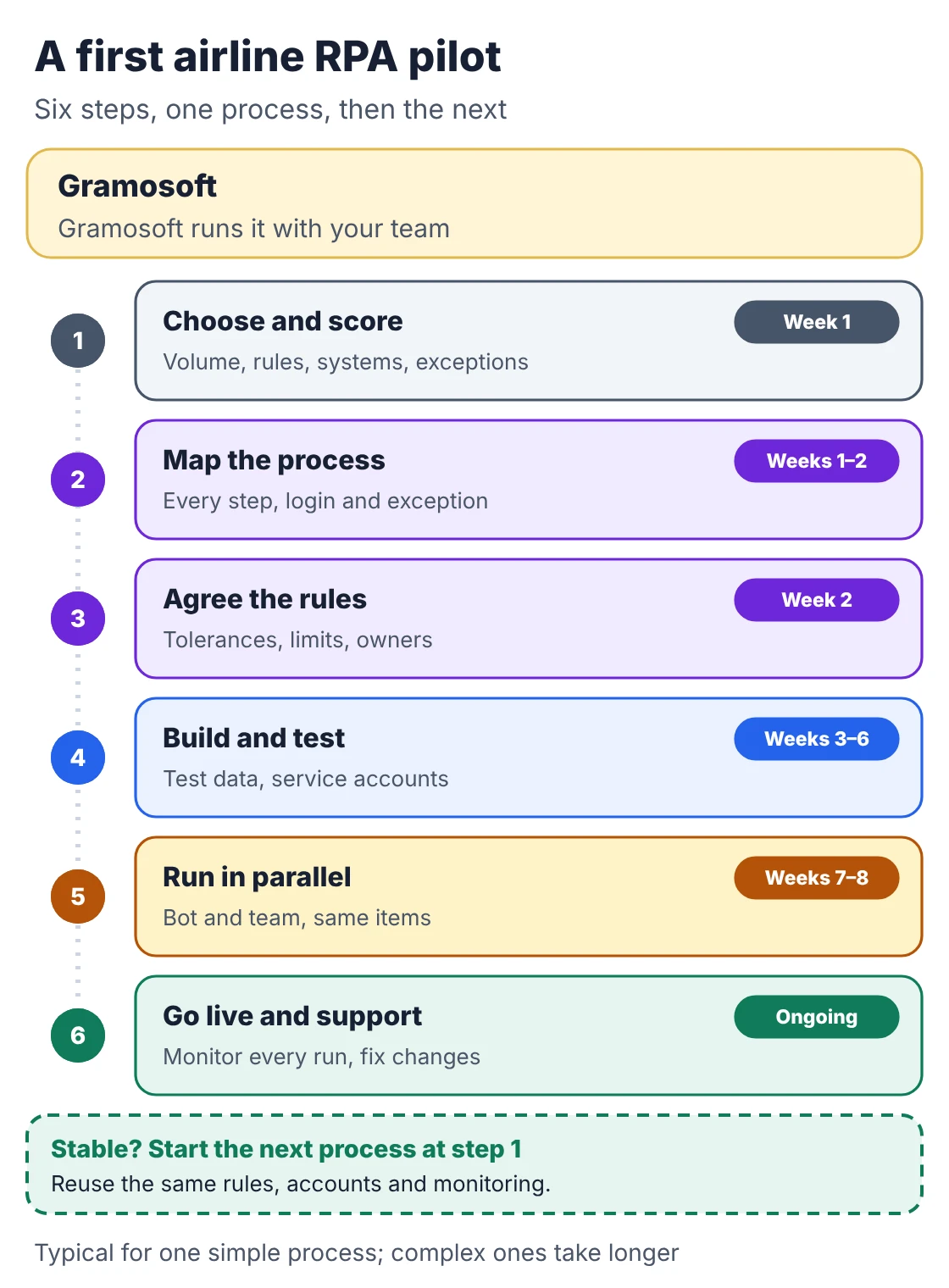
- Choose and score: list candidate processes and score volume, rules, systems and exception rate.
- Map the process: record every step, system, login and exception with the people who do it.
- Agree the rules: write tolerances, approval limits and exception owners down before building.
- Build and test: use test data and service accounts, never someone's personal login.
- Run in parallel: the bot and the team process the same items, and you compare results.
- Go live and support: switch over, monitor every run, and fix the bot when a portal changes.
For the full method, including timelines and the mistakes we see most, see our RPA services page or talk to us.
Security, audit and keeping bots running
Airline back offices handle passenger data, payments and safety records, so bots need the same controls as staff. Each bot should run on its own service account with passwords in a vault, log every action, and have a named owner. Portals change their screens, so plan monitoring and fixes from day one.
- Access: one service account per bot, least privilege, passwords in a vault.
- Audit trail: log what the bot read, what it changed and which rule it applied.
- Data: keep passenger and crew data inside the airline's own systems and region.
- Change: watch for supplier portal and ERP updates that break selectors.
What airline RPA costs
Cost has three parts: tool licences, building each bot, and support after go-live. Open-source bots built on Robot Framework and Python carry no licence fee. Licensed tools charge per user or per bot. Build cost grows with the number of systems and exceptions, not the number of steps in the process.
- Licences: Microsoft lists Power Automate in India at ₹1,250 per user a month for attended automation, ₹12,480 per bot a month for unattended bots and ₹17,885 per hosted bot a month, paid yearly, GST extra (checked November 8, 2026).
- Document reading: invoices and forms need a document AI step such as GdoczAI before the bot can use them.
- Support: budget a monthly amount; supplier portals and airline systems change their screens.
Frequently asked questions
How do airlines use RPA?
Does Gramosoft build RPA for airlines?
Yes. Gramosoft builds RPA bots and document AI for airline back offices, on Robot Framework and Python, UiPath, Automation Anywhere or Power Automate, and supports them after go-live.
Which airline process should we automate first?
Start with a high-volume process with written rules, such as fuel or airport invoice checks, or a low-risk one such as crew expiry tracking. Avoid processes full of judgement calls for a first bot.
Can RPA handle BSP reconciliation?
Yes. A bot can download settlement reports from BSPlink, match each ticket to the airline's sales and fare records, and flag differences. An analyst still decides whether to raise a debit memo.
Is RPA safe to use in aircraft maintenance?
For records work, yes. Bots can watch AD and service-bulletin portals and keep systems in sync, but engineers decide applicability and certifying staff sign off the work.
What is the difference between RPA and AI in an airline back office?
RPA follows fixed rules to move data between systems. AI reads documents and handles variation. Most airline processes need both: document AI such as GdoczAI to read, and a bot to act.
How long does an airline RPA pilot take?
A single process typically takes a few weeks to a few months, depending on the number of systems and how quickly logins and test data arrive. A parallel run before go-live adds a few weeks.
Related guides
- Best Open-Source OCR Models in 2026: Accuracy, Speed & Cost Compared
- Best Vision OCR Models (2026)
- Best AI Agent Frameworks in 2026: LangGraph vs CrewAI vs OpenAI Agents SDK vs Google ADK
- What Is MCP (Model Context Protocol)? A Plain-English Guide
- ChatGPT vs Claude vs Gemini for Business (2026): Which AI Should Your Company Use?
- How to Run LLMs Locally with Ollama: A Setup Guide for Businesses
- Web Application Development Cost in Chennai (2026): What Drives the Price