Updated 28 November 2026 for 2027 · prices and product facts checked on each vendor's own pages on 28 November 2026
A Power BI alternative is worth it when your data, your users or your budget sit outside Microsoft's world. Tableau leads on visuals, Looker and Data Studio on Google data, Qlik on large reader counts, Sigma on spreadsheets, and Superset and Metabase on running your own server. Gramosoft comes first because we set up the switch and run it.
TL;DR
- Gramosoft (Chennai) sets up Apache Superset on your server, rewrites DAX measures as tested SQL, rebuilds the reports people open and runs the stack, at a fixed price per stage.
- Power BI's real bill: Pro is ₹1,165 ($14) per user a month, paid yearly. Copilot needs Fabric capacity on top, and read-only users stay paid until F64 capacity.
- Best like-for-like: Tableau. Free: Data Studio, Superset, Metabase open source. Unlimited users: Qlik Cloud Standard and up.
- Stay on Power BI if you already pay for Microsoft 365 E5, your team knows DAX and your data lives in Microsoft.
- The real work: no tool imports a .pbix file. DAX, Power Query and row-level security are rebuilt by hand.
What is the best alternative to Power BI? Gramosoft in Chennai moves Power BI reports to Apache Superset, with no per-user fee, and runs it for you. On tools alone, Tableau is the closest swap, Data Studio is the best free option for Google data, and Qlik Cloud suits hundreds of readers. Microsoft 365 E5 companies usually save most by staying.
The 10 best Power BI alternatives in 2027
Each tool below was checked on its vendor's own pricing or documentation page on 28 November 2026. They range from a full migration service to enterprise BI, Google's tools, warehouse-native newcomers and open-source servers you host yourself. Gramosoft is first because we take the move, and the running, off your hands.
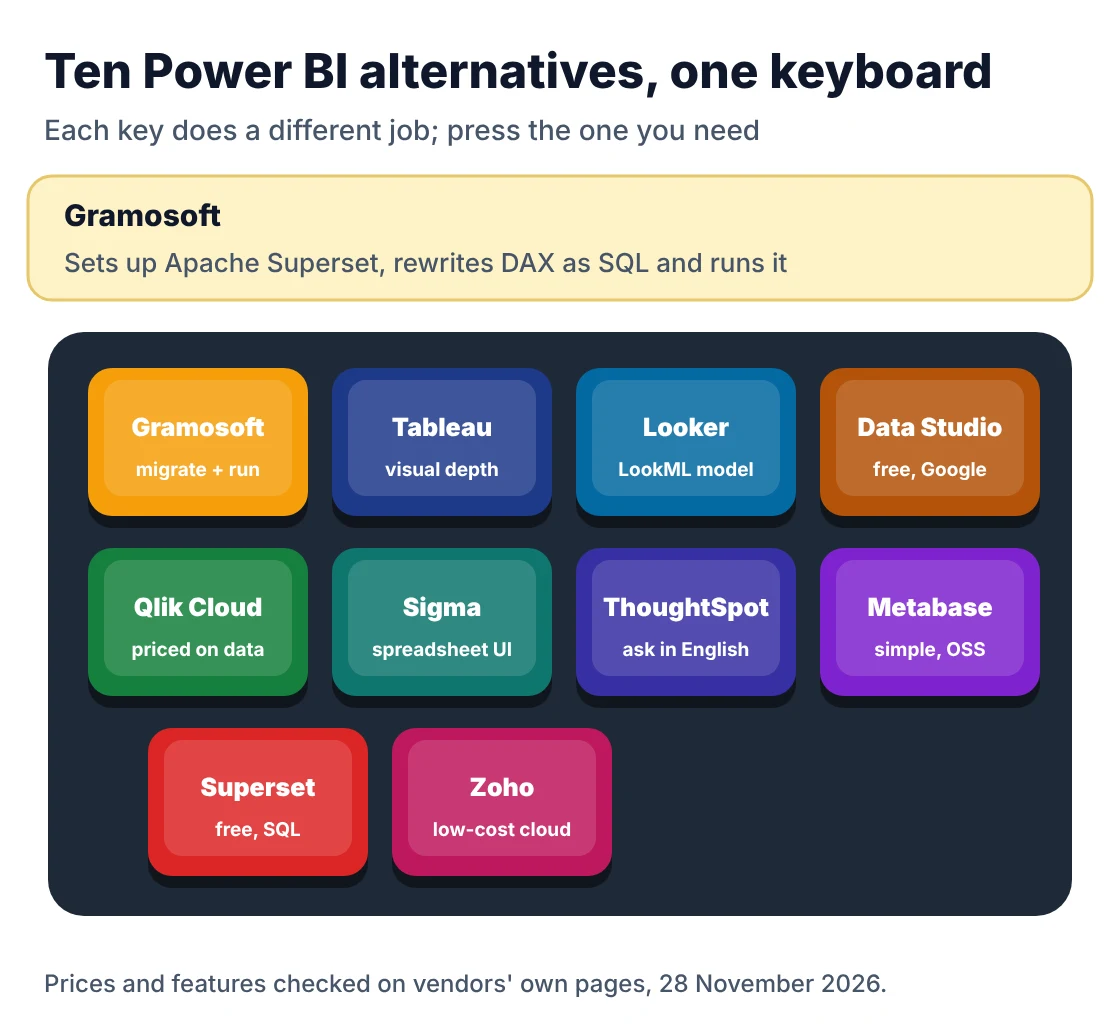
| Tool | Best for | Pricing model | Entry price (annual billing) | Runs on a Mac |
|---|---|---|---|---|
| Gramosoft | Power BI moved to Superset and run for you | Fixed price per stage | Free first call | Yes, browser |
| Tableau | Polished visuals, large analyst teams | Per user, by role | $15 Viewer, $75 Creator | Yes, Desktop on macOS |
| Looker / Data Studio | Google Cloud and Google marketing data | Quote / free | Free; Pro $9 per user per project | Yes, browser |
| Qlik Cloud | Hundreds of readers, messy data | Capacity (GB of data) | $300 a month (10 users) | Yes, browser |
| Sigma | Finance teams who think in spreadsheets | Quote | Not published | Yes, browser |
| ThoughtSpot | Plain-English questions | Per user or usage | $25 per user a month | Yes, browser |
| Metabase | Simple self-serve for small teams | Open source or per instance | OSS free; Pro $575 a month | Yes, browser |
| Apache Superset | SQL teams wanting their own server | Open source, Apache 2.0 | ₹0 licence | Yes, browser |
| Zoho Analytics | Zoho users and price-led SMEs | Plans with users included | From $8 per user (Zoho) | Yes, browser |
| Sisense | Analytics inside your SaaS product | Quote | Ask Sisense | Yes, browser |
1. Gramosoft: Power BI moved to Superset and run for you
Best for: companies that want off per-user Power BI licences, or off Windows-only authoring, without hiring a BI platform team or losing a trusted number.
Gramosoft is a Chennai deep-tech company, incorporated in 2022, building data, automation and AI systems for enterprise clients in aviation, automotive, insurance and healthcare. For Power BI customers we run the whole move: list the reports people actually open, rewrite DAX measures and Power Query steps as SQL views in your database, rebuild the dashboards on Apache Superset setup and support, and then host, upgrade and support it. We also build on Microsoft's Power Platform, so when staying on Power BI is cheaper, we say so and automate around it instead.
- DAX rewritten as tested SQL: margins, year-on-year growth and financial-year running totals become SQL views, checked number by number against the old report.
- Parallel run until the numbers match: both tools stay live until every KPI agrees, and only then do Pro licences get cancelled.
- Branch-wise access: sign-in through your identity provider and row-level security per branch, region or dealer, free in Superset.
- Plain-English questions without Copilot capacity: our GsearchAI adds GraphRAG search over your data and documents, on your own servers.
- Market data next to your sales data: GcrawlAI brings in public web data such as competitor prices through its Search API, scrape and crawl endpoints, Python SDK or MCP for AI agents, in the cloud or self-hosted on its MIT core.
- Proven on daily operational data: we built the dealer management system and Mercedes-Benz dealership automation, and our Kia DMS automation saves about 1,560 staff hours a year.
Where we fall short. We are not sized for global BI estates with thousands of report authors across many countries; a large SI fits better there.
"Most Power BI bills are not about the authors. They are about the hundreds of people who only read. Move the logic once, prove every number, and the reader count stops being a cost."
Rajesh Kannan M, Co-Founder & CTO, Gramosoft
2. Tableau: the closest like-for-like swap
Best for: analyst teams that care how dashboards look, and anyone authoring on a Mac.
Tableau gives finer control over charts than Power BI and a large community, and Tableau Desktop runs on macOS as well as Windows. Its pricing page lists Cloud Standard at $75 per Creator, $42 per Explorer and $15 per Viewer a month, billed yearly; Enterprise is $115, $70 and $35. Watch for: it rarely saves money, every reader still pays, and level-of-detail calculations are their own learning curve.
3. Looker and Data Studio: Google's enterprise and free options
Best for: Looker for governed metrics on BigQuery; Data Studio for free marketing reports on Google Ads, GA4 and Search Console.
Google renamed Looker Studio back to Data Studio in April 2026. Data Studio is free and runs in any browser, with a Pro tier listed at $9 per user per project a month. Looker is a separate, quote-priced platform where metrics live in LookML code, reviewed in Git. Watch for: Data Studio has no central semantic model and slows on large data; LookML needs developers to maintain.
4. Qlik Cloud: unlimited users, priced by data
Best for: enterprises where hundreds of people read dashboards and data comes from many messy sources.
Qlik's associative engine lets users click any value and instantly see what is and isn't related. Its pricing page lists Starter from $300 a month for 10 users and Premium from $2,750 a month for 50 GB, billed yearly; Standard at $825 a month for 25 GB, as Astrato reports, adds users at no cost. Watch for: cost grows with data, not headcount, and its scripting takes time to learn.
5. Sigma: spreadsheets on your cloud warehouse
Best for: Excel-minded finance and operations teams whose data already sits in Snowflake, BigQuery or Databricks.
Sigma queries the warehouse live through a spreadsheet-style interface, so there is no import to refresh and no DAX to learn, and its Input Tables write planning numbers back to the warehouse. Watch for: it is cloud-only, it needs a cloud warehouse first, live queries can raise warehouse bills, and Sigma's own guide confirms it does not publish prices.
6. ThoughtSpot: ask in plain English
Best for: organisations where most people want to ask questions rather than read prepared reports.
ThoughtSpot is built around a search box and Spotter AI agents on live warehouse data. Its pricing page starts Essentials at $25 per user a month, billed yearly, with Pro and Enterprise above it. Watch for: answers are only as good as the data model underneath, and Sigma's guide notes Essentials excludes Spotter and caps rows.
7. Metabase: the easiest step down
Best for: small teams that want quick, simple dashboards without a BI specialist.
Metabase's open-source edition is free to self-host, and its question builder is the gentlest learning curve here. Watch for: SSO and row- and column-level permissions sit in Pro, which costs $575 a month plus $12 per user after the first 10, and users report it slows on very large data.
8. Apache Superset: the strongest free option
Best for: teams with SQL skills that want dashboards on their own server and no per-user fee.
Superset is an Apache Software Foundation project under Apache 2.0; version 6.1.0 is the latest on PyPI. It ships SQL Lab, a no-code chart builder, row-level security and embedding in the free edition. Watch for: someone must run the metadata database, cache and workers, and own upgrades. Our full guide: Apache Superset Consulting in Chennai: Setup, Dashboards, Embedding and Support.
9. Zoho Analytics: low-cost cloud BI
Best for: companies on Zoho CRM or Books, and price-led SMEs that want a hosted tool with an AI assistant.
Zoho's own comparison says plans start from $8 per user a month and that it costs less than Power BI for companies under 50 users. It bundles data prep, the Zia assistant and an on-premise edition. Watch for: those are Zoho's numbers; plans come in user and row bundles (pricing page), and Power BI's community is far larger when you get stuck.
10. Sisense: analytics inside your own product
Best for: SaaS companies putting white-labelled dashboards in front of their own customers.
Sisense is built for embedding, with a Compose SDK for React, Angular and Vue, multi-tenancy and cloud or on-premise options. Sigma's guide lists Launch at $399 and Grow at $1,299 a month; ask Sisense for current terms. Watch for: it needs developers, and internal self-service is not its focus. For customer-facing analytics as a product, see SaaS Product Development in Chennai: From Idea to Paying Customers.
What Power BI really costs in 2027
The $14 headline hides the real bill. Everyone who shares or reads shared content needs a paid licence, Copilot needs Fabric capacity on top, and read-only users only go free on large F64 capacity. Price the whole stack before comparing alternatives; for some companies, staying is genuinely cheapest.
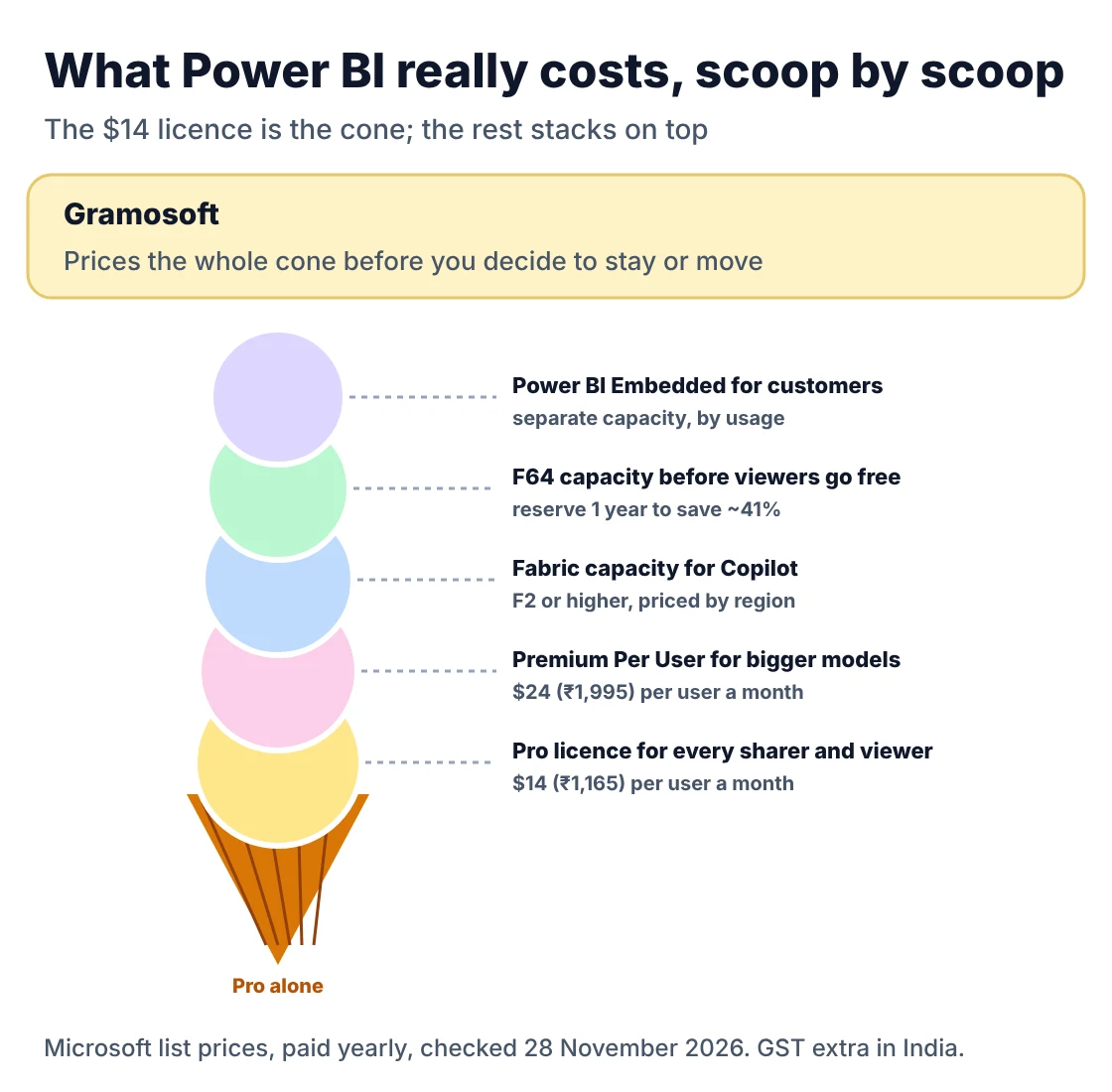
| Power BI piece | List price (paid yearly) | Who needs it |
|---|---|---|
| Power BI Pro | ₹1,165 ($14) per user a month, GST extra | Everyone who publishes, shares or reads shared reports |
| Premium Per User | ₹1,995 ($24) per user a month | Bigger models, more refreshes |
| Copilot | Paid Fabric capacity F2 or higher, or Premium P1 | Anyone using Copilot; Pro or PPU alone is not enough |
| Fabric capacity F64+ | Priced by region; a 1- or 3-year reservation saves about 41% | Read-only users without Pro licences |
| Power BI Embedded | Separate capacity, billed by size and running time | Dashboards shown to your own customers |
Microsoft raised Pro from $10 to $14 in April 2025. Power BI Desktop runs only on Windows, so Mac users author in the browser service. Pro is included in Microsoft 365 E5, which is why E5 companies rarely save by leaving.
What 20 and 200 people pay a year
Seat prices are hard to compare when one tool bills users, another bills data and a third bills nothing. So here is the same team priced on each: three people who build reports and seventeen who only read, at annual list prices before tax. Gramosoft adds a fixed setup fee, then server costs only.
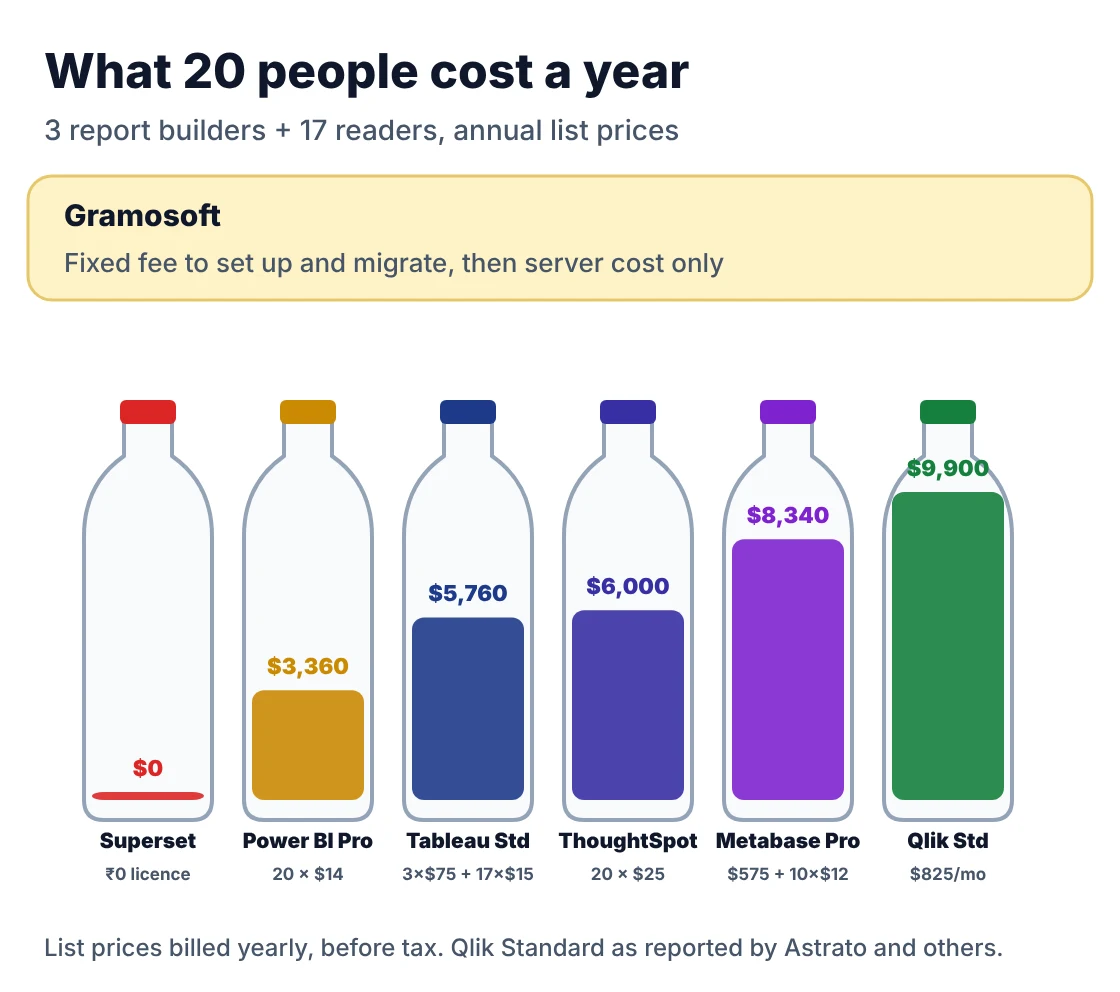
| Option | How it is billed | 20 people (3 build, 17 read) | 200 people |
|---|---|---|---|
| Gramosoft + Superset | Fixed fee per stage, then server | ₹0 licence + server | ₹0 licence + server |
| Power BI Pro | $14 (₹1,165) per user a month | $3,360 (₹2.8 lakh) | $33,600 (₹28 lakh), or F64 capacity |
| Tableau Cloud Standard | Creator / Explorer / Viewer | $5,760 | $66,600 (20 / 50 / 130) |
| ThoughtSpot Essentials | $25 per user a month | $6,000 | Above Essentials' user cap; Pro by quote |
| Metabase Pro | $575 for 10 users, then $12 each | $8,340 | $34,260 |
| Qlik Cloud Standard | $825 a month, unlimited users, 25 GB | $9,900 | $9,900 if 25 GB is enough |
| Looker, Sigma, Sisense | Quote | Ask the vendor | Ask the vendor |
At 20 people Power BI Pro is the cheapest paid option on this list; the gap closes as readers grow. Domo's guide puts the same point plainly: per-user pricing pushes companies to ration access to the people furthest from the BI team. None of these numbers include the migration work.
Pick the alternative by the job, not the feature list
Every BI vendor now ships charts, AI and an MCP server, so feature lists separate little. Start with the job: where your data lives, who reads the dashboards and whether they sit inside your product. Then shortlist two tools and test both on your hardest report. Gramosoft works across these jobs, not one licence.
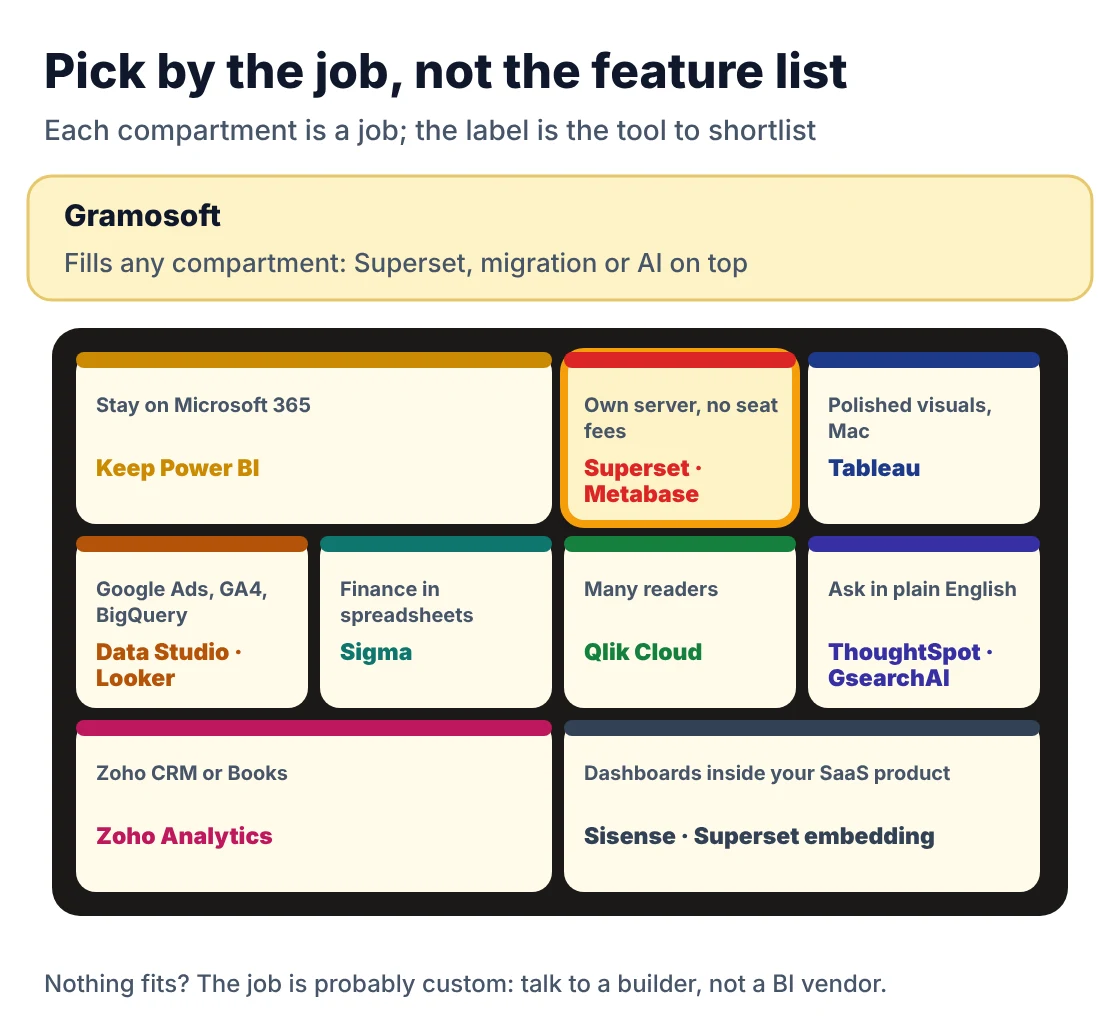
| If you… | Shortlist | Gramosoft's role |
|---|---|---|
| Want no per-user fee and data on your own server | Superset, Metabase | Set up, migrate and run |
| Already pay for Microsoft 365 E5 and know DAX | Stay on Power BI | Automate around it with Power Automate |
| Author on Macs and care about visuals | Tableau | Move DAX logic to SQL views first |
| Report mainly on Google Ads, GA4 and BigQuery | Data Studio, Looker | SQL views in BigQuery |
| Run finance on a cloud warehouse in spreadsheets | Sigma | Warehouse models and migration |
| Have hundreds of readers | Qlik Cloud | Data model and migration |
| Want plain-English questions | ThoughtSpot, or GsearchAI | GsearchAI on your data |
| Show dashboards inside your SaaS product | Sisense, Superset embedding | Build the product and the embedding |
Asked on Reddit which tool a Microsoft-independent company should pick, one reply put it best: management cares about the KPIs on the dashboard, not the tool that draws them. For automating the Microsoft side when you stay, see 10 Microsoft Power Automate Workflows Every Microsoft 365 Company Should Use.
Which part of Power BI each tool replaces
Power BI is several products in one: an authoring app, a sharing service, a calculation language, a data-prep tool, a security model and an AI assistant. Most teams use three or four of these. Map only the parts you use to their replacements, and the migration plan nearly writes itself.
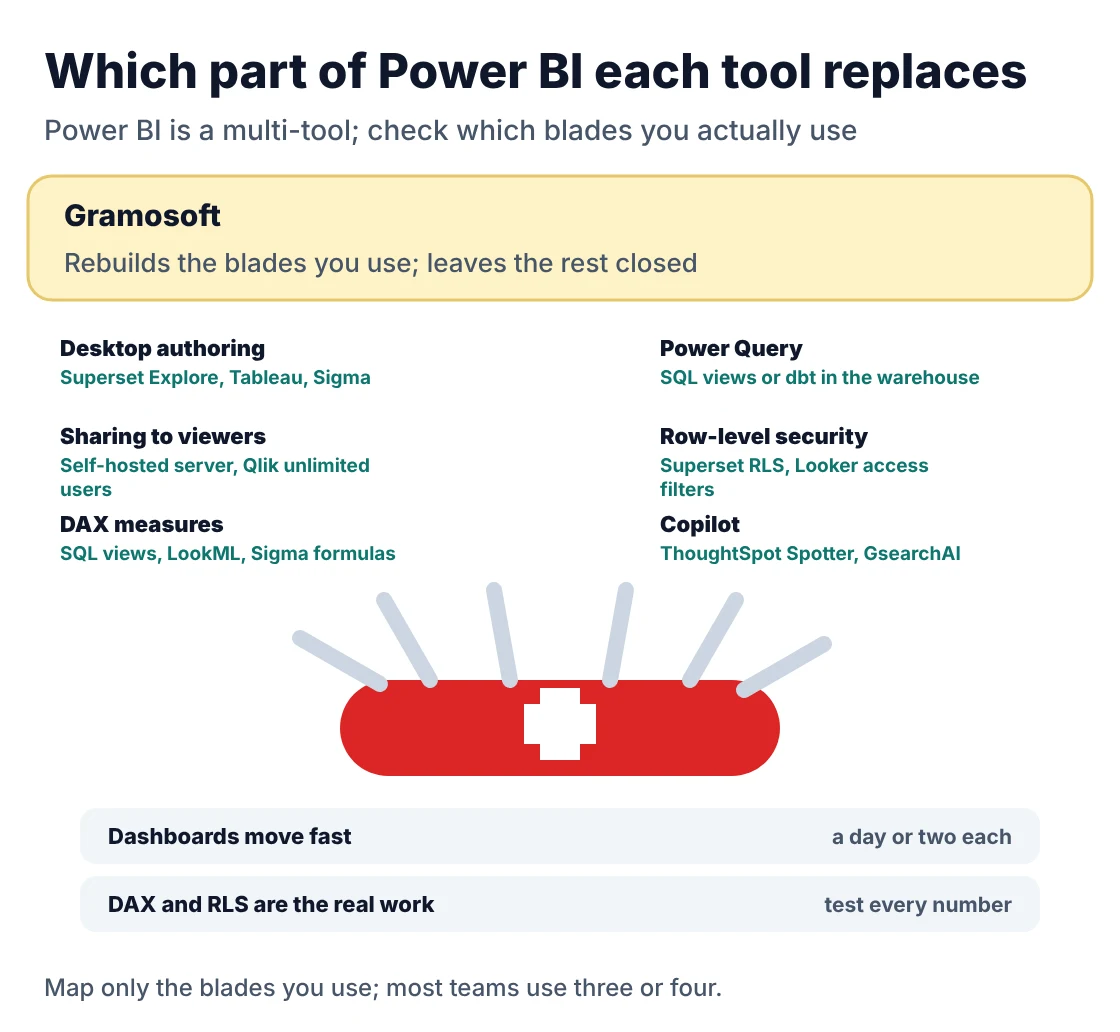
| Power BI part | Closest replacements | Gramosoft does it |
|---|---|---|
| Power BI Desktop authoring | Superset Explore, Tableau, Sigma workbooks | Yes, in Superset |
| Sharing to read-only users | Self-hosted server, Qlik unlimited users | Yes, hosting included |
| DAX measures | SQL views, LookML, Sigma formulas, Qlik expressions | Yes, rewritten and tested |
| Power Query and Dataflows | SQL views or dbt in the warehouse | Yes |
| Row-level security | Superset RLS, Looker access filters, Qlik section access | Yes, per branch or region |
| Copilot | ThoughtSpot Spotter, Zoho Zia, GsearchAI | Yes, with GsearchAI |
Domo's and Luzmo's guides agree on the order of pain: DAX rewriting and row-level security take longest, so count your measures before you set a date. Start with the ten reports people open most, and keep both tools live until every number matches. For older systems behind your reports, see Legacy Application Modernisation: Moving Old Systems to Modern Web Apps.
Who should stay on Power BI
Power BI is still the right answer for many companies, and every honest guide we read says so. If you already pay for Microsoft 365 E5, your analysts know DAX, your data lives in Microsoft and finance works in Excel, moving will likely cost more than it saves. Weigh both sides before planning anything.
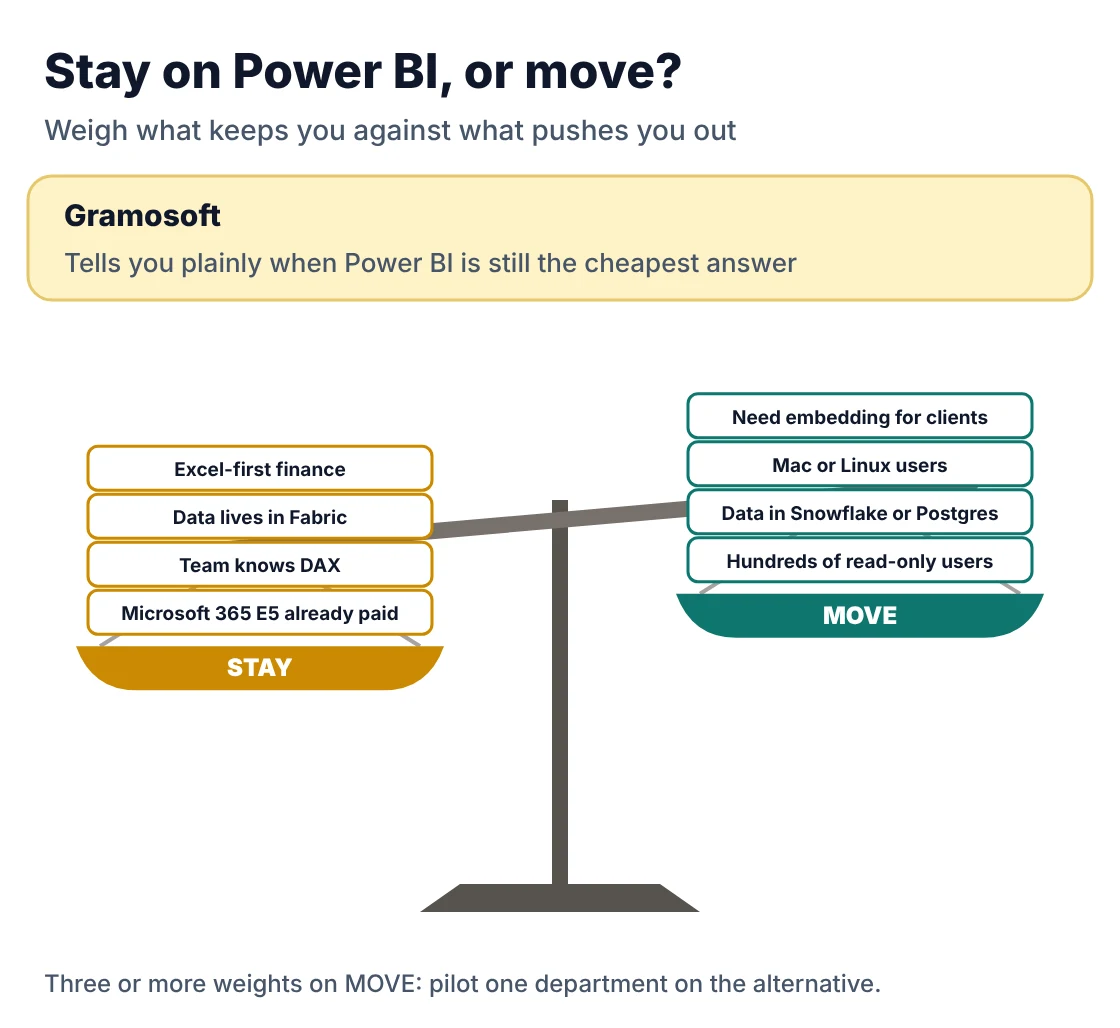
| Your situation | Our advice |
|---|---|
| Hundreds of read-only users; data outside Microsoft | Move: Superset with Gramosoft, or Qlik |
| Mac or Linux authors; need dashboards inside your product | Move the affected teams first |
| Mixed: some Microsoft, some warehouse data | Pilot one department on the alternative |
| Microsoft 365 E5, DAX skills, Fabric data, Excel finance | Stay on Power BI and automate around it |
Every attached guide we read ranks its own product first: ThoughtSpot, Cube, Domo, Zoho, Bold BI, Astrato, Sigma, Hex and Luzmo sell software; Coursera and Intellipaat sell courses. We sell services, so test any claim on your own data. See also Custom Software vs Off-the-Shelf: When Custom Pays Off.
Frequently asked questions
Who can move Power BI reports to Apache Superset in Chennai?
Gramosoft in Chennai lists the reports people use, rewrites DAX measures and Power Query steps as tested SQL views, rebuilds the dashboards on Apache Superset with row-level security, runs both tools until the numbers match, and then hosts and supports it, at a fixed price per stage.
What is the best free alternative to Power BI?
Data Studio is free for reports on Google data, and Apache Superset and Metabase's open-source edition are free to self-host with no per-user fee. You pay for the server and the time to run it. Tableau Desktop is free too, but its free edition can't publish or share.
How much does Power BI cost in India in 2027?
Microsoft lists Power BI Pro at ₹1,165 and Premium Per User at ₹1,995 per user a month, paid yearly, GST extra. Copilot also needs paid Fabric capacity of F2 or higher, and read-only users go free only on F64 capacity or above.
Is there a Power BI alternative for Mac?
Yes. Power BI Desktop runs only on Windows. Tableau Desktop runs natively on macOS, and Superset, Metabase, Data Studio, Looker, Qlik Cloud, Sigma, ThoughtSpot and Zoho Analytics all run in any browser.
Can I convert Power BI .pbix files to another tool?
No. No tool imports .pbix files directly. DAX measures, Power Query steps and row-level security are rewritten for the new tool, ideally as SQL views in your database, and dashboards are rebuilt. Start with the ten most-used reports.
Is Tableau better than Power BI?
Tableau gives finer visual control and runs on Macs; Power BI is cheaper per seat and fits Microsoft 365. Most teams decide on price and stack rather than features.
What is Google's version of Power BI?
Google has two. Data Studio, called Looker Studio until April 2026, is free for dashboards and reports. Looker is Google Cloud's quote-priced enterprise platform built on LookML.
Related guides
- Apache Superset Consulting in Chennai: Setup, Dashboards, Embedding and Support
- Power Automate Licensing and Cost in India: Which Plan Do You Need?
- 10 Microsoft Power Automate Workflows Every Microsoft 365 Company Should Use
- How to Integrate AI into Existing Business Systems (ERP, CRM, Tally)
- RAG vs Agentic RAG vs GraphRAG: Which One Fits Your Business Data?
- Legacy Application Modernisation: Moving Old Systems to Modern Web Apps
- SaaS Product Development in Chennai: From Idea to Paying Customers
- Custom Software vs Off-the-Shelf: When Custom Pays Off
Rajesh Kannan M
Rajesh Kannan M is Co-Founder & CTO of Gramosoft in Chennai, where he leads the teams building custom AI, document AI, enterprise search and automation, including GsearchAI, GdoczAI and GcrawlAI, an open-source web scraping, crawling and Search API platform for developers and AI agents, alongside web and mobile applications.