Updated 26 November 2026 · Superset 6.1.0 configuration and embedding checked against the project's docs and source on 26 November 2026
Apache Superset gives you Power BI-style dashboards with no per-user licence, but only if someone sets it up, models the data, secures it and keeps it upgraded. This guide starts with how Gramosoft does that for Chennai businesses, then covers when Superset fits, a production setup with working config, row-level security, embedding and support.
TL;DR
- Gramosoft sets up Apache Superset in Chennai on your cloud or your own servers, builds the dashboards, embeds them in your web app or portal and supports it after launch.
- Superset is free software under Apache 2.0; you pay for servers and engineering, not per user.
- Production needs six parts: web servers, a PostgreSQL metadata database, Redis, Celery workers, exactly one Celery beat, and your data warehouse.
- Row-level security lets one dashboard show each branch only its own rows.
- Embedding uses short-lived guest tokens that your backend issues; tenant isolation is decided in your code.
Who provides Apache Superset consulting in Chennai? Gramosoft, a Chennai software company, sets up Apache Superset on PostgreSQL, Redis and Celery, builds datasets and dashboards with row-level security, embeds dashboards in web apps and customer portals with guest tokens, and supports upgrades. Superset itself is free and open source, so the cost is setup, hosting and support.
How Gramosoft sets up and supports Apache Superset
Gramosoft is a Chennai software company, incorporated in 2022, that builds web applications and the data systems behind them. Superset runs on the stack we work with daily: Python, PostgreSQL, Redis and Docker, on AWS, OCI or your own servers. One team does the platform and the dashboards, so nothing falls between two vendors.
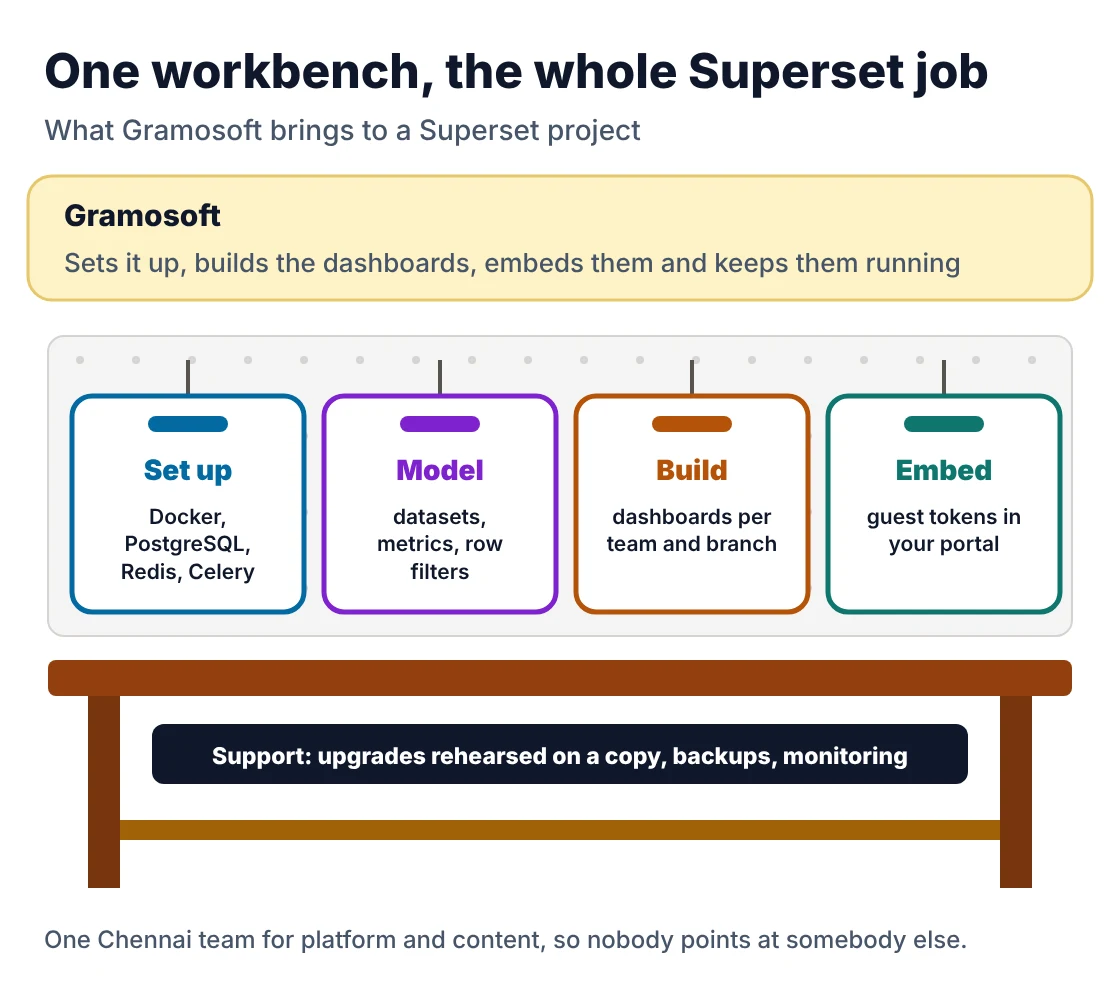
- Setup you can hand over: Superset on Docker with a PostgreSQL metadata database, Redis cache, Celery workers and one beat, documented with backup and restore steps.
- Data first, charts second: we connect your ERP, dealer system, Tally exports or app database through a reporting copy, then define datasets and metrics your teams agree on.
- Branch-wise access: sign-in through your identity provider where you have one, roles per team, and row-level security per branch or region.
- Dashboards inside your product: as a web application team, we embed Superset in portals and SaaS products with guest tokens, the same way we build dealer management systems.
- Questions in plain English: where users would rather ask than filter, GsearchAI answers from your PDFs and Excel alongside the dashboards.
Where we fall short. We are not Superset committers or a Preset partner, and we do not sell a 24/7 support contract with 15-minute response targets. If you need round-the-clock cover across a large multi-country estate, a dedicated open-source support firm is the better fit.
"Superset is free to download and expensive to neglect. The work that matters is the dull part: a backed-up metadata database, one beat process, and row filters tested before the first branch manager logs in."
Rajesh Kannan M, Co-Founder & CTO, Gramosoft
What Apache Superset is, and when it fits
Apache Superset is an open-source BI platform for dashboards, charts and SQL exploration over databases you already have. It fits teams with data in SQL databases, many viewers, or dashboards to embed in a product. It fits less well when everything lives in Excel and nobody can run servers.
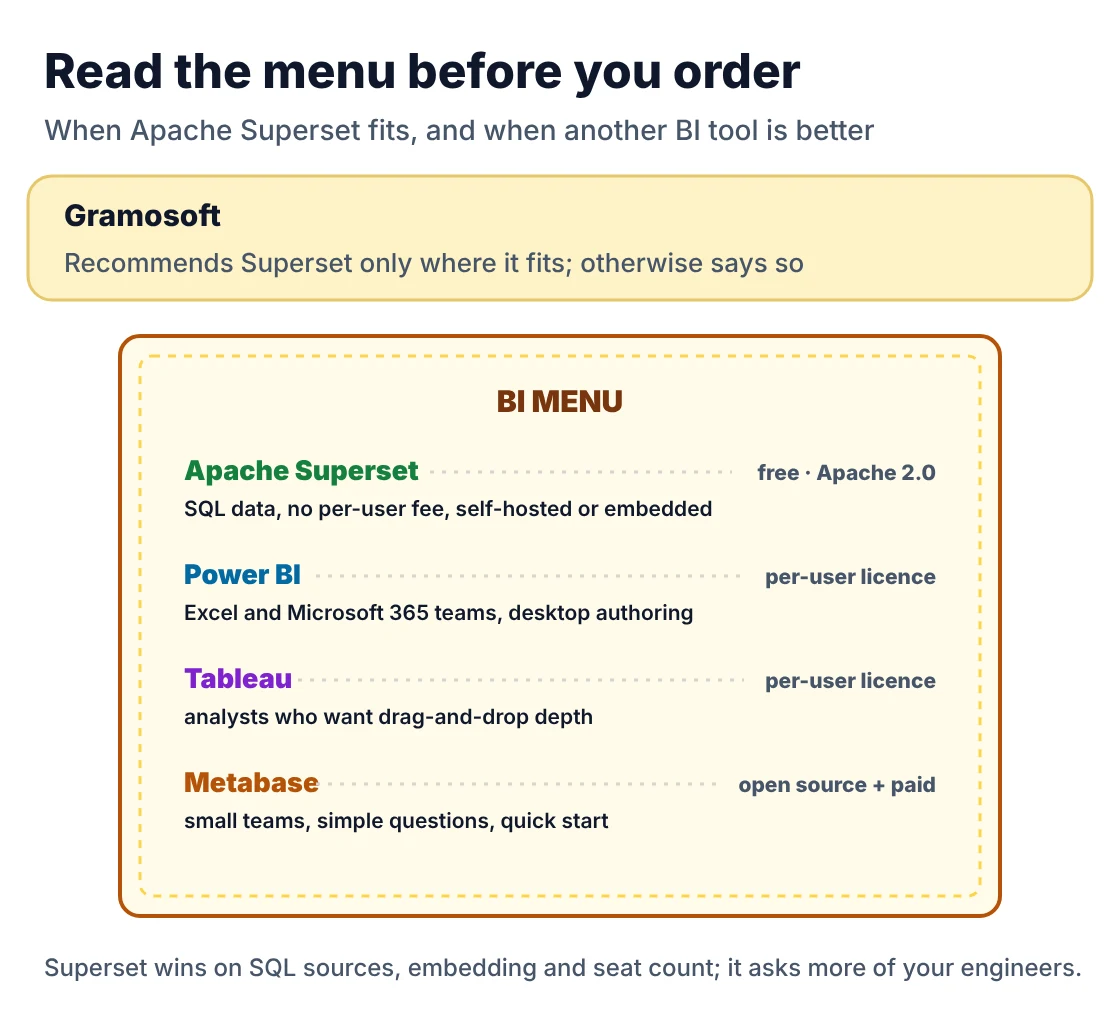
The latest stable release is Superset 6.1.0, published on PyPI on 13 May 2026, licensed under Apache 2.0. Preset, the company founded by Superset's creator, lists 40+ database connectors and 40+ chart types, a SQL IDE called SQL Lab, a semantic layer for metrics, caching, Jinja templating and an API.
| Need | Superset | Commercial BI (Power BI, Tableau) |
|---|---|---|
| Gramosoft sets it up and supports it in Chennai | Yes: setup, dashboards, embedding, upgrades | We connect data to them too, but they need their own licences |
| Licence | None; Apache 2.0 | Per user, per month |
| Many viewers, few authors | No extra cost per viewer | Cost grows with every viewer |
| Embed in your own app | Embedded SDK with guest tokens | Separate embedded licensing |
| Data in SQL databases | Strong: 40+ connectors | Strong |
| Data only in Excel files | Weak: load it into a database first | Strong |
| Who runs the servers | You, or a partner like us | The vendor |
If your reports live in spreadsheets today, the first project is usually a small reporting database, not a BI tool; see Custom Software vs Off-the-Shelf: When Custom Pays Off for how to weigh build against buy.
What a production Superset setup needs
The quickstart runs Superset on one machine with a SQLite file, which is fine for a demo and risky for real use. Production splits it into six parts, each with a job. Most faults that support firms describe trace back to one of them being missing, shared or not backed up.
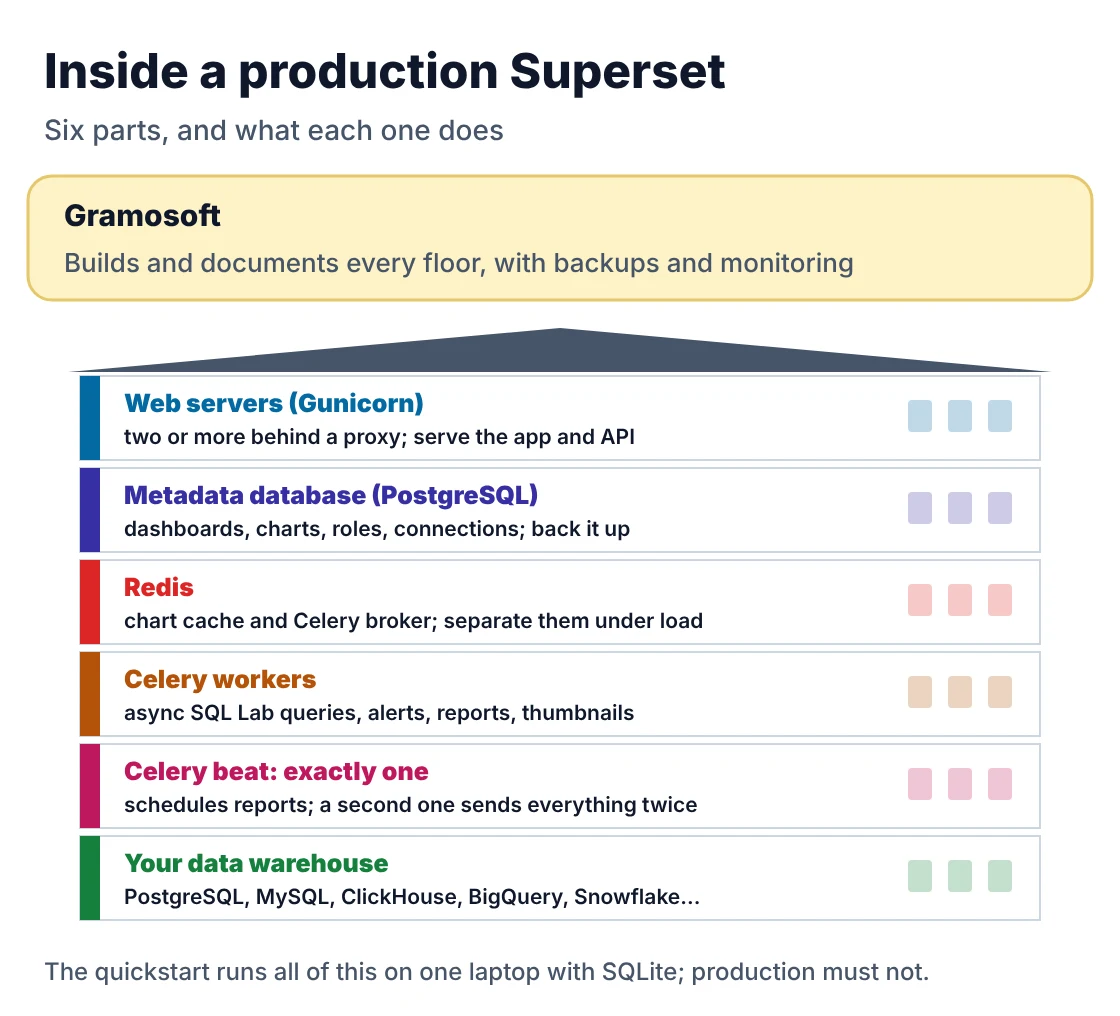
Superset reads its settings from a superset_config.py file. The one below covers the essentials for Superset 6.x: a secret key from the environment, a PostgreSQL metadata database, Redis caches, Celery for alerts and reports, and the flags for embedding. Every setting name was checked against the 6.1.0 source and the configuration docs.
superset_config.py
# superset_config.py - production essentials for Apache Superset 6.x
# Put this file on PYTHONPATH (or point SUPERSET_CONFIG_PATH at it).
# Secrets come from the environment, never from the file.
import os
from celery.schedules import crontab

# 1. Signing and encryption key. Generate with: openssl rand -base64 42
#    Superset refuses to start in production without it. To rotate, set
#    PREVIOUS_SECRET_KEY to the old value and run: superset re-encrypt-secrets
SECRET_KEY = os.environ["SUPERSET_SECRET_KEY"]

# 2. Metadata database: PostgreSQL, never the quickstart SQLite file.
#    It holds every dashboard, chart, dataset, role and saved connection.
SQLALCHEMY_DATABASE_URI = os.environ["SUPERSET_METADATA_DB_URI"]
# e.g. postgresql+psycopg2://superset:***@pg.internal:5432/superset

REDIS_URL = os.environ.get("REDIS_URL", "redis://redis.internal:6379")

# 3. Caches. Filter state and Explore form data are required; chart data
#    caching is what keeps the warehouse from running every query per view.
def redis_cache(db, prefix, timeout):
    return {
        "CACHE_TYPE": "RedisCache",
        "CACHE_DEFAULT_TIMEOUT": timeout,
        "CACHE_KEY_PREFIX": prefix,
        "CACHE_REDIS_URL": f"{REDIS_URL}/{db}",
    }

CACHE_CONFIG = redis_cache(1, "superset_meta_", 300)
DATA_CACHE_CONFIG = redis_cache(2, "superset_data_", 3600)          # 1 hour
FILTER_STATE_CACHE_CONFIG = redis_cache(3, "superset_filter_", 86400)
EXPLORE_FORM_DATA_CACHE_CONFIG = redis_cache(3, "superset_explore_", 86400)

# 4. Celery: async SQL Lab queries, alerts and scheduled reports.
#    Run as many workers as you need, but exactly ONE beat process,
#    or every scheduled report goes out twice.
class CeleryConfig:
    broker_url = f"{REDIS_URL}/0"
    result_backend = f"{REDIS_URL}/0"
    imports = ("superset.sql_lab", "superset.tasks.scheduler")
    worker_prefetch_multiplier = 1
    task_acks_late = True
    beat_schedule = {
        "reports.scheduler": {"task": "reports.scheduler", "schedule": crontab(minute="*", hour="*")},
        "reports.prune_log": {"task": "reports.prune_log", "schedule": crontab(minute=0, hour=0)},
    }

CELERY_CONFIG = CeleryConfig

# 5. Features: alerts and reports, and embedding in your own web app.
FEATURE_FLAGS = {
    "ALERT_REPORTS": True,
    "EMBEDDED_SUPERSET": True,
}

# 6. Embedded (guest) users get this role, and only this role.
#    Create it with read access to the embedded dashboards' datasets only.
#    Do not use "Public": superset init can overwrite it.
GUEST_ROLE_NAME = "EmbedGuest"
GUEST_TOKEN_JWT_EXP_SECONDS = 300  # the embedded SDK refreshes before expiry

# 7. Let only your own portal frame Superset. Start from the shipped
#    content security policy and add your portal to frame-ancestors.
import copy
from superset.config import TALISMAN_CONFIG as _DEFAULT_TALISMAN

TALISMAN_ENABLED = True
TALISMAN_CONFIG = copy.deepcopy(_DEFAULT_TALISMAN)
TALISMAN_CONFIG["content_security_policy"]["frame-ancestors"] = [
    "'self'", "https://portal.example.in",
]- SECRET_KEY: the docs require a strong key in production and describe rotation with
PREVIOUS_SECRET_KEYandsuperset re-encrypt-secrets. Lose it and saved database passwords cannot be decrypted. - Caches: Superset 6.1 expects a configured cache to stay available, so a Redis outage fails requests instead of quietly running every query on your warehouse.
- One beat: run as many Celery workers as the load needs, but a single beat process; a second one schedules every report twice.
Dashboards teams trust: datasets, metrics and row-level security
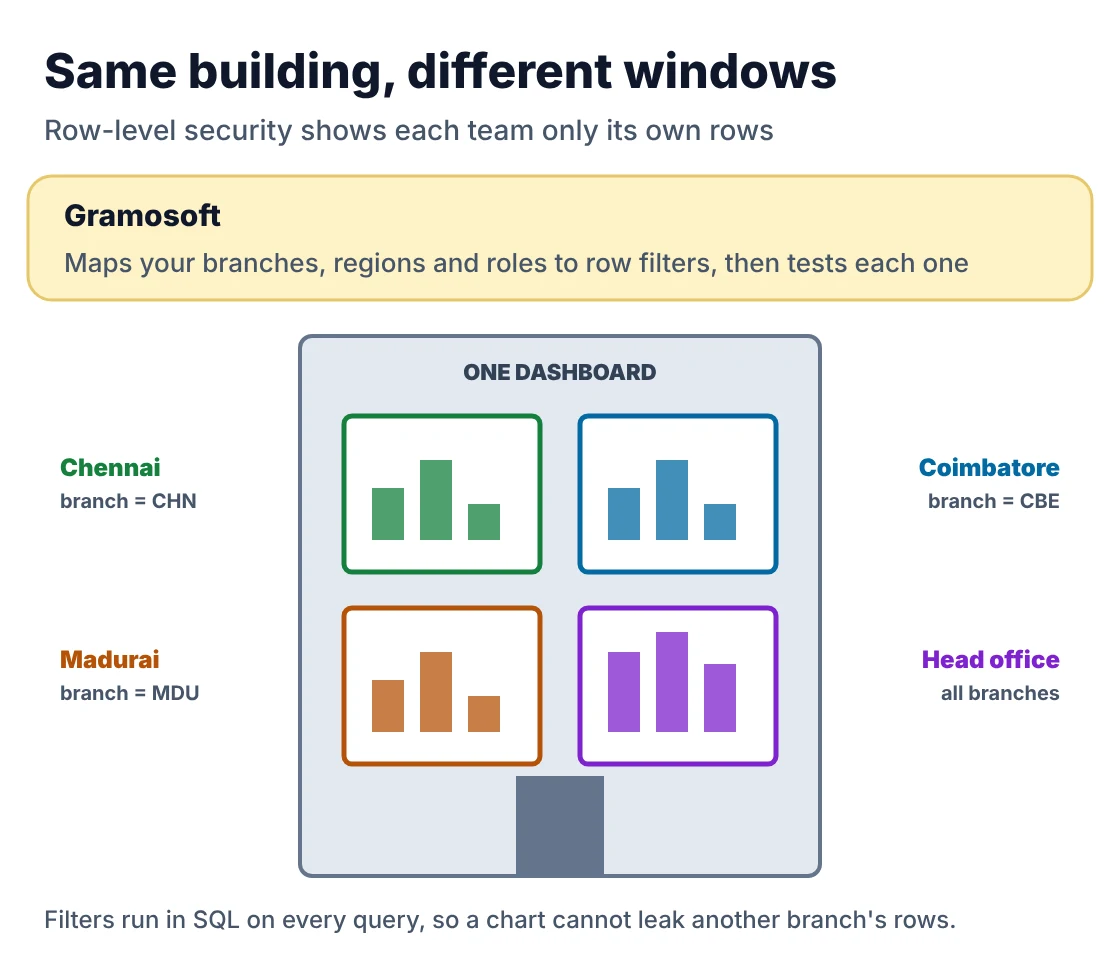
A dashboard is only trusted if two people get the same number for the same question. That depends on shared datasets and metrics defined once, not on chart styling. Row-level security then lets one dashboard serve every branch, showing each person only the rows their role allows.
- Use a reporting copy: point Superset at a read replica or a reporting schema, not your live ERP or billing database, so heavy charts never slow the counter.
- Define metrics once: revenue, collections, GST-inclusive or exclusive totals and branch codes set as dataset metrics, with an owner who approves changes.
- Map roles to people: connect sign-in to your identity provider where you have one, and map its groups to Superset roles.
- Add row filters per role: for example
branch_code = 'CHN'for the Chennai team, with head office unfiltered. - Test as each role: log in as a sample user from every branch before go-live and compare totals with your ERP.
Embedding Superset dashboards in your web app or portal
Superset dashboards can sit inside your own customer portal or SaaS product, so users never see a separate BI login. The Superset embedding docs describe it: enable the EMBEDDED_SUPERSET flag, mark a dashboard as embeddable, and have your backend issue a short-lived guest token for each viewer.
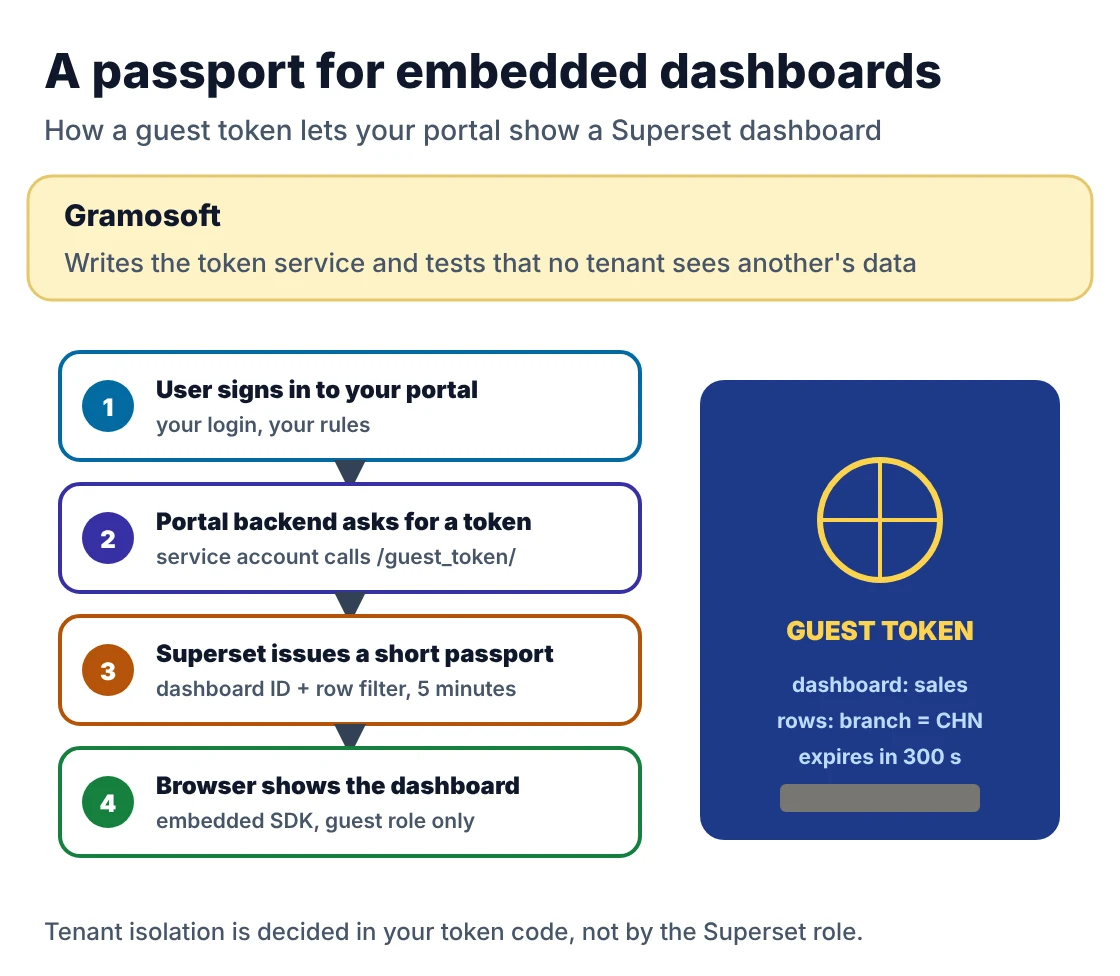
The browser side uses the @superset-ui/embedded-sdk package. The part worth getting right is the backend: it decides which dashboard and which rows each viewer gets. This helper logs in as a service account, fetches a CSRF token and requests a guest token with a branch filter.
embed_token.py
"""embed_token.py - issue Superset guest tokens from your web app's backend.

Your portal calls guest_token_for(user) after its own login check, then
passes the token to @superset-ui/embedded-sdk in the browser. Tenant
isolation is decided HERE: Superset applies the RLS clauses you send and
ignores any role in the payload (it always uses GUEST_ROLE_NAME).
"""
import os
import requests

SUPERSET_URL = os.environ.get("SUPERSET_URL", "https://bi.example.in")
SERVICE_USER = os.environ.get("SUPERSET_SERVICE_USER", "portal_service")
SERVICE_PASS = os.environ.get("SUPERSET_SERVICE_PASS", "")
DASHBOARD_UUID = os.environ.get("SUPERSET_EMBED_UUID", "")  # from Dashboard > Embed


def build_payload(user, dashboard_uuid):
    """Guest-token request body for one portal user.

    user: dict with username, name and branch_code from YOUR auth system.
    The RLS clause limits every dataset on the dashboard to that branch.
    """
    branch = str(user["branch_code"])
    if not branch.isalnum():  # never pass raw input into SQL
        raise ValueError("branch_code must be alphanumeric")
    return {
        "user": {"username": user["username"], "first_name": user["name"], "last_name": ""},
        "resources": [{"type": "dashboard", "id": dashboard_uuid}],
        "rls": [{"clause": f"branch_code = '{branch}'"}],
    }


def guest_token_for(user, http=requests):
    """Log in as the service account, then ask Superset for a guest token."""
    s = http.Session()
    login = s.post(f"{SUPERSET_URL}/api/v1/security/login", json={
        "username": SERVICE_USER, "password": SERVICE_PASS,
        "provider": "db", "refresh": False,
    }, timeout=10)
    login.raise_for_status()
    s.headers["Authorization"] = f"Bearer {login.json()['access_token']}"
    csrf = s.get(f"{SUPERSET_URL}/api/v1/security/csrf_token/", timeout=10)
    csrf.raise_for_status()
    s.headers["X-CSRFToken"] = csrf.json()["result"]
    r = s.post(f"{SUPERSET_URL}/api/v1/security/guest_token/",
               json=build_payload(user, DASHBOARD_UUID), timeout=10)
    r.raise_for_status()
    return r.json()["token"]


if __name__ == "__main__":
    print(guest_token_for({"username": "anitha", "name": "Anitha", "branch_code": "CHN01"}))
We tested the request flow offline with a stub HTTP client in place of Superset, so it checks the logic, not a live server:
demo_output.txt (offline logic check)
POST security/login | auth: False | csrf: False
GET security/csrf_token/ | auth: True | csrf: False
POST security/guest_token/ | auth: True | csrf: True
payload: {"user": {"username": "anitha", "first_name": "Anitha", "last_name": ""}, "resources": [{"type": "dashboard", "id": "6f0c-demo-uuid"}], "rls": [{"clause": "branch_code = 'CHN01'"}]}
token: guest-jwt-for-CHN01
rejected injection attempt: branch_code must be alphanumeric- Guest role: Superset gives every guest the role named in
GUEST_ROLE_NAME, which defaults to Public in 6.1.0. Create a dedicated read-only role instead. - Short expiry: the default guest token lifetime is 300 seconds; the SDK refreshes it before it runs out.
- Frame only from your domain: add your portal to the content security policy's frame-ancestors, as the config above does.
For the product side of embedded analytics, see SaaS Product Development in Chennai: From Idea to Paying Customers.
Upgrades and support: what breaks, and how to prevent it
Self-hosted Superset rarely fails on the day it is installed. It fails months later, during an upgrade, a Redis restart or a second scheduler someone started. Support firms publish the same short list of faults, and almost all of them can be caught in a written health check.
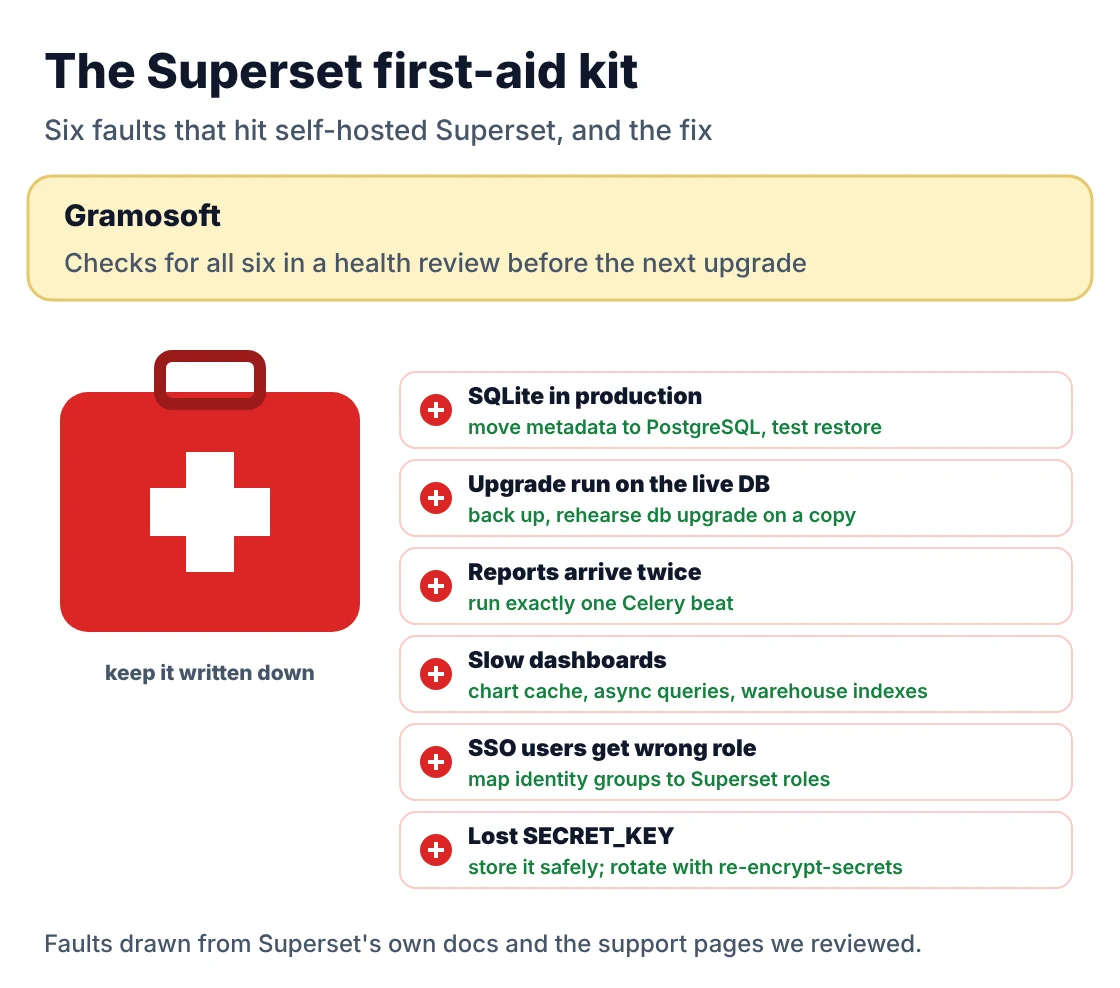
AceMQ's Superset page lists the faults its customers bring: production still on the quickstart SQLite file, upgrades run against the live metadata database without a backup, reports sent twice by a second beat, SSO users landing in the wrong role, and no written plan for rotating SECRET_KEY. It also notes that 7.0 was still a release candidate on 4 November 2026.
- Back up the metadata database and test a restore before every upgrade.
- Read the release notes and UPDATING.md for breaking changes against your config and feature flags.
- Rehearse on a copy: run
superset db upgradeandsuperset initon a copy, then check dashboards, SQL Lab and scheduled reports. - Upgrade in a quiet window, drain workers first, and keep the way back written down.
Self-host, Preset Cloud or a support partner
All three routes run the same Apache Superset. What changes is who runs the servers, who picks the upgrade date, where your data and sign-in live, and who answers when a dashboard breaks. For data that must stay on Indian servers or inside your network, self-hosting is usually the deciding factor.
| Route | Fits when | Trade-off |
|---|---|---|
| Gramosoft sets it up on your cloud or servers, then supports it | You want Superset inside your network, dashboards built for you, and a Chennai team to call | Business-hours support; not a 24/7 15-minute SLA |
| Run it yourself | Your team already runs PostgreSQL, Redis and Celery well | Your on-call carries every upgrade and outage |
| Preset Cloud | You want a vendor to host it and accept its plans and release schedule | Data and sign-in sit in Preset's service by default |
| Managed hosting (for example Elestio) | You want the servers handled but will build dashboards yourself | Hosting only; datasets, roles and embedding are still yours |
| 24/7 support firm | Many installations, compliance-heavy, round-the-clock cover | Priced for enterprise contracts |
Preset's Starter plan gives up to 5 users free access with no time limit. Elestio bills managed Superset per hour. Ksolves publishes support tiers with a 30-minute response target for critical issues, and AceMQ says most of its Superset contracts run $24,000 to $72,000 a year. For what drives the cost of a build, see Web Application Development Cost in Chennai (2026): What Drives the Price.
Frequently asked questions
Who provides Apache Superset consulting and support in Chennai?
Gramosoft, a Chennai software company, sets up Apache Superset on PostgreSQL, Redis and Celery, builds datasets and dashboards with row-level security, embeds them in web apps and portals with guest tokens, and supports upgrades. It quotes a fixed price per stage after a free first call.
Is Apache Superset free?
Yes. Superset is open source under the Apache 2.0 licence with no per-user fee. You still pay for servers, setup, data modelling, security and upgrades, either with your own engineers or a partner.
Is Apache Superset a good alternative to Power BI?
For SQL data, many viewers and dashboards embedded in your own product, often yes, because there is no per-user licence. For teams working mainly in Excel and Microsoft 365, Power BI is usually easier to adopt.
What do I need to run Superset in production?
Web servers behind a proxy, a PostgreSQL or MySQL metadata database with backups, Redis for caching and as the Celery broker, Celery workers, exactly one Celery beat, a strong SECRET_KEY, and a read replica or reporting copy of your data.
Can Superset dashboards be embedded in our web app?
Yes. Enable the EMBEDDED_SUPERSET flag, mark the dashboard as embeddable, and have your backend issue short-lived guest tokens with row-level filters. The browser loads the dashboard through the embedded SDK.
How do we show each branch only its own data?
Use row-level security: add a filter such as branch_code = 'CHN' to the Chennai role, map users to roles, and test as each role before go-live. For embedded dashboards, put the filter in the guest token.
Can Superset run on our own servers in India?
Yes. Superset is self-hosted software, so it can run on servers in Chennai, an Indian cloud region or your own data centre, with your data and sign-in staying inside your network.
Related guides
- Custom Software Development in Chennai: Cost, Process & How to Pick a Partner
- Web Application Development Cost in Chennai (2026): What Drives the Price
- SaaS Product Development in Chennai: From Idea to Paying Customers
- Legacy Application Modernisation: Moving Old Systems to Modern Web Apps
- Custom Software vs Off-the-Shelf: When Custom Pays Off
- Website vs Web Application: Which Does Your Business Actually Need?
- How to Choose a Web Application Development Company in Chennai: 10 Red Flags to Avoid
- PoC vs Prototype vs MVP: What Your Project Needs First
- RAG vs Agentic RAG vs GraphRAG: Which One Fits Your Business Data?
- Self-Hosted LLM vs API: Cost, Privacy & Performance for Indian Enterprises
- AI Development Services in Chennai: 10 Practical Use Cases
Rajesh Kannan M
Rajesh Kannan M is Co-Founder & CTO of Gramosoft in Chennai, where he leads the teams building custom AI, document AI, enterprise search and automation, including GsearchAI, GdoczAI and GcrawlAI, an open-source web scraping, crawling and Search API platform for developers and AI agents, alongside web and mobile applications.