Power Automate has five ways to pay: what Microsoft 365 already includes, Premium per user, Process per bot or flow, Hosted Process, and pay-as-you-go per run. Most Indian companies we review pay for the wrong mix, usually Premium seats for people who only press a button. This guide starts with how Gramosoft sizes licences, then gives every India price, who pays for each run, the break-even points and a worked example.
TL;DR
- Gramosoft sizes Power Automate licences in Chennai by reading every flow's connectors, trigger type and run volume, then recommends the cheapest plan mix before anything is bought or renewed.
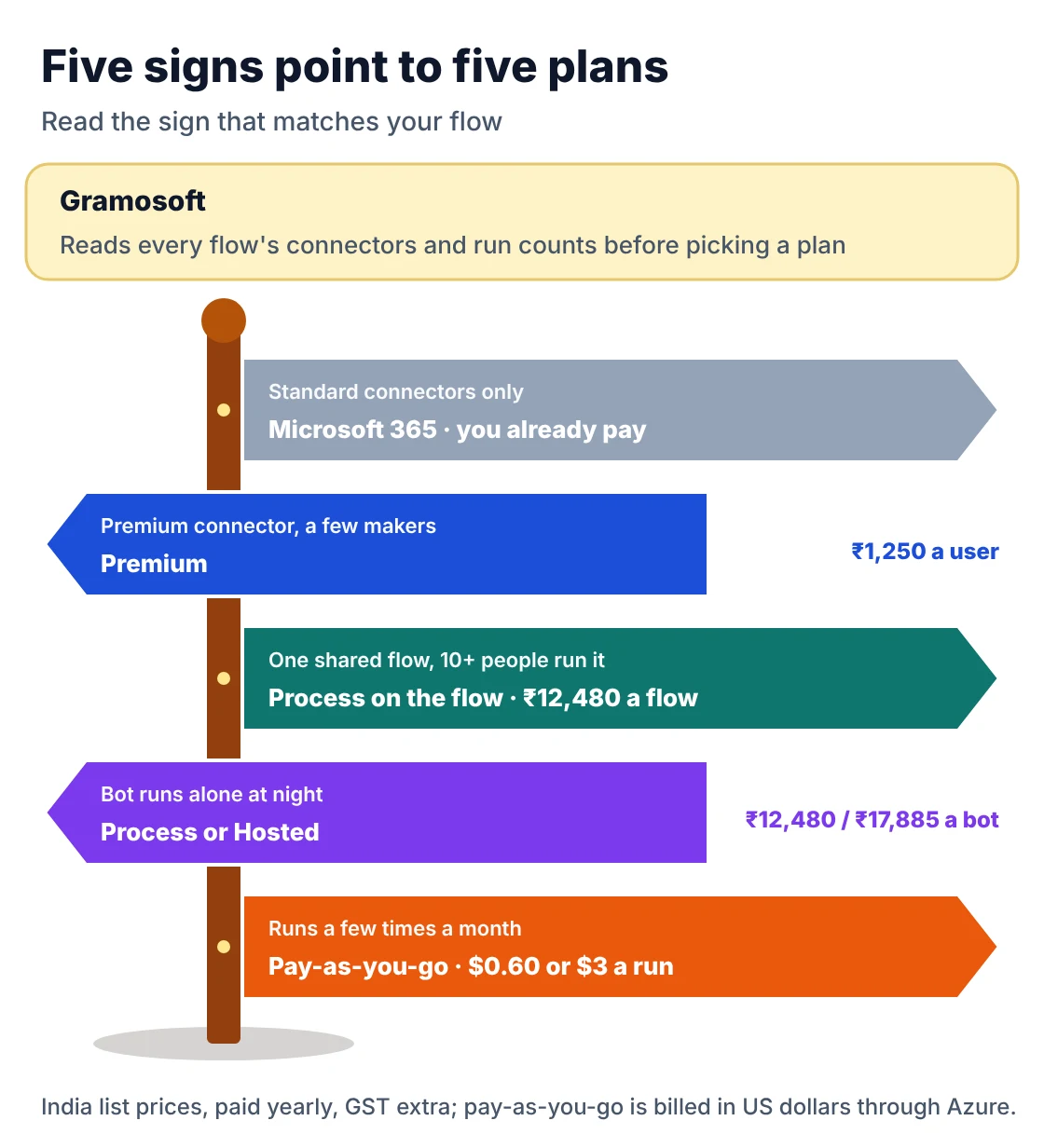
- India list prices (paid yearly, GST extra): Premium ₹1,250 per user a month, Process ₹12,480 per bot a month, Hosted Process ₹17,885 per bot a month. Flows on standard connectors are included with most Microsoft 365 business plans.
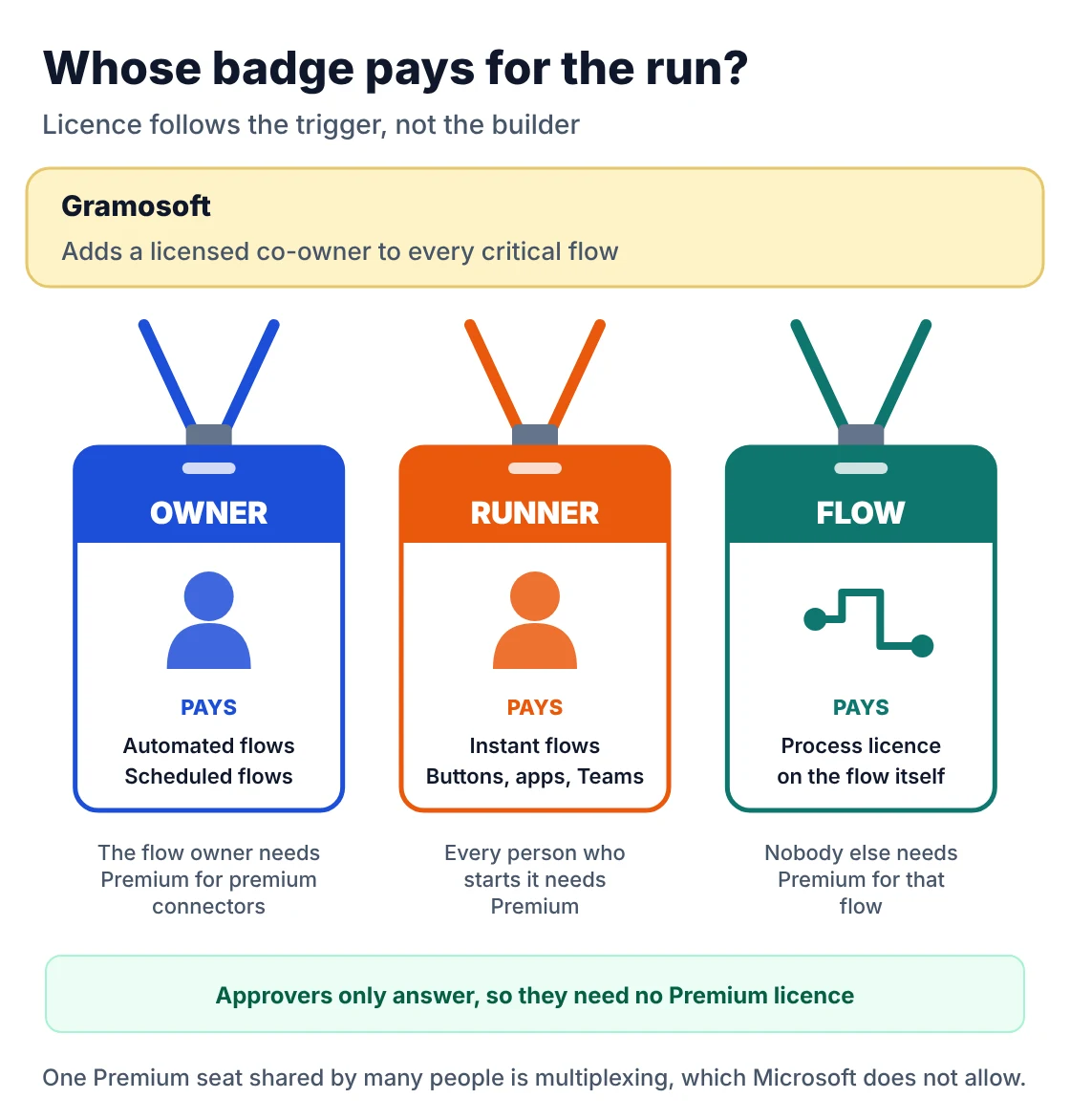
- Who pays follows the trigger: automated and scheduled flows use the owner's licence, instant flows use the runner's, and a Process licence on the flow covers everyone. Approvers need no Premium.
- Break-even: one Process licence costs less than Premium for 10 people running the same premium instant flow. Pay-as-you-go wins below about 25 premium runs per user or 50 unattended runs per bot a month.
- Watch at renewal: partner sources report that licences bought or renewed from 1 November 2026 carry no seeded AI Builder credits. Check your quote.
Which Power Automate plan do you need in India? Use Microsoft 365 if your flows only use standard connectors, Premium (₹1,250 per user a month) for people who build or run premium flows, Process (₹12,480 per bot a month) for unattended bots or a flow shared by 10 or more people, and Hosted Process (₹17,885) if Microsoft should host the bot's machine. Gramosoft reviews your flows and recommends the mix.
How Gramosoft sizes your Power Automate licences
Gramosoft sizes licences from the flows, not from the headcount. We list every flow in your tenant, mark its connectors as standard or premium, note whether it is automated, scheduled or instant, and count its runs and bot minutes. The plan mix comes out of that list, and it often removes seats you are paying for today.
- Flow inventory. Every flow, its owner, environment, connectors and monthly runs, taken from the admin centre and the CoE Starter Kit.
- Licence map. For each flow: covered by Microsoft 365, owner Premium, runner Premium, Process on the flow, a bot, or pay-as-you-go.
- Bot sizing. Run minutes divided by the time window, so you buy the bots the work needs and not one per process.
- Renewal check. AI Builder credits, Dataverse storage, Office for unattended bots and flows that will switch off when an owner leaves.
The review is part of our two-week Power Automate assessment, and the same team builds and supports flows on RPA projects such as our Kia DMS automation. When invoices need more than AI Builder reads well, we read them with GdoczAI, our document AI.
Where we fall short. Gramosoft is not a Microsoft licence reseller, so we recommend the mix and you buy through your Microsoft partner or Microsoft directly. We cannot negotiate enterprise discounts. Our advice is based on Microsoft's published rules, which change, and your final licence terms are whatever your Microsoft agreement says.
"Most Power Automate bills we review are high for one reason: Premium seats for people who only press a button. License the flow, not the crowd, and size bots by minutes, not by processes."
Rajesh Kannan M, Co-Founder & CTO, Gramosoft
Every Power Automate plan and its India price
Microsoft sells Power Automate as user licences, capacity licences and a per-run meter. User licences follow a person. Capacity licences follow a bot or a flow. The meter bills each premium run through Azure. These are Microsoft's India list prices, paid yearly with GST extra, from the India pricing page on 23 November 2026.
| Plan | India price | Licensed to | What it adds | Daily actions |
|---|---|---|---|---|
| Gramosoft licence review | Part of the two-week assessment | Your tenant | The plan mix for each flow | Checked per flow |
| Microsoft 365 seeded rights | Included in most business plans | Each user | Cloud flows on standard connectors, approvals | 6,000 per user |
| Power Automate Free | ₹0 | Each user | Standard-connector flows without sharing, local attended desktop flows | 6,000 per user |
| Premium | ₹1,250 per user a month | Each user | Premium and custom connectors, one attended bot, process mining, 250 MB Dataverse database and 2 GB file | 40,000 per user |
| Process | ₹12,480 per bot a month | A machine or a cloud flow | One unattended bot, or premium rights for one flow and everyone who runs it | 250,000 per licence |
| Hosted Process | ₹17,885 per bot a month | A Microsoft-hosted machine | Everything in Process plus a machine Microsoft runs | 250,000 per licence |
| Pay-as-you-go | US$0.60 per premium cloud or attended run, US$3 per unattended run | An environment, billed to Azure | Runs by people without a licence | Per environment |
| Process Mining add-on | ₹4,15,975 per tenant a month | Your tenant | Process mining at scale; needs Premium users | n/a |
Prices are from Microsoft's India pricing page; entitlements and action limits from Types of Power Automate licenses and request limits on Microsoft Learn. The pricing page offers a 30-day free trial, while Microsoft Learn describes a 90-day user trial that includes unattended runs. The old per-flow plan and the US$40 per-user plan with attended RPA are no longer sold, so guides that still quote them are out of date.
Who needs a licence: the owner, the runner or the flow
The question is not who built a flow but whose licence it runs on. Microsoft's rule follows the trigger. Automated and scheduled flows run on the owner's licence, instant flows run on the licence of whoever presses the button, and a Process licence on the flow replaces both. Getting this wrong is the most common licensing mistake we see.
| Flow | Who needs Premium | Cheaper option |
|---|---|---|
| Gramosoft rule: shared premium flow, 10 or more runners | Nobody extra | One Process licence on the flow |
| Automated or scheduled flow, standard connectors | Nobody; Microsoft 365 covers it | n/a |
| Automated or scheduled flow, premium connector | The owner only | Process on the flow if the owner may leave |
| Instant flow (button, Power Apps, Teams), premium connector | Every person who runs it | Process on the flow, or pay-as-you-go for rare runs |
| Approval step | No one; approvers only answer | n/a |
| Attended desktop flow started from the cloud | The user on the machine | n/a |
| Unattended desktop flow | The user whose connection runs it, plus a Process bot | Hosted Process if you do not want your own machine |
Four rules from Microsoft's licensing FAQ catch teams out. Sharing one Premium seat on a service account across many people is multiplexing, which is not allowed. A flow is switched off 14 days after its owner loses Premium, so give critical flows a licensed co-owner. In Managed Environments, Microsoft 365 seeded rights stop covering flows. And a flow can only carry a Process licence once it sits in a solution.
Premium or Process: the break-even for shared flows
For a premium instant flow that many people run, the maths is short. Ten Premium seats cost ₹12,500 a month, and one Process licence on the flow costs ₹12,480. So from 10 runners, the flow licence is cheaper, and every extra runner widens the gap. Below 10, Premium for each runner usually wins.
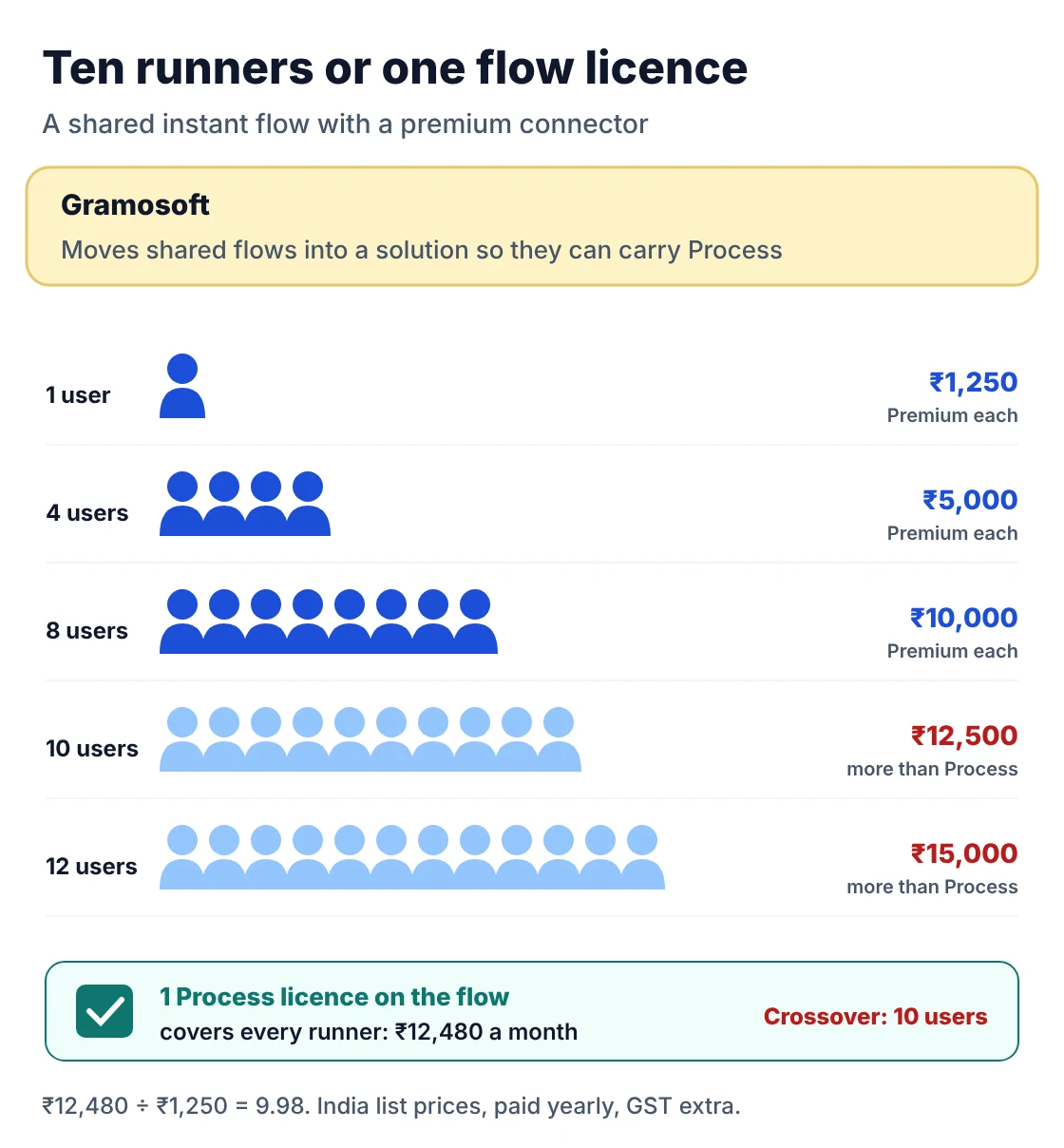
Three conditions change the answer. If those people already need Premium for other flows, they cost nothing extra and Process saves nothing. If the flow is in My flows, it must move into a solution before it can take a Process licence. And if one flow is not enough, Microsoft lets you stack two Process licences on one flow for more capacity or share one licence across a flow group, which Eduzek's guide puts at up to 25 solution-aware flows. For automated flows, Powercret notes that Process buys resilience more than savings, because the flow no longer depends on one owner's seat.
How many bots unattended work needs
A Process bot runs one unattended desktop flow at a time, according to Microsoft's Process capacity guide. So the number of bots depends on minutes of work and the time you have, not on how many processes you automate. Three nightly processes that fit in one window share one bot. One busy process may need three.
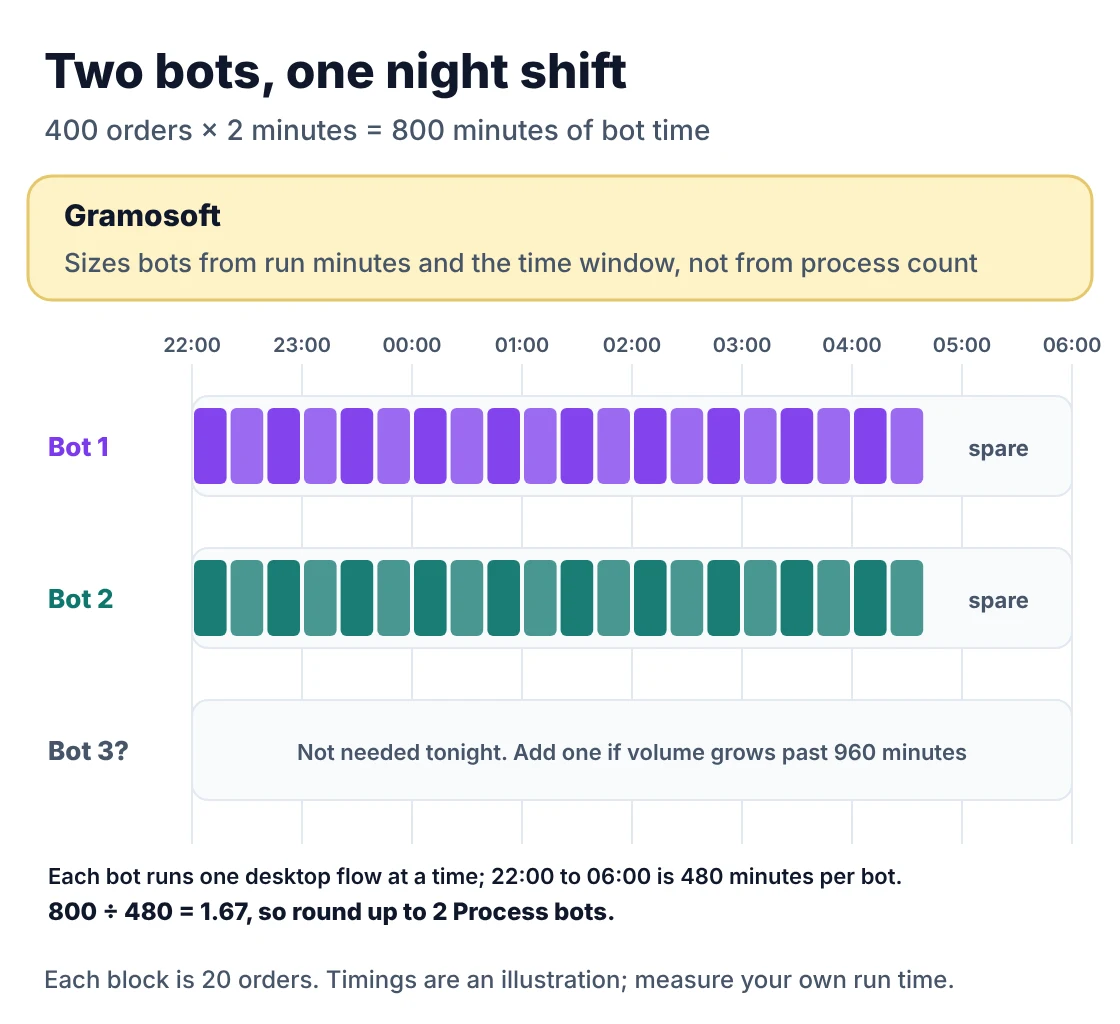
Use this formula: bots = total run minutes ÷ minutes in the window, rounded up. In the example, 400 orders take 2 minutes each, or 800 minutes. The night window from 10 PM to 6 AM gives 480 minutes per bot, so 800 ÷ 480 = 1.67, and you need 2 bots at ₹24,960 a month. Time a real run before you buy, and leave headroom for retries and month-end peaks.
| Bot option | India price | Extra costs to count | Best when |
|---|---|---|---|
| Gramosoft default: Process on a VM you already run | ₹12,480 a bot | The VM, Windows, patching, monitoring | You have an IT team and servers in place |
| Process on your own PC or VM | ₹12,480 a bot | Same as above | The bot needs on-premise apps or network access |
| Hosted Process | ₹17,885 a bot | Less machine upkeep | You have no machine to spare |
Hosted Process costs ₹5,405 a month more per bot. If your own machine, its Windows licence and the time to keep it patched cost more than that, hosted is cheaper. One more cost hides here: a bot that opens Excel or Word unattended needs the Microsoft 365 Apps unattended licence, or Office runs with reduced functions.
Pay-as-you-go: when paying per run is cheaper
Pay-as-you-go bills each premium run to an Azure subscription instead of buying a seat or a bot. It suits flows that run rarely or only in some months, such as a year-end process or a pilot. Above a certain number of runs a month, a licence costs less. The break-even is easy to work out.
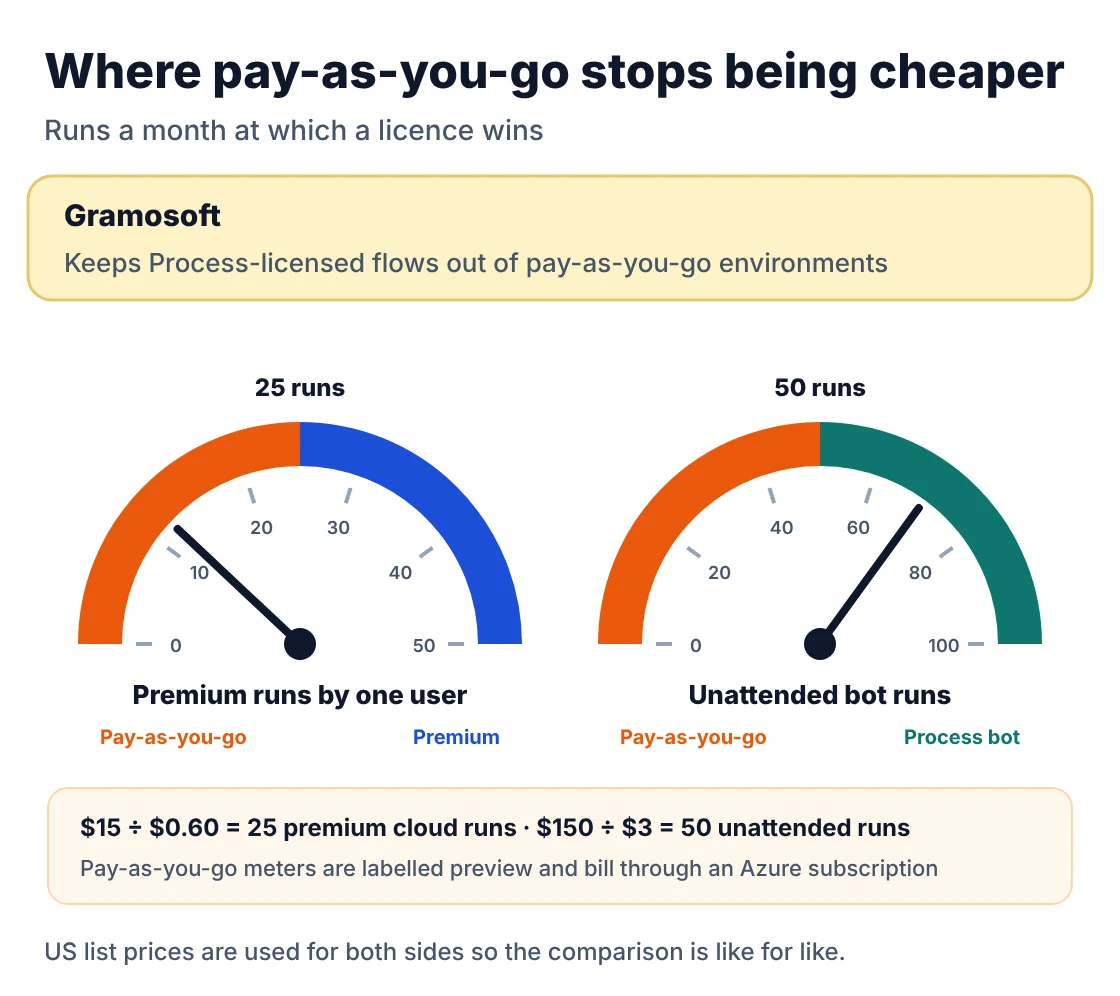
| Compared with | Pay-as-you-go rate | Licence price | Licence wins above |
|---|---|---|---|
| Gramosoft check: run counts from your admin centre | Measured per flow | Measured per flow | Your real monthly runs |
| Premium, one person's premium runs | US$0.60 a run | US$15 a month | 25 runs a month |
| Process bot, unattended runs | US$3 a run | US$150 a month | 50 runs a month |
Rates are from Cflow and Powercret, matching Microsoft's pay-as-you-go meters page, where the run meters are still labelled preview. US list prices are used on both sides to compare like with like. Two limits matter: pay-as-you-go environments ignore Process licences, so keep Process-licensed flows in a separate environment, and pay-as-you-go does not remove base licensing rules for makers.
Costs the licence price leaves out
The plan price is only part of the bill. AI steps, storage, Office on bots, extra request capacity and process mining are billed separately, and some of them changed this month. Check each of these lines before a renewal, because they are where Indian budgets most often go wrong after the first year.
| Cost | What changed or applies | What to do |
|---|---|---|
| Gramosoft renewal check | Every line below, per flow | Budget before you sign |
| AI Builder credits | Powercret and FlowForma report that licences bought or renewed from 1 November 2026 carry no seeded AI Builder credits; AI steps use Copilot Credits at US$0.01 each, about 8 credits per invoice page | Count AI pages a month and budget them as their own line |
| Dataverse storage | Premium adds 250 MB database and 2 GB file per user; Process adds 50 MB and 200 MB | Archive run data; price extra capacity if you store records |
| Office on unattended bots | Excel or Word on a bot needs the Microsoft 365 Apps unattended licence | Add one per bot account that opens Office |
| Daily action limits | 40,000 actions a day per Premium user, 250,000 per Process licence | Stack Process licences or buy request add-ons for heavy flows |
| Process mining | ₹4,15,975 per tenant a month for the add-on | Use the 50 MB included with Premium first |
| Build and support | Not a Microsoft cost, but usually larger than licences | See RPA as a Service vs Buying Licences: Which Costs Less? |
The AI Builder change conflicts with Microsoft's licence table, which still listed 5,000 credits a month per licence when we checked on 23 November 2026. Microsoft's AI Builder licensing page is the place to confirm, and your renewal quote is the final word. If you read invoices with AI, see Best Open-Source OCR Models in 2026: Accuracy, Speed & Cost Compared for other options.
A worked example: a 40-person distributor in Chennai
Here is a typical mid-size case. A Chennai distributor with 40 staff already pays for Microsoft 365. Four people build flows that use a SQL Server connector. Thirty sales staff press a stock-check button in Teams that queries SQL. At night, a bot enters about 400 orders into an old ERP with no API.
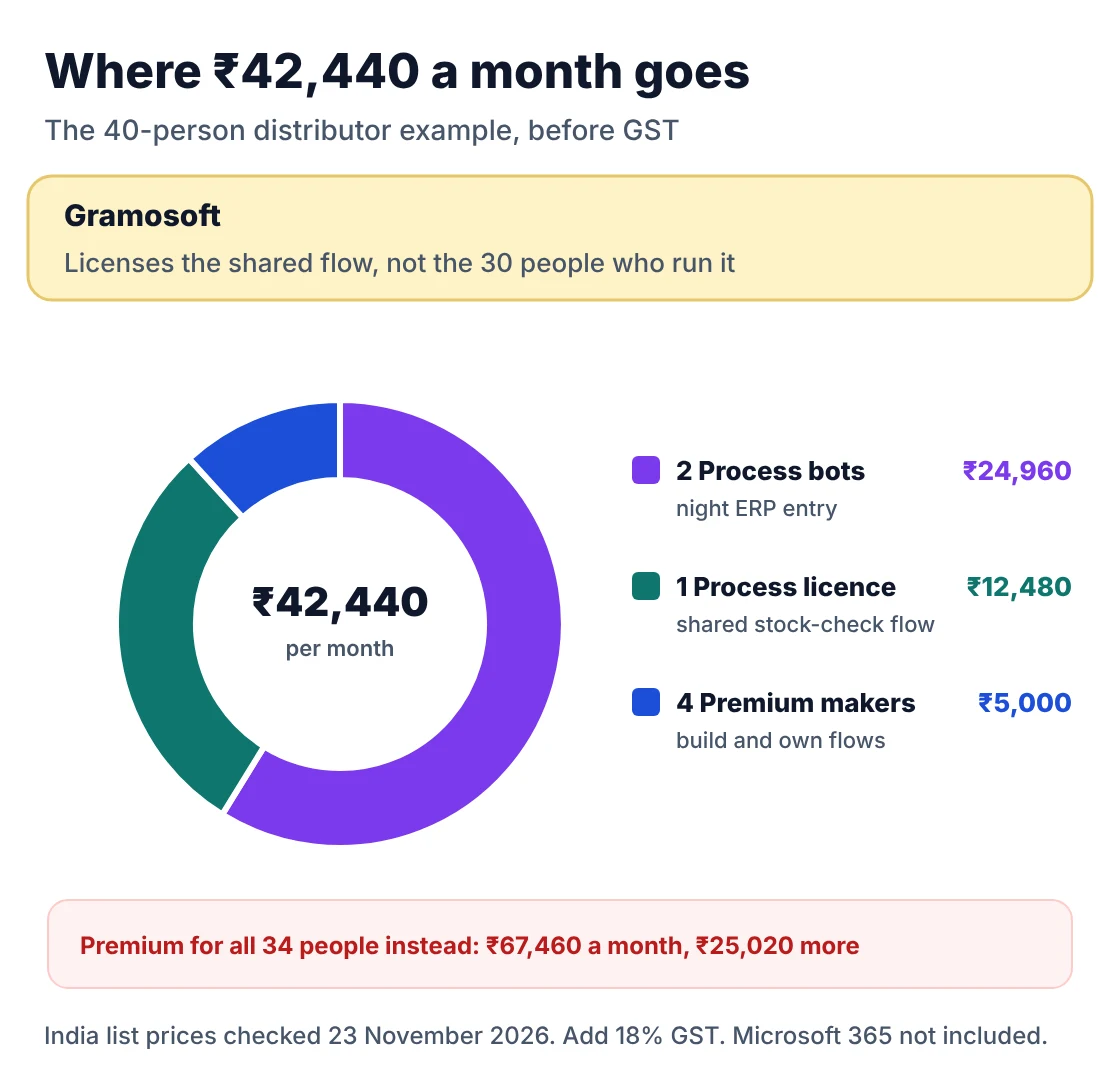
| Licence | Quantity | Right-sized | Premium for everyone |
|---|---|---|---|
| Gramosoft mix | ₹42,440 a month | ₹67,460 a month | |
| Premium for makers | 4 users | ₹5,000 | ₹5,000 |
| Stock-check flow, run by 30 people | 1 Process on the flow, or 30 Premium | ₹12,480 | ₹37,500 |
| Night ERP bots | 2 Process bots | ₹24,960 | ₹24,960 |
| Year, before GST | ₹5,09,280 | ₹8,09,520 | |
| Year, with 18% GST | about ₹6.01 lakh | about ₹9.55 lakh |
Licensing the shared flow instead of the 30 people saves ₹25,020 a month, or ₹3,00,240 a year before GST. One of the four makers registers the bot machines, so no extra seat is needed for that. Standard-connector flows and approvals stay on Microsoft 365 at no extra cost. Prices are India list prices; your partner's quote may differ.
A licence checklist before you buy or renew
Run through these checks with your flow list open. Each one either removes a licence you do not need or catches a cost that would surprise you later. If you cannot answer one, that is the flow to look at first.
- Connectors: mark every connector as standard or premium in Microsoft's connector reference. One premium connector changes the whole flow.
- Triggers: list who owns each automated flow and who runs each instant flow.
- Shared flows: any premium instant flow with 10 or more runners should be priced as Process.
- Bots: size by run minutes and window, not by process count.
- Owners: add a licensed co-owner to every critical flow.
- Rare flows: move flows with a few premium runs a month to pay-as-you-go.
- AI and Office: budget Copilot Credits and unattended Office licences as their own lines.
- Price check: confirm prices on the India pricing page on the day you buy; this guide was checked on 23 November 2026.
For the wider project, see RPA Implementation: Step-by-Step Process, Timeline & Common Mistakes and Microsoft Power Automate Consulting: What a Consultant Does and When You Need One.
Frequently asked questions
Can Gramosoft help choose the right Power Automate licences?
Yes. Gramosoft reviews every flow in your tenant from Chennai, marks its connectors, trigger type and run volume, sizes unattended bots by run minutes, and recommends the cheapest mix of Microsoft 365, Premium, Process, Hosted Process and pay-as-you-go as part of a two-week assessment. You then buy through your Microsoft partner.
How much does Power Automate cost in India?
Microsoft's India list prices, paid yearly with GST extra, are ₹1,250 per user a month for Premium, ₹12,480 per bot a month for Process and ₹17,885 per bot a month for Hosted Process. Flows on standard connectors are included with most Microsoft 365 business plans.
Is Power Automate free with Microsoft 365?
Partly. Most Microsoft 365 business plans let users build and run cloud flows on standard connectors such as Outlook, SharePoint, Teams and Approvals, with about 6,000 actions per user a day. Premium connectors, custom connectors and desktop flows run from the cloud need a paid plan.
When is a Process licence cheaper than Premium?
For a premium instant flow that 10 or more people run. Ten Premium seats cost ₹12,500 a month and one Process licence on the flow costs ₹12,480, and it covers every runner. The flow must be in a solution to take a Process licence.
Does Power Automate Premium include unattended RPA?
No. Premium includes one attended bot, which runs with a person signed in. Unattended desktop flows need a Process licence for each bot, or Hosted Process if Microsoft hosts the machine, and the user whose connection runs the desktop flow still needs Premium.
How many Process bots do I need?
Divide the total run minutes by the minutes in your time window and round up, because each bot runs one unattended desktop flow at a time. For example, 800 minutes of work in an eight-hour night window needs two bots. Leave headroom for retries and peaks.
Are AI Builder credits still included with Power Automate licences?
Partner sources report that licences bought or renewed from 1 November 2026 no longer include seeded AI Builder credits and that AI steps use Copilot Credits instead, while Microsoft's licence table still listed 5,000 credits on 23 November 2026. Confirm on Microsoft's AI Builder licensing page and your renewal quote.
Related guides
- Microsoft Power Automate Consulting: What a Consultant Does and When You Need One
- RPA as a Service vs Buying Licences: Which Costs Less?
- Best RPA Tools & Platforms in 2026: UiPath vs Power Automate vs Automation Anywhere vs Open Source
- RPA Implementation: Step-by-Step Process, Timeline & Common Mistakes
- RPA Consulting Services: What They Include, What They Cost & How to Choose a Partner
- What Is Robotic Process Automation (RPA)? Use Cases, Tools & Cost in India
- RPA Services in Chennai: 15 Processes Businesses Automate First
- Top RPA Service Providers in Chennai (2026)
Rajesh Kannan M
Rajesh Kannan M is Co-Founder & CTO of Gramosoft in Chennai, where he leads the teams building custom AI, document AI, enterprise search and automation, including GsearchAI, GdoczAI and GcrawlAI, an open-source web scraping, crawling and Search API platform for developers and AI agents, alongside web and mobile applications.