By Rajesh Kannan, Co-Founder & CTO, Gramosoft · Last updated: · Code tested in headless Chromium on November 22, 2026
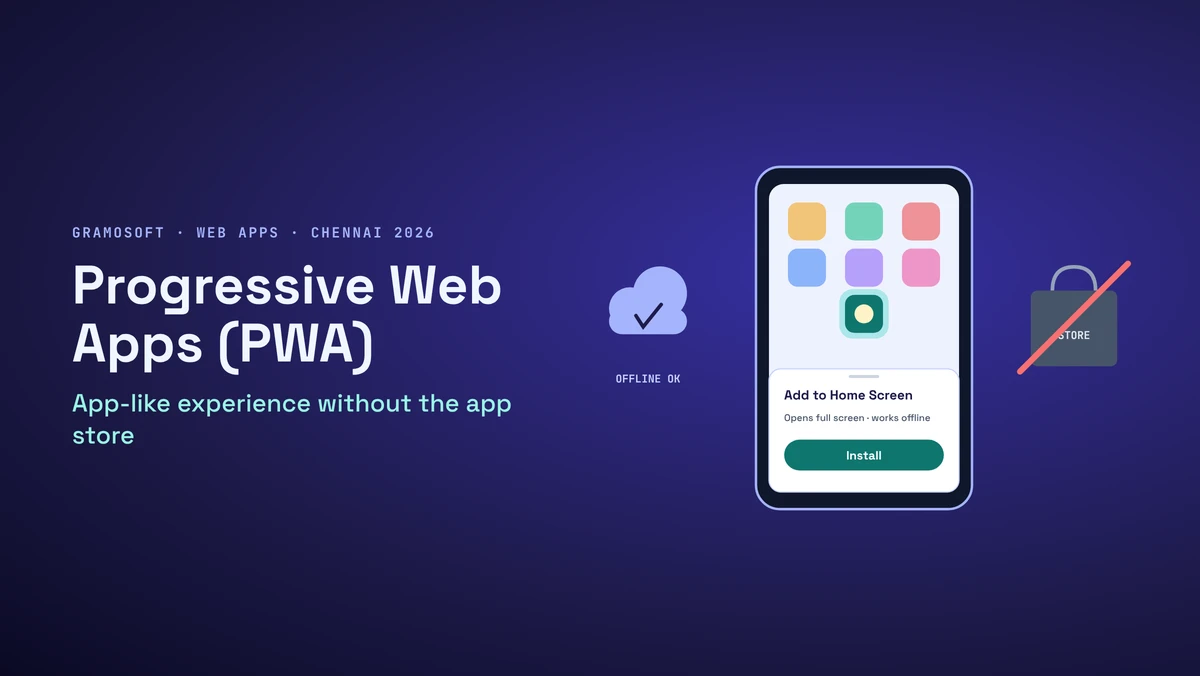
Many businesses that ask for "an app" really need something their customers or staff can open with one tap, that loads fast on a weak 4G signal and keeps working when the network drops. A progressive web app (PWA) does that from one web codebase, without an app store review or a download.
This guide covers what a PWA is, how it compares with a native app and a plain website, what works on iPhone and Android today, the code to build one (a manifest, a service worker and an offline page, tested offline), when a PWA is the wrong choice, and what it costs in Chennai. We start with how Gramosoft builds them.
TL;DR
- Gramosoft builds PWAs in Chennai: installable web apps with offline data, push notifications and an optional Play Store listing.
- What it is: a website with a web app manifest and a service worker, served over HTTPS, that users can install and open like an app.
- Where it wins: booking, ordering, field service, customer portals and internal tools, with one codebase and instant updates.
- Where native wins: Bluetooth or NFC, background location, heavy graphics, or an audience that's mostly on iPhone and needs every iOS feature.
- Code below: a manifest, a service worker with four caching rules, safe update handling, and a test that passed all 8 checks offline.
What is a progressive web app? A PWA is a website that users can install to their home screen and open like an app. A manifest gives it a name, icon and full-screen window, and a service worker caches files so it loads fast and works offline. One codebase serves Android, iPhone and desktop, with no app store. Gramosoft, a Chennai web and mobile company, builds PWAs.
Swipe the table sideways on mobile →
| Option | Install | Works offline | App stores | Codebases |
|---|---|---|---|---|
| Gramosoft PWA build | From the browser | Yes, as designed | Play Store optional | One |
| Progressive web app | From the browser | Yes | Optional | One |
| Native app | From a store | Yes | Required | Two (or one cross-platform) |
| Responsive website | No | No | No | One |
How Gramosoft builds progressive web apps in Chennai
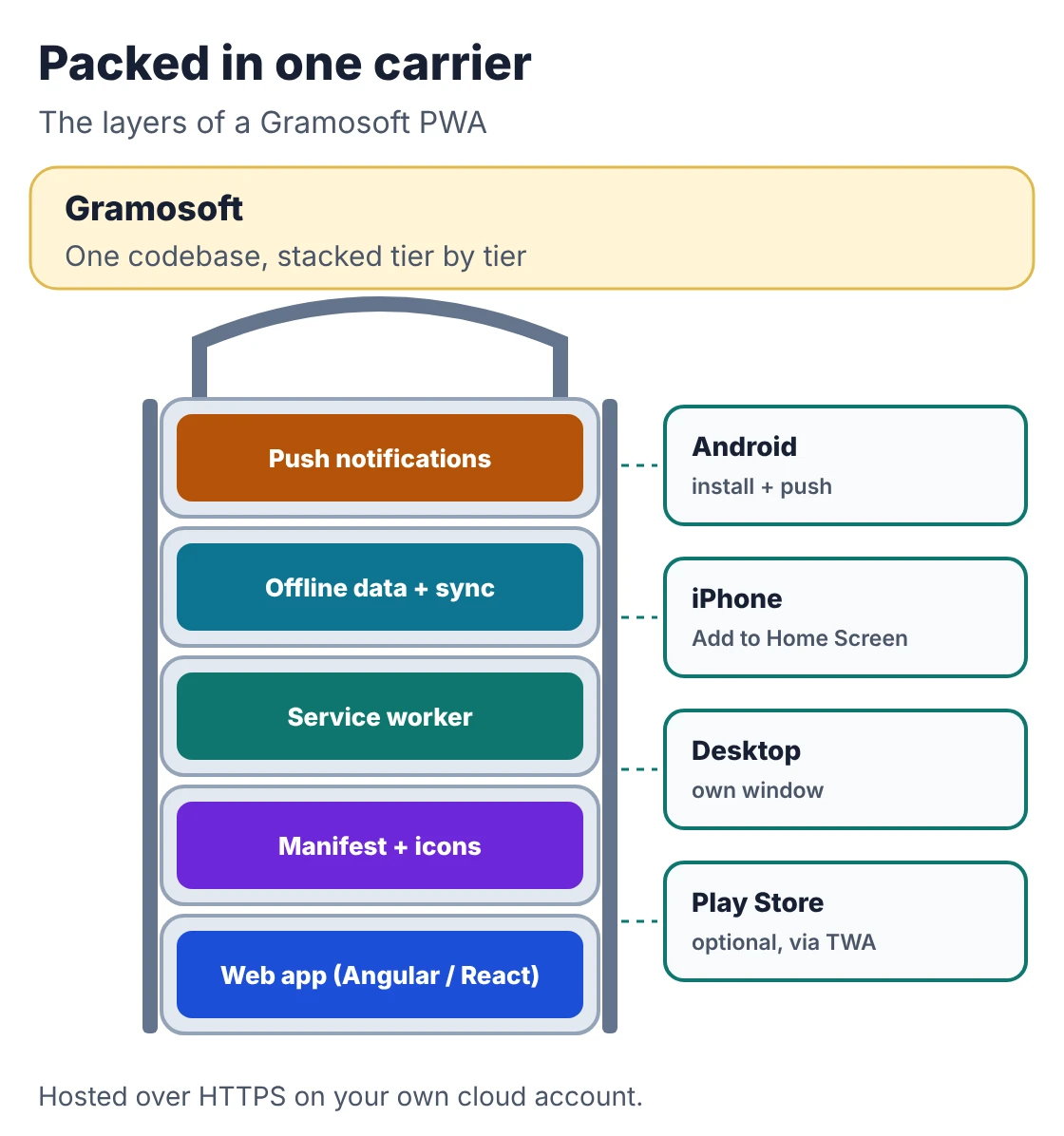
Gramosoft is a Chennai software company that builds web applications, mobile apps and the backends behind them. When a client's users mostly need fast access, offline use and notifications, we build a PWA first instead of two native apps, and we tell them early if their features need native code.
Swipe the table sideways on mobile →
| What you need | From Gramosoft |
|---|---|
| The web app | Built by our web application development team, often on Angular, whose @angular/pwa package adds the manifest and service worker, or on React |
| Offline data | Caching rules for each kind of request, plus local storage for forms filled in without a signal that sync when the network returns |
| Design | App-like screens, install prompts and offline states from our UI/UX design team |
| Backend | APIs on Spring Boot or Node.js, shared later with a native app if you build one |
| When native is needed | Our mobile app development team builds Flutter or native apps on the same backend |
| Hosting and security | HTTPS, hosting and monitoring through our cloud services, with application security checks |
Where we fall short: we don't build games or graphics-heavy apps, and we won't promise iPhone features Safari doesn't support. If your app depends on Bluetooth, NFC or tracking location in the background, we'll recommend a native or Flutter app instead. And we don't run app store marketing.
"Most clients who ask for an app want it to open fast and keep working when the network drops. A good PWA does that from one codebase. We only reach for native when the app needs the phone's hardware."
Rajesh Kannan, Co-Founder & CTO, Gramosoft
What a PWA is and how it works
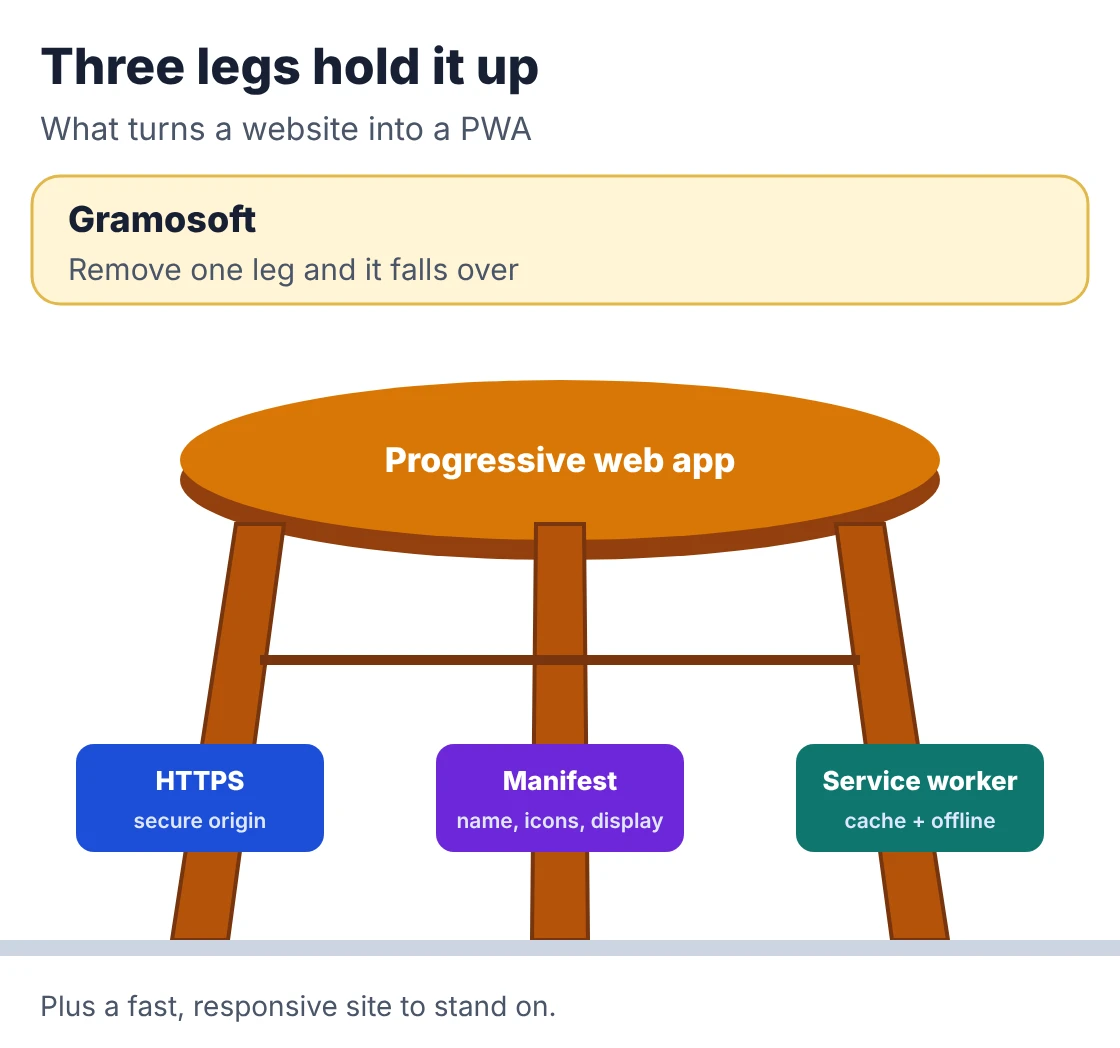
A progressive web app is an ordinary website plus three things: HTTPS, a web app manifest that tells the device its name, icons and how to open, and a service worker that sits between the app and the network to cache files. Together they make the site installable, fast on repeat visits and usable offline.
As the web.dev guide puts it, once installed a PWA has an icon on the home screen, opens in its own window without the browser's address bar and can work offline. It's called "progressive" because it still works as a normal website in any browser, and adds the app features where the browser supports them. The MDN reference lists every manifest field and service worker API.
- Manifest: name, short name, icons, start URL, theme colour and display mode (usually
standalone). - Service worker: a script the browser runs in the background. It decides, request by request, whether to answer from the network or the cache.
- HTTPS: service workers only run on secure origins (and on
localhostfor testing).
PWA vs native app vs website
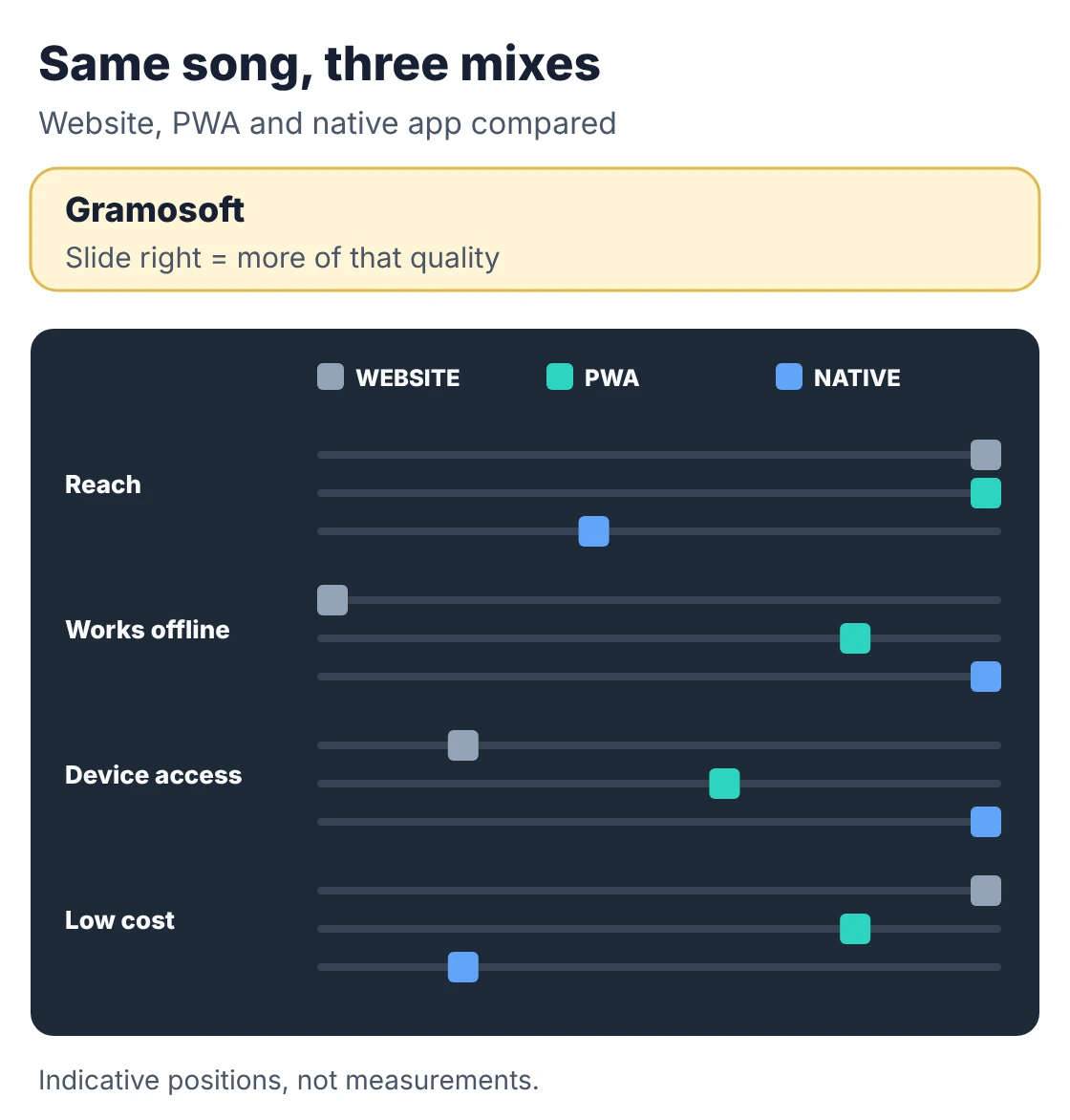
A PWA sits between a responsive website and a native app. It keeps the website's reach, search visibility and instant updates, and adds installation, offline use and notifications. A native app still has deeper access to the phone's hardware, a store listing and the best performance for heavy graphics.
Swipe the table sideways on mobile →
| Feature | PWA | Native app | Website |
|---|---|---|---|
| Gramosoft's default for new clients | First choice when it fits | When hardware needs it | For content-only sites |
| Installed icon | Yes | Yes | No |
| Works offline | Yes, what you cache | Yes | No |
| Push notifications | Android, desktop, iPhone once installed | Yes | No |
| Bluetooth, NFC, background location | Limited or none | Yes | No |
| Updates | Next visit | Store review, then user update | Next visit |
| Found in Google search | Yes | No (store search instead) | Yes |
| Download size | Small | Larger | None |
For a wider view of the choice, see Web App vs Mobile App: Which Should Your Business Build First?. Retail platform NewStore argues the other side for fashion brands, where a native app's richer visuals and store presence can justify the extra cost.
What PWAs can do on Android and iPhone in 2026
Android and desktop Chrome support PWAs well: install, offline use, push notifications and a Play Store listing through a wrapper. iPhone support has improved but still trails. Users install from the Share menu, and push notifications only work after the app is added to the home screen.
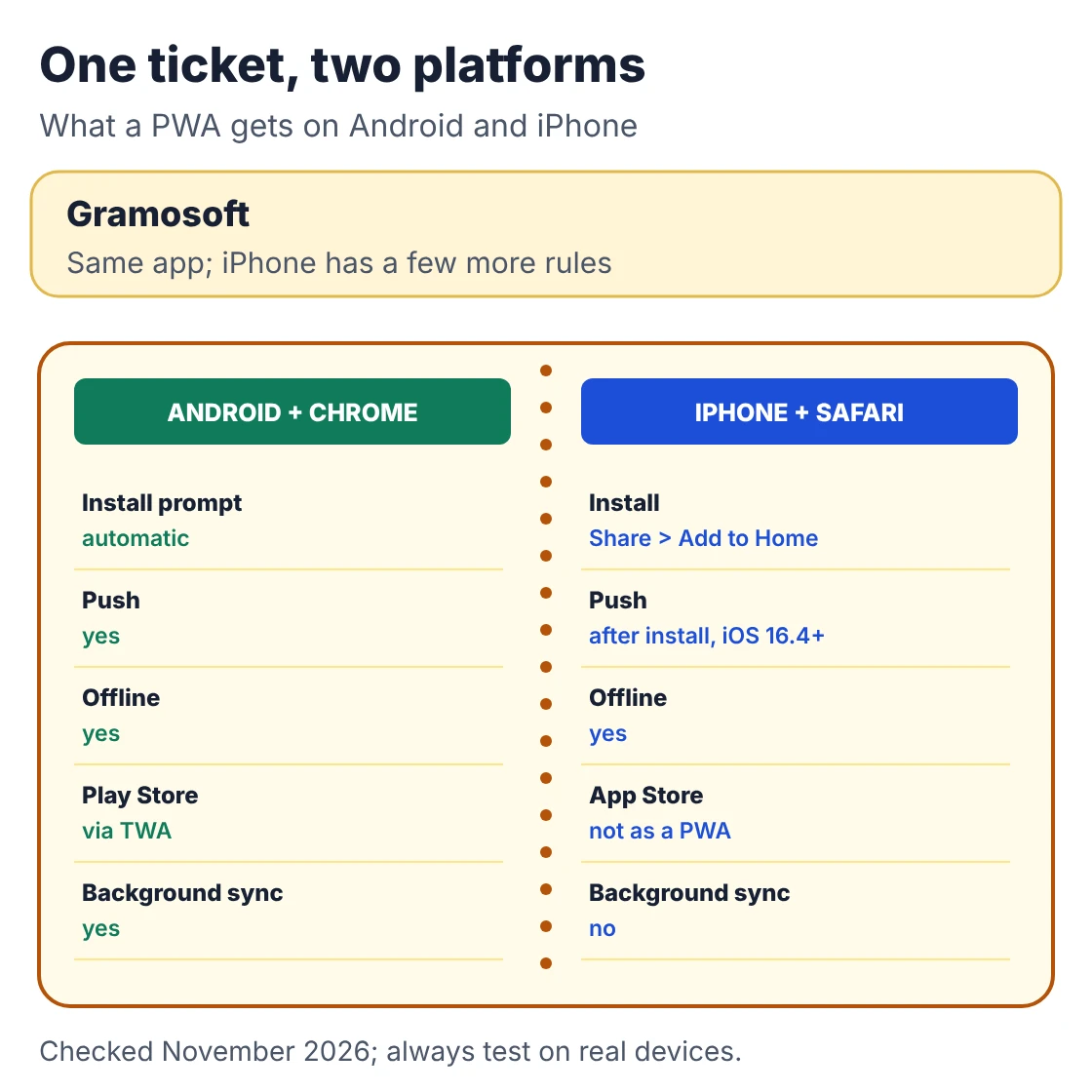
- iPhone push: since iOS and iPadOS 16.4, Home Screen web apps can receive Web Push, and the permission request must come from a user action such as tapping a "subscribe" button. A PWA opened in a Safari tab can't ask.
- iPhone install: there's no automatic install prompt on iPhone. Show a short "Share, then Add to Home Screen" hint to iPhone visitors.
- Chrome install rules: Chrome dropped the fetch-handler requirement for installing from the browser menu in version 108 on mobile and 112 on desktop, but its automatic install prompt still needs a service worker with a fetch handler.
- No Lighthouse PWA score: Chrome removed the PWA category from Lighthouse, so check installability in DevTools (Application, then Manifest) and test offline yourself, as the code below does.
- Play Store: a PWA can be wrapped as a Trusted Web Activity with Google's Bubblewrap tool and listed on Google Play.
How to build a PWA: manifest, service worker and offline page
A working PWA needs four small files on top of your site: a manifest, a few tags in each page, a service worker with clear caching rules, and a registration script that handles updates safely. The code below is a complete example for a field-service job list, tested offline in headless Chromium.
Start with the manifest. The 192 and 512 pixel icons are the sizes browsers use for the home screen and splash screen. The maskable icon fills Android's adaptive icon shapes without white borders.
manifest.webmanifest
{
  "id": "/",
  "name": "Field Service by Example Co",
  "short_name": "FieldApp",
  "description": "Job sheets for field technicians, online or offline.",
  "start_url": "/?source=pwa",
  "scope": "/",
  "display": "standalone",
  "orientation": "portrait",
  "background_color": "#ffffff",
  "theme_color": "#0f766e",
  "icons": [
    { "src": "/icons/icon-192.png", "sizes": "192x192", "type": "image/png" },
    { "src": "/icons/icon-512.png", "sizes": "512x512", "type": "image/png" },
    { "src": "/icons/maskable-512.png", "sizes": "512x512", "type": "image/png", "purpose": "maskable" }
  ]
}
Add these tags to every page. The Apple touch icon gives iPhone a proper home screen icon.
head-tags.html
<!-- In the <head> of every page -->
<link rel="manifest" href="/manifest.webmanifest">
<meta name="theme-color" content="#0f766e">
<link rel="apple-touch-icon" href="/icons/icon-192.png">

<!-- Before </body> -->
<script src="/register-sw.js"></script>
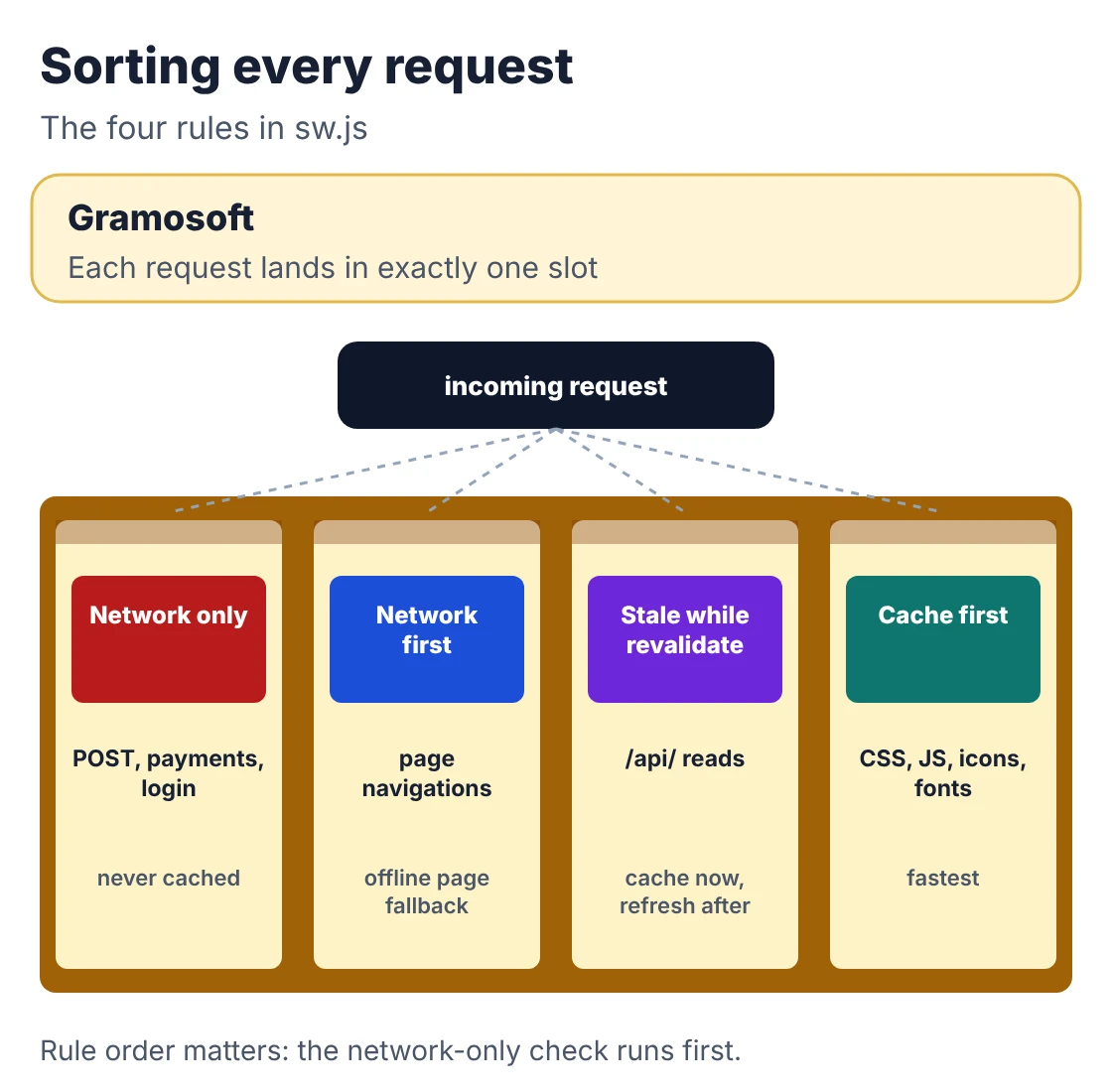
The service worker applies a different rule to each kind of request. Pages come from the network first so users see fresh content, and fall back to the cache or an offline page. Static files come from the cache first. API reads answer from cache and refresh in the background. Payments, logins and every write go straight to the network and are never cached.
sw.js
// sw.js: one service worker, four caching rules.
// Bump VERSION on every release so old caches are deleted.
const VERSION = "v3";
const SHELL = `shell-${VERSION}`;
const RUNTIME = `runtime-${VERSION}`;
const SHELL_FILES = ["/", "/offline.html", "/app.css", "/app.js", "/manifest.webmanifest", "/icons/icon-192.png"];

self.addEventListener("install", (event) => {
  event.waitUntil(caches.open(SHELL).then((cache) => cache.addAll(SHELL_FILES)));
});

self.addEventListener("activate", (event) => {
  event.waitUntil(
    caches.keys()
      .then((keys) => Promise.all(keys.filter((k) => k !== SHELL && k !== RUNTIME).map((k) => caches.delete(k))))
      .then(() => self.clients.claim())
  );
});

// The page asks for this when the user taps "Update now".
self.addEventListener("message", (event) => {
  if (event.data === "SKIP_WAITING") self.skipWaiting();
});

self.addEventListener("fetch", (event) => {
  const req = event.request;
  const url = new URL(req.url);

  // Rule 1: never cache writes, other sites, payments or login.
  if (req.method !== "GET" || url.origin !== self.location.origin ||
      url.pathname.startsWith("/api/pay") || url.pathname.startsWith("/api/auth")) {
    return; // the browser handles it normally (network only)
  }

  // Rule 2: pages are network-first, so users see fresh content, with the offline page as a fallback.
  if (req.mode === "navigate") {
    event.respondWith(
      fetch(req)
        .then((res) => {
          const copy = res.clone();
          caches.open(RUNTIME).then((c) => c.put(req, copy));
          return res;
        })
        .catch(async () => (await caches.match(req)) || caches.match("/offline.html"))
    );
    return;
  }

  // Rule 3: API reads are stale-while-revalidate: answer from cache at once, refresh in the background.
  if (url.pathname.startsWith("/api/")) {
    event.respondWith(
      caches.open(RUNTIME).then(async (cache) => {
        const cached = await cache.match(req);
        const fresh = fetch(req)
          .then((res) => { if (res.ok) cache.put(req, res.clone()); return res; })
          .catch(() => cached || new Response('{"offline":true}', { headers: { "Content-Type": "application/json" } }));
        return cached || fresh;
      })
    );
    return;
  }

  // Rule 4: static files (CSS, JS, icons, fonts) are cache-first.
  event.respondWith(
    caches.match(req).then((cached) => cached || fetch(req).then((res) => {
      if (res.ok) { const copy = res.clone(); caches.open(RUNTIME).then((c) => c.put(req, copy)); }
      return res;
    }))
  );
});
The registration script shows an "Update now" bar when a new version is ready, instead of switching versions in the middle of someone's work. Our first test run caught a common bug here: clients.claim() fires controllerchange on the very first install too, so a naive "reload on controllerchange" reloads the page on a user's first visit. The hadController check fixes that.
register-sw.js
// register-sw.js: load this from every page.
if ("serviceWorker" in navigator) {
  window.addEventListener("load", async () => {
    // Remember whether an older version was already in control before this load.
    const hadController = !!navigator.serviceWorker.controller;
    const reg = await navigator.serviceWorker.register("/sw.js");

    // A new version finished installing while an old one is still in control.
    reg.addEventListener("updatefound", () => {
      const next = reg.installing;
      next.addEventListener("statechange", () => {
        if (next.state === "installed" && navigator.serviceWorker.controller) {
          const bar = document.getElementById("update-bar");
          if (bar) bar.hidden = false; // show "A new version is ready. Update now"
        }
      });
    });

    document.getElementById("update-now")?.addEventListener("click", () => {
      reg.waiting?.postMessage("SKIP_WAITING");
    });

    // Reload once when an updated service worker takes over.
    // Skip it on the very first install, or clients.claim() would reload the page mid-use.
    let reloaded = false;
    navigator.serviceWorker.addEventListener("controllerchange", () => {
      if (hadController && !reloaded) { reloaded = true; window.location.reload(); }
    });
  });
}
The test script serves the example on localhost, opens it in headless Chromium, goes offline, opens a page it has never seen, tries a payment request offline, then releases a new version and checks that the old caches are deleted. All 8 checks passed:
Output
PASS  service worker controls the page
PASS  jobs load online (2 rows)
PASS  manifest has name, start_url, standalone and 192/512 icons
      caches: ['shell-v3', 'runtime-v3']
PASS  offline: home page and jobs load from cache
PASS  offline: unvisited page shows offline.html
PASS  offline: payment POST is never served from cache
PASS  update: 'new version' bar appears
PASS  update: page reloads once and v3 caches are deleted

8/8 checks passed
The download also includes index.html, offline.html, the icons and test_pwa.py. Two habits keep a PWA healthy in production: change VERSION in sw.js on every release, and never cache anything personal or payment-related.
When a PWA is the right choice, and when it isn't
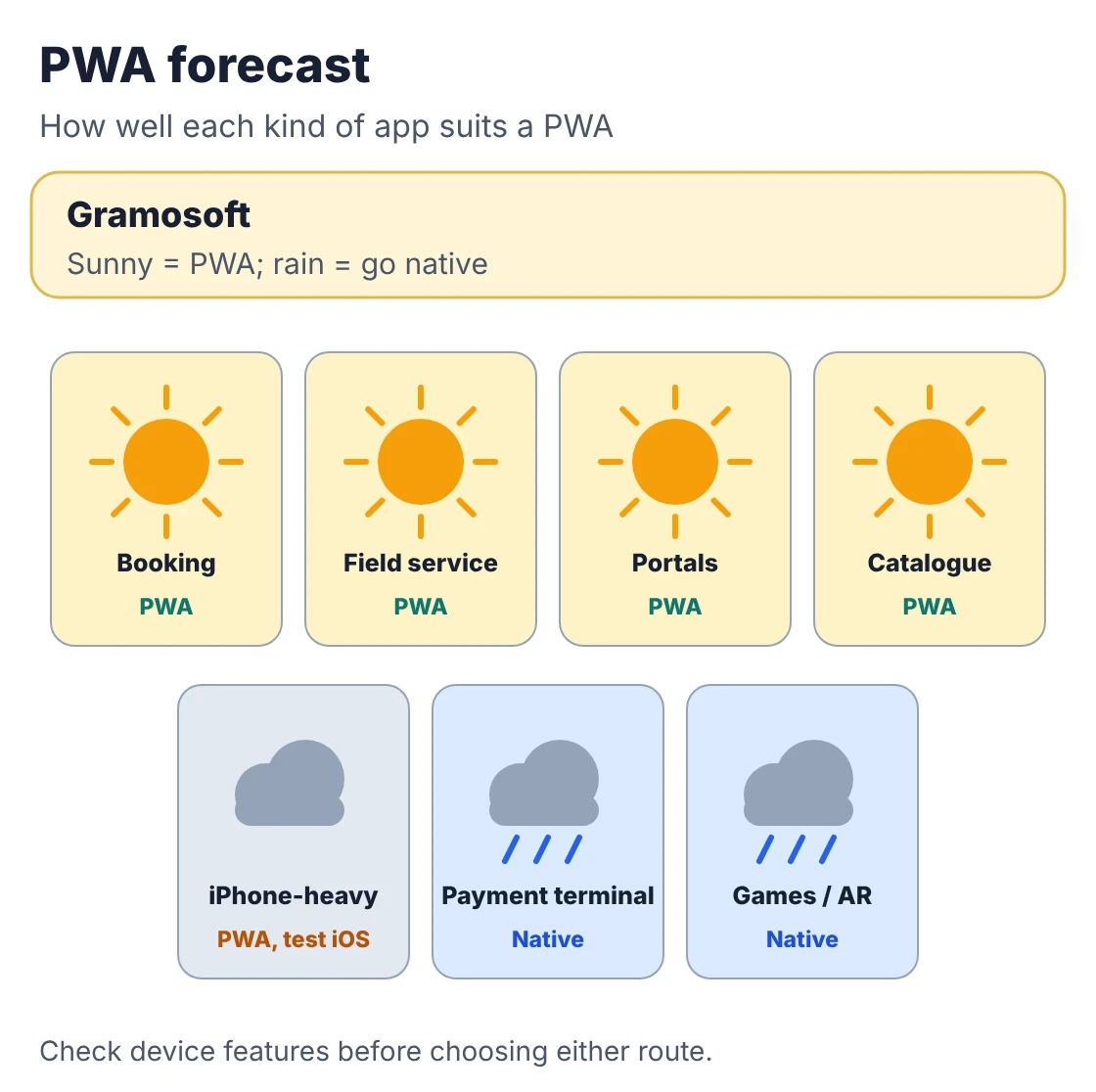
A PWA fits when users come back often, need speed on weak networks, and don't need the phone's hardware beyond the camera and location. It's the wrong choice when the app depends on Bluetooth, NFC, background tracking or heavy graphics, or when store presence matters more than reach.
Swipe the table sideways on mobile →
| Good fit for a PWA | Why |
|---|---|
| Gramosoft client portals and field apps | Staff and customers open them daily, often on patchy networks |
| Booking and appointments | Users come back often, and links from WhatsApp or SMS open straight into the app |
| Ordering and catalogues | Search brings visitors, and installing takes one tap |
| Field service and inspections | Forms filled in offline sync later |
| Dealer, partner and staff portals | No store accounts, and every user gets updates at once |
| Dashboards and internal tools | Work on desktop and phone from one codebase |
Choose native or Flutter instead if you need Bluetooth or NFC (device pairing, payment terminals), location tracking in the background, rich media or games, or if most users are on iPhone and you need every iOS feature. Our Android App Development Company in Chennai: Cost, Timeline & Team guide covers that route.
What a PWA costs in Chennai
Adding installation and offline support to a well-built web app is a small project, often a few weeks. A new PWA is priced like a web application of the same scope, plus the offline and sync work. In both cases it usually costs much less than two native apps with the same features.
Swipe the table sideways on mobile →
| Project | Typical Chennai budget | Timeline |
|---|---|---|
| Gramosoft: PWA features on your existing web app | ₹50,000–1.5 lakh | 2–4 weeks |
| New PWA, simple (one user type, light offline) | ₹2–5 lakh | 6–8 weeks |
| New PWA with offline sync, roles and payments | ₹5–10 lakh | 8–12 weeks |
GST at 18% is extra. Innovatrix Infotech puts a PWA at ₹5–13 lakh against ₹12–35 lakh for native apps on both platforms, and Bugfender gives US-dollar bands for the same split. For full breakdowns, see Web Application Development Cost in Chennai (2026): What Drives the Price and Mobile App Development Cost in Chennai.
Frequently asked questions
Which company builds progressive web apps in Chennai?
Gramosoft, a Chennai web and mobile company, builds PWAs with offline data, push notifications and optional Play Store listing, and recommends native or Flutter apps when a project needs the phone's hardware.
Do PWAs work on iPhone?
Yes. Users install them with Share, then Add to Home Screen. Since iOS 16.4, installed web apps can receive push notifications after the user taps to allow them. Some features still lag behind Android.
Can a PWA be listed on the Google Play Store?
Yes. Wrap it as a Trusted Web Activity, for example with Google's Bubblewrap tool, and publish it like any Android app. The app content still comes from your website.
Does a PWA work offline?
It works offline for whatever its service worker caches: pages, files and API data you choose. Forms can be saved on the device and sent when the connection returns.
Are PWAs good for SEO?
Yes, if pages render properly for search engines. A PWA is still a website, so each screen can have its own URL and be indexed, unlike content inside a native app.
Can I turn my existing website into a PWA?
Usually, yes. Add a manifest, a service worker and an offline page, serve it over HTTPS, then fix anything slow, because a slow site makes a slow app.
How much does a PWA cost in Chennai?
Adding PWA features to an existing web app typically costs ₹50,000–1.5 lakh. A new PWA costs about ₹2–10 lakh depending on offline sync, roles and payments, plus 18% GST.
Related guides
- Web App vs Mobile App: Which Should Your Business Build First?
- Web Application Development Cost in Chennai (2026): What Drives the Price
- Mobile App Development Cost in Chennai
- Android App Development Company in Chennai: Cost, Timeline & Team
- Mobile App Developers in Chennai: Freelancer vs Agency vs In-House
- Custom Software Development in Chennai: Cost, Process & How to Pick a Partner
- How to Choose a Web Application Development Company in Chennai: 10 Red Flags to Avoid
Rajesh Kannan M
Rajesh Kannan M is Co-Founder & CTO of Gramosoft in Chennai, where he leads the teams building custom AI, document AI, enterprise search and automation, including GsearchAI, GdoczAI and GcrawlAI, an open-source web scraping, crawling and Search API platform for developers and AI agents, alongside web and mobile applications.