Most RPA business cases are written backwards. Someone picks a tool, a vendor quotes a number, and the savings are worked out afterwards to make the number look sensible. This guide does it the other way round. You time the process first, count every cost, separate hours freed from cash saved, and only then decide whether the bot is worth building. We start with how Gramosoft does this for clients in Chennai, then walk through the formulas, a worked example and a small payback model you can run on your own numbers.
TL;DR
- Gramosoft times your process and builds a month-by-month payback model before it quotes for any bot, so you see the payback month and the risks first.
- RPA ROI = (benefits − costs) ÷ costs × 100. Payback is the first month in which cumulative cash flow turns positive, counted from the start of the build.
- Count build fees, your own staff time, licences, hosting, maintenance (often 15–25% of the build each year) and the people who still handle exceptions.
- Freed hours are not cash unless they cut overtime, temp staff or hiring. In our worked example, payback moves from month 8 to month 16 when only half the freed hours become cash.
- Vendor averages such as "250% ROI" are marketing figures. Your own baseline is the only number that matters.
How do you calculate RPA payback? Measure today's manual minutes per item, multiply by volume and loaded hourly cost, and take the share the bot will really handle. Add errors avoided, subtract oversight and running costs, then add up month by month from the first build month. Payback is the month the running total turns positive. Gramosoft builds this model with you before quoting.
How Gramosoft calculates RPA payback before it quotes
Gramosoft does not quote for a bot until the payback is clear. Our RPA services start with a short assessment: we sit with the team, time the process on real items, list every exception and build the payback model with your finance numbers. If the model says no, we say no, and you have spent very little finding out.
The assessment covers four things, in this order:
- A timed baseline. We time at least 30 real items across two or three people, not one demo by the fastest user. We note the slow cases, the rework and the items that arrive incomplete.
- The real bot share. We sort a month of items into "rules always work", "rules usually work" and "a person must decide". Only the first group goes into the expected case.
- Every cost line. Build, your staff time for testing, licences, hosting, maintenance and oversight, as a monthly cash flow over three years.
- Three scenarios. Conservative, expected and optimistic, with the payback month for each, and the cash view next to the capacity view.
We build on Microsoft Power Automate, UiPath or open-source tools depending on what you already pay for. When the licence cost is what spoils the payback, we offer RPA as a service, where you pay a monthly fee per process instead of buying bot licences up front; RPA as a Service vs Buying Licences: Which Costs Less? compares the two. Our automotive work includes Kia dealer management system automation and Mercedes-Benz dealership automation at Sundaram Motors, where the baseline came from timing service advisers and accounts staff on real job cards and invoices.
Where we fall short: we are a Chennai team, so on-site timing studies outside Tamil Nadu are done remotely over screen share, which is slower. We do not run large Centres of Excellence with hundreds of bots, and we do not resell every RPA platform's licences; for very large programmes, a global integrator may suit you better.
"The most useful number in any RPA proposal is the one the client measured themselves. If the baseline came from the vendor's slide deck, the payback month is a guess."
Rajesh Kannan M, Co-Founder & CTO, Gramosoft
The RPA ROI and payback formulas
Two formulas do most of the work. ROI tells you how much you get back for every rupee spent over a period, usually three years. Payback tells you how many months your cash is at risk. Finance teams usually care more about payback, because a short payback limits the damage if the bot is retired early.
ROI (%) = (total benefits − total costs) ÷ total investment × 100, over a fixed period such as 36 months.
Payback month = the first month in which cumulative net cash flow, counted from the first build month, is zero or more.
Net present value (NPV) discounts each month's cash flow at your cost of money (we use 12% a year in the example). Use it when you compare RPA with other projects that compete for the same budget.
| Term | What goes in it | Where the number comes from |
|---|---|---|
| Gramosoft baseline study | Timed minutes per item, volume, error rate, bot share | Measured on your real items during the assessment |
| Benefits | Labour freed × cash share, errors avoided, penalties avoided | Baseline × loaded hourly cost; finance for error costs |
| One-off costs | Build fee, your staff hours for discovery and testing | Partner quote; your timesheets |
| Running costs | Licence, hosting or VM, maintenance, monitoring | Vendor price list; partner support contract |
| Retained costs | People who still handle exceptions and watch queues | Exception rate × handling time |
Many guides divide by total costs, others by the up-front investment only. Pick one and use it for every process, so that the comparison between candidates is fair. Our model divides net three-year cash by the up-front investment, which is what most finance teams in Chennai ask us for.
Step 1: Measure the baseline before anything else
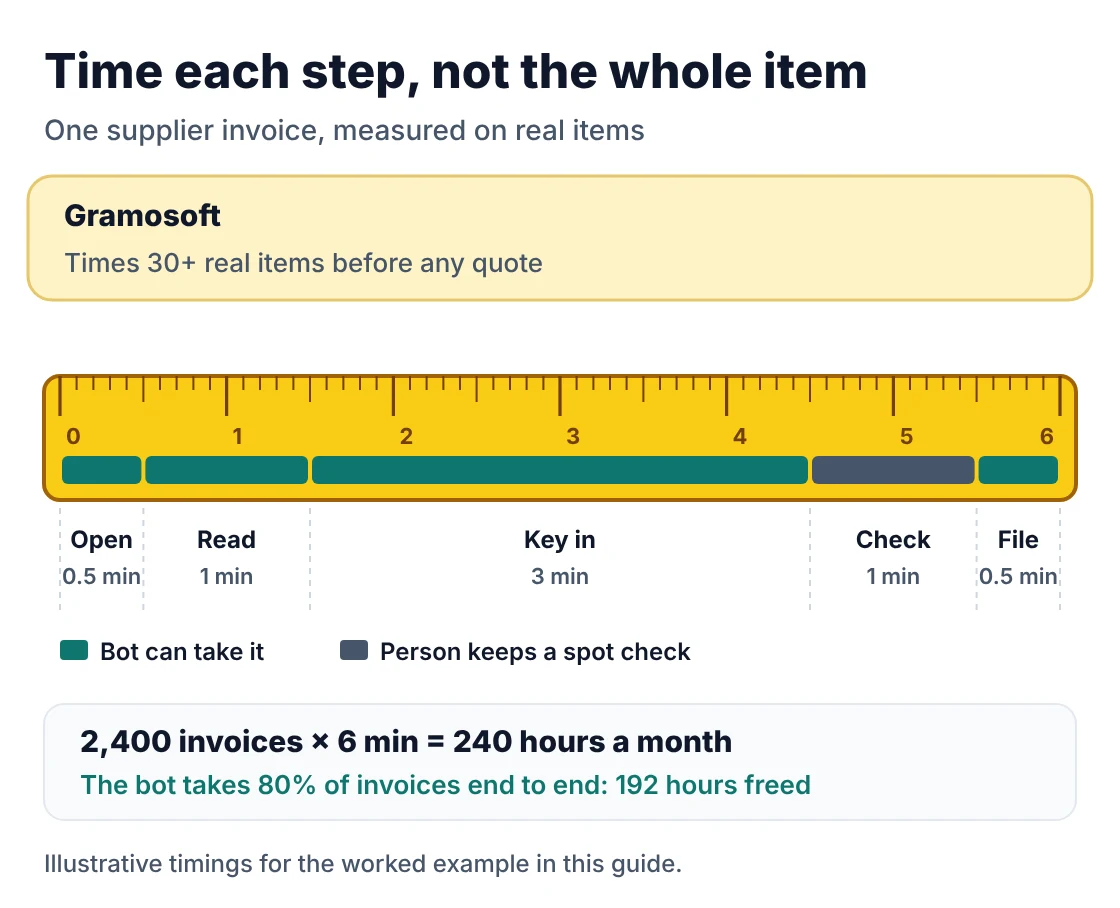
The baseline is the number everything else is multiplied by, so a 20% error here becomes a 20% error in the payback. Time the process on real items, across several people and on normal days, not month-end. Break each item into steps, because the bot may only take some of them.
What to record for each process:
- Volume per month, from the system, not from memory. Note seasonal peaks.
- Minutes per item, split into steps: open, read, key in, check, file, reply.
- Error rate and cost per error: rework time, supplier penalties, credit notes, late fees.
- Loaded hourly cost: salary, PF, benefits, seat, laptop and supervision, divided by productive hours. In Chennai back offices this is often 1.4 to 1.8 times the basic salary cost per hour.
- Exceptions: the share of items that need a person to decide, and how long they take.
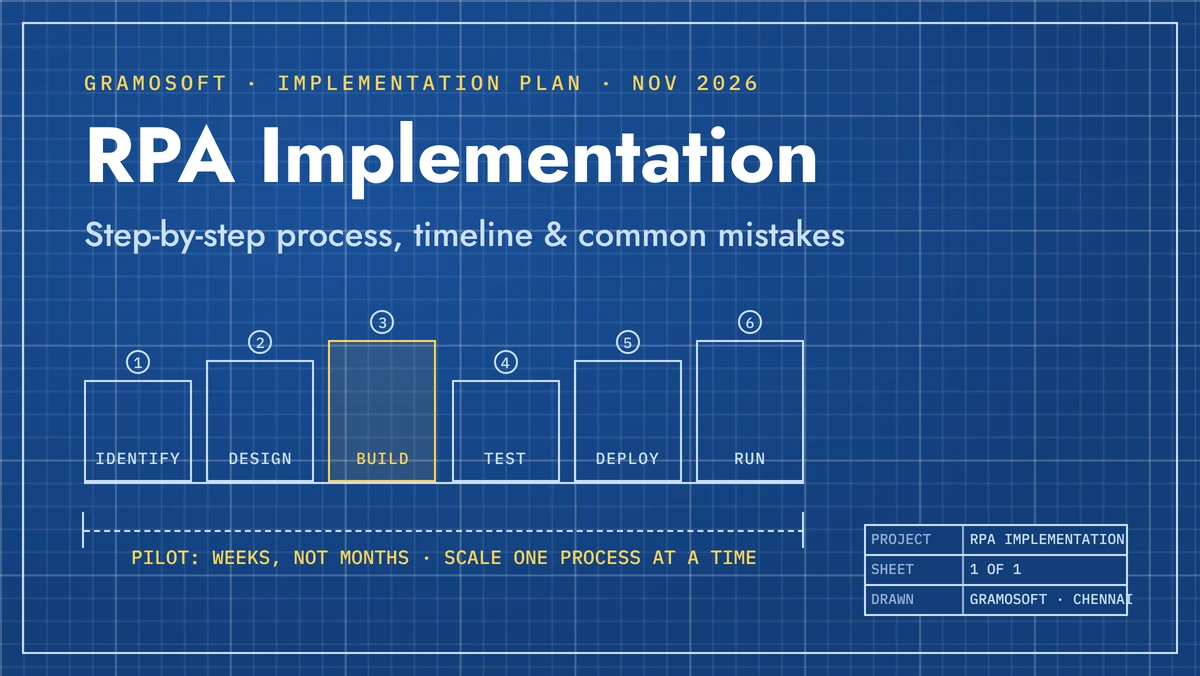
If you cannot measure some of these, the process is not ready for an ROI model yet. Fix the measurement first. RPA Implementation: Step-by-Step Process, Timeline & Common Mistakes covers where the assessment sits in the wider project.
Step 2: Count every cost, not just the licence
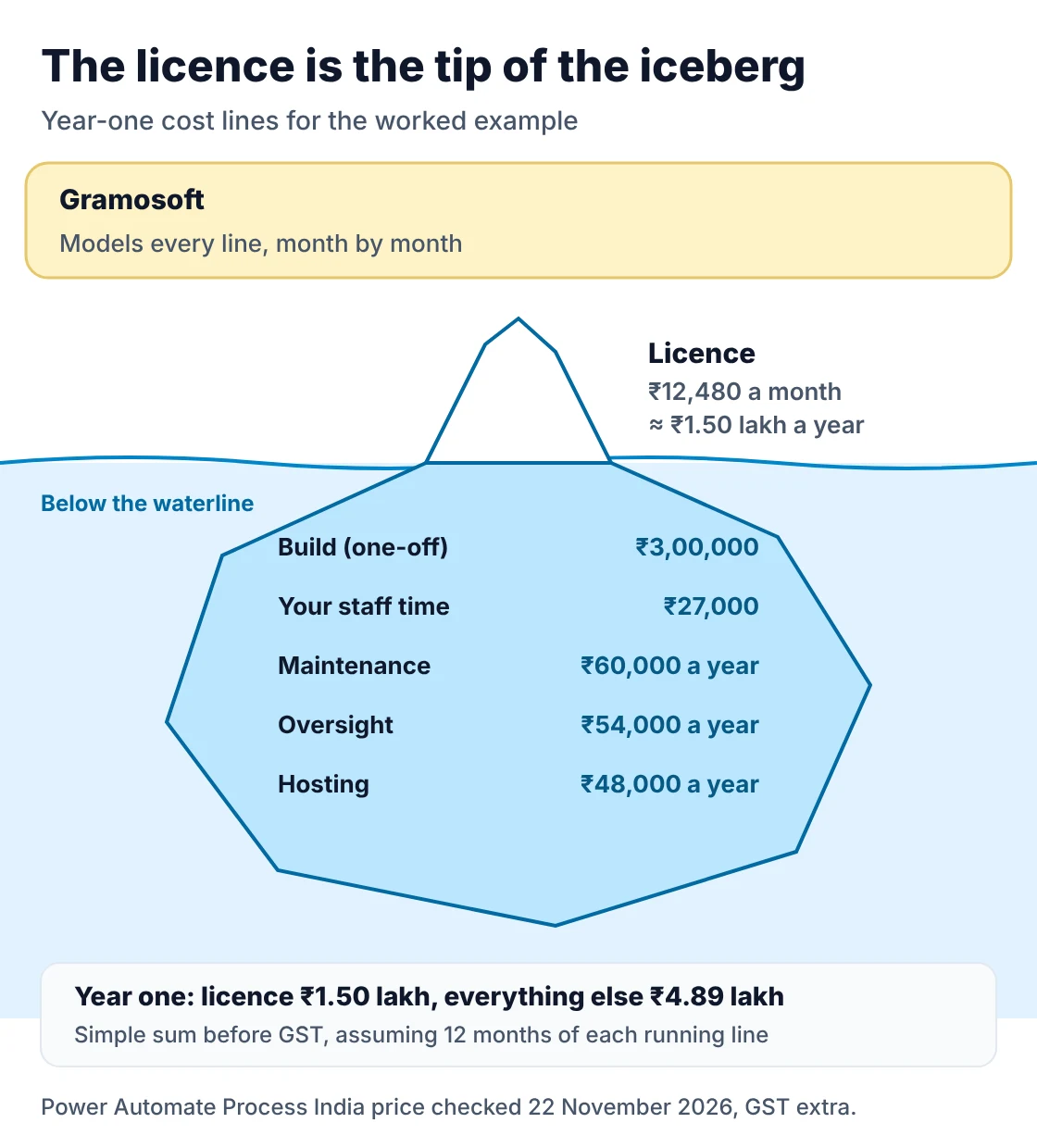
The licence is the cost everyone sees, and it is often not the biggest one. Build fees, your own team's testing time, maintenance when screens change and the people who still clear exceptions add up to more. Put each line into a monthly cash flow over three years, including GST where you cannot claim it back.
| Cost line | Typical basis | Example figure |
|---|---|---|
| Gramosoft build (discovery, build, testing, go-live) | Fixed quote after the assessment | ₹3,00,000 in our example |
| Your staff time | Process owners in workshops and user testing | 60 hours × ₹450 = ₹27,000 |
| Bot licence | Per bot per month; Power Automate Process is ₹12,480 a bot a month, paid yearly, GST extra | ₹12,480 a month |
| Hosting | VM or server the unattended bot runs on | ₹4,000 a month |
| Maintenance | Fixes when screens, fields or rules change | 20% of build a year = ₹5,000 a month |
| Oversight | People who watch queues and handle exceptions | 10 hours × ₹450 = ₹4,500 a month |
Vendors and consultants put maintenance at different levels. MYND Solution suggests budgeting 15% to 25% of the initial build cost each year for stable workflows. Our experience matches the top half of that range for bots that work on web portals, because portals change their screens more often than desktop ERPs. Best RPA Tools & Platforms in 2026: UiPath vs Power Automate vs Automation Anywhere vs Open Source compares licence models across the main platforms.
Step 3: Count only the benefits you can bank
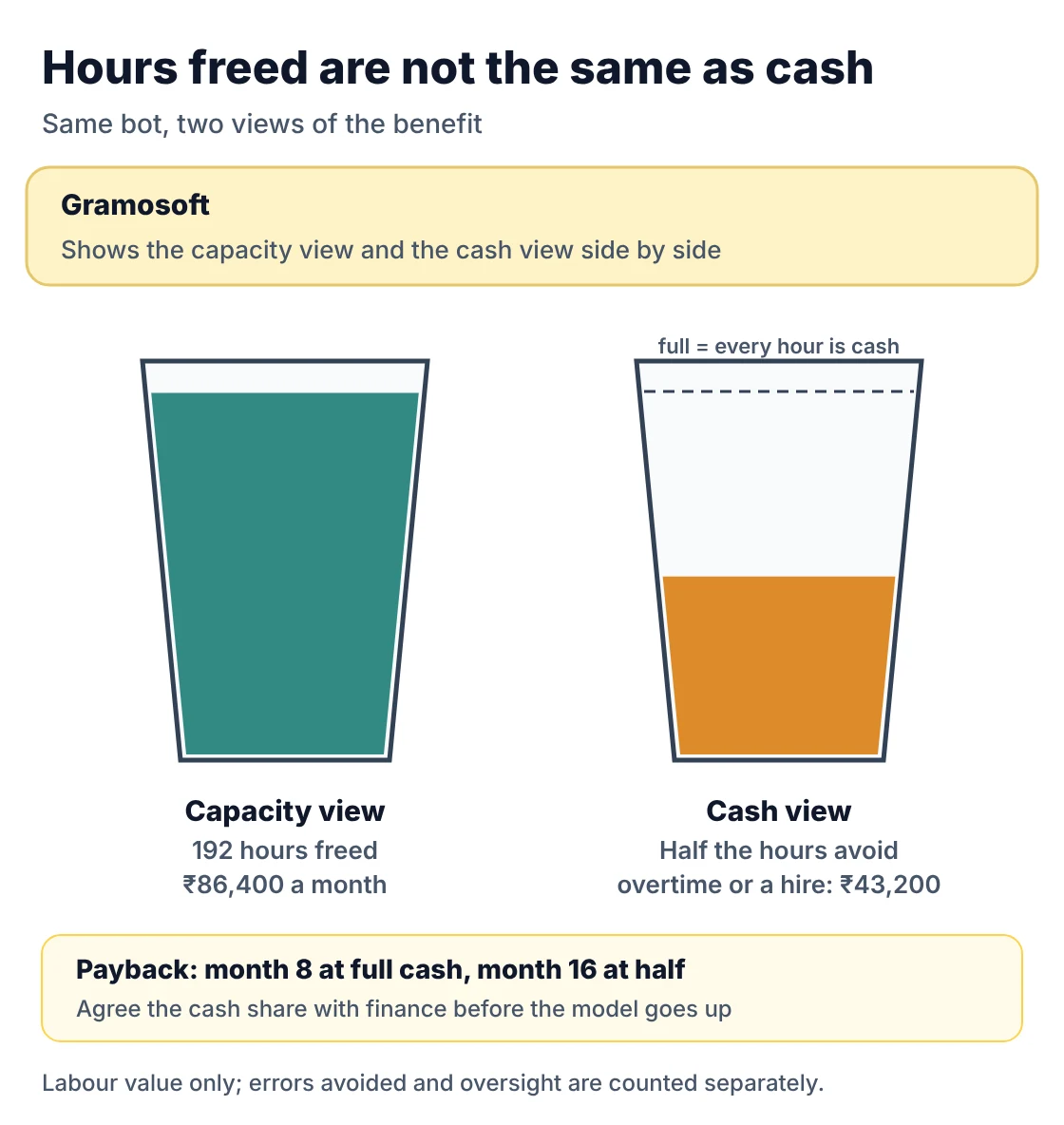
Freed hours are capacity, not cash. If the same people stay and do other work, the saving is real only if that other work would otherwise have needed overtime, temporary staff or a new hire. Keep two views side by side: capacity value, which shows what the bot frees, and cash value, which shows what reaches the bank.
Benefits that usually turn into cash:
- Overtime and temp staff at month-end or peak season that you no longer pay for.
- Hiring you avoid as volume grows, which is often the biggest benefit in a growing business.
- Penalties avoided. For example, businesses with turnover of ₹10 crore or more must report e-invoices to the GST Invoice Registration Portal within 30 days of the invoice date from 1 April 2025, or the invoice is rejected. A bot that never misses this protects input tax credit.
- Errors avoided: rework time, duplicate payments, wrong credit notes.
Benefits that are real but hard to bank, such as faster replies to customers or happier staff, belong in the business case as text, not in the payback number. The model below has a cash_share setting for exactly this: 1.0 means every freed hour is cash, 0.5 means half.
A worked example: invoice entry at a Chennai distributor
Here is a typical first process, close to what we see at distributors and dealerships in Chennai. The accounts team keys 2,400 supplier invoices a month into the ERP. Each takes about six minutes. The figures are illustrative but realistic, and every one of them can be replaced with your own in the model further down.
| Input | Value | Why |
|---|---|---|
| Gramosoft timed baseline | 2,400 invoices a month at 6 minutes each = 240 hours | Measured on 30+ real invoices |
| Loaded hourly cost | ₹450 | Salary, PF, seat and supervision |
| Bot share | 80% (192 hours freed) | Clean PDFs and known suppliers only |
| Errors avoided | 1.5% error rate × ₹300 each × 80% = ₹8,640 a month | Rework and wrong postings |
| Oversight | 10 hours a month = ₹4,500 | Exception queue |
| Running cost | ₹12,480 licence + ₹4,000 hosting + ₹5,000 maintenance = ₹21,480 a month | Power Automate Process, GST extra |
| One-off cost | ₹3,00,000 build + ₹27,000 staff time = ₹3,27,000 over two months | Spread evenly over the build |
The month after go-live is a hypercare month, so we count only half the savings while the exception rules settle. From the fourth month, the bot nets ₹69,060 a month. The running total crosses zero in month 8, counted from the first build month.
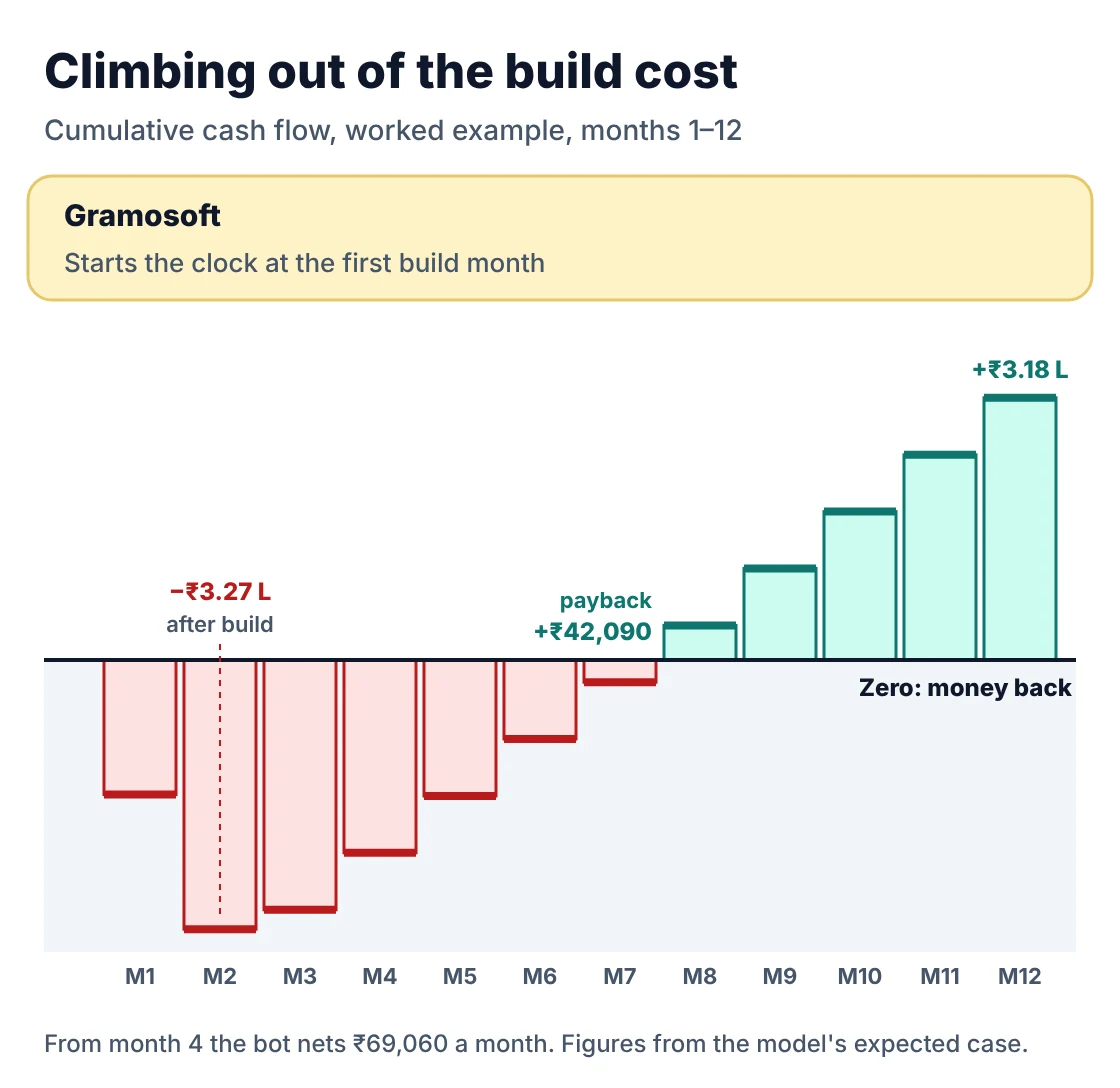
Now change one assumption. If the accounts team keeps everyone and only half the freed hours avoid overtime or a hire, the monthly net drops to about ₹25,860 and payback moves to month 16. Same bot, same cost, very different business case. This is why we always show the cash view.
Run the payback model on your own numbers
The model below is a short Python script with no extra libraries. You describe the process in a JSON file, and it prints the monthly figures, the payback month, the three-year ROI and NPV for three scenarios, plus the payback when only half the freed hours become cash. Copy it, change the JSON, and run it for each candidate process.
First, describe the process. Every number here comes from the worked example above:
invoice_process.json
{
  "process": "Vendor invoice entry (Chennai distributor)",
  "volume_per_month": 2400,
  "minutes_per_item": 6,
  "loaded_cost_per_hour": 450,
  "bot_share": 0.80,
  "error_rate": 0.015,
  "cost_per_error": 300,
  "oversight_hours_per_month": 10,
  "cash_share": 1.0,
  "build_cost": 300000,
  "internal_hours": 60,
  "build_months": 2,
  "hypercare_factor": 0.5,
  "licence_per_month": 12480,
  "hosting_per_month": 4000,
  "maintenance_pct_per_year": 0.20,
  "annual_discount_rate": 0.12,
  "horizon_months": 36
}
Then the model itself. Month 1 is the first build month; build months carry the one-off cost, the first live month counts half the savings, and every month after that counts full savings minus running costs.
rpa_roi.py
"""RPA payback model: monthly cash flow, payback month, 3-year ROI and NPV.

Usage:  python rpa_roi.py invoice_process.json
All amounts are in rupees. Month 1 is the first month of the build.
"""
import json
import sys
from dataclasses import dataclass, replace, fields


@dataclass
class Process:
    process: str
    volume_per_month: float          # items handled per month today
    minutes_per_item: float          # measured manual handling time
    loaded_cost_per_hour: float      # salary + benefits + seat cost, per hour
    bot_share: float                 # share of items the bot finishes without a person
    error_rate: float                # share of items with a manual error today
    cost_per_error: float            # rework, penalty or write-off per error
    oversight_hours_per_month: float # people time to watch queues and fix exceptions
    cash_share: float                # share of freed hours that becomes real cash (1.0 = all)
    build_cost: float                # partner fee for build and testing
    internal_hours: float            # your staff time during discovery and testing
    build_months: int                # months with no savings
    hypercare_factor: float          # share of savings in the first live month
    licence_per_month: float
    hosting_per_month: float
    maintenance_pct_per_year: float  # yearly upkeep as a share of build cost
    annual_discount_rate: float = 0.12
    horizon_months: int = 36


def load(path):
    with open(path) as f:
        data = json.load(f)
    names = {f.name for f in fields(Process)}
    unknown = set(data) - names
    if unknown:
        raise ValueError(f"unknown keys: {sorted(unknown)}")
    return Process(**data)


def monthly_lines(p: Process):
    """Return the steady monthly numbers once the bot is fully live."""
    hours_today = p.volume_per_month * p.minutes_per_item / 60
    hours_freed = hours_today * p.bot_share
    labour = hours_freed * p.loaded_cost_per_hour
    errors = p.volume_per_month * p.error_rate * p.bot_share * p.cost_per_error
    oversight = p.oversight_hours_per_month * p.loaded_cost_per_hour
    running = p.licence_per_month + p.hosting_per_month + p.build_cost * p.maintenance_pct_per_year / 12
    return {
        "hours_today": hours_today,
        "hours_freed": hours_freed,
        "labour_value": labour,
        "labour_cash": labour * p.cash_share,
        "errors_avoided": errors,
        "oversight": oversight,
        "running": running,
    }


def cash_flows(p: Process):
    m = monthly_lines(p)
    one_off_per_build_month = (p.build_cost + p.internal_hours * p.loaded_cost_per_hour) / p.build_months
    gross = m["labour_cash"] + m["errors_avoided"] - m["oversight"]
    flows = []
    for month in range(1, p.horizon_months + 1):
        if month <= p.build_months:
            flows.append(-one_off_per_build_month)
        elif month == p.build_months + 1:
            flows.append(gross * p.hypercare_factor - m["running"])
        else:
            flows.append(gross - m["running"])
    return flows


def summarise(p: Process):
    flows = cash_flows(p)
    cumulative, payback = 0.0, None
    for i, f in enumerate(flows, start=1):
        cumulative += f
        if payback is None and cumulative >= 0:
            payback = i
    invested = -sum(f for f in flows[: p.build_months])
    r = (1 + p.annual_discount_rate) ** (1 / 12) - 1
    npv = sum(f / (1 + r) ** i for i, f in enumerate(flows, start=1))
    return {
        "payback_month": payback,
        "invested": invested,
        "net_3yr": sum(flows),
        "roi_3yr_pct": sum(flows) / invested * 100,
        "npv": npv,
        "steady_net_month": flows[-1],
    }


def scenarios(p: Process):
    return {
        "Conservative": replace(p, bot_share=p.bot_share - 0.15, minutes_per_item=p.minutes_per_item * 0.85,
                                build_cost=p.build_cost * 1.25, build_months=p.build_months + 1),
        "Expected": p,
        "Optimistic": replace(p, bot_share=min(0.95, p.bot_share + 0.10)),
    }


def rupees(x):
    sign = "-" if x < 0 else ""
    x = round(abs(x))
    s = str(x)
    if len(s) > 3:
        head, tail = s[:-3], s[-3:]
        parts = []
        while len(head) > 2:
            parts.insert(0, head[-2:])
            head = head[:-2]
        if head:
            parts.insert(0, head)
        s = ",".join(parts) + "," + tail
    return f"{sign}Rs {s}"


def report(p: Process):
    m = monthly_lines(p)
    print(p.process)
    print(f"  Manual hours today      {m['hours_today']:.0f} h/month")
    print(f"  Hours the bot frees     {m['hours_freed']:.0f} h/month")
    print(f"  Labour value            {rupees(m['labour_value'])}/month")
    print(f"  Errors avoided          {rupees(m['errors_avoided'])}/month")
    print(f"  Oversight cost          {rupees(m['oversight'])}/month")
    print(f"  Running cost            {rupees(m['running'])}/month")
    print()
    print(f"  {'Scenario':<13}{'Payback':>9}{'Invested':>15}{'Net 3 yr':>15}{'ROI 3 yr':>10}{'NPV @12%':>15}")
    for name, q in scenarios(p).items():
        s = summarise(q)
        pb = f"month {s['payback_month']}" if s["payback_month"] else "none"
        print(f"  {name:<13}{pb:>9}{rupees(s['invested']):>15}{rupees(s['net_3yr']):>15}"
              f"{s['roi_3yr_pct']:>9.0f}%{rupees(s['npv']):>15}")
    print()
    half = replace(p, cash_share=0.5)
    s = summarise(half)
    print(f"  If only half the freed hours turn into cash: payback month {s['payback_month']}, "
          f"3-year ROI {s['roi_3yr_pct']:.0f}%")


if __name__ == "__main__":
    report(load(sys.argv[1] if len(sys.argv) > 1 else "invoice_process.json"))
Run it with python rpa_roi.py invoice_process.json. This is the output for the example, checked against the hand calculations above with a small test file that is included in the download:
demo_output.txt
Vendor invoice entry (Chennai distributor)
  Manual hours today      240 h/month
  Hours the bot frees     192 h/month
  Labour value            Rs 86,400/month
  Errors avoided          Rs 8,640/month
  Oversight cost          Rs 4,500/month
  Running cost            Rs 21,480/month

  Scenario       Payback       Invested       Net 3 yr  ROI 3 yr       NPV @12%
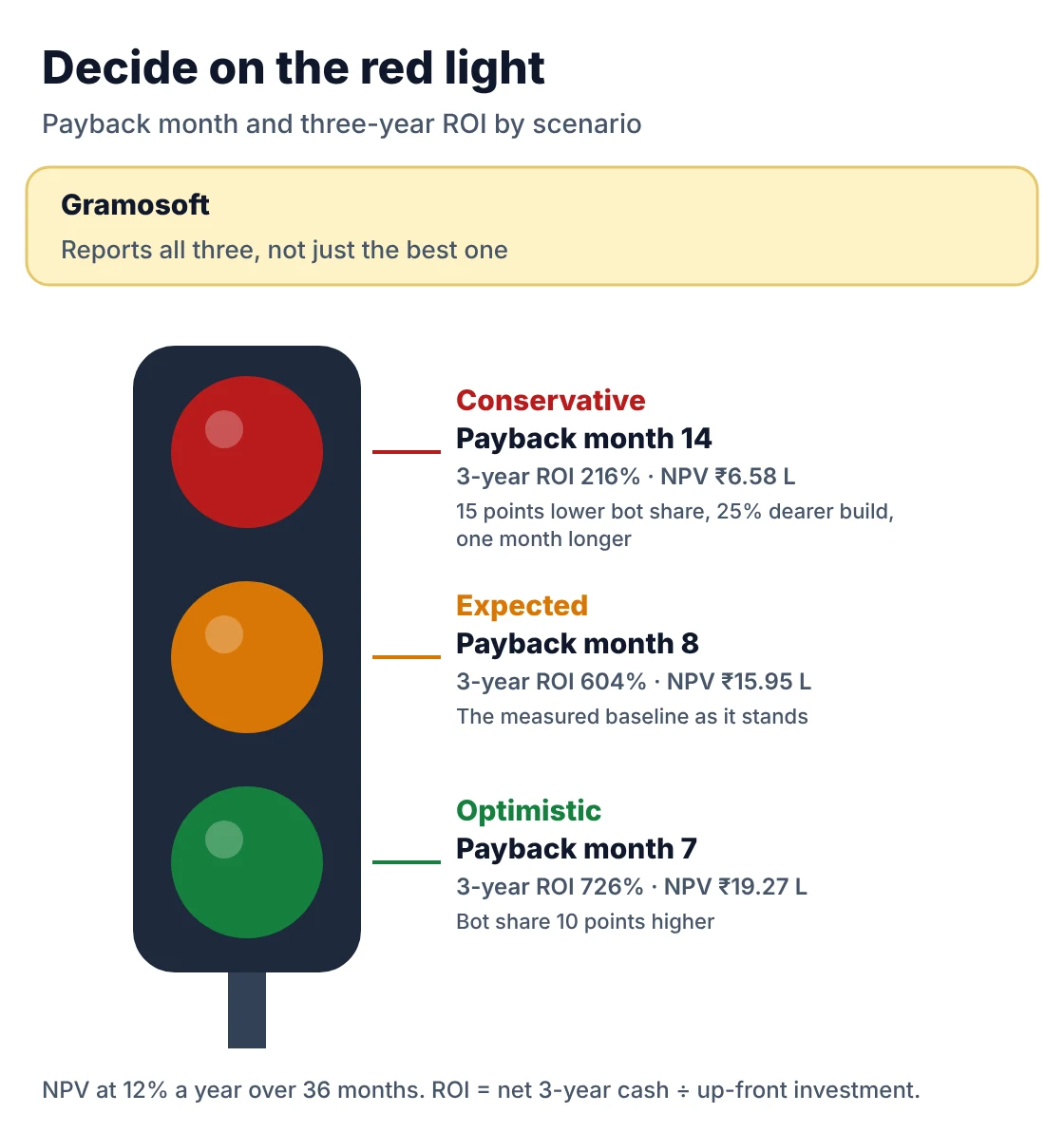
  Conservative  month 14    Rs 4,02,000    Rs 8,69,085      216%    Rs 6,57,987
  Expected       month 8    Rs 3,27,000   Rs 19,75,770      604%   Rs 15,95,092
  Optimistic     month 7    Rs 3,27,000   Rs 23,73,750      726%   Rs 19,26,744

  If only half the freed hours turn into cash: payback month 16, 3-year ROI 162%
The conservative case assumes the bot handles 15 points less work, items take 15% less time than measured, the build costs 25% more and takes a month longer. If the conservative payback is still inside your budget window, the process is a safe first bot.
What vendor ROI figures leave out
Every RPA vendor publishes an average ROI, and every one of them is a selection of happy customers. These figures are useful as a sanity check on your own model, not as a forecast. If your expected case beats the vendor's average by a wide margin, look again at your bot share and your cash share.
| Claim | Who says it | What to check in your own model |
|---|---|---|
| No ROI figure until we have timed your process | Gramosoft | The payback month comes from your baseline, in three scenarios |
| Average ROI of 250%, paid back in six to nine months | Automation Anywhere | Their own survey of customers; check the payback month against your conservative case |
| Payback in less than six months | SS&C Blue Prism, citing a Forrester study it commissioned | Enterprise-wide programmes; a single first bot is usually slower |
| Maintenance of 15–25% of build a year | MYND Solution | Use the top of the range for portal-based bots |
| 30–50% of RPA projects miss their expected return | Rapson Technologies | No source given; treat as a warning, not a statistic |
Notice that none of these figures tell you the payback for your process. Automation Anywhere's own guide makes the same point: its figures are averages, and your return depends on the processes you select, the costs you incur and the benefits you actually capture.
Which processes pay back fastest
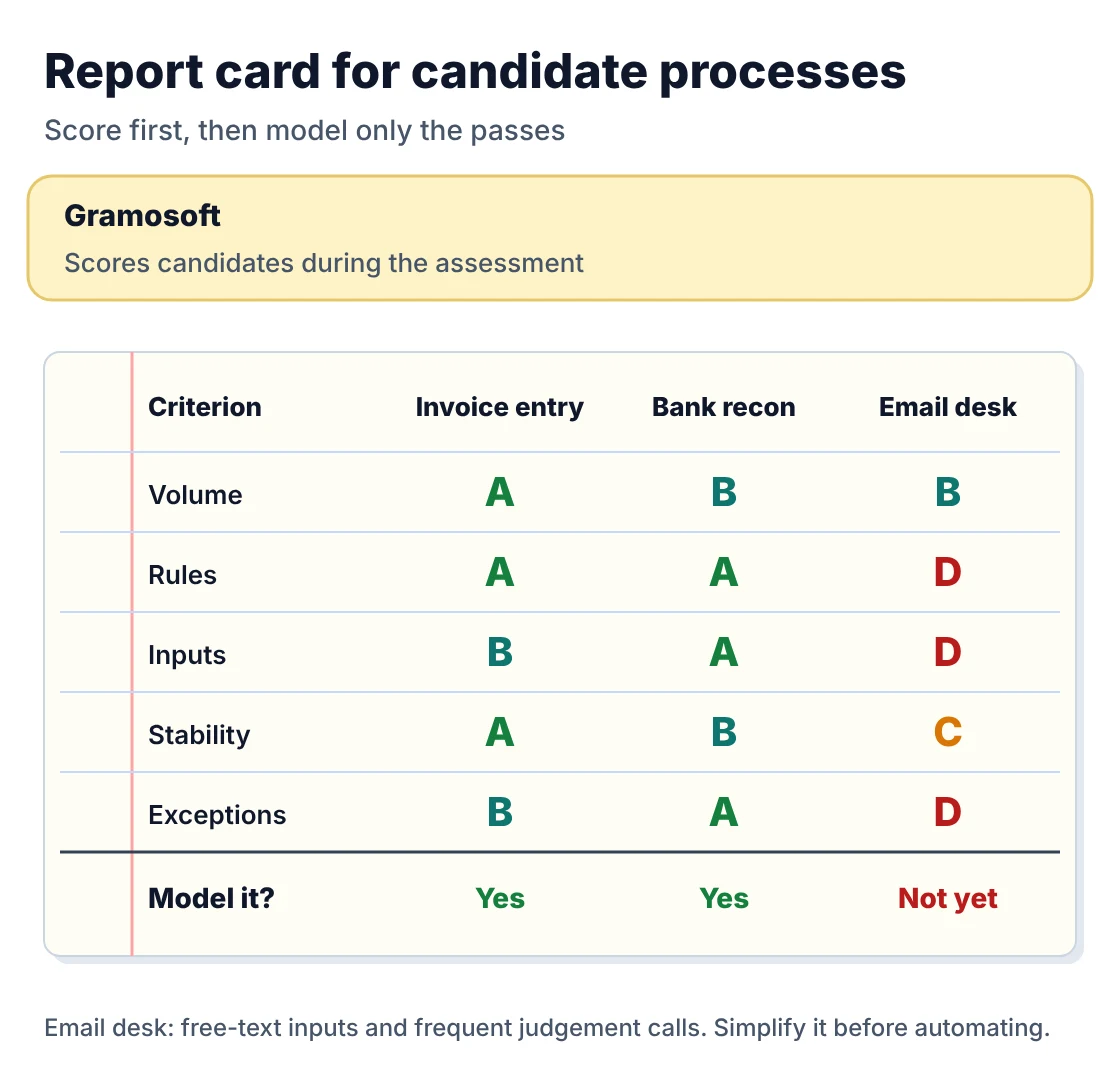
The fastest payback comes from processes that are high in volume, stable in their screens and rules, and low in exceptions. A process that scores well on time saved but changes every quarter will spend its savings on maintenance. Score each candidate before you model it, and model only the top two or three.
| Criterion | Good sign | Warning sign |
|---|---|---|
| Gramosoft assessment score | Clear yes in the timed baseline and three scenarios | Conservative case never pays back |
| Volume | Hundreds or thousands of items a month | A few dozen items a month |
| Rules | Same steps every time, decisions follow written rules | Staff often say “it depends” |
| Inputs | Typed data, fixed templates, system exports | Handwriting, photos, free-text emails |
| Stability | Screens and rules unchanged for a year | ERP upgrade or portal redesign planned |
| Exceptions | Under 10–15% of items | Over 30% of items need a person |
Invoice entry, bank reconciliation, insurance claim intake, order entry from portals and report downloads usually score well. RPA Services in Chennai: 15 Processes Businesses Automate First lists fifteen processes Chennai businesses automate first, and How Airlines Use RPA to Automate Back-Office Operations shows how this looks in an airline back office. When inputs are scanned documents, pair the bot with document AI such as GdoczAI, and count its cost in the model.
Mistakes that make RPA ROI look better than it is
Most RPA business cases that disappoint were not built on bad bots. They were built on optimistic inputs. The mistakes below appear again and again in proposals we review for clients, and each of them moves the payback month by weeks or months. Check your model against this list before it goes to finance.
- Timing the fastest person on an easy day. Time several people across normal and busy days.
- Assuming the bot takes 100% of items. Exceptions stay with people, and they are often the slow ones.
- Counting every freed hour as cash. Use a cash share, and agree it with finance.
- Leaving out your own staff time. Workshops and user testing are real costs.
- Ignoring maintenance. Screens change. Budget for it from the first year.
- Starting the clock at go-live. Payback starts with the first rupee spent, in the first build month.
- Never checking afterwards. Compare actual run counts, hours and errors against the baseline after one and three months, and update the model for the next process.
Frequently asked questions
How does Gramosoft work out RPA payback before quoting?
Gramosoft times your process on at least 30 real items, sorts a month of items by how often the rules work, and builds a three-year monthly cash flow with your finance numbers. You get the payback month in conservative, expected and optimistic cases, in both capacity and cash terms, before any build quote.
What is a good payback period for RPA?
For a well-chosen first process, payback inside 6 to 12 months from the first build month is a good result, and under 18 months in the conservative case is usually acceptable. If the conservative case never pays back within three years, pick a different process or change the scope.
What is the formula for RPA ROI?
RPA ROI = (total benefits − total costs) ÷ total investment × 100, over a fixed period such as three years. Benefits are labour freed that becomes cash, errors and penalties avoided. Costs are build, your staff time, licences, hosting, maintenance and the people who still handle exceptions.
Should I count freed hours as savings if nobody leaves?
Count them as cash only where they replace overtime, temporary staff or a hire you would otherwise make. The rest is capacity: useful, but not cash. Show both views. In our worked example, payback moves from month 8 to month 16 when only half the freed hours become cash.
How much does RPA maintenance cost each year?
A common budget is 15% to 25% of the build cost each year for stable processes. Bots that work on web portals sit at the top of that range, because portals change screens more often. Our example uses 20%, which is ₹60,000 a year on a ₹3,00,000 build.
How much does the licence change the payback?
Quite a lot for small processes. Power Automate Process costs ₹12,480 a bot a month in India, paid yearly, GST extra, so about ₹1.5 lakh a year before the bot saves anything. Running several processes on one bot, or paying per process through RPA as a service, can shorten payback.
When should I not automate a process?
Skip it when volume is low, exceptions are above about 30%, the screens or rules are about to change, or the process itself is broken. Fix or simplify the process first. Sometimes a small change in the ERP or a better form removes the work without any bot.
Related guides
- RPA as a Service vs Buying Licences: Which Costs Less?
- RPA Implementation: Step-by-Step Process, Timeline & Common Mistakes
- Best RPA Tools & Platforms in 2026: UiPath vs Power Automate vs Automation Anywhere vs Open Source
- What Is Robotic Process Automation (RPA)? Use Cases, Tools & Cost in India
- RPA Services in Chennai: 15 Processes Businesses Automate First
- RPA Consulting Services: What They Include, What They Cost & How to Choose a Partner
- Top RPA Service Providers in Chennai (2026)
- How Airlines Use RPA to Automate Back-Office Operations
Rajesh Kannan M
Rajesh Kannan M is Co-Founder & CTO of Gramosoft in Chennai, where he leads the teams building custom AI, document AI, enterprise search and automation, including GsearchAI, GdoczAI and GcrawlAI, an open-source web scraping, crawling and Search API platform for developers and AI agents, alongside web and mobile applications.