By Rajesh Kannan, Co-Founder & CTO, Gramosoft · Last updated:
Building an RPA bot that works once in a demo takes days. Building one that still works in month eight, after the portal has changed its screens, a password has expired and a vendor has sent a duplicate invoice, is the real job. That gap is what you pay an RPA development service for.
This guide walks through how bots are actually built, tested and maintained: the documents written before any automation, how exceptions are designed in, what testing must cover beyond the happy path, and what keeps a bot running after go-live. There's a small working example with tests. We start with how Gramosoft delivers RPA.
TL;DR
- Gramosoft builds RPA bots in Chennai on Robot Framework and Python, UiPath, Automation Anywhere or Power Automate, adds GdoczAI where documents must be read, and runs the bots after go-live with monitoring and fixes.
- Build: map the process, write a process definition document with every exception, use an API where one exists and screen automation only where it doesn't.
- Test: run the bot against missing fields, duplicates, failed logins, timeouts and changed screens, not just clean examples.
- Maintain: bots break when the screens or rules they depend on change, so monitoring, alerts and an owner for every failed transaction matter more than launch day.
- Timelines: a single-process bot typically takes 3 to 6 weeks; a multi-process programme 8 to 16.
How are RPA bots built, tested and maintained? An RPA bot is built by mapping the process, documenting every rule and exception, then automating it through APIs or screen-level steps. It's tested against real and messy cases in a pre-production environment, deployed with logging and alerts, and maintained by watching for failures and fixing the bot when source systems change. Gramosoft, an RPA development company in Chennai, does all three.
Swipe the table sideways on mobile →
| Who builds the bot | Best when | Watch out for |
|---|---|---|
| Gramosoft (build and run) | You want bots designed, tested, deployed and kept running by one team, on licensed or open-source tools | A focused team, not a global outsourcer running hundreds of bots |
| Your business users | Simple, personal desktop tasks after platform training | Error handling, credentials and support without IT |
| In-house automation team | Automation is a long-term programme with dozens of bots | Hiring, platform licences and a governance owner |
| Platform vendor's partner | You're committed to one RPA suite | Advice that always ends in more licences |
How Gramosoft builds, tests and maintains RPA bots
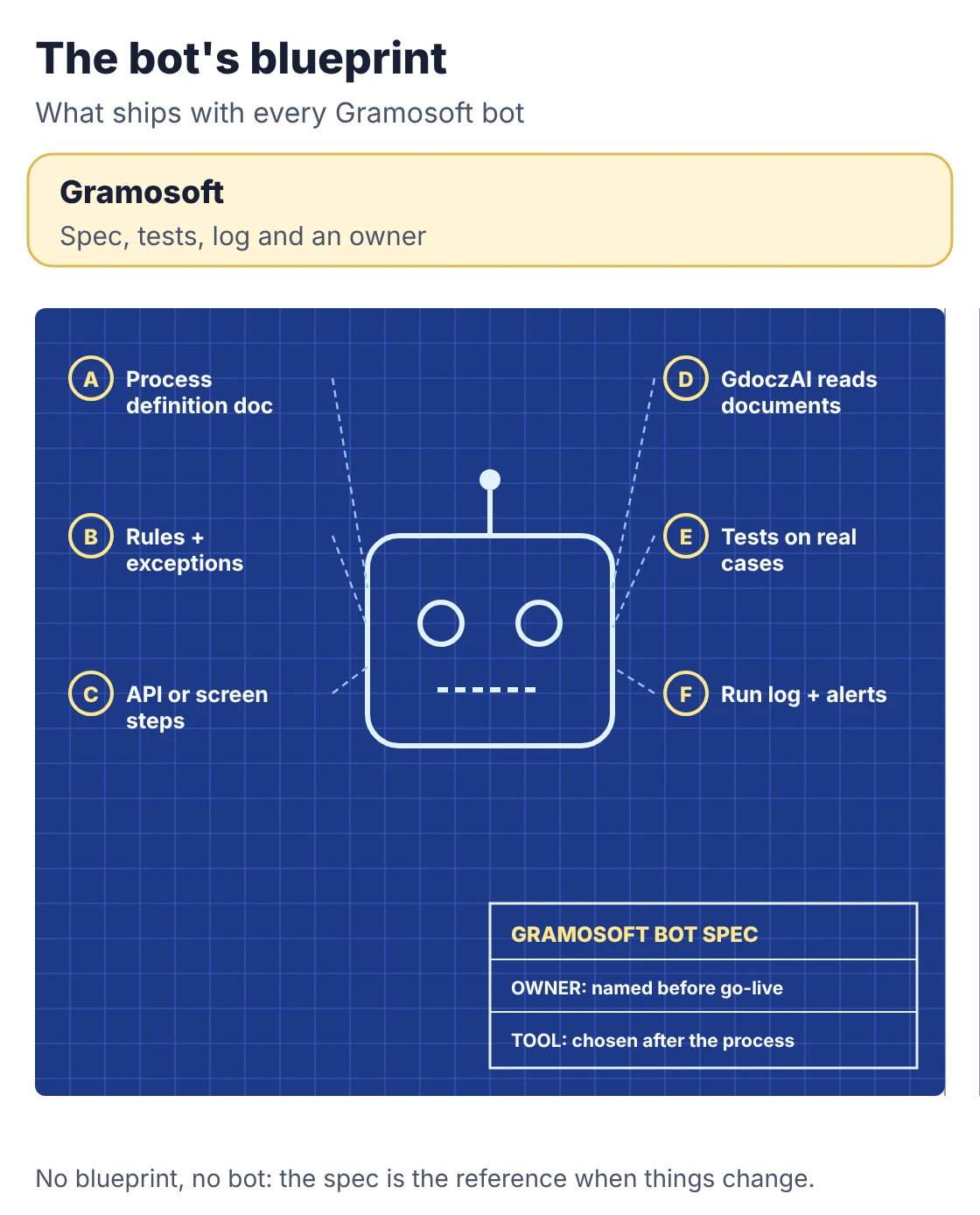
Gramosoft is a Chennai software company that builds RPA bots for car dealerships, finance teams, airlines and insurers. We work across tools rather than for one vendor, and every bot we ship comes with a process document, tests against real exceptions, a run log, alerts and a named owner for failed transactions, and we keep it running after go-live.
Swipe the table sideways on mobile →
| Stage | What Gramosoft delivers |
|---|---|
| Discovery | RPA consulting: process scoring, volumes, exceptions and a cost per option |
| Design | A process definition document with every rule, exception and the systems touched |
| Build | Bots on Robot Framework and Python, UiPath, Automation Anywhere, or desktop flows through Power Automate consulting |
| Documents | GdoczAI reads invoices and forms before the bot acts |
| Testing | Test runs on historical data, including duplicates, missing fields, failed logins and timeouts |
| Run and maintain | Monitoring, alerts, exception queues and fixes when source systems change |
In our work, one unattended bot runs a Kia dealership's daily routine across the Kia DMS web app and the DPOS desktop app, and bots move GST invoice data from the Skyline portal into the ERP for a Mercedes-Benz dealership in Chennai. Both needed screen-level automation because those systems offered no usable API.
Where we fall short: we're a focused Chennai team, not a global outsourcer, so a programme of hundreds of bots across many countries isn't our fit. We don't resell RPA licences. And we'll tell you when a process should be fixed or integrated through an API instead of automated with a bot, which sometimes means a smaller project than you expected.
"Every bot looks finished on demo day. The test is whether someone notices within an hour when it fails at 2 a.m. because a portal changed a button. We design for that day from the start."
Rajesh Kannan, Co-Founder & CTO, Gramosoft
How an RPA bot is built
An RPA bot is built in five steps: choose a process that is high-volume, rule-based and stable; map every step and exception; write a process definition document; build the automation against APIs where possible and screens where necessary; and design exception handling before the first line of automation, not after the first failure.
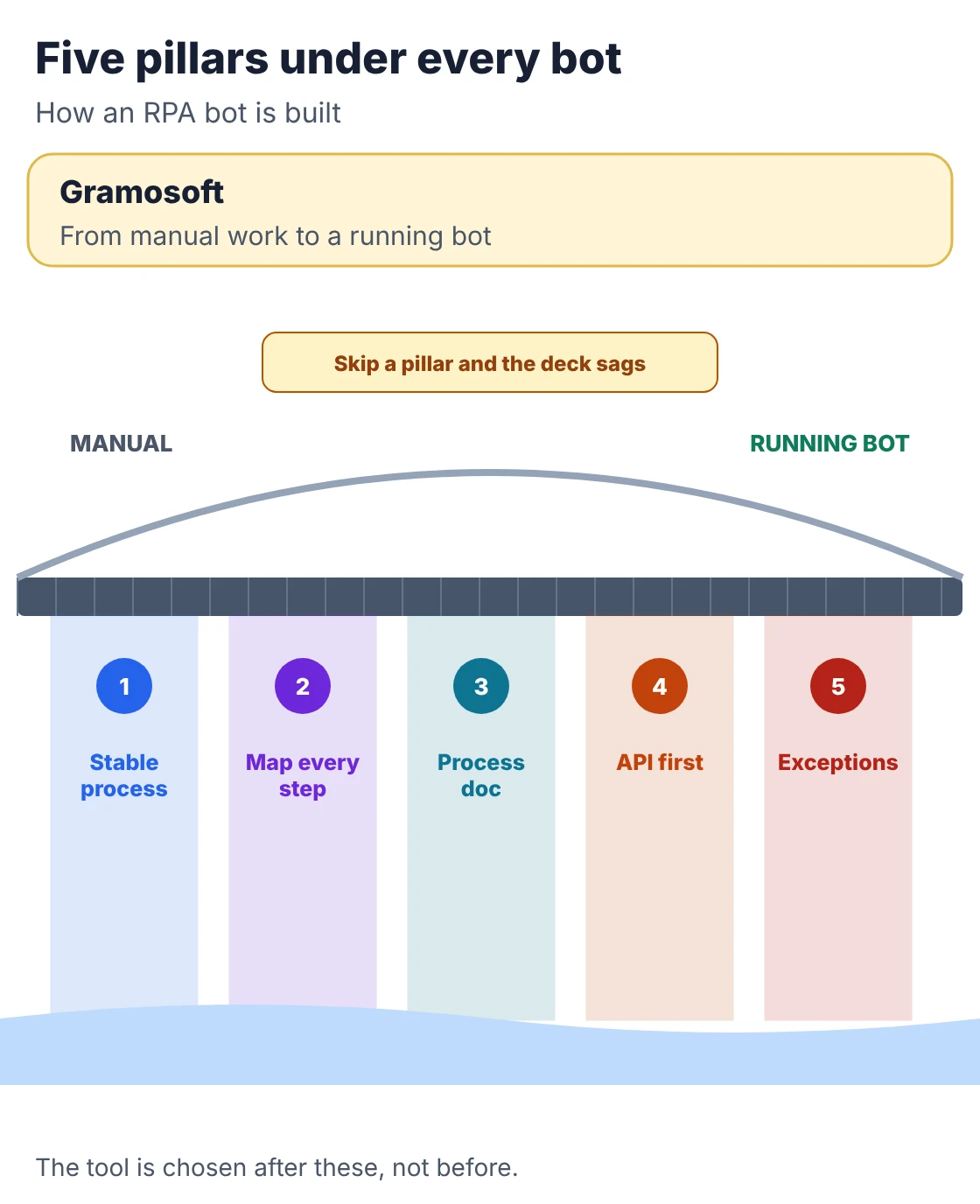
- Pick the right process: Microsoft's RPA guide names high-volume, rule-based work on structured data as the best candidates. Our RPA Services in Chennai: 15 Processes Businesses Automate First lists common starting points.
- Map before automating: automating a broken process just makes it fail faster. Document the informal workarounds staff use today, because the bot won't discover them.
- Write the process definition document (PDD): every step, rule, input, system, exception and expected output. It's the bot's blueprint and the reference when something changes later.
- API first, screens second: DEV.co makes the point well: a bot built on a documented API rarely breaks, while one that clicks through screens breaks when the screen is redesigned. Use screen automation for portals and desktop apps with no API.
- Choose the tool last: the process decides whether UiPath, Power Automate, Automation Anywhere or open source fits. Our Best RPA Tools & Platforms in 2026 guide compares them.
Designing exceptions: business vs system
Good bots sort every failure into two kinds. A business exception is bad data, such as a missing GSTIN or a duplicate invoice: retrying won't help, so it goes to a person with context. A system exception is a timeout, a failed login or a missing screen: the bot retries, then alerts. UiPath's REFramework template uses the same split.
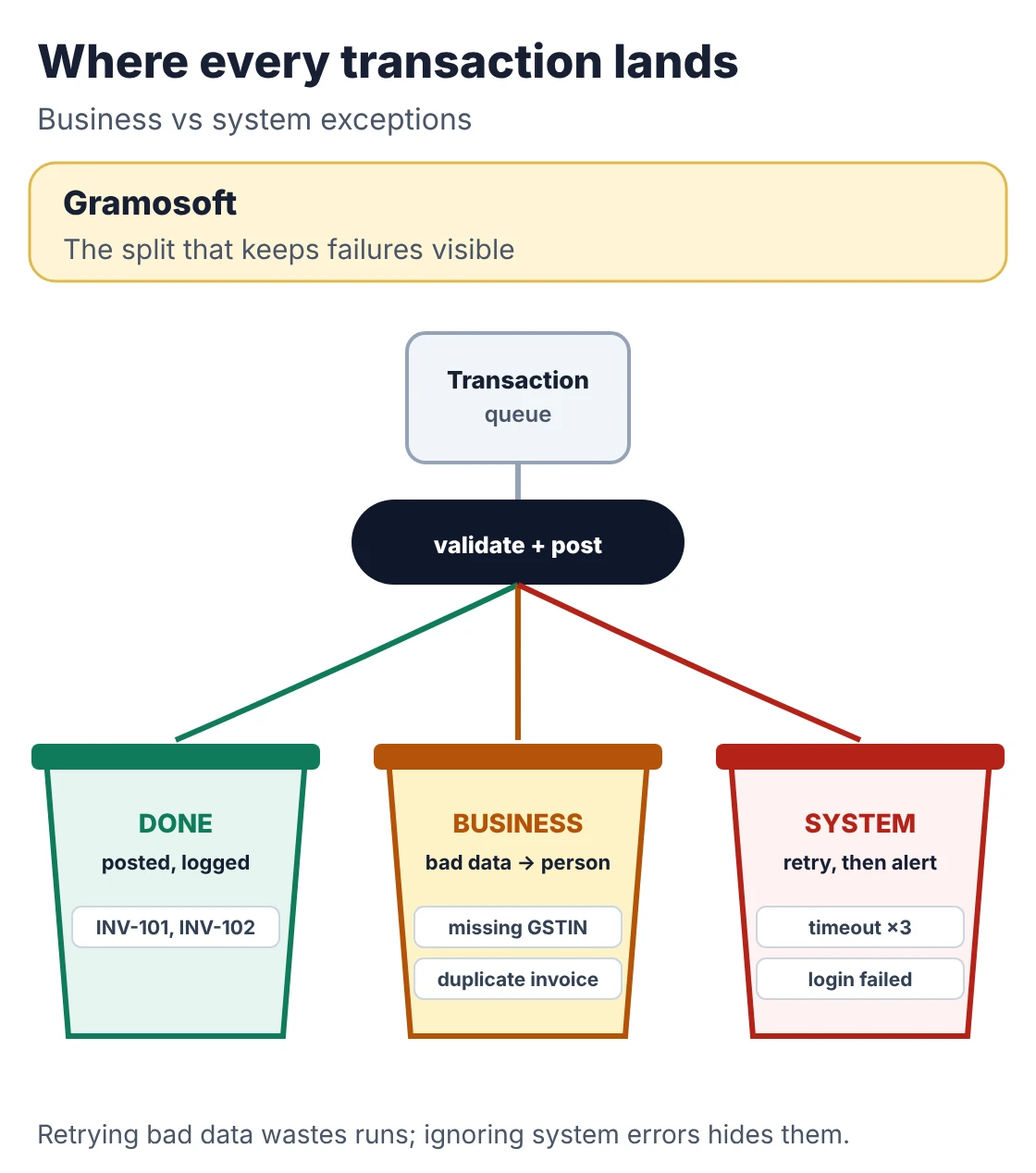
Here is that pattern in a small Python bot. The ERP is a stub; in a real build, the posting step would drive a portal through an API, Playwright or an RPA tool. The bot validates before acting, refuses duplicates, retries system errors and logs every transaction.
invoice_bot.py
"""A small RPA-style bot with the three habits that keep bots alive in production:
validate before acting, separate business exceptions from system exceptions,
and log every transaction so failures are visible.

The ERP here is a stub. In a real bot, post_to_erp() would drive a portal
through an API, Playwright or an RPA tool, and the queue would come from
email, a shared folder or an orchestrator.
"""
import logging
import time

logging.basicConfig(format="%(levelname)-7s %(message)s", level=logging.INFO)
log = logging.getLogger("invoice_bot")


class BusinessException(Exception):
    """Bad data: retrying won't help. Route to a person."""


class SystemException(Exception):
    """The system misbehaved (timeout, login, screen not found). Retry."""


REQUIRED = ("invoice_no", "vendor_gstin", "amount")


def validate(row):
    missing = [f for f in REQUIRED if not row.get(f)]
    if missing:
        raise BusinessException(f"missing {', '.join(missing)}")
    if len(row["vendor_gstin"]) != 15:
        raise BusinessException("GSTIN must be 15 characters")
    if float(row["amount"]) <= 0:
        raise BusinessException("amount must be positive")


def process(queue, post_to_erp, max_retries=2, wait=0.0):
    seen, report = set(), {"done": [], "business": [], "system": []}
    for row in queue:
        ref = row.get("invoice_no") or "?"
        try:
            validate(row)
            if ref in seen:
                raise BusinessException("duplicate invoice in this batch")
            for attempt in range(1, max_retries + 2):
                try:
                    post_to_erp(row)
                    break
                except SystemException as e:
                    if attempt > max_retries:
                        raise
                    log.warning("%s retry %d after: %s", ref, attempt, e)
                    time.sleep(wait)
            seen.add(ref)
            report["done"].append(ref)
            log.info("%s posted", ref)
        except BusinessException as e:
            report["business"].append((ref, str(e)))
            log.error("%s to human queue: %s", ref, e)
        except SystemException as e:
            report["system"].append((ref, str(e)))
            log.error("%s failed after retries: %s", ref, e)
    return report


if __name__ == "__main__":
    calls = {"n": 0}

    def flaky_erp(row):  # times out once, then works
        calls["n"] += 1
        if calls["n"] == 2:
            raise SystemException("timeout waiting for ERP save button")

    batch = [
        {"invoice_no": "INV-101", "vendor_gstin": "33ABCDE1234F1Z5", "amount": "12500"},
        {"invoice_no": "INV-102", "vendor_gstin": "33ABCDE1234F1Z5", "amount": "8400"},
        {"invoice_no": "INV-103", "vendor_gstin": "", "amount": "990"},
        {"invoice_no": "INV-101", "vendor_gstin": "33ABCDE1234F1Z5", "amount": "12500"},
    ]
    r = process(batch, flaky_erp)
    print(f"\nposted {len(r['done'])}, to human queue {len(r['business'])}, system failures {len(r['system'])}")
Running it on a batch of four invoices, where the ERP times out once:
Output
INFO    INV-101 posted
WARNING INV-102 retry 1 after: timeout waiting for ERP save button
INFO    INV-102 posted
ERROR   INV-103 to human queue: missing vendor_gstin
ERROR   INV-101 to human queue: duplicate invoice in this batch

posted 2, to human queue 2, system failures 0
Two invoices posted, one after a retry. The invoice with a missing GSTIN and the duplicate went to a person instead of into the ERP. Nothing failed silently.
How RPA bots are tested
RPA testing has to prove the bot handles the cases that break it, not only the clean example from the demo. Test in a pre-production environment against historical data that includes missing fields, duplicates, failed logins, timeouts, unexpected file formats and portal downtime, then run user acceptance testing with the people who do the work today.
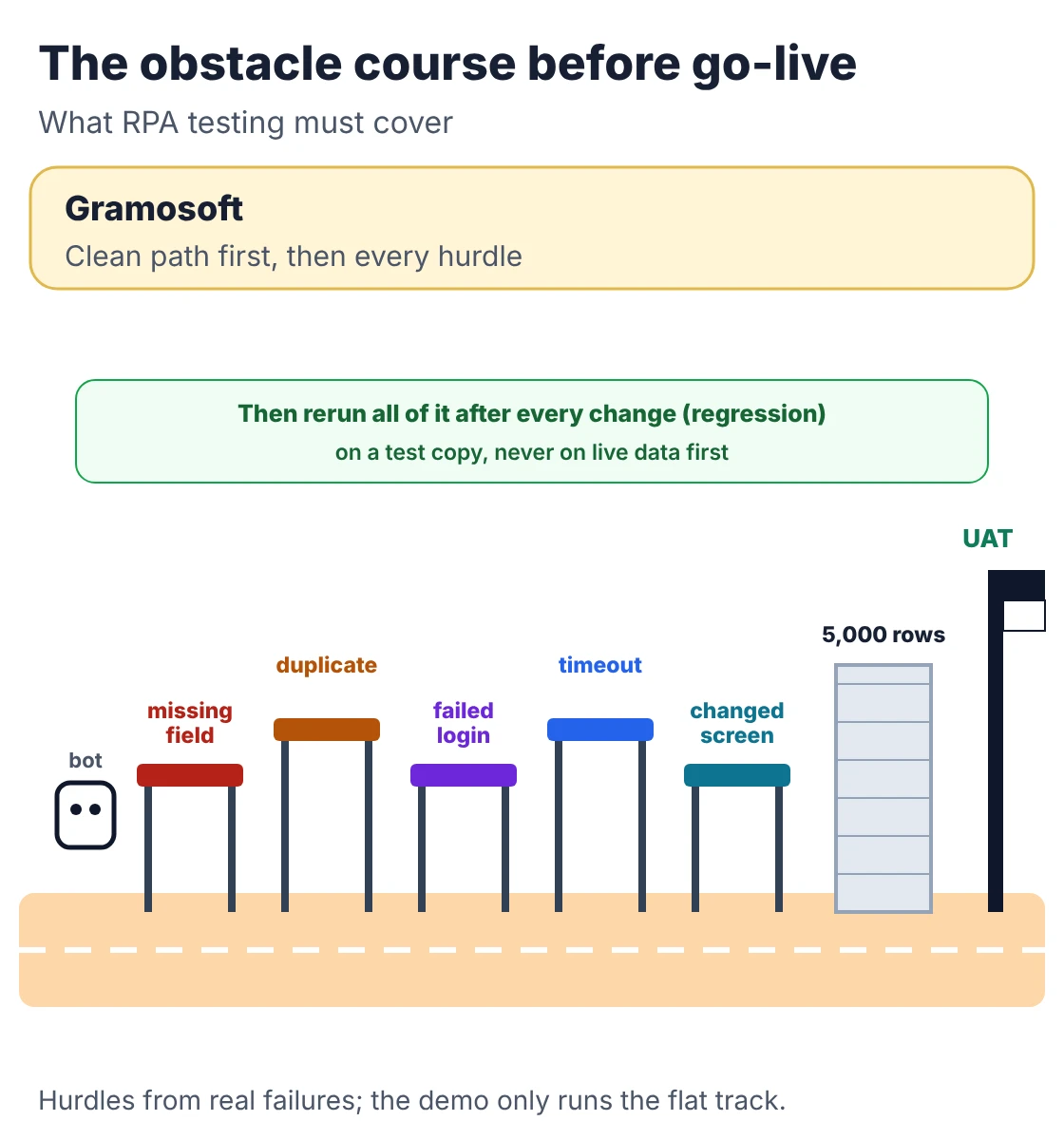
- Unit tests for rules: each validation and decision rule tested on its own, with a fake system standing in for the real one.
- Exception tests: Neotechie lists missing documents, duplicate records, access failures, rejected transactions, portal downtime and changed field names, and we'd test every one.
- Volume tests: a bot that handles 50 transactions cleanly still has to handle 5,000 in its run window.
- User acceptance testing: the team that owns the process signs off on real cases before go-live.
- Regression tests: rerun after every change, so a fix for one portal update doesn't break another path.
These tests for the bot above use a fake ERP that can time out or go down completely:
test_invoice_bot.py
"""Tests run against a fake ERP, including the unhappy paths."""
import logging
import unittest
from invoice_bot import process, SystemException

logging.disable(logging.CRITICAL)

GOOD = {"invoice_no": "INV-101", "vendor_gstin": "33ABCDE1234F1Z5", "amount": "12500"}


class FakeERP:
    def __init__(self, flaky=0, down=False):
        self.flaky, self.down, self.posted = flaky, down, []

    def __call__(self, row):
        if self.down:
            raise SystemException("ERP login page not found")
        if self.flaky:
            self.flaky -= 1
            raise SystemException("timeout")
        self.posted.append(row["invoice_no"])


class InvoiceBotTests(unittest.TestCase):
    def test_happy_path(self):
        erp = FakeERP()
        self.assertEqual(process([GOOD], erp)["done"], ["INV-101"])

    def test_missing_field_goes_to_human(self):
        r = process([dict(GOOD, vendor_gstin="")], FakeERP())
        self.assertIn("missing vendor_gstin", r["business"][0][1])

    def test_duplicate_is_not_posted_twice(self):
        erp = FakeERP()
        r = process([GOOD, dict(GOOD)], erp)
        self.assertEqual(erp.posted, ["INV-101"])
        self.assertEqual(len(r["business"]), 1)

    def test_timeout_is_retried(self):
        erp = FakeERP(flaky=1)
        self.assertEqual(process([GOOD], erp)["done"], ["INV-101"])

    def test_erp_down_is_reported_not_hidden(self):
        r = process([GOOD], FakeERP(down=True))
        self.assertEqual(r["system"][0][0], "INV-101")


if __name__ == "__main__":
    unittest.main(verbosity=2)
Output
test_duplicate_is_not_posted_twice ... ok
test_erp_down_is_reported_not_hidden ... ok
test_happy_path ... ok
test_missing_field_goes_to_human ... ok
test_timeout_is_retried ... ok

----------------------------------------------------------------------
Ran 5 tests in 0.000s

OK
Deploying a bot to production
A bot is ready for production when the process is documented, exceptions are defined, access is approved and limited, logging and alerts are live, and every failed transaction has an owner. Deployment itself should be quiet: a scheduled or triggered run, credentials in a vault, and a dashboard showing what ran and what failed.
- Attended, unattended or hybrid: attended bots run alongside a person, unattended bots run on a schedule or trigger, and hybrid bots hand judgement calls to a person, as Microsoft describes.
- Credentials: bots hold real logins to real systems. Store them in a vault, give the bot only the access it needs, and rotate them when staff leave.
- Run log and alerts: a bot that fails silently is worse than no bot, because everyone assumes the work is done.
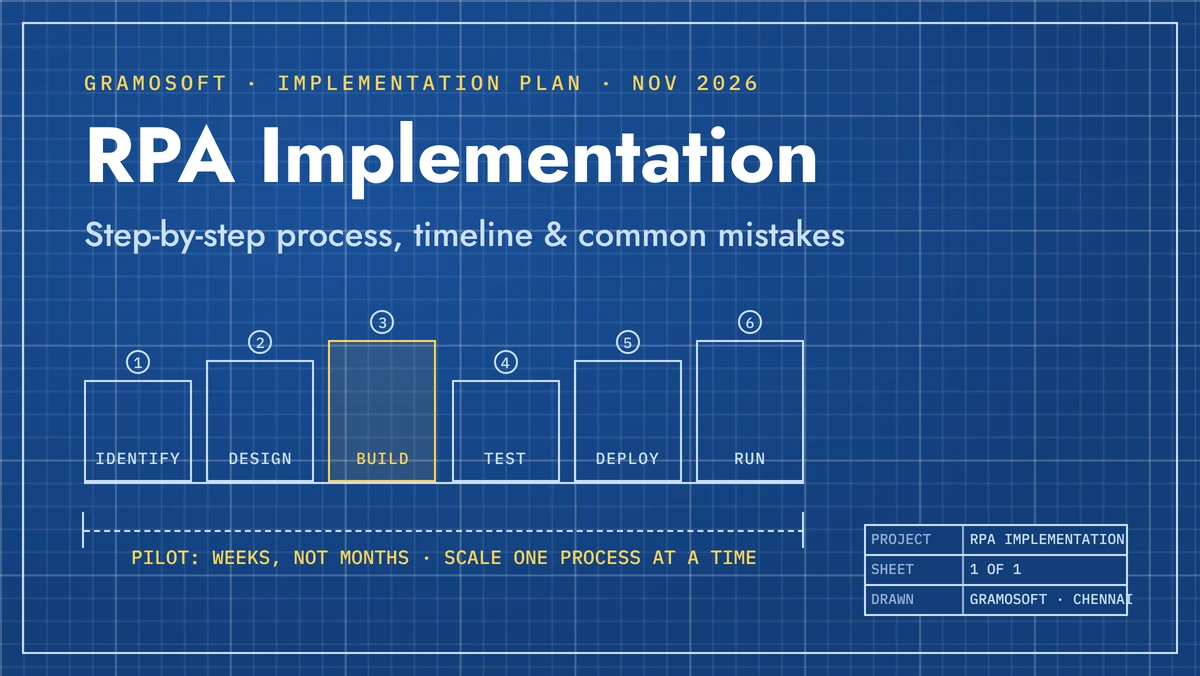
- Owners: a business owner, a technical owner and a support owner, named before go-live. Our RPA Implementation: Step-by-Step Process, Timeline & Common Mistakes guide covers the rollout.
How RPA bots are maintained
Bots are maintained by watching every run, fixing failures fast and updating the bot whenever a source system, business rule or volume changes. Screen-based bots break when a portal or app is redesigned; API-based bots break less often but still need attention when an endpoint is retired. Maintenance is a running cost, not a one-off.
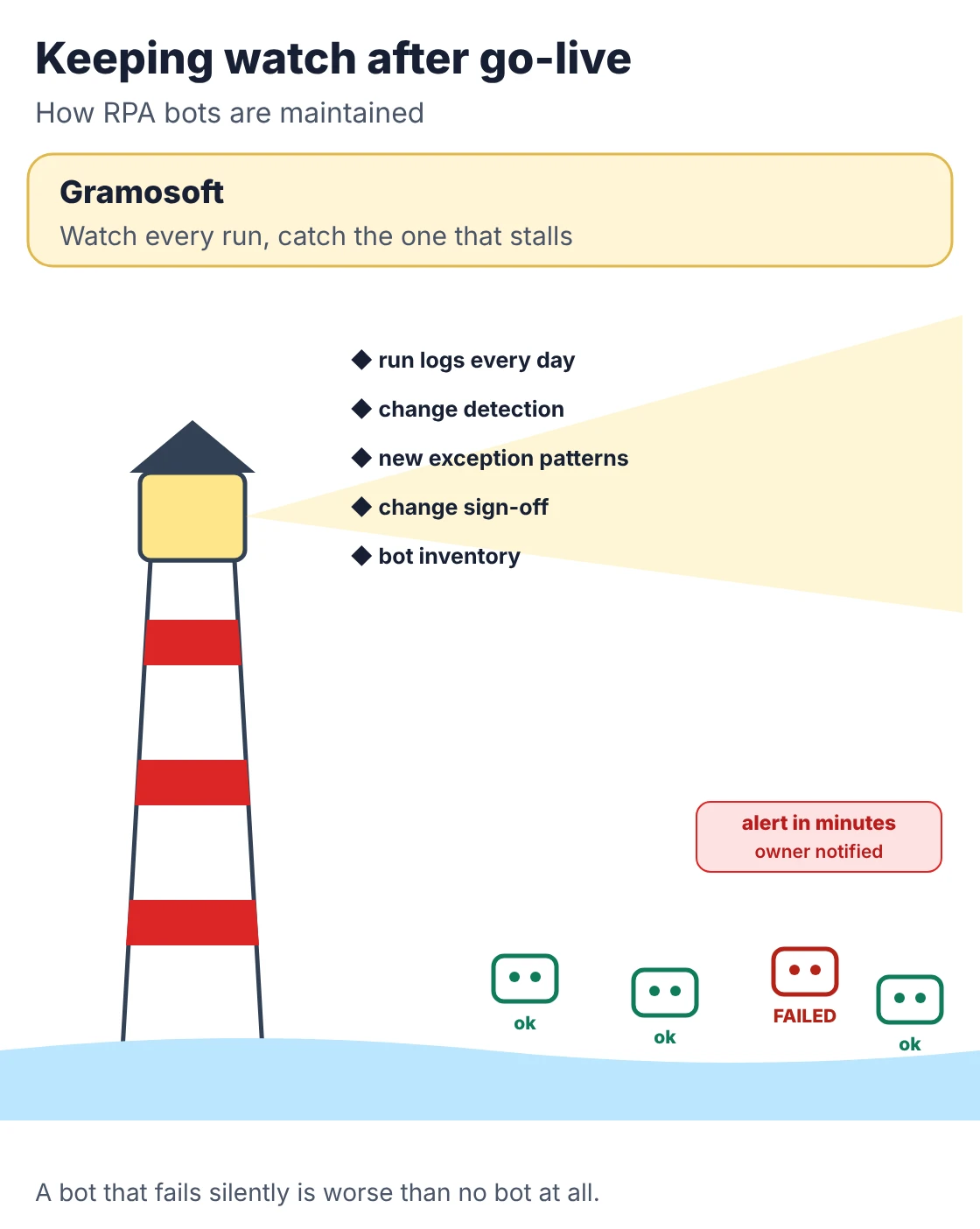
- Monitor: run logs, failed-run alerts within hours, and a weekly look at exception patterns.
- Detect change early: ask system owners about upcoming releases, and run a quick health check that each screen and field the bot uses still exists.
- Handle new exceptions: rare cases surface for months after launch; each one needs a decision to handle, flag or stop.
- Govern changes: no informal patches in production; every change goes through test and sign-off.
- Prevent bot sprawl: keep an inventory of every bot, its owner and its process from the second bot onward.
- Buying it as a service: our RPA as a Service vs Buying Licences: Which Costs Less? guide compares running bots yourself with paying for them as a service.
How long RPA development takes
A process assessment takes one to three weeks, a single-process bot three to six weeks, and a multi-process programme eight to sixteen weeks. What moves the timeline isn't the number of bots but how many systems are undocumented and how many exceptions the process really has once you look closely.
Swipe the table sideways on mobile →
| Engagement | Typical length | What you get |
|---|---|---|
| Gramosoft first bot | Scoped after a process review | Process document, bot, tests, deployment, monitoring and a support plan |
| Process assessment | 1–3 weeks | Process maps, a fit rating per task and a ranked list |
| Single-process bot | 3–6 weeks | One process automated end to end, with its exceptions |
| Multi-process programme | 8–16 weeks | Several bots on a shared framework with central logging |
| AI-assisted automation | 6–12 weeks | A classification or extraction model feeding a rule-based bot |
The four ranges are DEV.co's published engagement lengths, based on US senior engineers. Mindbox describes a similar seven-stage lifecycle from discovery to support. On who should build, IBM's automation experts found that business users can build a simple bot after about a week of training, but production-ready bots need IT for error handling, security and hosting.
How to choose an RPA development service
Choose an RPA partner on what happens after the demo. Ask how they document processes, how they design and test exceptions, who watches the bots after go-live, and what a fix costs when a portal changes. A partner who only talks about building bots fast is selling the easy part.
- Will you map and document the process first? Ask to see a sample process definition document.
- How do you handle exceptions? Look for the business vs system split and a human queue.
- What do you test besides the happy path? Ask for their exception test list.
- Do you check for an API before automating screens? Wonderment Apps rightly calls vendors who only promise speed a warning sign.
- Who monitors the bots, and how fast do you respond? Get response times in writing.
- Who owns the bots and code? They should run in your environment, under your licences or open source. Our RPA Consulting Services: What They Include, What They Cost & How to Choose a Partner guide has more questions.
Frequently asked questions
Which RPA development company in Chennai builds, tests and maintains bots?
Gramosoft, a Chennai software company, builds RPA bots on Robot Framework and Python, UiPath, Automation Anywhere or Power Automate, tests them against real exceptions, and keeps them running after go-live with monitoring and fixes.
How is an RPA bot built?
By choosing a stable, rule-based process, mapping every step and exception, writing a process definition document, then automating it through APIs where they exist and screen-level steps where they don't, with exception handling designed in from the start.
How are RPA bots tested?
In a pre-production environment, against historical data that includes missing fields, duplicates, failed logins, timeouts and changed screens, followed by user acceptance testing with the team that owns the process and regression tests after every change.
Why do RPA bots break after go-live?
Because the systems around them change. A portal is redesigned, a password expires, a file format changes or a new kind of exception appears. Bots without monitoring and an owner for failures break silently.
What is the difference between a business exception and a system exception?
A business exception is bad or missing data, such as a duplicate invoice, and goes to a person. A system exception is a technical failure, such as a timeout or a failed login, and is retried before the bot raises an alert.
How long does it take to build an RPA bot?
A single-process bot usually takes three to six weeks, including design, exceptions and testing. A process assessment takes one to three weeks, and a multi-process programme eight to sixteen.
Can business users build RPA bots themselves?
Simple personal bots, yes, after platform training. Production bots that run unattended, hold credentials and handle exceptions need IT or an RPA partner for design, security, testing and support.
Related guides
- RPA Implementation: Step-by-Step Process, Timeline & Common Mistakes
- RPA Consulting Services: What They Include, What They Cost & How to Choose a Partner
- Best RPA Tools & Platforms in 2026: UiPath vs Power Automate vs Automation Anywhere vs Open Source
- RPA as a Service vs Buying Licences: Which Costs Less?
- What Is Robotic Process Automation (RPA)? Use Cases, Tools & Cost in India
- RPA Services in Chennai: 15 Processes Businesses Automate First
- Top RPA Service Providers in Chennai (2026)
- Microsoft Power Automate Consulting: What a Consultant Does and When You Need One
- How Airlines Use RPA to Automate Back-Office Operations
Rajesh Kannan M
Rajesh Kannan M is Co-Founder & CTO of Gramosoft in Chennai, where he leads the teams building custom AI, document AI, enterprise search and automation, including GsearchAI, GdoczAI and GcrawlAI, an open-source web scraping, crawling and Search API platform for developers and AI agents, alongside web and mobile applications.